flat tire TOYOTA AVALON HYBRID 2017 XX40 / 4.G Owners Manual
[x] Cancel search | Manufacturer: TOYOTA, Model Year: 2017, Model line: AVALON HYBRID, Model: TOYOTA AVALON HYBRID 2017 XX40 / 4.GPages: 492, PDF Size: 7.28 MB
Page 5 of 492

5
1
8 7
6
5
4
3
2
9
6-1. Maintenance and careCleaning and protecting the vehicle exterior .......... 326
Cleaning and protecting the vehicle interior ........... 329
6-2. Maintenance Maintenance requirements ................... 332
General maintenance ........ 334
Emission inspection and maintenance (I/M)
programs ......................... 338
6-3. Do-it-yourself maintenance
Do-it-yourself service precautions ..................... 339
Hood.................................. 341
Positioning a floor jack ...... 342
Engine compartment ......... 343
12-volt battery ................... 352
Tires .................................. 356
Tire inflation pressure........ 365
Wheels .............................. 368
Air conditioning filter .......... 371
Electronic key battery ........ 373
Checking and replacing fuses ............................... 375
Light bulbs ......................... 378 7-1. Essential information
Emergency flashers ........... 392
If your vehicle has to be stopped in an
emergency....................... 393
7-2. Steps to take in an emergency
If your vehicle needs to be towed ...................... 394
If you think something is wrong ........................... 397
If a warning light turns on or a warning buzzer
sounds ............................. 398
If a warning message is displayed...................... 407
If you have a flat tire .......... 408
If the hybrid system will not start ........................... 420
If the electronic key does not operate properly ........ 422
If the 12-volt battery is discharged ................... 424
If your vehicle overheats......................... 429
If the vehicle becomes stuck ................................ 433
6Maintenance and care7When trouble arises
Page 17 of 492
17Pictorial index
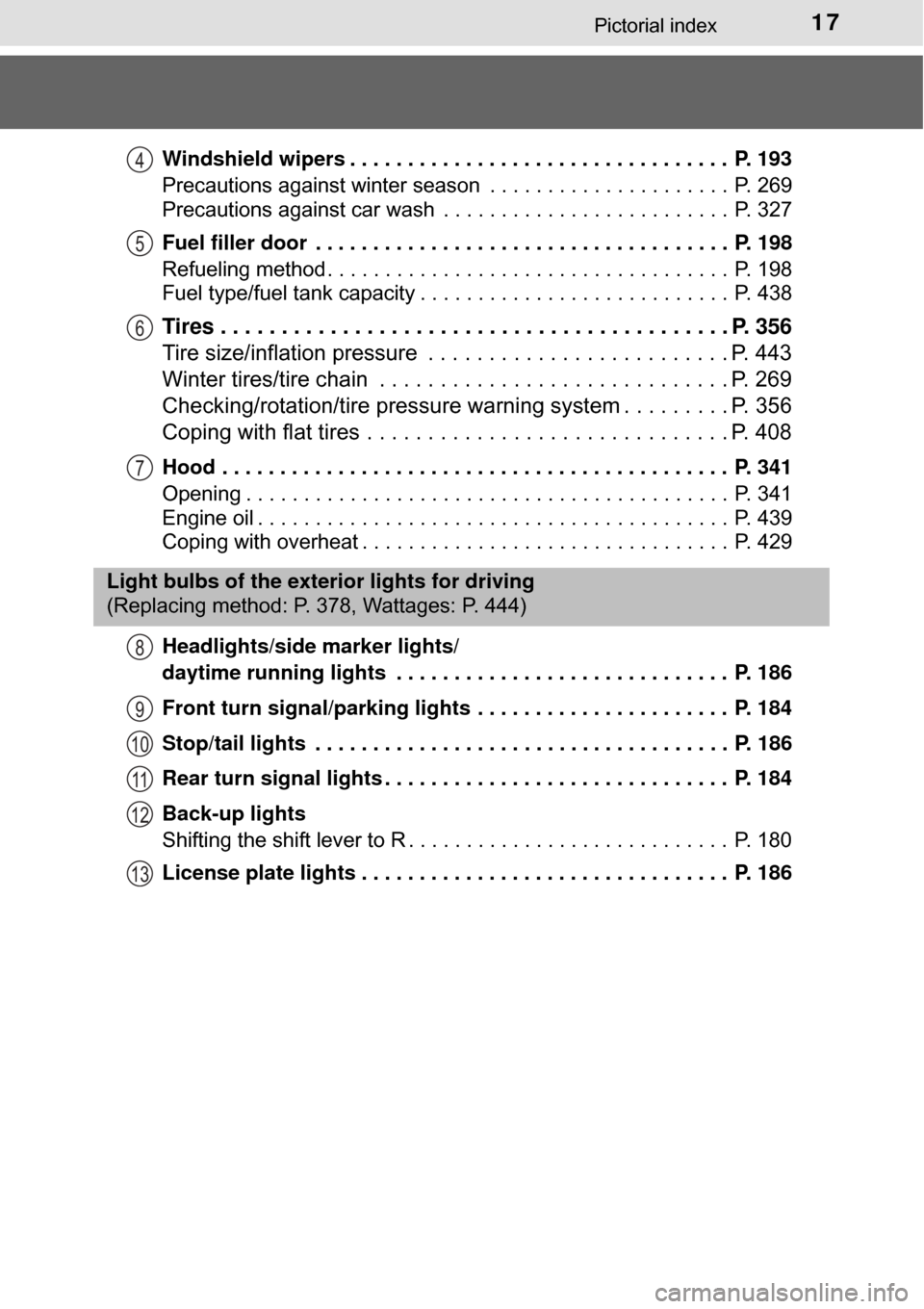
Windshield wipers . . . . . . . . . . . . . . . . . . . . . . . . . . . . . . . . . P. 193
Precautions against winter season . . . . . . . . . . . . . . . . . . . . . P. 269
Precautions against car wash . . . . . . . . . . . . . . . . . . . . . . . . . P. 327
Fuel filler door . . . . . . . . . . . . . . . . . . . . . . . . . . . . . . . . . . . . P. 198
Refueling method . . . . . . . . . . . . . . . . . . . . . . . . . . . . . . . . . . . P. 198
Fuel type/fuel tank capacity . . . . . . . . . . . . . . . . . . . . . . . . . . . P. 438
Tires . . . . . . . . . . . . . . . . . . . . . . . . . . . . . . . . . . . . . . . . . . P. 356
Tire size/inflation pressure . . . . . . . . . . . . . . . . . . . . . . . . . P. 443
Winter tires/tire chain . . . . . . . . . . . . . . . . . . . . . . . . . . . . . P. 269
Checking/rotation/tire pressure warning system . . . . . . . . . P. 356
Coping with flat tires . . . . . . . . . . . . . . . . . . . . . . . . . . . . . . P. 408
Hood . . . . . . . . . . . . . . . . . . . . . . . . . . . . . . . . . . . . . . . . . . . . P. 341
Opening . . . . . . . . . . . . . . . . . . . . . . . . . . . . . . . . . . . . . . . . . . P. 341
Engine oil . . . . . . . . . . . . . . . . . . . . . . . . . . . . . . . . . . . . . . . . . P. 439
Coping with overheat . . . . . . . . . . . . . . . . . . . . . . . . . . . . . . . . P. 429
Headlights/side marker lights/
daytime running lights . . . . . . . . . . . . . . . . . . . . . . . . . . . . . P. 186
Front turn signal/parking lights . . . . . . . . . . . . . . . . . . . . . . P. 184
Stop/tail lights . . . . . . . . . . . . . . . . . . . . . . . . . . . . . . . . . . . . P. 186
Rear turn signal lights . . . . . . . . . . . . . . . . . . . . . . . . . . . . . . P. 184
Back-up lights
Shifting the shift lever to R . . . . . . . . . . . . . . . . . . . . . . . . . . . . P. 180
License plate lights . . . . . . . . . . . . . . . . . . . . . . . . . . . . . . . . P. 186
4
5
6
7
Light bulbs of the exter ior lights for driving
(Replacing method: P. 378, Wattages: P. 444)
8
9
10
11
12
13
Page 99 of 492

992. Instrument cluster
2
Instrument cluster
■Setting display automatic cancelation
In the following situations, setting display in which the settings can b\
e
changed through the “DISP” button will automatically be turned off.
●When a warning message appears while the setting display is displayed
● When the vehicle begins to move while the setting display is displayed
■
Tire inflation pressure
●It may take a few minutes to display the tire inflation pressure after the
power switch is turned to ON mode. It may also take a few minutes to
display the tire inflation pressure after inflation pressure has been
adjusted
●“---” may be displayed if the tire information cannot be determined due to
unfavorable radio wave conditions.
●Tire inflation pressure changes with temperature. The displayed values
may also be different from the values measured using a tire pressure
gauge.
■ Liquid crystal display
Small spots or light spots may appear on the display. This phenomenon is
characteristic of liquid crystal displays, and there is no problem continuing to
use the display.
WARNING
■The information display at low temperatures
Allow the interior of the vehicle to warm up before using the liquid crystal
information display. At extremely low temperatures, the information display
monitor may respond slowly, and display changes may be delayed.
For example, there is a lag between the driver’s shifting and the new gear
number appearing on the display. This lag could cause the driver to down-
shift again, causing rapid and excessive engine braking and possibly an
accident resulting in death or injury.
■ Cautions during setting up the display
As the hybrid system needs to be operating during setting up the display,
ensure that the vehicle is parked in a place with adequate ventilation. In a
closed area such as a garage, exhaust gases including harmful carbon
monoxide (CO) may collect and enter the vehicle. This may lead to death or
a serious health hazard.
NOTICE
■During setting up the display
To prevent 12-volt battery discharge, ensure that the hybrid system is oper-
ating while setting up the display features.
Page 164 of 492

1644-1. Before driving
NOTICE
■When driving the vehicle
● Do not depress the accelerator and brake pedals at the same time during
driving, as this may restrain driving torque.
● Do not use the accelerator pedal or depress the accelerator and brake
pedals at the same time to hold the vehicle on a hill.
■ When parking the vehicle
Always set the parking brake, and shift the shift lever to P. Failure to do so
may cause the vehicle to move or the vehicle may accelerate suddenly if
the accelerator pedal is accidentally depressed.
■ Avoiding damage to vehicle parts
● Do not turn the steering wheel fully in either direction and hold it there for
an extended period of time.
Doing so may damage the power steering motor.
● When driving over bumps in the road, drive as slowly as possible to avoid
damaging the wheels, underside of the vehicle, etc.
■ If you get a flat tire while driving
A flat or damaged tire may cause the following situations. Hold the steering
wheel firmly and gradually depress the brake pedal to slow down the vehi-
cle.
● It may be difficult to control your vehicle.
● The vehicle will make abnormal sounds or vibrations.
● The vehicle will behave abnormally.
Information on what to do in case of a flat tire ( →P. 408)
Page 192 of 492

1924-3. Operating the lights and wipers
●In the situations shown below, the system may not be able to accurately
detect surrounding brightness levels. This may cause the low beams to
remain on or the high beams to cause problems for pedestrians, vehicles
ahead or other parties. In these cases, manually switch between the high
and low beams.
• In bad weather (rain, snow, fog, sandstorms etc.)
• The windshield is obscured by fog, mist, ice, dirt etc.
• The windshield is cracked or damaged.
• The inside rear view mirror or ca mera sensor is deformed or dirty.
• The camera sensor temperature is extremely high.
• Surrounding brightness levels are equal to those of headlights, tail lights or fog lights.
• Vehicles ahead have headlights that are either switched off, dirty, are
changing color, or have are not aimed properly.
• When driving through an area of in termittently changing brightness and
darkness.
• When frequently and repeatedly driving ascending/descending roads, or roads with rough, bumpy or uneven surfaces (such as stone-paved
roads, gravel tracks etc.).
• When frequently and repeatedly taking curves or driving on a winding road.
• There is a highly reflective object ahead of the vehicle, such as a sign or
a mirror.
• The back of a vehicle ahead is highly reflective, such as a container on a truck.
• The vehicle’s headlights are damaged or dirty.
• The vehicle is listing or tilting, due to a flat tire, a trailer being towed etc.
• The high beam and low beam are repeatedly being switched between in an abnormal manner.
• The driver believes that the high beam may be causing problems or dis-
tress to other drivers or pedestrians nearby.
■ If the Automatic High Beam indicator flashes
It may indicate a malfunction in the system. Contact your Toyota dealer.
■ Customization
The automatic high beam can be deactivated.
(Customizable feature: →P. 461)
Page 212 of 492

2124-5. Using the driving support systems
WARNING
■When to disable the pre-collision system
In the following situations, disable the system, as it may not operate prop-
erly, possibly leading to an accident resulting in death or serious injury:
● When the vehicle is being towed
● When your vehicle is towing another vehicle
● When transporting the vehicle via truck, boat, train or similar means of
transportation
● When the vehicle is raised on a lift with the hybrid system on and the tires
are allowed to rotate freely
● When inspecting the vehicle using a drum tester such as a chassis dyna-
mometer or speedometer tester, or when using an on vehicle wheel bal-
ancer
● When a strong impact is applied to the front bumper or front grille, due to
an accident or other reasons
● If the vehicle cannot be driven in a stable manner, such as when the vehi-
cle has been in an accident or is malfunctioning
● When the vehicle is driven in a sporty manner or off-road
● When the tires are not properly inflated
● When the tires are very worn
● When tires of a size other than specified are installed
● When tire chains are installed
● When a compact spare tire or an emergency tire puncture repair kit is used
● If equipment (snow plow, etc.) that may obstruct the radar sensor or cam-
era sensor is temporarily installed to the vehicle
Page 220 of 492

2204-5. Using the driving support systems
• If the wheels are misaligned
• If a wiper blade is blocking the camera sensor
• The vehicle is wobbling.
• The vehicle is being driven at extremely high speeds.
• When driving on a hill
• If the radar sensor or camera sensor is misaligned
● In some situations such as the following, sufficient braking force may not be
obtained, preventing the system from performing properly:
• If the braking functions cannot operate to their full extent, such as when
the brake parts are extremely cold, extremely hot, or wet
• If the vehicle is not properly maintained (brakes or tires are excessively worn, improper tire inflation pressure, etc.)
• When the vehicle is being driven on a gravel road or other slippery sur-
face
● Some pedestrians such as the following may not be detected by the radar
sensor and camera sensor, preventing the system from operating prop-
erly
*2:
• Pedestrians shorter than approximately 3.2 ft. (1 m) or taller than approx- imately 6.5 ft. (2 m)
• Pedestrians wearing oversized clothing (a rain coat, long skirt, etc.), mak- ing their silhouette obscure
• Pedestrians who are carrying large baggage, holding an umbrella, etc.,
hiding part of their body
• Pedestrians who are bending forward or squatting
• Pedestrians who are pushing a stroller, wheelchair, bicycle or other vehi-
cle
• Groups of pedestrians which are close together
• Pedestrians who are wearing white and look extremely bright
• Pedestrians in the dark, such as at night or while in a tunnel
• Pedestrians whose clothing appears to be nearly the same color or brightness as their surroundings
• Pedestrians near walls, fences, guardrails, or large objects
• Pedestrians who are on a metal object (manhole cover, steel plate, etc.) on the road
• If the front of the vehicle is raised or
lowered
Page 225 of 492

2254-5. Using the driving support systems
4
Driving
WARNING
■Situations unsuitable for LDA
Do not use the LDA system in the following situations.
The system may not operate properly and lead to an accident, resulting in
death or serious injury.
● A spare tire, tire chains, etc., are equipped.
● When the tires have been excessively worn, or when the tire inflation pres-
sure is low.
● Tires which differ by structure, manufacturer, brand or tread pattern are
used.
● Objects or patterns that could be mistaken for white (yellow) lines are
present on the side of the road (guardrails, curbs, reflective poles, etc.).
● Vehicle is driven on a snow-covered road.
● White (yellow) lines are difficult to see due to rain, snow, fog, dust, etc.
● Asphalt repair marks, white (yellow) line marks, etc., are present due to
road repair.
● Vehicle is driven in a temporary lane or restricted lane due to construction
work.
● Vehicle is driven on a road surface which is slippery due to rainy weather,
fallen snow, freezing, etc.
● Vehicle is driven in traffic lanes other than on highways and freeways.
● Vehicle is driven in a construction zone.
● Vehicle is towing a trailer or another vehicle.
■ Preventing LDA system malfunctio ns and operations performed by
mistake
● Do not modify the headlights or place stickers, etc., on the surface of the
lights.
● Do not modify the suspension etc. If the suspension etc. needs to be
replaced, contact your Toyota dealer.
● Do not install or place anything on the hood or grille. Also, do not install a
grille guard (bull bars, kangaroo bar, etc.).
● If your windshield needs repairs, contact your Toyota dealer.
Page 265 of 492

2654-5. Using the driving support systems
4
Driving
WARNING
■Stopping distance when the ABS is operating may exceed that of nor-
mal conditions
The ABS is not designed to shorten the vehicle’s stopping distance. Always
maintain a safe distance from the vehicle in front of you, especially in the
following situations:
● When driving on dirt, gravel or snow-covered roads
● When driving with tire chains
● When driving over bumps in the road
● When driving over roads with potholes or uneven surfaces
■ TRAC may not operat e effectively when
Directional control and power may not be achievable while driving on slip-
pery road surfaces, even if the TRAC system is operating.
Drive the vehicle carefully in conditions where stability and power may be
lost.
■ When the VSC is activated
The slip indicator light flashes. Always drive carefully. Reckless driving may
cause an accident. Exercise particular care when the indicator light flashes.
■ When the TRAC/VSC syst ems are turned off
Be especially careful and drive at a speed appropriate to the road condi-
tions. As these are the systems to help ensure vehicle stability and driving
force, do not turn the TRAC/VSC systems off unless necessary.
■ Hill-start assist control
● Do not overly rely on hill-start assist control. Hill-start assist control may
not operate effectively on extremely steep inclines and roads covered with
ice.
● Unlike the parking brake, hill-start assist control is not intended to hold the
vehicle stationary for an extended period of time. Do not attempt to use
hill-start assist control to hold the vehicle on an incline for an extended
period of time, as doing so may lead to an accident.
■ Replacing tires
Make sure that all tires are of the specified size, brand, tread pattern and
total load capacity. In addition, make sure that the tires are inflated to the
recommended tire inflation pressure level.
The ABS, TRAC and VSC systems will not function correctly if different tires
are installed on the vehicle.
Contact your Toyota dealer for further information when replacing tires or
wheels.
■ Handling of tires and the suspension
Using tires with any kind of problem or modifying the suspension will affect
the driving assist systems, and may cause a system to malfunction.
Page 267 of 492

2674-6. Driving tips
4
Driving
◆When braking
Make sure to operate the brakes gently and in a timely manner. A
greater amount of electrical energy can be regenerated when slow-
ing down.
◆Delays
Repeated acceleration and deceleration, as well as long waits at
traffic lights, will lead to bad fuel economy. Check traffic reports
before leaving and avoid delays as much as possible. When driving
in a traffic jam, gently release the brake pedal to allow the vehicle to
move forward slightly while avoi ding overuse of the accelerator
pedal. Doing so can help control excessive gasoline consumption.
◆Highway driving
Control and maintain the vehicle at a constant speed. Before stop-
ping at a toll booth or similar, allow plenty of time to release the
accelerator and gently apply the br akes. A greater amount of elec-
trical energy can be regenerated when slowing down.
◆Air conditioning
Use the air conditioning only when necessary. Doing so can help
reduce excessive gasoline consumption.
In summer: When the ambient temperature is high, use the recircu-
lated air mode. Doing so will help to reduce the burden on the air
conditioning system and reduce fuel consumption as well.
In winter: Because the gasoline eng ine will not automatically cut out
until it and the interior of the vehi cle are warm, it will consume fuel.
Also, fuel consumption can be improved by avoiding overuse of the
heater.
◆Checking tire inflation pressure
Make sure to check the tire infl ation pressure frequently. Improper
tire inflation pressure can cause poor fuel economy.
Also, as snow tires can cause larg e amounts of friction, their use on
dry roads can lead to poor fuel economy. Use tires that are appro-
priate for the season.