brake TOYOTA AVALON HYBRID 2017 XX40 / 4.G Quick Reference Guide
[x] Cancel search | Manufacturer: TOYOTA, Model Year: 2017, Model line: AVALON HYBRID, Model: TOYOTA AVALON HYBRID 2017 XX40 / 4.GPages: 52, PDF Size: 2.89 MB
Page 3 of 52
OVERVIEW
FEATURES & OPERATIONS
TOYOTA SAFETY SENSE
SAFETY & EMERGENCY FEATURES
1
INDEX
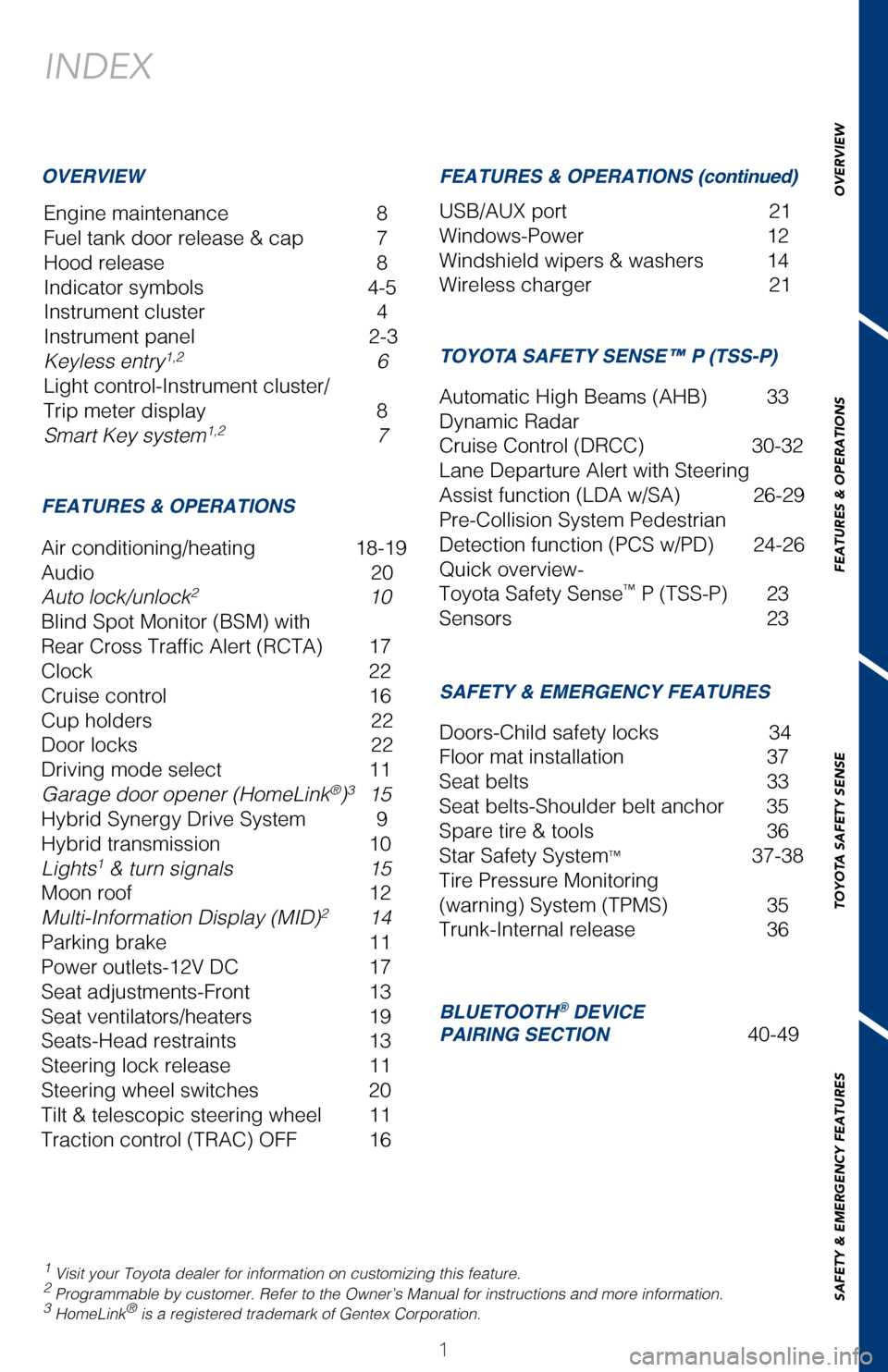
Engine maintenance 8
Fuel tank door release & cap 7
Hood release 8
Indicator symbols 4-5
Instrument cluster 4
Instrument panel 2-3
Keyless entry
1,2 6
Light control-Instrument cluster/
Trip meter display 8
Smart Key system
1,2 7
1 Visit your Toyota dealer for information on customizing this feature.2 Programmable by customer. Refer to the Owner’s Manual for instructio\
ns and more information.3 HomeLink® is a registered trademark of Gentex Corporation.
OVERVIEW
FEATURES & OPERATIONS FEATURES & OPERATIONS (continued)
SAFETY & EMERGENCY FEATURES
Air conditioning/heating 18-19
Audio
20
Auto lock/unlock
2 10
Blind Spot Monitor (BSM) with
Rear Cross Traffic Alert (RCTA) 17
Clock 22
Cruise control 16
Cup holders 22
Door locks 22
Driving mode select 11
Garage door opener (HomeLink
®)3 15
Hybrid Synergy Drive System 9
Hybrid transmission 10
Lights
1 & turn signals 15
Moon roof 12
Multi-Information Display (MID)
2 14
Parking brake 11
Power outlets-12V DC 17
Seat adjustments-Front 13
Seat ventilators/heaters 19
Seats-Head restraints 13
Steering lock release 11
Steering wheel switches 20
Tilt & telescopic steering wheel 11
Traction control (TRAC) OFF 16 USB/AUX port
21
Windows-Power 12
Windshield wipers & washers 14
Wireless charger 21
Doors-Child safety locks 34
Floor mat installation 37
Seat belts 33
Seat belts-Shoulder belt anchor 35
Spare tire & tools 36
Star Safety System
™ 37-38
Tire Pressure Monitoring
(warning) System (TPMS) 35
Trunk-Internal release 36
AVALON HV 2017
This Quick Reference Guide is a summary of basic vehicle
operations. It contains brief descriptions of fundamental
operations so you can locate and use the vehicle’s main
equipment quickly and easily.
The Quick Reference Guide is not intended as a substitute for
the Owner’s Manual located in your vehicle’s glove box. We
strongly encourage you to review the Owner’s Manual and
supplementary manuals so you will have a better understanding
of your vehicle’s capabilities and limitations.
Your dealership and the entire staff of Toyota Motor Sales,
U.S.A., Inc. wish you many years of satisfied driving in your new
Avalon HV.
A word about safe vehicle operations
This Quick Reference Guide is not a full description of Avalon HV operat\
ions.
Every Avalon HV owner should review the Owner’s Manual that accompani\
es
this vehicle.
Pay special attention to the boxed information highlighted in color throughout
the Owner’s Manual. Each box contains safe operating instructions to \
help you
avoid injury or equipment malfunction.
All information in this Quick Reference Guide is current at the time of \
printing.
Toyota reserves the right to make changes at any time without notice.
BLUETOOTH® DEVICE
PAIRING SECTION 40-49
TOYOTA SAFETY SENSE™ P (TSS-P)
Automatic High Beams (AHB) 33
Dynamic Radar
Cruise Control (DRCC) 30-32
Lane Departure Alert with Steering
Assist function (LDA w/SA) 26-29
Pre-Collision System Pedestrian
Detection function (PCS w/PD) 24-26
Quick overview-
Toyota Safety Sense
™ P (TSS-P) 23
Sensors 23
2017_Avalon_HV_QRG_D4_1.indd 19/23/16 5:35 AM
Page 6 of 52

4
OVERVIEWInstrument cluster
For details, refer to “Indicators and warning lights,” Section 2-2\
, 2017 Owner’s
Manual.
Hybrid System indicator Speedometer
Multi-Information Display
Engine coolant
temperature gauge
Odometer and tripmeter display
Shift position and
shift range display Trip meter reset/
Instrument panel light controlFuel gauge
1 If indicator does not turn off within a few seconds of starting engine, \
there may be a malfunction.
Have vehicle inspected by your Toyota dealer.
2 If this light flashes, refer to “Cruise control,” Section 4-5, 201\
7 Owner’s Manual.3 If this light flashes, refer to “Dynamic Radar Cruise Control,” Se\
ction 4-5, 2017 Owner’s Manual.4 The indicator flashes to indicate a malfunction.5 The indicator flashes to indicate that the system is operating.6 The indicator flashes faster than usual to indicate that the system is \
operating.7 If equipped.
Cruise control indicator2,4
Cruise control SET indicatorAirbag SRS warning1
Automatic High Beam indicator4
Anti-lock Brake System warning1
Arrow direction indicates fuel
tank door position
“AIR BAG ON/OFF” indicator1
Charging system warning1,7
Brake system warning1
Brake system warning1ECO drive mode indicator
EV drive mode indicator
EV indicator
Dynamic Radar Cruise Control
indicator3,4
Driver seat belt reminder (alarm
sounds for speeds over 12 mph)
Indicator symbols
Service indicators and reminders
2017_Avalon_HV_QRG_D4_1.indd 49/23/16 5:35 AM
Page 8 of 52

6
Keyless entry
OVERVIEW
NOTE: If a door is not opened within 30 seconds of unlocking, all doors will \
relock for
safety.
ACCESSORY
ON
OFF
NOTE: Gear shift lever must be in Park and brake pedal depressed.
Without depressing the brake pedal, pressing the “POWER” switch will chan\
ge the
operation mode in succession from:
Push
ONCE: Driver door TWICE: All doors
Carry remote
Smart key feature
Carry remote
Smart key feature
Front door lock
Touch Carry remote
Smart key feature
Grasp
Front door unlock*
Push
Push and hold
(1)
LOCKING OPERATION
PANIC BUTTON
TRUNK LOCKING/UNLOCKING
UNLOCKING OPERATIONSTART FUNCTION
POWER (WITHOUT STARTING HYBRID SYSTEM)
NOTE: Tighten until one click is heard. If the cap is not locked or tightened\
,
Check Engine “
” indicator may illuminate.
The fuel tank door locks/unlocks with the vehicle’s doors.
* Driver door unlocking function can be programmed to unlock driver door \
only,
or all doors. In some models, grasping front passenger door handle will un\
lock all
doors. Please refer to the Owner’s Manual for more details on how to program the
doors.
NOTE: Doors may also be locked/unlocked using remote.
Push
2017_Avalon_HV_QRG_D4_1.indd 69/23/16 5:35 AM
Page 9 of 52
OVERVIEW
FEATURES & OPERATIONS
TOYOTA SAFETY SENSE
SAFETY & EMERGENCY FEATURES
7
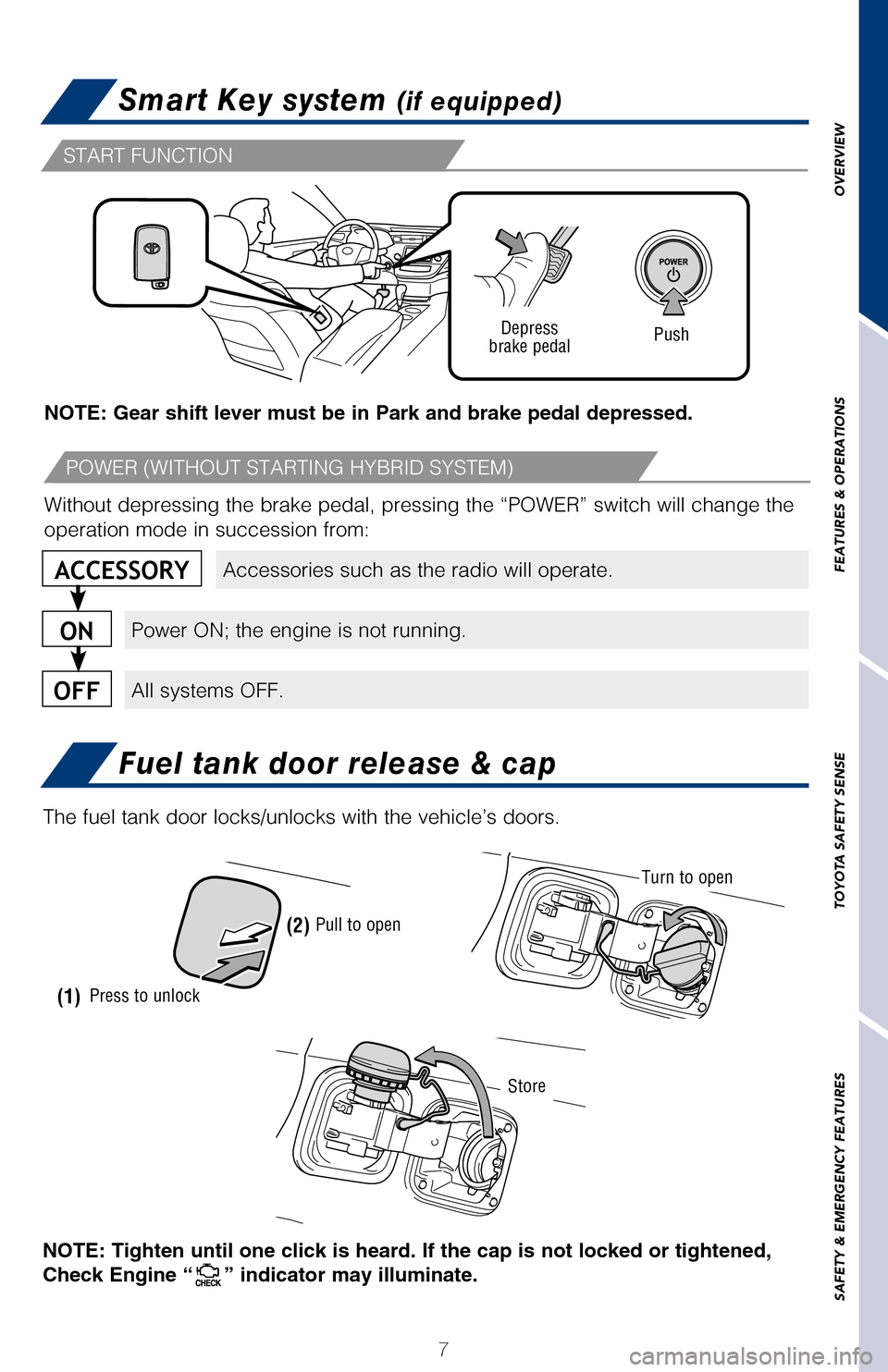
Smart Key system (if equipped)
Fuel tank door release & cap
NOTE: If a door is not opened within 30 seconds of unlocking, all doors \
will relock for
safety.
Accessories such as the radio will operate.
Power ON; the engine is not running.
All systems OFF.
ACCESSORY
ON
OFF
NOTE: Gear shift lever must be in Park and brake pedal depressed.
Push
Depress
brake pedal
Without depressing the brake pedal, pressing the “POWER” switch wi\
ll change the
operation mode in succession from:Carry remote
Smart key feature
Carry remote
Smart key feature
Carry remote
Smart key feature
Front door unlock*
Press to unlock(1) (2)
Pull to open
START FUNCTION
POWER (WITHOUT STARTING HYBRID SYSTEM)
NOTE: Tighten until one click is heard. If the cap is not locked or tigh\
tened,
Check Engine “
” indicator may illuminate.
Turn to open
Store
The fuel tank door locks/unlocks with the vehicle’s doors.
* Driver door unlocking function can be programmed to unlock driver door\
only,
or all doors. In some models, grasping front passenger door handle will \
unlock all
doors.
Please refer to the Owner’s Manual for more details on how to program\
the
doors.
NOTE: Doors may also be locked/unlocked using remote.
2017_Avalon_HV_QRG_D4_1.indd 79/23/16 5:35 AM
Page 10 of 52

8
OVERVIEWFEATURES & OPERATIONS
NOTE: Regularly scheduled maintenance, including oil changes, will help
extend the life of your vehicle and maintain performance. Please refer t\
o the
“Warranty & Maintenance Guide.”
The Hybrid Synergy Drive System utilizes a computer-controlled gasoline \
engine
and electric motor to provide the most efficient combination of power fo\
r the
vehicle. To conserve energy, when the brakes are applied the braking for\
ce
generates electricity which is then sent to the traction battery. In add\
ition, the
engine shuts off when the vehicle is stopped. The benefits are better fu\
el economy,
reduced vehicle emissions and improved performance.
NOTE: Fuel consumption and energy information of the Hybrid System are
shown on the Multi-Information Display (MID) and/or display audio syst\
em/
navigation system screen (if equipped).
1. Ensure tire pressures are maintained at levels specified in the Owner\
’s Manual.
2. Link trips to reduce engine cold starts whenever possible.
3. Avoid driving at speeds that are higher than necessary, especially on\
the highway.
4. When possible, avoid sudden stops to maximize regenerative braking en\
ergy.
5. Minimize use of the air conditioning.
Pull up latch and
raise hood
Pull
Hood release
Engine maintenance
Turn
Brightness control
Engine oil filler cap Engine oil level dipstick
Engine coolant reservoir
Windshield washer fluid tank Push
Switch “A” and “B”
TIPS FOR IMPROVED FUEL ECONOMY
(1) Put the selector lever in “P.”
(2) Depress the brake pedal, and “” will be displayed on the Multi-Information
Display.
(3) Press the “POWER” switch briefly and firmly.
(4) The “READY” light will blink. After a few seconds, when the light \
remains steady and a beep sounds, you may begin driving.
STARTING THE HYBRID SYSTEM
Light control-
Instrument cluster/Trip meter display
2017_Avalon_HV_QRG_D4_1.indd 89/23/16 5:35 AM
Page 11 of 52
OVERVIEW
FEATURES & OPERATIONS
TOYOTA SAFETY SENSE
SAFETY & EMERGENCY FEATURES
9
FEATURES & OPERATIONS
NOTE: Regularly scheduled maintenance, including oil changes, will help
extend the life of your vehicle and maintain performance. Please refer t\
o the
“Warranty & Maintenance Guide.”
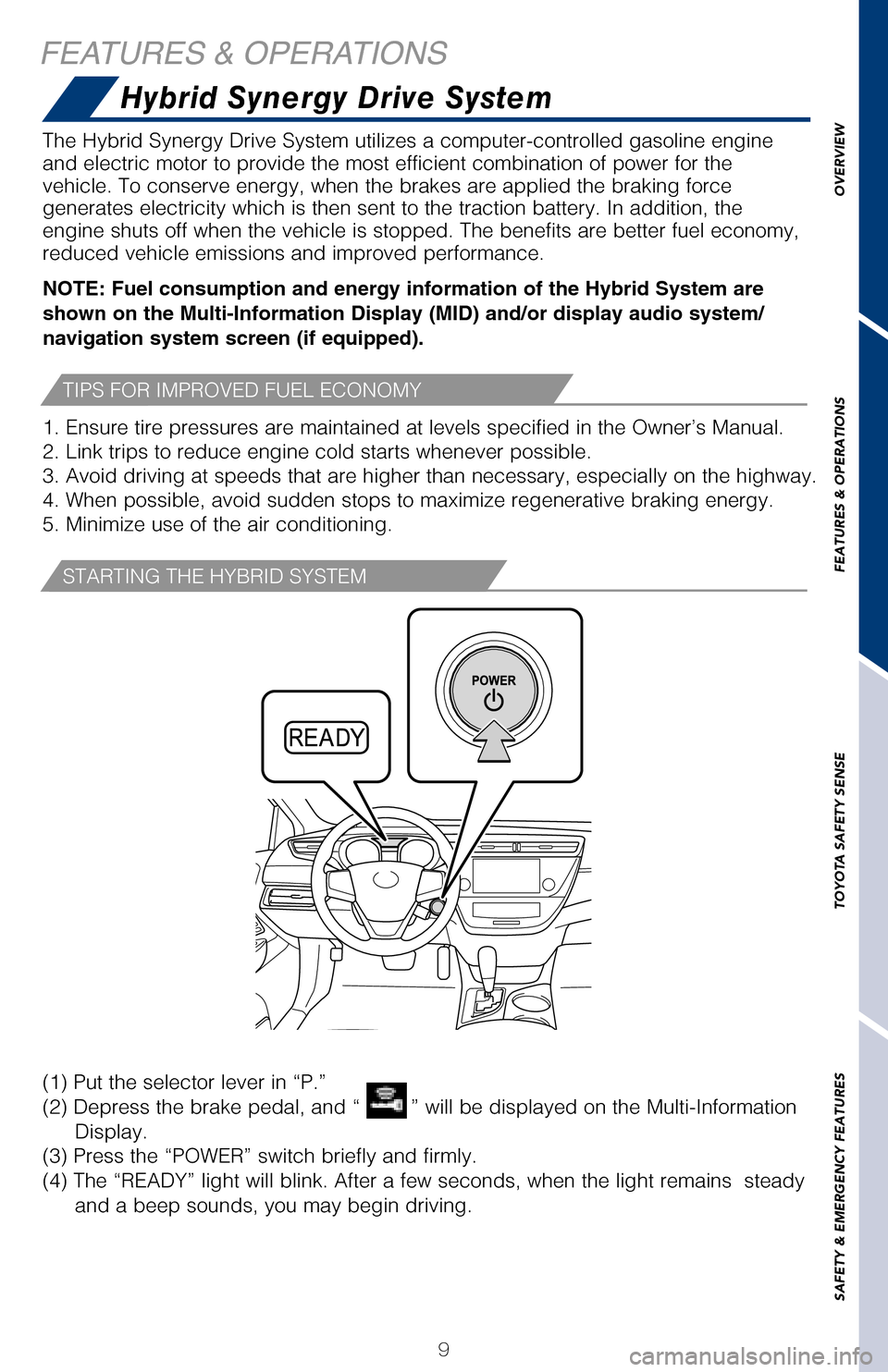
The Hybrid Synergy Drive System utilizes a computer-controlled gasoline \
engine
and electric motor to provide the most efficient combination of power fo\
r the
vehicle. To conserve energy, when the brakes are applied the braking for\
ce
generates electricity which is then sent to the traction battery. In add\
ition, the
engine shuts off when the vehicle is stopped. The benefits are better fu\
el economy,
reduced vehicle emissions and improved performance.
NOTE: Fuel consumption and energy information of the Hybrid System are
shown on the Multi-Information Display (MID) and/or display audio syst\
em/
navigation system screen (if equipped).
1. Ensure tire pressures are maintained at levels specified in the Owner\
’s Manual.
2. Link trips to reduce engine cold starts whenever possible.
3. Avoid driving at speeds that are higher than necessary, especially on\
the highway.
4. When possible, avoid sudden stops to maximize regenerative braking en\
ergy.
5. Minimize use of the air conditioning.
Pull up latch and
raise hood
Hood release
Hybrid Synergy Drive System
Engine maintenance
Push
Switch “A” and “B”
TIPS FOR IMPROVED FUEL ECONOMY
(1) Put the selector lever in “P.”
(2) Depress the brake pedal, and “
” will be displayed on the Multi-Information
Display.
(3) Press the “POWER” switch briefly and firmly.
(4) The “READY” light will blink. After a few seconds, when the light \
remains steady
and a beep sounds, you may begin driving.
STARTING THE HYBRID SYSTEM
2017_Avalon_HV_QRG_D4_1.indd 99/23/16 5:35 AM
Page 13 of 52
OVERVIEW
FEATURES & OPERATIONS
TOYOTA SAFETY SENSE
SAFETY & EMERGENCY FEATURES
11
Hybrid transmissionParking brake
Driving mode select
Steering lock release
* The “POWER” switch/ignition switch must be “ON” and the br\
ake pedal
depressed to shift from Park.
Shift the shift lever to “S” position from “D” position.
+ : Upshift (push and release)
- : Downshift (pull and release)
Downshifting increases power going uphill, or provides engine braking do\
wnhill. For
best fuel economy during normal driving conditions, always drive with th\
e shift lever
in the “D” position.
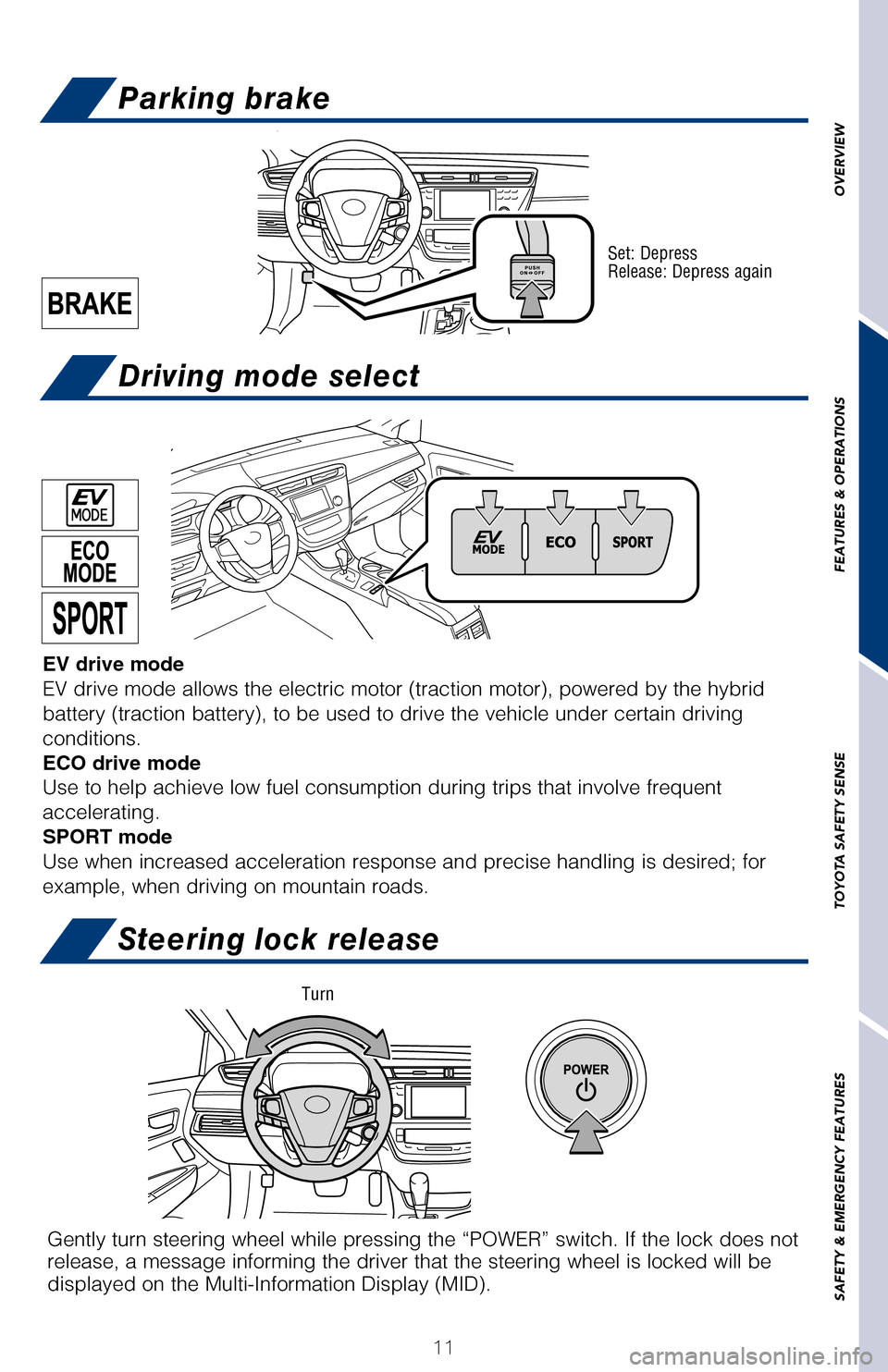
Set: Depress
Release: Depress again
- (“S” mode)
Auto lock/unlock
Automatic door locks can be programmed to operate in different modes, or\
turned
OFF.
Shift position linked door locking/unlocking function
-Doors lock when shifting from Park.
-Doors unlock when shifting into Park.
Speed linked door locking function
-Doors lock when the vehicle speed goes above approximately 12 mph.
Driver’s door linked door unlocking function
-Doors unlock when the engine switch is set to OFF and driver’s door i\
s opened.
Refer to the Owner’s Manual for more details.
Gently turn steering wheel while pressing the “POWER” switch. If t\
he lock does not
release, a message informing the driver that the steering wheel is locke\
d will be
displayed on the Multi-Information Display (MID).
EV drive mode
EV drive mode allows the electric motor (traction motor), powered by t\
he hybrid
battery (traction battery), to be used to drive the vehicle under cert\
ain driving
conditions.
ECO drive mode
Use to help achieve low fuel consumption during trips that involve frequ\
ent
accelerating.
SPORT mode
Use when increased acceleration response and precise handling is desired\
; for
example, when driving on mountain roads.
Turn
2017_Avalon_HV_QRG_D4_1.indd 119/23/16 5:35 AM
Page 18 of 52
 OFF
TURNING SYSTEM ON/OFF
FUNCTIONS
FEATURES & OPERATIONS
To disable the system, press “TRAC OFF” and a message will be show\
n on the
Multi-Information")
16
Cruise control
Traction control (TRAC) OFF
TURNING SYSTEM ON/OFF
FUNCTIONS
FEATURES & OPERATIONS
To disable the system, press “TRAC OFF” and a message will be show\
n on the
Multi-Information Display (MID). Press the switch again to turn the sy\
stem back on.
The Blind Spot Monitor is a system that has two functions:
• The Blind Spot Monitor function (assists the driver in making the decision when changing lanes)
• The Rear Cross Traffic Alert function (assists the driver when backing up)
The system is designed to use radar sensors to detect vehicles traveling in the
Avalon’s blind spot and advises the driver of the vehicles’ presence via the outside
rear view mirror indicators.
Refer to the Owner‘s Manual for limitations and more details on this \
system before
attempting to use it.
1 The set speed may also be cancelled by depressing the brake pedal.2 The set speed may be resumed once vehicle speed exceeds 25 mph.
System ON/OFF
Indicators
Set Speed
Increase speed
Decrease speed
Cancel1
Resume2
Set
Front console
Type A
The “POWER” switch must be in the ACCESSORY or IGNITION ON mode fo\
r use.
Rear armrest (if equipped)
2017_Avalon_HV_QRG_D4_1.indd 169/23/16 5:35 AM
Page 19 of 52
 OFF
To disable the system, press “TRAC OFF” and a message will be shown \
o")
OVERVIEW
FEATURES & OPERATIONS
TOYOTA SAFETY SENSE
SAFETY & EMERGENCY FEATURES
17
Cruise control
Traction control (TRAC) OFF
To disable the system, press “TRAC OFF” and a message will be shown \
on the
Multi-Information Display (MID). Press the switch again to turn the system back on.
System ON/OFF
Buzzer
Rear view mirror indicators
The Blind Spot Monitor is a system that has two functions:
• The Blind Spot Monitor function (assists the driver in making the deci\
sion when
changing lanes)
• The Rear Cross Traffic Alert function (assists the driver when backing\
up)
The system is designed to use radar sensors to detect vehicles traveling in\
the
Avalon’s blind spot and advises the driver of the vehicles’ presence via the \
outside
rear view mirror indicators.
Refer to the Owner‘s Manual for limitations and more details on this syste\
m before
attempting to use it.
1 The set speed may also be cancelled by depressing the brake pedal.2 The set speed may be resumed once vehicle speed exceeds 25 mph.
System ON/OFF
Increase speed
Blind Spot Monitor (BSM) with Rear
Cross Traffic Alert (RCTA)
(if equipped)
Front console
Type AType B
The “POWER” switch must be in the ACCESSORY or IGNITION ON mode for u\
se.
Center console (Accessible from rear seat)
Rear armrest (if equipped)
Power outlets - 12V DC
2017_Avalon_HV_QRG_D4_1.indd 179/23/16 5:35 AM
Page 26 of 52

24
The Pre-Collision System uses a radar sensor and camera sensor to help d\
etect
vehicles and pedestrians in front of your vehicle.
As there is a limit to the degree of recognition accuracy and control pe\
rformance
that this system can provide, do not overly rely on this system. This sy\
stem will not
prevent collisions or lessen collision damage or injury in every situati\
on. Do not use
PCS instead of normal braking operations under any circumstances. Do not\
attempt
to test the operation of the pre-collision system yourself, as the syste\
m may not
operate or engage, possibly leading to an accident. In some situations, \
such as
when driving in inclement weather such as heavy rain, fog, snow or a san\
dstorm or
while driving on a curve and for a few seconds after driving on a curve,\
a vehicle
may not be detected by the radar and camera sensors, preventing the syst\
em from
operating or engaging properly.
Refer to a Toyota Owner’s Manual for a list of additional situations \
in which the
system may not operate properly.Refer to a Toyota Owner’s Manual for additional information on PCS w/\
PD operation,
settings adjustments, limitations, and precautions before attempting to \
use it. Pre-Collision Warning
When the system determines that the possibility of a frontal collision i\
s high, a
buzzer will sound and a warning message will be displayed on the Multi-I\
nformation
Display (MID) to urge the driver to take evasive action.
Pre-Collision Brake Assist
If the driver notices the hazard and brakes, the system may provide addi\
tional
braking force using Brake Assist. This system may prime the brakes and m\
ay apply
greater braking force in relation to how strongly the brake pedal is dep\
ressed.
Pre-Collision Braking
If the driver does not brake in a set time and the system determines tha\
t the
possibility of a frontal collision with a preceding vehicle is extremely\
high, the
system may automatically apply the brakes, reducing speed in order to he\
lp the
driver reduce the impact and in certain cases avoid the collision.
Pre-Collision System with Pedestrian
Detection function (PCS w/PD)
TOYOTA SAFETY SENSE
™
CHANGING THE PCS ALERT TIMING
(1) Press “ ” switches and select from the Multi-Information Display (MID).
(2) Press “ ” switches and select
from the MID and then press “”. The
setting screen is displayed.
(3) Press “
” each time to change the setting. Each time it is pressed, the
response to the PCS alert timing changes as shown above. You can press “\
” to
go back to the menu.
Note: PCS is enabled each time the engine switch is turned to Ignition O\
n.
The system can be disabled/enabled and the alert timing of the system ca\
n be
changed. (Alert timing only, brake operation remains the same). As part of the Pre-Collision System, this function is also designed to f\
irst provide an
alert and then automatic braking if needed.
In certain conditions, the PCS system included with the TSS-P package ma\
y also
help to detect a pedestrian in front of your vehicle. With Toyota Safety\
Sense™ P,
PCS uses an in-vehicle camera and front-grill mounted millimeter-wave ra\
dar to
help detect a pedestrian in front of your vehicle in certain conditions.\
The in-vehicle
camera of PCS detects a potential pedestrian based on size, profile, and\
motion of
the detected pedestrian. However, a pedestrian may not be detected depen\
ding
on the conditions, including the surrounding brightness and the motion, \
posture,
size, and angle of the potential detected pedestrian, preventing the sys\
tem from
operating or engaging. Refer to a Toyota Owner’s Manual for additional information.
PEDESTRIAN DETECTION FUNCTION
2017_Avalon_HV_QRG_D4_1.indd 249/23/16 5:35 AM