brake light TOYOTA AVALON HYBRID 2018 Owners Manual (in English)
[x] Cancel search | Manufacturer: TOYOTA, Model Year: 2018, Model line: AVALON HYBRID, Model: TOYOTA AVALON HYBRID 2018Pages: 492, PDF Size: 7.3 MB
Page 3 of 492

3
1
8 7
6
5
4
3
2
9
4-1. Before drivingDriving the vehicle ............. 156
Cargo and luggage............ 166
Vehicle load limits ............. 169
Trailer towing..................... 170
Dinghy towing.................... 171
4-2. Driving procedures Power (ignition) switch ...... 172
EV drive mode................... 178
Hybrid transmission........... 180
Turn signal lever................ 184
Parking brake .................... 185
4-3. Operating the lights and wipers
Headlight switch ................ 186
Automatic High Beam ....... 189
Windshield wipers and washer ............................ 193
4-4. Refueling Opening the fuel tank cap .......................... 198 4-5. Using the driving
support systems
Toyota Safety Sense P ...... 202
PCS (Pre-Collision System) ........................... 209
LDA (Lane Departure Alert with steering
control) ............................ 222
Dynamic radar cruise control.............................. 233
Cruise control .................... 246
BSM (Blind Spot Monitor)......... 250
• The Blind Spot Monitor function.......................... 252
• The Rear Cross Traffic Alert function detection
areas ............................. 257
Driving mode select switch .............................. 259
Driving assist systems ....... 261
4-6. Driving tips Hybrid vehicle driving tips ................................... 266
Winter driving tips .............. 269
4Driving
Page 87 of 492
872. Instrument cluster
2
Instrument cluster
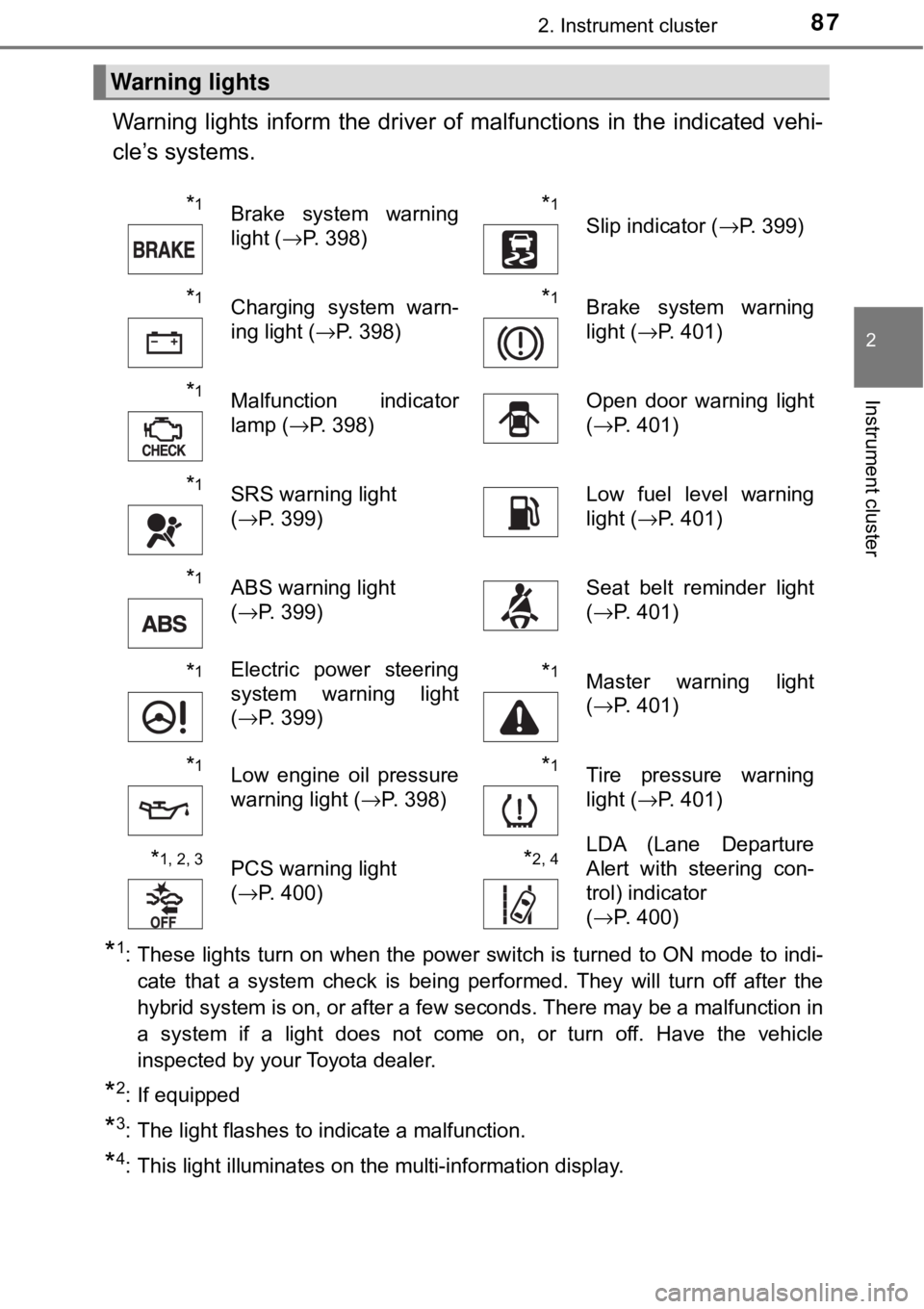
Warning lights inform the driver of malfunctions in the indicated vehi-
cle’s systems.
*1: These lights turn on when the power switch is turned to ON mode to indi- cate that a system check is being performed. They will turn off after the
hybrid system is on, or after a few seconds. There may be a malfunction in
a system if a light does not come on, or turn off. Have the vehicle
inspected by your Toyota dealer.
*2: If equipped
*3: The light flashes to indicate a malfunction.
*4: This light illuminates on the multi-information display.
Warning lights
*1Brake system warning
light ( →P. 398)*1
Slip indicator ( →P. 399)
*1Charging system warn-
ing light (→P. 398)*1Brake system warning
light (→P. 401)
*1Malfunction indicator
lamp ( →P. 398)Open door warning light
(→P. 401)
*1SRS warning light
(→P. 399)Low fuel level warning
light ( →P. 401)
*1ABS warning light
(→P. 399)Seat belt reminder light
(→P. 401)
*1Electric power steering
system warning light
(→P. 399)*1Master warning light
(→P. 401)
*1Low engine oil pressure
warning light ( →P. 398)*1Tire pressure warning
light ( →P. 401)
*1, 2, 3PCS warning light
(→P. 400)*2, 4LDA (Lane Departure
Alert with steering con-
trol) indicator
(→P. 400)
Page 155 of 492

155
Driving4
4-1. Before drivingDriving the vehicle ............. 156
Cargo and luggage ........... 166
Vehicle load limits ............. 169
Trailer towing..................... 170
Dinghy towing ................... 171
4-2. Driving procedures Power (ignition) switch ...... 172
EV drive mode .................. 178
Hybrid transmission........... 180
Turn signal lever................ 184
Parking brake .................... 185
4-3. Operating the lights and wipers
Headlight switch ................ 186
Automatic High Beam ....... 189
Windshield wipers and washer ............................ 193
4-4. Refueling Opening the fuel tank cap .................................. 198 4-5. Using the driving
support systems
Toyota Safety Sense P ..... 202
PCS (Pre-Collision System)........................... 209
LDA (Lane Departure Alert with steering
control) ............................ 222
Dynamic radar cruise control ............................. 233
Cruise control .................... 246
BSM (Blind Spot Monitor) ........ 250
• The Blind Spot Monitor
function ......................... 252
• The Rear Cross Traffic Alert function detection
areas ............................. 257
Driving mode select switch .............................. 259
Driving assist systems ...... 261
4-6. Driving tips Hybrid vehicle driving tips .................................. 266
Winter driving tips ............. 269
Page 158 of 492

1584-1. Before driving
WARNING
Observe the following precautions.
Failure to do so may result in death or serious injury.
■When starting the vehicle
Always keep your foot on the brake pedal while stopped with the “READY”
indicator is illuminated. This prevents the vehicle from creeping.
■ When driving the vehicle
● Do not drive if you are unfamiliar with the location of the brake and ac\
cel-
erator pedals to avoid depressing the wrong pedal.
• Accidentally depressing the accelerator pedal instead of the brake
pedal will result in sudden acceleration that may lead to an accident.
• When backing up, you may twist your body around, leading to a diffi- culty in operating the pedals. Make sure to operate the pedals properly.
• Make sure to keep a correct driving posture even when moving the vehicle only slightly. This allows you to depress the brake and accelera-
tor pedals properly.
• Depress the brake pedal using your right foot. Depressing the brake pedal using your left foot may delay response in an emergency, result-
ing in an accident.
● The driver should pay extra attention to pedestrians when the vehicle is
powered only by the electric motor (traction motor). As there is no engine
noise, the pedestrians may misjudge the vehicle’s movement.
● Do not drive the vehicle over or stop the vehicle near flammable materials.
The exhaust system and exhaust gases can be extremely hot. These hot
parts may cause a fire if there is any flammable material nearby.
Page 162 of 492

1624-1. Before driving
WARNING
Observe the following precautions.
Failure to do so may result in death or serious injury.
■When the vehicle is parked
● Do not leave glasses, cigarette lighters, spray cans, or soft drink cans in
the vehicle when it is in the sun.
Doing so may result in the following:
• Gas may leak from a cigarette lighter or spray can, and may lead to a
fire.
• The temperature inside the vehicle may cause the plastic lenses and plastic material of glasses to deform or crack.
• Soft drink cans may fracture, causing the contents to spray over the interior of the vehicle, and may also cause a short circuit in the vehicle’s
electrical components.
● Do not leave cigarette lighters in the vehicle. If a cigarette lighter is in a
place such as the glove box or on the floor, it may be lit accidentally when
luggage is loaded or the seat is adjusted, causing a fire.
● Do not attach adhesive discs to the windshield or windows. Do not place
containers such as air fresheners on the instrument panel or dashboard.
Adhesive discs or containers may act as lenses, causing a fire in the vehi-
cle.
● Do not leave a door or window open if the curved glass is coated with a
metallized film such as a silver-colored one. Reflected sunlight may cause
the glass to act as a lens, causing a fire.
● Always apply the parking brake, shift the shift lever to P, stop the hybrid
system and lock the vehicle.
Do not leave the vehicle unattended while the “READY” indicator is illumi-
nated.
If the vehicle is parked with the shift lever in P but the parking brake is not
set, the vehicle may start to move, possibly leading to an accident.
● Do not touch the exhaust pipes while the “READY” indicator is illuminated
or immediately after turning the hybrid system off.
Doing so may cause burns.
Page 187 of 492
1874-3. Operating the lights and wipers
4
Driving
■Daytime running light system
●Vehicles with halogen headlights (low beam):
The daytime running lights illuminate the headlight high beams, and they
are darker than the headlight high beams.
Vehicles with discharge headlights (low beam) or LED headlights:
The daytime running lights illuminate the parking lights, and they are
brighter than parking lights.
● To make your vehicle more visible to other drivers during daytime driving,
the daytime running lights turn on automatically when all of the following
conditions are met. (The daytime running lights are not designed for use at
night.)
• The hybrid system is operating
• The parking brake released
• The headlight switch is in or (when the surroundings are
bright) position
The daytime running lights remain on after they illuminate due to the condi-
tions above, even if the parking brake is set again.
● Daytime running lights can be turned off by operating the switch.
● Compared to turning on the headlights, the daytime running light system
offers greater durability and consumes less electricity, so it can help improve
fuel economy.
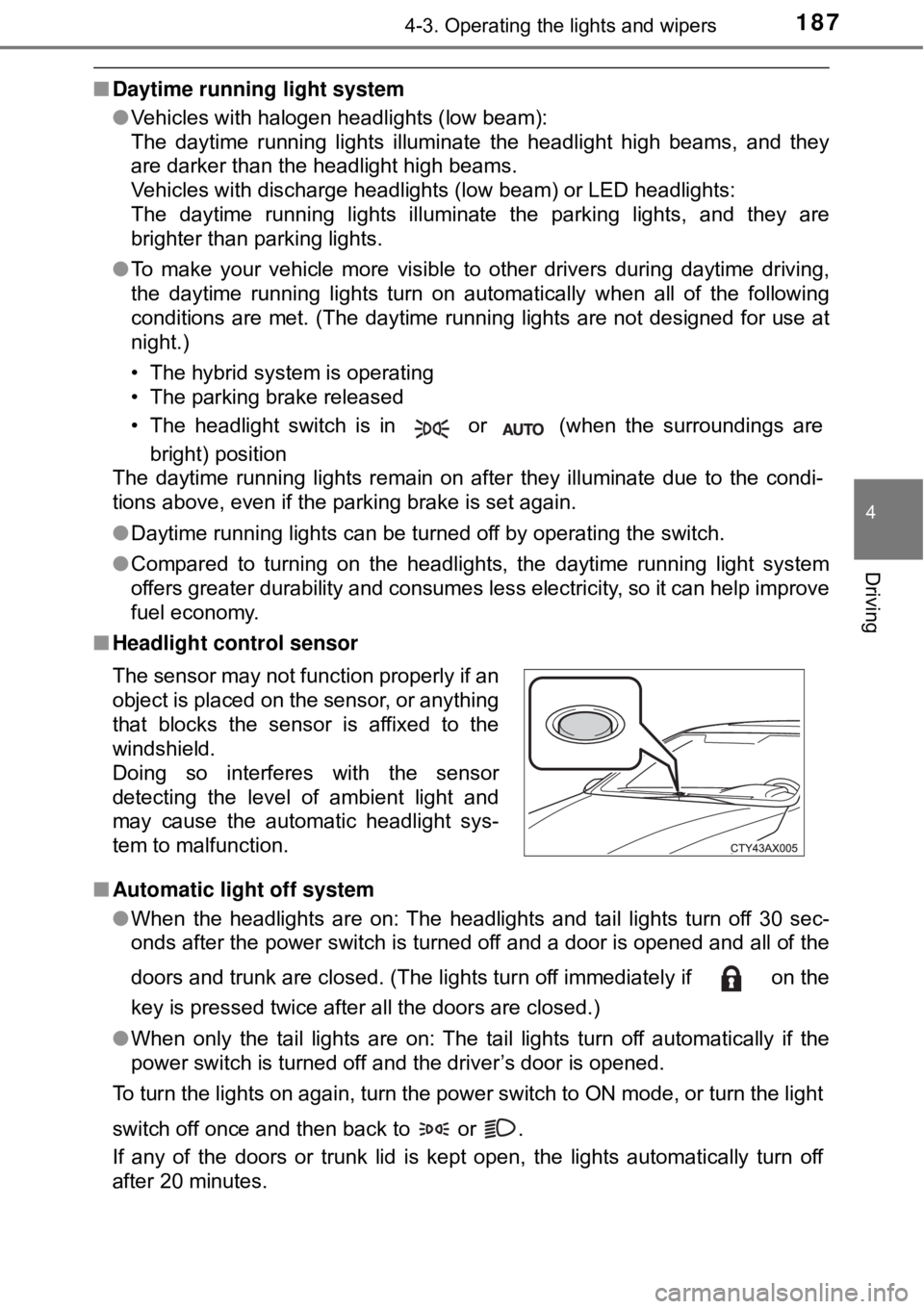
■ Headlight control sensor
■ Automatic light off system
●When the headlights are on: The headlights and tail lights turn off 30 sec-
onds after the power switch is turned off and a door is opened and all of the
doors and trunk are closed. (The lights turn off immediately if on the
key is pressed twice after all the doors are closed.)
● When only the tail lights are on: The tail lights turn off automatically if the
power switch is turned off and the driver’s door is opened.
To turn the lights on again, turn the power switch to ON mode, or turn th\
e light
switch off once and then back to or .
If any of the doors or trunk lid is kept open, the lights automatically turn off
after 20 minutes. The sensor may not function properly if an
object is placed on the sensor, or anything
that blocks the sensor is affixed to the
windshield.
Doing so interferes with the sensor
detecting the level of ambient light and
may cause the automatic headlight sys-
tem to malfunction.
Page 214 of 492
 2144-5. Using the driving support systems
■Operational conditions
Availability of the pedestrian detection function depends on the region i\
n
which the vehicle was sold. (For specific countries/are")
2144-5. Using the driving support systems
■Operational conditions
Availability of the pedestrian detection function depends on the region i\
n
which the vehicle was sold. (For specific countries/areas: →P. 209)
Read the following for details:
Region A
(The pedestrian detection function is available)
The pre-collision system is enabled and the system determines that the pos-
sibility of a frontal collision with a vehicle or pedestrian is high.
Each function is operational at the following speeds:
● Pre-collision warning:
• Vehicle speed is between approximately 7 and 110 mph (10 and 180 km/h).
(For detecting a pedestrian, vehicle speed is between approximately 7 and
50 mph [10 and 80 km/h].)
• The relative speed between your vehicle and the vehicle or pedestrian ahead is approximately 7 mph (10 km/h) or more.
● Pre-collision brake assist:
• Vehicle speed is between approximat ely 19 and 110 mph (30 and 180 km/h).
(For detecting a pedestrian, vehicle speed is between approximately 19 and
50 mph [30 and 80 km/h].)
• The relative speed between your vehicle and the vehicle or pedestrian
ahead is approximately 19 mph (30 km/h) or more.
● Pre-collision braking:
• Vehicle speed is between approximately 7 and 110 mph (10 and 180 km/h).
(For detecting a pedestrian, vehicle speed is between approximately 7 and
50 mph [10 and 80 km/h].)
• The relative speed between your vehicle and the vehicle or pedestrian ahead is approximately 7 mph (10 km/h) or more.
The system may not operate in the following situations:
● If a 12-volt battery terminal has been disconnected and reconnected and
then the vehicle has not been driven for a certain amount of time
● If the shift lever is in R
● If VSC is disabled (only the pre-collision warning function will be opera-
tional)
● If the PCS warning light is flashing or illuminated
Page 215 of 492

2154-5. Using the driving support systems
4
Driving
Region B
(The pedestrian detection function is not available)
The pre-collision system is enabled and the system determines that the pos-
sibility of a frontal collision with a vehicle is high.
Each function is operational at the following speeds:
● Pre-collision warning:
• Vehicle speed is between approximately 10 and 110 mph (15 and 180 km/h).
• The relative speed between your vehicle and the vehicle ahead is
approximately 7 mph (10 km/h) or more.
● Pre-collision brake assist:
• Vehicle speed is between approximately 19 and 110 mph (30 and 180 km/h).
• The relative speed between your vehicle and the vehicle ahead is
approximately 19 mph (30 km/h) or more.
● Pre-collision braking:
• Vehicle speed is between approximately 10 and 110 mph (15 and 180 km/h).
• The relative speed between your vehicle and the vehicle ahead is
approximately 7 mph (10 km/h) or more.
The system may not operate in the following situations:
● If a 12-volt battery terminal has been disconnected and reconnected and
then the vehicle has not been driven for a certain amount of time
● If the shift lever is in R
● If VSC is disabled (only the pre-collision warning function will be opera-
tional)
● If the PCS warning light is flashing or illuminated
Page 221 of 492

2214-5. Using the driving support systems
4
Driving
• Pedestrians who are walking fast
• Pedestrians who are changing speed abruptly
• Pedestrians running out from behind a vehicle or a large object
• Pedestrians who are extremely close to the side of the vehicle (outsiderear view mirror, etc.)
*2: For countries/areas specified as Region B ( →P. 209), the pedestrian
detection function may not be available.
■ If the PCS warning light flashes a nd a warning message is displayed on
the multi-information display
The pre-collision system may be tempor arily unavailable or there may be a
malfunction in the system.
● In the following situations, the warning light will turn off, the message will
disappear and the system will become operational when normal operating
conditions return:
• When the radar sensor or camera sensor or the area around either sen-
sor is hot, such as in the sun
• When the radar sensor or camera sensor or the area around either sen- sor is cold, such as in an extremely cold environment
• When the radar sensor or front grill e emblem is dirty or covered with
snow, etc.
• If the camera sensor is obstructed, such as when the hood is open or a sticker is attached to the windshield near the camera sensor
● If the PCS warning light continues to flash or the warning message does not
disappear, the system may be malfunctioning. Have the vehicle inspected
by your Toyota dealer immediately.
■ If VSC is disabled
●If VSC is disabled ( →P. 263), the pre-collision brake assist and pre-collision
braking functions are also disabled.
● The PCS warning light will turn on and “Pre-Collision Brake is Disabled Due
to VSC OFF” will be displayed on the multi-information display.
Page 236 of 492
2364-5. Using the driving support systems
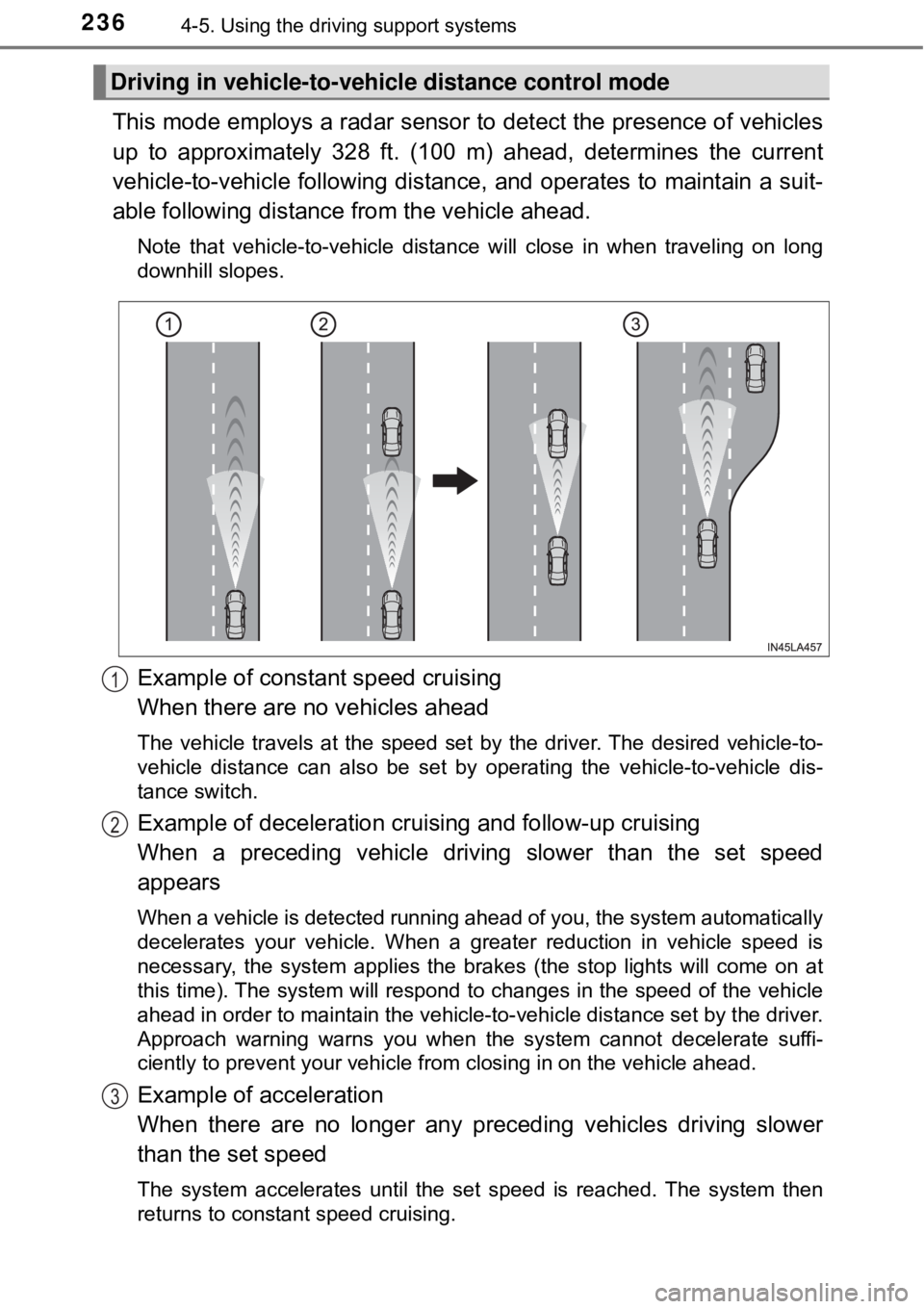
This mode employs a radar sensor to detect the presence of vehicles
up to approximately 328 ft. (100 m) ahead, determines the current
vehicle-to-vehicle following distance, and operates to maintain a suit-
able following distance from the vehicle ahead.
Note that vehicle-to-vehicle distance will close in when traveling on long
downhill slopes.
Example of constant speed cruising
When there are no vehicles ahead
The vehicle travels at the speed set by the driver. The desired vehicle-to-
vehicle distance can also be set by operating the vehicle-to-vehicle dis-
tance switch.
Example of deceleration cruising and follow-up cruising
When a preceding vehicle driving slower than the set speed
appears
When a vehicle is detected running ahead of you, the system automatically
decelerates your vehicle. When a greater reduction in vehicle speed is
necessary, the system applies the brakes (the stop lights will come on at
this time). The system will respond to changes in the speed of the vehicle
ahead in order to maintain the vehicle-to-vehicle distance set by the driver.
Approach warning warns you when the system cannot decelerate suffi-
ciently to prevent your vehicle from closing in on the vehicle ahead.
Example of acceleration
When there are no longer any preceding vehicles driving slower
than the set speed
The system accelerates until the set speed is reached. The system then
returns to constant speed cruising.
Driving in vehicle-to-vehicle distance control mode
1
2
3