brakes TOYOTA AVALON HYBRID 2022 User Guide
[x] Cancel search | Manufacturer: TOYOTA, Model Year: 2022, Model line: AVALON HYBRID, Model: TOYOTA AVALON HYBRID 2022Pages: 584, PDF Size: 9.53 MB
Page 319 of 584

3194-5. Using the driving support systems
4
Driving
WARNING
■Sensors
Certain vehicle conditions and the surrounding environment may affect the
ability of a sensor to correctly detect an object. Particular instances where
this may occur are listed below.
● There is dirt, snow or ice on the sensor. (Wiping the sensors w ill resolve
this problem.)
● The sensor is frozen. (Thawing the area will resolve this probl em.)
In especially cold weather, if a sensor is frozen the screen may show an
abnormal display, or objects may not be detected.
● The sensor is covered in any way.
● The vehicle is leaning considerably to one side.
● On an extremely bumpy road, on an incline, on gravel, or on grass.
● The vicinity of the vehicle is noisy due to vehicle horns, moto rcycle
engines, air brakes of large vehicles, or other loud noises pro ducing ultra-
sonic waves.
● There is another vehicle equipped with parking assist sensors in the vicin-
ity.
● The sensor is coated with a sheet of spray or heavy rain.
● The sensor is drenched with water on a flooded road.
● The vehicle is equipped with a fender pole or wireless antenna.
● Towing eyelets are installed.
● The bumper or sensor receives a strong impact.
● The vehicle is approaching a tall or curved curb.
● The detection range is reduced due to an object such as a sign.
● In harsh sunlight or intense cold weather.
● The area directly under the bumpers is not detected.
● If objects draw too close to the sensor.
● A non-genuine Toyota suspension (lowered suspension, etc.) is installed.
● A backlit license plate is installed.
In addition to the examples above, there are instances in which , because of
their shape, signs and other objects may be judged by a sensor to be closer
than they are.
Page 326 of 584

3264-5. Using the driving support systems
If the Intelligent Clearance Sona r function detects that a collision with
an object is possible, the hybrid system output will be restric ted to
restrain any increase in the vehicle speed. (Hybrid system outp ut
restriction control: See A below.)
Additionally, if the accelerator pedal continues to be depresse d, the
brakes will be applied automatically to reduce the vehicle spee d.
(Brake control: See B below.)
Intelligent Clearance Sonar function
Page 330 of 584
3304-5. Using the driving support systems
■Situations in which the Intellige nt Clearance Sonar function ma y operate
even if there is no possibility of a collision
In some situations such as the following, the Intelligent Clear ance Sonar
function may operate even though there is no possibility of a c ollision.
● Vehicle surroundings
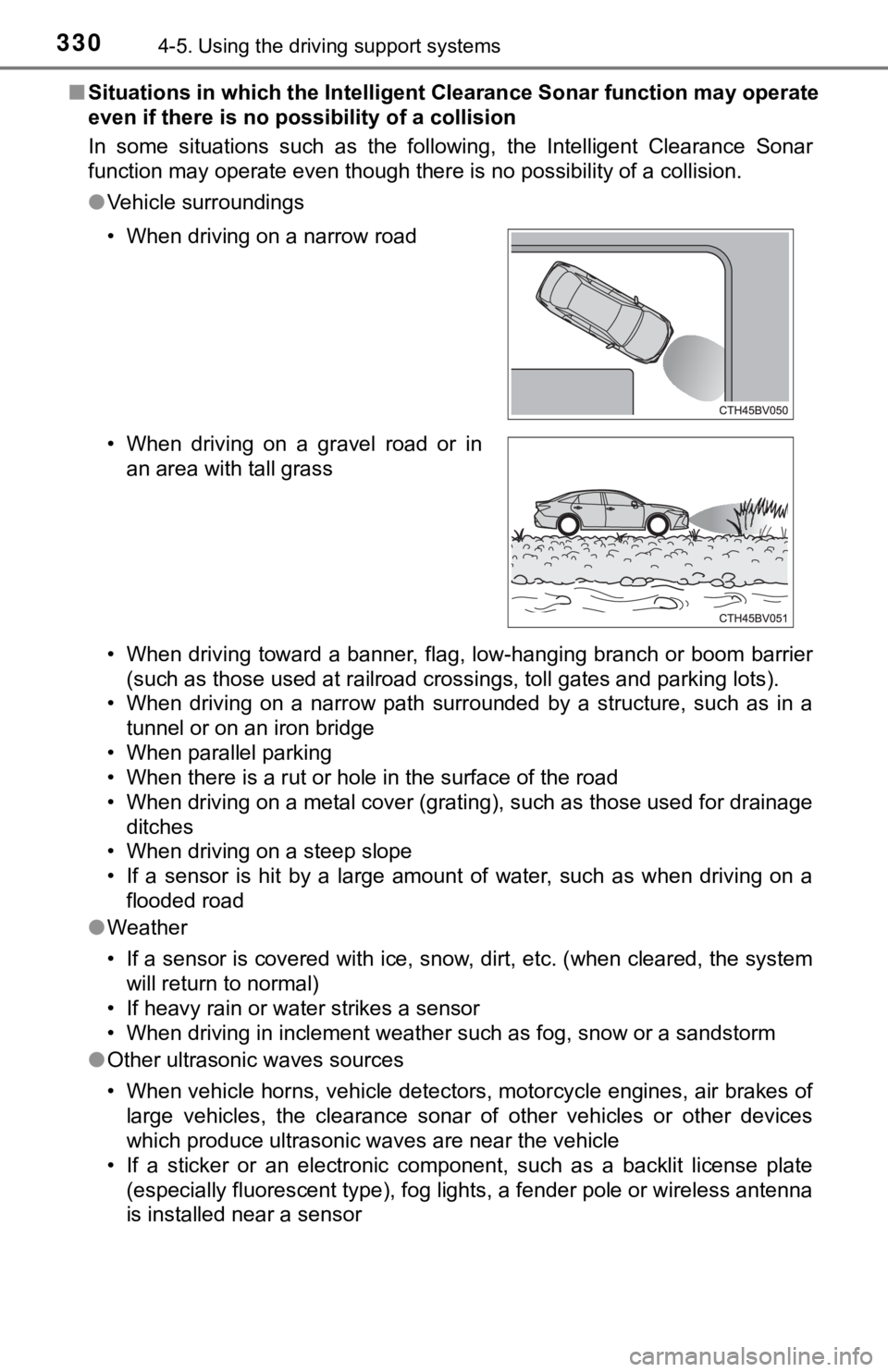
• When driving toward a banner, flag, low-hanging branch or boom barrier
(such as those used at railroad crossings, toll gates and parki ng lots).
• When driving on a narrow path surrounded by a structure, such as in a
tunnel or on an iron bridge
• When parallel parking
• When there is a rut or hole in the surface of the road
• When driving on a metal cover (grating), such as those used fo r drainage
ditches
• When driving on a steep slope
• If a sensor is hit by a large amount of water, such as when driving on a flooded road
● Weather
• If a sensor is covered with ice, snow, dirt, etc. (when cleared, the system
will return to normal)
• If heavy rain or water strikes a sensor
• When driving in inclement weather such as fog, snow or a sands torm
● Other ultrasonic waves sources
• When vehicle horns, vehicle detectors, motorcycle engines, air brakes of
large vehicles, the clearance sonar of other vehicles or other devices
which produce ultrasonic waves are near the vehicle
• If a sticker or an electronic component, such as a backlit license plate (especially fluorescent type), fog lights, a fender pole or wir eless antenna
is installed near a sensor
• When driving on a narrow road
• When driving on a gravel road or in
an area with tall grass
Page 332 of 584

3324-5. Using the driving support systems
●Other ultrasonic waves sources
• When vehicle horns, vehicle detectors, motorcycle engines, air brakes of
large vehicles, the clearance sonar of other vehicles or other devices
which produce ultrasonic waves are near the vehicle
• If a sticker or an electronic component, such as a backlit license plate
(especially fluorescent type), fog lights, a fender pole or wir eless antenna
is installed near a sensor
● Changes in the vehicle posture
• If the vehicle is significantly tilted
• If the front of the vehicle is raised or lowered due to the ca rried load
• If the orientation of a sensor has been changed due to a collision or other impact
■ If a 12-volt battery terminal has been disconnected and reconne cted
The system needs to be initialized.
To initialize the system, drive the vehicle straight ahead for 5 seconds or more
at a speed of approximately 22 mph (35 km/h) or more.
■ If “ICS Unavailable” is displayed on the multi-information display and
the ICS OFF indicator is flashing
Initialization may not have been performed after a 12-volt battery terminal
was disconnected and reconnected. Initialize the system. ( P. 332)
If this message continues to be displayed even after initializa tion, have the
vehicle inspected by your Toyota dealer.
■ If “ICS Unavailable” and “Parking Assist Unavailable Clean Park ing
Assist Sensor” are displayed on th e multi-information display and the
ICS OFF indicator is flashing
● A sensor may be covered with ice, snow, dirt, etc. In this case , remove the
ice, snow, dirt, etc., from the sensor to return the system to normal. If this
message is shown even after removing dirt from the sensor, or s hown when
the sensor was not dirty to begin with, have the vehicle inspec ted at your
Toyota dealer.
● A sensor may be frozen. Once the ice melts, the system will ret urn to nor-
mal.
● Water may be continuously flowing over the sensor surface, such as in a
heavy rain. When the system determines that it is normal, the system will
return to normal.
Page 335 of 584
3354-5. Using the driving support systems
4
Driving
If the Rear Cross Traffic Auto Brake function detects that a collision
with an approaching vehicle is p ossible, the hybrid system output will
be restricted to restrain any increase in vehicle speed. (Hybri d system
output restriction c ontrol: See A below.)
Additionally, if the accelerator pedal continues to be depresse d, the
brakes will be applied automatically to reduce the vehicle spee d.
(Brake control: See B below.)
Rear Cross Traffic Auto Brake function
Page 344 of 584
3444-5. Using the driving support systems
◆ECB (Electronically Controlled Brake System)
The electronically controlled system generates braking force co rre-
sponding to the brake operation
◆ABS (Anti-lock Brake System)
Helps to prevent wheel lock when the brakes are applied suddenl y,
or if the brakes are applied while driving on a slippery road surface
◆Brake assist
Generates an increased level of braking force after the brake p edal
is depressed when the system de tects a panic stop situation
◆VSC (Vehicle Stability Control)
Helps the driver to control skidding when swerving suddenly or
turning on slippery road surfaces.
◆Enhanced VSC (Enhanced Vehicle Stability Control)
Provides cooperative control of the ABS, TRAC, VSC and EPS.
Helps to maintain directional stability when swerving on slippe ry
road surfaces by controlling steering performance.
◆TRAC (Traction Control)
Helps to maintain drive power and prevent the drive wheels from
spinning when starting the vehicl e or accelerating on slippery roads
◆Hill-start assist control
Helps to reduce the backward movement of the vehicle when start -
ing on an uphill
Driving assist systems
To keep driving safety and perf ormance, the following systems
operate automatically in respon se to various driving situations.
Be aware, however, that these systems are supplementary and
should not be relied upon too heav ily when operating the vehi-
cle.
Page 345 of 584
3454-5. Using the driving support systems
4
Driving
◆EPS (Electric Power Steering)
Employs an electric motor to reduce the amount of effort needed to
turn the steering wheel
◆The Secondary Collision Brake
When the SRS airbag sensor detects a collision and the system
operates, the brakes and stop li ghts are automatically controlled to
reduce the vehicle speed and hel p reduce the possibility of further
damage due to a secondary collision.
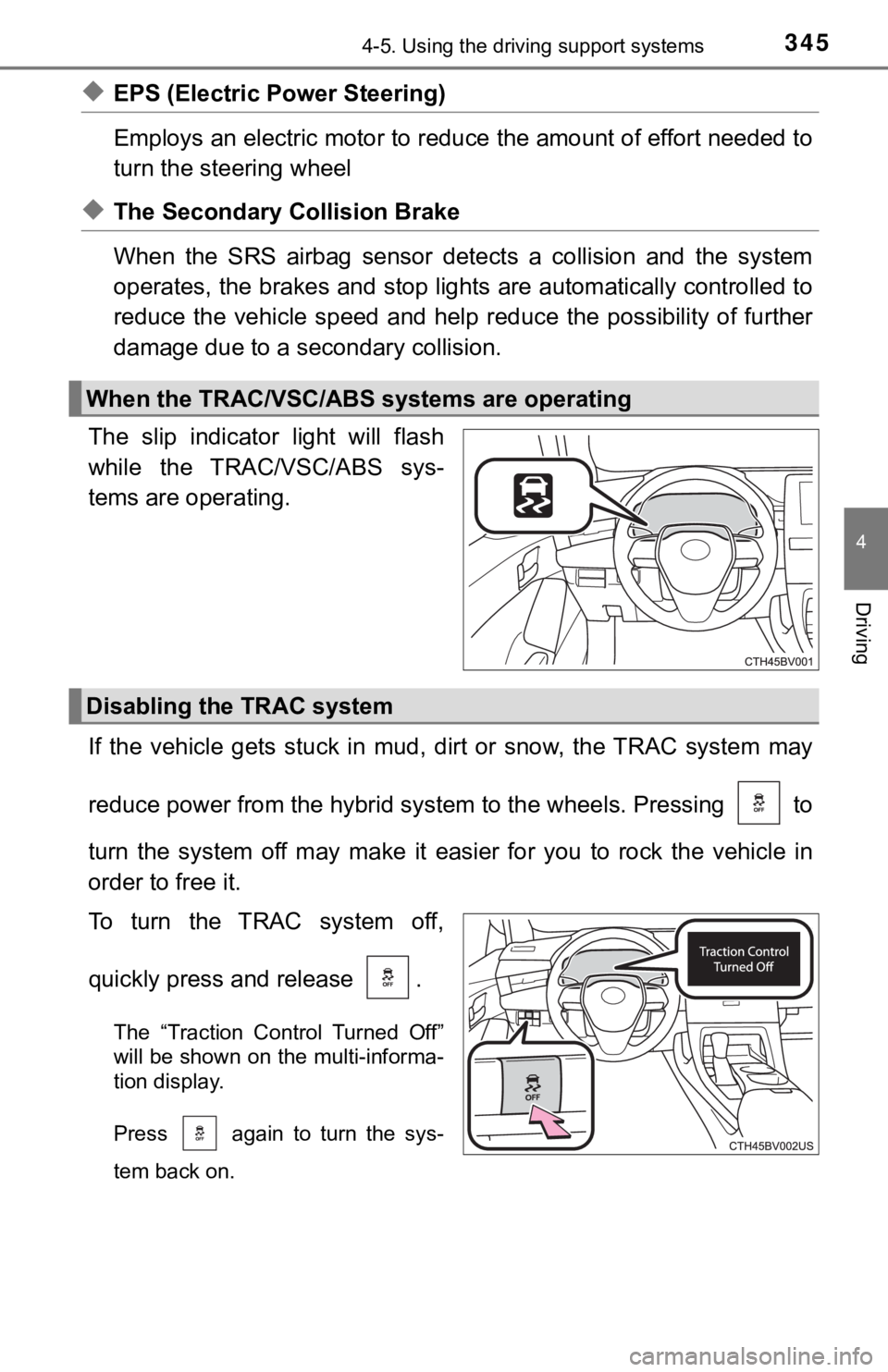
The slip indicator light will flash
while the TRAC/VSC/ABS sys-
tems are operating.
If the vehicle gets stuck in mud, dirt or snow, the TRAC system may
reduce power from the hybrid sys tem to the wheels. Pressing to
turn the system off may make it easier for you to rock the vehicle in
order to free it.
To turn the TRAC system off,
quickly press and release .
The “Traction Control Turned Off”
will be shown on the multi-informa-
tion display.
Press again to turn the sys-
tem back on.
When the TRAC/VSC/ABS systems are operating
Disabling the TRAC system
Page 352 of 584

3524-6. Driving tips
◆When braking
Make sure to operate the brakes gently and in a timely manner. A
greater amount of electrical energy can be regenerated when slow-
ing down.
◆Delays
Repeated acceleration and deceleration, as well as long waits a t
traffic lights, will lead to bad fuel economy. Check traffic re ports
before leaving and avoid delays as much as possible. When drivi ng
in a traffic jam, gently release the brake pedal to allow the v ehicle to
move forward slightly while avoiding overuse of the accelerator
pedal. Doing so can help control excessive gasoline consumption.
◆Highway driving
Control and maintain the vehicle at a constant speed. Before st op-
ping at a toll booth or similar, allow plenty of time to releas e the
accelerator and gently apply the brakes. A greater amount of el ec-
trical energy can be regenerated when slowing down.
◆Air conditioning
Use the air conditioning only when necessary. Doing so can help
reduce excessive gasoline consumption.
In summer: When the ambient tempe rature is high, use the recircu-
lated air mode. Doing so will help to reduce the burden on the air
conditioning system and reduce fuel consumption as well.
In winter: Because the gasolin e engine will not automatically cut out
until it and the interior of the vehicle are warm, it will cons ume fuel.
Also, fuel consumption can be improved by avoiding overuse of t he
heater.
◆Checking tire inflation pressure
Make sure to check the tire inflation pressure frequently. Impr oper
tire inflation pressure can cause poor fuel economy.
Also, as snow tires can cause large amounts of friction, their use on
dry roads can lead to poor fuel economy. Use tires that are app ro-
priate for the season.
Page 354 of 584
3544-6. Driving tips
●Use fluids that are appropriate t o the prevailing outside tempera-
tures. • Engine oil
• Engine/power control unit coolant
• Washer fluid
● Have a service technician inspect the condition of the 12-volt bat-
tery.
● Have the vehicle fitted with four snow tires or purchase a set of tire
chains for the front tires.
*
Ensure that all tires are the specified size and brand, and tha t chains
match the size of the tires.
*: Tire chains cannot be mounted on vehicles with 18 and 19-inch tires.
Perform the following according to the driving conditions:
● Do not try to forcibly open a window or move a wiper that is fr ozen.
Pour warm water over the frozen area to melt the ice. Wipe away
the water immediately to p revent it from freezing.
● To ensure proper operation of the climate control system fan,
remove any snow that has accumulated on the air inlet vents in
front of the windshield.
● Check for and remove any excess ic e or snow that may have accu-
mulated on the exterior lights, vehicle’s roof, chassis, around the
tires or on the brakes.
● Remove any snow or mud from the bottom of your shoes before
getting in the vehicle.
Winter driving tips
Carry out the necessary preparations and inspections before
driving the vehicle in winter. Always drive the vehicle in a ma n-
ner appropriate to the prevailing weather conditions.
Preparation for winter
Before driving the vehicle
Page 409 of 584

4096-1. Maintenance and care
6
Maintenance and care
■Wheels and wheel ornaments
●Remove any dirt immediately by using a neutral detergent.
● Wash detergent off with water immediately after use.
● To protect the paint from damage, make sure to observe the following pre-
cautions.
• Do not use acidic, alkaline or abrasive detergent
• Do not use hard brushes
• Do not use detergent on the wheels when they are hot, such as after driv-
ing or parking in hot weather
■ Brake pads and calipers
Rust may form if the vehicle is parked with wet brake pads or d isc rotors,
causing them to stick. Before parking the vehicle after it is washed, drive
slowly and apply the brakes several times to dry the parts.
■ Bumpers
Do not scrub with abrasive cleaners.
■ Plated portions
If dirt cannot be removed, clean the parts as follows:
●Use a soft cloth dampened with an approximately 5% solution of neutral
detergent and water to clean the dirt off.
● Wipe the surface with a dry, soft cloth to remove any remaining moisture.
● To remove oily deposits, use alcohol wet wipes or a similar product.
WARNING
■When washing the vehicle
Do not apply water to the inside of the engine compartment. Doing so may
cause the electrical components, etc. to catch fire.
■ Precautions regarding the exhaust pipes
Exhaust gasses cause the exhaust pipes to become quite hot.
When washing the vehicle, be careful not to touch the pipes unt il it has
cooled sufficiently, as touching a hot exhaust pipes can cause burns.
■ Precaution regarding the rear bumper with Blind Spot Monitor
If the paint of the rear bumper is chipped or scratched, the system may mal-
function. If this occurs, avoid using the system and consult your Toyota
dealer.