key battery TOYOTA AVALON HYBRID 2022 User Guide
[x] Cancel search | Manufacturer: TOYOTA, Model Year: 2022, Model line: AVALON HYBRID, Model: TOYOTA AVALON HYBRID 2022Pages: 584, PDF Size: 9.53 MB
Page 202 of 584

2024-2. Driving procedures
■Auto power off function
If the vehicle is left in ACCESSORY mode for more than 20 minut es or ON
mode (with the hybrid system not operating) for more than an ho ur with the
shift lever in P, the power switch will automatically turn off. However, this func-
tion cannot entirely prevent 12-volt battery discharge. Do not leave the vehi-
cle with the power switch in ACCESSORY or ON mode for long peri ods of
time when the hybrid system is not operating.
■ Automatic hybrid system shut off feature
●The vehicle is equipped with a feature that automatically shuts off the hybrid
system when the shift lever is in P with the hybrid system oper ating for an
extended period.
● The hybrid system will automatically shut off after approximate ly 1 hour if it
has been left running while the shift lever is in P.
● The timer for the automatic hybrid system shut off feature will reset if the
brake pedal is depressed or if the shift lever is in a position other than P.
● After the vehicle is parked, if the door is locked with the door lock switch
(P. 144) from the inside or the mechanical key ( P. 507) from the outside,
the automatic hybrid system shut off feature will be disabled. The timer for
the automatic hybrid system shut off feature will be re-enabled if the driver’s
door is opened.
■ Sounds and vibrations sp ecific to a hybrid vehicle
P. 78
■ Electronic key battery depletion
P. 140
■ When the ambient temperature is low, such as during winter driv ing con-
ditions
● When starting the hybrid system, the flashing time of the “READY” indicator
may be long. Leave the vehicle as it is until the “READY” indic ator is steady
on, as steady means the vehicle is able to move.
● When the hybrid battery (traction battery) is extremely cold (b elow approxi-
mately -22°F [-30°C]) under the influence of the outside temper ature, it may
not be possible to start the hybrid system. In this case, try t o start the hybrid
system again after the temperature of the hybrid battery increa ses due to
the outside temperature increase etc.
■ Conditions affecting operation
P. 155
■ Notes for the entry function
P. 156
■ If the hybrid system does not start
●The immobilizer system may not have been deactivated. ( P. 86)
Contact your Toyota dealer.
● Check that the shift lever is securely set in P. The hybrid sys tem may not
start if the shift lever is displaced out of P.
Page 203 of 584
2034-2. Driving procedures
4
Driving
●If a message related to start-up is shown on the multi-informat ion display,
read the message and follow the instructions.
■ Steering lock
After turning the power switch off and opening and closing the doors, the
steering wheel will be locked due to the steering lock function . Operating the
power switch again automatically cancels the steering lock.
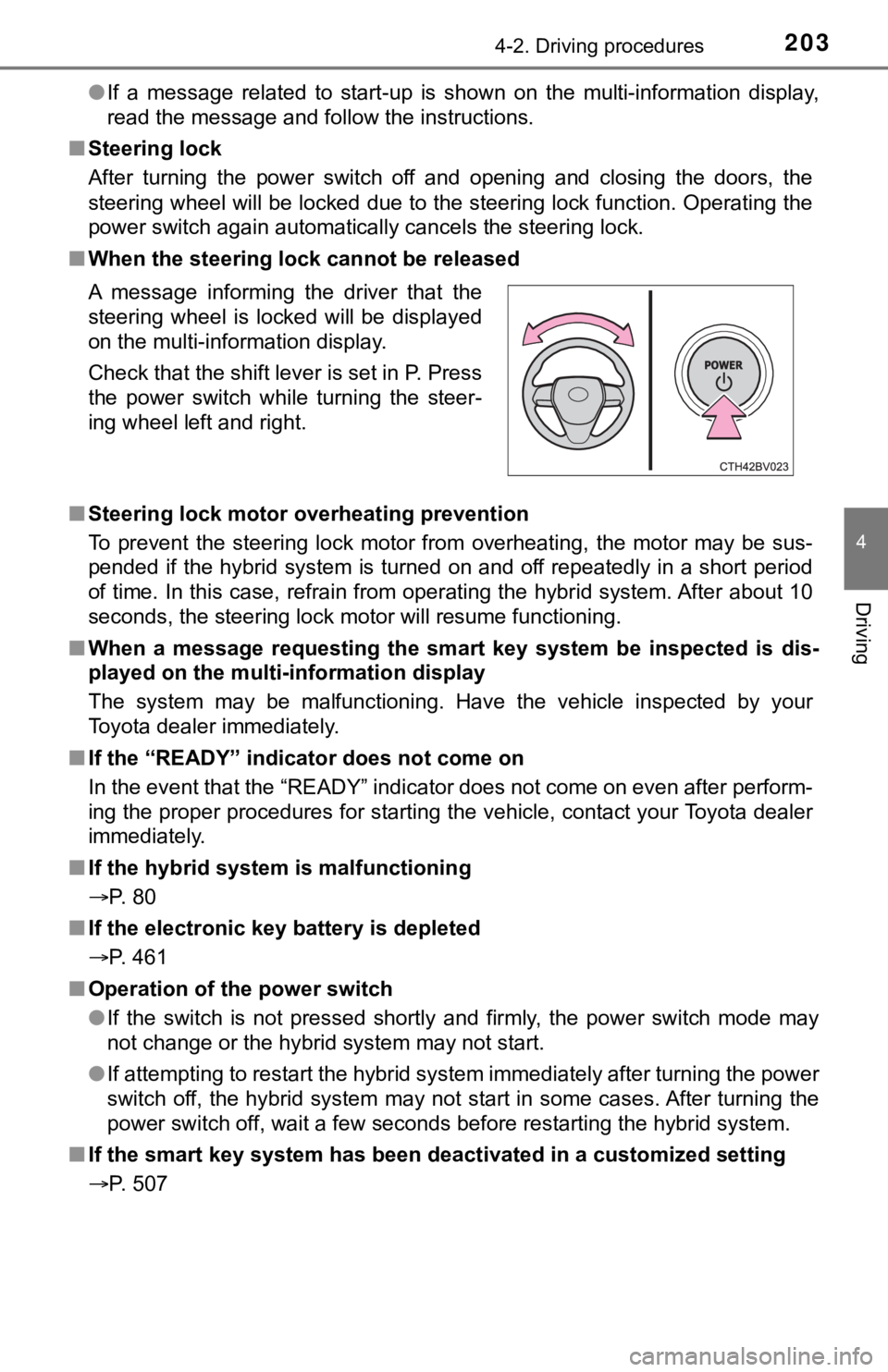
■ When the steering lock cannot be released
■ Steering lock motor overheating prevention
To prevent the steering lock motor from overheating, the motor may be sus-
pended if the hybrid system is turned on and off repeatedly in a short period
of time. In this case, refrain from operating the hybrid system . After about 10
seconds, the steering lock motor will resume functioning.
■ When a message requesting the smart key system be inspected is dis-
played on the multi-information display
The system may be malfunctioning. Have the vehicle inspected by your
Toyota dealer immediately.
■ If the “READY” indicator does not come on
In the event that the “READY” indicator does not come on even a fter perform-
ing the proper procedures for starting the vehicle, contact you r Toyota dealer
immediately.
■ If the hybrid system is malfunctioning
P. 80
■ If the electronic key battery is depleted
P. 461
■ Operation of the power switch
●If the switch is not pressed shortly and firmly, the power switch mode may
not change or the hybrid system may not start.
● If attempting to restart the hybrid system immediately after tu rning the power
switch off, the hybrid system may not start in some cases. After turning the
power switch off, wait a few seconds before restarting the hybrid system.
■ If the smart key system has been d eactivated in a customized setting
P. 507 A message informing the driver that the
steering wheel is locked will be displayed
on the multi-information display.
Check that the shift lever is set in P. Press
the power switch while turning the steer-
ing wheel left and right.
Page 225 of 584
2254-3. Operating the lights and wipers
4
Driving
■12-volt battery-saving function
In the following conditions, the remaining lights will go off automatically after
20 minutes in order to prevent the 12-volt battery from being discharged:
●The headlights and/or tail lights are on.
● The power switch is in ACCESSORY mode or turned off.
This function will be canceled in any of the following situations:
● When the power switch is turned to ON mode.
● When the light switch is operated.
● When a door or the trunk is opened or closed.
■ Welcome lighting
If the headlight switch is turned to and the surrounding area is dark,
unlocking the doors using the smart key system or wireless remote control
will turn the parking lights and tail lights on automatically.
■ Customization
Some functions can be customized. ( P. 548)
NOTICE
■To prevent 12-volt battery discharge
Do not leave the lights on longer than necessary when the hybrid system is
off.
Page 396 of 584

3965-4. Other interior features
NOTICE
■Conditions in which the wireless charger may not operate correctly
In the following situations, the wireless charger may not operate correctly:
● When a portable device is fully charged
● When there is a foreign object between the charging area and portable
device
● When a portable device becomes hot while charging
● When a portable device is placed on the wireless area with its charging
surface facing up
● When a portable device is not centered on the charging area
● When the vehicle is near a TV tower, electric power plant, gas station,
radio station, large display, airport or other facility that ge nerates strong
radio waves or electrical noise
● When the portable device is in contact with, or is covered by a ny of the fol-
lowing metallic objects:
• Cards to which aluminum foil is attached
• Cigarette boxes that have aluminum foil inside
• Metallic wallets or bags
• Coins
• Metal hand warmers
• Media such as CDs and DVDs
● When wireless keys (that emit radio waves) other than those of your vehi-
cle are being used nearby.
If in situations other than above the wireless charger does not operate prop-
erly or the operation indicator light is blinking, the wireless charger may be
malfunctioning. Contact your Toyota dealer.
■ To prevent failure or damage to data
● Do not bring magnetic cards, such as a credit card, or magnetic recording
media, close to the wireless charger while charging. Otherwise, data may
be erased due to the influence of magnetism.
Additionally, do not bring precision instruments such as wrist watches,
close to the wireless charger, as such objects may malfunction.
● Do not leave portable devices in the cabin. The temperature ins ide the
cabin may become high when parked in the sun, and cause damage to the
device.
■ To prevent 12-volt battery discharge
Do not use the wireless charger for a long period of time with the hybrid sys-
tem stopped.
Page 407 of 584

407
6Maintenance and care
6-1. Maintenance and careCleaning and protecting the vehicle exterior .......... 408
Cleaning and protecting the vehicle interior ........... 411
6-2. Maintenance Maintenance requirements ................... 414
General maintenance........ 416
Emission inspection and maintenance (I/M)
programs......................... 420
6-3. Do-it-yourself maintenance
Do-it-yourself service precautions ..................... 421
Hood ................................. 423
Positioning a floor jack ...... 424
Engine compartment ......... 425
12-volt battery ................... 433
Tires .................................. 437
Tire inflation pressure ....... 449
Wheels .............................. 452
Air conditioning filter.......... 454
Cleaning the hybrid battery (traction battery)
air intake vent and
filter ................................. 456
Electronic key battery........ 461
Checking and replacing fuses ............................... 464
Light bulbs......................... 467
Page 408 of 584
4086-1. Maintenance and care
●Working from top to bottom, liberally apply water to the vehicl e
body, wheel wells and underside of the vehicle to remove any di rt
and dust.
● Wash the vehicle body using a sponge or soft cloth, such as a
chamois.
● For hard-to-remove marks, use car wash soap and rinse thoroughl y
with water.
● Wipe away any water.
● Wax the vehicle when the wate rproof coating deteriorates.
If water does not bead on a clean surface, apply wax when the vehicle
body is cool.
■Automatic car washes
●Fold the mirrors before washing the vehicle. Start washing from the front of
the vehicle. Make sure to extend the mirrors before driving.
● Brushes used in automatic car washes may scratch the vehicle su rface,
parts (wheel, etc.) and harm your vehicle's paint.
● Vehicles with a rear spoiler: In certain automatic car washes, the rear spoiler
may interfere with machine operation. This may prevent the vehicle from
being cleaned properly or result in damage to the rear spoiler.
■ High pressure car washes
As water may enter the cabin, do not bring the nozzle tip near the gaps
around the doors or perimeter of the windows, or spray these ar eas continu-
ously.
■ When using a car wash
If the door handle becomes wet while the electronic key is within the effective
range, the door may lock and unlock repeatedly. In that case, f ollow the fol-
lowing correction procedures to wash the vehicle:
● Place the key in a position 6 ft. (2 m) or more separate from t he vehicle
while the vehicle is being washed. (Take care to ensure that th e key is not
stolen.)
● Set the electronic key to battery-saving mode to disable the sm art key sys-
tem. ( P. 154)
Cleaning and prot ecting the vehicle
exterior
Perform the following to protect the vehicle and maintain it in
prime condition:
Page 434 of 584
4346-3. Do-it-yourself maintenance
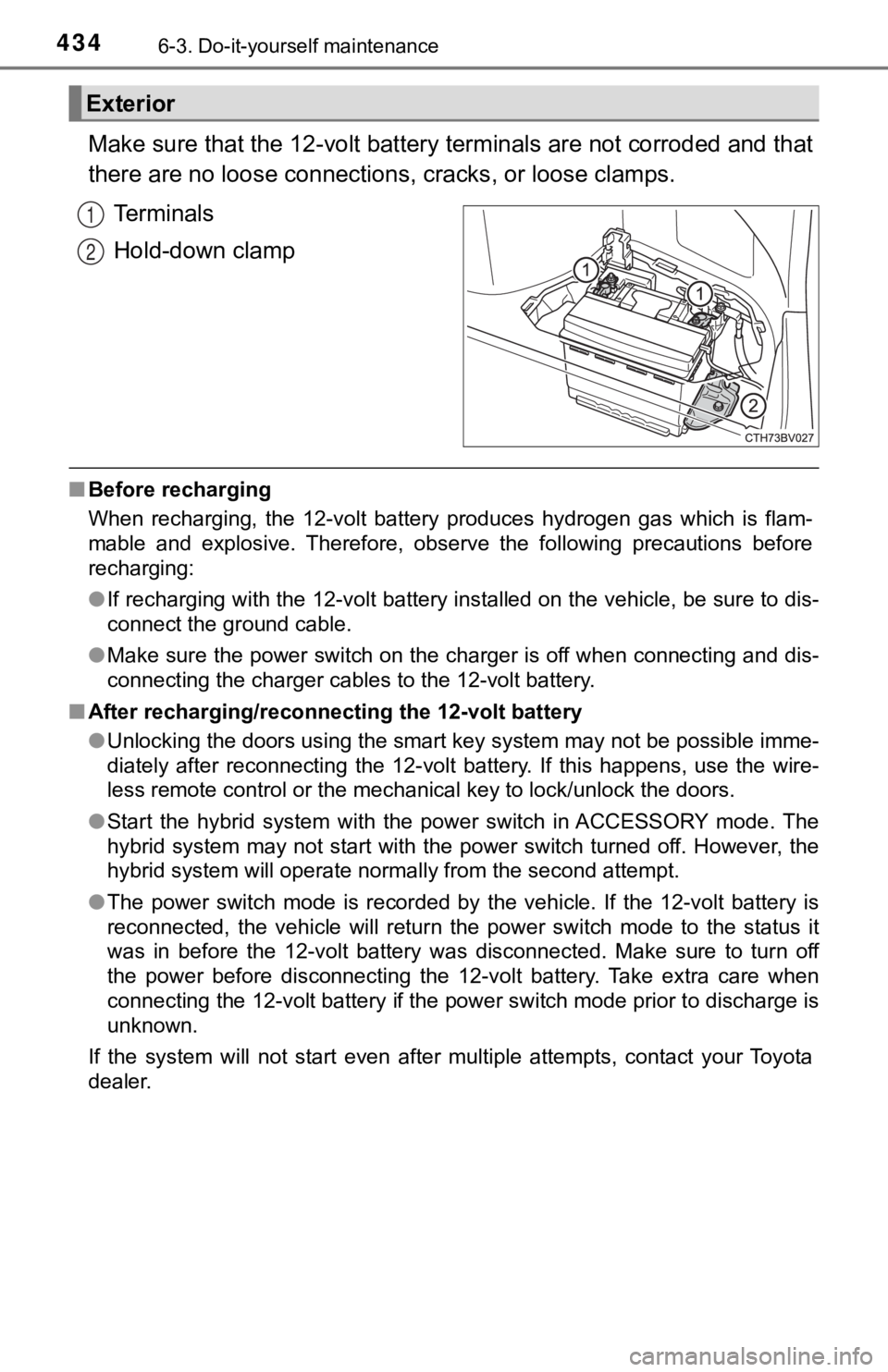
Make sure that the 12-volt battery terminals are not corroded and that
there are no loose connections, cracks, or loose clamps.
Terminals
Hold-down clamp
■ Before recharging
When recharging, the 12-volt battery produces hydrogen gas which is flam-
mable and explosive. Therefore, observe the following precautio ns before
recharging:
● If recharging with the 12-volt battery installed on the vehicle , be sure to dis-
connect the ground cable.
● Make sure the power switch on the charger is off when connectin g and dis-
connecting the charger cables to the 12-volt battery.
■ After recharging/reconnecting the 12-volt battery
●Unlocking the doors using the smart key system may not be possi ble imme-
diately after reconnecting the 12-volt battery. If this happens, use the wire-
less remote control or the mechanical key to lock/unlock the do ors.
● Start the hybrid system with the power switch in ACCESSORY mode . The
hybrid system may not start with the power switch turned off. However, the
hybrid system will operate normally from the second attempt.
● The power switch mode is recorded by the vehicle. If the 12-vol t battery is
reconnected, the vehicle will return the power switch mode to t he status it
was in before the 12-volt battery was disconnected. Make sure t o turn off
the power before disconnecting the 12-volt battery. Take extra care when
connecting the 12-volt battery if the power switch mode prior t o discharge is
unknown.
If the system will not start even after multiple attempts, contact your Toyota
dealer.
Exterior
1
2
Page 461 of 584
4616-3. Do-it-yourself maintenance
6
Maintenance and care
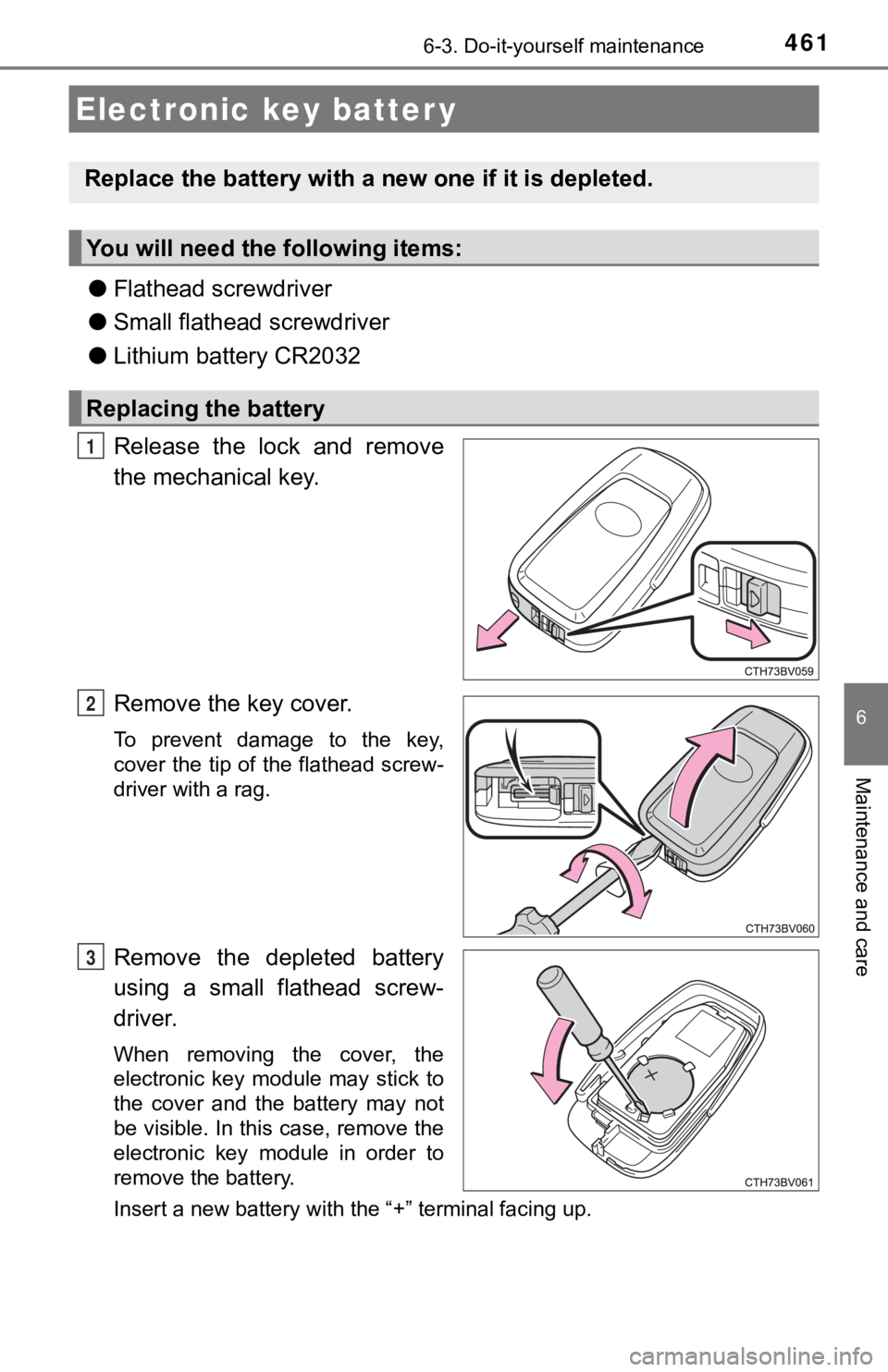
●Flathead screwdriver
● Small flathead screwdriver
● Lithium battery CR2032
Release the lock and remove
the mechanical key.
Remove the key cover.
To prevent damage to the key,
cover the tip of the flathead screw-
driver with a rag.
Remove the depleted battery
using a small flathead screw-
driver.
When removing the cover, the
electronic key module may stick to
the cover and the battery may not
be visible. In this case, remove the
electronic key module in order to
remove the battery.
Insert a new battery with the “+” terminal facing up.
Electronic key batter y
Replace the battery with a n ew one if it is depleted.
You will need the following items:
Replacing the battery
1
2
3
Page 462 of 584

4626-3. Do-it-yourself maintenance
When installing the key cover and mechanical key, install by con-
ducting and with the directions reversed.
Operate the or switch and check that the doors can
be locked/unlocked.
■When replacing the key battery
Be careful not to lose the battery or any other small parts.
■ Use a CR2032 lithium battery
●Batteries can be purchased at your Toyota dealer, local electrical appliance
shops or camera stores.
● Replace only with the same or equivalent type recommended by the manu-
facturer.
● Dispose of used batteries according to local laws.
■ If the key battery is depleted
The following symptoms may occur:
●The smart key system and wireless remote control will not funct ion properly.
● The operational range will be reduced.
WARNING
■ Battery precautions
Observe the following precautions.
Failure to do so may result in death or serious injury.
● Do not swallow the battery. Doing so may cause chemical burns.
● A coin battery or button battery is used in the electronic key. If a battery is
swallowed, it may cause severe chemical burns in as little as 2 hours and
may result in death or serious injury.
● Keep away new and removed batteries from children.
● If the cover cannot be firmly closed, stop using the electronic key and stow
the key in the place where children cannot reach, and then contact your
Toyota dealer.
● If you accidentally swallow a battery or put a battery into a part of your
body, get emergency medical attention immediately.
■ To prevent battery explosion or leakage of flammable liquid or gas
● Replace the battery with a new battery of the same type. If a w rong type of
battery is used, it may explode.
● Do not expose batteries to extremely low pressure due to high altitude or
extremely high temperatures.
● Do not burn, break or cut a battery.
4
21
5
Page 469 of 584

469
7When trouble arises
7-1. Essential informationEmergency flashers .......... 470
If your vehicle has to be stopped in
an emergency ................. 471
If the vehicle is submerged or water on the road is
rising ............................... 472
7-2. Steps to take in an emergency
If your vehicle needs to be towed ..................... 474
If you think something is wrong .......................... 477
If a warning light turns on or a warning
buzzer sounds ................ 478
If a warning message is displayed ..................... 488
If you have a flat tire.......... 494
If the hybrid system will not start ........................... 505
If the electronic key does not operate
properly ........................... 507
If the 12-volt battery is discharged ................... 510
If your vehicle overheats ........................ 517
If the vehicle becomes stuck ............................... 521