wheel TOYOTA AVALON HYBRID 2022 User Guide
[x] Cancel search | Manufacturer: TOYOTA, Model Year: 2022, Model line: AVALON HYBRID, Model: TOYOTA AVALON HYBRID 2022Pages: 584, PDF Size: 9.53 MB
Page 76 of 584
761-3. Hybrid system
◆When stopped/during start off
The gasoline engine stops
*, when the vehicle is stopped. During
start off, the electric motor (traction motor) drives the vehic le. At
slow speeds or when traveling down a gentle slope, the engine i s
stopped
* and the electric motor (tr action motor) is used.
When the shift lever is in N, the hybrid battery (traction batt ery) is
not being charged.
*: When the hybrid battery (traction battery) requires charging o r the
engine is warming up, etc., the gasoline engine will not automa tically
stop. ( P. 77)
◆During normal driving
The gasoline engine is predominantly used. The electric motor
(traction motor) charges the hybr id battery (traction battery) as nec-
essary.
◆When accelerating sharply
When the accelerator pedal is depressed heavily, the power of t he
hybrid battery (traction battery) is added to that of the gasol ine
engine via the electric motor (traction motor).
◆When braking (regenerative braking)
The wheels operate the electric motor (traction motor) as a pow er
generator, and the hybrid battery (traction battery) is charged.
When driving with the gasolin e engine stopped, a sound, which
changes in accordance with the driving speed, will be played in order
to warn people nearby of the vehicle’s approach. The sound will stop
when the vehicle speed exceeds approximately 22 mph (35 km/h).
Acoustic Vehicle Alerting System
Page 83 of 584

831-3. Hybrid system
1
For safety and security
WARNING
■Road accident cautions
Observe the following precautions to reduce the risk of death o r serious
injury:
● Pull your vehicle off the road, apply the parking brake, shift the shift lever
to P, and turn the hybrid system off.
● Do not touch the high voltage parts, cables and connectors.
● If electric wires are exposed inside or outside your vehicle, an electric
shock may occur. Never touch exposed electric wires.
● If a fire occurs in the hybrid vehicle, leave the vehicle as soon as possible.
Never use a fire extinguisher that is not meant for electric fires. Using even
a small amount of water may be dangerous.
● If your vehicle needs to be towed, do so with front wheels raised. If the
wheels connected to the electric motor (traction motor) are on the ground
when towing, the motor may continue to generate electricity. Th is may
cause a fire. ( P. 474)
● Carefully inspect the ground under the vehicle. If you find that liquid has
leaked onto the ground, the fuel system may have been damaged. Leave
the vehicle as soon as possible.
● If electrolyte is leaking from the hybrid battery (traction bat tery), do not
approach the vehicle.
Even in the unlikely event that the hybrid battery (traction battery) is dam-
aged, the internal construction of the battery will prevent a l arge amount
of electrolyte from leaking out. However, any electrolyte that does leak out
will give off a vapor. This vapor is an irritant to skin and ey es and could
cause acute poisoning if inhaled.
● Do not touch the hybrid battery (traction battery) if liquid is leaking from or
adhering to it. If electrolyte (carbonic-based organic electrol yte) from the
hybrid battery (traction battery) comes into contact with the eyes or skin, it
could cause blindness or skin wounds. In the unlikely event tha t it comes
into contact with the eyes or skin, wash it off immediately with a large
amount of water, and seek immediate medical attention.
● Do not bring burning or high-tem perature items close to the electrolyte.
The electrolyte may ignite and cause a fire.
Page 111 of 584
1112. Instrument cluster
2
Instrument cluster
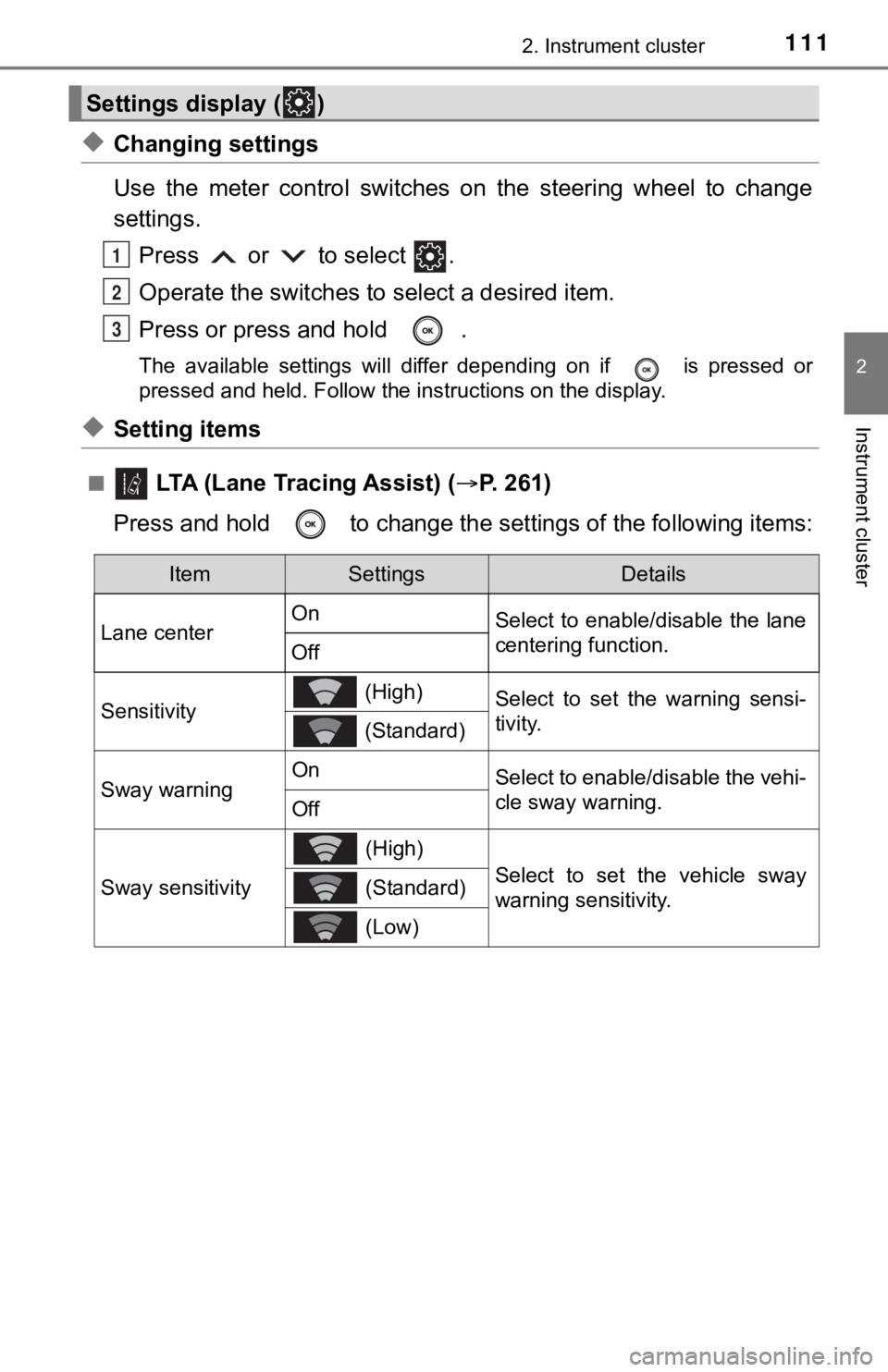
◆Changing settings
Use the meter control switches on the steering wheel to change
settings.Press or to select .
Operate the switches to select a desired item.
Press or press and hold .
The available settings will differ depending on if is pressed or
pressed and held. Follow the instructions on the display.
◆Setting items
■ LTA (Lane Tracing Assist) ( P. 2 6 1 )
Press and hold to change the se ttings of the following items:
Settings display ( )
1
2
3
ItemSettingsDetails
Lane center On
Select to enable/disable the lane
centering function.
Off
Sensitivity (High)Select to set the warning sensi-
tivity.
(Standard)
Sway warningOnSelect to enable/disable the vehi-
cle sway warning.
Off
Sway sensitivity
(High)
Select to set the vehicle sway
warning sensitivity. (Standard)
(Low)
Page 117 of 584
1172. Instrument cluster
2
Instrument cluster
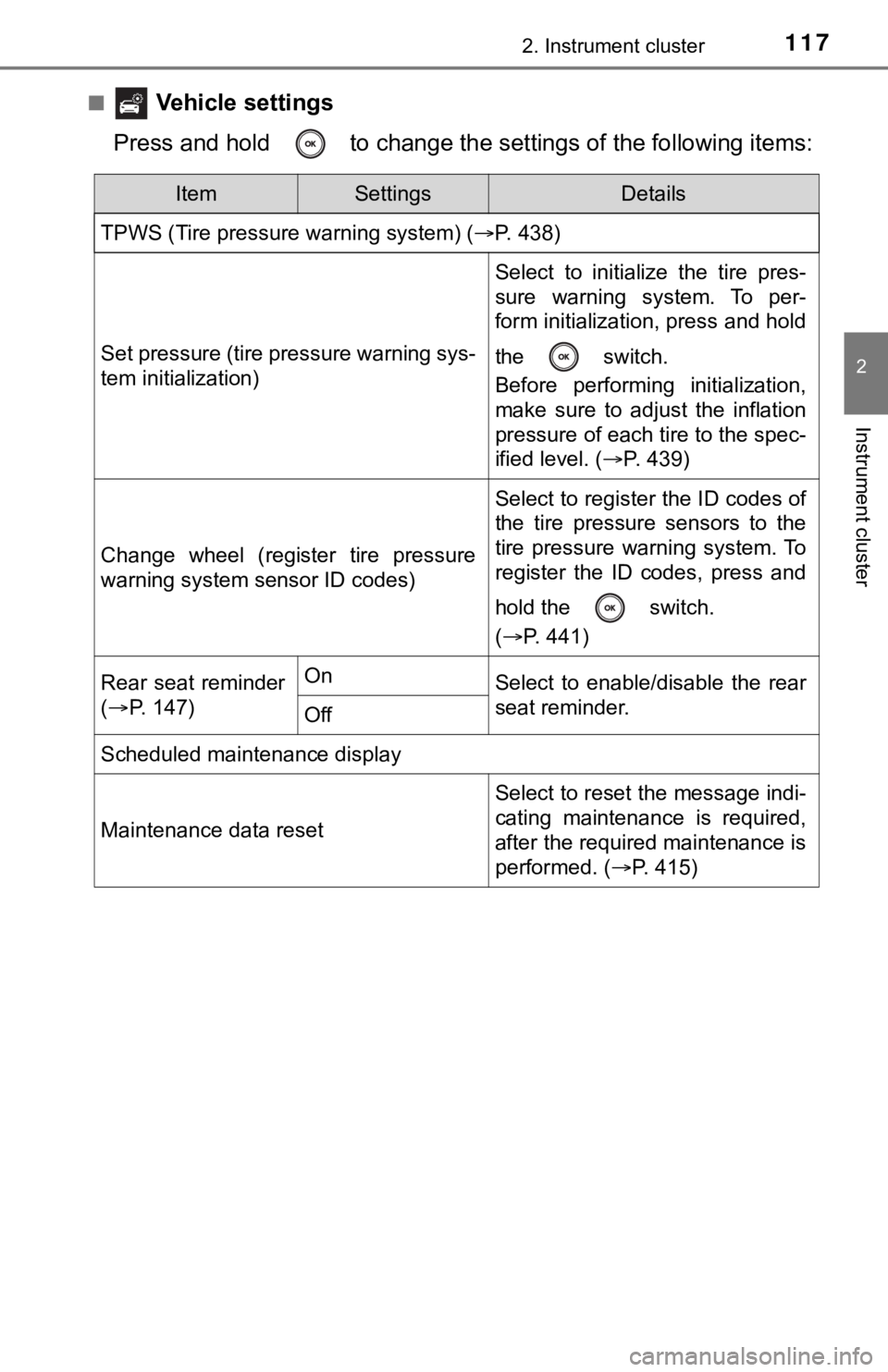
■ Vehicle settings
Press and hold to change the se ttings of the following items:
ItemSettingsDetails
TPWS (Tire pressure warning system) ( P. 438)
Set pressure (tire pressure warning sys-
tem initialization)
Select to initialize the tire pres-
sure warning system. To per-
form initialization, press and hold
the switch.
Before performing initialization,
make sure to adjust the inflation
pressure of each tire to the spec-
ified level. (P. 439)
Change wheel (register tire pressure
warning system sensor ID codes)
Select to register the ID codes of
the tire pressure sensors to the
tire pressure warning system. To
register the ID codes, press and
hold the switch.
(P. 441)
Rear seat reminder
( P. 147)OnSelect to enable/disable the rear
seat reminder.
Off
Scheduled maintenance display
Maintenance data reset
Select to reset the message indi-
cating maintenance is required,
after the required maintenance is
performed. ( P. 415)
Page 131 of 584
1312. Instrument cluster
2
Instrument cluster
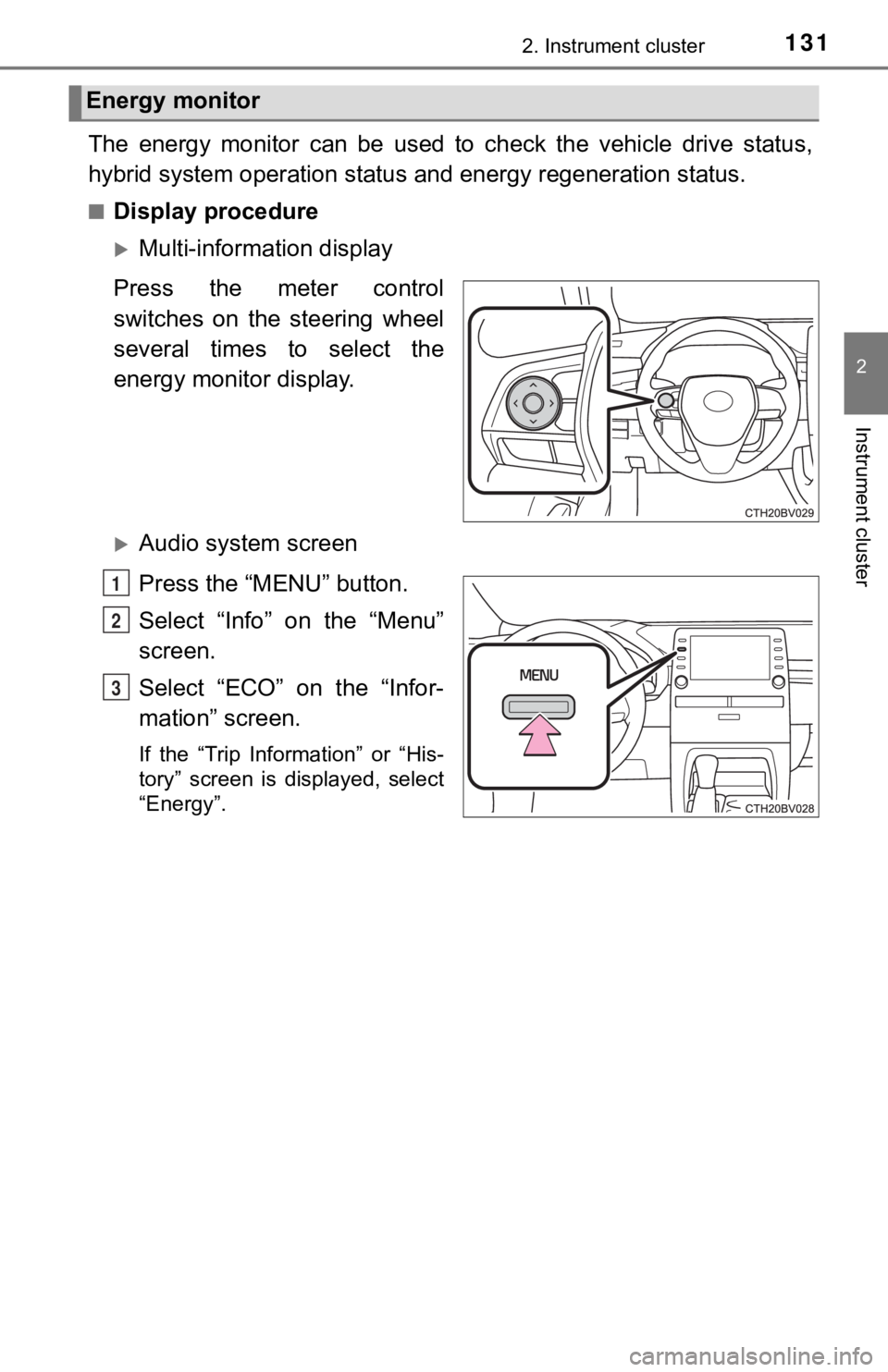
The energy monitor can be used to check the vehicle drive status,
hybrid system operation status and energy regeneration status.
■Display procedure
Multi-information display
Press the meter control
switches on the steering wheel
several times to select the
energy monitor display.
Audio system screen
Press the “MENU” button.
Select “Info” on the “Menu”
screen.
Select “ECO” on the “Infor-
mation” screen.
If the “Trip Information” or “His-
tory” screen is displayed, select
“Energy”.
Energy monitor
1
2
3
Page 137 of 584

137
3
Operation of
each component
3-1. Key information
Keys .................................. 138
3-2. Opening, closing and locking the doors
Doors ................................ 142
Trunk ................................. 148
Smart key system ............. 152
3-3. Adjusting the seats Front seats ........................ 159
Rear seats......................... 161
Driving position memory ........................... 163
Head restraints.................. 168
3-4. Adjusting the steering wheel and mirrors
Steering wheel .................. 170
Inside rear view mirror ...... 172
Outside rear view mirrors ............................. 174
3-5. Opening and closing the windows
Power windows ................. 177
Moon roof .......................... 181
Page 159 of 584
159
3
Operation of each component
3-3. Adjusting the seats
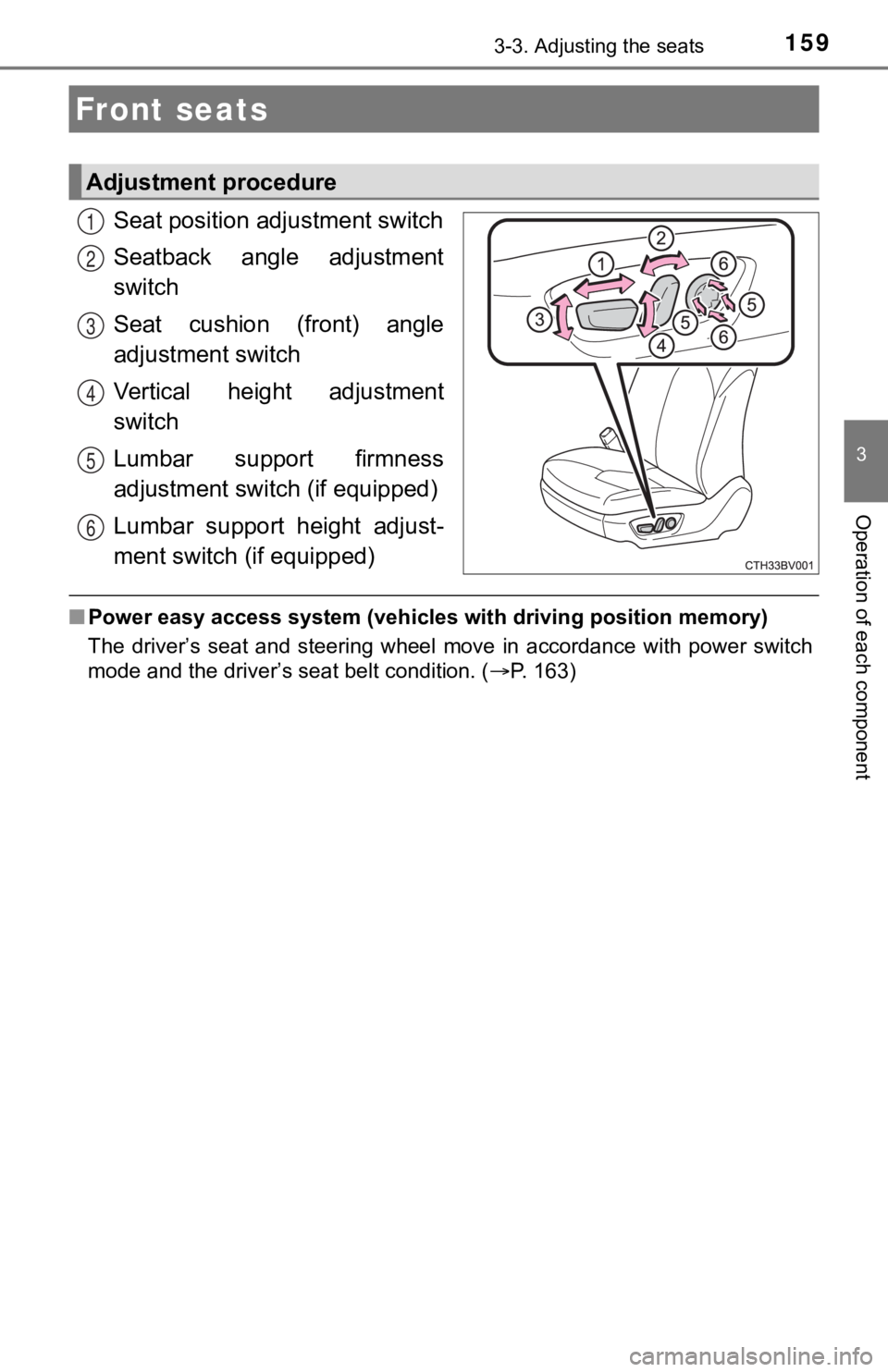
Seat position ad justment switch
Seatback angle adjustment
switch
Seat cushion (front) angle
adjustment switch
Vertical height adjustment
switch
Lumbar support firmness
adjustment switch (if equipped)
Lumbar support height adjust-
ment switch (if equipped)
■ Power easy access system (vehicles with driving position memory )
The driver’s seat and steering wheel move in accordance with po wer switch
mode and the driver’s seat belt condition. ( P. 163)
Front seats
Adjustment procedure
1
2
3
4
5
6
Page 163 of 584
1633-3. Adjusting the seats
3
Operation of each component
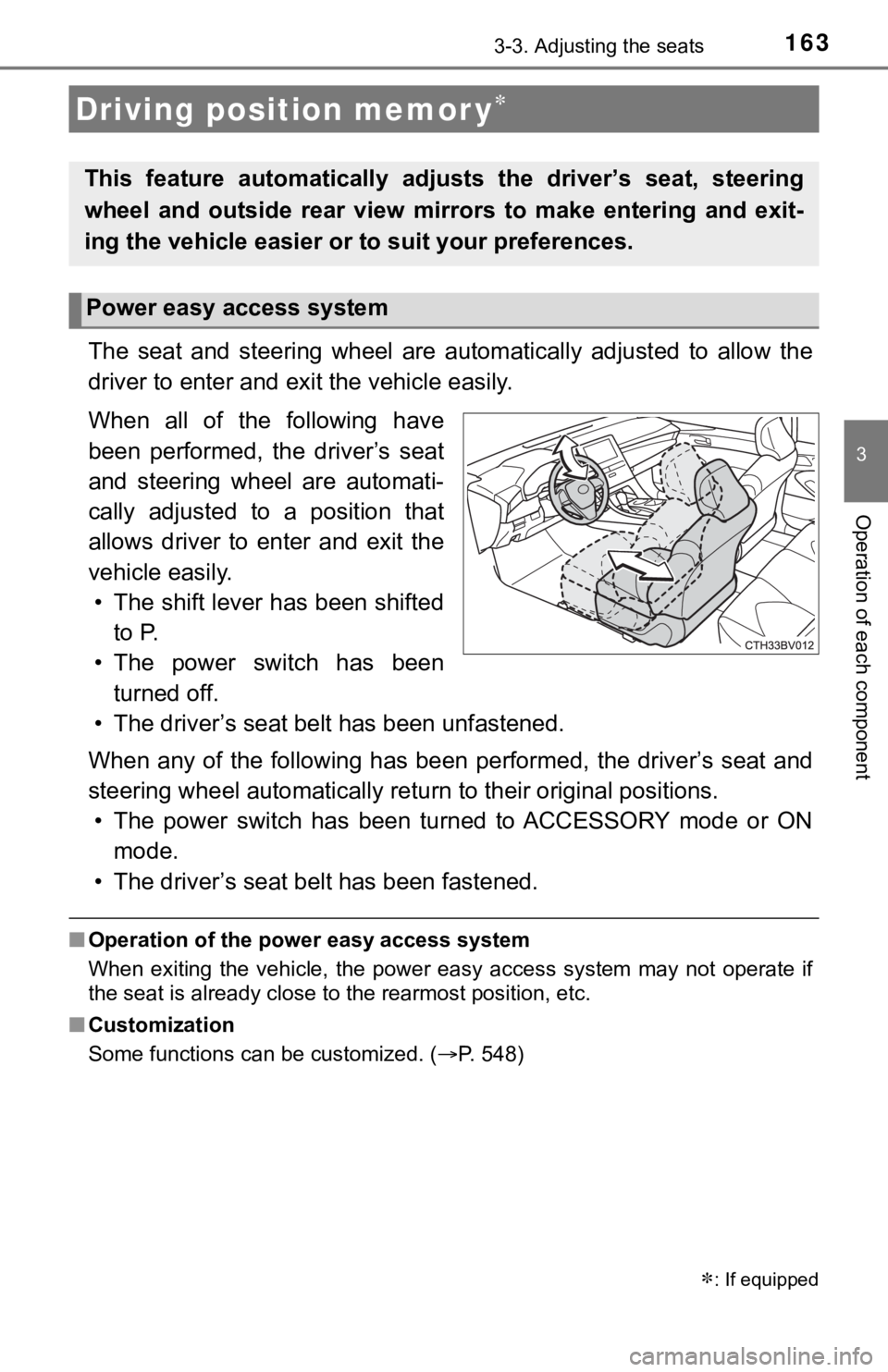
The seat and steering wheel are automatically adjusted to allow the
driver to enter and exi t the vehicle easily.
When all of the following have
been performed, the driver’s seat
and steering wheel are automati-
cally adjusted to a position that
allows driver to enter and exit the
vehicle easily. • The shift lever has been shifted to P.
• The power switch has been turned off.
• The driver’s seat belt has been unfastened.
When any of the following has be en performed, the driver’s seat and
steering wheel automatically ret urn to their original positions.
• The power switch has been turned to ACCESSORY mode or ON mode.
• The driver’s seat belt has been fastened.
■ Operation of the power easy access system
When exiting the vehicle, the power easy access system may not operate if
the seat is already close to the rearmost position, etc.
■ Customization
Some functions can be customized. ( P. 548)
Driving position memor y
: If equipped
This feature automatically adjusts the driver’s seat, steering
wheel and outside rear view mirrors to make entering and exit-
ing the vehicle easier or to suit your preferences.
Power easy access system
Page 164 of 584
1643-3. Adjusting the seats
Your preferred driving position (the position of the driver’s seat, steer-
ing wheel and outside rear view mirrors) can be recorded and re called
by pressing a button.
Two different driving positions can be recorded into memory.
■Recording procedure
Check that the shift lever is in P.
Turn the power switch to ON mode.
Adjust the driver’s seat, steerin g wheel, and outside rear view
mirrors to the desired positions.
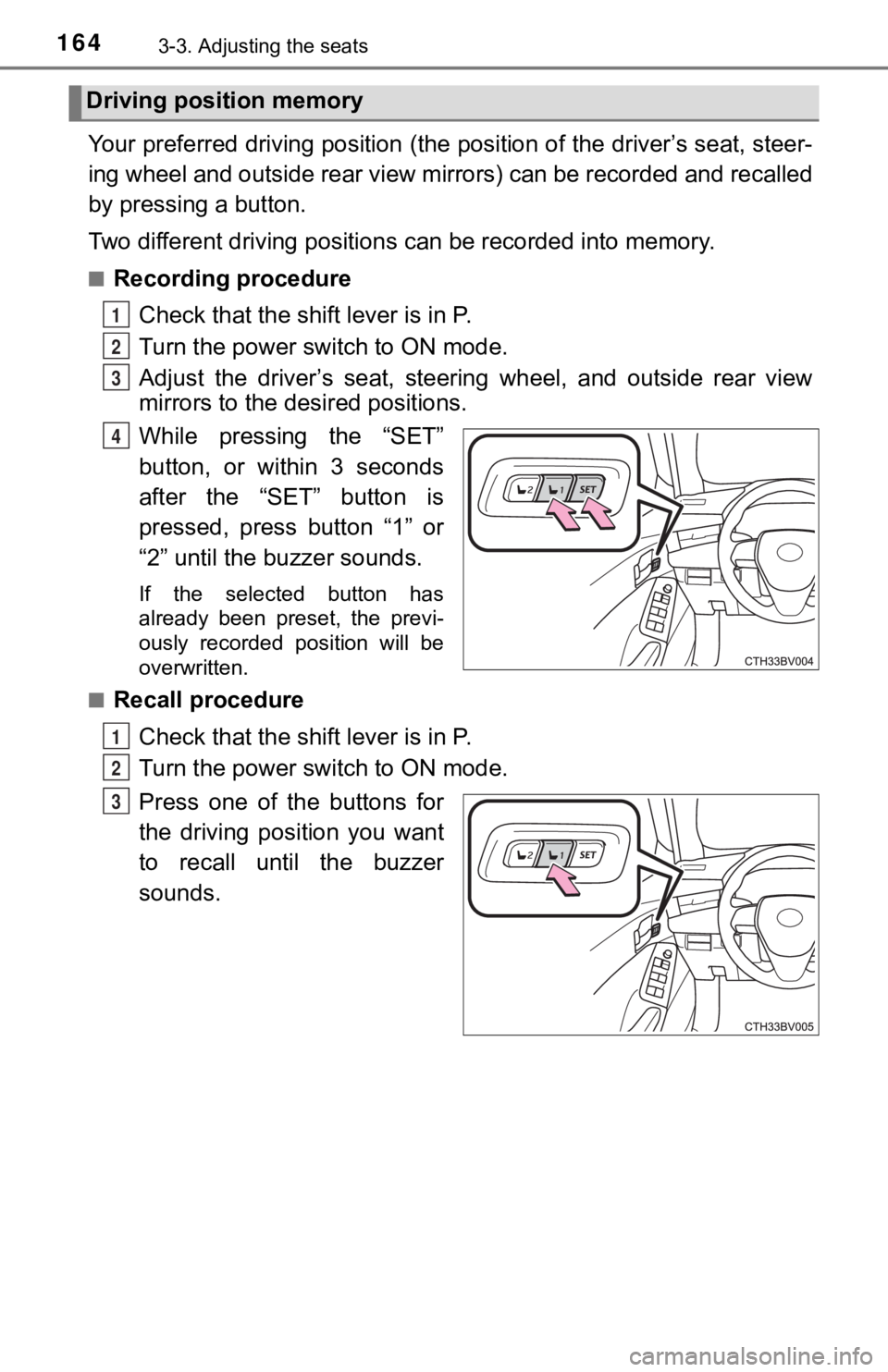
While pressing the “SET”
button, or within 3 seconds
after the “SET” button is
pressed, press button “1” or
“2” until the buzzer sounds.
If the selected button has
already been preset, the previ-
ously recorded position will be
overwritten.
■
Recall procedure
Check that the shift lever is in P.
Turn the power switch to ON mode.
Press one of the buttons for
the driving position you want
to recall until the buzzer
sounds.
Driving position memory
1
2
3
4
1
2
3
Page 165 of 584

1653-3. Adjusting the seats
3
Operation of each component
■To stop the position recall operation part-way through
Perform any of the following operations:
●Press the “SET” button.
● Press button “1” or “2”.
● Operate any of the seat adjustment switches (only cancels seat position
recall).
● Operate the tilt and telescopic steering control switch (only cancels steering
wheel position recall).
■ Seat positions that can be memorized ( P. 159)
The adjusted positions other than the position adjusted by lumb ar support
switch can be recorded.
■ Operating the driving position memory after turning the power s witch off
Recorded seat positions can be activated up to 180 seconds after the driver’s
door is opened and another 60 seconds after it is closed again.
■ When the recorded seat pos ition cannot be recalled
The seat position may not be recalled in some situations when t he seat posi-
tion is recorded in a certain range. For details, contact your Toyota dealer.
■ In order to correctly use the dr iving position memory function
If a seat position is already in the furthest possible position and the seat is
operated in the same direction, the recorded position may be sl ightly different
when it is recalled.