audio TOYOTA AVALON HYBRID 2022 Owner's Manual
[x] Cancel search | Manufacturer: TOYOTA, Model Year: 2022, Model line: AVALON HYBRID, Model: TOYOTA AVALON HYBRID 2022Pages: 584, PDF Size: 9.53 MB
Page 314 of 584
3144-5. Using the driving support systems
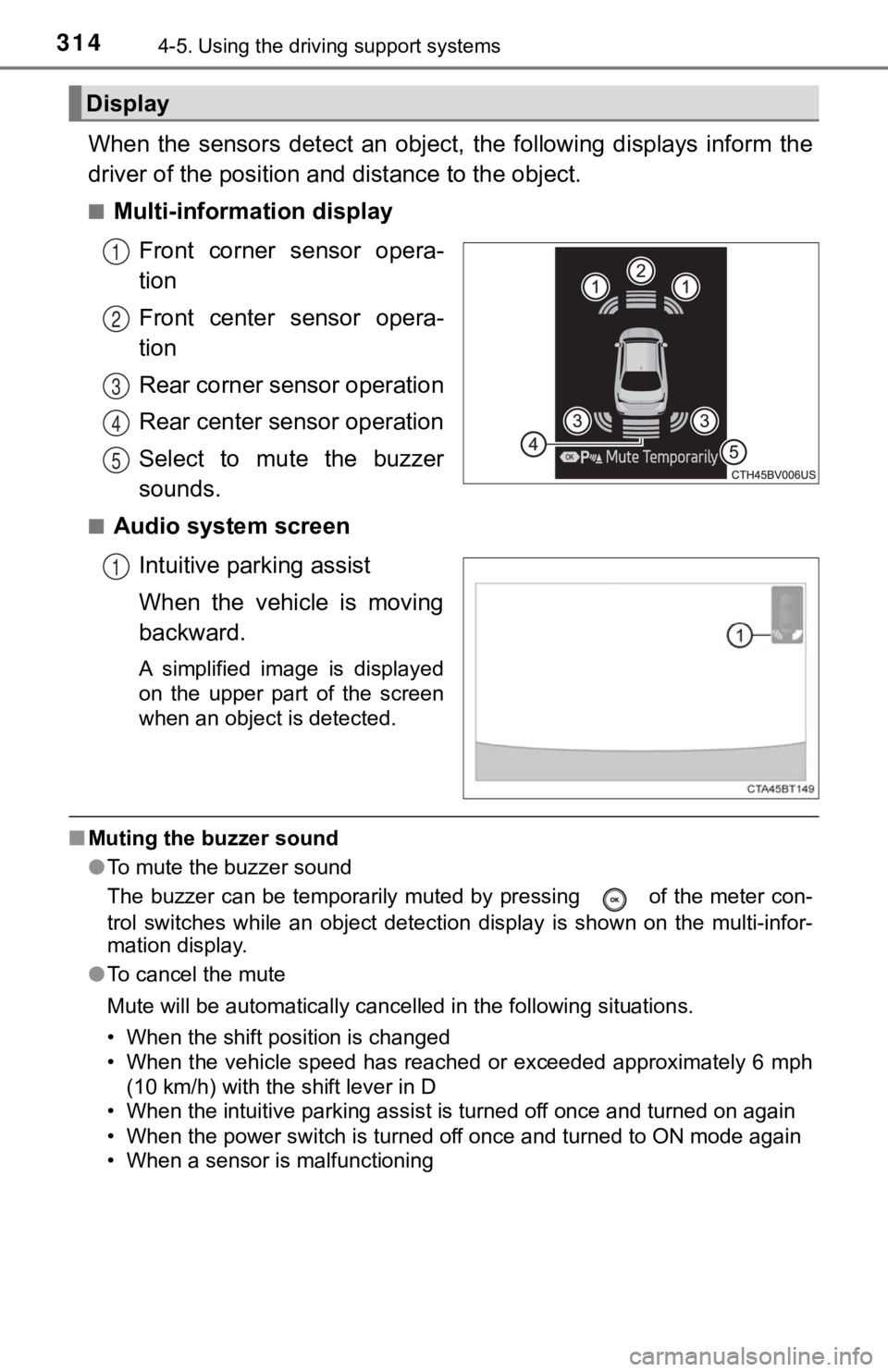
When the sensors detect an object, the following displays infor m the
driver of the position a nd distance to the object.
■Multi-information display
Front corner sensor opera-
tion
Front center sensor opera-
tion
Rear corner sensor operation
Rear center sensor operation
Select to mute the buzzer
sounds.
■Audio system screenIntuitive parking assist
When the vehicle is moving
backward.
A simplified image is displayed
on the upper part of the screen
when an object is detected.
■Muting the buzzer sound
●To mute the buzzer sound
The buzzer can be temporarily muted by pressing of the meter c on-
trol switches while an object detection display is shown on the multi-infor-
mation display.
● To cancel the mute
Mute will be automatically cancelled in the following situation s.
• When the shift position is changed
• When the vehicle speed has reached or exceeded approximately 6 mph
(10 km/h) with the shift lever in D
• When the intuitive parking assist is turned off once and turned on again
• When the power switch is turned off once and turned to ON mode again
• When a sensor is malfunctioning
Display
1
2
3
4
5
1
Page 317 of 584

3174-5. Using the driving support systems
4
Driving
■The intuitive parking assist can be operated when
●Front corner sensors:
• The power switch is in ON mode.
• The shift lever is in other than P.
• The vehicle speed is less than about 6 mph (10 km/h).
● Front center sensors:
• The power switch is in ON mode.
• The shift lever is in other than P or R.
• The vehicle speed is less than about 6 mph (10 km/h).
● Rear corner and rear center sensors:
• The power switch is in ON mode.
• The shift lever is in R.
• The vehicle speed is less than about 6 mph (10 km/h).
■ Intuitive parking assist display
When an object is detected while the Toyota parking assist moni tor or pan-
oramic view monitor is in use, the warning indicator will appea r in the upper
part of the screen even if the display setting has been set to off.
■ Sensor detection information
●The sensor’s detection areas are limited to the areas around th e vehicle’s
bumper.
● Depending on the shape of the object and other factors, the det ection dis-
tance may shorten, or detection may be impossible.
● Objects may not be detected if they are too close to the sensor .
● There will be a short delay between object detection and displa y. Even at
slow speeds, there is a possibility that the object will come w ithin the sen-
sor’s detection areas before the display is shown and the buzze r sounds.
● Thin posts or objects lower than the sensor may not be detected when
approached, even if they have been detected once.
● It might be difficult to hear beeps due to the volume of audio system or air
flow noise of the air conditioning system.
■ If a battery terminal has been disconnected and reconnected
The system needs to be initialized.
To initialize the system, drive the vehicle straight ahead for 5 seconds or more
at a speed of approximately 22 mph (35 km/h) or more.
■ If “Parking Assist Unavailable Please Clean Parking Assist Sens or” is
displayed on the multi-information display
A sensor may be dirty or covered with snow or ice. In such case s, if it is
removed from the sensor, the system should return to normal.
Also, due to the sensor being frozen at low temperatures, a mal function dis-
play may appear or an object may not be detected. If the sensor thaws out,
the system should return to normal.
Page 360 of 584
3605-1. Using the air conditioning system and defogger
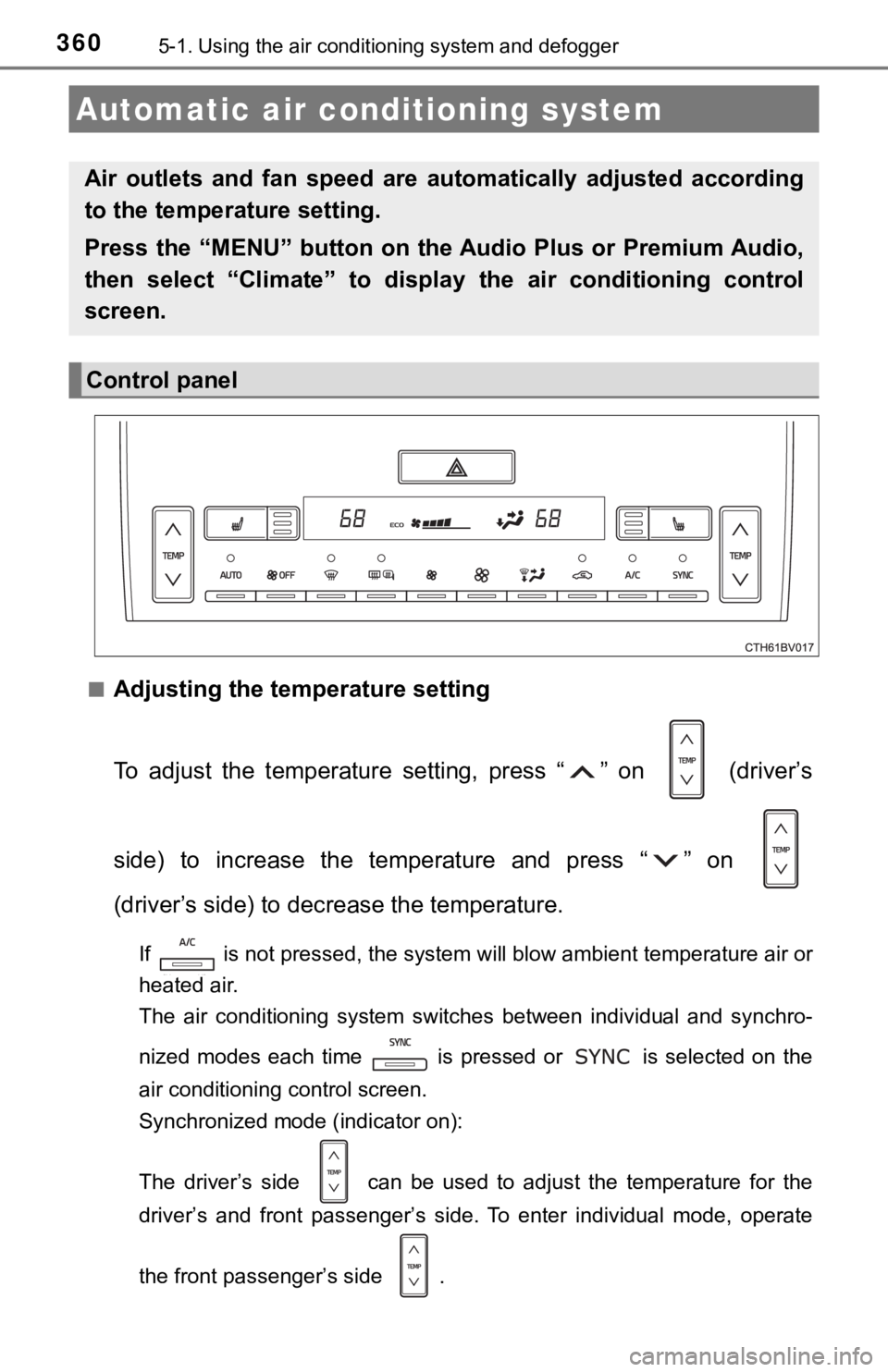
■Adjusting the temperature setting
To adjust the temperature setting, press “ ” on (driver’s
side) to increase the temperature and press “ ” on
(driver’s side) to decrease the temperature.
If is not pressed, the system will blow ambient temperature ai r or
heated air.
The air conditioning system switches between individual and syn chro-
nized modes each time is pressed or is selected on the
air conditioning control screen.
Synchronized mode (indicator on):
The driver’s side can be used to adjust the temperature for th e
driver’s and front passenger’s side. To enter individual mode, operate
the front passenger’s side .
Automatic air conditioning system
Air outlets and fan speed are automatically adjusted according
to the temperature setting.
Press the “MENU” button on the Audio Plus or Premium Audio,
then select “Climate” to displa y the air conditioning control
screen.
Control panel
Page 413 of 584
4136-1. Maintenance and care
6
Maintenance and care
NOTICE
■Cleaning detergents
● Do not use the following types of detergent, as they may discolor the vehi-
cle interior or cause streaks or damage to painted surfaces:
• Areas other than the seats and steering wheel: Organic substan ces
such as benzene or gasoline, alkaline or acidic solutions, dye, and
bleach
• Seats: Alkaline or acidic solutions, such as thinner, benzene, and alco-
hol
• Steering wheel: Organic substances, such as thinner, and clean er that
contains alcohol
● Do not use polish wax or polish cleaner. The instrument panel’s or other
interior part’s painted surface may be damaged.
■ Preventing damage to leather surfaces
Observe the following precautions to avoid damage to and deterioration of
leather surfaces:
● Remove any dust or dirt from leather surfaces immediately.
● Do not expose the vehicle to direct sunlight for extended periods of time.
Park the vehicle in the shade, especially during summer.
● Do not place items made of vinyl, plastic, or containing wax on the uphol-
stery, as they may stick to the leather surface if the vehicle interior heats
up significantly.
■ Water on the floor
Do not wash the vehicle floor with water.
Vehicle systems such as the audio system may be damaged if water comes
into contact with electrical components such as the audio system above or
under the floor of the vehicle. Water may also cause the body to rust.
■ When cleaning the inside of the windshield
Do not allow glass cleaner to contact the lens. Also, do not touch the lens.
(P. 240)
■ Cleaning the inside of the rear window
● Do not use glass cleaner to clean the rear window, as this may cause
damage to the rear window defogger heater wires or antenna. Use a cloth
dampened with lukewarm water to gently wipe the window clean. Wipe the
window in strokes running parallel to the heater wires or antenna.
● Be careful not to scratch or damage the heater wires or antenna .
Page 484 of 584

4847-2. Steps to take in an emergency
■When the tire pressure warning light comes on
Inspect the tires to check if a tire is punctured.
If a tire is punctured: P. 494
If none of the tires are punctured:
Turn the power switch off then turn it to ON mode. Check if the tire pres-
sure warning light comes on or blinks.
If the tire pressure wa rning light comes on
After the temperature of the tires has lowered sufficiently, ch eck the
inflation pressure of each tire and adjust them to the specifie d level.
If the warning light does not turn off even after several minut es have
elapsed, check that the inflation pressure of each tire is at t he specified
level and perform initialization. (P. 4 3 9 )
If the warning light does not tu rn off several minutes after the initialization
has been performed, have the vehi cle inspected by your Toyota dealer
immediately.
If the tire pressure warning light blinks fo r 1 minute then stays on
There may be a malfunction in the tire pressure warning system. Have
the vehicle inspected by you r Toyota dealer immediately.
■The tire pressure warning light may come on due to natural caus es
The tire pressure warning light may come on due to natural caus es such
as natural air leaks and tire inflation pressure changes caused by tem-
perature. In this case, adjusting the tire inflation pressure w ill turn off the
warning light (afte r a few minutes).
■When a tire is replace d with a spare tire
The compact spare tire is not equipped with a tire pressure war ning valve
and transmitter. If a tire goes flat, the tire pressure warning light will not
turn off even though the flat tire has been replaced with the s pare tire.
Replace the spare tire with the repaired tire and adjust the ti re inflation
pressure. The tire pressure war ning light will go off after a few minutes.
■Conditions that the tire pressure warning system may not functi on
properly
P. 4 4 4
■Warning buzzer
In some cases, the buzzer may not be heard because of noisy pla ce or
an audio sound.
1
2
Page 513 of 584

5137-2. Steps to take in an emergency
7
When trouble arises
■Starting the hybrid system when the 12-volt battery is discharg ed
The hybrid system cannot be started by push-starting.
■ To prevent 12-volt battery discharge
●Turn off the headlights and the audio system while the hybrid s ystem is off.
● Turn off any unnecessary electrical components when the vehicle is running
at a low speed for an extended period, such as in heavy traffic .
■ When the 12-volt battery is removed or discharged
● Information stored in the ECU is cleared. When the 12-volt batt ery is
depleted, have the vehicle inspected at your Toyota dealer.
● Some systems may require initialization. ( P. 557)
■ When removing the 12-vo lt battery terminals
When the 12-volt battery terminals are removed, the information stored in the
ECU is cleared. Before removing the 12-volt battery terminals, contact your
Toyota dealer.
■ Charging the 12-volt battery
The electricity stored in the 12-volt battery will discharge gr adually even when
the vehicle is not in use, due to natural discharge and the dra ining effects of
certain electrical appliances. If the vehicle is left for a lon g time, the 12-volt
battery may discharge, and the hybrid system may be unable to start. (The
12-volt battery recharges automatically while the hybrid system is operating.)
■ When recharging or replacing the 12-volt battery
●In some cases, it may not be possible to unlock the doors using the smart
key system when the 12-volt battery is discharged. Use the wire less remote
control or the mechanical key to lock or unlock the doors.
● The hybrid system may not start on the first attempt after the 12-volt battery
has recharged but will start normally after the second attempt. This is not a
malfunction.
● The power switch mode is memorized by the vehicle. When the 12- volt bat-
tery is reconnected, the system will return to the mode it was in before the
12-volt battery was discharged. Before disconnecting the 12-volt battery,
turn the power switch off.
If you are unsure what mode the power switch was in before the 12-volt bat-
tery discharged, be especially careful when reconnecting the 12 -volt battery.
Page 548 of 584
5488-2. Customization
When customizing vehicle features, ensure that the vehicle is parked
in a safe place with the shift le ver in P and the parking brake set.
■Changing on the audio system screen
Press the “MENU” button.
Select “Setup” on the “Menu” screen.
Select “General” or “Vehicle” on the “Setup” screen.
Various setting can be changed. Refer to the list of settings t hat can
be changed for details.
■Changing using the mult i-information display
P. 1 1 1
Customizable features
Your vehicle includes a variety of electronic features that can be
personalized to suit your preferences. The settings of these fe a-
tures can be changed using the multi-information display, on th e
audio system screen, or at your Toyota dealer.
Customizing vehicle features
1
2
3
Page 549 of 584

5498-2. Customization
8
Vehicle specifications
Some function settings are changed simultaneously with other func-
tions being customized. Contact your Toyota dealer for further details.
Settings that can be changed on the audio system screen
Settings that can be chan ged by your Toyota dealer
Definition of symbols: O = Available, — = Not available
Customizable features
1
2
Page 561 of 584

561
Index
What to do if... (Troubleshooting) .................... 562
Alphabetical index ..................... 566
For information regarding the equipment listed below, refer to “NAV-
IGATION AND MULTIMEDIA SYSTEM OWNER’S MANUAL”.
• Navigation system
• Audio/visual system
• Toyota parking assist monitor
• Panoramic view monitor
• Connected Services
Page 566 of 584

566Alphabetical index
Alphabetical index
A/C ............................................ 360Air conditioning filter ............. 454
Automatic air conditioning system ............ 360
ABS (Anti-lock Brake System)...... 344
Warning light ......................... 479
Acoustic Vehicle Alerting System ..................................... 76
AGC (Auto glide control) ........ 343
Air conditioning filter .............. 454
Air conditioning system .................................... 360
Air conditioning filter ............. 454
Automatic air conditioning system ......... ....................... 360
S-FLOW mode ...................... 363
Airbags ....................................... 34 Airbag operating conditions .... 43
Airbag preca utions for
your child .............................. 37
Correct driving posture ........... 26
Curtain shield airbag
operating conditions ............. 44
Curtain shield airbag
precautions ........................... 40
Front passenger occupant classification syst em............. 48
General airbag precautions .... 37
Locations of airbags................ 34
Modification and disposal of airbags.............................. 42
Side airbag operating conditions ............................. 44
Side airbag precautions .......... 37
Side and curtain shield airbags operating
conditions ............................. 44
Side and curtain shield airbags precautions .............. 37
SRS airbags............................ 34
SRS warning light ................. 479 Alarm .......................................... 88
Ambient lights ......................... 376
Anchor brackets ........................ 58
Antennas
(smart key system) ............... 152
Anti-lock Brake System (ABS) ...................................... 344
Warning light......................... 479
Approach warning ................... 290
Armrest..................................... 397
Assist grips .............................. 397
Audio Plus
*
Audio/visual system*
Auto glide control (AGC) ........ 343
Automatic air conditioning system ............. 360
Air conditioning filter ............. 454
Automatic High Beam ............. 226
Automatic light control system.................................... 222
Auxiliary boxes ........................ 381
A