key TOYOTA AVALON HYBRID 2022 Service Manual
[x] Cancel search | Manufacturer: TOYOTA, Model Year: 2022, Model line: AVALON HYBRID, Model: TOYOTA AVALON HYBRID 2022Pages: 584, PDF Size: 9.53 MB
Page 224 of 584
2244-3. Operating the lights and wipers
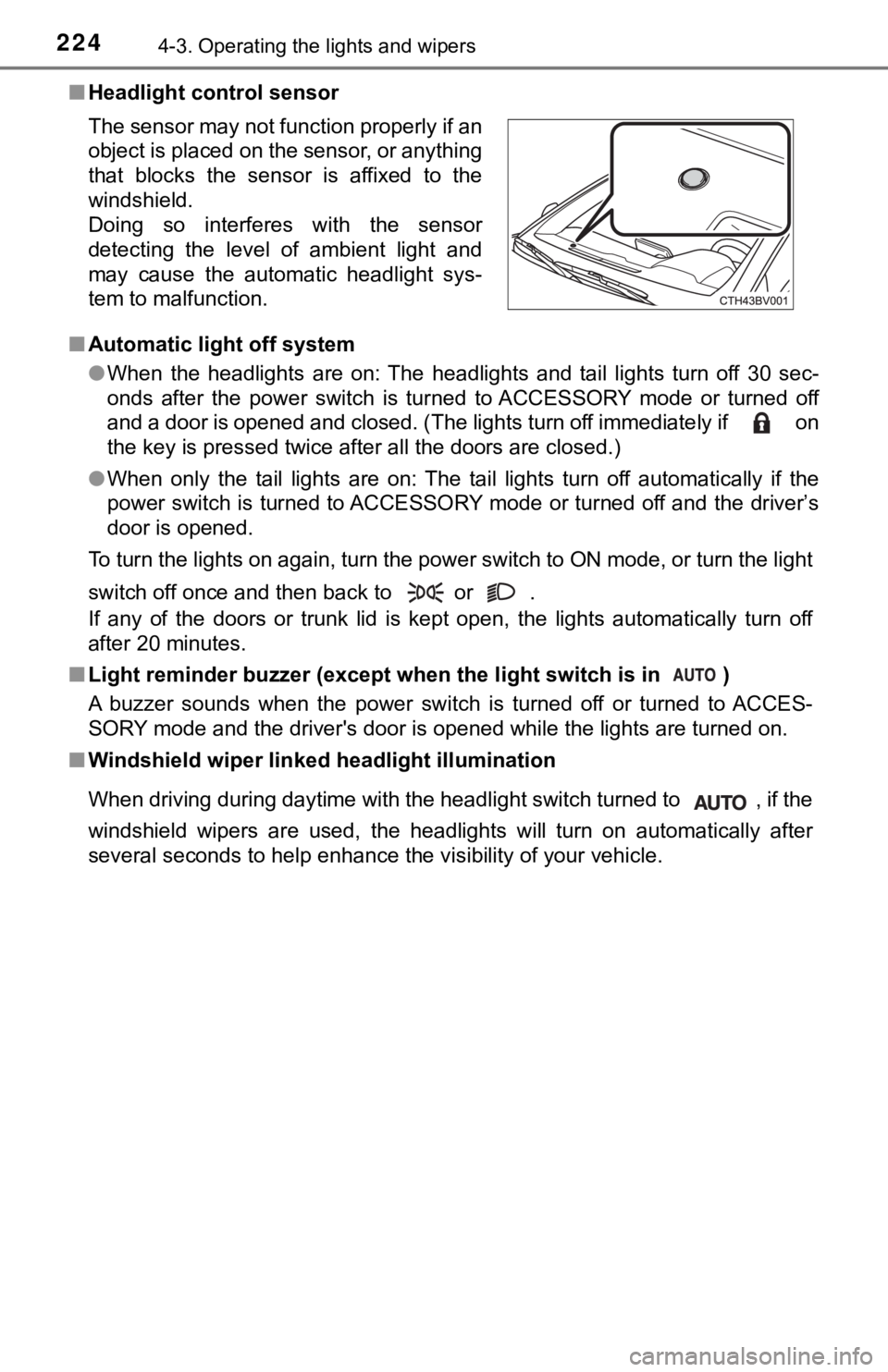
■Headlight control sensor
■ Automatic light off system
●When the headlights are on: The headlights and tail lights turn off 30 sec-
onds after the power switch is turned to ACCESSORY mode or turn ed off
and a door is opened and closed. (The lights turn off immediate ly if on
the key is pressed twice after all the doors are closed.)
● When only the tail lights are on: The tail lights turn off automatically if the
power switch is turned to ACCESSORY mode or turned off and the driver’s
door is opened.
To turn the lights on again, turn the power switch to ON mode, or turn the light
switch off once and then back to or .
If any of the doors or trunk lid is kept open, the lights automatically turn off
after 20 minutes.
■ Light reminder buzzer (except when the light switch is in )
A buzzer sounds when the power switch is turned off or turned to ACCES-
SORY mode and the driver's door is opened while the lights are turned on.
■ Windshield wiper linked h eadlight illumination
When driving during daytime with the headlight switch turned to , if the
windshield wipers are used, the headlights will turn on automat ically after
several seconds to help enhance the visibility of your vehicle. The sensor may not function properly if an
object is placed on the sensor, or anything
that blocks the sensor is affixed to the
windshield.
Doing so interferes with the sensor
detecting the level of ambient light and
may cause the automatic headlight sys-
tem to malfunction.
Page 225 of 584
2254-3. Operating the lights and wipers
4
Driving
■12-volt battery-saving function
In the following conditions, the remaining lights will go off automatically after
20 minutes in order to prevent the 12-volt battery from being discharged:
●The headlights and/or tail lights are on.
● The power switch is in ACCESSORY mode or turned off.
This function will be canceled in any of the following situations:
● When the power switch is turned to ON mode.
● When the light switch is operated.
● When a door or the trunk is opened or closed.
■ Welcome lighting
If the headlight switch is turned to and the surrounding area is dark,
unlocking the doors using the smart key system or wireless remote control
will turn the parking lights and tail lights on automatically.
■ Customization
Some functions can be customized. ( P. 548)
NOTICE
■To prevent 12-volt battery discharge
Do not leave the lights on longer than necessary when the hybrid system is
off.
Page 376 of 584
3765-2. Using the interior lights
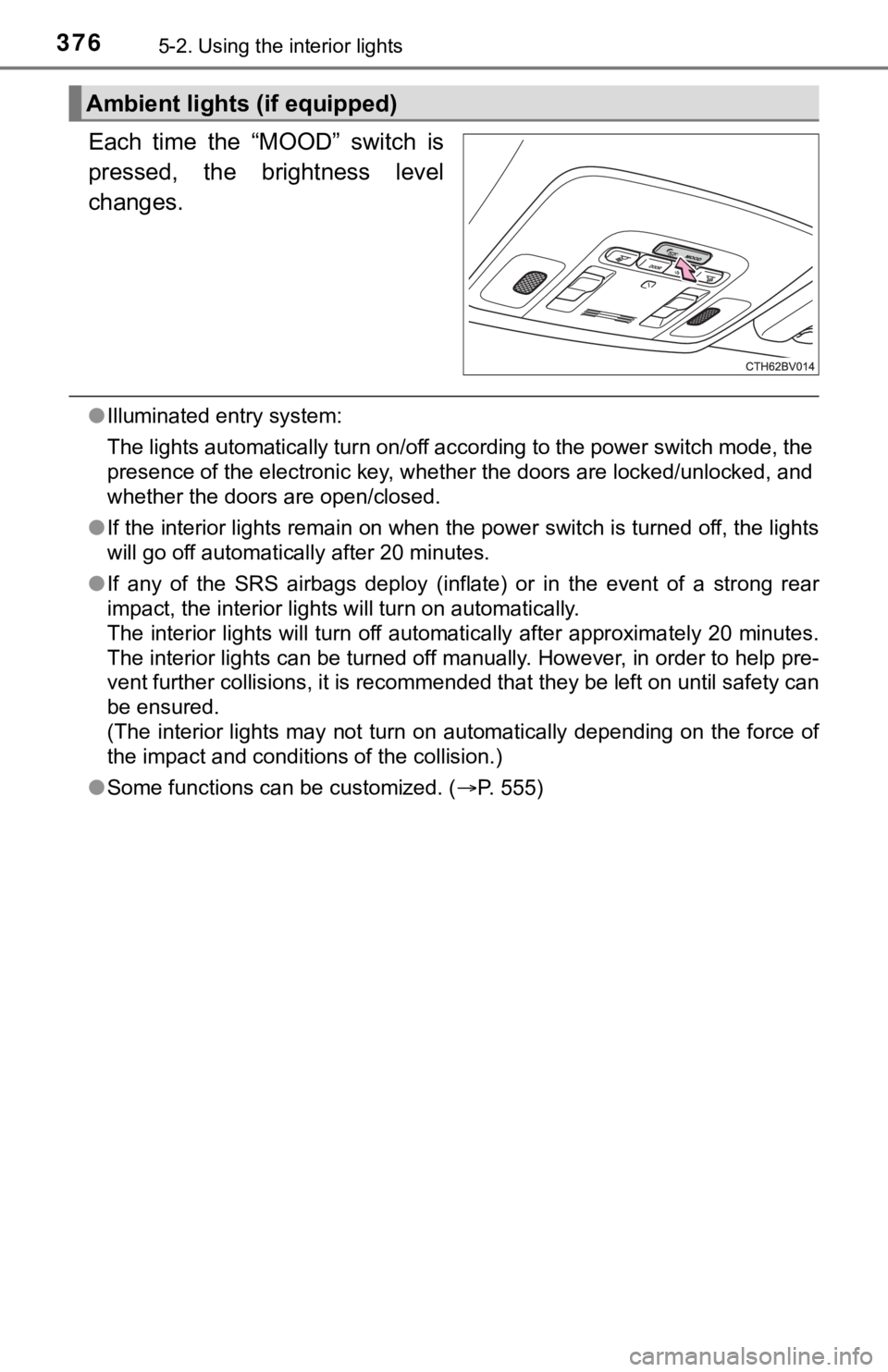
Each time the “MOOD” switch is
pressed, the brightness level
changes.
●Illuminated entry system:
The lights automatically turn on/off according to the power swi tch mode, the
presence of the electronic key, whether the doors are locked/un locked, and
whether the doors are open/closed.
● If the interior lights remain on when the power switch is turned off, the lights
will go off automatically after 20 minutes.
● If any of the SRS airbags deploy (inflate) or in the event of a strong rear
impact, the interior lights will turn on automatically.
The interior lights will turn off automatically after approxima tely 20 minutes.
The interior lights can be turned off manually. However, in ord er to help pre-
vent further collisions, it is recommended that they be left on until safety can
be ensured.
(The interior lights may not turn on automatically depending on the force of
the impact and conditions of the collision.)
● Some functions can be customized. ( P. 555)
Ambient lights (if equipped)
Page 391 of 584

3915-4. Other interior features
5
Interior features
■The wireless charger can be operated when
The power switch is in ACCESSORY or ON mode.
■ Portable devices that can be charged
●Portable devices compatible with the Qi wireless charging stand ard can be
charged by the wireless charger. However, compatibility with all devices
which meet the Qi wireless charging standard is not guaranteed.
● The wireless charger is designed to supply low power electricit y (5 W or
less) to a cellular phone, smartphone, or other portable device .
■ If a cover or accessory is attach ed to the portable device
Do not charge a portable device if a cover or accessory which i s not Qi com-
patible is attached. Depending on the type of cover and/or acce ssory
attached, it may not be possible to charge the portable device. If the portable
device is placed on the charging area and does not charge, remo ve the cover
and/or accessories.
■ If interference is heard in AM ra dio broadcasts while charging
Turn off the wireless charger and check if the noise is reduced. If noise is
reduced, press and hold the power supply switch of the wireless charger for 2
seconds. The frequency of the wireless charger is changed and n oise may be
reduced. When the frequency is changed, the operation indicator light will
blink (orange) 2 times.
■ Charging precautions
●If the electronic key cannot be detected in the cabin, charging cannot be
performed. When a door is opened and closed, charging may be te mporarily
suspended.
● While charging, the wireless charger and the portable device wi ll become
warm. This is not a malfunction.
If a portable device becomes warm while charging and charging stops due
to the protection function of the portable device, wait until the portable
device cools down and charge it again.
■ Sound generated during operation
When the power supply switch is turned on or while a portable d evice is being
identified, operation sounds may be heard. This is not a malfunction.
■ Cleaning the wireless charger
P. 412
Page 396 of 584

3965-4. Other interior features
NOTICE
■Conditions in which the wireless charger may not operate correctly
In the following situations, the wireless charger may not operate correctly:
● When a portable device is fully charged
● When there is a foreign object between the charging area and portable
device
● When a portable device becomes hot while charging
● When a portable device is placed on the wireless area with its charging
surface facing up
● When a portable device is not centered on the charging area
● When the vehicle is near a TV tower, electric power plant, gas station,
radio station, large display, airport or other facility that ge nerates strong
radio waves or electrical noise
● When the portable device is in contact with, or is covered by a ny of the fol-
lowing metallic objects:
• Cards to which aluminum foil is attached
• Cigarette boxes that have aluminum foil inside
• Metallic wallets or bags
• Coins
• Metal hand warmers
• Media such as CDs and DVDs
● When wireless keys (that emit radio waves) other than those of your vehi-
cle are being used nearby.
If in situations other than above the wireless charger does not operate prop-
erly or the operation indicator light is blinking, the wireless charger may be
malfunctioning. Contact your Toyota dealer.
■ To prevent failure or damage to data
● Do not bring magnetic cards, such as a credit card, or magnetic recording
media, close to the wireless charger while charging. Otherwise, data may
be erased due to the influence of magnetism.
Additionally, do not bring precision instruments such as wrist watches,
close to the wireless charger, as such objects may malfunction.
● Do not leave portable devices in the cabin. The temperature ins ide the
cabin may become high when parked in the sun, and cause damage to the
device.
■ To prevent 12-volt battery discharge
Do not use the wireless charger for a long period of time with the hybrid sys-
tem stopped.
Page 407 of 584

407
6Maintenance and care
6-1. Maintenance and careCleaning and protecting the vehicle exterior .......... 408
Cleaning and protecting the vehicle interior ........... 411
6-2. Maintenance Maintenance requirements ................... 414
General maintenance........ 416
Emission inspection and maintenance (I/M)
programs......................... 420
6-3. Do-it-yourself maintenance
Do-it-yourself service precautions ..................... 421
Hood ................................. 423
Positioning a floor jack ...... 424
Engine compartment ......... 425
12-volt battery ................... 433
Tires .................................. 437
Tire inflation pressure ....... 449
Wheels .............................. 452
Air conditioning filter.......... 454
Cleaning the hybrid battery (traction battery)
air intake vent and
filter ................................. 456
Electronic key battery........ 461
Checking and replacing fuses ............................... 464
Light bulbs......................... 467
Page 408 of 584
4086-1. Maintenance and care
●Working from top to bottom, liberally apply water to the vehicl e
body, wheel wells and underside of the vehicle to remove any di rt
and dust.
● Wash the vehicle body using a sponge or soft cloth, such as a
chamois.
● For hard-to-remove marks, use car wash soap and rinse thoroughl y
with water.
● Wipe away any water.
● Wax the vehicle when the wate rproof coating deteriorates.
If water does not bead on a clean surface, apply wax when the vehicle
body is cool.
■Automatic car washes
●Fold the mirrors before washing the vehicle. Start washing from the front of
the vehicle. Make sure to extend the mirrors before driving.
● Brushes used in automatic car washes may scratch the vehicle su rface,
parts (wheel, etc.) and harm your vehicle's paint.
● Vehicles with a rear spoiler: In certain automatic car washes, the rear spoiler
may interfere with machine operation. This may prevent the vehicle from
being cleaned properly or result in damage to the rear spoiler.
■ High pressure car washes
As water may enter the cabin, do not bring the nozzle tip near the gaps
around the doors or perimeter of the windows, or spray these ar eas continu-
ously.
■ When using a car wash
If the door handle becomes wet while the electronic key is within the effective
range, the door may lock and unlock repeatedly. In that case, f ollow the fol-
lowing correction procedures to wash the vehicle:
● Place the key in a position 6 ft. (2 m) or more separate from t he vehicle
while the vehicle is being washed. (Take care to ensure that th e key is not
stolen.)
● Set the electronic key to battery-saving mode to disable the sm art key sys-
tem. ( P. 154)
Cleaning and prot ecting the vehicle
exterior
Perform the following to protect the vehicle and maintain it in
prime condition:
Page 434 of 584
4346-3. Do-it-yourself maintenance
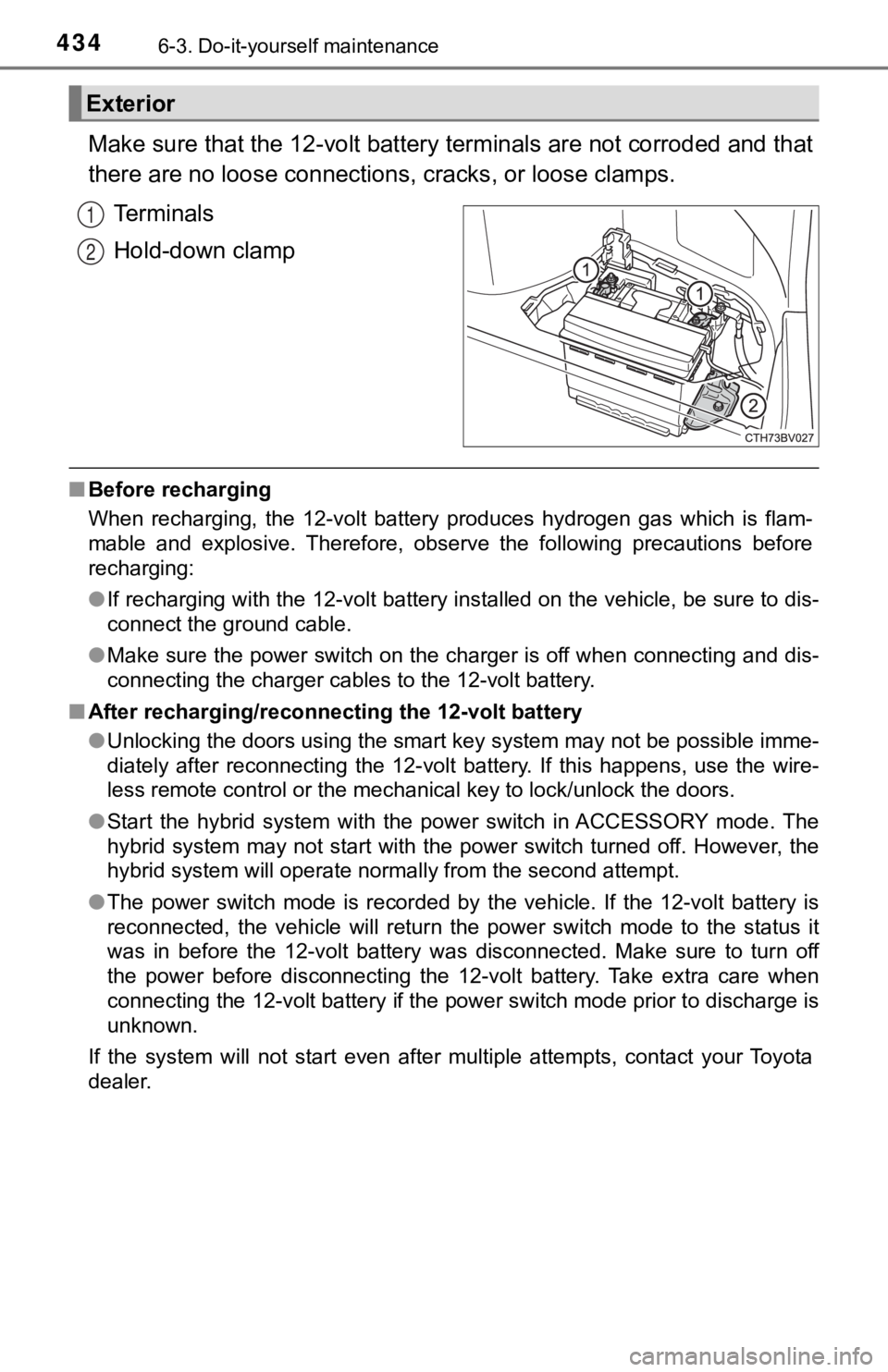
Make sure that the 12-volt battery terminals are not corroded and that
there are no loose connections, cracks, or loose clamps.
Terminals
Hold-down clamp
■ Before recharging
When recharging, the 12-volt battery produces hydrogen gas which is flam-
mable and explosive. Therefore, observe the following precautio ns before
recharging:
● If recharging with the 12-volt battery installed on the vehicle , be sure to dis-
connect the ground cable.
● Make sure the power switch on the charger is off when connectin g and dis-
connecting the charger cables to the 12-volt battery.
■ After recharging/reconnecting the 12-volt battery
●Unlocking the doors using the smart key system may not be possi ble imme-
diately after reconnecting the 12-volt battery. If this happens, use the wire-
less remote control or the mechanical key to lock/unlock the do ors.
● Start the hybrid system with the power switch in ACCESSORY mode . The
hybrid system may not start with the power switch turned off. However, the
hybrid system will operate normally from the second attempt.
● The power switch mode is recorded by the vehicle. If the 12-vol t battery is
reconnected, the vehicle will return the power switch mode to t he status it
was in before the 12-volt battery was disconnected. Make sure t o turn off
the power before disconnecting the 12-volt battery. Take extra care when
connecting the 12-volt battery if the power switch mode prior t o discharge is
unknown.
If the system will not start even after multiple attempts, contact your Toyota
dealer.
Exterior
1
2
Page 461 of 584
4616-3. Do-it-yourself maintenance
6
Maintenance and care
●Flathead screwdriver
● Small flathead screwdriver
● Lithium battery CR2032
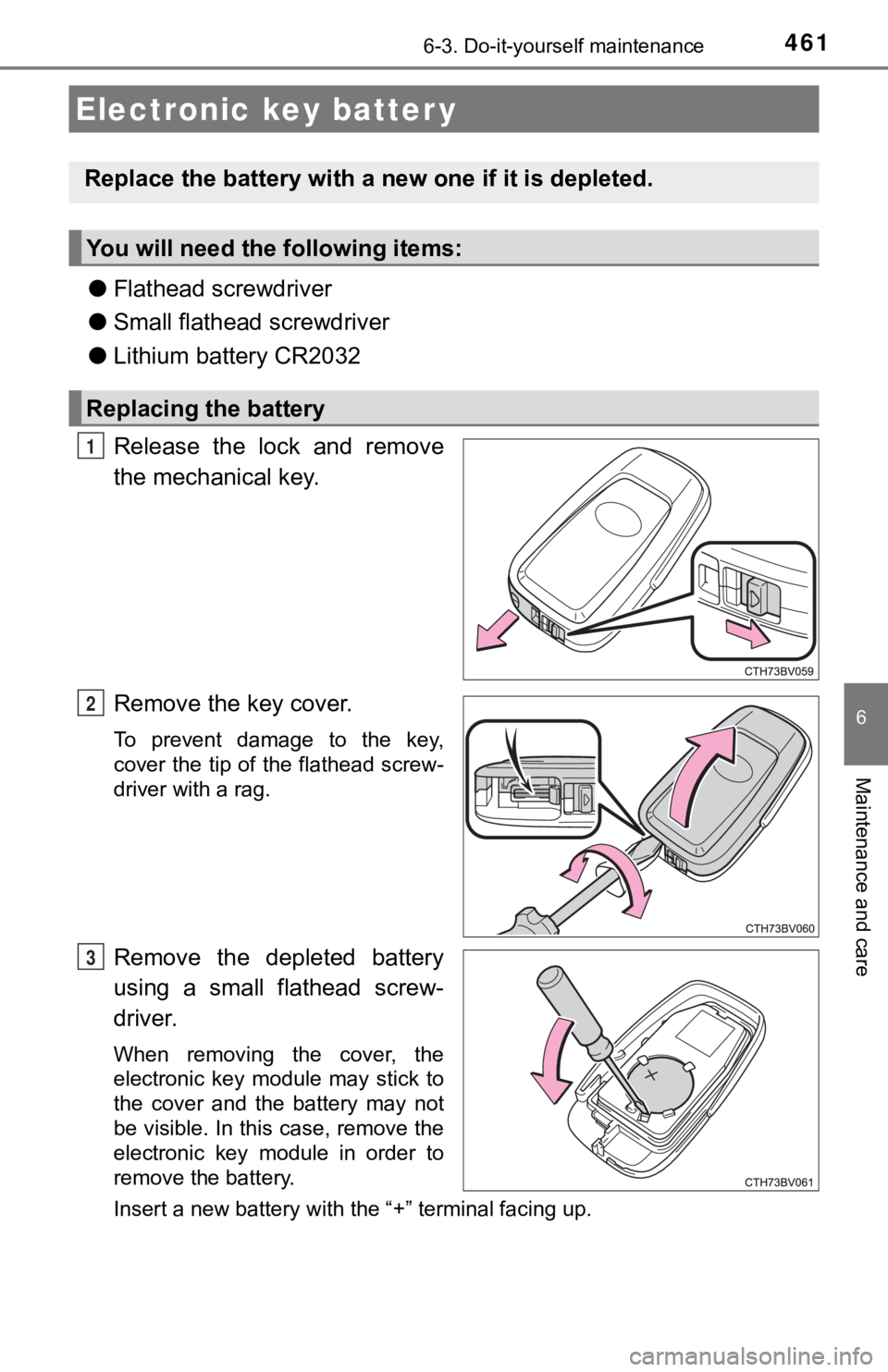
Release the lock and remove
the mechanical key.
Remove the key cover.
To prevent damage to the key,
cover the tip of the flathead screw-
driver with a rag.
Remove the depleted battery
using a small flathead screw-
driver.
When removing the cover, the
electronic key module may stick to
the cover and the battery may not
be visible. In this case, remove the
electronic key module in order to
remove the battery.
Insert a new battery with the “+” terminal facing up.
Electronic key batter y
Replace the battery with a n ew one if it is depleted.
You will need the following items:
Replacing the battery
1
2
3
Page 462 of 584

4626-3. Do-it-yourself maintenance
When installing the key cover and mechanical key, install by con-
ducting and with the directions reversed.
Operate the or switch and check that the doors can
be locked/unlocked.
■When replacing the key battery
Be careful not to lose the battery or any other small parts.
■ Use a CR2032 lithium battery
●Batteries can be purchased at your Toyota dealer, local electrical appliance
shops or camera stores.
● Replace only with the same or equivalent type recommended by the manu-
facturer.
● Dispose of used batteries according to local laws.
■ If the key battery is depleted
The following symptoms may occur:
●The smart key system and wireless remote control will not funct ion properly.
● The operational range will be reduced.
WARNING
■ Battery precautions
Observe the following precautions.
Failure to do so may result in death or serious injury.
● Do not swallow the battery. Doing so may cause chemical burns.
● A coin battery or button battery is used in the electronic key. If a battery is
swallowed, it may cause severe chemical burns in as little as 2 hours and
may result in death or serious injury.
● Keep away new and removed batteries from children.
● If the cover cannot be firmly closed, stop using the electronic key and stow
the key in the place where children cannot reach, and then contact your
Toyota dealer.
● If you accidentally swallow a battery or put a battery into a part of your
body, get emergency medical attention immediately.
■ To prevent battery explosion or leakage of flammable liquid or gas
● Replace the battery with a new battery of the same type. If a w rong type of
battery is used, it may explode.
● Do not expose batteries to extremely low pressure due to high altitude or
extremely high temperatures.
● Do not burn, break or cut a battery.
4
21
5