air condition TOYOTA AVALON HYBRID 2022 Owners Manual
[x] Cancel search | Manufacturer: TOYOTA, Model Year: 2022, Model line: AVALON HYBRID, Model: TOYOTA AVALON HYBRID 2022Pages: 584, PDF Size: 9.53 MB
Page 4 of 584

TABLE OF CONTENTS4
5-1. Using the air conditioning system and defogger
Automatic air conditioning system............................. 360
Heated steering wheel/ seat heaters/
seat ventilators ................ 371
5-2. Using the interior lights Interior lights list ................ 374
• Interior light ................... 375
• Personal lights .............. 375
• Ambient lights ............... 376
5-3. Using the storage features
List of storage features...... 377
• Glove box...................... 378
• Console box .................. 378
• Bottle holders ................ 379
• Cup holders .................. 380
• Auxiliary boxes.............. 381
• Open tray ...................... 382
Trunk features ................... 383
5-4. Other interior features Other interior features ....... 384
• Sun visors ..................... 384
• Vanity mirrors................ 384
• Power outlet .................. 385
• USB charging ports....... 386
• Wireless charger ........... 388
• Armrest ......................... 397
• Assist grips ................... 397
• Coat hooks.................... 398
Garage door opener .......... 399 6-1. Maintenance and care
Cleaning and protecting the vehicle exterior .......... 408
Cleaning and protecting the vehicle interior ........... 411
6-2. Maintenance Maintenance requirements ................... 414
General maintenance ........ 416
Emission inspection and maintenance (I/M)
programs ......................... 420
6-3. Do-it-yourself maintenance
Do-it-yourself service precautions ...................... 421
Hood .................................. 423
Positioning a floor jack....... 424
Engine compartment ......... 425
12-volt battery .................... 433
Tires................................... 437
Tire inflation pressure ........ 449
Wheels............................... 452
Air conditioning filter .......... 454
Cleaning the hybrid battery (traction battery)
air intake vent and
filter.................................. 456
Electronic key battery ........ 461
Checking and replacing fuses ................................ 464
Light bulbs ......................... 467
5Interior features6Maintenance and care
Page 17 of 584

17Pictorial index
Parking brake switch . . . . . . . . . . . . . . . . . . . . . . . . . . . . . . . P. 216
Applying/releasing . . . . . . . . . . . . . . . . . . . . . . . . . . . . . . P. 216, 217
Precautions for winter season . . . . . . . . . . . . . . . . . . . . . . . . . P. 355
Warning light/warning buzzer/
warning message . . . . . . . . . . . . . . . . . . . . . . . . . . . . . . . P. 219, 478
Turn signal lever . . . . . . . . . . . . . . . . . . . . . . . . . . . . . . . . . . P. 215
Headlight switch . . . . . . . . . . . . . . . . . . . . . . . . . . . . . . . . . . P. 222
Headlights/side marker lights/parking lights/tail lights/
license plate lights/daytime running lights . . . . . . . . . . . . . . . . P. 222
Windshield wiper and washer switch . . . . . . . . . . . . . . . . . P. 230
Usage . . . . . . . . . . . . . . . . . . . . . . . . . . . . . . . . . . . . . . . . . . . P. 230
Adding washer fluid . . . . . . . . . . . . . . . . . . . . . . . . . . . . . . . . . P. 432
Emergency flasher switch . . . . . . . . . . . . . . . . . . . . . . . . . . P. 470
Hood lock release lever. . . . . . . . . . . . . . . . . . . . . . . . . . . . . P. 423
Tilt and telescopic steering lock release lever
*1 . . . . . . . . P. 170
Tilt and telescopic steering control switch
*1 . . . . . . . . . . . P. 170
Adjustment . . . . . . . . . . . . . . . . . . . . . . . . . . . . . . . . . . . . . . . . P. 170
Driving position memory . . . . . . . . . . . . . . . . . . . . . . . . . . . . . P. 163
Air conditioning system . . . . . . . . . . . . . . . . . . . . . . . . . . . . P. 360
Usage . . . . . . . . . . . . . . . . . . . . . . . . . . . . . . . . . . . . . . . . . . . P. 360
Rear window defogger . . . . . . . . . . . . . . . . . . . . . . . . . . . . . . . P. 365
Audio Plus
*1, 2
Premium Audio*1, 2
4
5
6
7
8
9
10
11
12
*1: If equipped
*2: Refer to “NAVIGATION AND MULT IMEDIA SYSTEM OWNER’S MANUAL”.
Page 44 of 584
441-1. For safe use
■SRS airbag deployment conditions (SRS side and curtain shield a irbags)
● The SRS side and curtain shield airbags will deploy in the even t of an
impact that exceeds the set threshold level (the level of force corresponding
to the impact force produced by an approximately 3300 lb. [1500 kg] vehicle
colliding with the vehicle cabin from a direction perpendicular to the vehicle
orientation at an approximate speed of 12 - 18 mph [20 - 30 km/ h]).
● Both SRS curtain shield airbags may deploy in the event of a severe side
collision.
● Both SRS curtain shield airbags will deploy in the event of veh icle rollover.
● Both SRS curtain shield airbags may also deploy in the event of a severe
frontal collision.
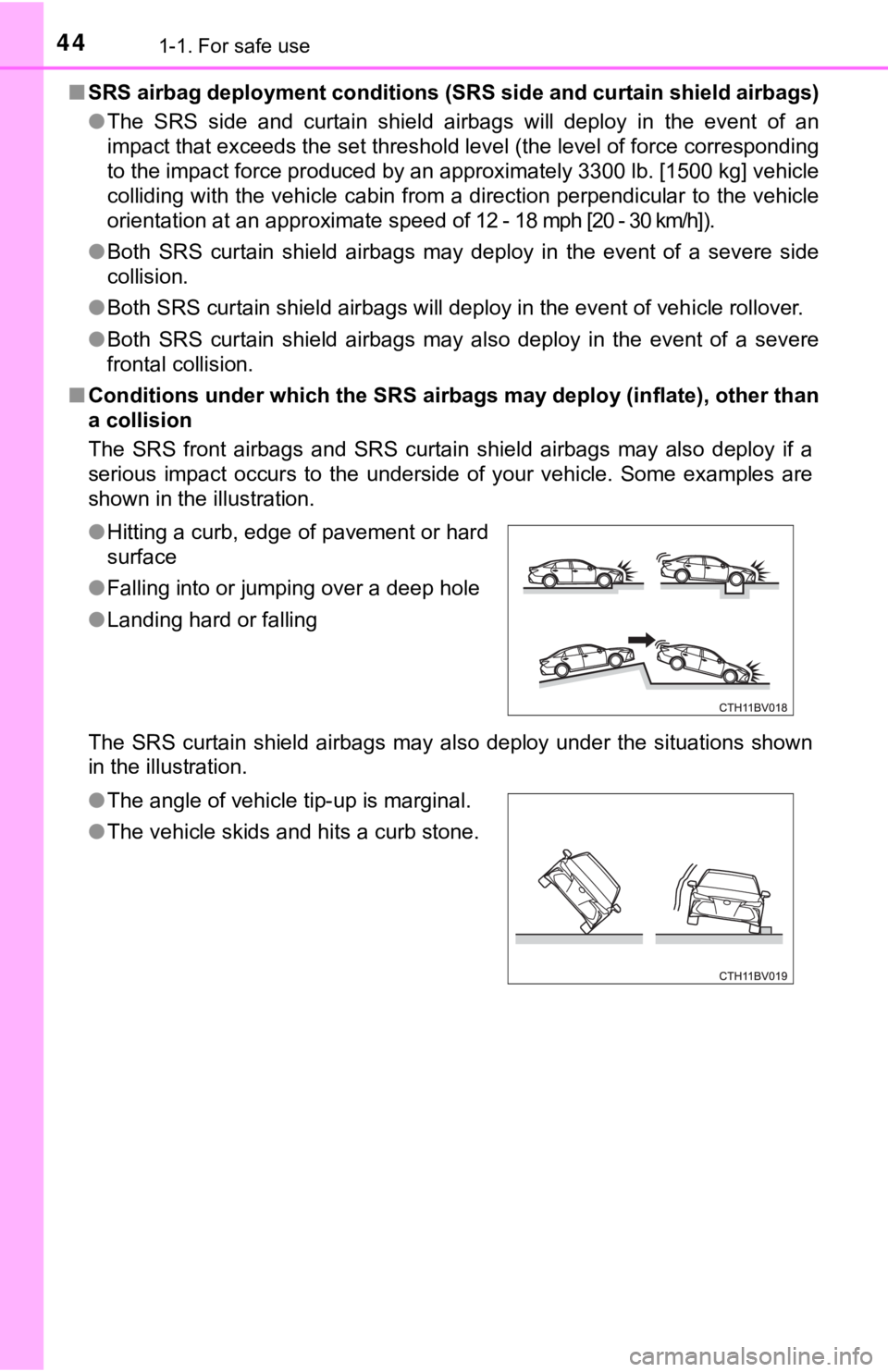
■ Conditions under which the SRS ai rbags may deploy (inflate), other than
a collision
The SRS front airbags and SRS curtain shield airbags may also d eploy if a
serious impact occurs to the underside of your vehicle. Some ex amples are
shown in the illustration.
The SRS curtain shield airbags may also deploy under the situat ions shown
in the illustration. ● Hitting a curb, edge of pavement or hard
surface
● Falling into or jumping over a deep hole
● Landing hard or falling
● The angle of vehicle tip-up is marginal.
● The vehicle skids and hits a curb stone.
Page 48 of 584
481-1. For safe use
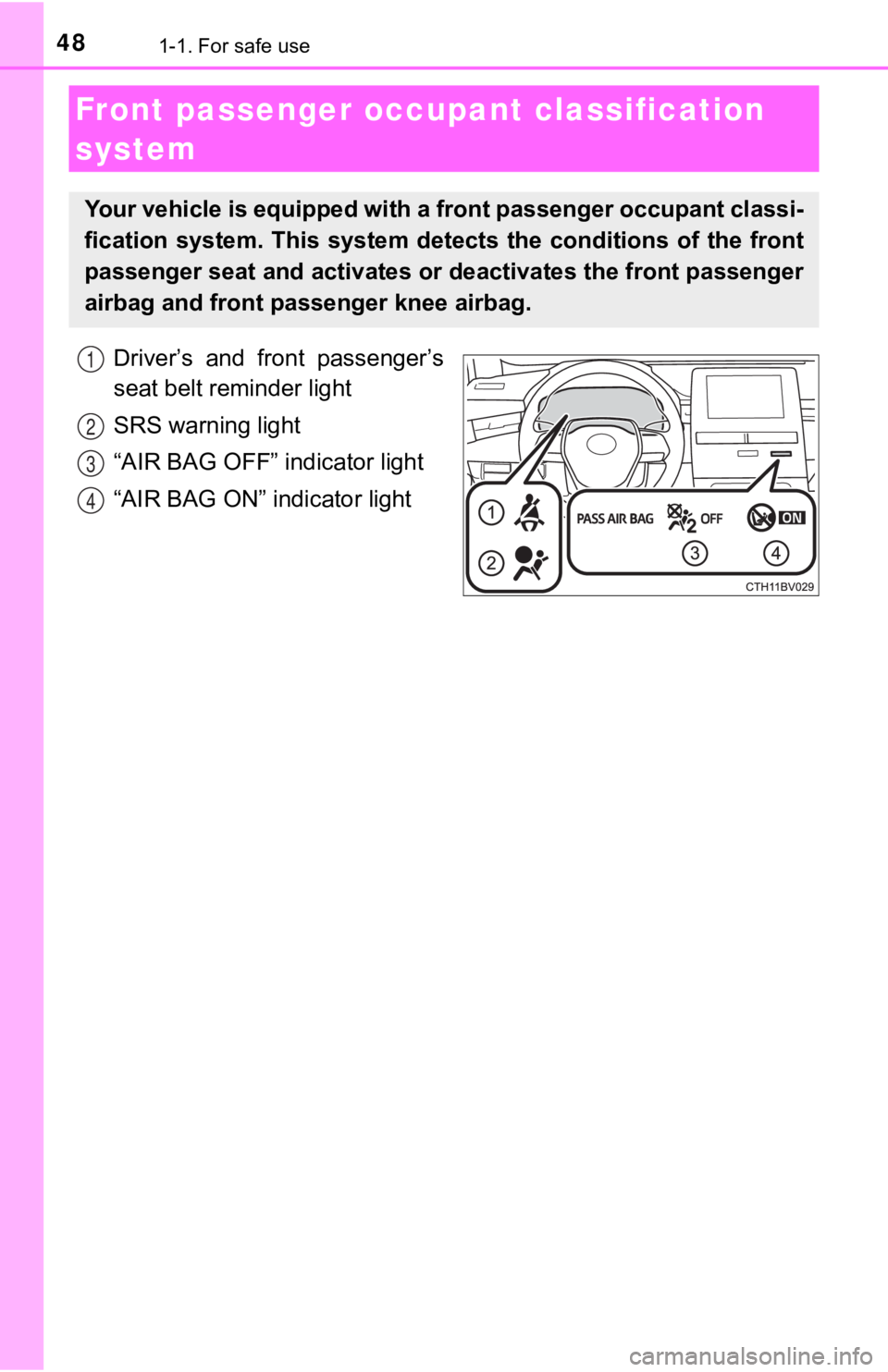
Driver’s and front passenger’s
seat belt reminder light
SRS warning light
“AIR BAG OFF” indicator light
“AIR BAG ON” indicator light
Front passenger occupant classification
system
Your vehicle is equipped with a front passenger occupant classi -
fication system. This system det ects the conditions of the front
passenger seat and activates or deactivates the front passenger
airbag and front passenger knee airbag.
1
2
3
4
Page 49 of 584
491-1. For safe use
1
For safety and security
■Adult*1
■Child*4
■Child restraint system with infant*5
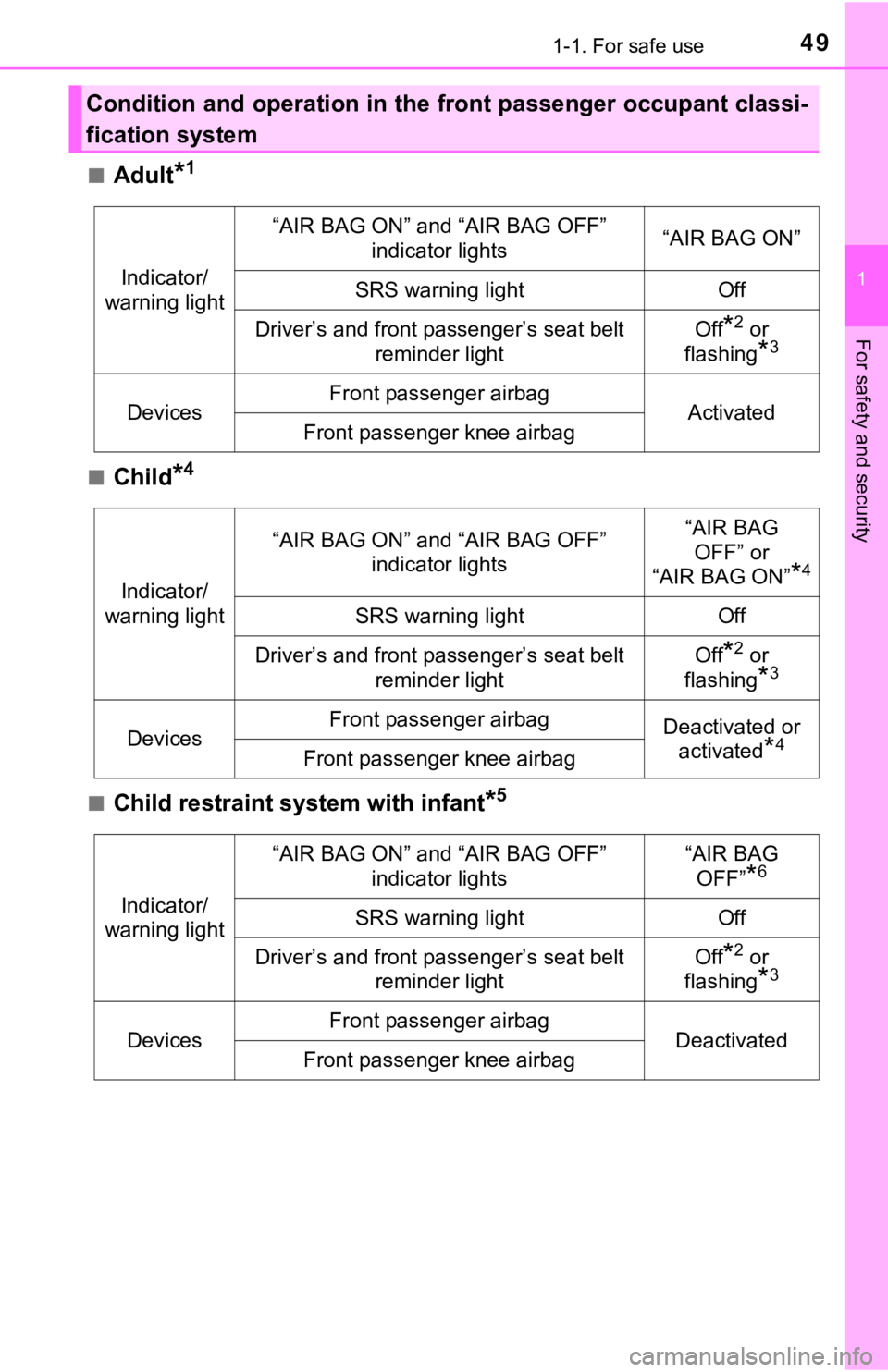
Condition and operation in the front passenger occupant classi-
fication system
Indicator/
warning light
“AIR BAG ON” and “AIR BAG OFF” indicator lights“AIR BAG ON”
SRS warning lightOff
Driver’s and front passenger’s seat belt
reminder lightOff*2 or
flashing
*3
DevicesFront passenger airbagActivatedFront passenger knee airbag
Indicator/
warning light
“AIR BAG ON” and “AIR BAG OFF” indicator lights“AIR BAG
OFF” or
“AIR BAG ON”
*4
SRS warning lightOff
Driver’s and front passenger’s seat belt
reminder lightOff*2 or
flashing
*3
DevicesFront passenger airbagDeactivated or activated
*4Front passenger knee airbag
Indicator/
warning light
“AIR BAG ON” and “AIR BAG OFF”
indicator lights“AIR BAG OFF”
*6
SRS warning lightOff
Driver’s and front passenger’s seat belt reminder lightOff*2 or
flashing
*3
DevicesFront passenger airbagDeactivatedFront passenger knee airbag
Page 72 of 584

721-2. Emergency assistance
■Automatic Collision Notification
In case of either airbag deployment or severe rear-end collision, the
system is designed to automatically call the response center. T he
responding agent receives the v ehicle’s location and attempts to
speak with the vehicl e occupants to assess the level of emergency.
If the occupants are unable to communicate, the agent automati-
cally treats the call as an emergency, contacts the nearest eme r-
gency services provider to descr ibe the situation, and requests that
assistance be sent to the location.
■Stolen Vehicle Location
If your vehicle is stolen, Safety Connect can work with local author-
ities to assist them in locating and recovering the vehicle. Af ter filing
a police report, call the Customer Experience Center at 1-800-3 31-
4331 in the United States, 1-877-8 55-8377 in Puerto Rico or 1-888-
869-6828 in Canada, and follow the prompts for Safety Connect t o
initiate this service.
In addition to assisting law enforcement with recovery of a sto len
vehicle, Safety-Connect-equipped vehicle location data may, und er
certain circumstances, be shared with third parties to locate y our
vehicle. Further information is a vailable at Toyota.com in the United
States, Toyotapr.com in Puerto Rico and Toyota.ca in Canada.
■Emergency Assistance Button (“SOS”)
In the event of an emergency on t he road, push the “SOS” button to
reach the Safety Connect respons e center. The answering agent
will determine your vehicle’s loca tion, assess the emergency, and
dispatch the necessary assistanc e required.
If you accidentally press the “SOS” button, tell the response-c enter
agent that you are not experiencing an emergency.
■
Enhanced Roadside Assistance
Enhanced Roadside As sistance adds GPS data to the already
included warranty-based Toyota roadside service.
Subscribers can press the “SOS” button to reach a Safety Connec t
response-center agent, who can he lp with a wide range of needs,
such as: towing, flat tire, fuel delivery, etc. For a description of the
Enhanced Roadside Assistance se rvices and their limitations,
please see the Safety Connect Te rms and Conditions, which are
available at Toyota.com in the United States, Toyotapr.com in
Puerto Rico and Toyota.ca in Canada.
Safety Connect services
Page 79 of 584
791-3. Hybrid system
1
For safety and security
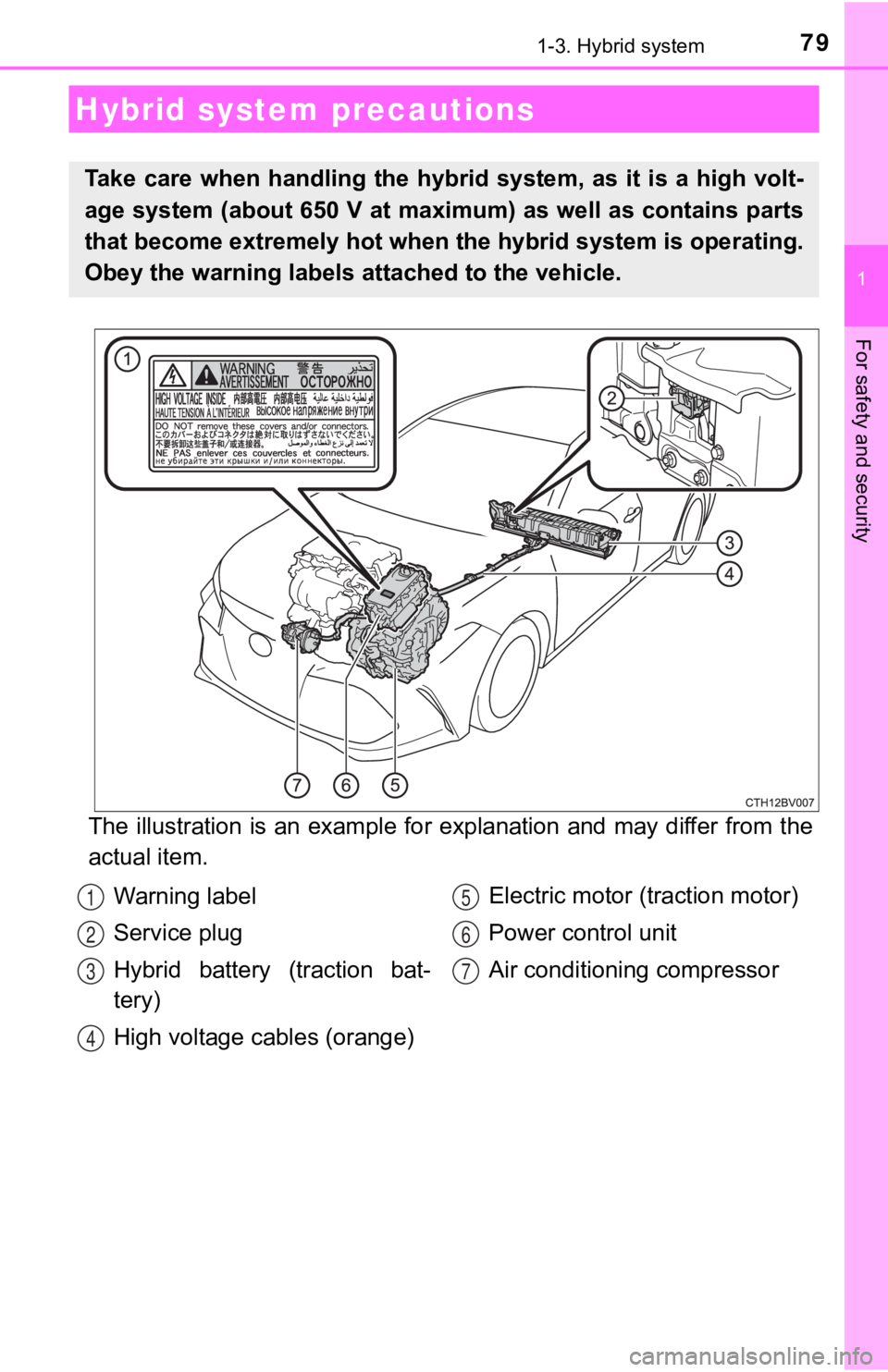
The illustration is an example for explanation and may differ from the
actual item.
Hybrid system precautions
Take care when handling the hybrid system, as it is a high volt -
age system (about 650 V at maximum) as well as contains parts
that become extremely hot when the hybrid system is operating.
Obey the warning labels attached to the vehicle.
Warning label
Service plug
Hybrid battery (traction bat-
tery)
High voltage cables (orange) Electric motor (traction motor)
Power control unit
Air conditioning compressor1
2
3
4
5
6
7
Page 139 of 584
1393-1. Key information
3
Operation of each component
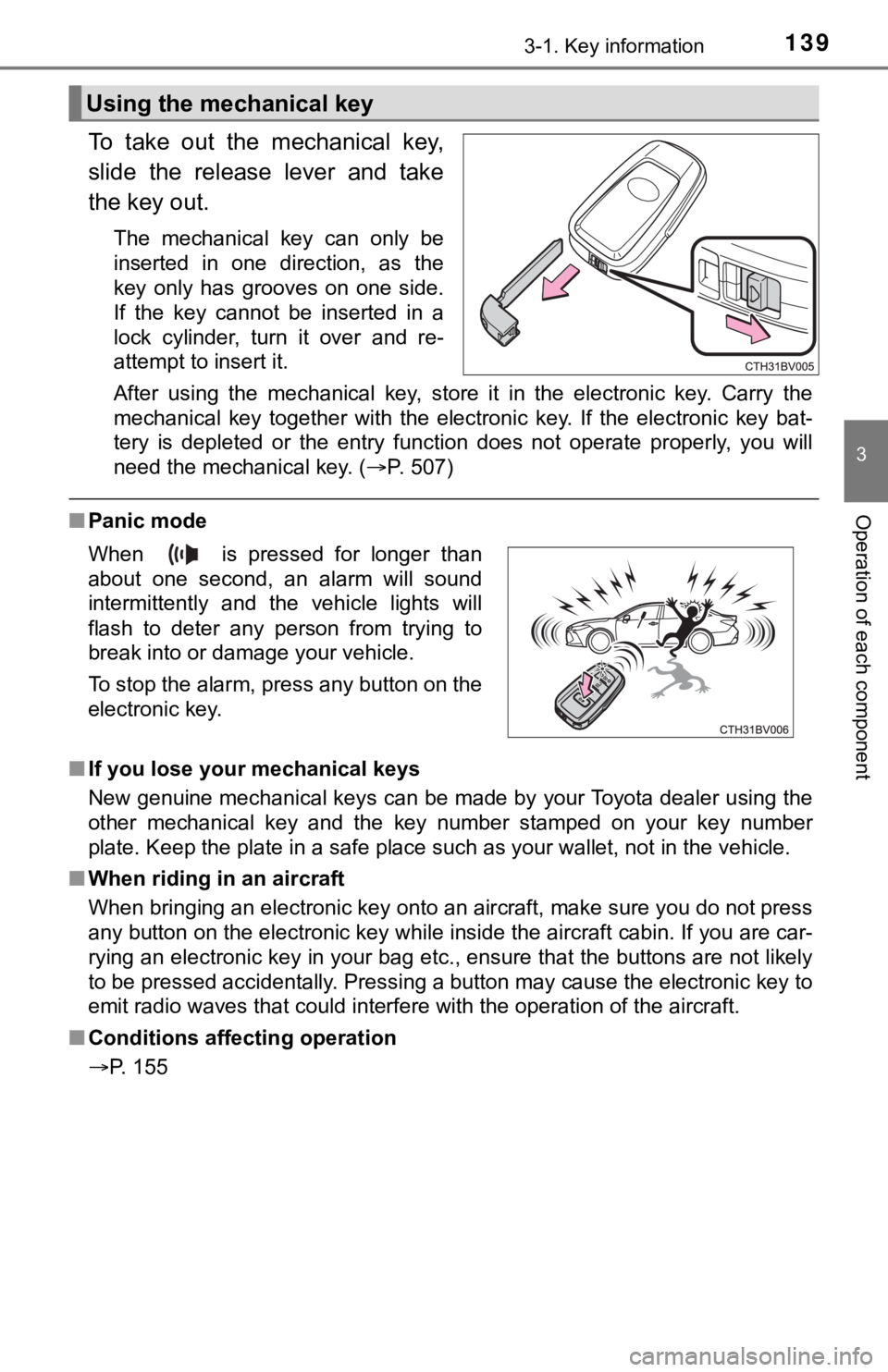
To take out the mechanical key,
slide the release lever and take
the key out.
The mechanical key can only be
inserted in one direction, as the
key only has grooves on one side.
If the key cannot be inserted in a
lock cylinder, turn it over and re-
attempt to insert it.
After using the mechanical key, store it in the electronic key. Carry the
mechanical key together with the electronic key. If the electro nic key bat-
tery is depleted or the entry function does not operate properl y, you will
need the mechanical key. ( P. 507)
■Panic mode
■ If you lose your mechanical keys
New genuine mechanical keys can be made by your Toyota dealer u sing the
other mechanical key and the key number stamped on your key num ber
plate. Keep the plate in a safe place such as your wallet, not in the vehicle.
■ When riding in an aircraft
When bringing an electronic key onto an aircraft, make sure you do not press
any button on the electronic key while inside the aircraft cabi n. If you are car-
rying an electronic key in your bag etc., ensure that the butto ns are not likely
to be pressed accidentally. Pressing a button may cause the electronic key to
emit radio waves that could interfere with the operation of the aircraft.
■ Conditions affecting operation
P. 155
Using the mechanical key
When is pressed for longer than
about one second, an alarm will sound
intermittently and the vehicle lights will
flash to deter any person from trying to
break into or damage your vehicle.
To stop the alarm, press any button on the
electronic key.
Page 155 of 584

1553-2. Opening, closing and locking the doors
3
Operation of each component
■Conditions affecting operation
The smart key system, wireless remote control and immobilizer s ystem use
weak radio waves. In the following situations, the communication between
the electronic key and the vehicle may be affected, preventing the smart key
system, wireless remote control and immobilizer system from operating prop-
erly. (Ways of coping: P. 507)
● When the electronic key battery is depleted
● Near a TV tower, electric power plant, gas station, radio stati on, large dis-
play, airport or other facility that generates strong radio wav es or electrical
noise
● When the electronic key is in contact with, or is covered by th e following
metallic objects
• Cards to which aluminum foil is attached
• Cigarette boxes that have aluminum foil inside
• Metallic wallets or bags
• Coins
• Hand warmers made of metal
• Media such as CDs and DVDs
● When other wireless keys (that emit radio waves) are being used nearby
● When carrying the electronic key together with the following devices that
emit radio waves
• Portable radio, cellular phone, cordless phone or other wirele ss commu-
nication devices
• Another vehicle’s electronic key, another electronic key of yo ur vehicle, or
a wireless key that emits radio waves
• Personal computers or personal digital assistants (PDAs)
• Digital audio players
• Portable game systems
● If window tint with a metallic content or metallic objects are attached to the
rear window
● When the electronic key is placed near a battery charger or ele ctronic
devices
● When the vehicle is parked in a pay parking spot where radio wa ves are
emitted.
Page 244 of 584
2444-5. Using the driving support systems
■If a warning message is displayed on the multi-information display
A system may be temporarily unavailable or there may be a malfu nction in
the system.
● In the following situations, perform the actions specified in t he table. When
the normal operating conditions are detected, the message will disappear
and the system will become operational.
If the message does not disappear, contact your Toyota dealer.
SituationAction
When the area around a camera is
covered with dirt, moisture (fogged
up, covered with condensation, ice,
etc.), or other foreign matterUsing the wiper and A/C function,
remove the dirt and other attached
matter. ( P. 365)
When the temperature around the
front camera is outside of the opera-
tional range, such as when the vehi-
cle is in the sun or in an extremely
cold environment
If the front camera is hot, such as
after the vehicle had been parked in
the sun, use the air conditioning sys-
tem to decrease the temperature
around the front camera.
If a sunshade was used when the
vehicle was parked, depending on
its type, the sunlight reflected from
the surface of the sunshade may
cause the temperature of the front
camera to become excessively high.
If the front camera is cold, such after
the vehicle is parked in an extremely
cold environment, use the air condi-
tioning system to increase the tem-
perature around the front camera.
The area in front of the front camera
is obstructed, such as when the
hood is open or a sticker is attached
to the part of the windshield in front
of the front camera. Close the hood, remove the sticker,
etc. to clear the obstruction.
When “Pre-Collision System Radar
In Self Calibration Unavailable See
Owner's Manual” is displayedCheck whether there is attached
materials on the radar sensor and
radar sensor cover, and if there is,
remove it.