lock TOYOTA AVENSIS 2012 Owners Manual
[x] Cancel search | Manufacturer: TOYOTA, Model Year: 2012, Model line: AVENSIS, Model: TOYOTA AVENSIS 2012Pages: 772, PDF Size: 34.43 MB
Page 697 of 772
5
697 5-2. Steps to take in an emergency
When trouble arises
AVENSIS_EE (OM20B44E)
CAUTION
When releasing the parking brake manually
Vehicles with smart entry & start system
Shift the shift lever to “P” (Multidrive or automatic transmission) or “1” or
“R” (manual transmission), turn the “ENGINE START STOP” switch
OFF and chock the tires.
Failure to do so may cause the vehicle to move, resulting in an acci-
dent.
Turn the “ENGINE START STOP” switch OFF and check that the park-
ing brake indicator is off.
Failure to do so may cause the system to operate and turn the parking
brake release tool that is inserted, resulting in an injury.
Vehicles without smart entry & start system
Shift the shift lever to “P” (Multidrive or automatic transmission) or “1” or
“R” (manual transmission), turn the engine switch to “LOCK” position
and chock the tires.
Failure to do so may cause the vehicle to move, resulting in an acci-
dent.
Turn the engine switch to “LOCK” position and check that the parking
brake indicator is off.
Failure to do so may cause the system to operate and turn the parking
brake release tool that is inserted, resulting in an injury.
Page 702 of 772
702
5-2. Steps to take in an emergency
AVENSIS_EE (OM20B44E)
If the electronic key does not operate properly
Locking and unlocking the doors and key linked functions
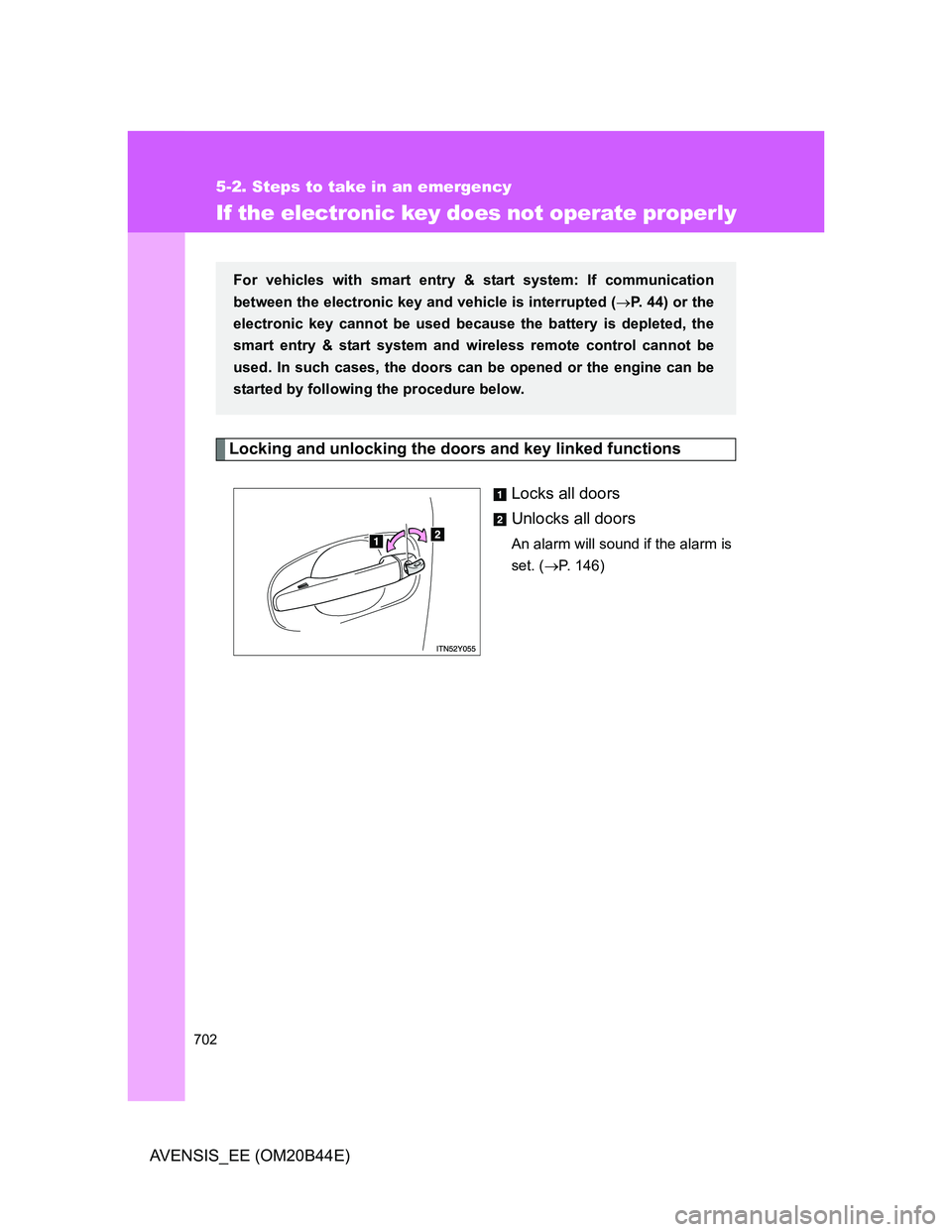
Locks all doors
Unlocks all doors
An alarm will sound if the alarm is
set. (P. 146)
For vehicles with smart entry & start system: If communication
between the electronic key and vehicle is interrupted (P. 44) or the
electronic key cannot be used because the battery is depleted, the
smart entry & start system and wireless remote control cannot be
used. In such cases, the doors can be opened or the engine can be
started by following the procedure below.
Page 704 of 772
704 5-2. Steps to take in an emergency
AVENSIS_EE (OM20B44E)To change “ENGINE START STOP” switch modes: Within 10
seconds of the buzzer sounding, release the brake pedal
(Multidrive or automatic transmission) or clutch pedal (manual
transmission) and press the “ENGINE START STOP” switch.
Modes can be changed each time the switch is pressed.
(P. 212)
To start the engine: Press the “ENGINE START STOP” switch
within 10 seconds after the buzzer sounds, keeping the brake
pedal (Multidrive or automatic transmission) or clutch pedal
(manual transmission) depressed.
In the event that the “ENGINE START STOP” switch still cannot be
operated, contact any authorized Toyota dealer or repairer, or another
duly qualified and equipped professional.
Stopping the engine
Shift the shift lever to “P” (Multidrive or automatic transmission) or “N” (man-
ual transmission) and press the “ENGINE START STOP” switch as you nor-
mally do when stopping the engine.
Replacing the key battery
As this procedure is a temporary measure, it is recommended that the elec-
tronic key battery be replaced immediately when the battery depletes.
(P. 564)
Alarm
Using the mechanical key to lock the doors will not set the alarm system.
If a door is unlocked using the mechanical key when the alarm system is set,
the alarm may be triggered. (P. 146)
STEP3
Page 717 of 772
5
717 5-2. Steps to take in an emergency
When trouble arises
AVENSIS_EE (OM20B44E)
CAUTION
If the engine has to be turned off while driving
Power assist for the brakes and steering wheel will be lost, making the
brake pedal harder to depress and the steering wheel heavier to turn.
Decelerate as much as possible before turning off the engine.
Vehicles without smart entry & start system: Never attempt to remove the
key, as doing so will lock the steering wheel.
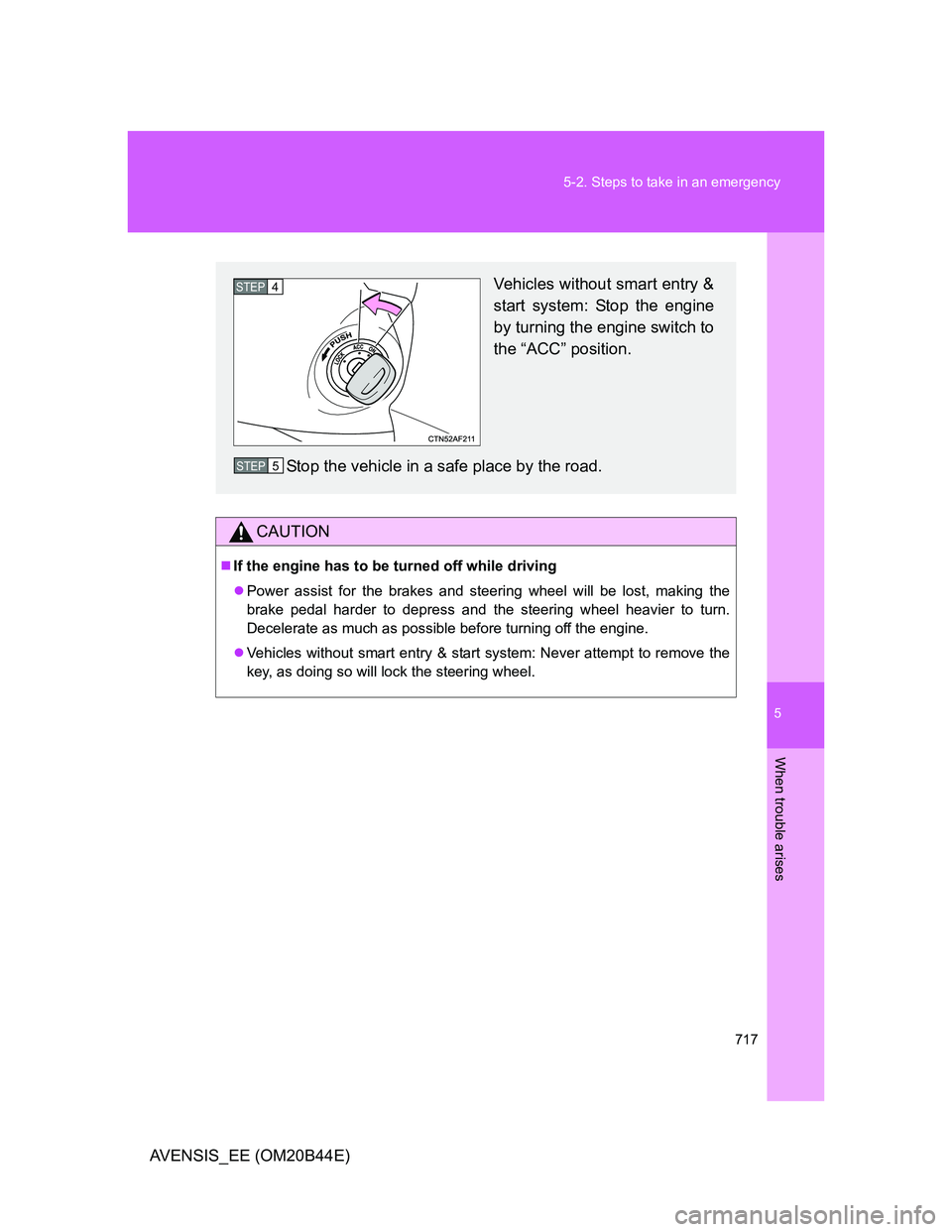
Vehicles without smart entry &
start system: Stop the engine
by turning the engine switch to
the “ACC” position.
Stop the vehicle in a safe place by the road.STEP4
STEP5
Page 723 of 772
723 6-1. Specifications
6
Vehicle specifications
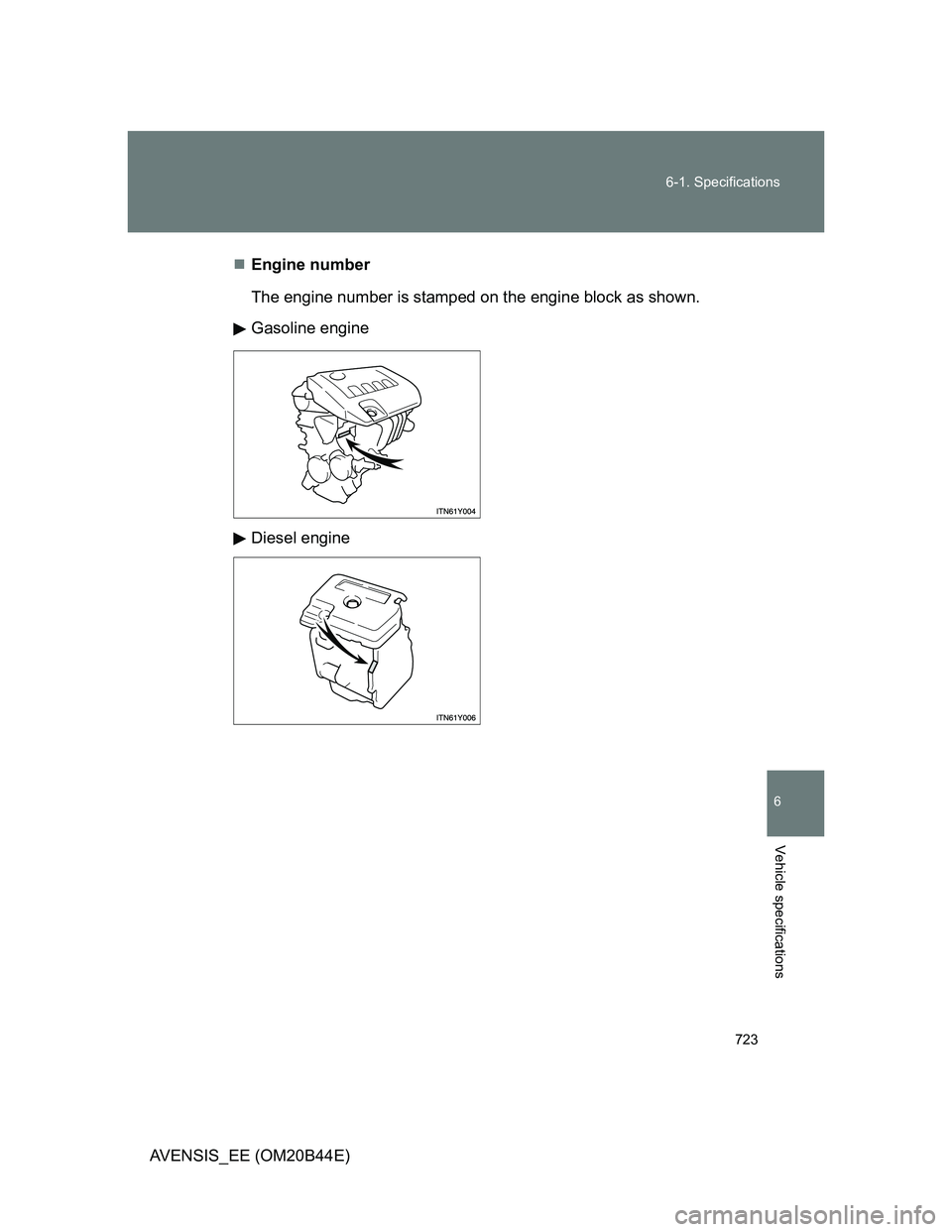
AVENSIS_EE (OM20B44E)Engine number
The engine number is stamped on the engine block as shown.
Gasoline engine
Diesel engine
Page 735 of 772
735 6-1. Specifications
6
Vehicle specifications
AVENSIS_EE (OM20B44E)
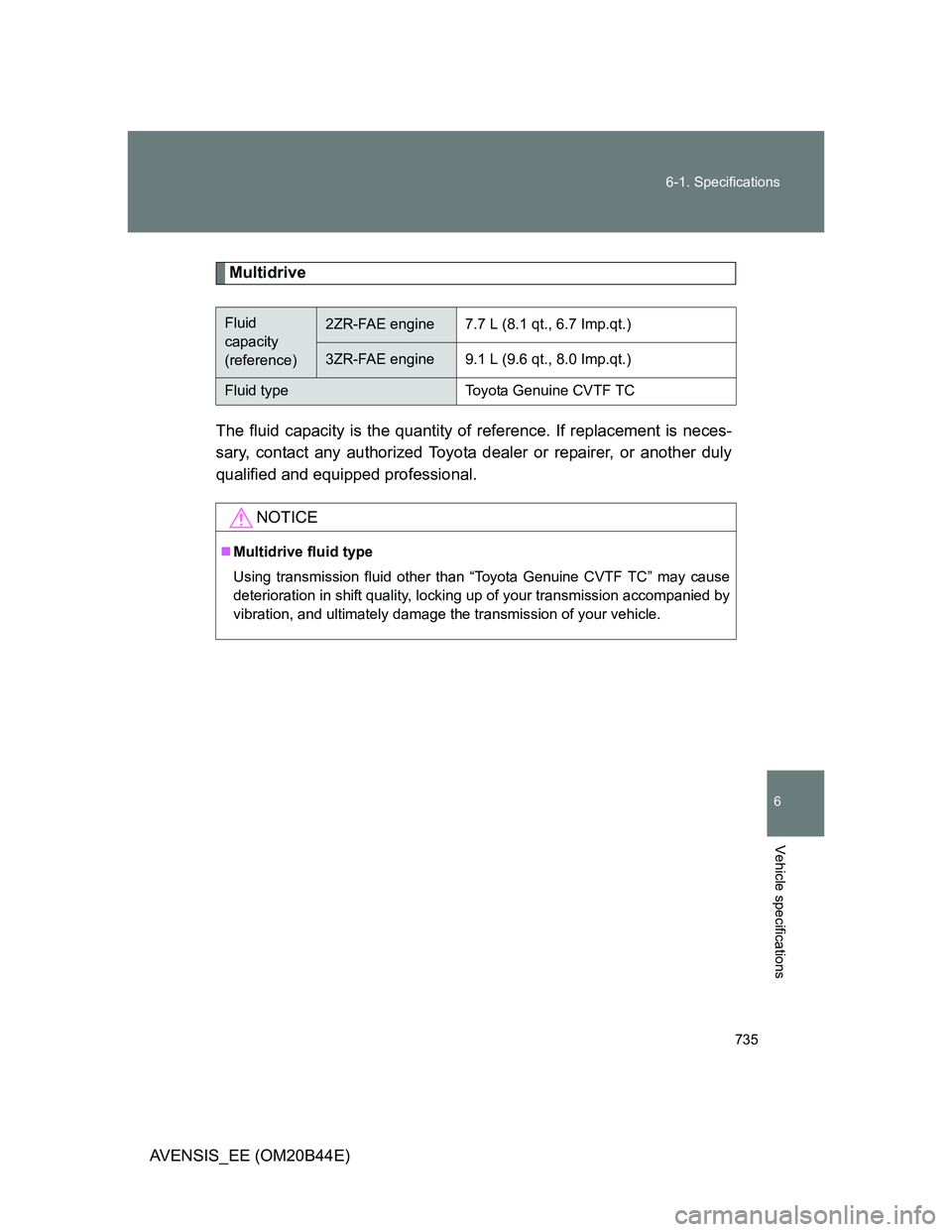
Multidrive
The fluid capacity is the quantity of reference. If replacement is neces-
sary, contact any authorized Toyota dealer or repairer, or another duly
qualified and equipped professional.
Fluid
capacity
(reference)2ZR-FAE engine7.7 L (8.1 qt., 6.7 Imp.qt.)
3ZR-FAE engine9.1 L (9.6 qt., 8.0 Imp.qt.)
Fluid typeToyota Genuine CVTF TC
NOTICE
Multidrive fluid type
Using transmission fluid other than “Toyota Genuine CVTF TC” may cause
deterioration in shift quality, locking up of your transmission accompanied by
vibration, and ultimately damage the transmission of your vehicle.
Page 736 of 772
736 6-1. Specifications
AVENSIS_EE (OM20B44E)
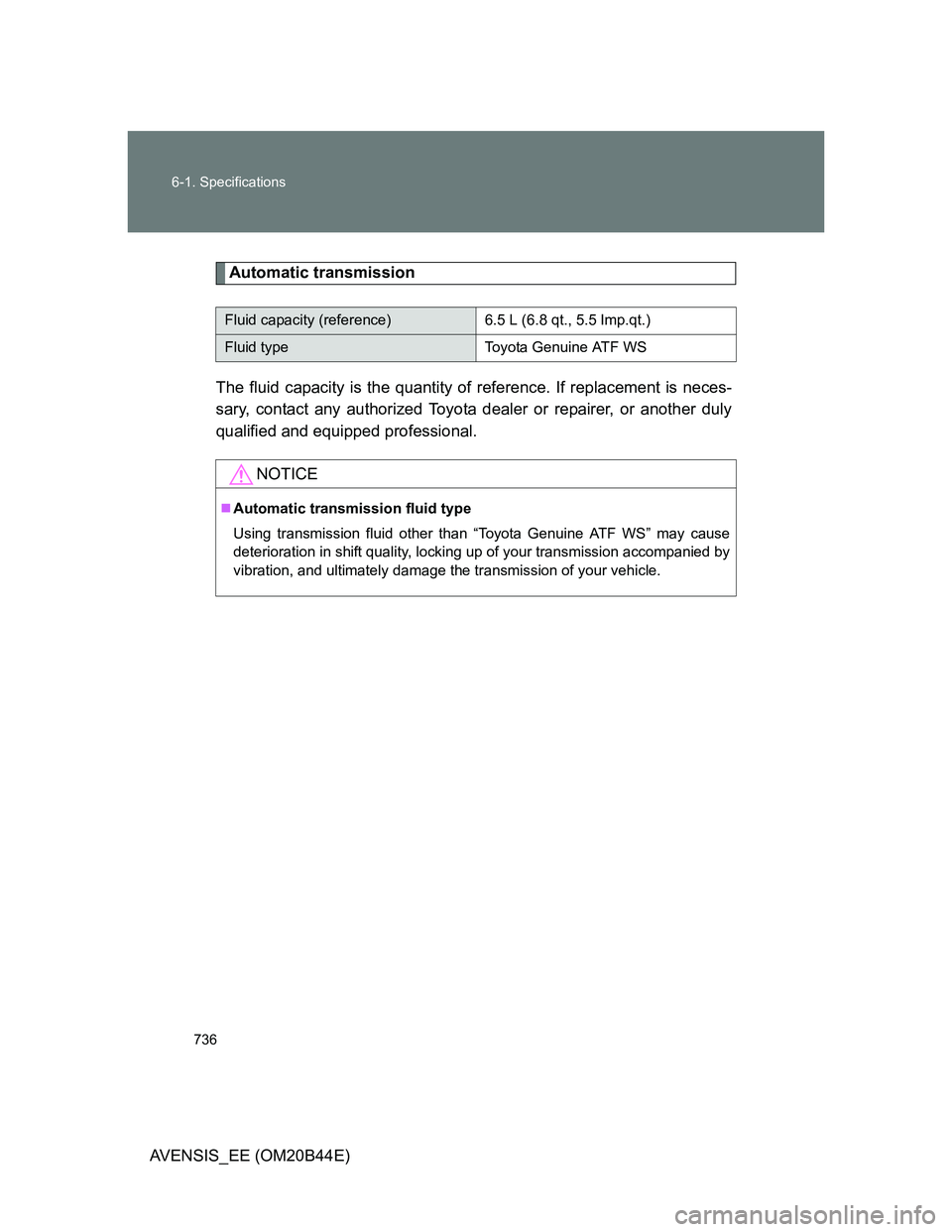
Automatic transmission
The fluid capacity is the quantity of reference. If replacement is neces-
sary, contact any authorized Toyota dealer or repairer, or another duly
qualified and equipped professional.
Fluid capacity (reference) 6.5 L (6.8 qt., 5.5 Imp.qt.)
Fluid type Toyota Genuine ATF WS
NOTICE
Automatic transmission fluid type
Using transmission fluid other than “Toyota Genuine ATF WS” may cause
deterioration in shift quality, locking up of your transmission accompanied by
vibration, and ultimately damage the transmission of your vehicle.
Page 750 of 772
750 6-2. Customization
AVENSIS_EE (OM20B44E)
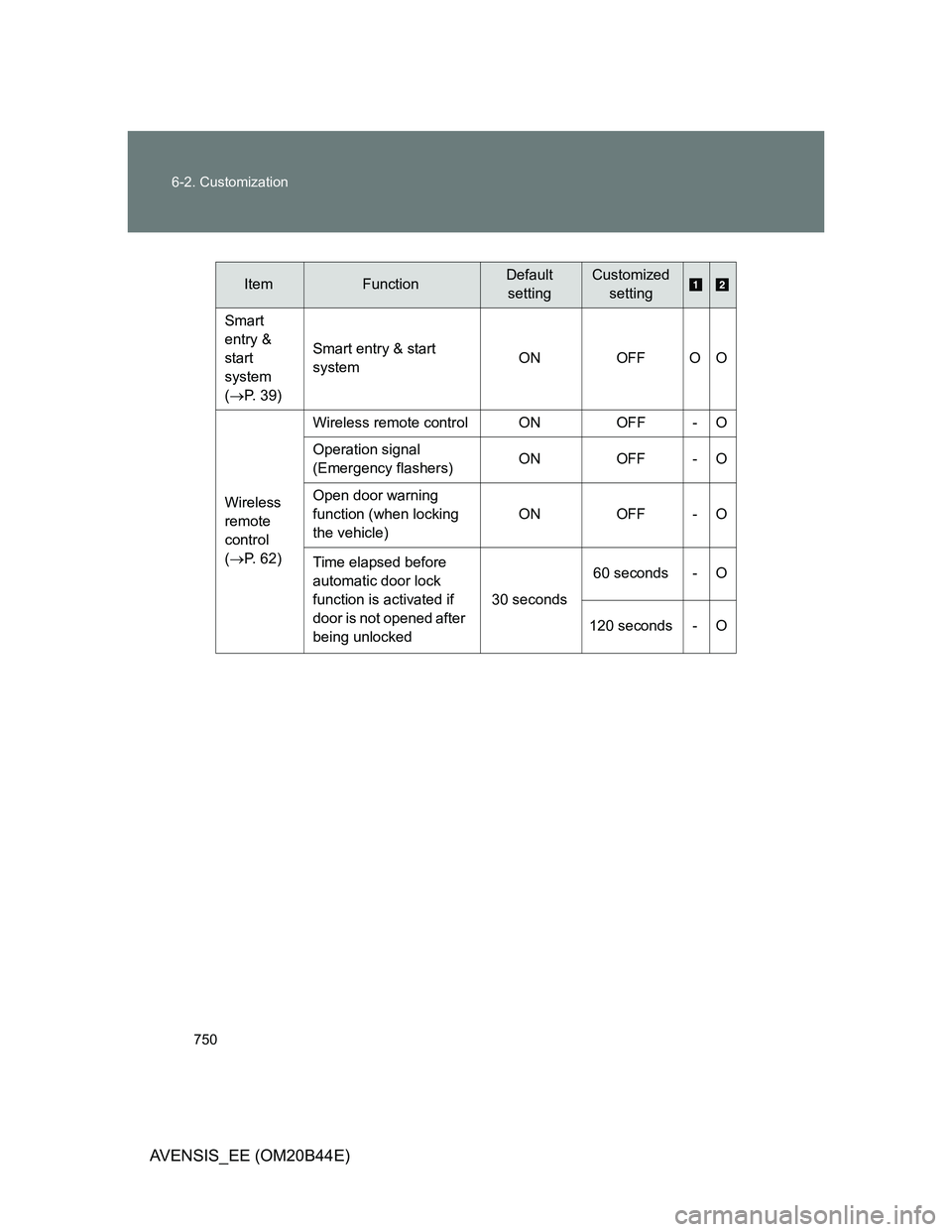
ItemFunctionDefault
settingCustomized
setting
Smart
entry &
start
system
(P. 39)Smart entry & start
systemON OFF O O
Wireless
remote
control
(P. 62)Wireless remote control ON OFF - O
Operation signal
(Emergency flashers)ON OFF - O
Open door warning
function (when locking
the vehicle)ON OFF - O
Time elapsed before
automatic door lock
function is activated if
door is not opened after
being unlocked30 seconds60 seconds - O
120 seconds - O
Page 751 of 772
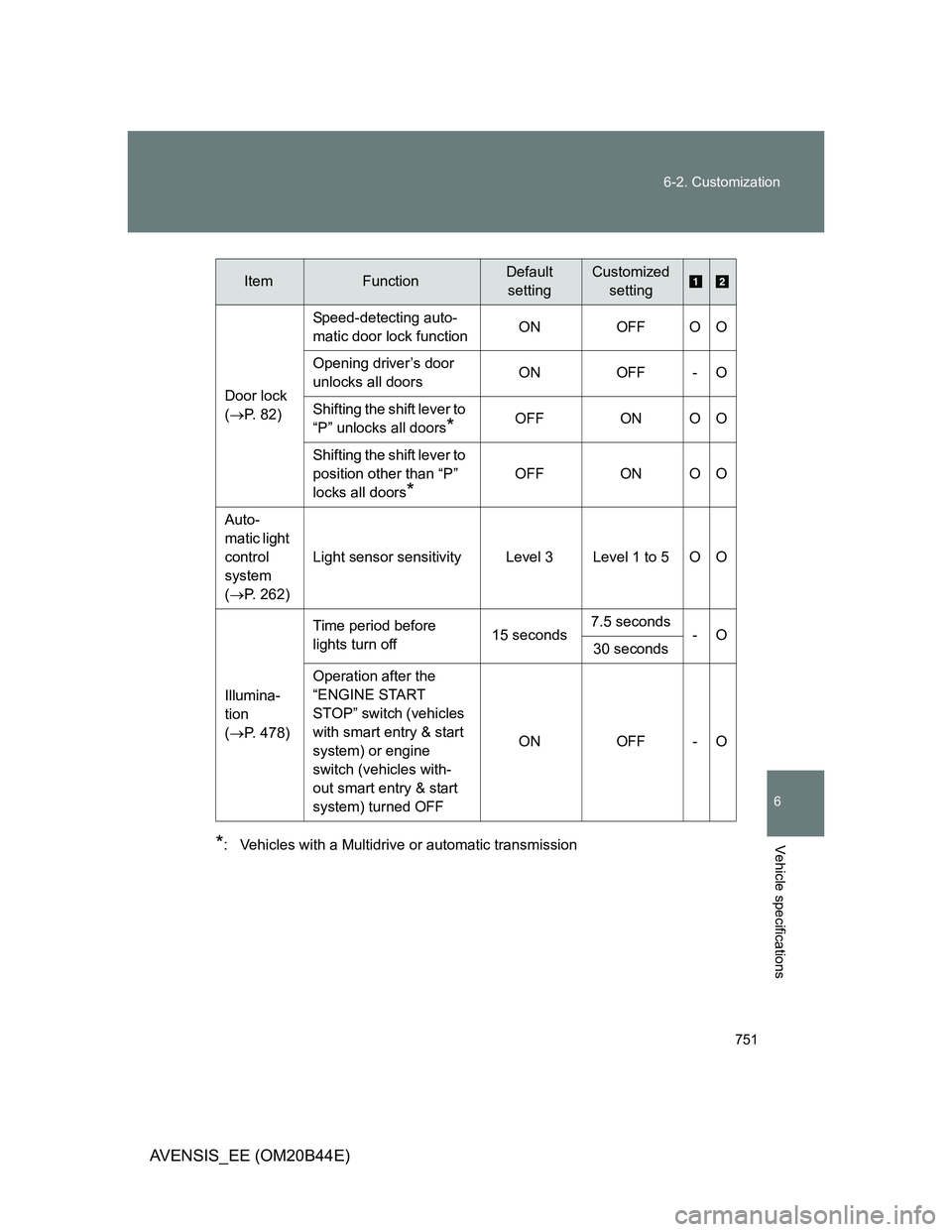
751 6-2. Customization
6
Vehicle specifications
AVENSIS_EE (OM20B44E)
*: Vehicles with a Multidrive or automatic transmissionDoor lock
(P. 82)Speed-detecting auto-
matic door lock functionON OFF O O
Opening driver’s door
unlocks all doorsON OFF - O
Shifting the shift lever to
“P” unlocks all doors
*OFF ON O O
Shifting the shift lever to
position other than “P”
locks all doors
*
OFF ON O O
Auto-
matic light
control
system
(P. 262)Light sensor sensitivity Level 3 Level 1 to 5 O O
Illumina-
tion
(P. 478)Time period before
lights turn off15 seconds7.5 seconds
-O
30 seconds
Operation after the
“ENGINE START
STOP” switch (vehicles
with smart entry & start
system) or engine
switch (vehicles with-
out smart entry & start
system) turned OFFON OFF - O
ItemFunctionDefault
settingCustomized
setting
Page 752 of 772
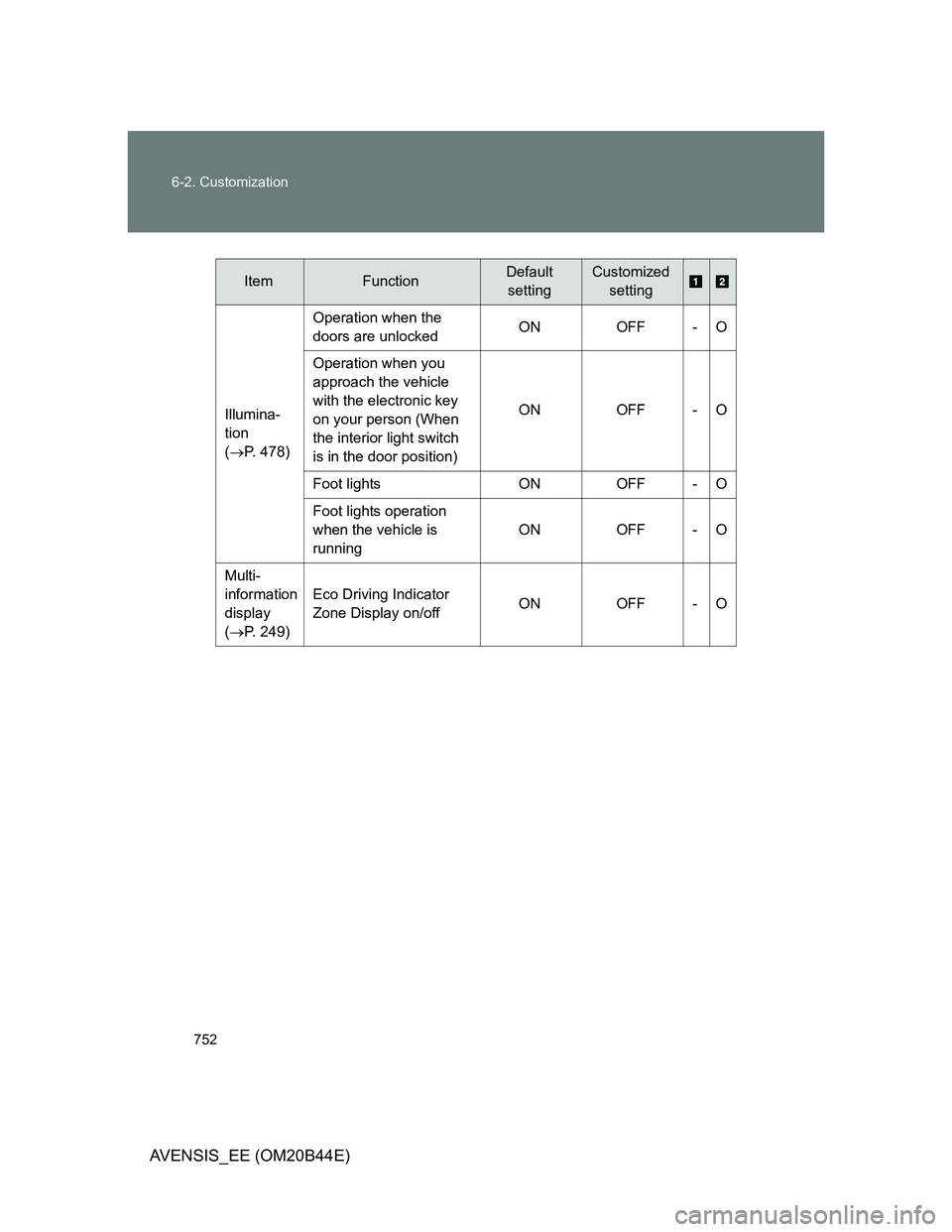
752 6-2. Customization
AVENSIS_EE (OM20B44E)
ItemFunctionDefault
settingCustomized
setting
Illumina-
tion
(P. 478)Operation when the
doors are unlockedON OFF - O
Operation when you
approach the vehicle
with the electronic key
on your person (When
the interior light switch
is in the door position)ON OFF - O
Foot lights ON OFF - O
Foot lights operation
when the vehicle is
runningON OFF - O
Multi-
information
display
(P. 249)Eco Driving Indicator
Zone Display on/off ON OFF - O