key TOYOTA AVENSIS 2012 Service Manual
[x] Cancel search | Manufacturer: TOYOTA, Model Year: 2012, Model line: AVENSIS, Model: TOYOTA AVENSIS 2012Pages: 772, PDF Size: 34.43 MB
Page 470 of 772
![TOYOTA AVENSIS 2012 Service Manual 470 3-2. Using the audio system
AVENSIS_EE (OM20B44E)
Initialization
Select “Initialize” using .
Initializing the sound settings
Select “Sound Setting” using and press [YES].
For details](/img/14/59673/w960_59673-469.png "TOYOTA AVENSIS 2012 Service Manual 470 3-2. Using the audio system
AVENSIS_EE (OM20B44E)
Initialization
Select “Initialize” using .
Initializing the sound settings
Select “Sound Setting” using and press [YES].
For details")
470 3-2. Using the audio system
AVENSIS_EE (OM20B44E)
Initialization
Select “Initialize” using .
Initializing the sound settings
Select “Sound Setting” using and press [YES].
For details about sound settings: P. 4 7 1
Initializing the device information
Select “Car Device Info” using and press [YES].
Automatic connection of a portable device, automatic connection confir-
mation display and the passkey will be initialized.
Initializing the all settings
Select “All Initialize” using and press [YES].
The number of Bluetooth® device that can be registered
Up to 5 Bluetooth
® device can be registered in the system.
Page 480 of 772
480 3-3. Using the interior lights
AVENSIS_EE (OM20B44E)
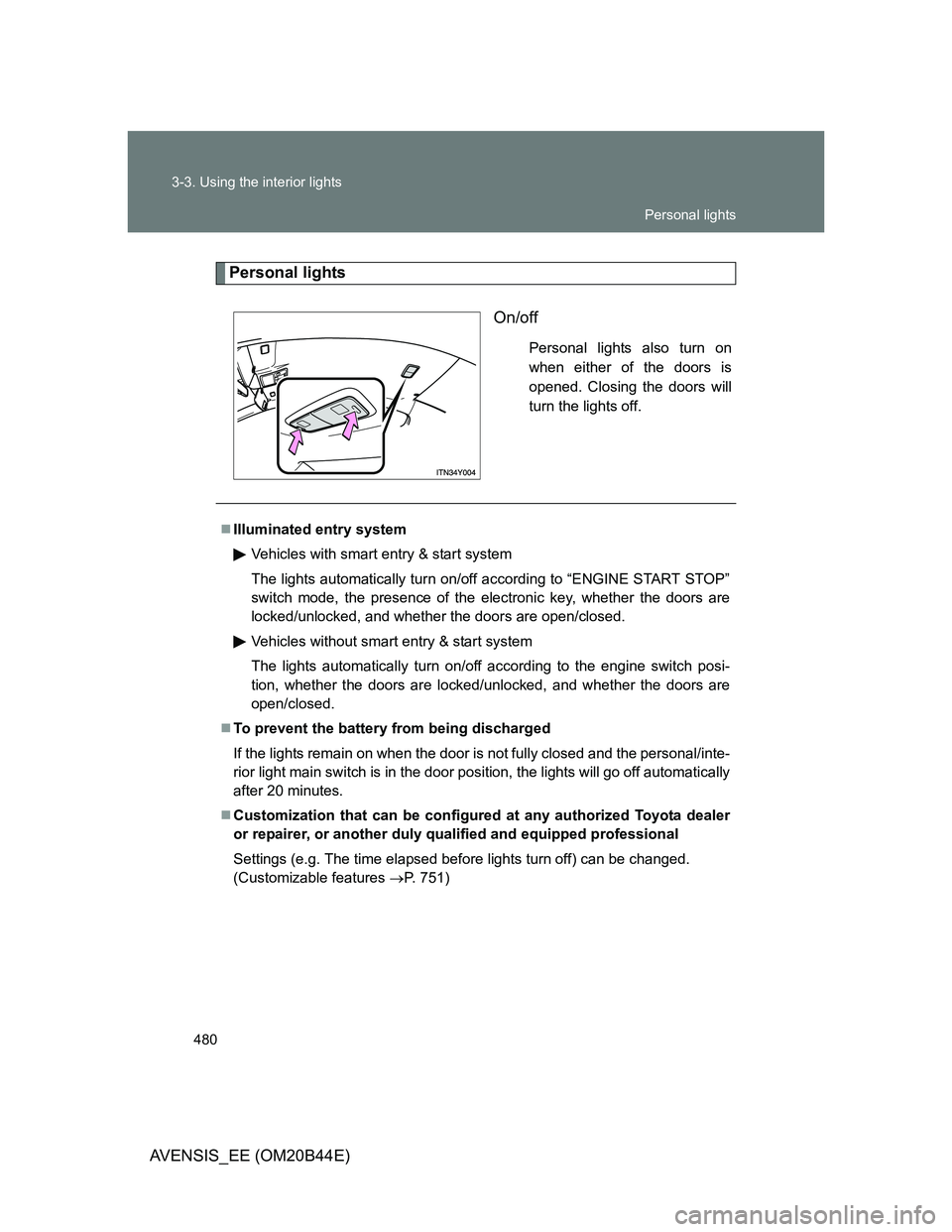
Personal lights
On/off
Personal lights also turn on
when either of the doors is
opened. Closing the doors will
turn the lights off.
Illuminated entry system
Vehicles with smart entry & start system
The lights automatically turn on/off according to “ENGINE START STOP”
switch mode, the presence of the electronic key, whether the doors are
locked/unlocked, and whether the doors are open/closed.
Vehicles without smart entry & start system
The lights automatically turn on/off according to the engine switch posi-
tion, whether the doors are locked/unlocked, and whether the doors are
open/closed.
To prevent the battery from being discharged
If the lights remain on when the door is not fully closed and the personal/inte-
rior light main switch is in the door position, the lights will go off automatically
after 20 minutes.
Customization that can be configured at any authorized Toyota dealer
or repairer, or another duly qualified and equipped professional
Settings (e.g. The time elapsed before lights turn off) can be changed.
(Customizable features P. 751)
Personal lights
Page 482 of 772
482 3-4. Using the storage features
AVENSIS_EE (OM20B44E)
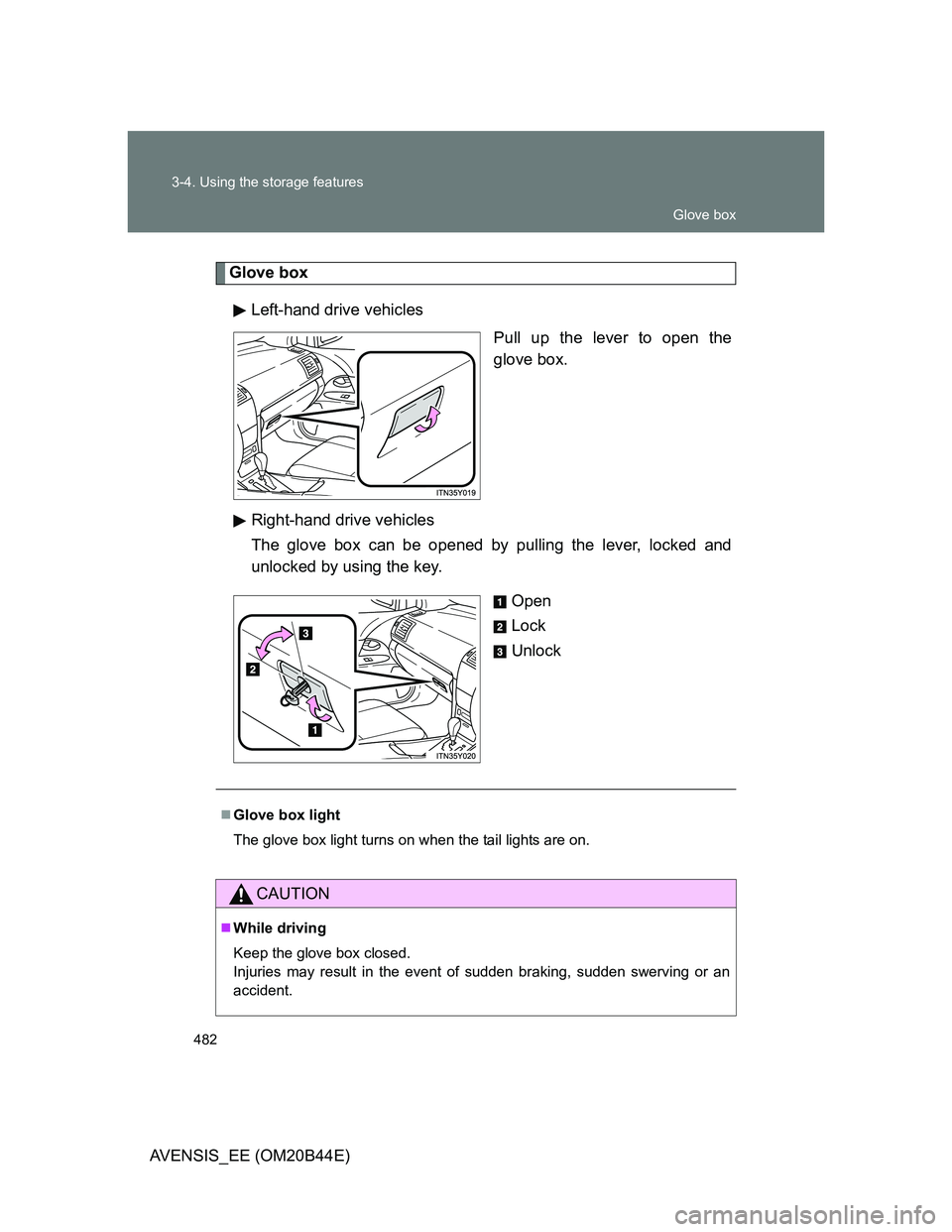
Glove box
Left-hand drive vehicles
Pull up the lever to open the
glove box.
Right-hand drive vehicles
The glove box can be opened by pulling the lever, locked and
unlocked by using the key.
Open
Lock
Unlock
Glove box light
The glove box light turns on when the tail lights are on.
CAUTION
While driving
Keep the glove box closed.
Injuries may result in the event of sudden braking, sudden swerving or an
accident.
Glove box
Page 515 of 772
4Maintenance and care
515
AVENSIS_EE (OM20B44E)
4-1. Maintenance and care
Cleaning and protecting
the vehicle exterior ......... 516
Cleaning and protecting
the vehicle interior .......... 521
4-2. Maintenance
Maintenance
requirements................... 524
4-3. Do-it-yourself maintenance
Do-it-yourself service
precautions ..................... 527
Hood ................................. 531
Positioning a floor jack ...... 533
Engine compartment......... 535
Tires .................................. 552
Tire inflation pressure ....... 556
Wheels .............................. 558
Air conditioning filter ......... 560
Key battery........................ 564
Checking and replacing
fuses ............................... 569
Light bulbs ........................ 585
Page 564 of 772
564
4-3. Do-it-yourself maintenance
AVENSIS_EE (OM20B44E)
Key batter y
Replace the battery with a new one if it is discharged.
You will need the following items:
Flathead screwdriver (To prevent damage to the key, cover
the tip of the screwdriver with rag.)
Small Phillips-head screwdriver
Lithium battery
Vehicles with smart entry & start system: CR1632
Vehicles without smart entry & start system: CR2016
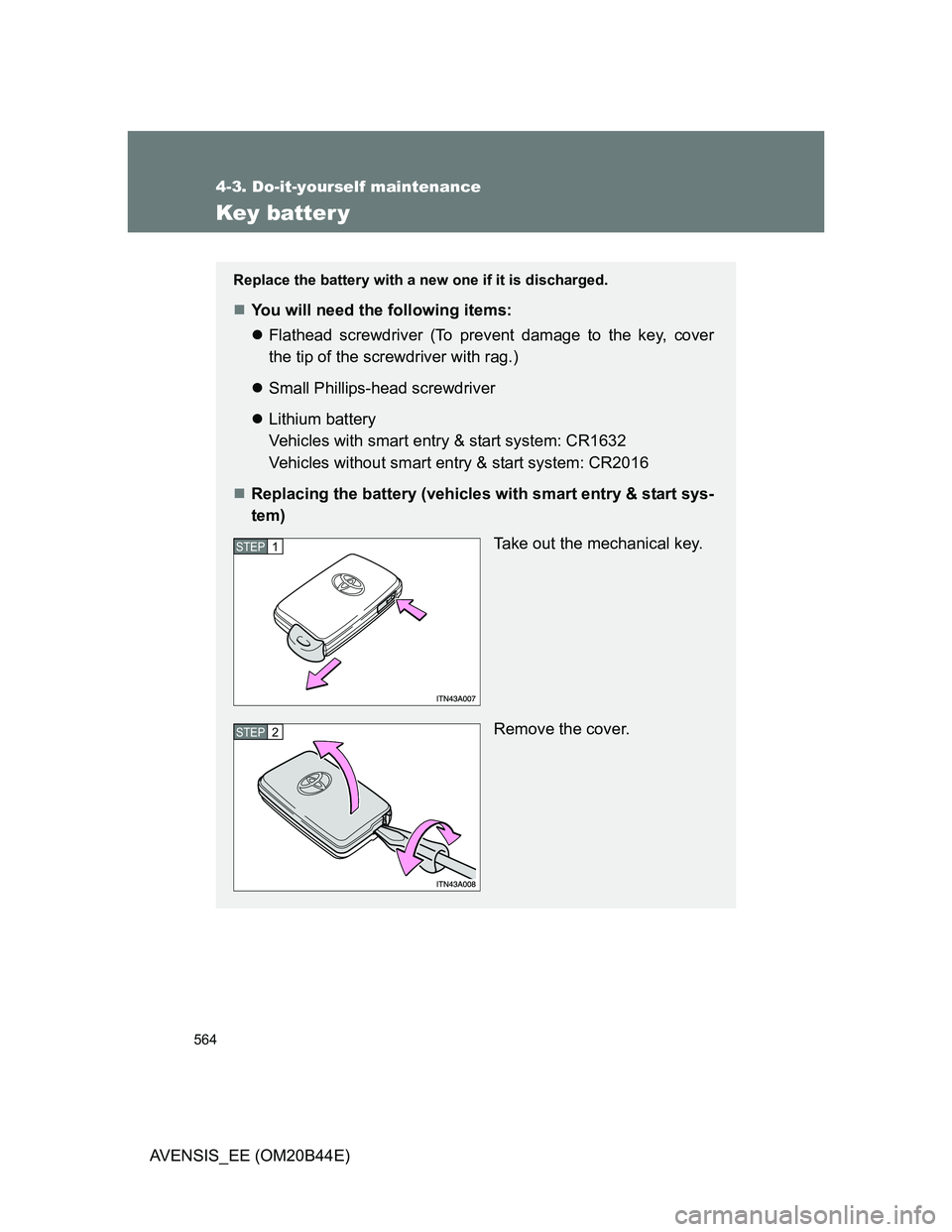
Replacing the battery (vehicles with smart entry & start sys-
tem)
Take out the mechanical key.
Remove the cover.
STEP1
STEP2
Page 565 of 772
565 4-3. Do-it-yourself maintenance
4
Maintenance and care
AVENSIS_EE (OM20B44E)
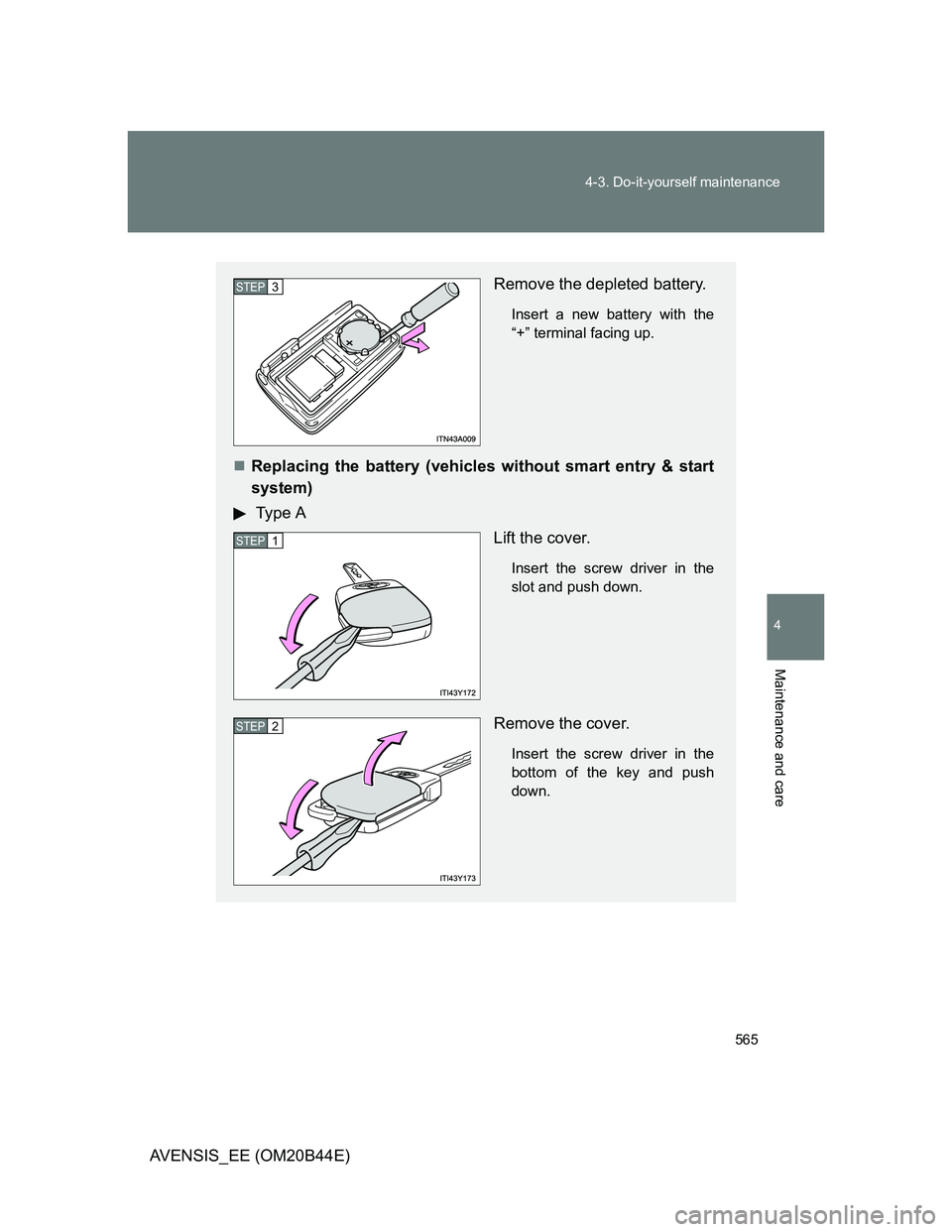
Remove the depleted battery.
Insert a new battery with the
“+” terminal facing up.
Replacing the battery (vehicles without smart entry & start
system)
Type A
Lift the cover.
Insert the screw driver in the
slot and push down.
Remove the cover.
Insert the screw driver in the
bottom of the key and push
down.
STEP3
STEP1
STEP2
Page 567 of 772
567 4-3. Do-it-yourself maintenance
4
Maintenance and care
AVENSIS_EE (OM20B44E)
If the key battery is discharged
The following symptoms may occur.
The smart entry & start system and wireless remote control will not func-
tion properly.
The operational range is reduced.
Use the following types of lithium battery
Vehicles with smart entry & start system: CR1632
Vehicles without smart entry & start system: CR2016
Batteries can be purchased at any authorized Toyota dealer or repairer,
or another duly qualified and equipped professional, jewelers, or camera
stores.
Replace only with the same or equivalent type recommended by any
authorized Toyota dealer or repairer, or another duly qualified and
equipped professional.
Dispose of used batteries according to the local laws.
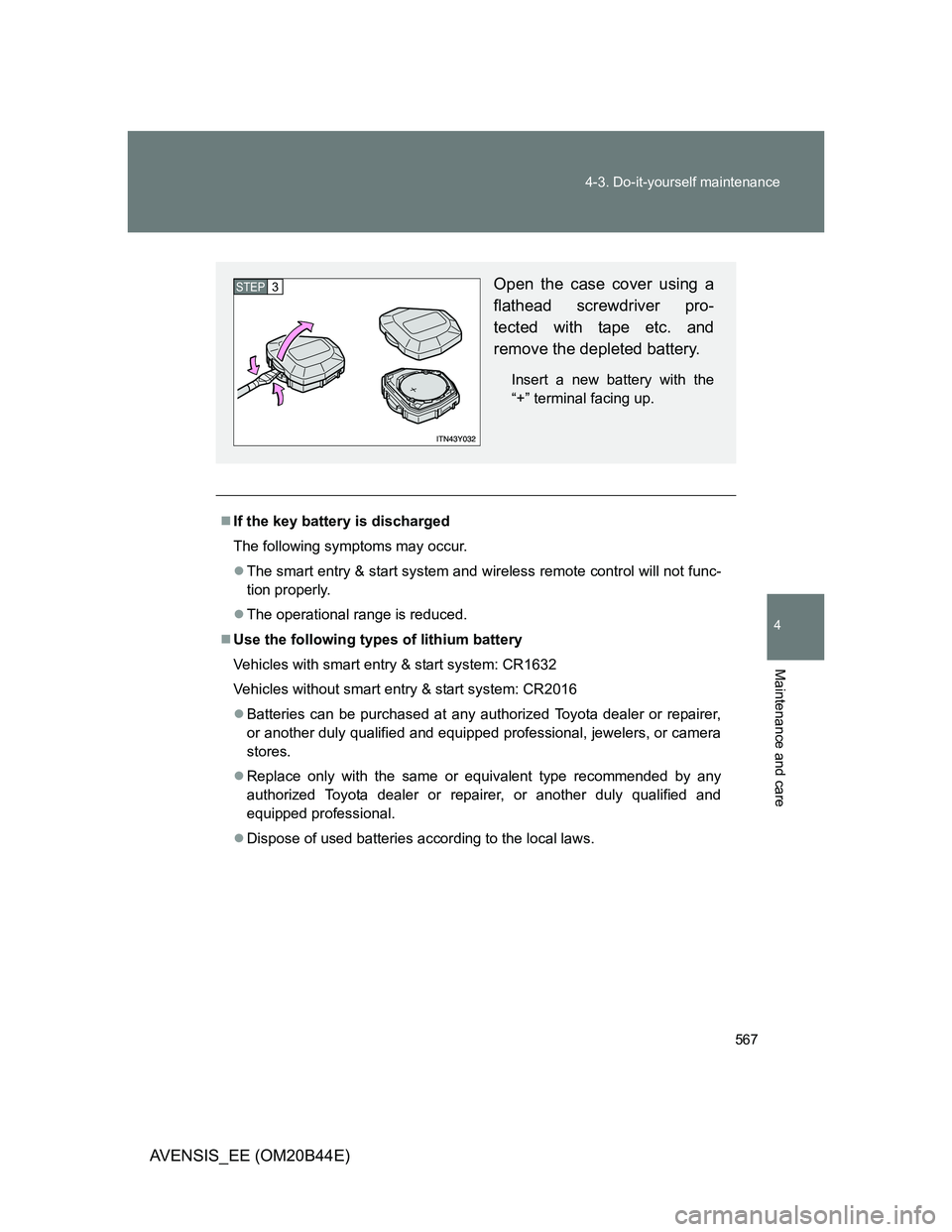
Open the case cover using a
flathead screwdriver pro-
tected with tape etc. and
remove the depleted battery.
Insert a new battery with the
“+” terminal facing up.
STEP3
Page 568 of 772
568 4-3. Do-it-yourself maintenance
AVENSIS_EE (OM20B44E)
CAUTION
Removed battery and other parts
Keep away from children. These parts are small and if swallowed by a child,
they can cause choking. Failure to do so could result in death or serious
injury.
Certification for the smart entry & start system
RISK OF EXPLOSION IF BATTERY IS REPLACED BY AN INCORRECT
TYPE. DISPOSE OF USED BATTERIES ACCORDING TO THE INSTRUC-
TIONS.
NOTICE
For normal operation after replacing the battery
Observe the following precautions to prevent accidents.
Always work with dry hands.
Moisture may cause the battery to rust.
Do not touch or move any other components inside the remote control.
Do not bend the battery terminals.
Please perform this operation in a clean environment to avoid garbage, oil,
etc. insertion in the key.
Page 603 of 772
5When trouble arises
603
AVENSIS_EE (OM20B44E)
5-1. Essential information
Emergency flashers .......... 604
If your vehicle needs
to be towed ..................... 605
If you think something
is wrong .......................... 615
Fuel pump shut off
system (gasoline
engine) ........................... 616
5-2. Steps to take in an
emergency
If a warning light turns
on or a warning buzzer
sounds... ........................ 617
If a warning message
is displayed ..................... 624If you have a flat tire
(vehicles with a spare
tire for sedan) ................. 648
If you have a flat tire
(vehicles with a spare
tire for wagon)................. 662
If you have a flat tire
(vehicles without a
spare tire) ....................... 676
If the engine will
not start........................... 689
If the shift lever cannot
be shifted from “P” .......... 692
If the parking brake
cannot be released ......... 693
If you lose your keys ......... 699
If you cannot operate
the trunk opener
(sedan) ........................... 700
If you cannot operate
the back door opener
(wagon)........................... 701
If the electronic key
does not operate
properly........................... 702
If the battery is
discharged ...................... 705
If your vehicle
overheats ........................ 710
If you run out of fuel and
the engine stalls
(diesel engine) ................ 713
If the vehicle becomes
stuck ............................... 714
If your vehicle has to be
stopped in an
emergency ...................... 716
Page 637 of 772
5
637 5-2. Steps to take in an emergency
When trouble arises
AVENSIS_EE (OM20B44E)
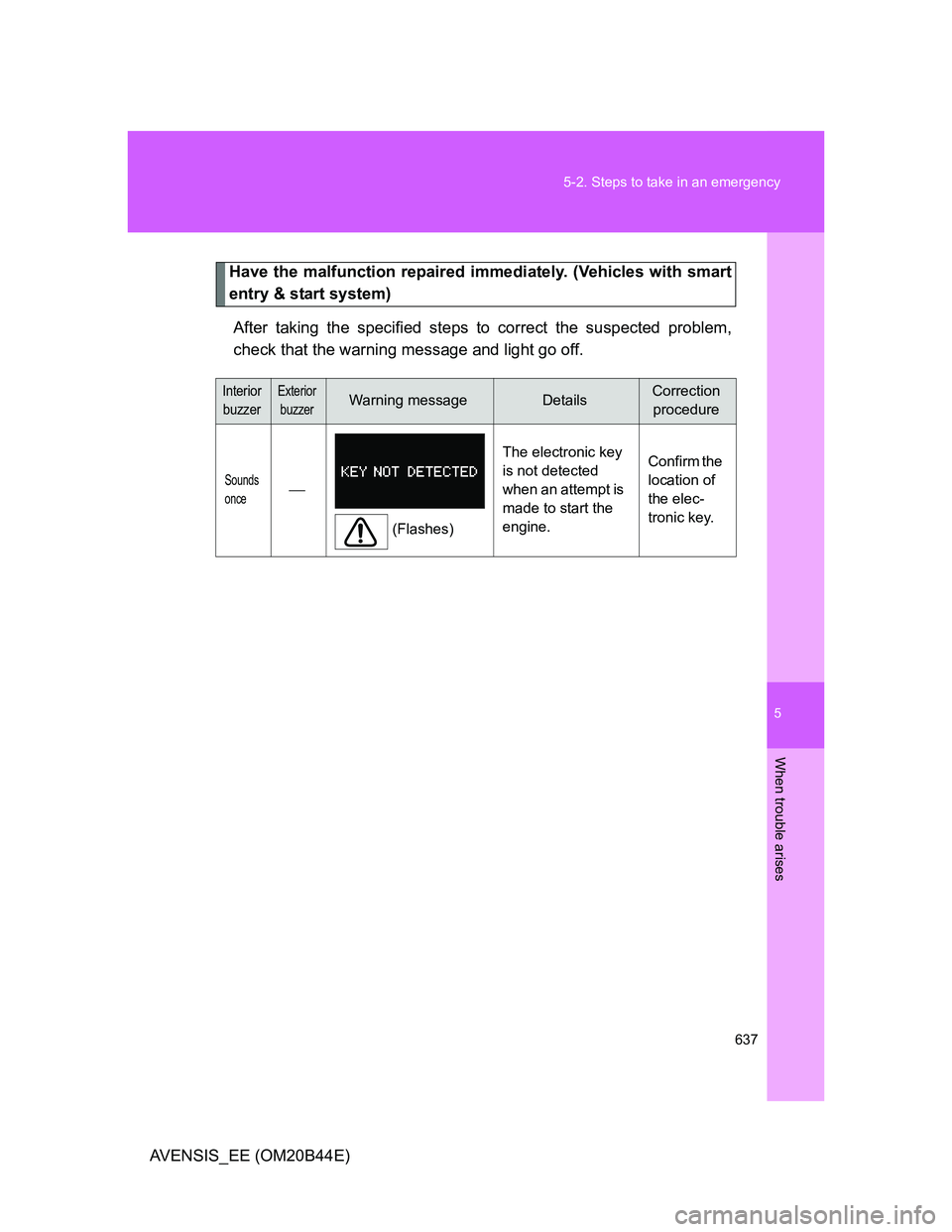
Have the malfunction repaired immediately. (Vehicles with smart
entry & start system)
After taking the specified steps to correct the suspected problem,
check that the warning message and light go off.
Interior
buzzerExterior
buzzerWarning messageDetailsCorrection
procedure
Sounds
once
(Flashes)The electronic key
is not detected
when an attempt is
made to start the
engine.Confirm the
location of
the elec-
tronic key.