tow TOYOTA AVENSIS 2012 Owners Manual
[x] Cancel search | Manufacturer: TOYOTA, Model Year: 2012, Model line: AVENSIS, Model: TOYOTA AVENSIS 2012Pages: 772, PDF Size: 34.43 MB
Page 1 of 772
TABLE OF CONTENTS
1
AVENSIS_EE (OM20B44E)
1Before drivingAdjusting and operating features such as door locks,
mirrors, and steering column
2When drivingDriving, stopping and safe-driving information
3Interior featuresAir conditioning and audio systems, as well as other in-
terior features for a comfortable driving experience
4Maintenance and
careCleaning and protecting your vehicle, performing do-it-
yourself maintenance, and maintenance information
5When trouble
arisesWhat to do if the vehicle needs to be towed, gets a flat
tire, or is involved in an accident
6Vehicle specifi-
cationsDetailed vehicle information
IndexAlphabetical listing of information contained in this man-
ual
Page 3 of 772
1
2
3
4
5
6
3
AVENSIS_EE (OM20B44E)
2-1. Driving procedures
Driving the vehicle .............. 194
Engine (ignition) switch
(vehicles with smart
entry & start system)......... 210
Engine (ignition) switch
(vehicles without smart
entry & start system)......... 215
Multidrive ............................ 219
Automatic transmission....... 225
Manual transmission ........... 232
Turn signal lever ................. 236
Parking brake...................... 237
Horn .................................... 241
2-2. Instrument cluster
Gauges and meters ............ 242
Indicators and warning
lights ................................. 245
Multi-information display ..... 2492-3. Operating the lights
and wipers
Headlight switch ................. 262
Fog light switch .................. 267
Windshield wipers
and washer ...................... 269
Rear window wiper
and washer (wagon) ........ 274
2-4. Using other driving systems
Cruise control ..................... 275
Dynamic radar cruise
control .............................. 281
Speed limiter ...................... 300
Toyota parking
assist-sensor .................... 303
Rear view monitor
system.............................. 308
LKA (Lane-Keeping
Assist) .............................. 318
Driving assist systems........ 327
PCS (Pre-Crash Safety) ..... 333
2-5. Driving information
Cargo and luggage............. 342
Winter driving tips............... 344
Trailer towing...................... 348
2When driving
Page 6 of 772
TABLE OF CONTENTSIndex
6
AVENSIS_EE (OM20B44E)
5-1. Essential information
Emergency flashers ............ 604
If your vehicle needs to
be towed ........................... 605
If you think something
is wrong ............................ 615
Fuel pump shut off system
(gasoline engine) .............. 616
5-2. Steps to take in an emergency
If a warning light turns
on or a warning buzzer
sounds... .......................... 617
If a warning message
is displayed ....................... 624
If you have a flat tire
(vehicles with a spare
tire for sedan) ................... 648
If you have a flat tire
(vehicles with a spare
tire for wagon)................... 662
If you have a flat tire
(vehicles without a
spare tire) ......................... 676
If the engine will not
start................................... 689If the shift lever cannot
be shifted from “P” ........... 692
If the parking brake
cannot be released .......... 693
If you lose your keys .......... 699
If you cannot operate the
trunk opener (sedan)........ 700
If you cannot operate the
back door opener
(wagon) ............................ 701
If the electronic key does
not operate properly ......... 702
If the battery is
discharged ....................... 705
If your vehicle overheats .... 710
If you run out of fuel and
the engine stalls
(diesel engine) ................. 713
If the vehicle becomes
stuck................................. 714
If your vehicle has to
be stopped in an
emergency ....................... 716
5When trouble arises
Page 37 of 772
37 1-1. Key information
1
Before driving
AVENSIS_EE (OM20B44E)
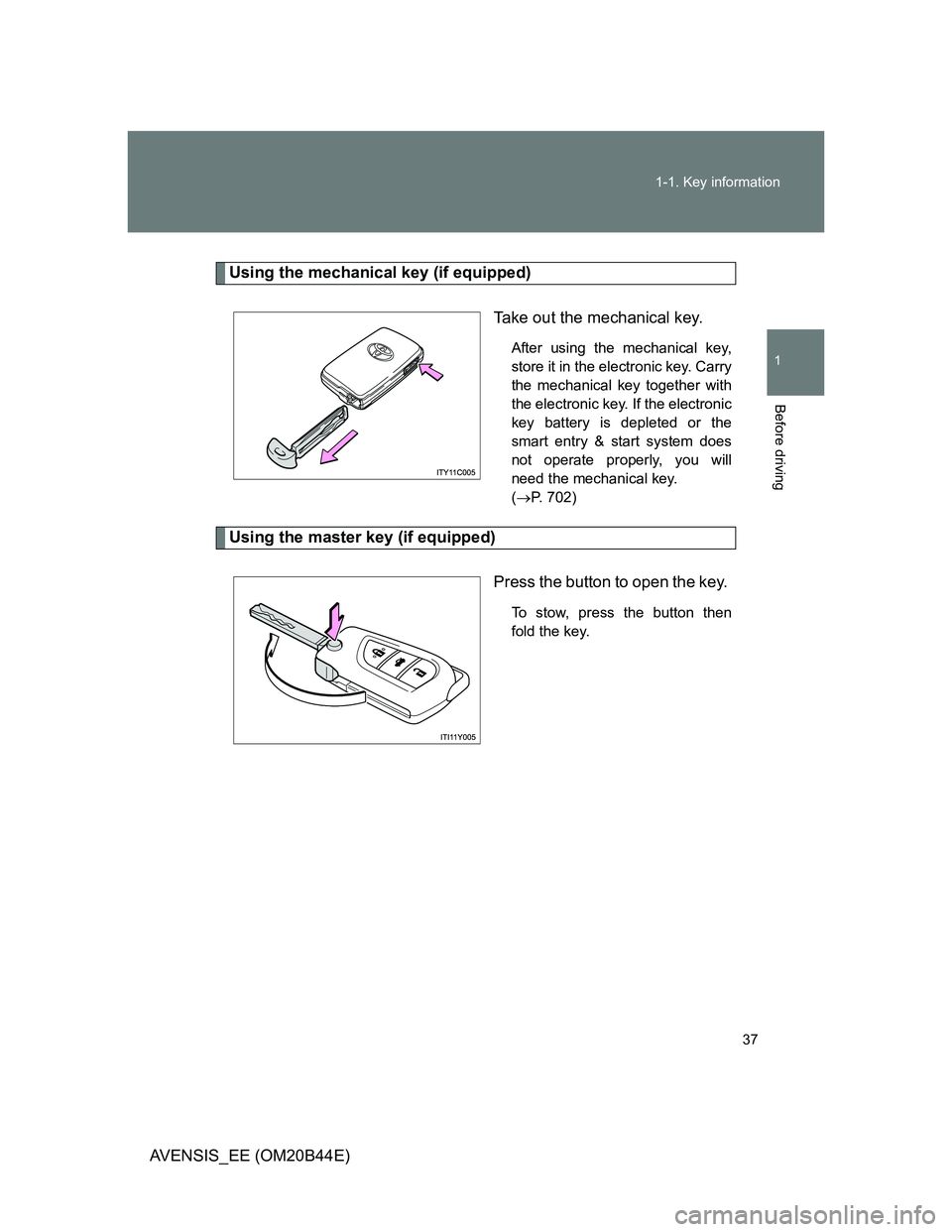
Using the mechanical key (if equipped)
Take out the mechanical key.
After using the mechanical key,
store it in the electronic key. Carry
the mechanical key together with
the electronic key. If the electronic
key battery is depleted or the
smart entry & start system does
not operate properly, you will
need the mechanical key.
(P. 702)
Using the master key (if equipped)
Press the button to open the key.
To stow, press the button then
fold the key.
Page 44 of 772
44 1-2. Opening, closing and locking the doors
AVENSIS_EE (OM20B44E)
Operation signals
The emergency flashers flash to indicate that the doors and trunk/back door
have been locked/unlocked. (Locked: Once; Unlocked: Twice)
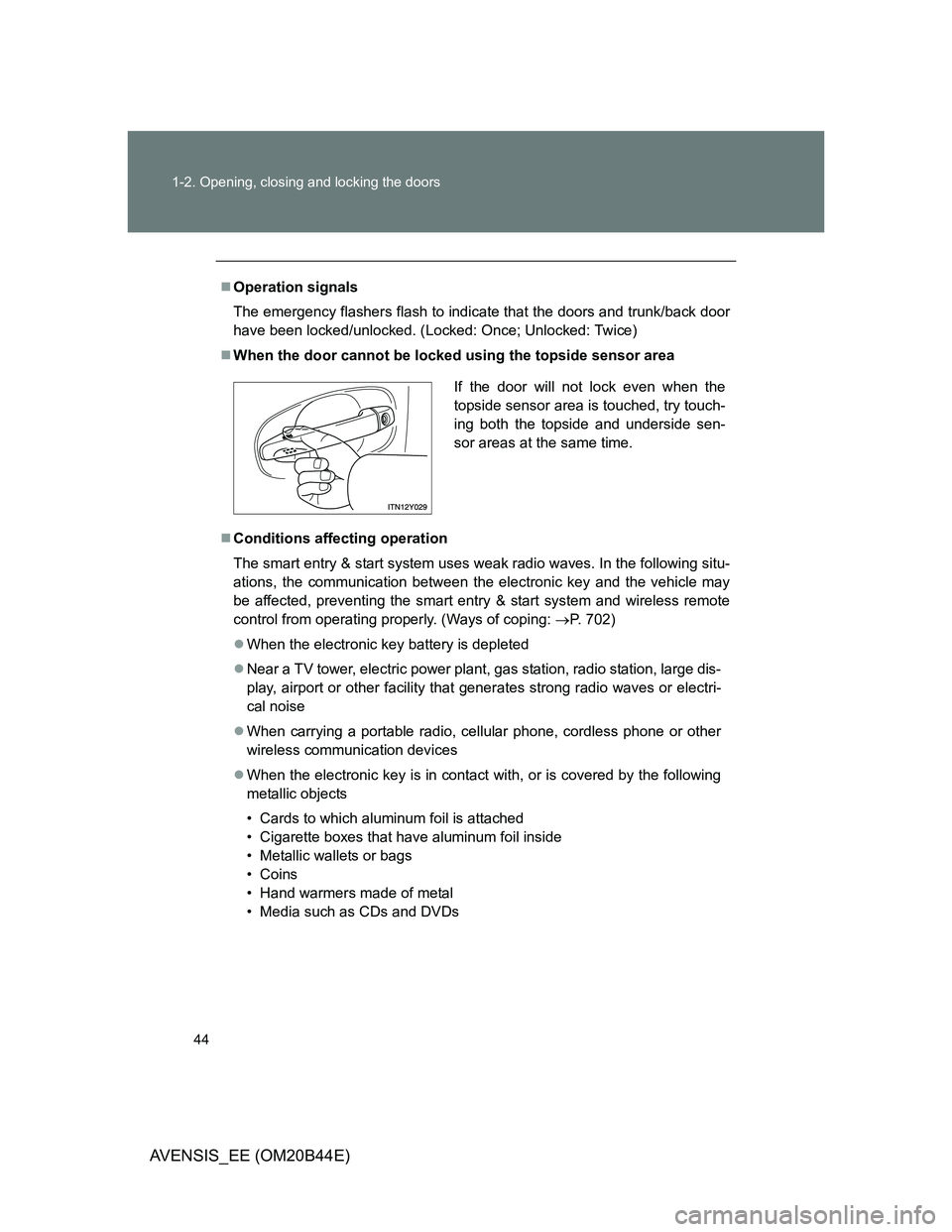
When the door cannot be locked using the topside sensor area
Conditions affecting operation
The smart entry & start system uses weak radio waves. In the following situ-
ations, the communication between the electronic key and the vehicle may
be affected, preventing the smart entry & start system and wireless remote
control from operating properly. (Ways of coping: P. 702)
When the electronic key battery is depleted
Near a TV tower, electric power plant, gas station, radio station, large dis-
play, airport or other facility that generates strong radio waves or electri-
cal noise
When carrying a portable radio, cellular phone, cordless phone or other
wireless communication devices
When the electronic key is in contact with, or is covered by the following
metallic objects
• Cards to which aluminum foil is attached
• Cigarette boxes that have aluminum foil inside
• Metallic wallets or bags
• Coins
• Hand warmers made of metal
• Media such as CDs and DVDs
If the door will not lock even when the
topside sensor area is touched, try touch-
ing both the topside and underside sen-
sor areas at the same time.
Page 65 of 772
65 1-2. Opening, closing and locking the doors
1
Before driving
AVENSIS_EE (OM20B44E)
Conditions affecting operation
Vehicles with smart entry & start system
P. 4 4
Vehicles without smart entry & start system
The wireless remote control function may not operate normally in the fol-
lowing situations.
Near a TV tower, radio station, electric power plant, airport or other
facility that generates strong radio waves
When carrying a portable radio, cellular phone or other wireless com-
munication device
When multiple wireless keys are in the vicinity
When the wireless key has come into contact with, or is covered by a
metallic object
When a wireless key (that emits radio waves) is being used nearby
When the wireless key has been left near an electrical appliance such
as a personal computer
When the wireless key battery is depleted
If window tint with a metallic content or metallic objects are attached to
the rear window
Sedan: If a metallic object is placed on the package tray
Customization that can be configured at any authorized Toyota dealer
or repairer, or another duly qualified and equipped professional
Settings (e.g. door lock buzzer) can be changed.
(Customizable features P. 749)
Page 100 of 772
100
1-3. Adjustable components (seats, mirrors, steering wheel)
AVENSIS_EE (OM20B44E)
Rear seats
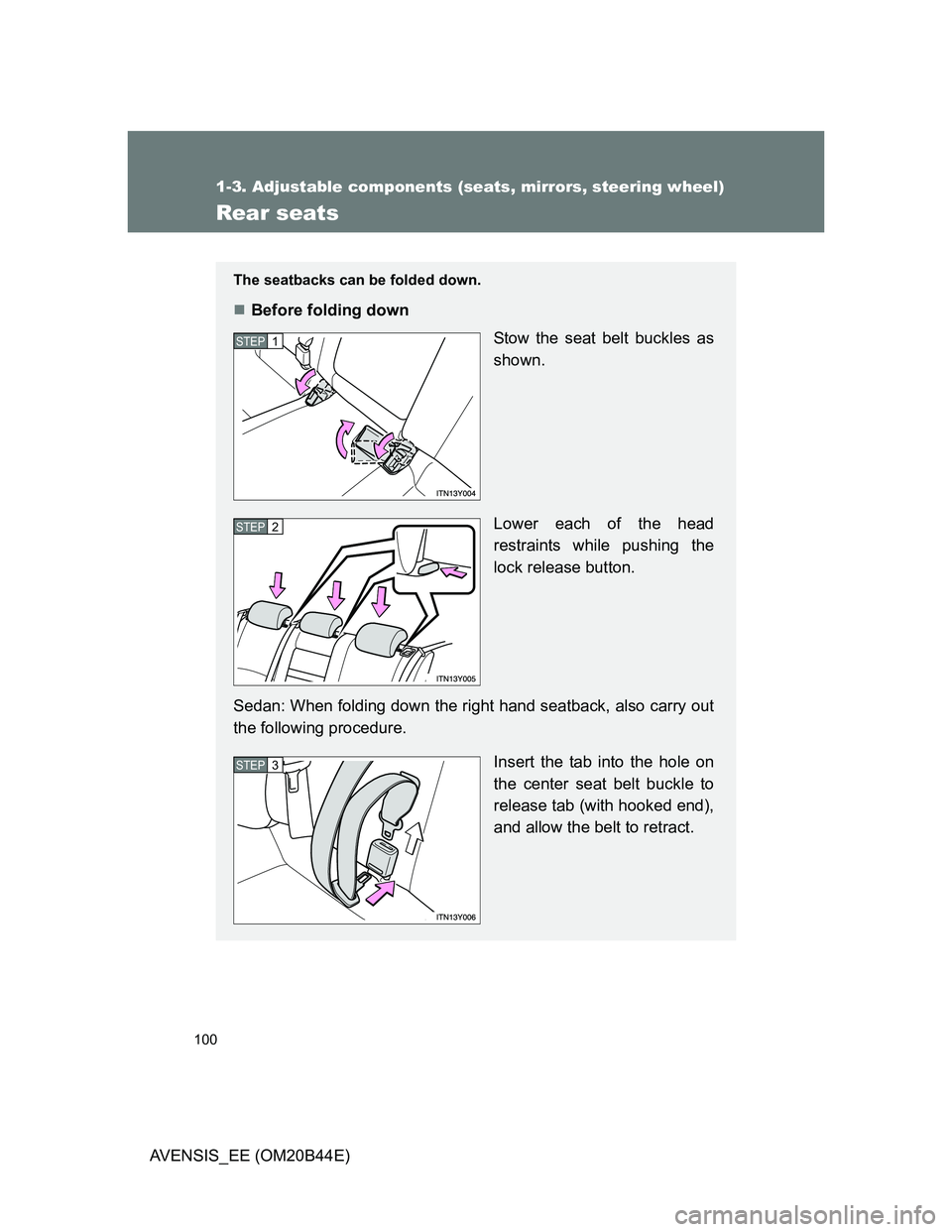
The seatbacks can be folded down.
Before folding down
Stow the seat belt buckles as
shown.
Lower each of the head
restraints while pushing the
lock release button.
Sedan: When folding down the right hand seatback, also carry out
the following procedure.
Insert the tab into the hole on
the center seat belt buckle to
release tab (with hooked end),
and allow the belt to retract.
STEP1
STEP2
STEP3
Page 106 of 772
106
1-3. Adjustable components (seats, mirrors, steering wheel)
AVENSIS_EE (OM20B44E)
Head restraints
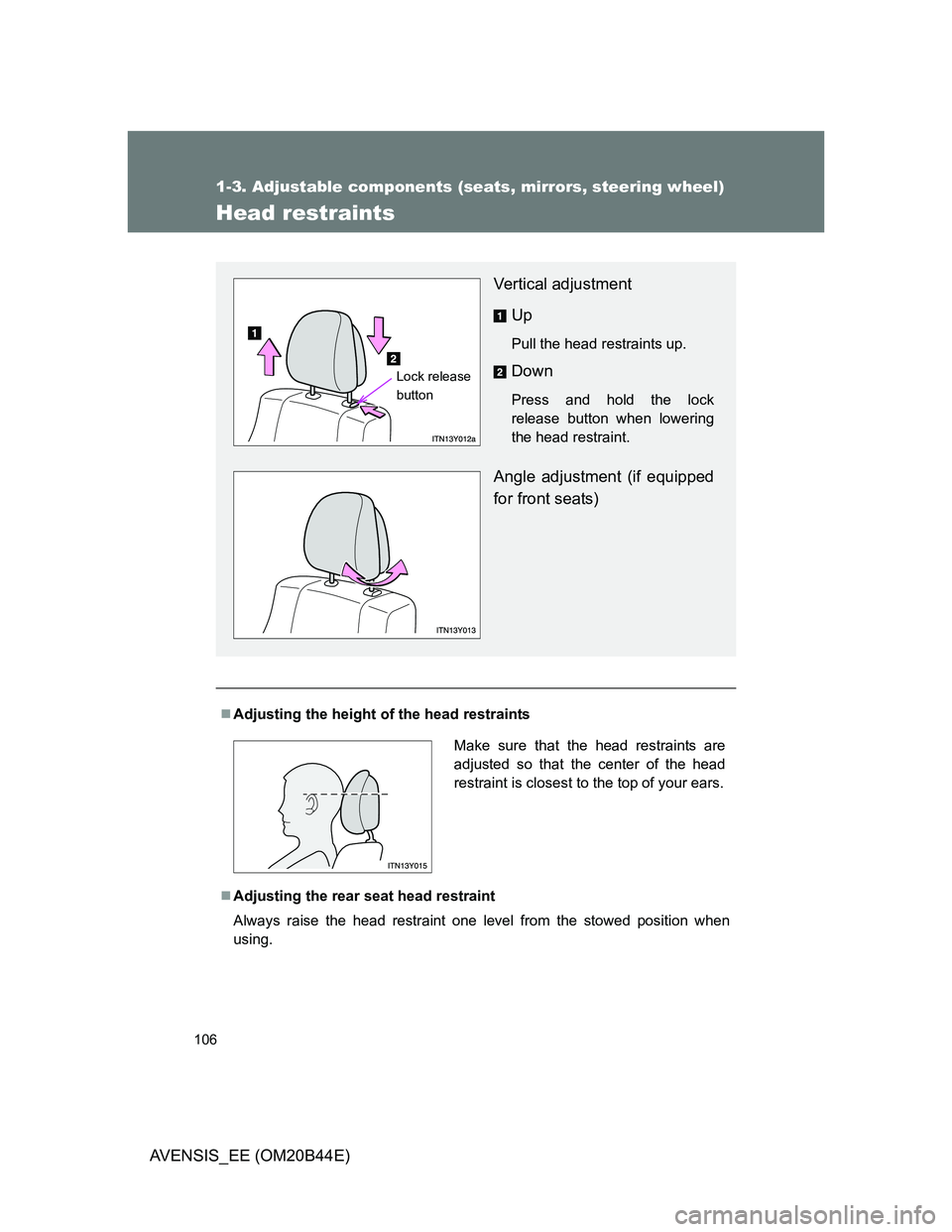
Adjusting the height of the head restraints
Adjusting the rear seat head restraint
Always raise the head restraint one level from the stowed position when
using.
Vertical adjustment
Up
Pull the head restraints up.
Down
Press and hold the lock
release button when lowering
the head restraint.
Angle adjustment (if equipped
for front seats)
Lock release
button
Make sure that the head restraints are
adjusted so that the center of the head
restraint is closest to the top of your ears.
Page 116 of 772
116
1-3. Adjustable components (seats, mirrors, steering wheel)
AVENSIS_EE (OM20B44E)
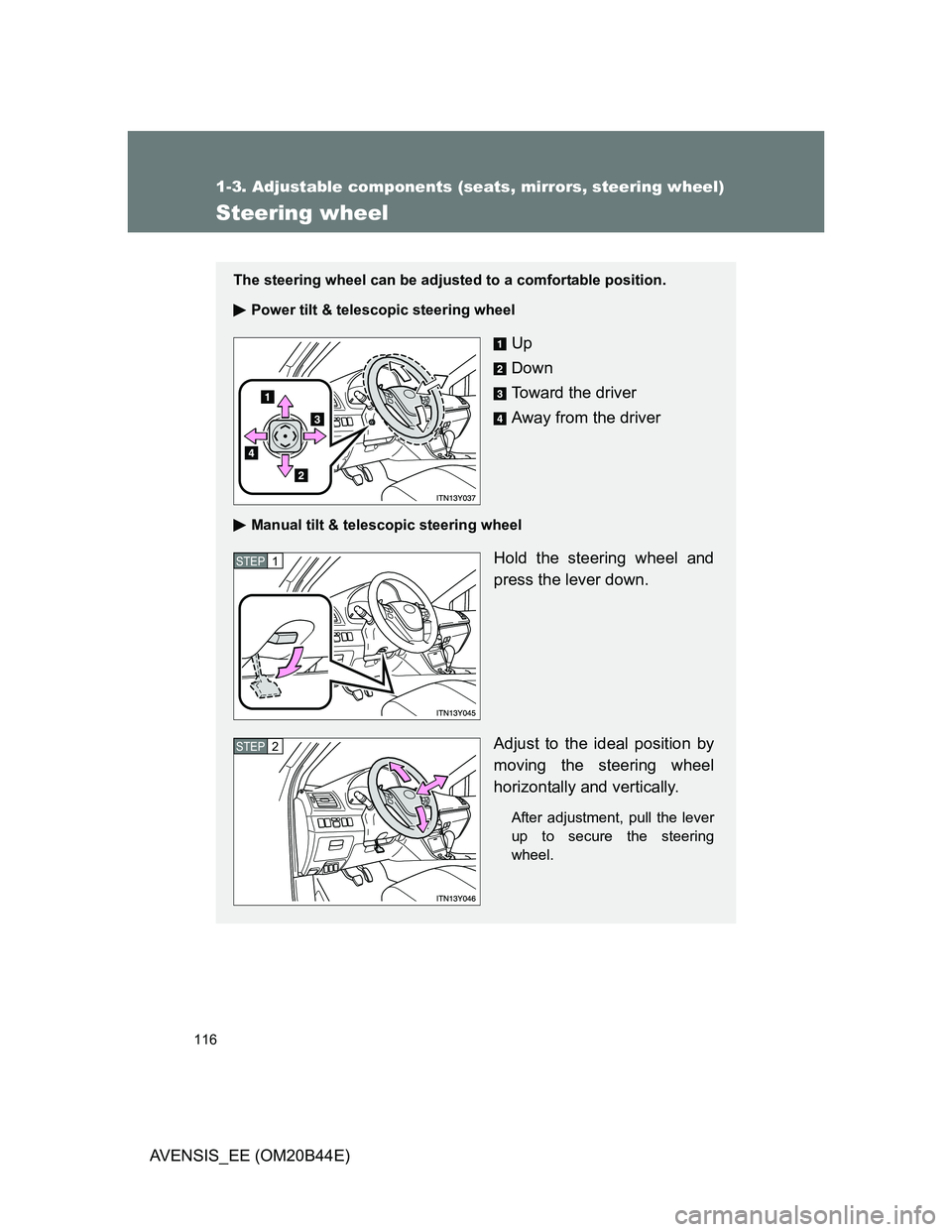
Steering wheel
The steering wheel can be adjusted to a comfortable position.
Power tilt & telescopic steering wheel
Up
Down
Toward the driver
Away from the driver
Manual tilt & telescopic steering wheel
Hold the steering wheel and
press the lever down.
Adjust to the ideal position by
moving the steering wheel
horizontally and vertically.
After adjustment, pull the lever
up to secure the steering
wheel.
STEP1
STEP2
Page 117 of 772
117 1-3. Adjustable components (seats, mirrors, steering wheel)
1
Before driving
AVENSIS_EE (OM20B44E)
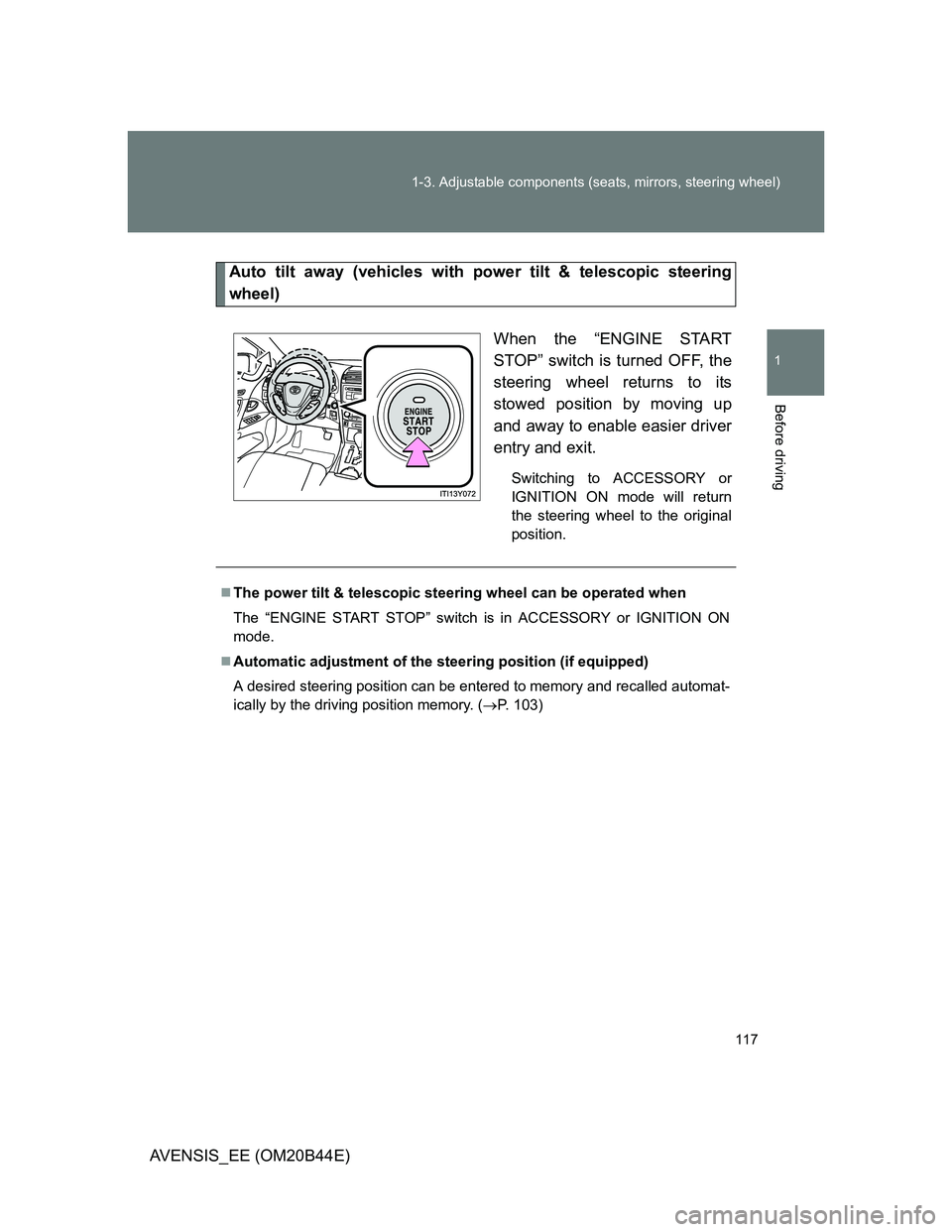
Auto tilt away (vehicles with power tilt & telescopic steering
wheel)
When the “ENGINE START
STOP” switch is turned OFF, the
steering wheel returns to its
stowed position by moving up
and away to enable easier driver
entry and exit.
Switching to ACCESSORY or
IGNITION ON mode will return
the steering wheel to the original
position.
The power tilt & telescopic steering wheel can be operated when
The “ENGINE START STOP” switch is in ACCESSORY or IGNITION ON
mode.
Automatic adjustment of the steering position (if equipped)
A desired steering position can be entered to memory and recalled automat-
ically by the driving position memory. (P. 103)