door lock TOYOTA AVENSIS 2014 (in English) Service Manual
[x] Cancel search | Manufacturer: TOYOTA, Model Year: 2014, Model line: AVENSIS, Model: TOYOTA AVENSIS 2014Pages: 776, PDF Size: 33.54 MB
Page 73 of 776
73 1-2. Opening, closing and locking the doors
1
Before driving
AVENSIS_OM_OM20B88E_(EE)
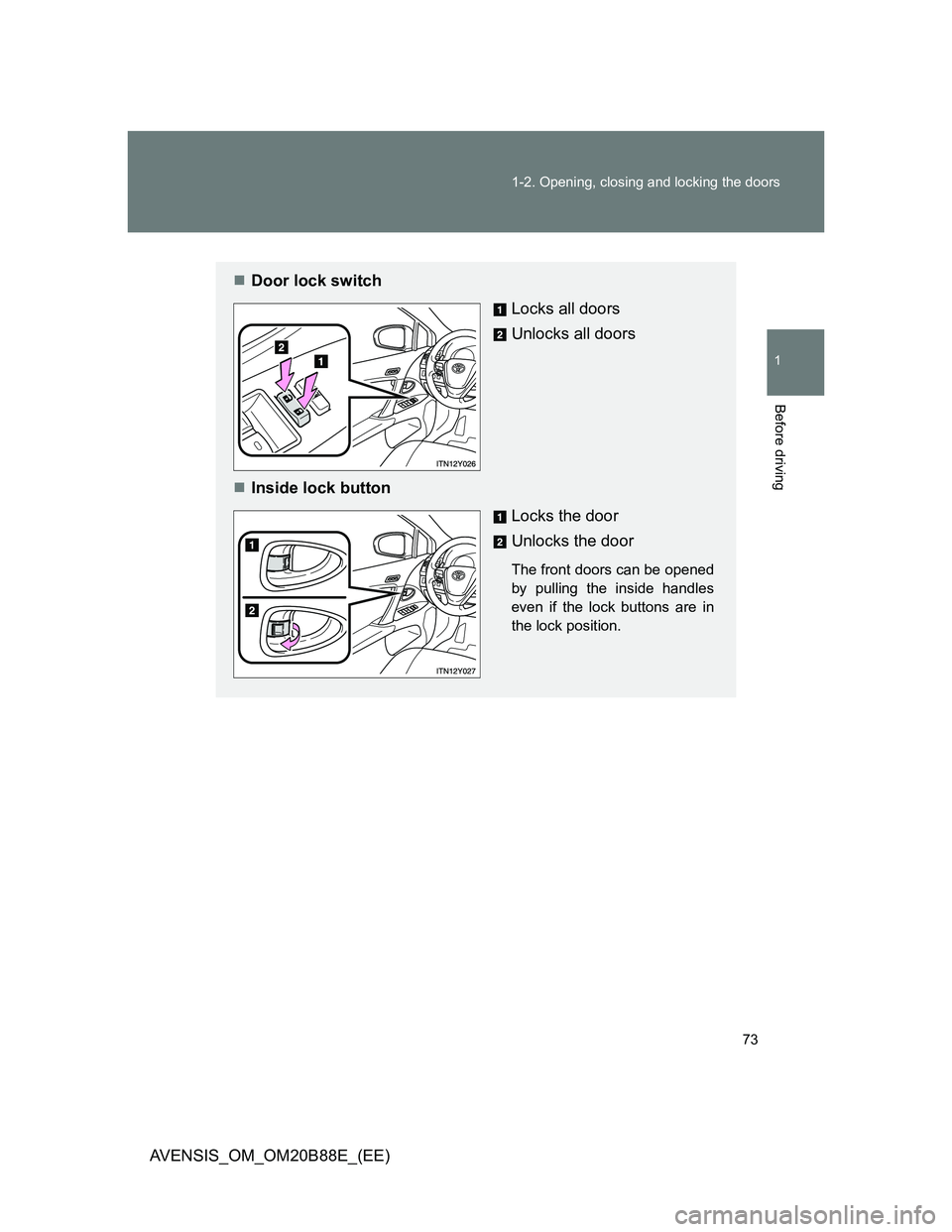
Door lock switch
Locks all doors
Unlocks all doors
Inside lock button
Locks the door
Unlocks the door
The front doors can be opened
by pulling the inside handles
even if the lock buttons are in
the lock position.
Page 74 of 776
74 1-2. Opening, closing and locking the doors
AVENSIS_OM_OM20B88E_(EE)
Locking the front doors from the outside without a key
Move the inside lock button to the lock position.
Close the door while pulling the door handle.
Vehicles with smart entry & start system
The door cannot be locked if the “ENGINE START STOP” switch is
in ACCESSORY or IGNITION ON mode, or the electronic key is
left inside the vehicle.
Depending on the position of the electronic key, the key may not be
detected correctly and the door may be locked.
Vehicles without smart entry & start system
The door cannot be locked if the key is in the engine switch.
STEP1
STEP2
Page 75 of 776
75 1-2. Opening, closing and locking the doors
1
Before driving
AVENSIS_OM_OM20B88E_(EE)
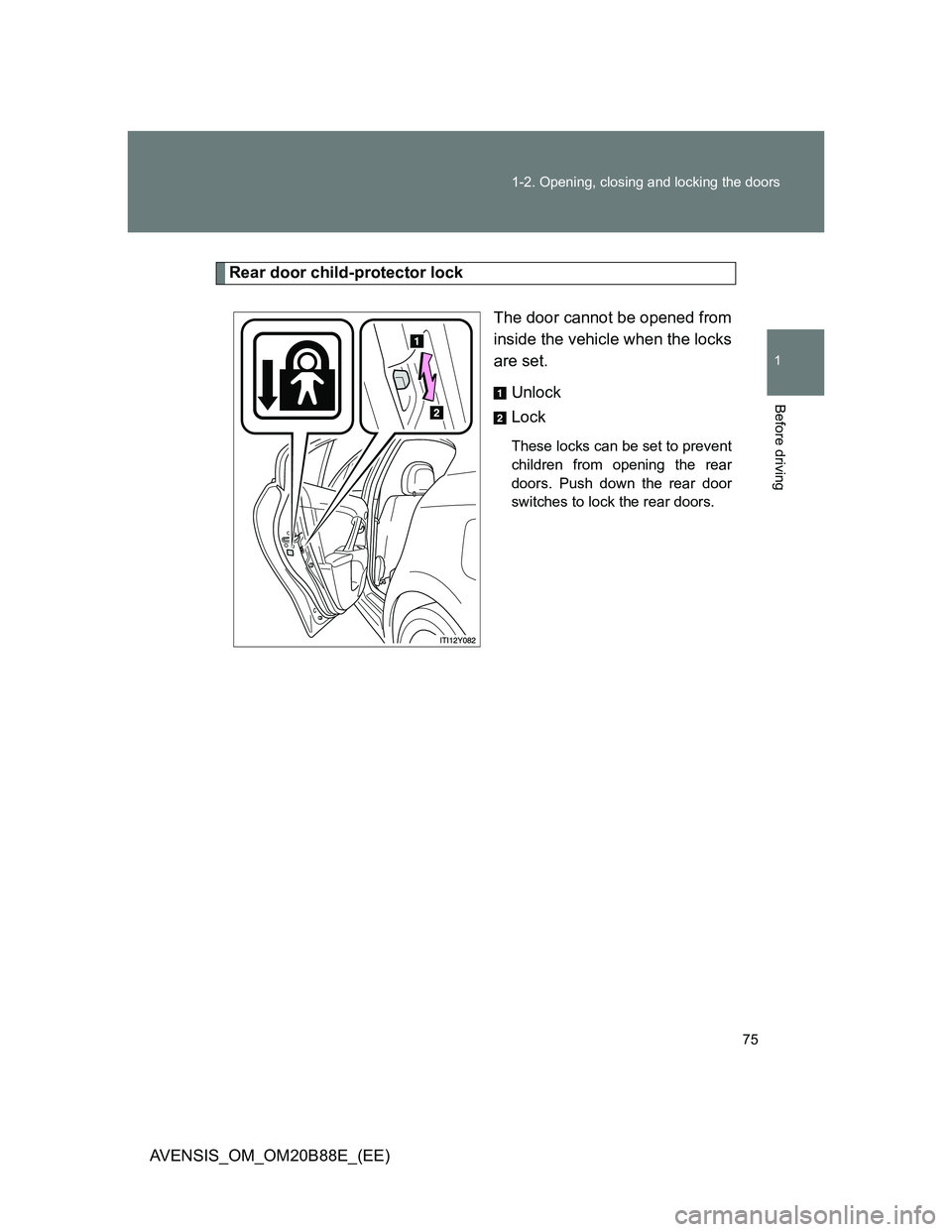
Rear door child-protector lock
The door cannot be opened from
inside the vehicle when the locks
are set.
Unlock
Lock
These locks can be set to prevent
children from opening the rear
doors. Push down the rear door
switches to lock the rear doors.
Page 76 of 776
76 1-2. Opening, closing and locking the doors
AVENSIS_OM_OM20B88E_(EE)
Automatic door locking and unlocking systems
To change the default setting, follow the instructions below.
FunctionOperationDefault
setting
Speed linked door locking
functionAll the doors are locked
when the vehicle speed is
approximately 20 km/h
(12 mph) or higher.On
Shift position linked door
locking functionShifting the shift lever out
of “P” locks all the doors.Off
Shift position linked door
unlocking functionShifting the shift lever to
“P” unlocks all the doors.Off
Driver’s door linked door
unlocking function (vehi-
cles with smart entry &
start system)All the doors are unlocked
when the driver’s door is
opened within 45 seconds
after turning the “ENGINE
START STOP” switch off.On
Driver’s door linked door
unlocking function (vehi-
cles without smart entry &
start system)All the doors are unlocked
when the driver’s door is
opened within 45 seconds
after turning the engine
switch to “LOCK” position.On
Page 77 of 776
77 1-2. Opening, closing and locking the doors
1
Before driving
AVENSIS_OM_OM20B88E_(EE)Setting and canceling the functions
Vehicles with a “touch screen”
Customization can also be done by “touch screen”. (Refer to the
““touch screen” Owner’s Manual”.)
Vehicles without a “touch screen”
To switch between setting and canceling, follow the procedure
below.
Vehicles with smart entry & start system:
Close all doors and turn the “ENGINE START STOP” switch
to IGNITION ON mode. (P. 202)
Perform within 10 seconds.
Vehicles without smart entry & start system:
Close all doors and turn the engine switch to “ON” position.
(P. 206)
Perform within 10 seconds.
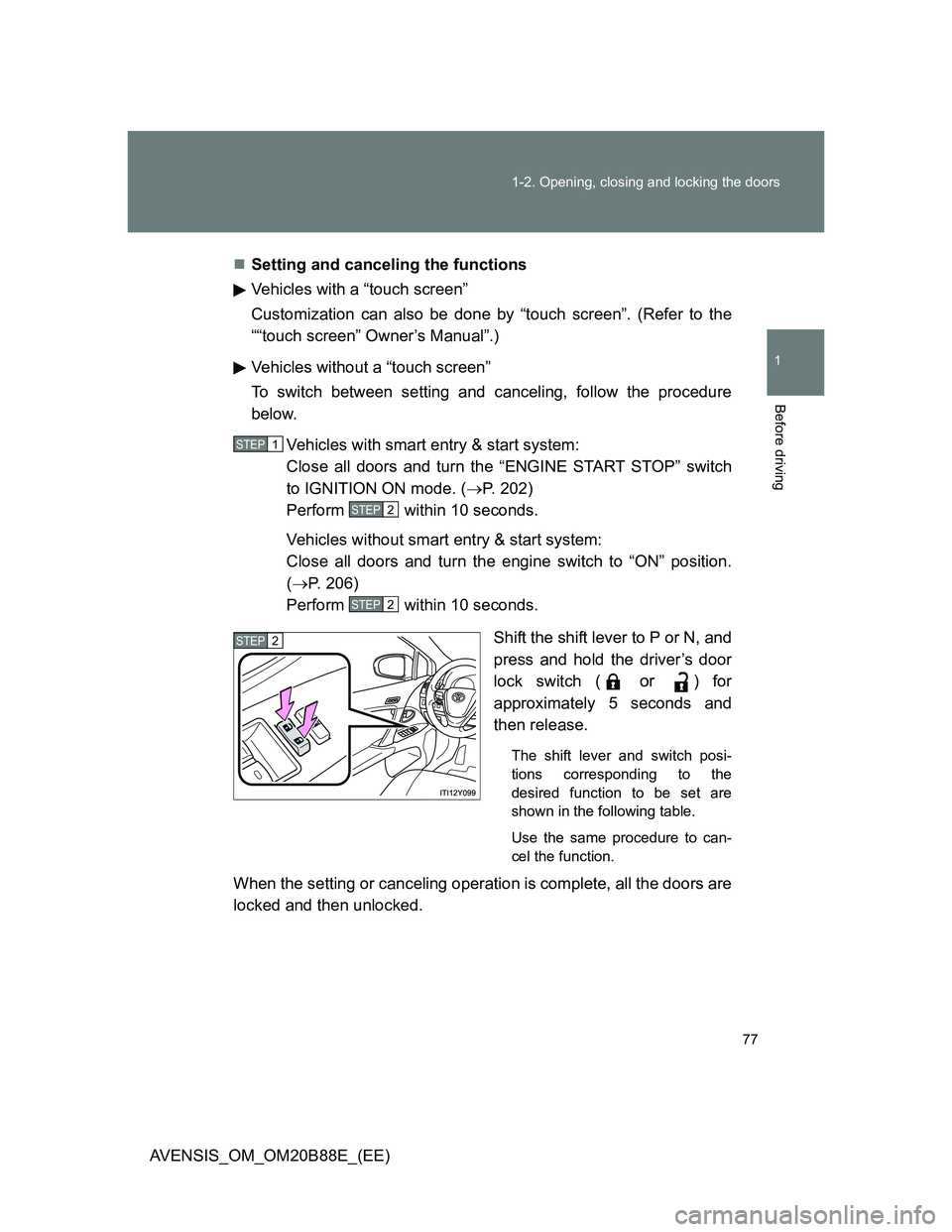
Shift the shift lever to P or N, and
press and hold the driver’s door
lock switch (
or ) for
approximately 5 seconds and
then release.
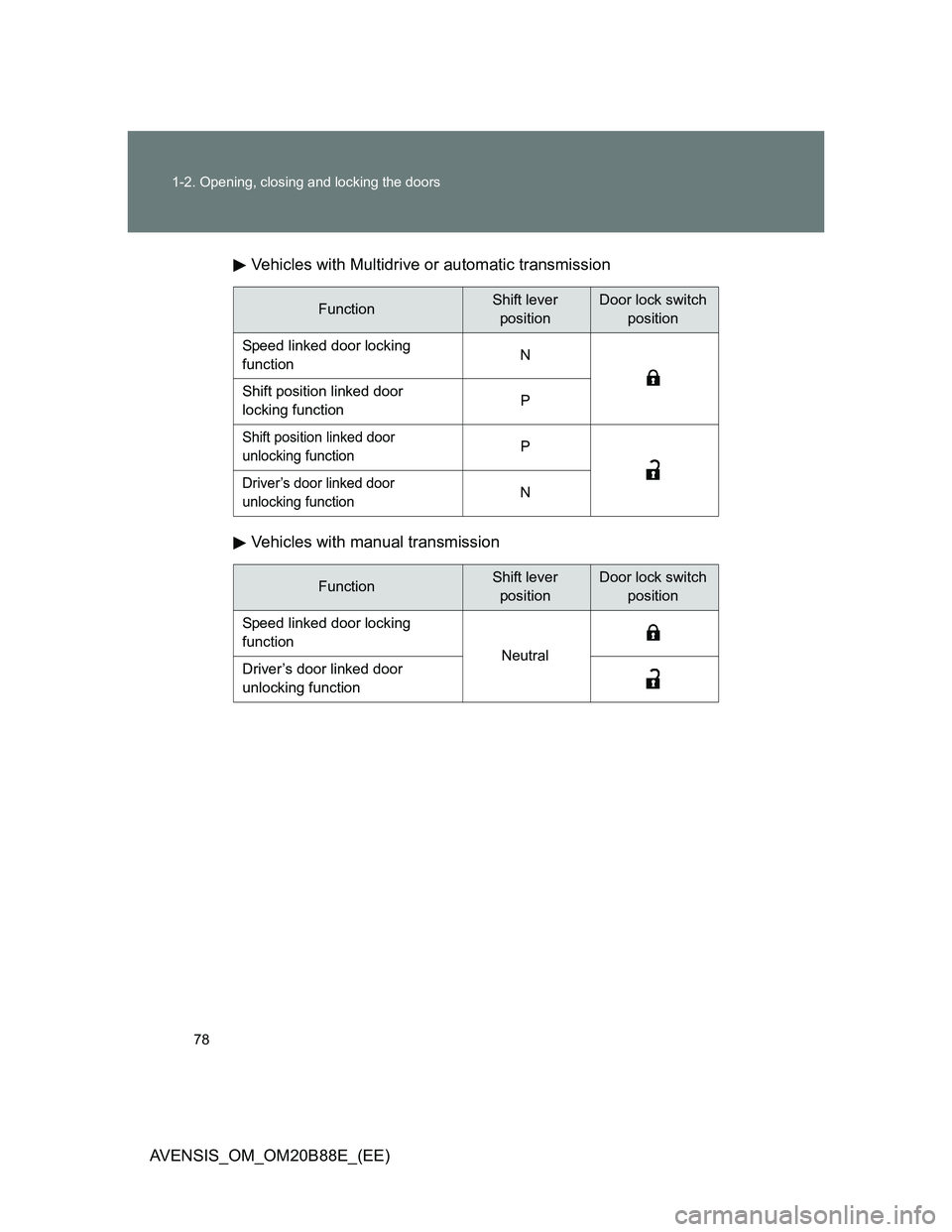
The shift lever and switch posi-
tions corresponding to the
desired function to be set are
shown in the following table.
Use the same procedure to can-
cel the function.
When the setting or canceling operation is complete, all the doors are
locked and then unlocked.
STEP1
STEP2
STEP2
STEP2
Page 78 of 776
78 1-2. Opening, closing and locking the doors
AVENSIS_OM_OM20B88E_(EE)Vehicles with Multidrive or automatic transmission
Vehicles with manual transmission
FunctionShift lever
positionDoor lock switch
position
Speed linked door locking
functionN
Shift position linked door
locking functionP
Shift position linked door
unlocking functionP
Driver’s door linked door
unlocking function N
FunctionShift lever
positionDoor lock switch
position
Speed linked door locking
function
NeutralDriver’s door linked door
unlocking function
Page 79 of 776
79 1-2. Opening, closing and locking the doors
1
Before driving
AVENSIS_OM_OM20B88E_(EE)
Impact detection door lock release system
In the event that the vehicle is subject to a strong impact, all the doors are
unlocked. Depending on the force of the impact or the type of accident, how-
ever, the system may not operate.
CAUTION
To prevent an accident
Observe the following precautions while driving the vehicle.
Failing to do so may result in a door opening and an occupant falling out,
resulting in death or serious injury.
Always use a seat belt.
Ensure that all doors are properly closed.
Do not pull the inside handle of the doors while driving.
The doors may be opened and the passengers are thrown out of the vehi-
cle and it may result in death or serious injury.
Be especially careful for the front doors, as the doors may be opened even
if the inside lock buttons are in locked position.
Set the rear door child-protector locks when children are seated in the rear
seat.
Page 80 of 776
80
1-2. Opening, closing and locking the doors
AVENSIS_OM_OM20B88E_(EE)
Trunk (sedan)
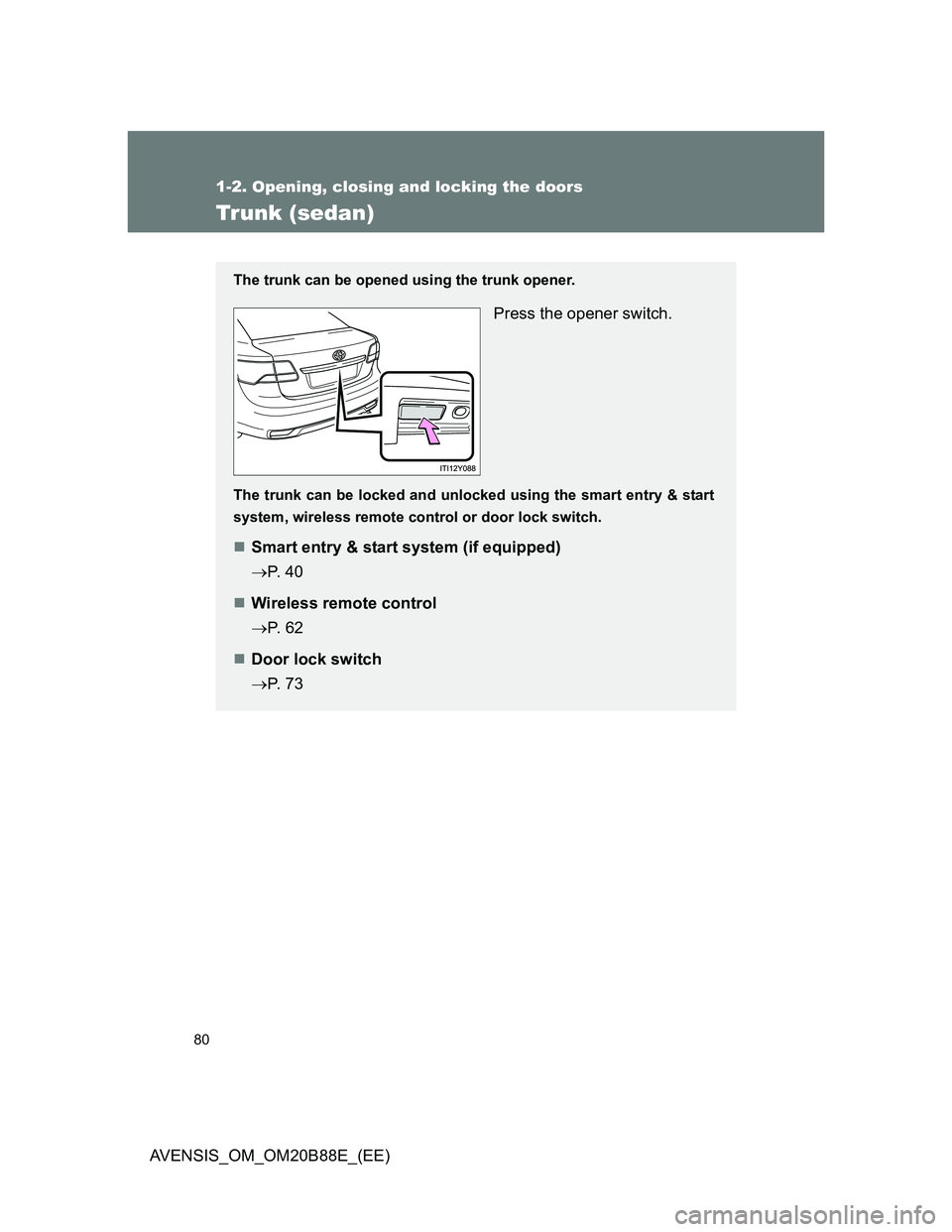
The trunk can be opened using the trunk opener.
Press the opener switch.
The trunk can be locked and unlocked using the smart entry & start
system, wireless remote control or door lock switch.
Smart entry & start system (if equipped)
P. 4 0
Wireless remote control
P. 6 2
Door lock switch
P. 7 3
Page 81 of 776
81 1-2. Opening, closing and locking the doors
1
Before driving
AVENSIS_OM_OM20B88E_(EE)
Trunk light
The trunk light turns on when the trunk is opened.
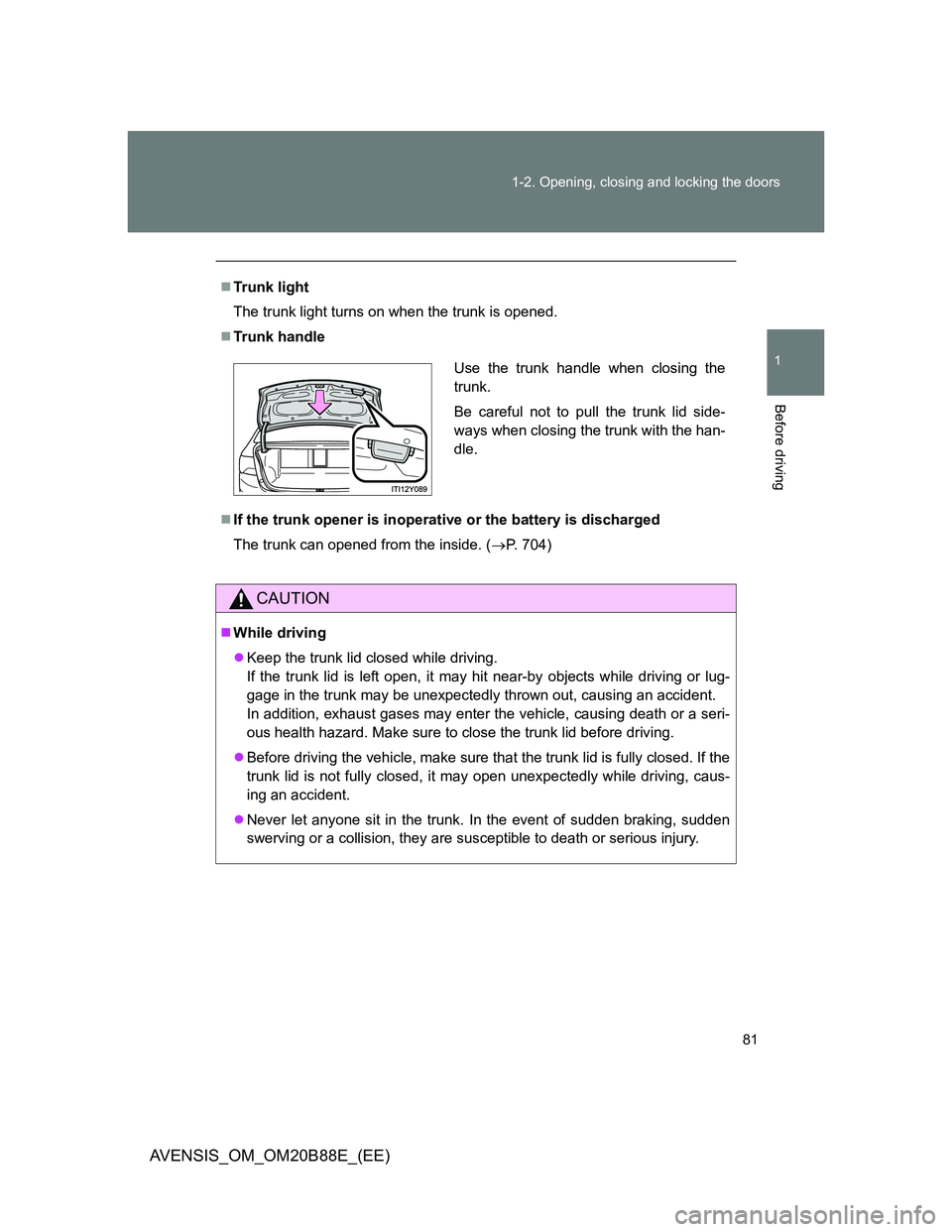
Trunk handle
If the trunk opener is inoperative or the battery is discharged
The trunk can opened from the inside. (P. 704)
CAUTION
While driving
Keep the trunk lid closed while driving.
If the trunk lid is left open, it may hit near-by objects while driving or lug-
gage in the trunk may be unexpectedly thrown out, causing an accident.
In addition, exhaust gases may enter the vehicle, causing death or a seri-
ous health hazard. Make sure to close the trunk lid before driving.
Before driving the vehicle, make sure that the trunk lid is fully closed. If the
trunk lid is not fully closed, it may open unexpectedly while driving, caus-
ing an accident.
Never let anyone sit in the trunk. In the event of sudden braking, sudden
swerving or a collision, they are susceptible to death or serious injury.
Use the trunk handle when closing the
trunk.
Be careful not to pull the trunk lid side-
ways when closing the trunk with the han-
dle.
Page 82 of 776
82 1-2. Opening, closing and locking the doors
AVENSIS_OM_OM20B88E_(EE)
CAUTION
When children are in the vehicle
Observe the following precautions.
Failure to do so may result in death or serious injury.
Do not allow children to enter the trunk.
If a child is accidentally locked in the trunk, they could have heat exhaus-
tion or suffocate.
Do not allow a child to open or close the trunk lid.
Doing so may cause the trunk lid operate unexpectedly, or cause the
child’s hands, head, or neck to be caught by the closing trunk lid.
Using the trunk
Observe the following precautions.
Failure to do so may cause parts of the body to be caught, resulting in seri-
ous injury.
Remove any heavy loads, such as snow and ice, from the trunk lid before
opening it. Failure to do so may cause the trunk lid to suddenly shut again
after it is opened.
When opening or closing the trunk lid, thoroughly check to make sure the
surrounding area is safe.
If anyone is in the vicinity, make sure they are safe and let them know that
the trunk is about to open or close.
Use caution when opening or closing the trunk lid in windy weather as it
may move abruptly in strong wind.