steering wheel TOYOTA AVENSIS 2014 (in English) Service Manual
[x] Cancel search | Manufacturer: TOYOTA, Model Year: 2014, Model line: AVENSIS, Model: TOYOTA AVENSIS 2014Pages: 776, PDF Size: 33.54 MB
Page 207 of 776
207 2-1. Driving procedures
2
When driving
AVENSIS_OM_OM20B88E_(EE)
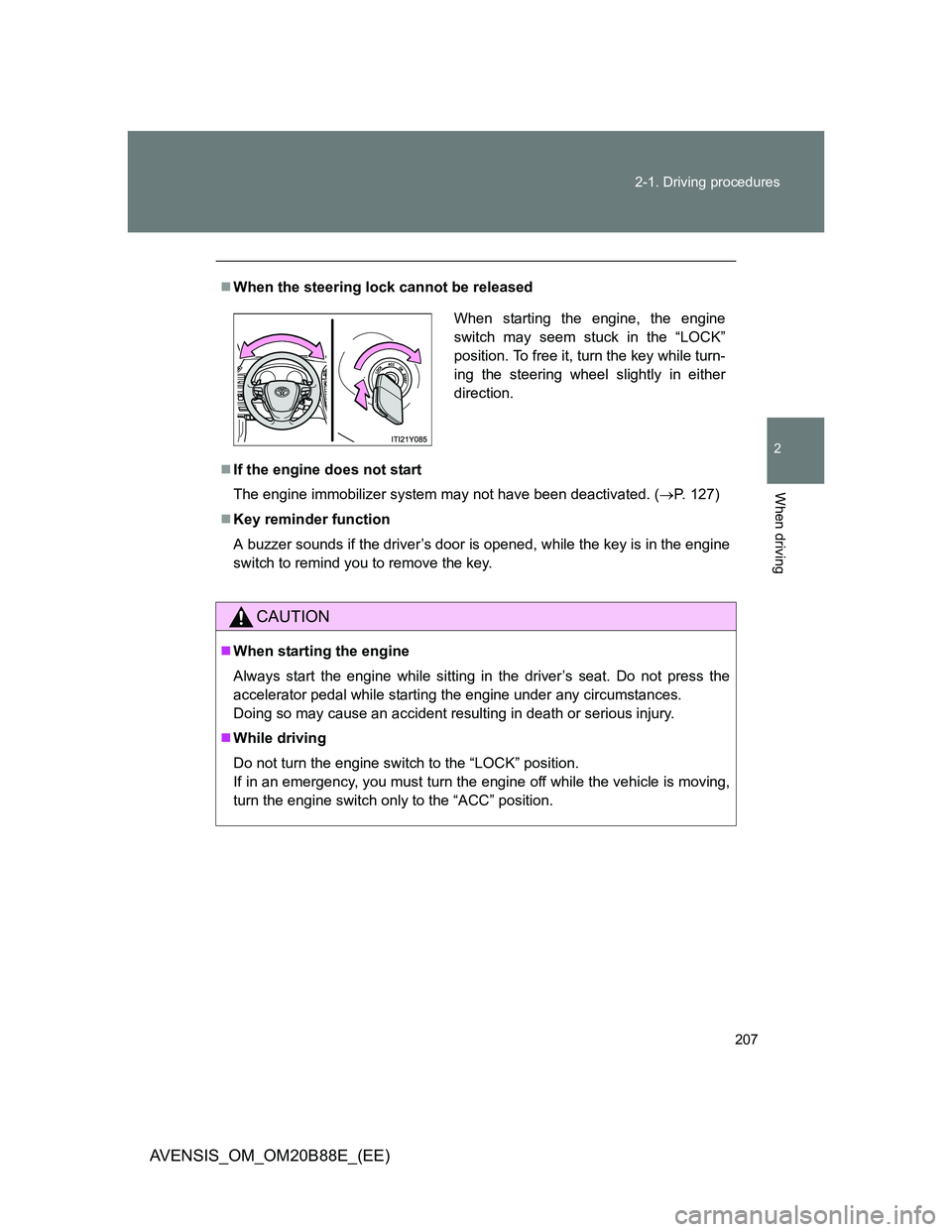
When the steering lock cannot be released
If the engine does not start
The engine immobilizer system may not have been deactivated. (P. 127)
Key reminder function
A buzzer sounds if the driver’s door is opened, while the key is in the engine
switch to remind you to remove the key.
CAUTION
When starting the engine
Always start the engine while sitting in the driver’s seat. Do not press the
accelerator pedal while starting the engine under any circumstances.
Doing so may cause an accident resulting in death or serious injury.
While driving
Do not turn the engine switch to the “LOCK” position.
If in an emergency, you must turn the engine off while the vehicle is moving,
turn the engine switch only to the “ACC” position.
When starting the engine, the engine
switch may seem stuck in the “LOCK”
position. To free it, turn the key while turn-
ing the steering wheel slightly in either
direction.
Page 231 of 776
231
2-1. Driving procedures
2
When driving
AVENSIS_OM_OM20B88E_(EE)
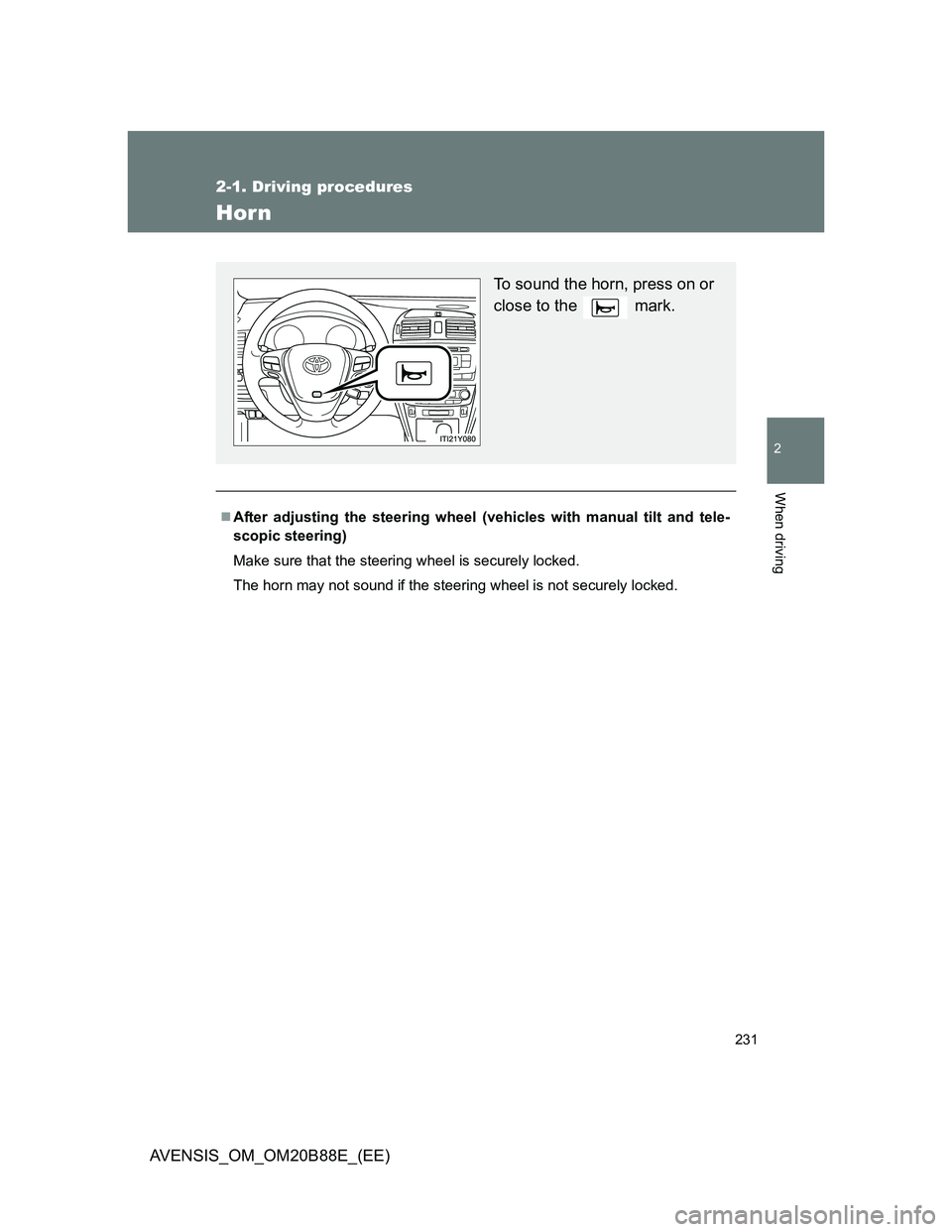
Horn
After adjusting the steering wheel (vehicles with manual tilt and tele-
scopic steering)
Make sure that the steering wheel is securely locked.
The horn may not sound if the steering wheel is not securely locked.
To sound the horn, press on or
close to the mark.
Page 290 of 776
290 2-4. Using other driving systems
AVENSIS_OM_OM20B88E_(EE)
CAUTION
When the sensor may not be correctly detecting the vehicle ahead
Apply the brakes as necessary when any of the following types of vehicles
are in front of you.
As the sensor may not be able to correctly detect these types of vehicles,
the approach warning (P. 281) will not be activated, and a fatal or serious
accident may result.
Vehicles that cut in suddenly
Vehicles traveling at low speeds
Vehicles that are not moving
Vehicles with small rear ends (trailers with no load on board etc.)
Motorcycles traveling in the same lane
Conditions under which the vehicle-to-vehicle distance control may
not function correctly
Apply the brakes as necessary in the following conditions as the radar sen-
sor may not be able to correctly detect vehicles ahead, and a fatal or serious
accident may result:
When water or snow thrown up by the surrounding vehicles hinders the
functioning of the sensor
When your vehicle is pointing upwards (caused by a heavy load in the
trunk etc.)
When the road curves or when the lanes are narrow
When steering wheel operation or your position in the lane is unstable
When the vehicle ahead of you decelerates suddenly
Page 307 of 776
307 2-4. Using other driving systems
2
When driving
AVENSIS_OM_OM20B88E_(EE)
CAUTION
When using the rear view monitor system
Observe the following precautions to avoid an accident that could result in
death or serious injuries.
Never depend solely on the monitor system when reversing.
Always check visually and with the mirrors to confirm your intended path is
clear.
Use your own eyes to confirm the vehicle’s surroundings, as the displayed
image may become faint or dark, and moving images will be distorted, or
not entirely visible when the outside temperature is low. When backing up,
be sure to check behind and all around the vehicle visually and with the
mirrors before proceeding.
Always check the vehicle surrounding area, because the guide lines are
ancillary lines.
The guide lines are ancillary lines and do not change even if the steering
wheel is turned.
Depicted distances between objects and flat surfaces differ from actual
distances.
Do not use the system if the trunk/back door is not completely closed.
Page 310 of 776
310
2-4. Using other driving systems
AVENSIS_OM_OM20B88E_(EE)
LKA (Lane-Keeping Assist)
: If equipped
While driving on a freeway or motor highway that has lane markers,
this system recognizes the lanes using a camera as a sensor to
assist the driver with staying in the lane. The LKA system has two
functions.
Lane departure warning function
If the system judges that the vehicle may deviate from its lane, it
alerts the driver using rapid beeping, indications on the multi-
information display, and a sensory warning
* given via the steer-
ing wheel.
*: A slight steering torque is applied for a short period of time in
the direction of the center of the lane.
Lane keeping assist function
This function will be active when the vehicle-to-vehicle distance
control mode of the cruise control (P. 273) is set with vehicle
speed above approx. 72 km/h (approx. 45 mph) and while the
lane departure warning function is active. When the lane keep-
ing assist function is active, a slight steering torque will be
applied, to help the driver maintain the vehicle in a central posi-
tion within the lane.
While the lane keeping assist function is active, sensory warnings
will not occur.
Page 313 of 776
313 2-4. Using other driving systems
2
When driving
AVENSIS_OM_OM20B88E_(EE)
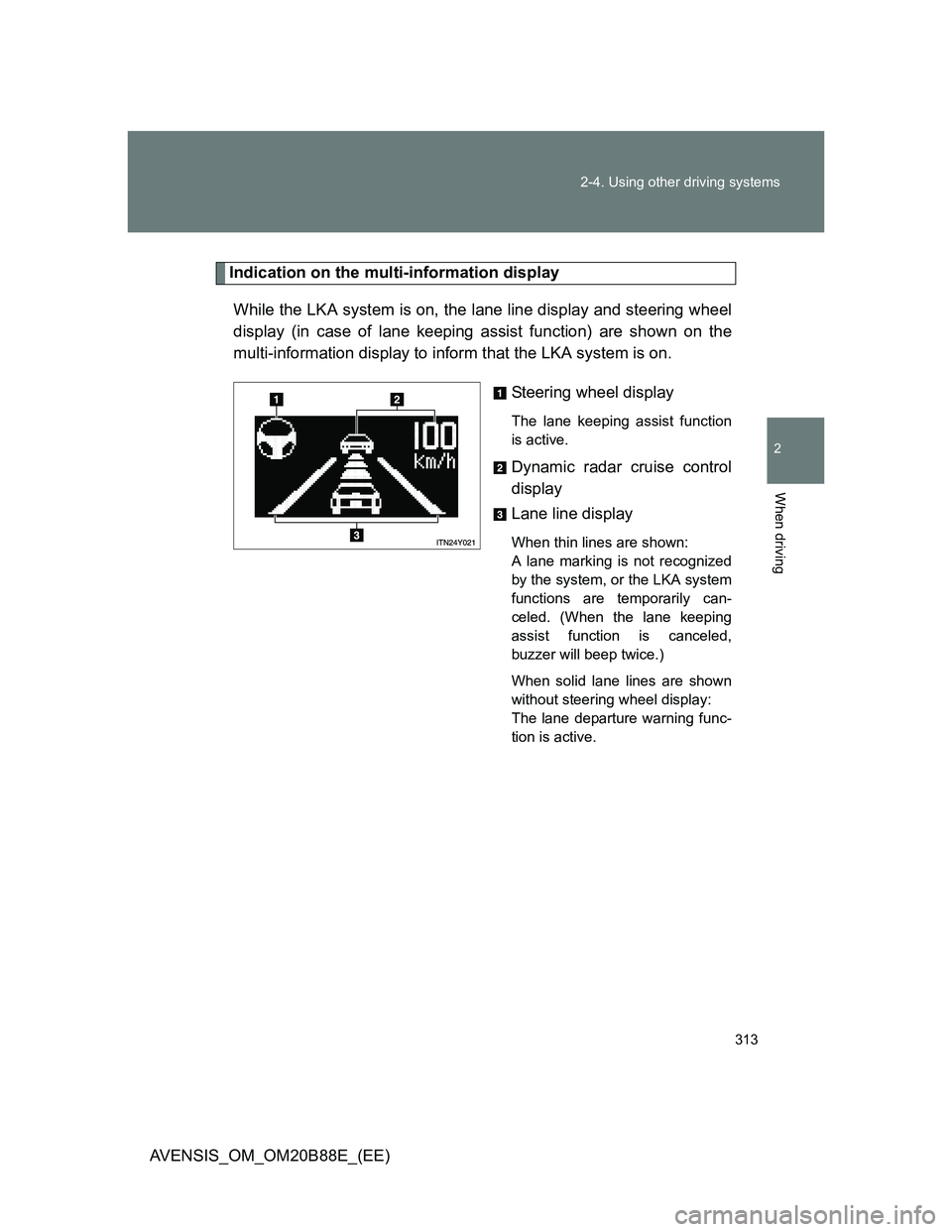
Indication on the multi-information display
While the LKA system is on, the lane line display and steering wheel
display (in case of lane keeping assist function) are shown on the
multi-information display to inform that the LKA system is on.
Steering wheel display
The lane keeping assist function
is active.
Dynamic radar cruise control
display
Lane line display
When thin lines are shown:
A lane marking is not recognized
by the system, or the LKA system
functions are temporarily can-
celed. (When the lane keeping
assist function is canceled,
buzzer will beep twice.)
When solid lane lines are shown
without steering wheel display:
The lane departure warning func-
tion is active.
Page 314 of 776
314 2-4. Using other driving systems
AVENSIS_OM_OM20B88E_(EE)
Temporary cancellation of the LKA system functions
If any of the following occurs, the LKA system functions will be temporarily
canceled. The functions will resume after the necessary operating conditions
have returned.
The turn signal lever is operated.
The steering wheel is turned as far as necessary to cause the vehicle to
change lanes.
The brake pedal is depressed.
However, the lane keeping assist function will not resume even after the
brake pedal is released because depressing the brake pedal also can-
cels the dynamic radar cruise control (only lane departure warning func-
tion will resume).
The vehicle speed deviates from the operating range of the LKA system
functions. (The buzzer will beep twice when the lane keeping assist func-
tion is being canceled.)
When the lane lines cannot be recognized while driving. (The buzzer will
beep twice when the lane keeping assist function is being canceled.)
The wiper operates continuously. (The buzzer will beep twice when the
lane keeping assist function is being canceled.)
The buzzer may not beep when the LKA system functions are canceled
because the notification of dynamic radar cruise control cancellation
takes priority over the LKA system and cancels the function.
When the lane departure warning function is activated
The lane departure warning function will be temporarily canceled and will not
resume until a few seconds elapse after it is activated.
Page 315 of 776
315 2-4. Using other driving systems
2
When driving
AVENSIS_OM_OM20B88E_(EE)
Hands-free driving warning
If the steering wheel is not operated for about 15 seconds on a straight road
or about 5 seconds on a curve, the buzzer will beep twice, indicators on the
multi-information display will flash, and the lane keeping assist function will
be temporarily canceled. If you drive the vehicle with your hands lightly
touching the steering wheel, this may also be detected as hands-free driv-
ing.
When the vehicle has been parked in the sun
The LKA system functions may not be available for a while after driving has
started. In such cases, turn the LKA system off and turn it on again after nor-
mal temperature returns. When the temperature in the cabin decreases and
the temperature around the camera sensor becomes suitable for its opera-
tion, the functions will begin to operate.
Warning lights and messages for LKA
Warning lights and messages are used to indicate a system malfunction or
to inform the driver of the need for caution while driving. (P. 611)
CAUTION
Before using the LKA system
Do not rely on the LKA system to remain within a selected lane. The LKA
system is not designed to enable inattentive driving. The steering wheel
should be operated by the driver to maintain the vehicle in a suitable position
within its lane. Always drive carefully.
Page 319 of 776
319
2-4. Using other driving systems
2
When driving
AVENSIS_OM_OM20B88E_(EE)
Driving assist systems
To help enhance driving safety and performance, the following sys-
tems operate automatically in response to various driving situations.
Be aware, however, that these systems are supplementary and
should not be relied upon too heavily when operating the vehicle.
ABS (Anti-lock Brake System)
Helps to prevent wheel lock when the brakes are applied suddenly, or if
the brakes are applied while driving on a slippery road surface.
Brake assist
Generates an increased level of braking force after the brake pedal is
depressed, when the system detects a panic stop situation.
VSC (Vehicle Stability Control)
Helps the driver to control skidding when swerving suddenly or turning
on slippery road surfaces.
TRC (Traction Control)
Helps to maintain drive power and prevent the front wheels from spin-
ning when starting the vehicle or accelerating on slippery roads.
EPS (Electric Power Steering)
Employs an electric motor to reduce the amount of effort needed to turn
the steering wheel.
VSC+ (Vehicle Stability Control+)
Provides cooperative control of the ABS, TRC, VSC and EPS.
Helps to maintain directional stability when swerving on slippery road
surfaces by controlling steering performance.
PCS (Pre-Crash Safety) (if equipped)
P. 325
Emergency brake signal (if equipped)
When the brakes are applied suddenly, the stop lights automatically
flash to alert the vehicle behind.
Page 322 of 776
322 2-4. Using other driving systems
AVENSIS_OM_OM20B88E_(EE)
Sounds and vibrations caused by the ABS, brake assist, TRC and VSC
A sound may be heard from the engine compartment when the engine is
started or just after the vehicle begins to move. This sound does not indi-
cate that a malfunction has occurred in any of these systems.
Any of the following conditions may occur when the above systems are
operating. None of these indicates that a malfunction has occurred.
• Vibrations may be felt through the vehicle body and steering.
• A motor sound may be heard after the vehicle comes to a stop.
• The brake pedal may pulsate slightly after the ABS is activated.
• The brake pedal may move down slightly after the ABS is activated.
EPS operation sound
When the steering wheel operates, a motor sound (whirring sound) may be
heard. This does not indicate a malfunction.
Reduced effectiveness of EPS
The effectiveness of EPS is reduced to prevent the system from overheating
when there is frequent steering input over an extended period of time. The
steering wheel may feel heavy as a result. Should this occur, refrain from
excessive steering input or stop the vehicle and turn the engine off. The sys-
tem should return to normal after about 10 minutes.