AUX TOYOTA AVENSIS 2014 Owners Manual (in English)
[x] Cancel search | Manufacturer: TOYOTA, Model Year: 2014, Model line: AVENSIS, Model: TOYOTA AVENSIS 2014Pages: 776, PDF Size: 33.54 MB
Page 4 of 776
TABLE OF CONTENTSIndex
4
AVENSIS_OM_OM20B88E_(EE)
3-1. Using the air conditioning
system and defogger
Automatic air conditioning
system .............................. 352
Manual air conditioning
system .............................. 362
Power heater ...................... 370
Rear window and outside
rear view mirror
defoggers.......................... 373
Windshield wiper
de-icer............................... 3743-2. Using the audio system
Audio system types ............ 375
Using the radio ................... 383
Using the CD player ........... 390
Playing back MP3 and
WMA discs ....................... 398
Operating an iPod .............. 408
Operating a
USB memory.................... 418
Optimal use of the
audio system .................... 428
Using the AUX port ............ 430
Using the steering wheel
audio switches ................. 431
Bluetooth
® audio/phone ..... 434
Using the Bluetooth®
audio/phone ..................... 441
Operating a Bluetooth
®
enabled portable player ... 447
Making a phone call ........... 451
Using the “SET UP” menu
(“Bluetooth” menu) ........... 457
Using the “SET UP” menu
(“TEL” menu).................... 463
3-3. Using the interior lights
Interior lights list ................. 470
• Personal/interior light
main switch ...................... 471
• Personal/interior lights ..... 471
• Personal lights ................. 472
3Interior features
Page 12 of 776
12
AVENSIS_OM_OM20B88E_(EE)
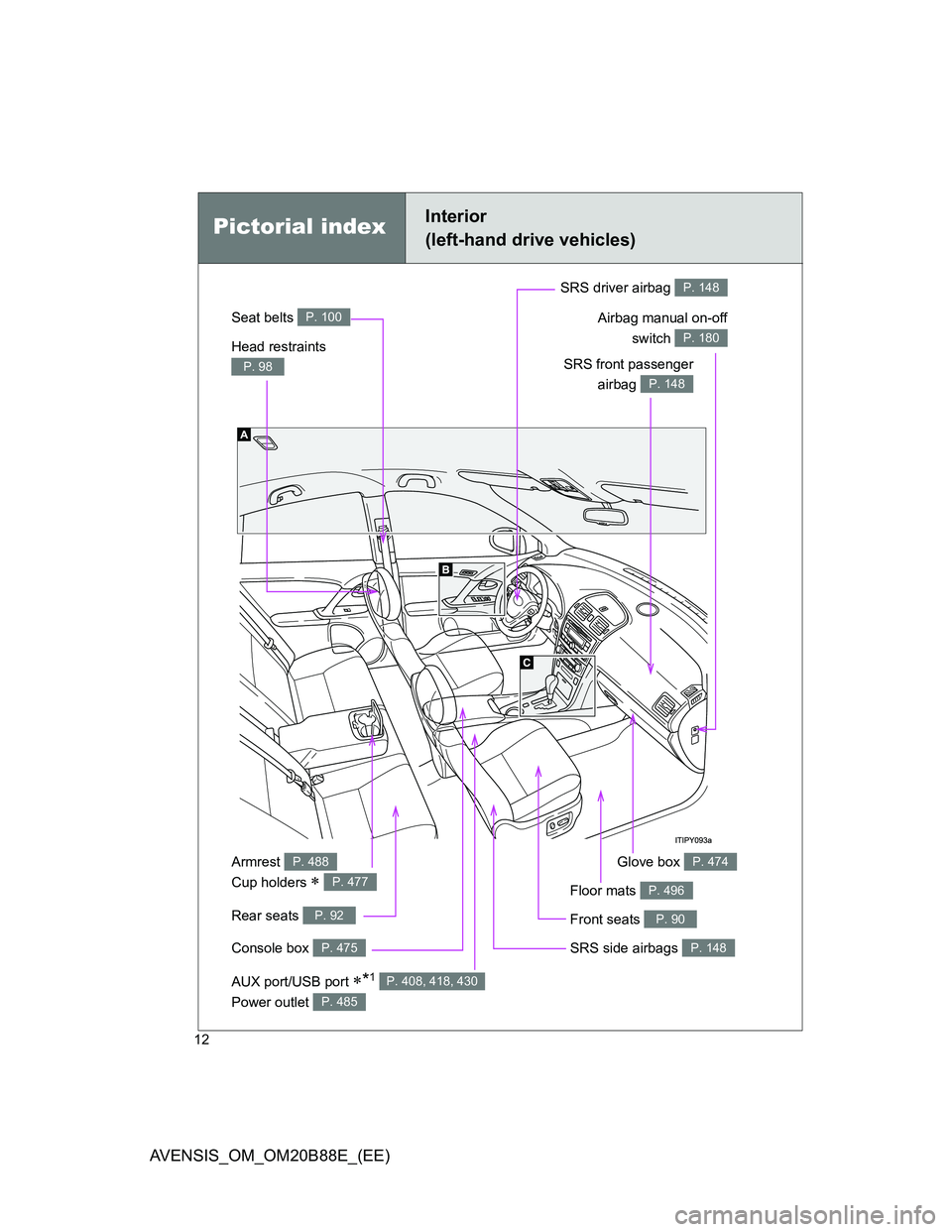
Power outlet P. 485
Pictorial indexInterior
(left-hand drive vehicles)
Seat belts P. 100
SRS front passenger
airbag
P. 148
SRS driver airbag P. 148
Head restraints
P. 98
Console box P. 475
Armrest
Cup holders
P. 488
P. 477
Front seats P. 90
SRS side airbags P. 148
Glove box P. 474
Rear seats P. 92
Floor mats P. 496
Airbag manual on-off
switch
P. 180
AUX port/USB port *1 P. 408, 418, 430
Page 20 of 776
20
AVENSIS_OM_OM20B88E_(EE)
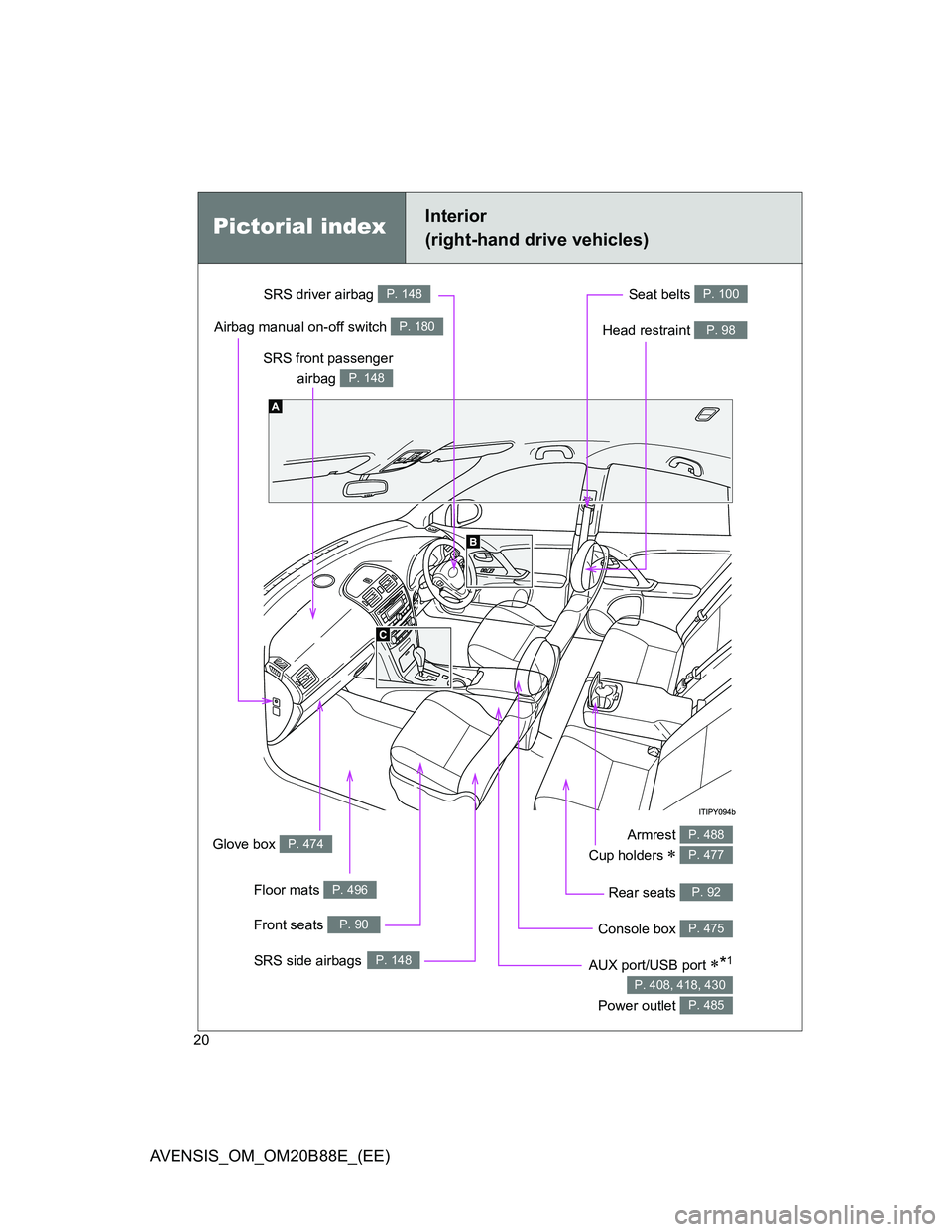
Pictorial indexInterior
(right-hand drive vehicles)
Seat belts P. 100
SRS front passenger
airbag
P. 148
SRS driver airbag P. 148
Head restraint P. 98
Armrest
Cup holders
P. 488
P. 477
Front seats P. 90
SRS side airbagsP. 148
Glove box P. 474
Airbag manual on-off switch P. 180
Floor mats P. 496
Console box P. 475
Rear seats P. 92
AUX port/USB port *1
Power outlet
P. 408, 418, 430
P. 485
Page 335 of 776
335 2-5. Driving information
2
When driving
AVENSIS_OM_OM20B88E_(EE)
CAUTION
Storage precautions
Observe the following precautions.
Failing to do so may result in death or serious injury.
Do not place cargo or luggage in or on the following locations as the item
may get under the clutch, brake or accelerator pedal and prevent the ped-
als from being depressed properly, block the driver’s vision, or hit the
driver or passengers, causing an accident.
• Driver’s feet
• Front passenger or rear seats (when stacking items)
• Package tray (sedan)
• Luggage cover (wagon)
• Instrument panel
• Dashboard
• Auxiliary box or tray that has no lid
Secure all items in the occupant compartment, as they may shift and injure
someone during sudden braking, sudden swerving or an accident.
Never allow anyone to ride in the enlarged trunk or luggage compartment.
It is not designed for passengers. They should ride in their seats with their
seat belts properly fastened. Otherwise, they are much more likely to suf-
fer death or serious injury, in the event of sudden braking, sudden swerv-
ing or an accident.
Page 351 of 776
3Interior features
351
AVENSIS_OM_OM20B88E_(EE)
3-2. Using the audio system
Audio system types .......... 375
Using the radio ................. 383
Using the CD player ......... 390
Playing back MP3 and
WMA discs...................... 398
Operating an iPod............. 408
Operating a
USB memory .................. 418
Optimal use of the
audio system .................. 428
Using the AUX port ........... 430
Using the steering wheel
audio switches ................ 431
Bluetooth
® audio/phone.... 434
Using the Bluetooth®
audio/phone .................... 441
Operating a Bluetooth
®
enabled portable
player .............................. 447
Making a phone call.......... 451
Using the “SET UP”
menu (“Bluetooth”
menu) ............................. 457
Using the “SET UP”
menu (“TEL” menu) ........ 463
3-3. Using the interior lights
Interior lights list................ 470
• Personal/interior light
main switch ..................... 471
• Personal/interior lights .... 471
• Personal lights ................ 4723-4. Using the storage features
List of storage features ..... 473
• Glove box ....................... 474
• Console box.................... 475
• Overhead console .......... 476
• Cup holders .................... 477
• Bottle holders.................. 478
• Coin box ......................... 480
3-5. Other interior features
Sun visors ......................... 481
Vanity mirror ..................... 482
Ashtray.............................. 483
Cigarette lighter ................ 484
Power outlet ...................... 485
Seat heaters ..................... 486
Armrest ............................. 488
Trunk/luggage
compartment storage
extension ........................ 489
Panoramic roof shade
(wagon)........................... 490
Rear sunshade (sedan) .... 493
Rear side sunshades
(sedan) ........................... 494
Assist grips ....................... 495
Floor mats ......................... 496
Trunk features (sedan) ..... 498
Luggage compartment
features (wagon)............. 500
Page 375 of 776
375
3
Interior features
AVENSIS_OM_OM20B88E_(EE)
3-2. Using the audio system
Audio system types
: If equipped
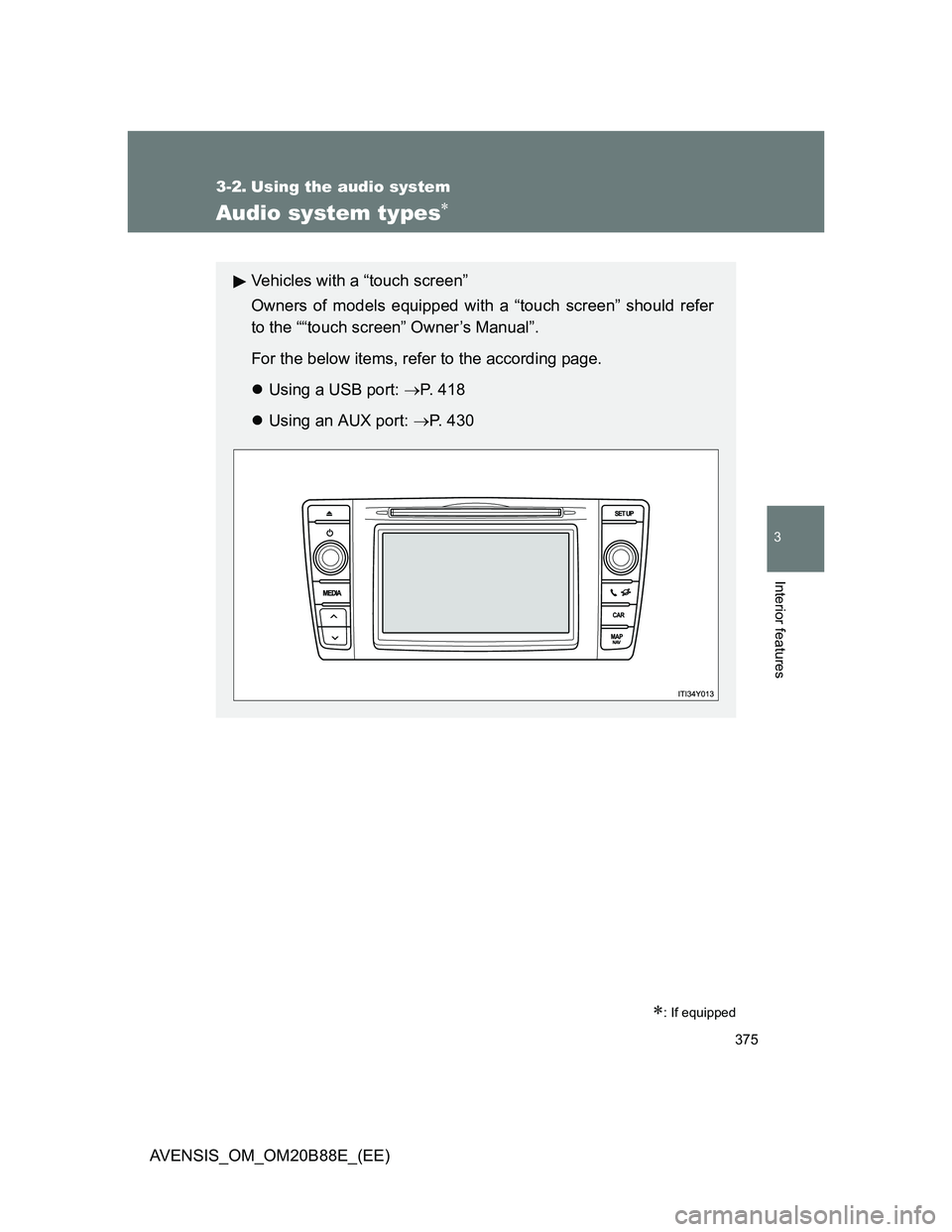
Vehicles with a “touch screen”
Owners of models equipped with a “touch screen” should refer
to the ““touch screen” Owner’s Manual”.
For the below items, refer to the according page.
Using a USB port: P. 418
Using an AUX port: P. 4 3 0
Page 378 of 776
378 3-2. Using the audio system
AVENSIS_OM_OM20B88E_(EE)
Using cellular phones
Interference may be heard through the audio system’s speakers if a cellular
phone is being used inside or close to the vehicle while the audio system is
operating.
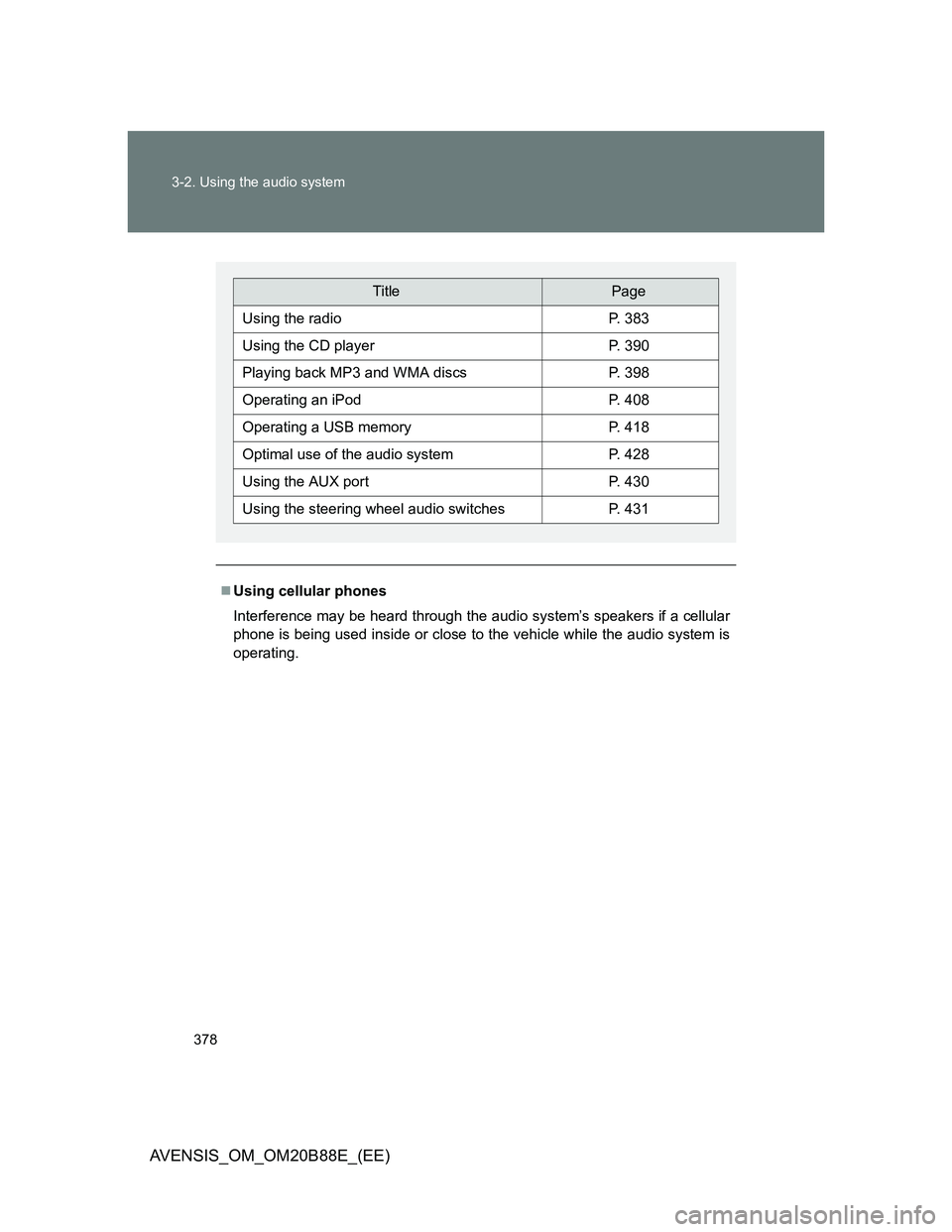
TitlePage
Using the radioP. 383
Using the CD playerP. 390
Playing back MP3 and WMA discsP. 398
Operating an iPodP. 408
Operating a USB memoryP. 418
Optimal use of the audio systemP. 428
Using the AUX portP. 430
Using the steering wheel audio switchesP. 431
Page 430 of 776
430
3-2. Using the audio system
AVENSIS_OM_OM20B88E_(EE)
Using the AUX por t
: If equipped
Operating portable audio devices connected to the audio system
The volume can be adjusted using the vehicle’s audio controls. All other
adjustments must be made on the portable audio device itself.
When using a portable audio device connected to the power outlet
Noise may occur during playback. Use the power source of the portable
audio device.
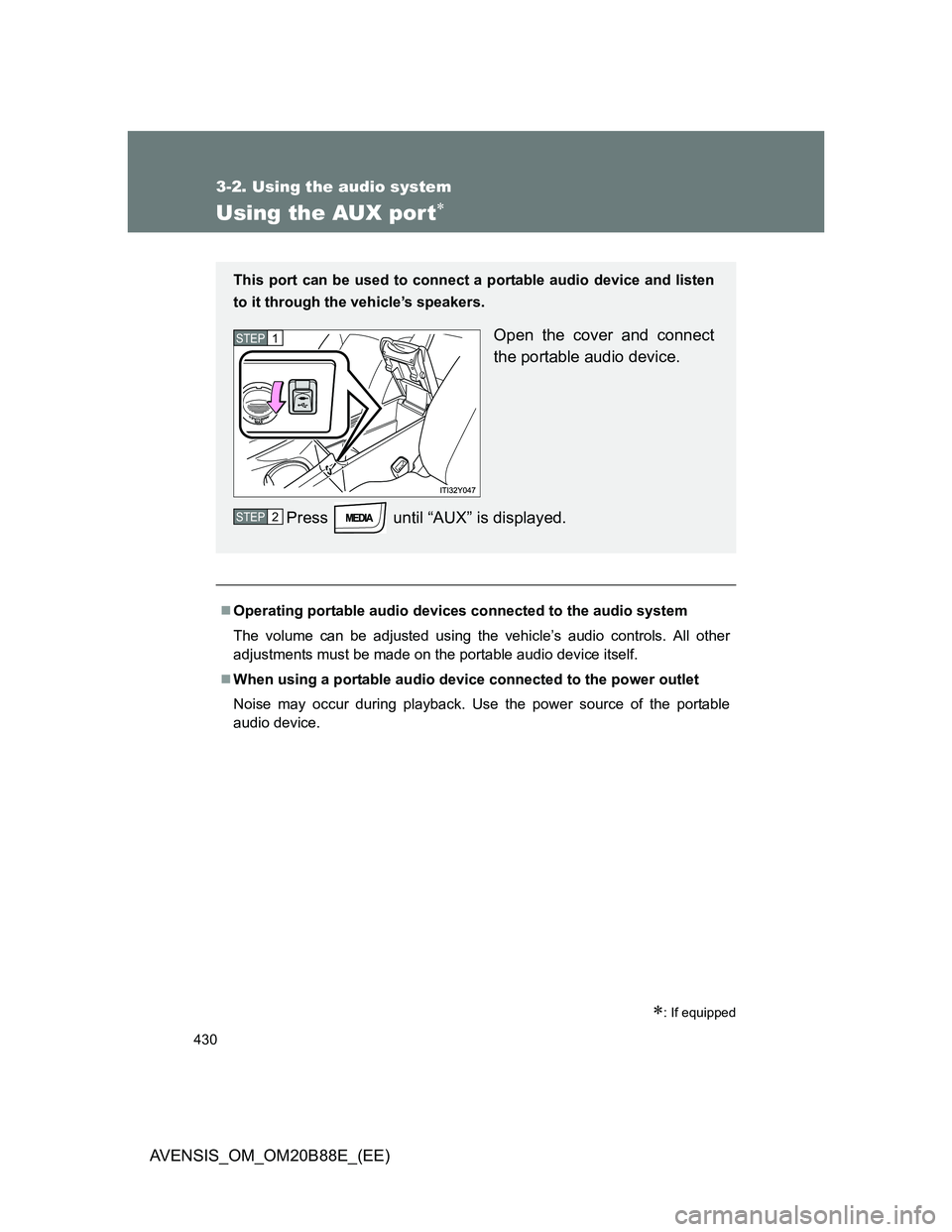
This port can be used to connect a portable audio device and listen
to it through the vehicle’s speakers.
Open the cover and connect
the portable audio device.
Press until “AUX” is displayed.STEP1
STEP2
Page 432 of 776
432 3-2. Using the audio system
AVENSIS_OM_OM20B88E_(EE)
Changing the audio source
Press when the audio system is turned on. The audio source
changes as follows each time is pressed. If a mode cannot
be used, it will be skipped.
AMFMCD modeiPod or USB memoryBluetooth
® audio*
AUX
*: If equipped
Adjusting the volume
Press “+” on to increase the volume and “-” to decrease the
volume.
Hold down “+” or “-” on to continue increasing or decreasing the
volume.
Silencing a sound
Press and hold .
To cancel, press and hold again.
Selecting a radio station
Press to select the radio mode.
Press “” or “” on to select a preset station.
To scan for receivable stations, press and hold “” or “” on
until you hear a beep.
STEP1
STEP2
Page 501 of 776
501 3-5. Other interior features
3
Interior features
AVENSIS_OM_OM20B88E_(EE)
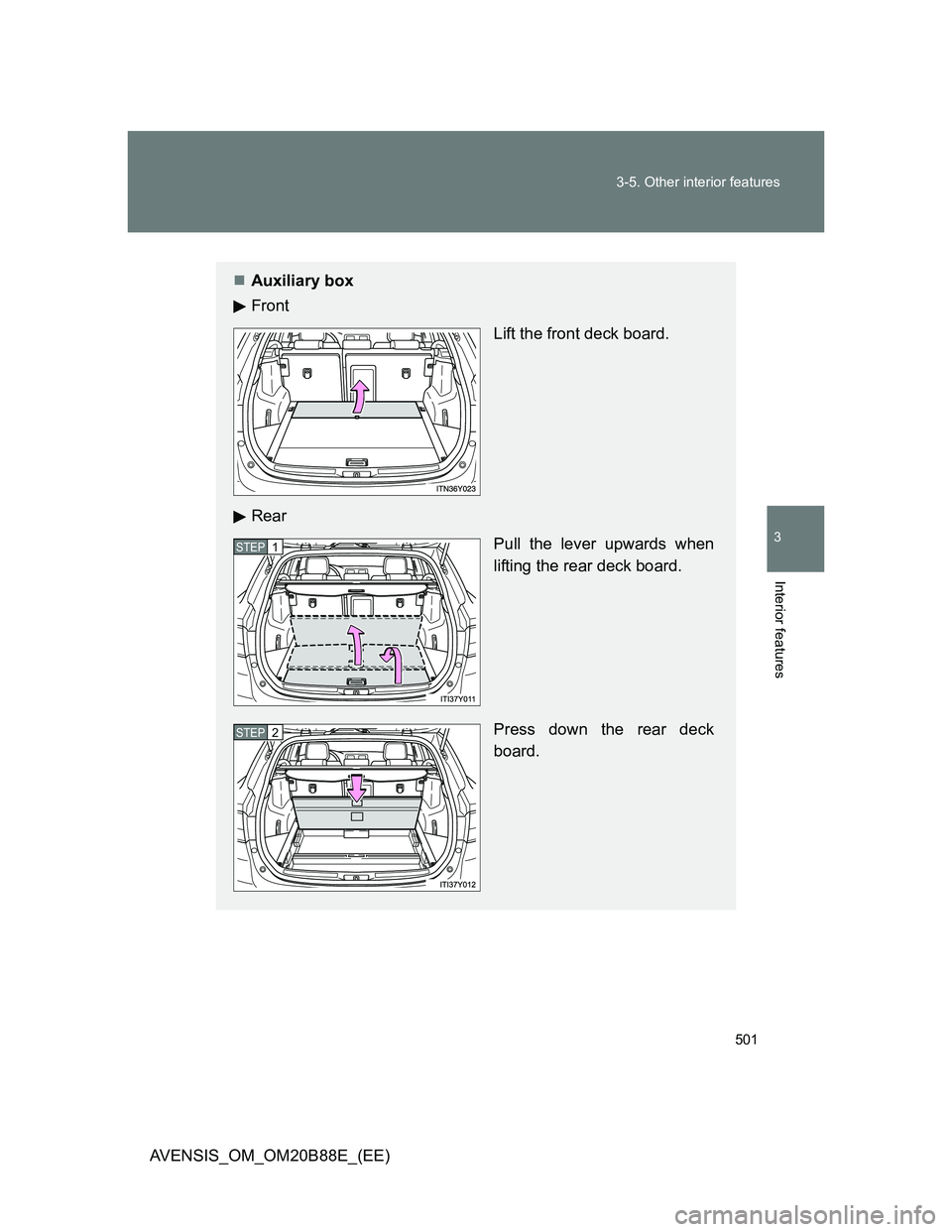
Auxiliary box
Front
Lift the front deck board.
Rear
Pull the lever upwards when
lifting the rear deck board.
Press down the rear deck
board.
STEP1
STEP2