instrument panel TOYOTA AVENSIS 2014 Owners Manual (in English)
[x] Cancel search | Manufacturer: TOYOTA, Model Year: 2014, Model line: AVENSIS, Model: TOYOTA AVENSIS 2014Pages: 776, PDF Size: 33.54 MB
Page 16 of 776
16
AVENSIS_OM_OM20B88E_(EE)
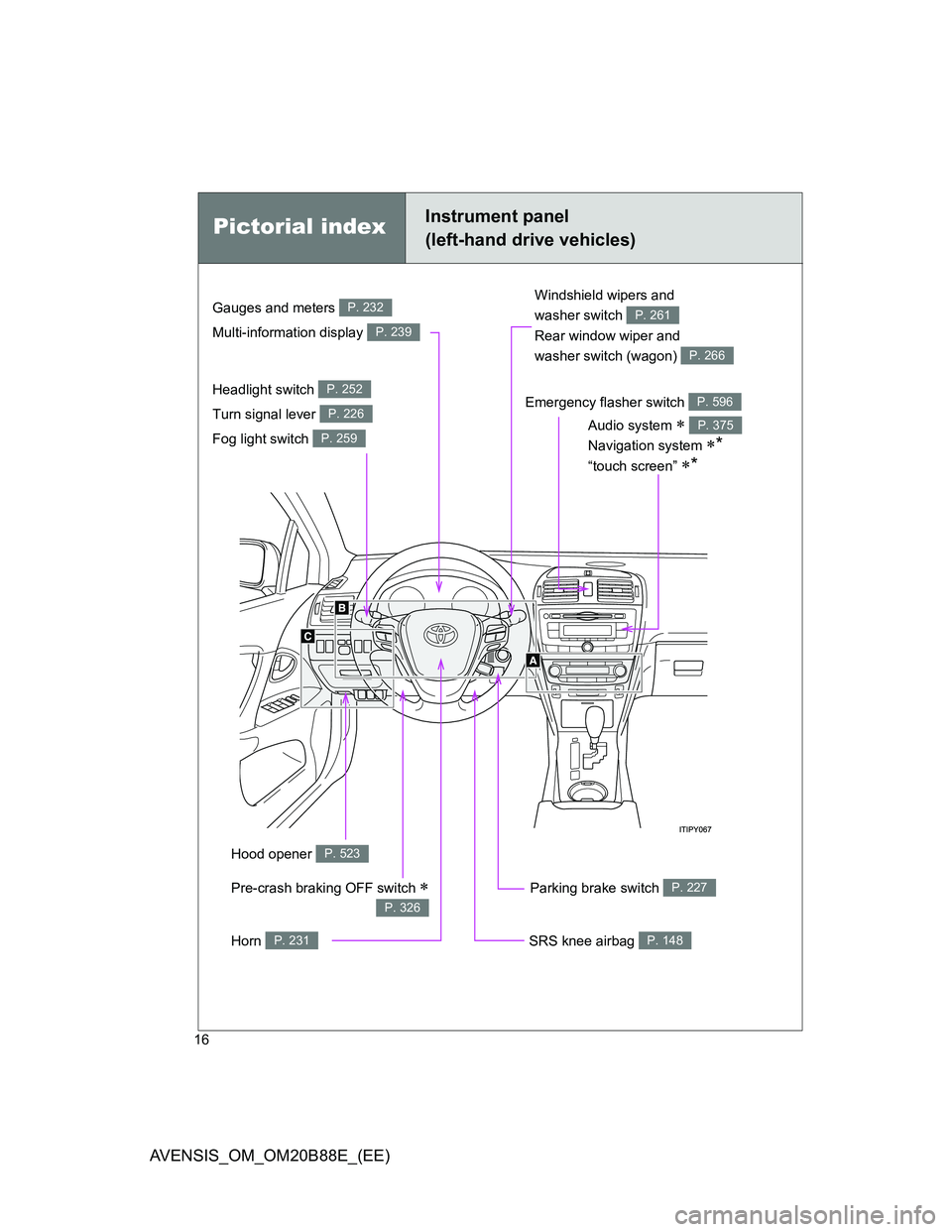
Pictorial indexInstrument panel
(left-hand drive vehicles)
Headlight switch
Turn signal lever
Fog light switch P. 252
P. 226
P. 259
Parking brake switch P. 227
Windshield wipers and
washer switch
Rear window wiper and
washer switch (wagon)
P. 261
P. 266
Hood opener P. 523
Gauges and meters
Multi-information display P. 232
P. 239
Audio system
Navigation system
*
“touch screen” *
P. 375
SRS knee airbag P. 148
Pre-crash braking OFF switch
P. 326
Emergency flasher switch P. 596
Horn P. 231
Page 18 of 776
18
AVENSIS_OM_OM20B88E_(EE)
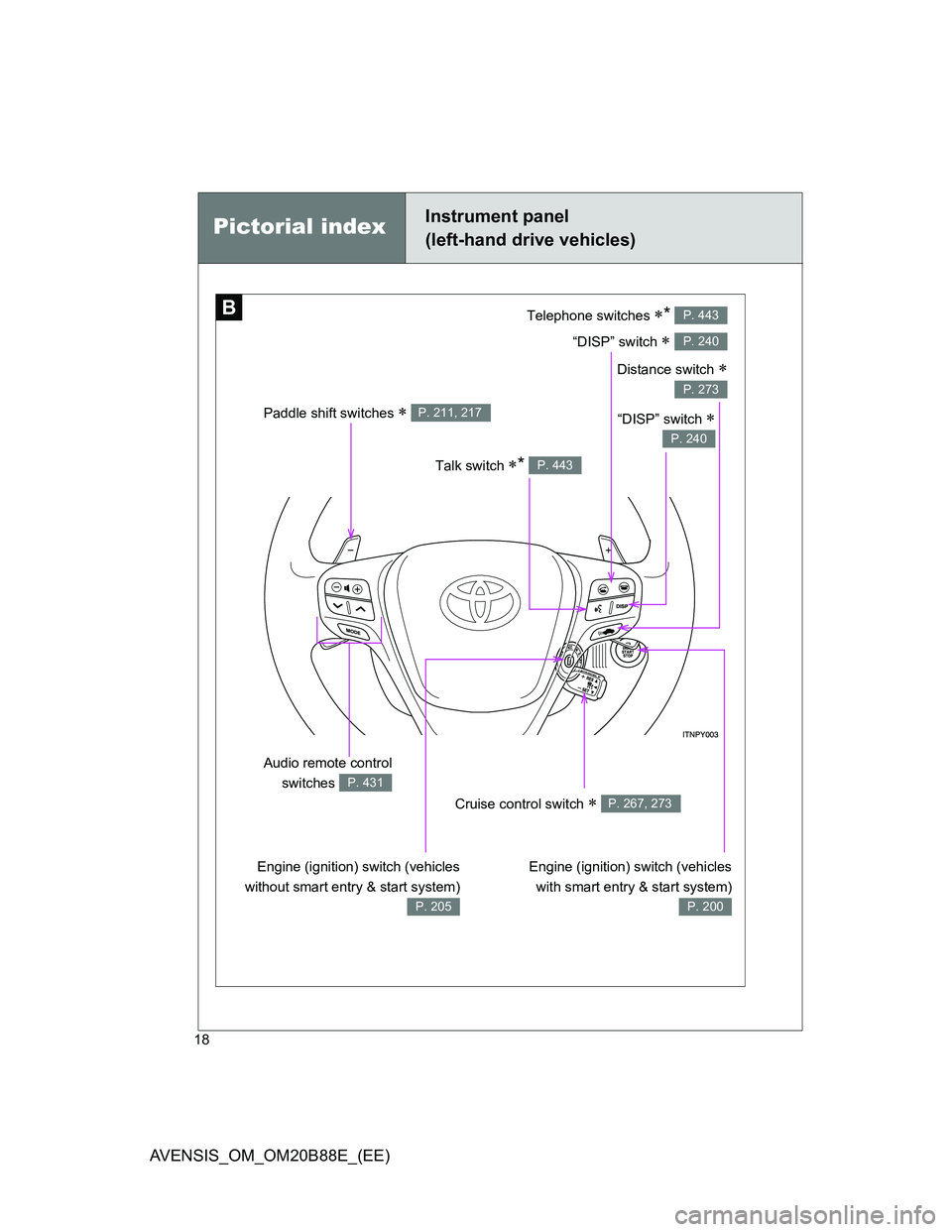
B
Paddle shift switches P. 211, 217
Telephone switches *
“DISP” switch
P. 443
P. 240
Talk switch * P. 443
“DISP” switch
P. 240
Engine (ignition) switch (vehicles
with smart entry & start system)
P. 200
Engine (ignition) switch (vehicles
without smart entry & start system)
P. 205
Audio remote control
switches
P. 431
Cruise control switch P. 267, 273
Distance switch
P. 273
Pictorial indexInstrument panel
(left-hand drive vehicles)
Page 24 of 776
24
AVENSIS_OM_OM20B88E_(EE)
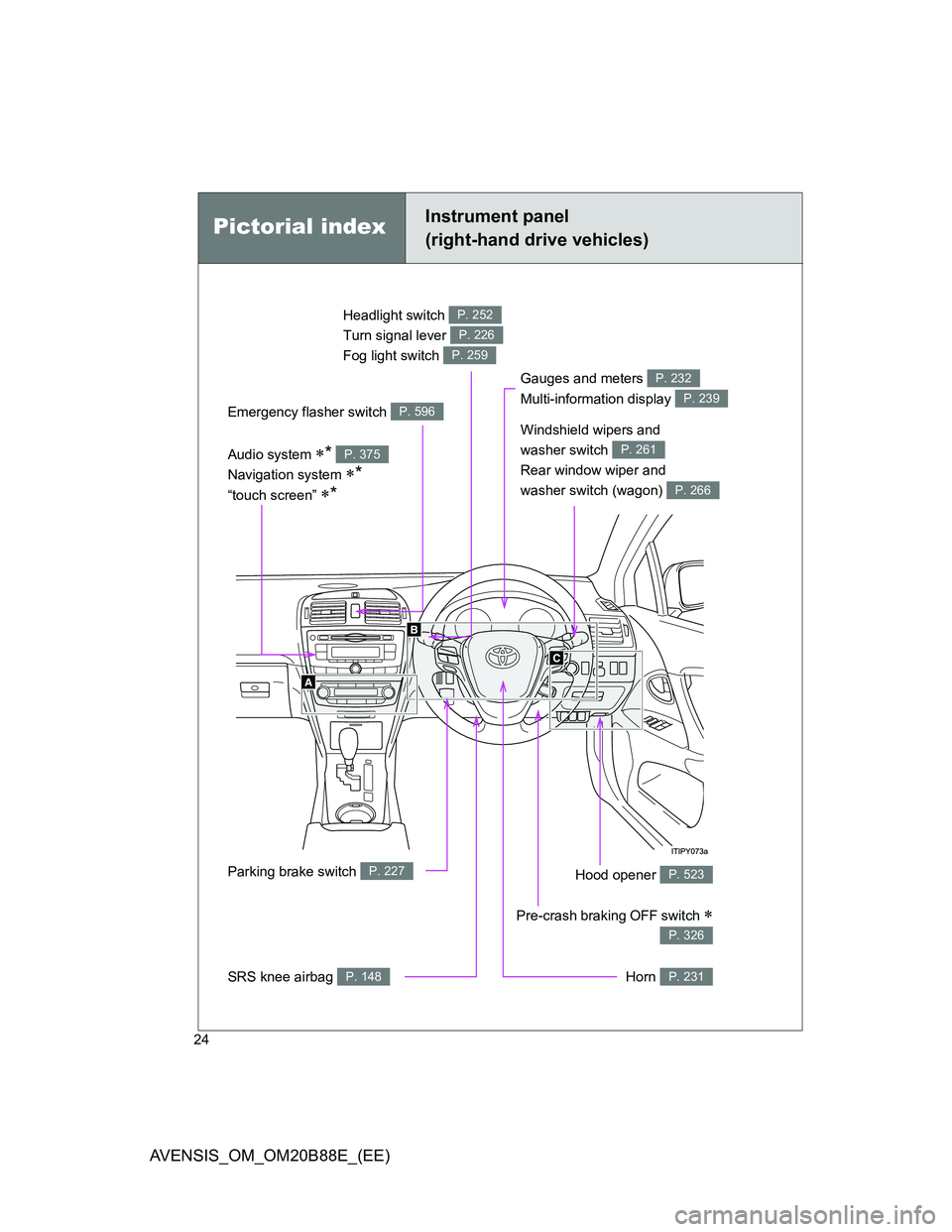
Headlight switch
Turn signal lever
Fog light switch P. 252
P. 226
P. 259
Gauges and meters
Multi-information display P. 232
P. 239
Audio system *
Navigation system
*
“touch screen” *
P. 375
Parking brake switch P. 227Hood opener P. 523
SRS knee airbag P. 148
Pictorial indexInstrument panel
(right-hand drive vehicles)
Windshield wipers and
washer switch
Rear window wiper and
washer switch (wagon)
P. 261
P. 266
Pre-crash braking OFF switch
P. 326
Emergency flasher switch P. 596
Horn P. 231
Page 26 of 776
26
AVENSIS_OM_OM20B88E_(EE)
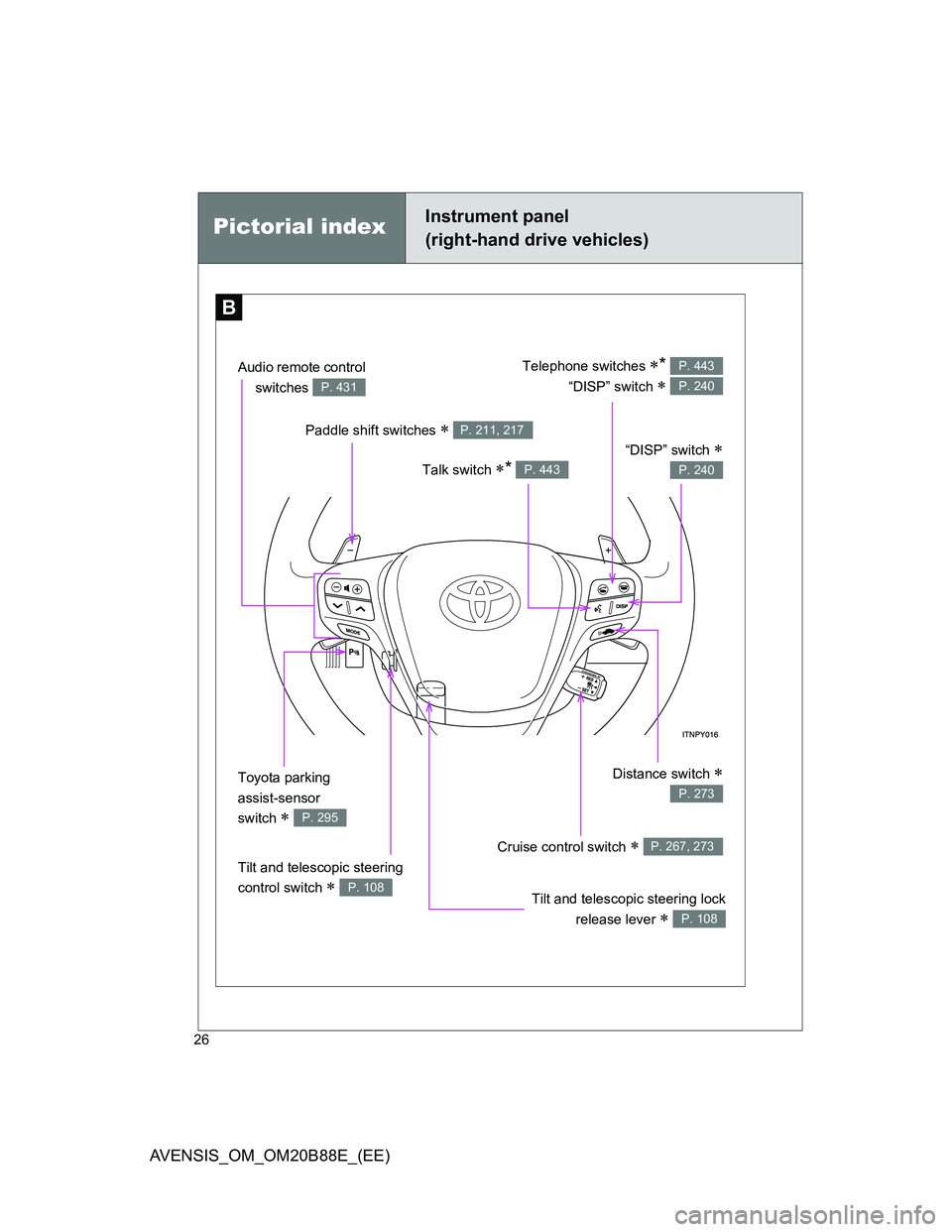
B
Pictorial indexInstrument panel
(right-hand drive vehicles)
Paddle shift switches P. 211, 217
Talk switch * P. 443
“DISP” switch
P. 240
Cruise control switch P. 267, 273
Audio remote control
switches
P. 431
Telephone switches *
“DISP” switch
P. 443
P. 240
Toyota parking
assist-sensor
switch
P. 295
Distance switch
P. 273
Tilt and telescopic steering
control switch
P. 108Tilt and telescopic steering lock
release lever
P. 108
Page 47 of 776
47 1-2. Opening, closing and locking the doors
1
Before driving
AVENSIS_OM_OM20B88E_(EE)
Note for the smart entry & start system
Even when the electronic key is within the effective range (detection
areas), the system may not operate properly in the following cases.
• The electronic key is too close to the window or outside door handle,
near the ground, or in a high place when the doors are locked or
unlocked.
• The electronic key is near the ground or in a high place, or too close to
the rear bumper center when the trunk or back door is locked/
unlocked.
• The electronic key is on the instrument panel, package tray (sedan),
luggage cover (wagon), floor or in the glove box when the engine is
started or “ENGINE START STOP” switch modes are changed.
Do not leave the electronic key on top of the instrument panel or near the
door pockets when exiting the vehicle. Depending on the radio wave
reception conditions, it may be detected by the antenna outside the cabin
and the door will become lockable from the outside, possibly trapping the
electronic key inside the vehicle.
As long as the electronic key is within the effective range, the doors may
be locked or unlocked by anyone.
Even if the electronic key is not inside the vehicle, it may be possible to
start the engine if the electronic key is near the window.
The doors may unlock or lock if a large amount of water splashes on the
door handle, such as in the rain or in a car wash when the electronic key
is within the effective range. (The doors will automatically be locked after
approximately 30 seconds if the doors are not opened and closed.)
If the key is kept near the vehicle while it is being washed, water applied
to a door handle may cause the door to lock and unlock repeatedly. In
this event, place the key in a location 2 m (6 ft.) or more from the vehicle,
taking care not to lose the key.
Page 154 of 776
154 1-7. Safety information
AVENSIS_OM_OM20B88E_(EE)
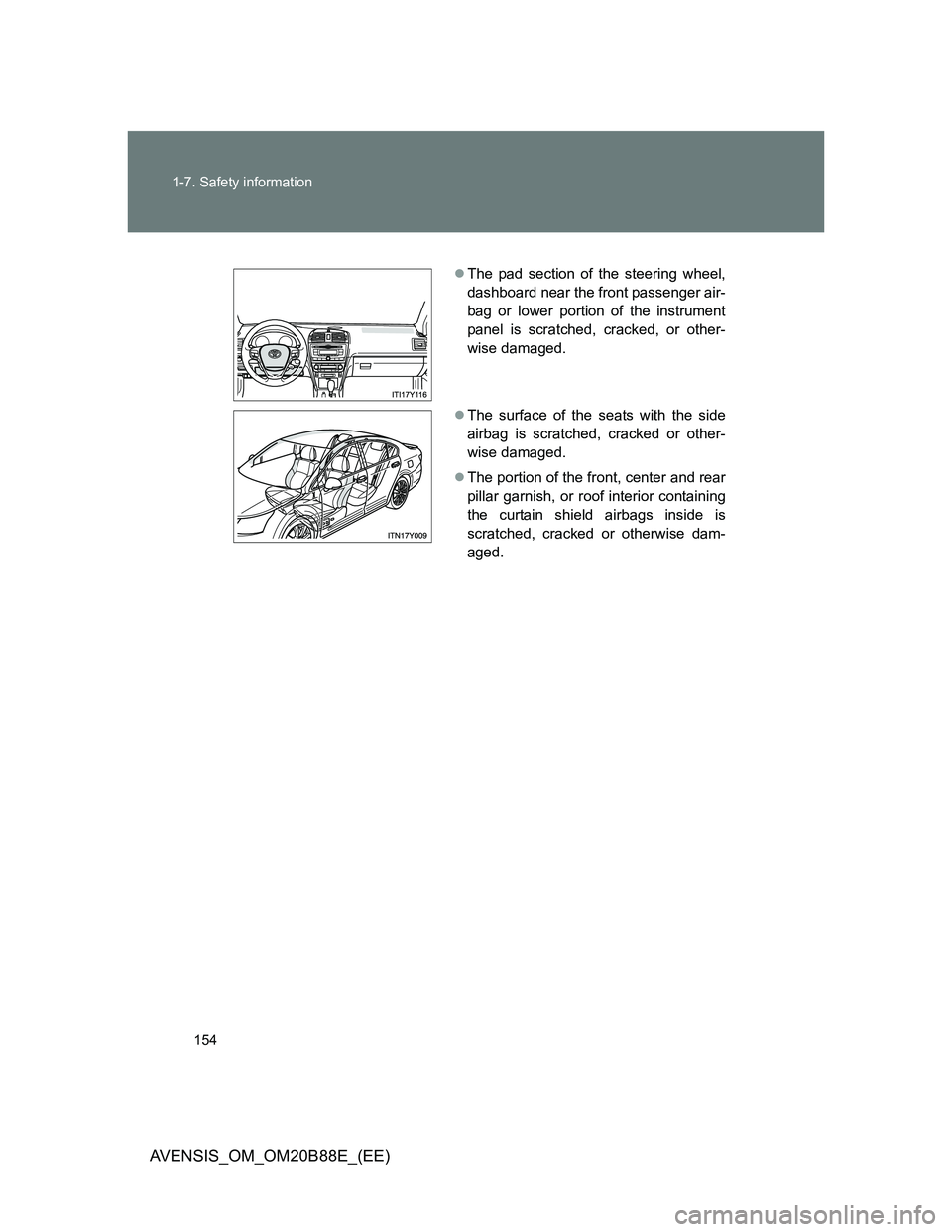
The pad section of the steering wheel,
dashboard near the front passenger air-
bag or lower portion of the instrument
panel is scratched, cracked, or other-
wise damaged.
The surface of the seats with the side
airbag is scratched, cracked or other-
wise damaged.
The portion of the front, center and rear
pillar garnish, or roof interior containing
the curtain shield airbags inside is
scratched, cracked or otherwise dam-
aged.
Page 155 of 776
155 1-7. Safety information
1
Before driving
AVENSIS_OM_OM20B88E_(EE)
CAUTION
SRS airbag precautions
Observe the following precautions regarding the airbags.
Failure to do so may cause death or serious injury.
The driver and all passengers in the vehicle must wear their seat belts
properly.
The SRS airbags are supplemental devices to be used with the seat belts.
The SRS driver airbag deploys with considerable force, and can cause
death or serious injury especially if the driver is very close to the airbag.
Since the risk zone for the driver’s airbag is the first 50 - 75 mm (2 - 3 in.)
of inflation, placing yourself 250 mm (10 in.) from your driver airbag pro-
vides you with a clear margin of safety. This distance is measured from the
center of the steering wheel to your breastbone. If you sit less than 250
mm (10 in.) away now, you can change your driving position in several
ways:
• Move your seat to the rear as far as you can while still reaching the
pedals comfortably.
• Slightly recline the back of the seat.
Although vehicle designs vary, many drivers can achieve the 250 mm
(10 in.) distance, even with the driver seat all the way forward, simply
by reclining the back of the seat somewhat. If reclining the back of your
seat makes it hard to see the road, raise yourself by using a firm, non-
slippery cushion, or raise the seat if your vehicle has that feature.
• If your steering wheel is adjustable, tilt it downward. This points the air-
bag toward your chest instead of your head and neck.
The seat should be adjusted as recommended above, while still maintaining
control of the foot pedals, steering wheel, and your view of the instrument
panel controls.
Page 157 of 776
157 1-7. Safety information
1
Before driving
AVENSIS_OM_OM20B88E_(EE)
CAUTION
SRS airbag precautions
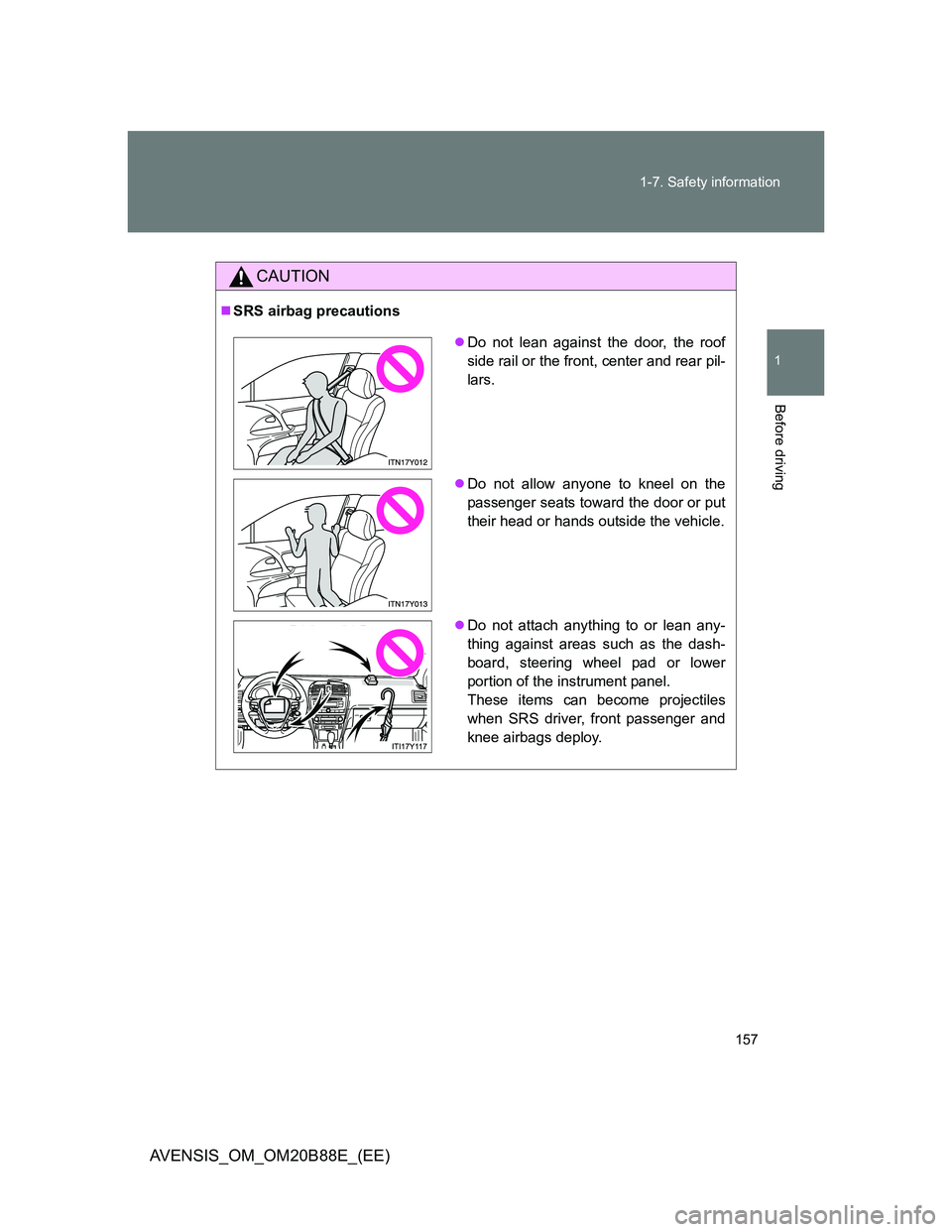
Do not lean against the door, the roof
side rail or the front, center and rear pil-
lars.
Do not allow anyone to kneel on the
passenger seats toward the door or put
their head or hands outside the vehicle.
Do not attach anything to or lean any-
thing against areas such as the dash-
board, steering wheel pad or lower
portion of the instrument panel.
These items can become projectiles
when SRS driver, front passenger and
knee airbags deploy.
Page 159 of 776
159 1-7. Safety information
1
Before driving
AVENSIS_OM_OM20B88E_(EE)
CAUTION
SRS airbag precautions
Do not touch any of the component parts immediately after the SRS air-
bags have deployed (inflated) as they may be hot.
If breathing becomes difficult after the SRS airbag has deployed, open a
door or window to allow fresh air in, or leave the vehicle if it is safe to do
so. Wash off any residue as soon as possible to prevent skin irritation.
If the areas where the SRS airbags are stored, such as the steering wheel
pad and front and rear pillar garnishes, are damaged or cracked, have
them replaced by any authorized Toyota dealer or repairer, or another duly
qualified and equipped professional.
Modification and disposal of SRS airbag system components
Do not dispose of your vehicle or perform any of the following modifications
without consulting any authorized Toyota dealer or repairer, or another duly
qualified and equipped professional.
The SRS airbags may malfunction or deploy (inflate) accidentally, causing
death or serious injury.
Installation, removal, disassembly and repair of the SRS airbags.
Repairs, modifications, removal or replacement of the steering wheel,
instrument panel, dashboard, seats or seat upholstery, front, center and
rear pillars or roof side rail.
Repairs or modifications of the front fender, front bumper, or side of the
occupant compartment.
Installation of snow plows, winches, etc. to the front grille (bull bars, kan-
garoo bar etc.).
Modifications to the vehicle’s suspension system.
Installation of electronic devices such as an RF-transmitter or CD players.
Page 233 of 776
233 2-2. Instrument cluster
2
When driving
AVENSIS_OM_OM20B88E_(EE)
Speedometer
Displays the vehicle speed.
“DISP.”/instrument panel light control button
Press: Switches the multi-information display.
Turn: To adjust the brightness of the instrument panel light. (P. 234)
Fuel gauge
Displays the quantity of fuel remaining in the tank.
Clock
Displays the time.
Engine coolant temperature gauge
Displays the engine coolant temperature.
Odometer/trip meter and trip meter reset button
Switches between odometer and trip meter displays. Pushing and hold-
ing the button will reset the trip meter when the trip meter is being dis-
played.