stop start TOYOTA AVENSIS 2018 User Guide
[x] Cancel search | Manufacturer: TOYOTA, Model Year: 2018, Model line: AVENSIS, Model: TOYOTA AVENSIS 2018Pages: 660, PDF Size: 63.16 MB
Page 101 of 660
1012. Instrument cluster
2
Instrument cluster
AVENSIS_OM_OM20C79E_(EE)
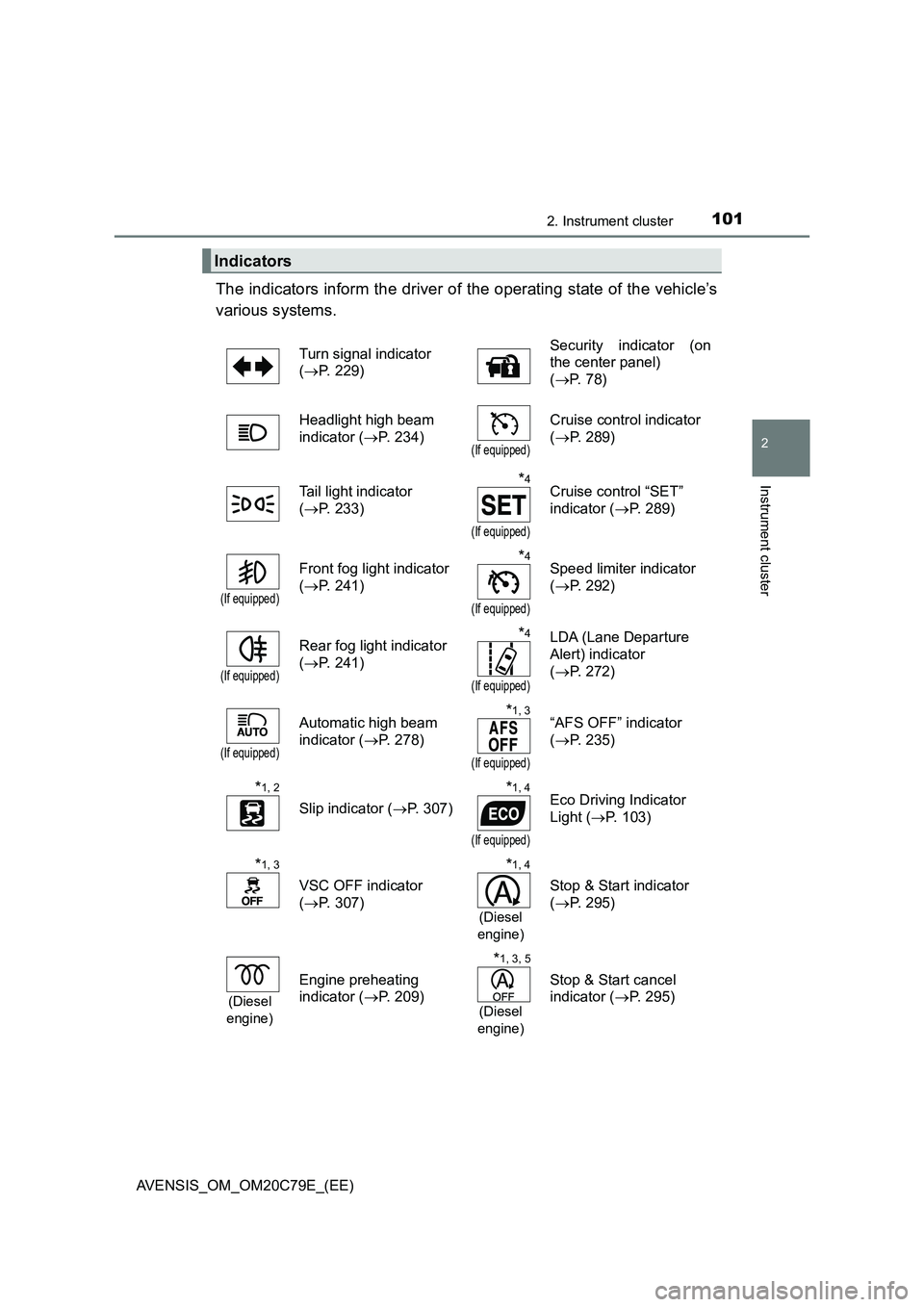
The indicators inform the driver of the operating state of the vehicle’s
various systems.
Indicators
Turn signal indicator
(P. 229)Security indicator (on
the center panel)
(P. 78)
Headlight high beam
indicator (P. 234)
(If equipped)
Cruise control indicator
(P. 289)
Tail light indicator
(P. 233)
*4
(If equipped)
Cruise control “SET”
indicator (P. 289)
(If equipped)
Front fog light indicator
(P. 241)*4
(If equipped)
Speed limiter indicator
(P. 292)
(If equipped)
Rear fog light indicator
(P. 241)*4
(If equipped)
LDA (Lane Departure
Alert) indicator
(P. 272)
(If equipped)
Automatic high beam
indicator (P. 278)*1, 3
(If equipped)
“AFS OFF” indicator
(P. 235)
*1, 2
Slip indicator (P. 307)
*1, 4
(If equipped)
Eco Driving Indicator
Light (P. 103)
*1, 3
VSC OFF indicator
(P. 307)
*1, 4
(Diesel
engine)
Stop & Start indicator
(P. 295)
(Diesel
engine)
Engine preheating
indicator (P. 209)
*1, 3, 5
(Diesel
engine)
Stop & Start cancel
indicator (P. 295)
Page 103 of 660
1032. Instrument cluster
2
Instrument cluster
AVENSIS_OM_OM20C79E_(EE)
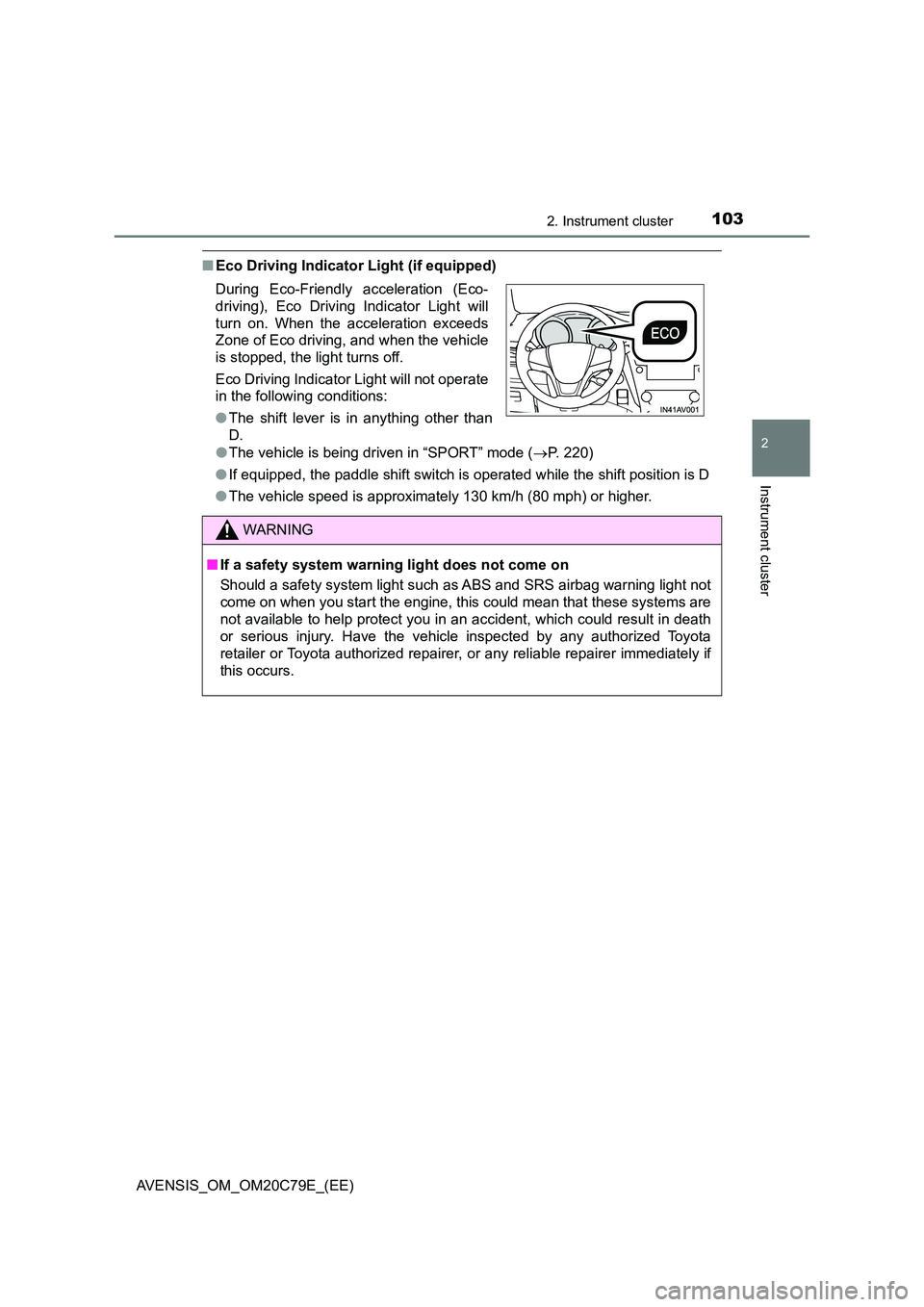
■Eco Driving Indicator Light (if equipped)
● The vehicle is being driven in “SPORT” mode (P. 220)
● If equipped, the paddle shift switch is operated while the shift position is D
● The vehicle speed is approximately 130 km/h (80 mph) or higher.
During Eco-Friendly acceleration (Eco-
driving), Eco Driving Indicator Light will
turn on. When the acceleration exceeds
Zone of Eco driving, and when the vehicle
is stopped, the light turns off.
Eco Driving Indicator Light will not operate
in the following conditions:
● The shift lever is in anything other than
D.
WARNING
■ If a safety system warning light does not come on
Should a safety system light such as ABS and SRS airbag warning light not
come on when you start the engine, this could mean that these systems are
not available to help protect you in an accident, which could result in death
or serious injury. Have the vehicle inspected by any authorized Toyota
retailer or Toyota authorized repairer, or any reliable repairer immediately if
this occurs.
Page 106 of 660
1062. Instrument cluster
AVENSIS_OM_OM20C79E_(EE)
Odometer and trip meter display
Displays the following items.
●Odometer
Displays the total distance the vehicle has been driven.
●Trip meter
Displays the distance the vehicle has been driven since the meter was
last reset. Trip meters A and B can be used to record and display differ-
ent distances independently.
●Maintenance required information (1WW and 2WW engines)
Displays the remaining distance until the engine oil should be changed.
If “-” is displayed before distance, it means oil maintenance is overdue.
Have the engine oil changed by any authorized Toyota retailer or Toyota
authorized repairer, or any reliable repairer.
• Displays the maintenance required information when the engine
switch is turned to the “ON” position (vehicles without smart entry &
start system) or in IGNITION ON mode (vehicles with smart entry &
start system).
• Maintenance required information reset method (P. 459)
●Stop & Start system operation time (1WW and 2WW engines
with monochrome display)
Displays the amount of time the engine was stopped due to operation of
the Stop & Start system during the current trip.
●Stop & Start system total operation time (1WW and 2WW
engines with monochrome display)
Displays the total amount of time that the engine has been stopped due
to operation of the Stop & Start system since the system was last reset.
●Stop & Start system operation time (1WW and 2WW engines
with color display)
Displays the elapsed time after the engine is stopped until it is re-started
by the Stop & Start system.
●Instrument panel light control display (vehicles with monochrome
display)
Displays the meter light control display.
Engine coolant temperature gauge
Displays the engine coolant temperature.
7
8
Page 107 of 660
1072. Instrument cluster
2
Instrument cluster
AVENSIS_OM_OM20C79E_(EE)
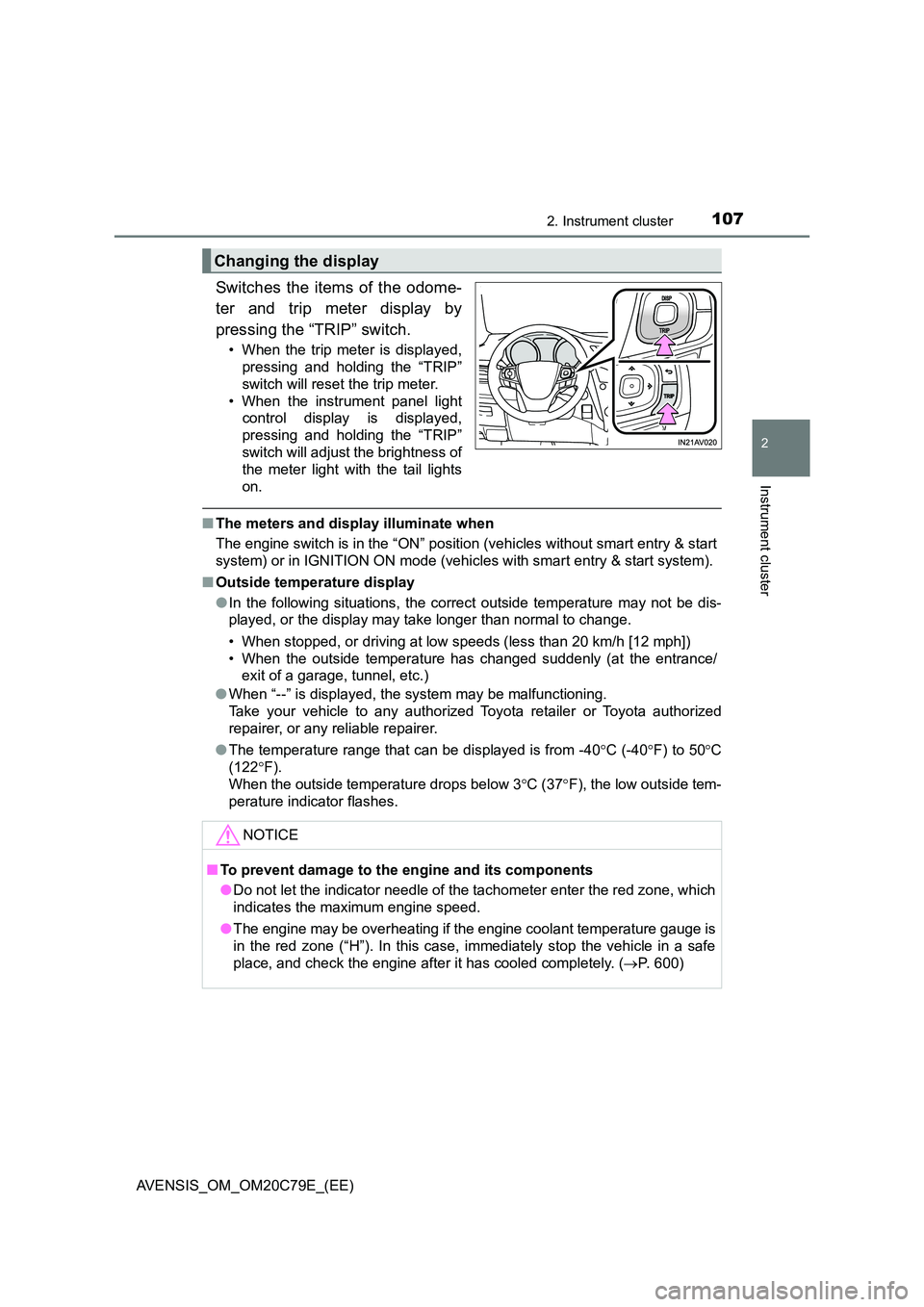
Switches the items of the odome-
ter and trip meter display by
pressing the “TRIP” switch.
• When the trip meter is displayed,
pressing and holding the “TRIP”
switch will reset the trip meter.
• When the instrument panel light
control display is displayed,
pressing and holding the “TRIP”
switch will adjust the brightness of
the meter light with the tail lights
on.
■ The meters and display illuminate when
The engine switch is in the “ON” position (vehicles without smart entry & start
system) or in IGNITION ON mode (vehicles with smart entry & start system).
■ Outside temperature display
● In the following situations, the correct outside temperature may not be dis-
played, or the display may take longer than normal to change.
• When stopped, or driving at low speeds (less than 20 km/h [12 mph])
• When the outside temperature has changed suddenly (at the entrance/
exit of a garage, tunnel, etc.)
● When “--” is displayed, the system may be malfunctioning.
Take your vehicle to any authorized Toyota retailer or Toyota authorized
repairer, or any reliable repairer.
● The temperature range that can be displayed is from -40C (-40F) to 50C
(122 F).
When the outside temperature drops below 3 C (37F), the low outside tem-
perature indicator flashes.
Changing the display
NOTICE
■ To prevent damage to the engine and its components
● Do not let the indicator needle of the tachometer enter the red zone, which
indicates the maximum engine speed.
● The engine may be overheating if the engine coolant temperature gauge is
in the red zone (“H”). In this case, immediately stop the vehicle in a safe
place, and check the engine after it has cooled completely. ( P. 600)
Page 109 of 660
1092. Instrument cluster
2
Instrument cluster
AVENSIS_OM_OM20C79E_(EE)When refueling, turn the engine switch to the “LOCK” position (vehicles
without smart entry & start system) or off (vehicles with smart entry &
start system).
If the vehicle is refueled without turning the engine switch to the “LOCK”
position or off, the display may not be updated.
●Average vehicle speed
Displays the average vehicle speed since the engine was last
started.
●Elapsed time
Displays the elapsed time since the engine was started.
●Setting
The settings of the following items can be changed.
• Language
Select to change the language on the display. (P. 629)
•Units
Select to change the units for measure of the fuel consumption and out-
side temperature. (P. 629)
• Eco Driving Indicator Light
Select to activate/deactivate the Eco Driving Indicator Light. (P. 109)
• Stop & start system
Select to change the stop & start system setting. (P. 295)
•Clock
Select to adjust the hours and minutes. (P. 110)
•Clock format
Select to change the clock format.
• Tire pressure warning system
Select to set up the tire pressure warning system. (P. 470)
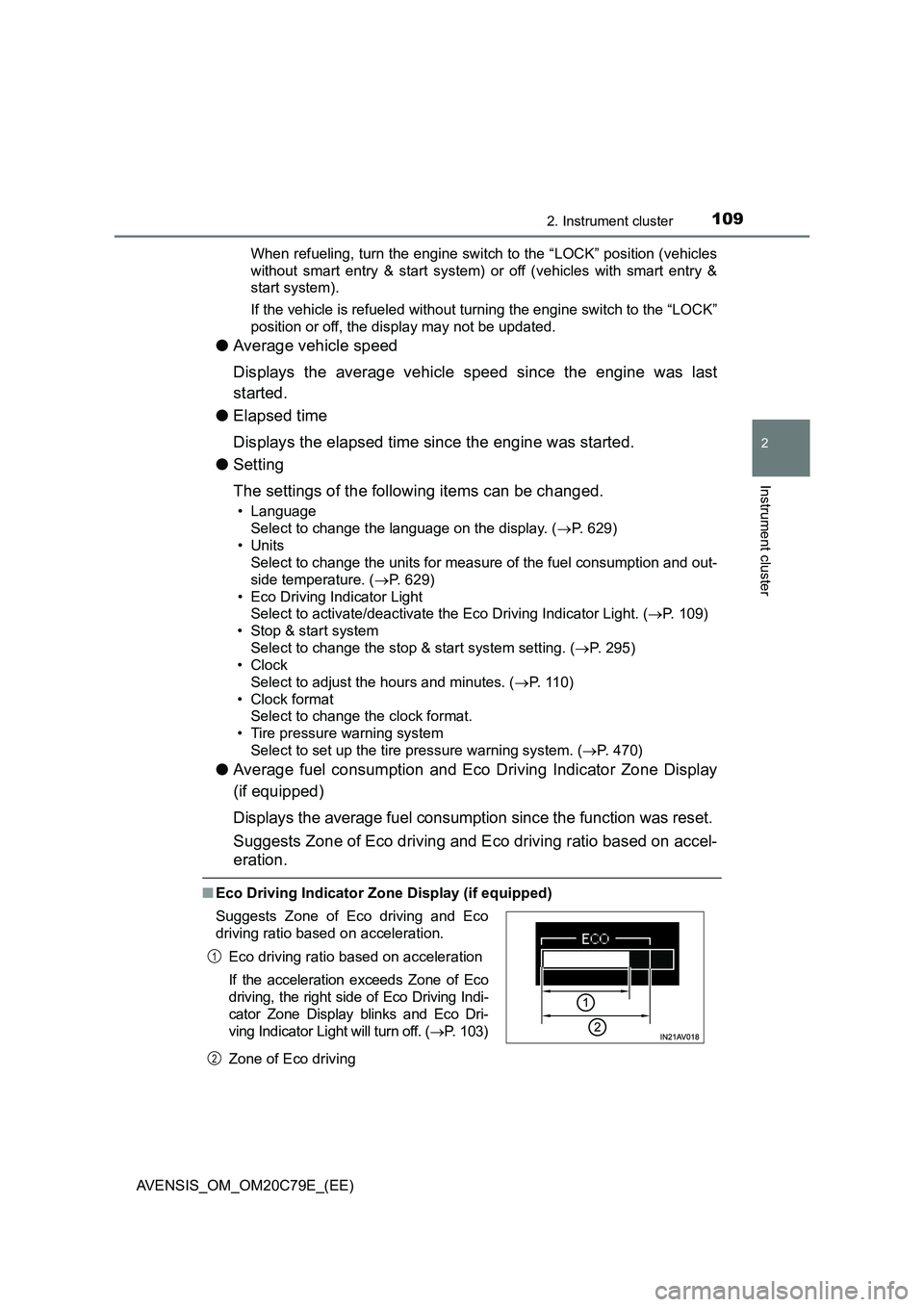
●Average fuel consumption and Eco Driving Indicator Zone Display
(if equipped)
Displays the average fuel consumption since the function was reset.
Suggests Zone of Eco driving and Eco driving ratio based on accel-
eration.
■Eco Driving Indicator Zone Display (if equipped)
Zone of Eco driving Suggests Zone of Eco driving and Eco
driving ratio based on acceleration.
Eco driving ratio based on acceleration
If the acceleration exceeds Zone of Eco
driving, the right side of Eco Driving Indi-
cator Zone Display blinks and Eco Dri-
ving Indicator Light will turn off. (P. 103)
1
2
Page 112 of 660
1122. Instrument cluster
AVENSIS_OM_OM20C79E_(EE)
Settings display
Select to change the meter display settings and the operation set-
tings of some vehicle functions. (P. 1 1 4 )
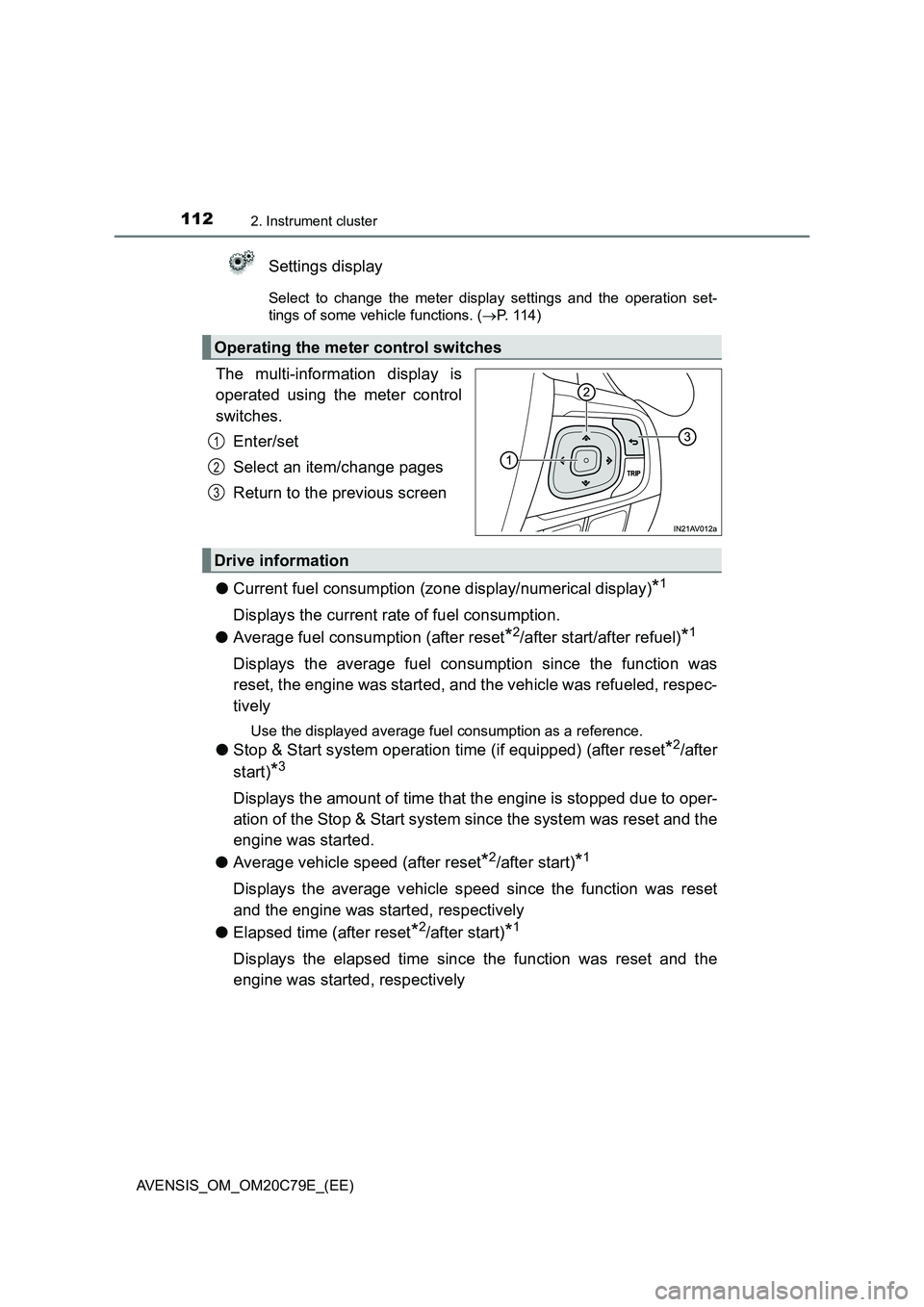
The multi-information display is
operated using the meter control
switches.
Enter/set
Select an item/change pages
Return to the previous screen
●Current fuel consumption (zone display/numerical display)
*1
Displays the current rate of fuel consumption.
●Average fuel consumption (after reset
*2/after start/after refuel)*1
Displays the average fuel consumption since the function was
reset, the engine was started, and the vehicle was refueled, respec-
tively
Use the displayed average fuel consumption as a reference.
●Stop & Start system operation time (if equipped) (after reset*2/after
start)
*3
Displays the amount of time that the engine is stopped due to oper-
ation of the Stop & Start system since the system was reset and the
engine was started.
●Average vehicle speed (after reset
*2/after start)*1
Displays the average vehicle speed since the function was reset
and the engine was started, respectively
●Elapsed time (after reset
*2/after start)*1
Displays the elapsed time since the function was reset and the
engine was started, respectively
Operating the meter control switches
1
2
3
Drive information
Page 114 of 660
1142. Instrument cluster
AVENSIS_OM_OM20C79E_(EE)
The settings of the following items can be changed, refer to P. 629.
For functions that can be enabled or disabled, the function switches
between on and off each time is pressed.
● (LDA [Lane Departure Alert])*1
Select to adjust LDA (Lane Departure Alert) sensitivity.
● (RSA [Road Sign Assist])
*1
Select to activate/deactivate RSA (Road Sign Assist).
●AFS (Adaptive Front-lighting System)
Select to activate/deactivate AFS (Adaptive Front-lighting System).
● (Clock)
Select to adjust time or set a clock format.
● (Instrument panel light)
Select to adjust brightness of the instrument panel light.
●Settings
Select the menu to set up the following items.
• (RSA [Road Sign Assist]) setup
*1
Select to set up RSA (Road Sign Assist).
• (Stop & Start system) setup*1
Select to set up Stop & Start system priority. (P. 300)
• (tire pressure warning system) setup*1
Select to set up the tire pressure warning system. (P. 470)
•Units
Select to change the unit for measure of the fuel consumption and out-
side temperature.
• (Eco Driving Indicator Light)*1
Select to activate/deactivate the Eco Driving Indicator Light. (P. 103)
Settings display
Page 115 of 660
1152. Instrument cluster
2
Instrument cluster
AVENSIS_OM_OM20C79E_(EE)
• Drive information 1 through 3
Select to select up to 2 items that will be displayed on a Drive informa-
tion screen, up to 3 Drive information screens can be set.
• Pop-up display
Select to set the pop-up displays*2, which may appear in some situa-
tions, on/off.
• Initialization
Registered or changed meter settings will be deleted or returned to their
default setting.
●Language
Select to change the language on the display.
*1: If equipped
*2: Stop & Start system operation time display (if equipped), route guidance
display of the navigation system-linked system (if equipped) and incom-
ing call display of the hands-free phone system (if equipped).
■Pop-up display
In some situations, such as when a switch operation is performed, a pop-up
display will be temporarily displayed on the multi-information display.
The pop-up display function can be set on/off.
■Setting display automatic cancelation
In the following situations, setting display in which the settings can be
changed through the meter control switch will automatically be turned off.
●If a warning message appears while the setting display is displayed
●When the vehicle begins to move while the setting display is displayed
■Liquid crystal display
Small spots or light spots may appear on the display. This phenomenon is
characteristic of liquid crystal displays, and there is no problem continuing to
use the display.
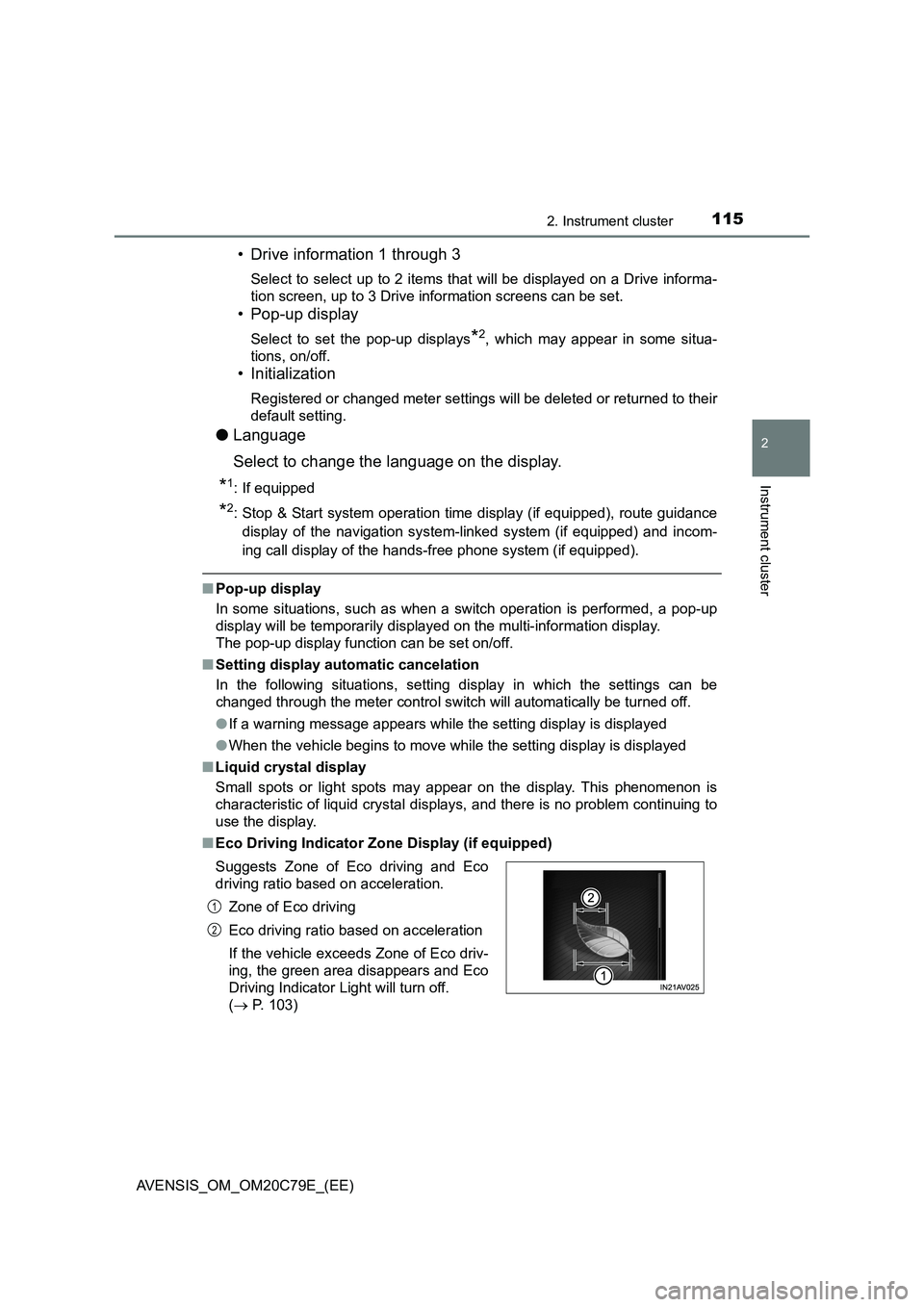
■Eco Driving Indicator Zone Display (if equipped)
Suggests Zone of Eco driving and Eco
driving ratio based on acceleration.
Zone of Eco driving
Eco driving ratio based on acceleration
If the vehicle exceeds Zone of Eco driv-
ing, the green area disappears and Eco
Driving Indicator Light will turn off.
( P. 103)
1
2
Page 124 of 660
1243-1. Key information
AVENSIS_OM_OM20C79E_(EE)■Key battery depletion
Vehicles without smart entry & start system
If the wireless remote control function does not operate, the battery may be
depleted. Replace the battery when necessary. (P. 493)
Vehicles with smart entry & start system
●The standard battery life is 1 to 2 years. (The battery becomes depleted
even if the electronic key is not used.) If the smart entry & start system or
the wireless remote control function does not operate, or the detection area
becomes smaller, the battery may be depleted. Replace the battery when
necessary. (P. 493)
●If the battery becomes low, an alarm will sound in the cabin when the engine
stops. (P. 150, 552)
●To avoid serious deterioration, do not leave the electronic key within 1 m (3
ft.) of the following electrical appliances that produce a magnetic field:
•TVs
• Personal computers
• Cellular phones, cordless phones and battery chargers
• Recharging cellular phones or cordless phones
• Glass top ranges
• Table lamps
■Replacing the
key battery
P. 493
■Customization
Settings (e.g. wireless remote control system) can be changed.
(Customizable features P. 629)
Page 134 of 660
1343-2. Opening, closing and locking the doors
AVENSIS_OM_OM20C79E_(EE)
■Operation signals
The emergency flashers flash to indicate that the doors and trunk/back door
have been locked/unlocked. (Locked: Once; Unlocked: Twice)
■Security feature
If a door is not opened within approximately 30 seconds after the vehicle is
unlocked, the security feature automatically locks the vehicle again.
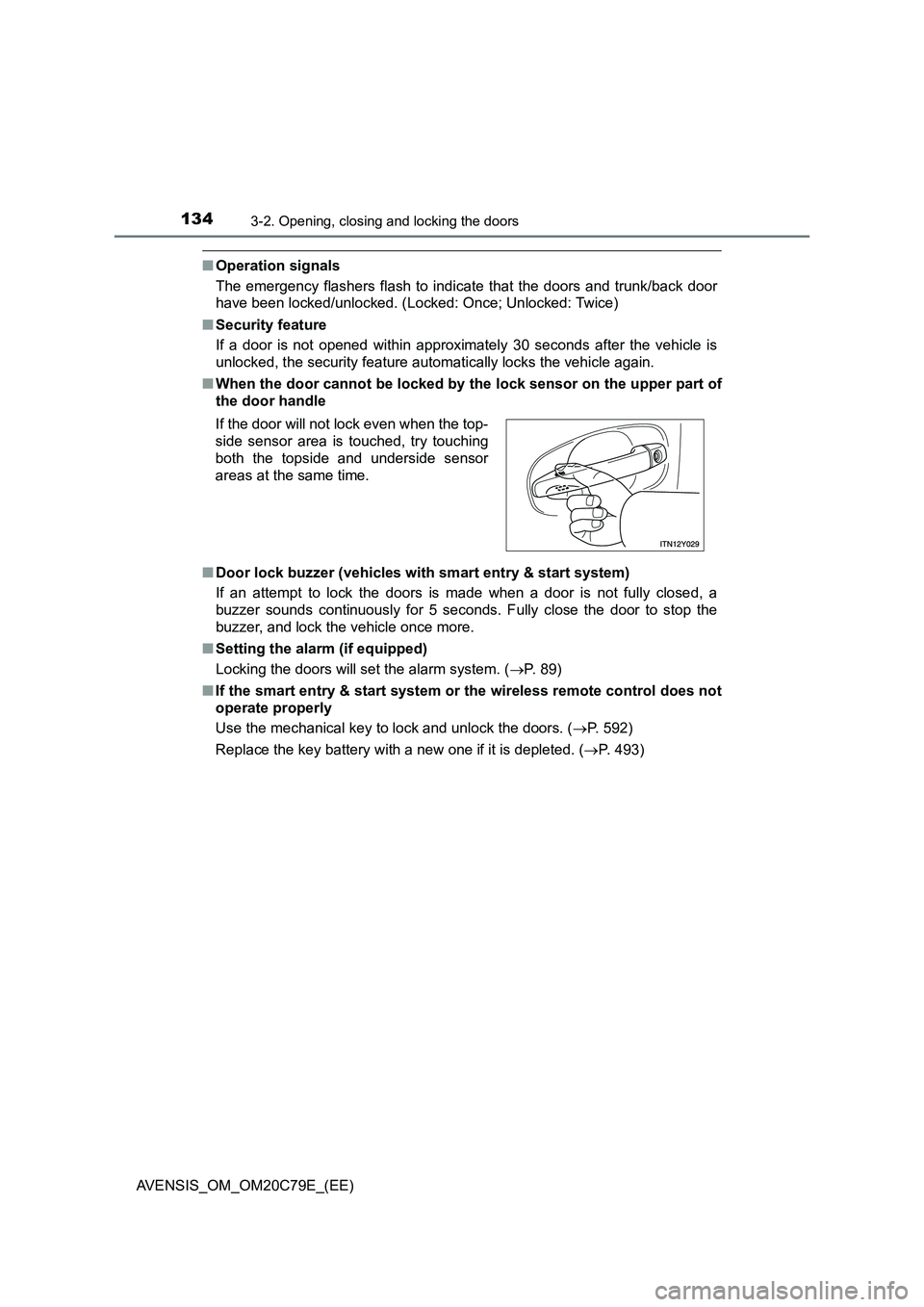
■When the door cannot be locked by the lock sensor on the upper part of
the door handle
■Door lock buzzer (vehicles with smart entry & start system)
If an attempt to lock the doors is made when a door is not fully closed, a
buzzer sounds continuously for 5 seconds. Fully close the door to stop the
buzzer, and lock the vehicle once more.
■Setting the alarm (if equipped)
Locking the doors will set the alarm system. (P. 89)
■If the smart entry & start system or the wireless remote control does not
operate properly
Use the mechanical key to lock and unlock the doors. (P. 592)
Replace the key battery with a new one if it is depleted. (P. 493) If the door will not lock even when the top-
side sensor area is touched, try touching
both the topside and underside sensor
areas at the same time.