trunk TOYOTA AVENSIS 2018 User Guide
[x] Cancel search | Manufacturer: TOYOTA, Model Year: 2018, Model line: AVENSIS, Model: TOYOTA AVENSIS 2018Pages: 660, PDF Size: 63.16 MB
Page 134 of 660
1343-2. Opening, closing and locking the doors
AVENSIS_OM_OM20C79E_(EE)
■Operation signals
The emergency flashers flash to indicate that the doors and trunk/back door
have been locked/unlocked. (Locked: Once; Unlocked: Twice)
■Security feature
If a door is not opened within approximately 30 seconds after the vehicle is
unlocked, the security feature automatically locks the vehicle again.
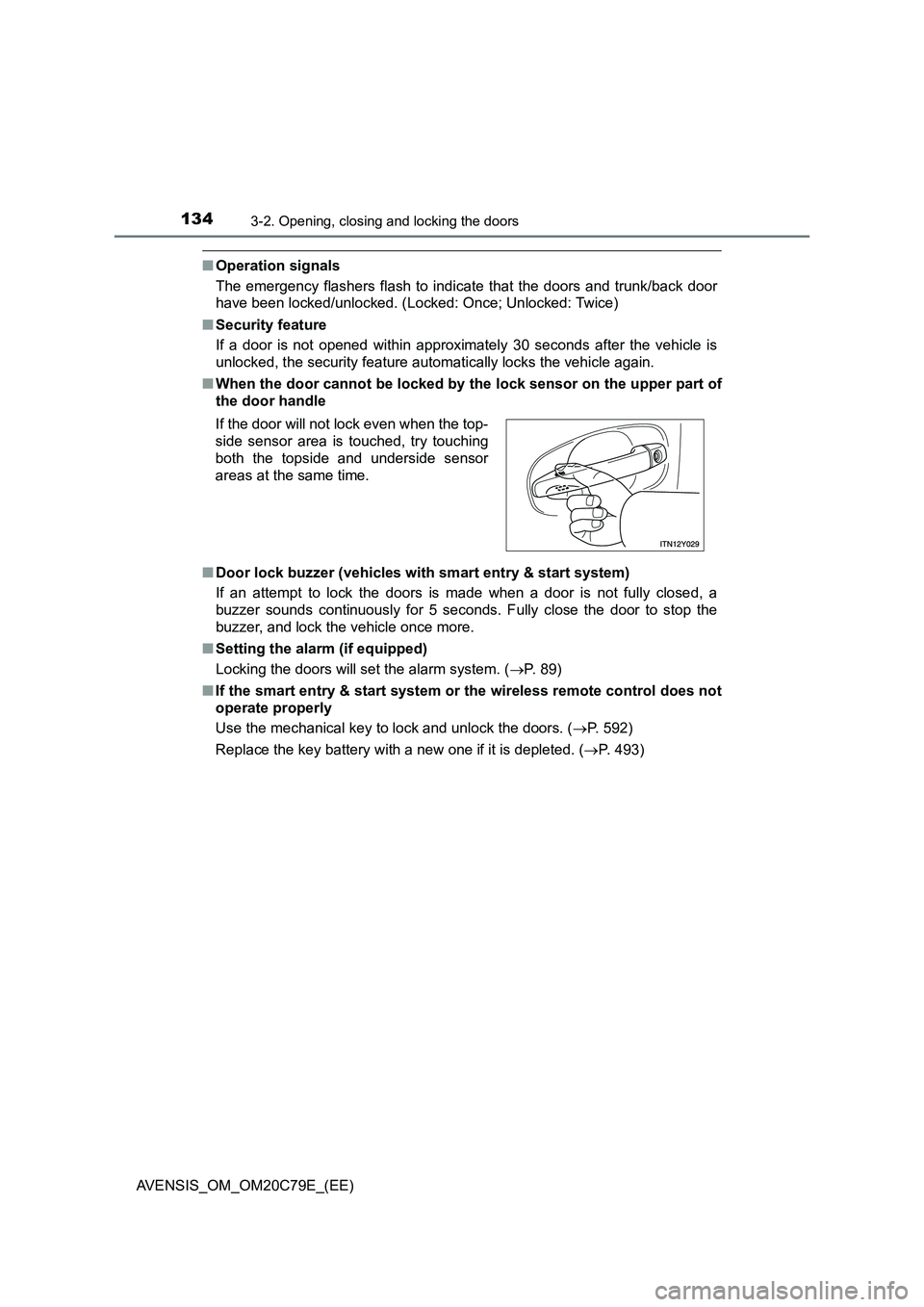
■When the door cannot be locked by the lock sensor on the upper part of
the door handle
■Door lock buzzer (vehicles with smart entry & start system)
If an attempt to lock the doors is made when a door is not fully closed, a
buzzer sounds continuously for 5 seconds. Fully close the door to stop the
buzzer, and lock the vehicle once more.
■Setting the alarm (if equipped)
Locking the doors will set the alarm system. (P. 89)
■If the smart entry & start system or the wireless remote control does not
operate properly
Use the mechanical key to lock and unlock the doors. (P. 592)
Replace the key battery with a new one if it is depleted. (P. 493) If the door will not lock even when the top-
side sensor area is touched, try touching
both the topside and underside sensor
areas at the same time.
Page 135 of 660
1353-2. Opening, closing and locking the doors
3
Operation of each component
AVENSIS_OM_OM20C79E_(EE)
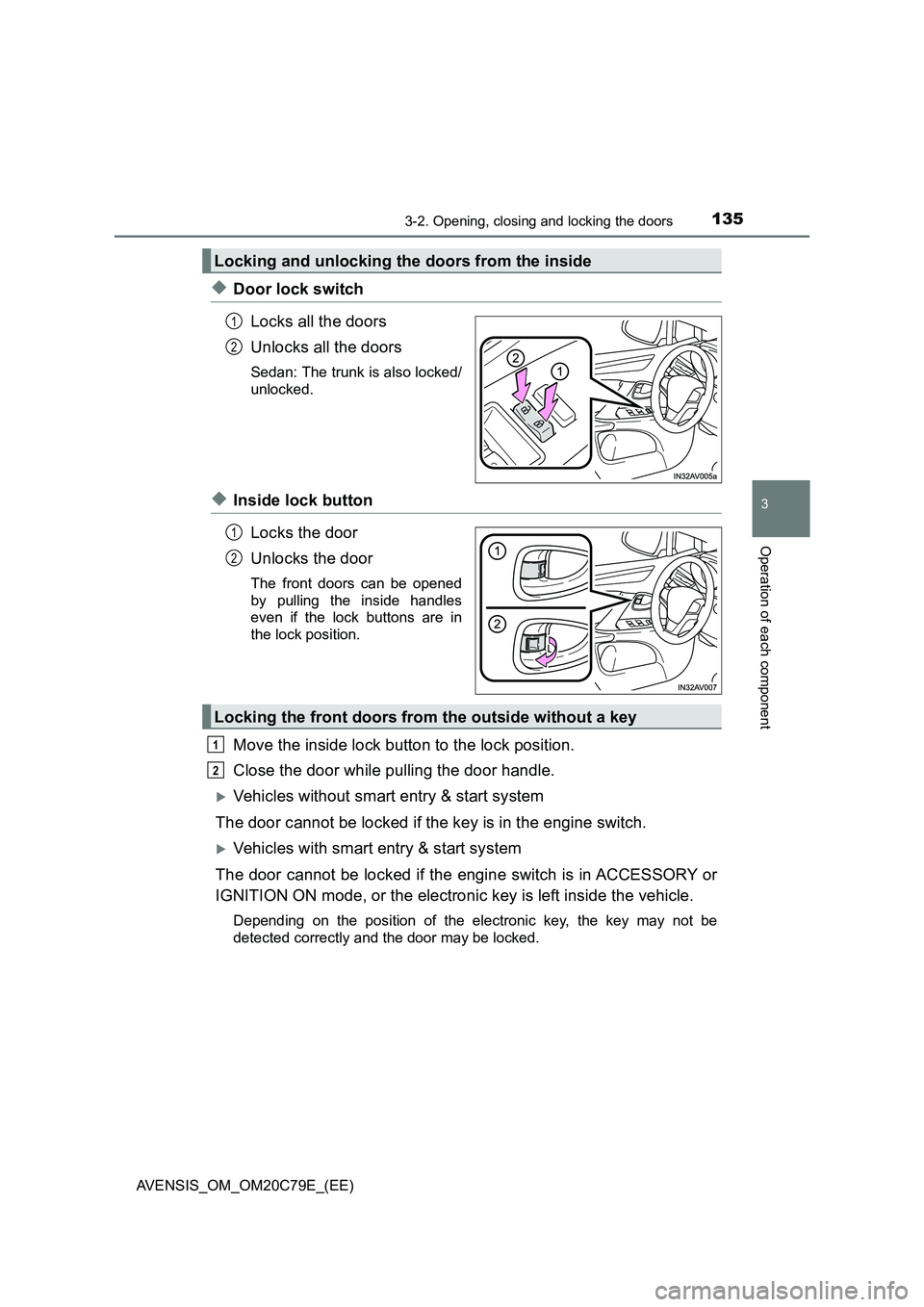
◆Door lock switch
Locks all the doors
Unlocks all the doors
Sedan: The trunk is also locked/
unlocked.
◆Inside lock button
Locks the door
Unlocks the door
The front doors can be opened
by pulling the inside handles
even if the lock buttons are in
the lock position.
Move the inside lock button to the lock position.
Close the door while pulling the door handle.
Vehicles without smart entry & start system
The door cannot be locked if the key is in the engine switch.
Vehicles with smart entry & start system
The door cannot be locked if the engine switch is in ACCESSORY or
IGNITION ON mode, or the electronic key is left inside the vehicle.
Depending on the position of the electronic key, the key may not be
detected correctly and the door may be locked.
Locking and unlocking the doors from the inside
1
2
1
2
Locking the front doors from the outside without a key
1
2
Page 139 of 660
139
3
3-2. Opening, closing and locking the doors
Operation of each component
AVENSIS_OM_OM20C79E_(EE)
Trunk (sedan)
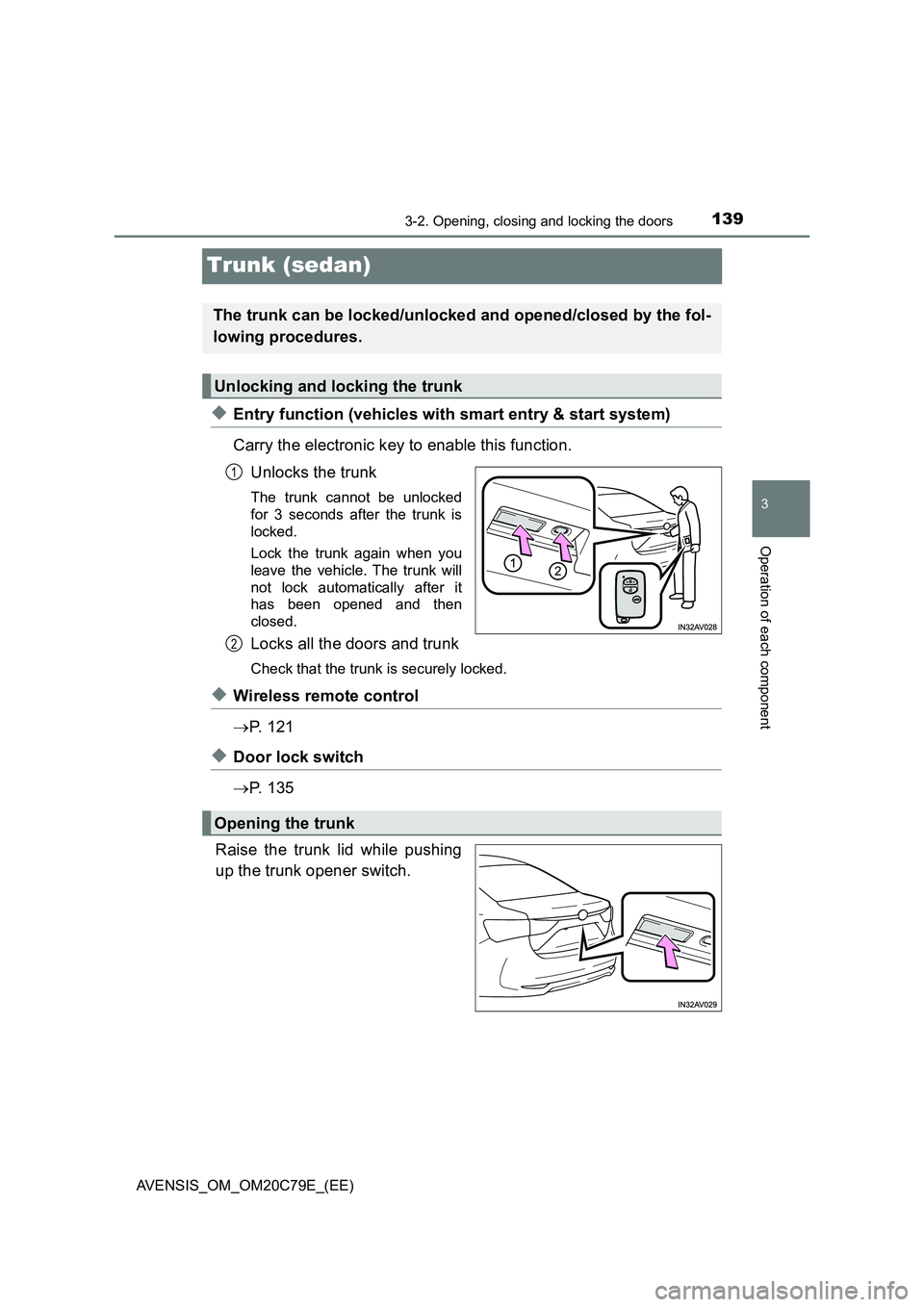
◆Entry function (vehicles with smart entry & start system)
Carry the electronic key to enable this function.
Unlocks the trunk
The trunk cannot be unlocked
for 3 seconds after the trunk is
locked.
Lock the trunk again when you
leave the vehicle. The trunk will
not lock automatically after it
has been opened and then
closed.
Locks all the doors and trunk
Check that the trunk is securely locked.
◆Wireless remote control
P. 1 2 1
◆Door lock switch
P. 1 3 5
Raise the trunk lid while pushing
up the trunk opener switch.
The trunk can be locked/unlocked and opened/closed by the fol-
lowing procedures.
Unlocking and locking the trunk
1
2
Opening the trunk
Page 140 of 660
1403-2. Opening, closing and locking the doors
AVENSIS_OM_OM20C79E_(EE)
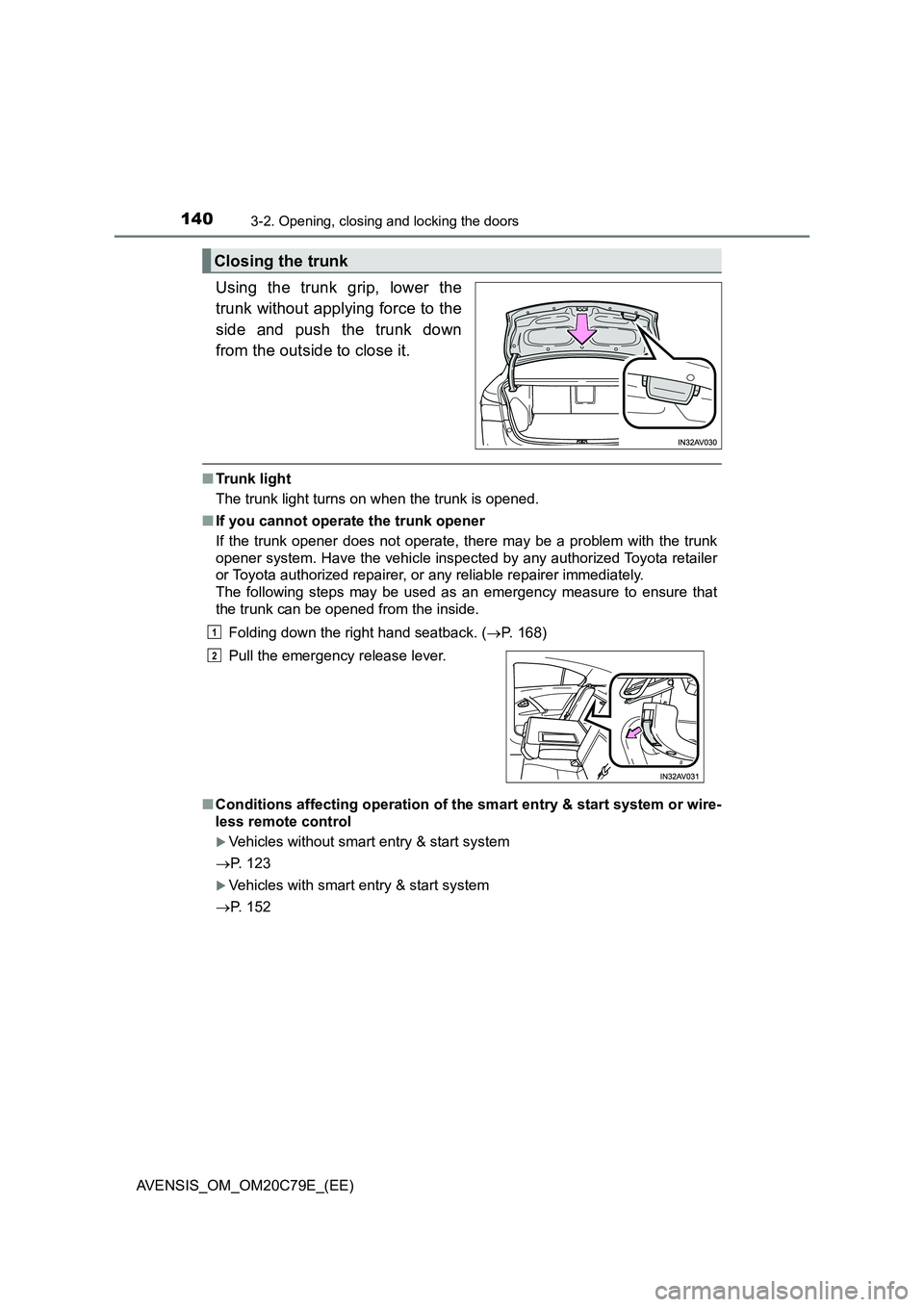
Using the trunk grip, lower the
trunk without applying force to the
side and push the trunk down
from the outside to close it.
■Trunk light
The trunk light turns on when the trunk is opened.
■If you cannot operate the trunk opener
If the trunk opener does not operate, there may be a problem with the trunk
opener system. Have the vehicle inspected by any authorized Toyota retailer
or Toyota authorized repairer, or any reliable repairer immediately.
The following steps may be used as an emergency measure to ensure that
the trunk can be opened from the inside.
Folding down the right hand seatback. (P. 168)
■Conditions affecting operation of the smart entry & start system or wire-
less remote control
Vehicles without smart entry & start system
P. 123
Vehicles with smart entry & start system
P. 152
Closing the trunk
Pull the emergency release lever.
1
2
Page 141 of 660
1413-2. Opening, closing and locking the doors
3
Operation of each component
AVENSIS_OM_OM20C79E_(EE)
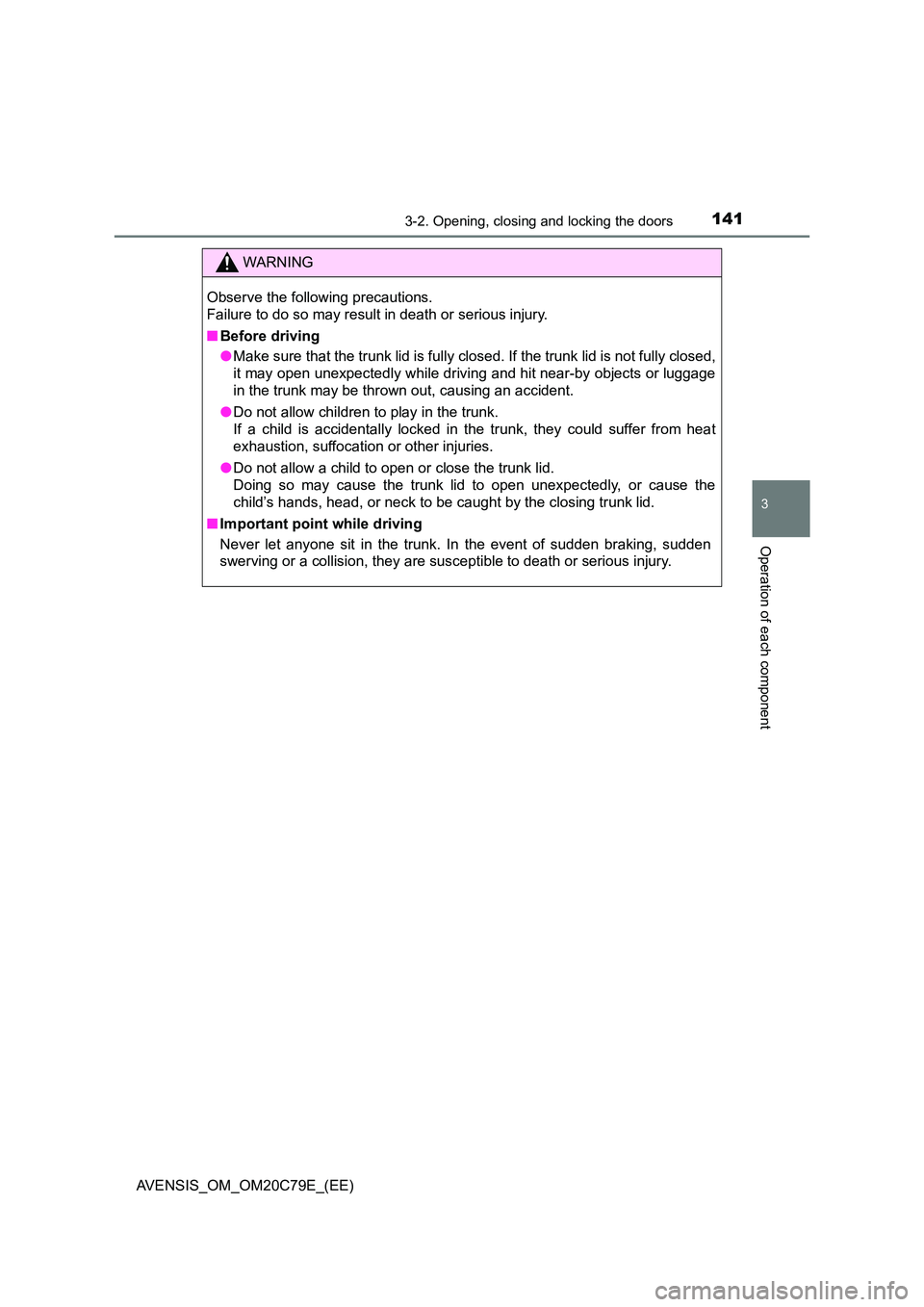
WARNING
Observe the following precautions.
Failure to do so may result in death or serious injury.
■ Before driving
● Make sure that the trunk lid is fully closed. If the trunk lid is not fully closed,
it may open unexpectedly while driving and hit near-by objects or luggage
in the trunk may be thrown out, causing an accident.
● Do not allow children to play in the trunk.
If a child is accidentally locked in the trunk, they could suffer from heat
exhaustion, suffocation or other injuries.
● Do not allow a child to open or close the trunk lid.
Doing so may cause the trunk lid to open unexpectedly, or cause the
child’s hands, head, or neck to be caught by the closing trunk lid.
■ Important point while driving
Never let anyone sit in the trunk. In the event of sudden braking, sudden
swerving or a collision, they are susceptible to death or serious injury.
Page 142 of 660
1423-2. Opening, closing and locking the doors
AVENSIS_OM_OM20C79E_(EE)
WARNING
■Using the trunk
Observe the following precautions.
Failure to do so may cause parts of the body to be caught, resulting in seri-
ous injury.
● Remove any heavy loads, such as snow and ice, from the trunk lid before
opening it. Failure to do so may cause the trunk lid to suddenly shut again
after it is opened.
● When opening or closing the trunk lid, thoroughly check to make sure the
surrounding area is safe.
● If anyone is in the vicinity, make sure they are safe and let them know that
the trunk is about to open or close.
● Use caution when opening or closing the trunk lid in windy weather as it
may move abruptly in strong wind.
● Do not attach any accessories other than genuine Toyota parts to the trunk
lid. Such additional weight on the tr unk lid may cause the lid to suddenly
shut again after it is opened.
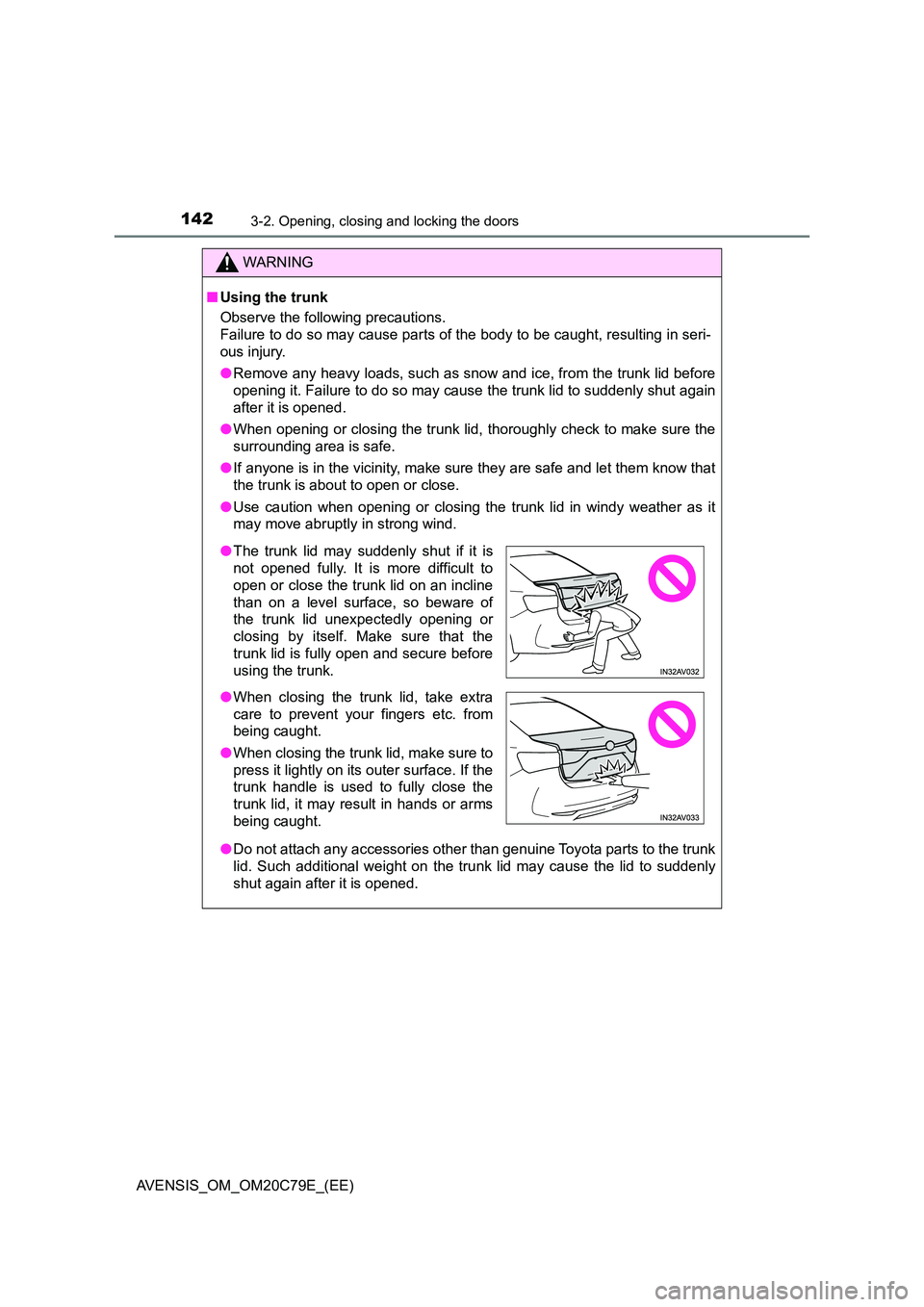
● The trunk lid may suddenly shut if it is
not opened fully. It is more difficult to
open or close the trunk lid on an incline
than on a level surface, so beware of
the trunk lid unexpectedly opening or
closing by itself. Make sure that the
trunk lid is fully open and secure before
using the trunk.
● When closing the trunk lid, take extra
care to prevent your fingers etc. from
being caught.
● When closing the trunk lid, make sure to
press it lightly on its outer surface. If the
trunk handle is used to fully close the
trunk lid, it may result in hands or arms
being caught.
Page 148 of 660
1483-2. Opening, closing and locking the doors
AVENSIS_OM_OM20C79E_(EE)
Smart entry & start system
●Unlocks and locks the doors (P. 132)
●Unlocks and locks the trunk (P. 139)
●Unlocks and locks the back door (P. 143)
●Starts and stops the engine (P. 212)
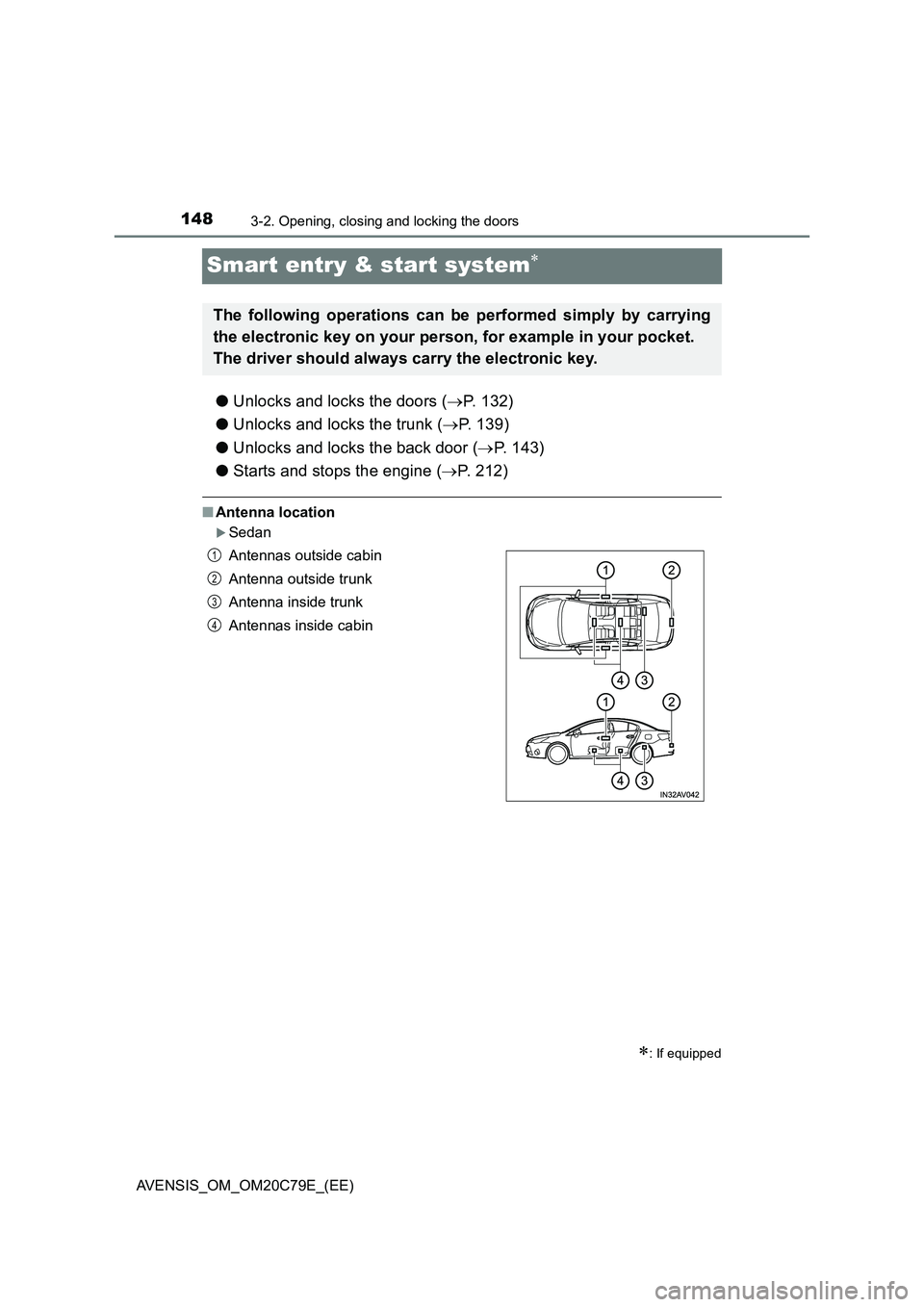
■Antenna location
Sedan
: If equipped
The following operations can be performed simply by carrying
the electronic key on your person, for example in your pocket.
The driver should always carry the electronic key.
Antennas outside cabin
Antenna outside trunk
Antenna inside trunk
Antennas inside cabin1
2
3
4
Page 149 of 660
1493-2. Opening, closing and locking the doors
3
Operation of each component
AVENSIS_OM_OM20C79E_(EE)
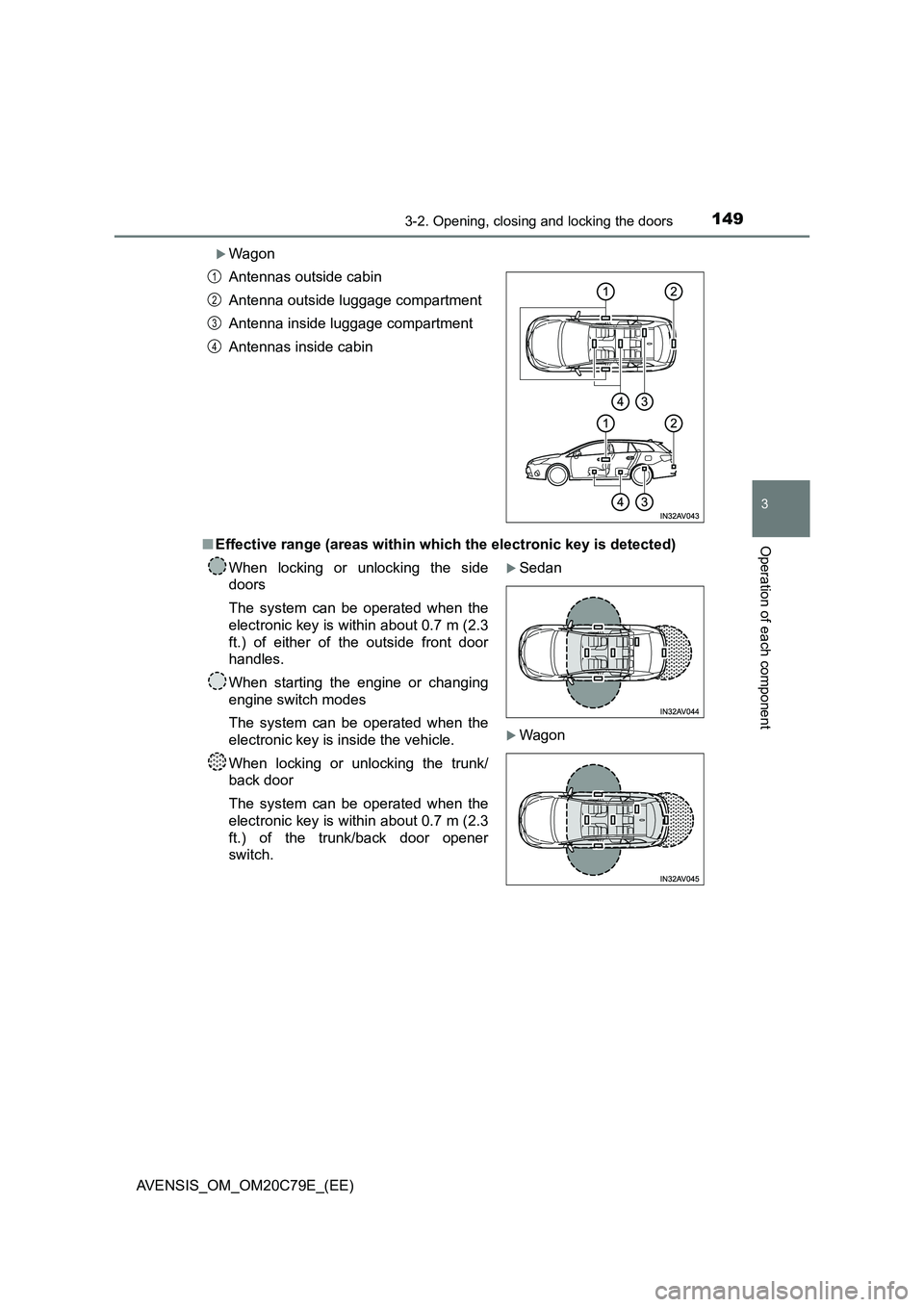
Wagon
■ Effective range (areas within which the electronic key is detected)
Antennas outside cabin
Antenna outside luggage compartment
Antenna inside luggage compartment
Antennas inside cabin
When locking or unlocking the side
doors
The system can be operated when the
electronic key is within about 0.7 m (2.3
ft.) of either of the outside front door
handles.
When starting the engine or changing
engine switch modes
The system can be operated when the
electronic key is inside the vehicle.
When locking or unlocking the trunk/
back door
The system can be operated when the
electronic key is within about 0.7 m (2.3
ft.) of the trunk/back door opener
switch.
Sedan
Wagon
1
2
3
4
Page 150 of 660
1503-2. Opening, closing and locking the doors
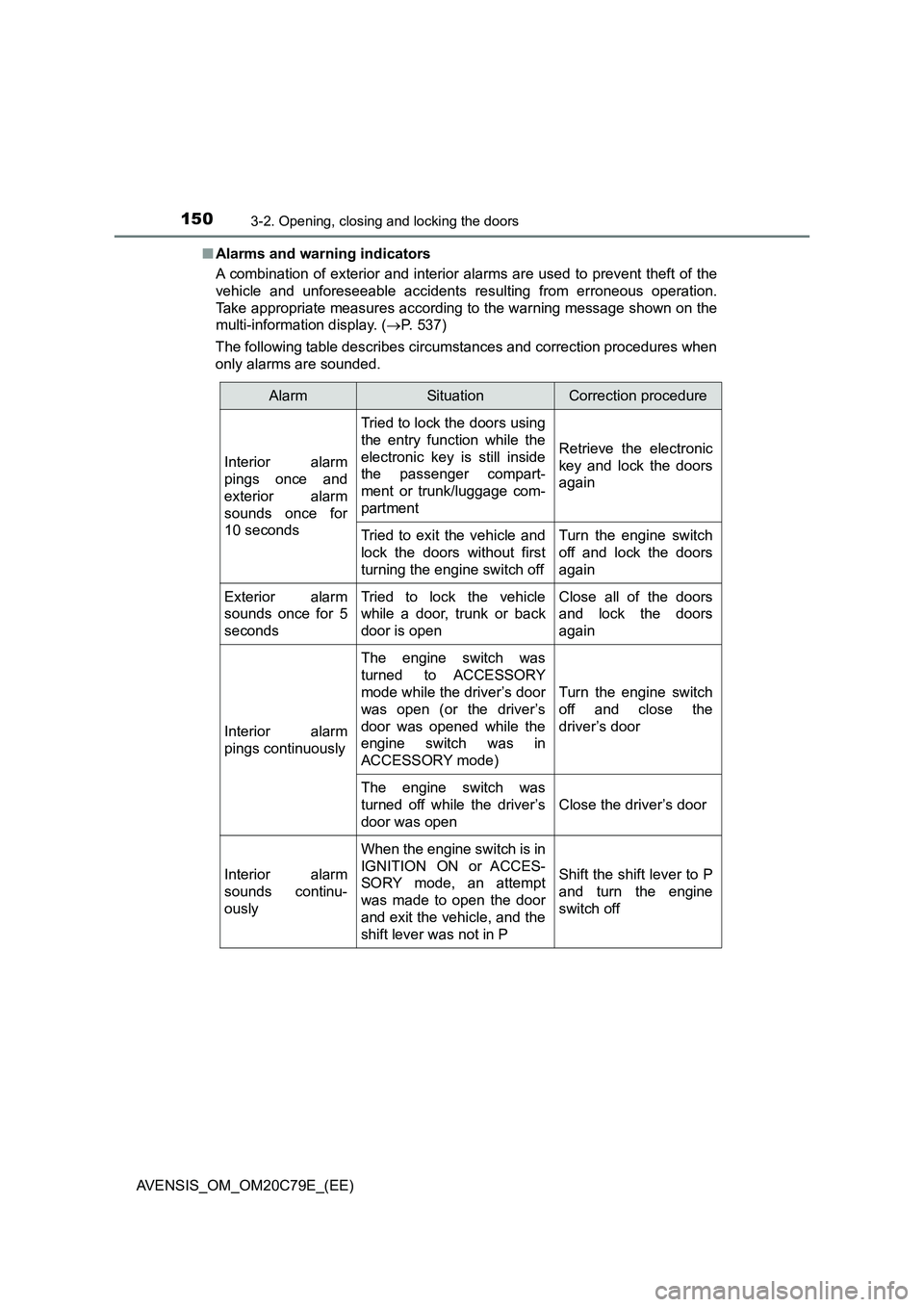
AVENSIS_OM_OM20C79E_(EE)■Alarms and warning indicators
A combination of exterior and interior alarms are used to prevent theft of the
vehicle and unforeseeable accidents resulting from erroneous operation.
Take appropriate measures according to the warning message shown on the
multi-information display. (P. 537)
The following table describes circumstances and correction procedures when
only alarms are sounded.
AlarmSituationCorrection procedure
Interior alarm
pings once and
exterior alarm
sounds once for
10 seconds
Tried to lock the doors using
the entry function while the
electronic key is still inside
the passenger compart-
ment or trunk/luggage com-
partment
Retrieve the electronic
key and lock the doors
again
Tried to exit the vehicle and
lock the doors without first
turning the engine switch offTurn the engine switch
off and lock the doors
again
Exterior alarm
sounds once for 5
secondsTried to lock the vehicle
while a door, trunk or back
door is openClose all of the doors
and lock the doors
again
Interior alarm
pings continuously
The engine switch was
turned to ACCESSORY
mode while the driver’s door
was open (or the driver’s
door was opened while the
engine switch was in
ACCESSORY mode)
Turn the engine switch
off and close the
driver’s door
The engine switch was
turned off while the driver’s
door was open
Close the driver’s door
Interior alarm
sounds continu-
ously
When the engine switch is in
IGNITION ON or ACCES-
SORY mode, an attempt
was made to open the door
and exit the vehicle, and the
shift lever was not in P
Shift the shift lever to P
and turn the engine
switch off
Page 153 of 660
1533-2. Opening, closing and locking the doors
3
Operation of each component
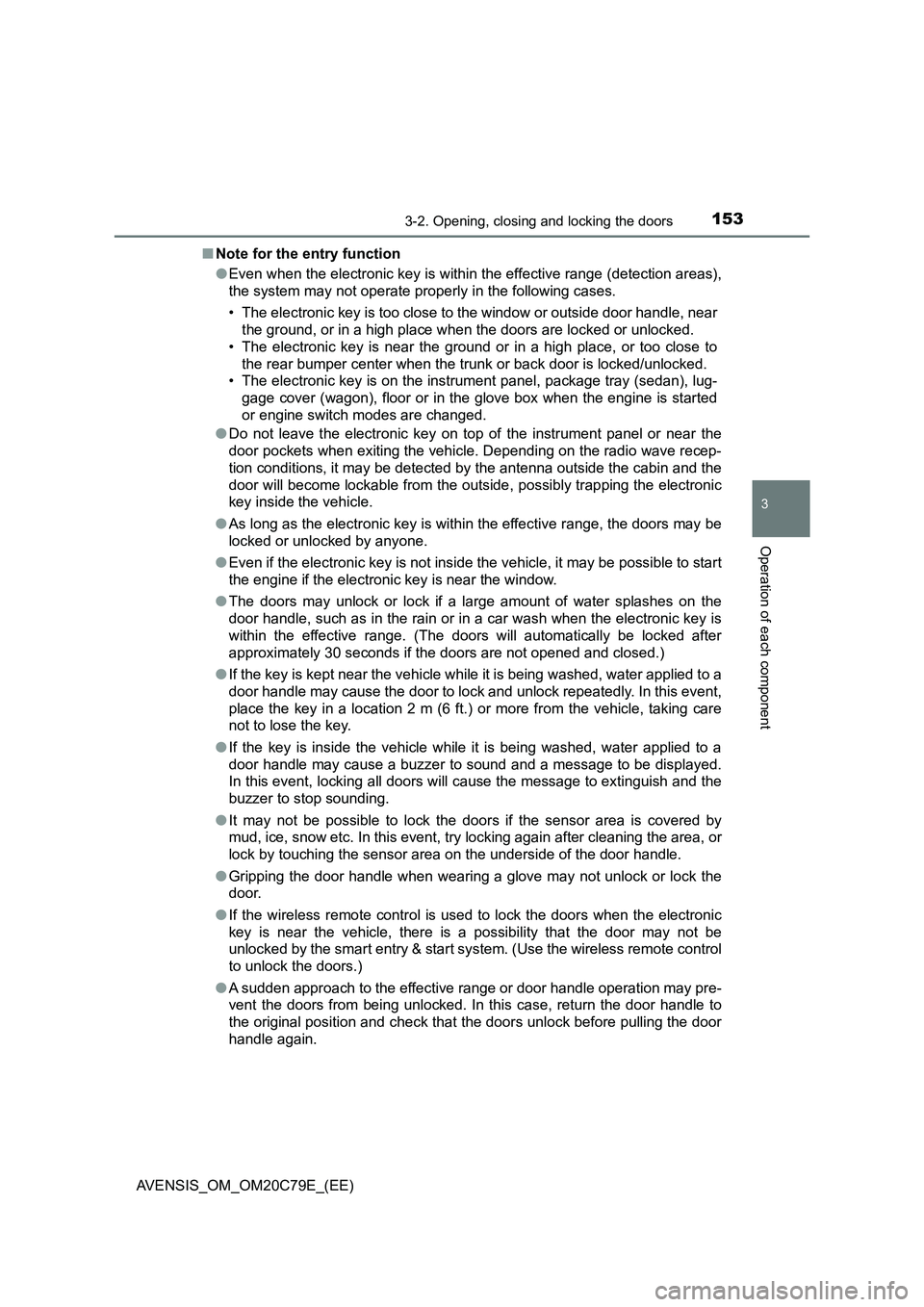
AVENSIS_OM_OM20C79E_(EE)■Note for the entry function
●Even when the electronic key is within the effective range (detection areas),
the system may not operate properly in the following cases.
• The electronic key is too close to the window or outside door handle, near
the ground, or in a high place when the doors are locked or unlocked.
• The electronic key is near the ground or in a high place, or too close to
the rear bumper center when the trunk or back door is locked/unlocked.
• The electronic key is on the instrument panel, package tray (sedan), lug-
gage cover (wagon), floor or in the glove box when the engine is started
or engine switch modes are changed.
●Do not leave the electronic key on top of the instrument panel or near the
door pockets when exiting the vehicle. Depending on the radio wave recep-
tion conditions, it may be detected by the antenna outside the cabin and the
door will become lockable from the outside, possibly trapping the electronic
key inside the vehicle.
●As long as the electronic key is within the effective range, the doors may be
locked or unlocked by anyone.
●Even if the electronic key is not inside the vehicle, it may be possible to start
the engine if the electronic key is near the window.
●The doors may unlock or lock if a large amount of water splashes on the
door handle, such as in the rain or in a car wash when the electronic key is
within the effective range. (The doors will automatically be locked after
approximately 30 seconds if the doors are not opened and closed.)
●If the key is kept near the vehicle while it is being washed, water applied to a
door handle may cause the door to lock and unlock repeatedly. In this event,
place the key in a location 2 m (6 ft.) or more from the vehicle, taking care
not to lose the key.
●If the key is inside the vehicle while it is being washed, water applied to a
door handle may cause a buzzer to sound and a message to be displayed.
In this event, locking all doors will cause the message to extinguish and the
buzzer to stop sounding.
●It may not be possible to lock the doors if the sensor area is covered by
mud, ice, snow etc. In this event, try locking again after cleaning the area, or
lock by touching the sensor area on the underside of the door handle.
●Gripping the door handle when wearing a glove may not unlock or lock the
door.
●If the wireless remote control is used to lock the doors when the electronic
key is near the vehicle, there is a possibility that the door may not be
unlocked by the smart entry & start system. (Use the wireless remote control
to unlock the doors.)
●A sudden approach to the effective range or door handle operation may pre-
vent the doors from being unlocked. In this case, return the door handle to
the original position and check that the doors unlock before pulling the door
handle again.