lock TOYOTA AVENSIS 2018 Owner's Guide
[x] Cancel search | Manufacturer: TOYOTA, Model Year: 2018, Model line: AVENSIS, Model: TOYOTA AVENSIS 2018Pages: 660, PDF Size: 63.16 MB
Page 121 of 660
1213-1. Key information
3
Operation of each component
AVENSIS_OM_OM20C79E_(EE)
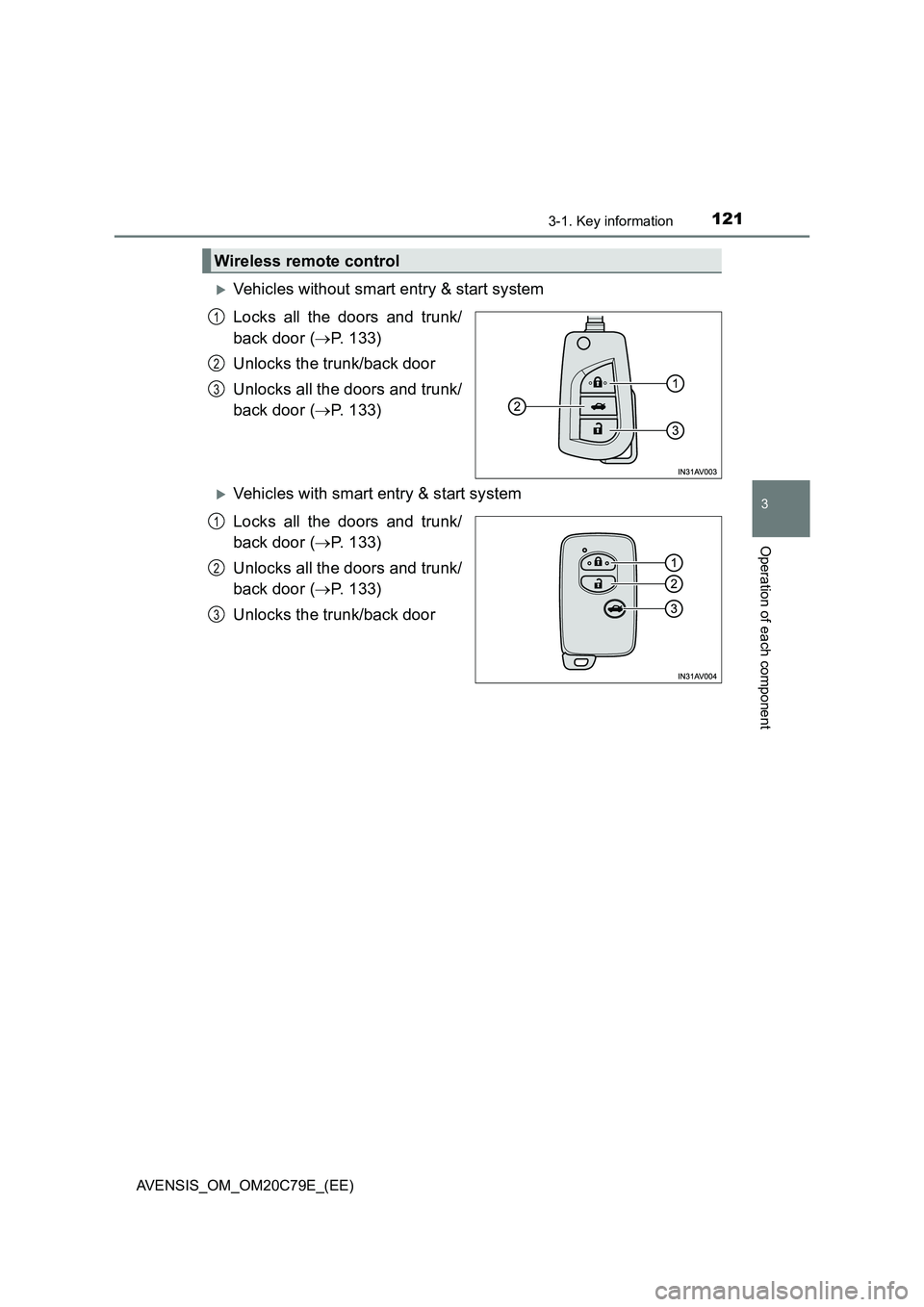
Vehicles without smart entry & start system
Locks all the doors and trunk/
back door (P. 133)
Unlocks the trunk/back door
Unlocks all the doors and trunk/
back door (P. 133)
Vehicles with smart entry & start system
Locks all the doors and trunk/
back door (P. 133)
Unlocks all the doors and trunk/
back door (P. 133)
Unlocks the trunk/back door
Wireless remote control
1
2
3
1
2
3
Page 122 of 660
1223-1. Key information
AVENSIS_OM_OM20C79E_(EE)
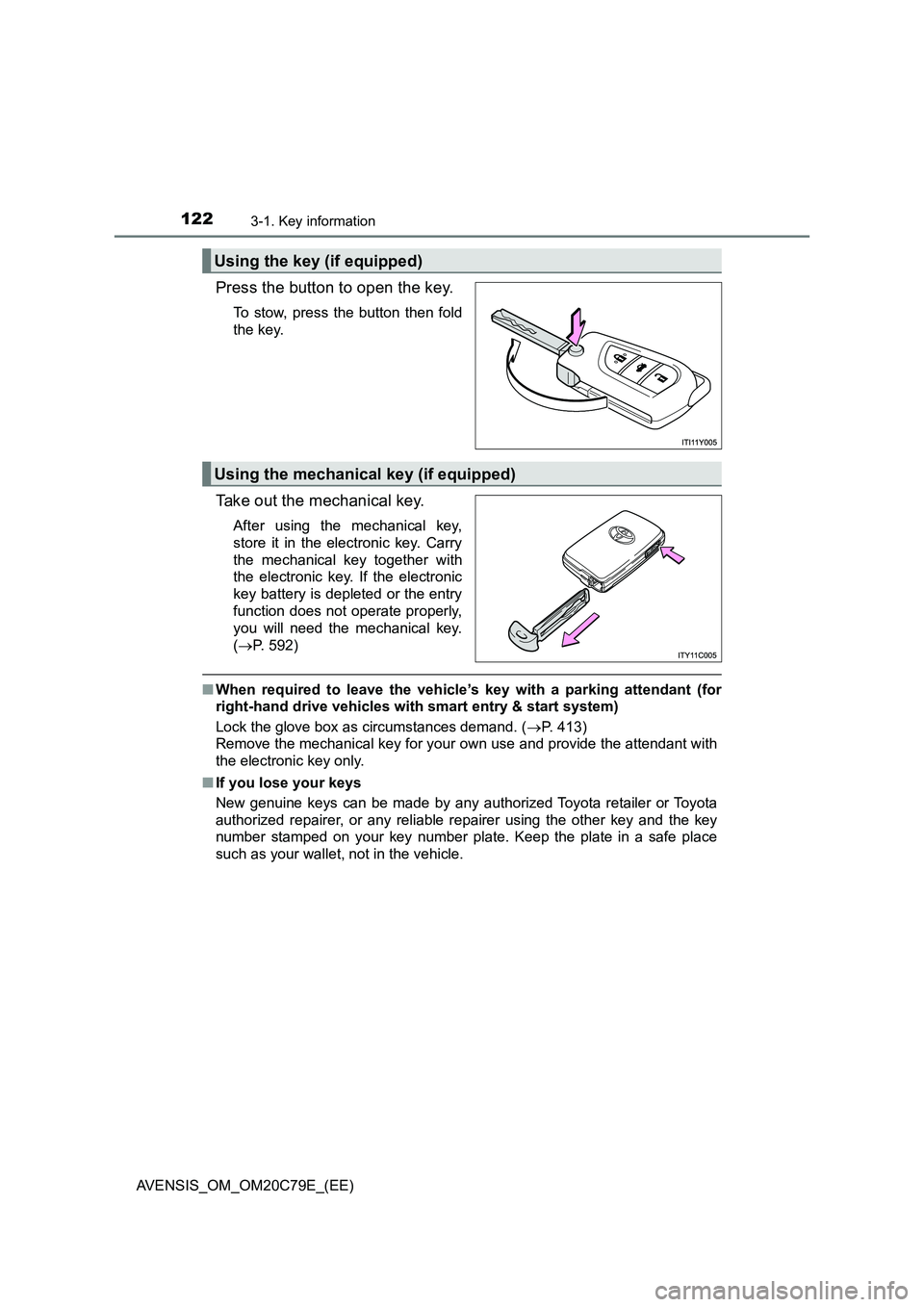
Press the button to open the key.
To stow, press the button then fold
the key.
Take out the mechanical key.
After using the mechanical key,
store it in the electronic key. Carry
the mechanical key together with
the electronic key. If the electronic
key battery is depleted or the entry
function does not operate properly,
you will need the mechanical key.
(P. 592)
■When required to leave the vehicle’s key with a parking attendant (for
right-hand drive vehicles with smart entry & start system)
Lock the glove box as circumstances demand. (P. 413)
Remove the mechanical key for your own use and provide the attendant with
the electronic key only.
■If you lose your keys
New genuine keys can be made by any authorized Toyota retailer or Toyota
authorized repairer, or any reliable repairer using the other key and the key
number stamped on your key number plate. Keep the plate in a safe place
such as your wallet, not in the vehicle.
Using the key (if equipped)
Using the mechanical key (if equipped)
Page 132 of 660
1323-2. Opening, closing and locking the doors
AVENSIS_OM_OM20C79E_(EE)
Side doors
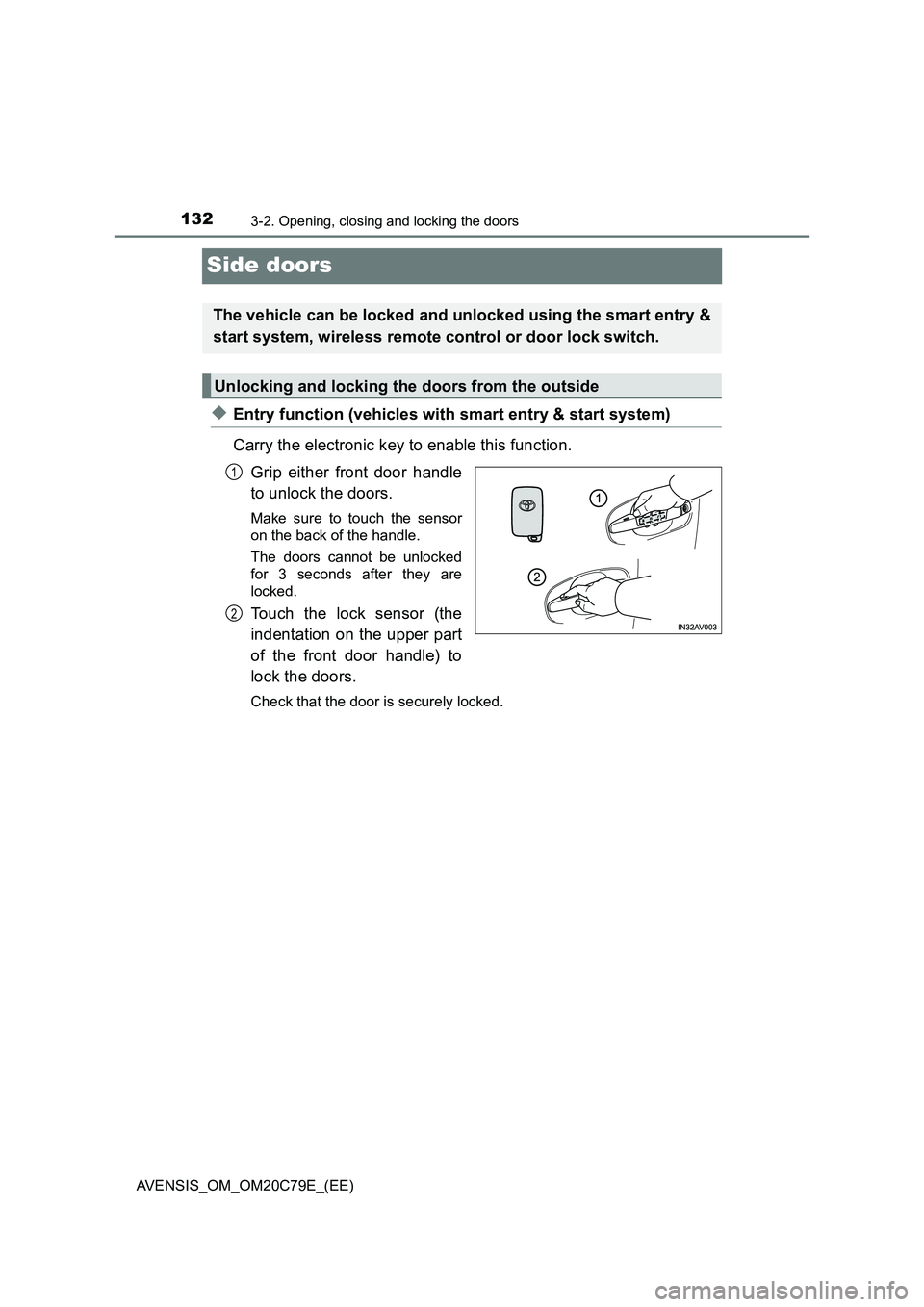
◆Entry function (vehicles with smart entry & start system)
Carry the electronic key to enable this function.
Grip either front door handle
to unlock the doors.
Make sure to touch the sensor
on the back of the handle.
The doors cannot be unlocked
for 3 seconds after they are
locked.
Touch the lock sensor (the
indentation on the upper part
of the front door handle) to
lock the doors.
Check that the door is securely locked.
The vehicle can be locked and unlocked using the smart entry &
start system, wireless remote control or door lock switch.
Unlocking and locking the doors from the outside
1
2
Page 133 of 660
1333-2. Opening, closing and locking the doors
3
Operation of each component
AVENSIS_OM_OM20C79E_(EE)
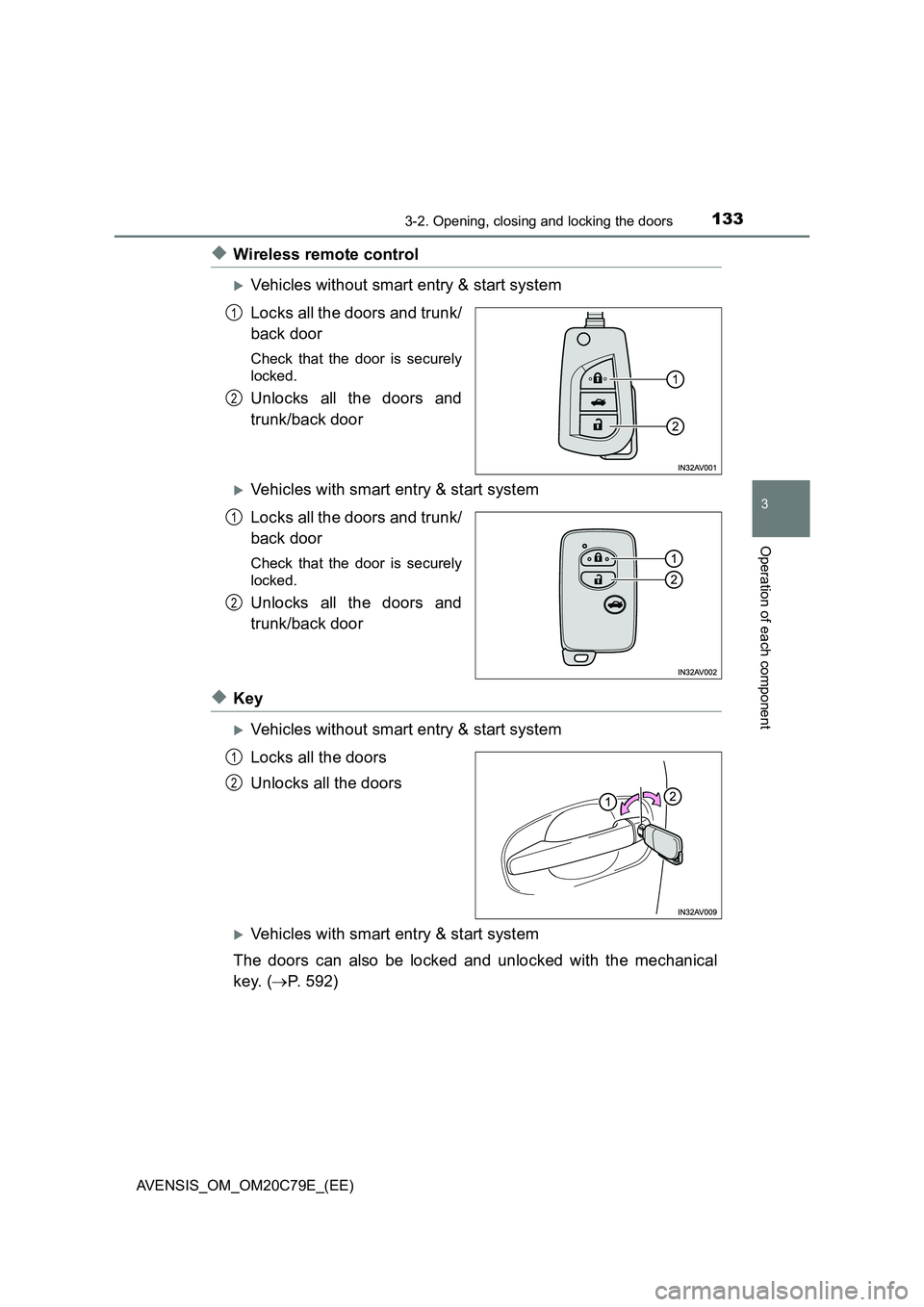
◆Wireless remote control
Vehicles without smart entry & start system
Locks all the doors and trunk/
back door
Check that the door is securely
locked.
Unlocks all the doors and
trunk/back door
Vehicles with smart entry & start system
Locks all the doors and trunk/
back door
Check that the door is securely
locked.
Unlocks all the doors and
trunk/back door
◆Key
Vehicles without smart entry & start system
Locks all the doors
Unlocks all the doors
Vehicles with smart entry & start system
The doors can also be locked and unlocked with the mechanical
key. (P. 592)
1
2
1
2
1
2
Page 134 of 660
1343-2. Opening, closing and locking the doors
AVENSIS_OM_OM20C79E_(EE)
■Operation signals
The emergency flashers flash to indicate that the doors and trunk/back door
have been locked/unlocked. (Locked: Once; Unlocked: Twice)
■Security feature
If a door is not opened within approximately 30 seconds after the vehicle is
unlocked, the security feature automatically locks the vehicle again.
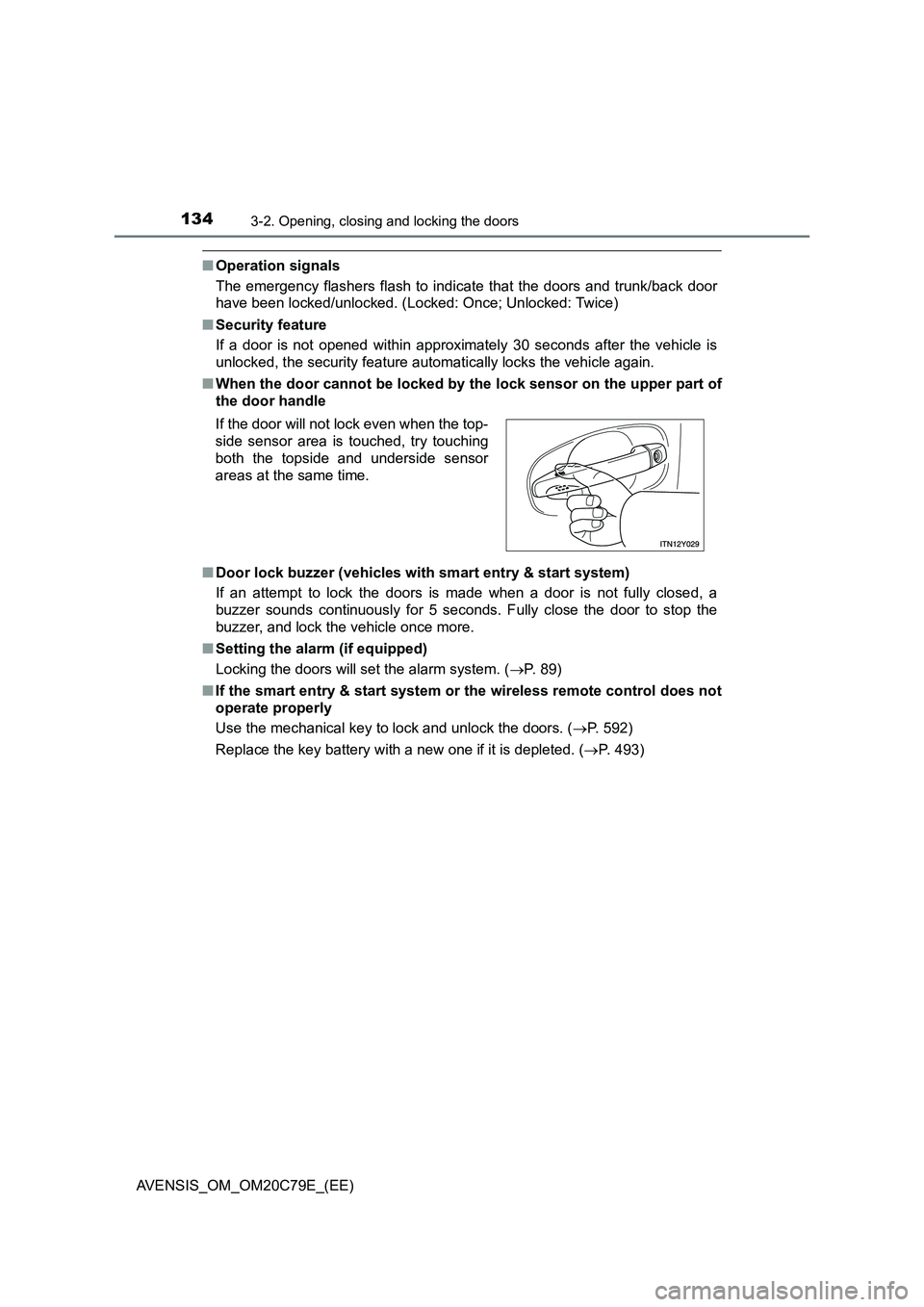
■When the door cannot be locked by the lock sensor on the upper part of
the door handle
■Door lock buzzer (vehicles with smart entry & start system)
If an attempt to lock the doors is made when a door is not fully closed, a
buzzer sounds continuously for 5 seconds. Fully close the door to stop the
buzzer, and lock the vehicle once more.
■Setting the alarm (if equipped)
Locking the doors will set the alarm system. (P. 89)
■If the smart entry & start system or the wireless remote control does not
operate properly
Use the mechanical key to lock and unlock the doors. (P. 592)
Replace the key battery with a new one if it is depleted. (P. 493) If the door will not lock even when the top-
side sensor area is touched, try touching
both the topside and underside sensor
areas at the same time.
Page 135 of 660
1353-2. Opening, closing and locking the doors
3
Operation of each component
AVENSIS_OM_OM20C79E_(EE)
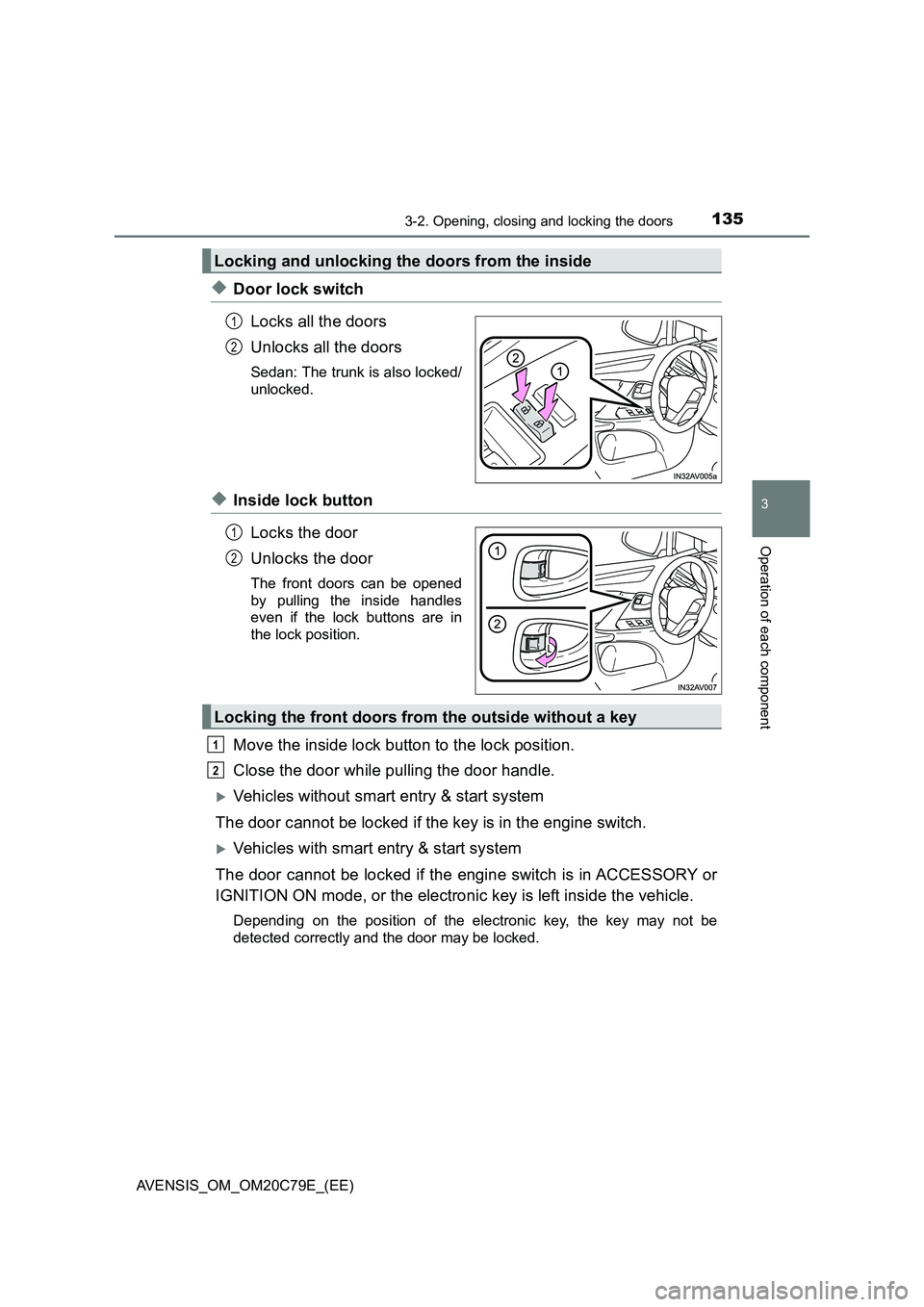
◆Door lock switch
Locks all the doors
Unlocks all the doors
Sedan: The trunk is also locked/
unlocked.
◆Inside lock button
Locks the door
Unlocks the door
The front doors can be opened
by pulling the inside handles
even if the lock buttons are in
the lock position.
Move the inside lock button to the lock position.
Close the door while pulling the door handle.
Vehicles without smart entry & start system
The door cannot be locked if the key is in the engine switch.
Vehicles with smart entry & start system
The door cannot be locked if the engine switch is in ACCESSORY or
IGNITION ON mode, or the electronic key is left inside the vehicle.
Depending on the position of the electronic key, the key may not be
detected correctly and the door may be locked.
Locking and unlocking the doors from the inside
1
2
1
2
Locking the front doors from the outside without a key
1
2
Page 136 of 660
1363-2. Opening, closing and locking the doors
AVENSIS_OM_OM20C79E_(EE)
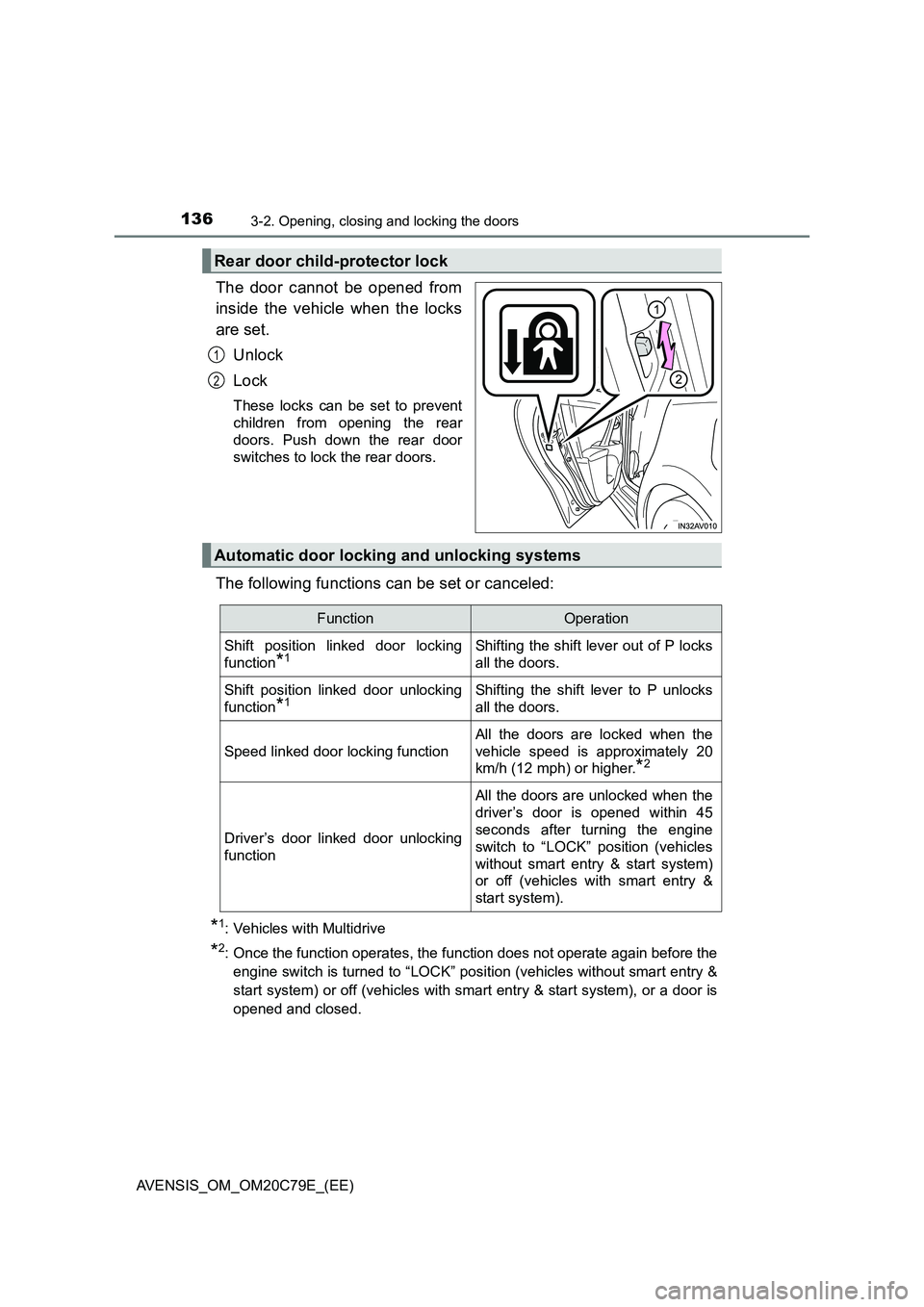
The door cannot be opened from
inside the vehicle when the locks
are set.
Unlock
Lock
These locks can be set to prevent
children from opening the rear
doors. Push down the rear door
switches to lock the rear doors.
The following functions can be set or canceled:
*1: Vehicles with Multidrive
*2: Once the function operates, the function does not operate again before the
engine switch is turned to “LOCK” position (vehicles without smart entry &
start system) or off (vehicles with smart entry & start system), or a door is
opened and closed.
Rear door child-protector lock
1
2
Automatic door locking and unlocking systems
FunctionOperation
Shift position linked door locking
function
*1Shifting the shift lever out of P locks
all the doors.
Shift position linked door unlocking
function
*1Shifting the shift lever to P unlocks
all the doors.
Speed linked door locking function
All the doors are locked when the
vehicle speed is approximately 20
km/h (12 mph) or higher.
*2
Driver’s door linked door unlocking
function
All the doors are unlocked when the
driver’s door is opened within 45
seconds after turning the engine
switch to “LOCK” position (vehicles
without smart entry & start system)
or off (vehicles with smart entry &
start system).
Page 137 of 660
1373-2. Opening, closing and locking the doors
3
Operation of each component
AVENSIS_OM_OM20C79E_(EE)■
Setting and canceling the functions (vehicles without naviga-
tion system or multimedia system)
To switch between setting and canceling, follow the procedure
below.
Close all the doors, and turn the engine switch to “ON” position
(vehicles without smart entry & start system) or IGNITION ON
mode (vehicles with smart entry & start system).
Perform within 10 seconds.
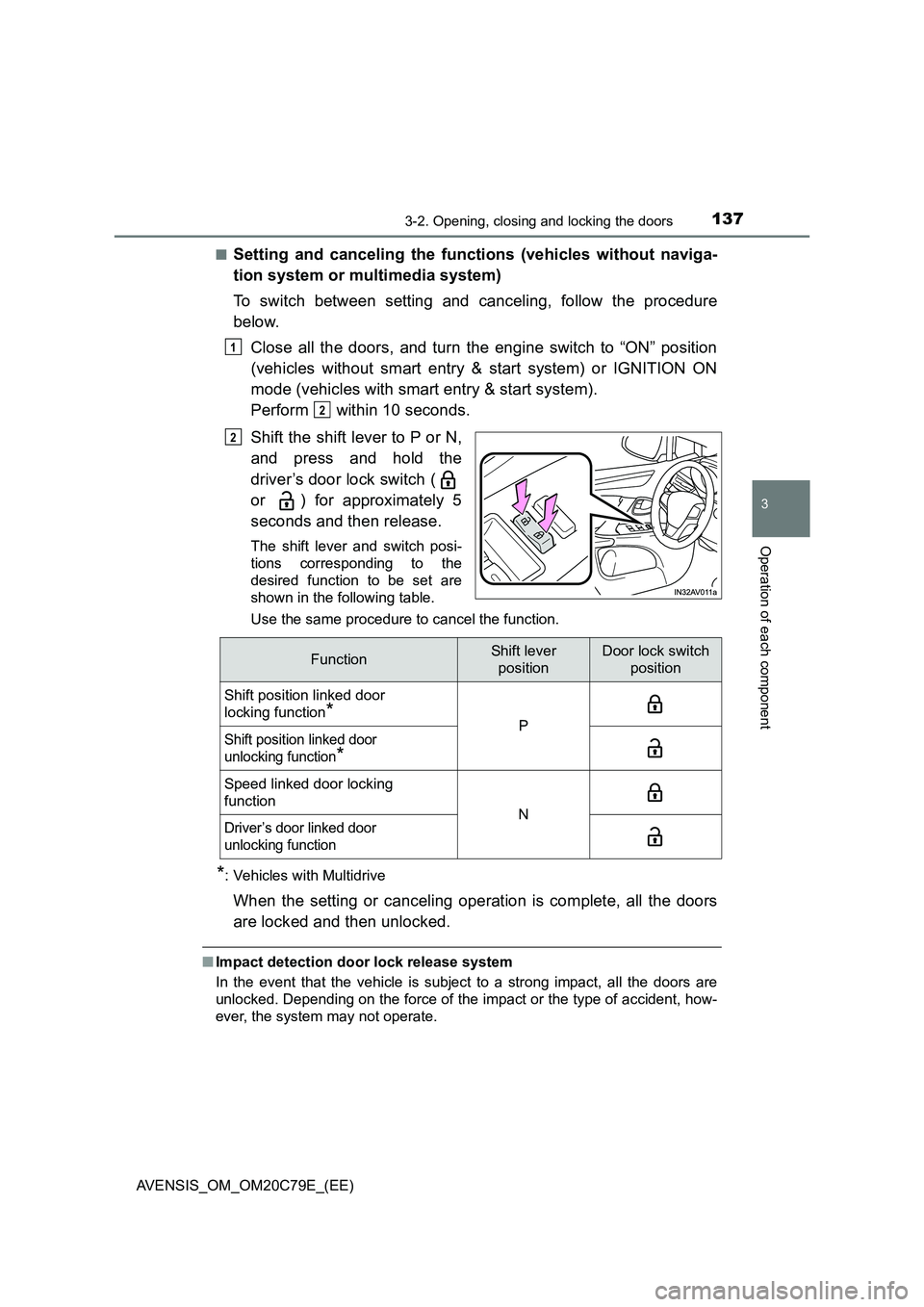
Shift the shift lever to P or N,
and press and hold the
driver’s door lock switch (
or ) for approximately 5
seconds and then release.
The shift lever and switch posi-
tions corresponding to the
desired function to be set are
shown in the following table.
Use the same procedure to cancel the function.
*: Vehicles with Multidrive
When the setting or canceling operation is complete, all the doors
are locked and then unlocked.
■Impact detection door lock release system
In the event that the vehicle is subject to a strong impact, all the doors are
unlocked. Depending on the force of the impact or the type of accident, how-
ever, the system may not operate.
1
2
2
FunctionShift lever
positionDoor lock switch
position
Shift position linked door
locking function
*PShift position linked door
unlocking function
*
Speed linked door locking
function
NDriver’s door linked door
unlocking function
Page 138 of 660
1383-2. Opening, closing and locking the doors
AVENSIS_OM_OM20C79E_(EE)
■ Conditions affecting operation
Vehicles without smart entry & start system
P. 123
Vehicles with smart entry & start system
P. 152
■ Customization
Settings (e.g. automatic door locking and unlocking system) can be changed.
(Customizable features P. 629)
WARNING
■To prevent an accident
Observe the following precautions while driving the vehicle.
Failing to do so may result in a door opening and an occupant falling out,
resulting in death or serious injury.
● Ensure that all doors are properly closed.
● Do not pull the inside handle of the doors while driving.
Be especially careful for the driver’s door, as the door may be opened
even if the inside lock button is in locked position.
● Set the rear door child-protector locks when children are seated in the rear
seat.
Page 139 of 660
139
3
3-2. Opening, closing and locking the doors
Operation of each component
AVENSIS_OM_OM20C79E_(EE)
Trunk (sedan)
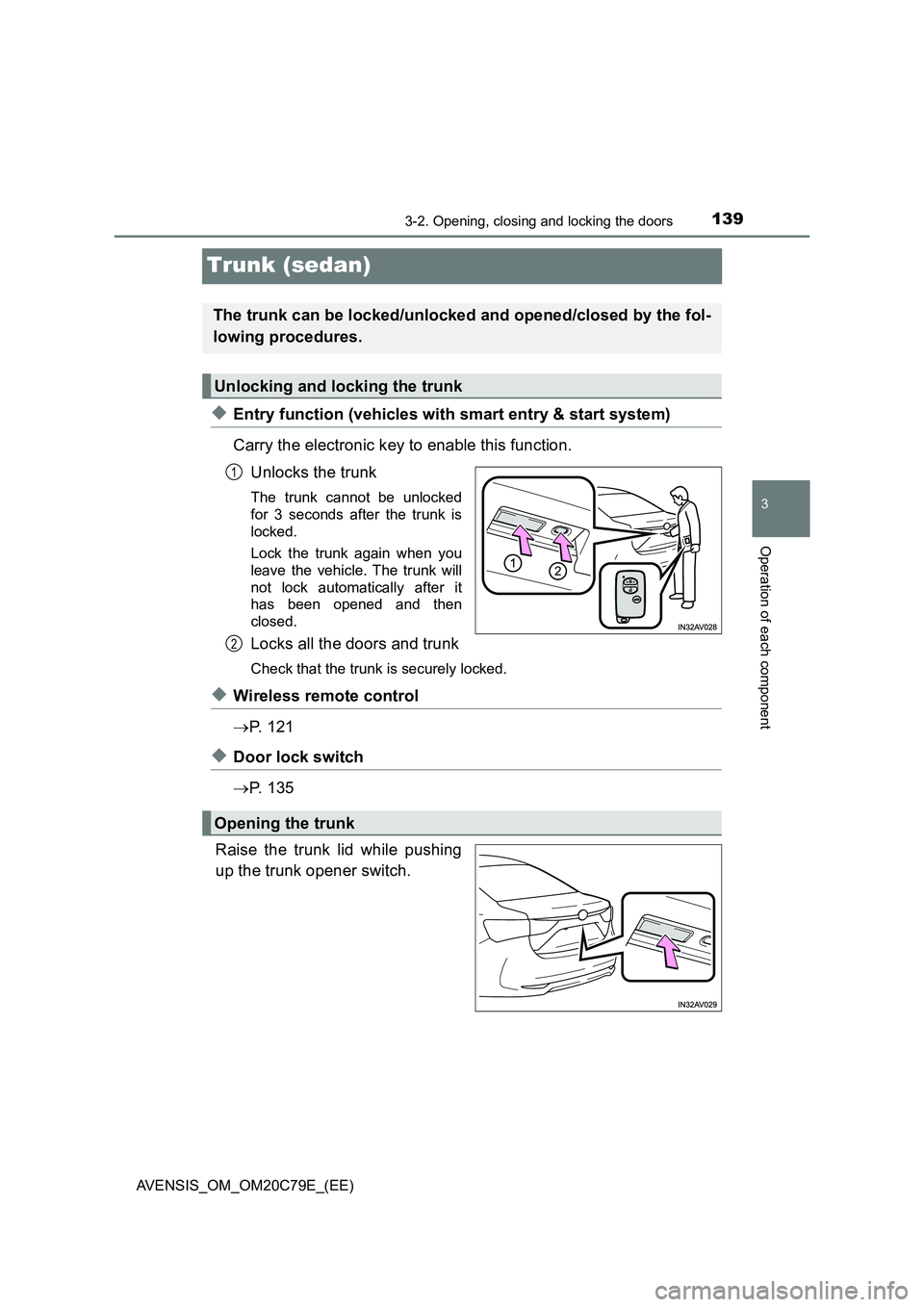
◆Entry function (vehicles with smart entry & start system)
Carry the electronic key to enable this function.
Unlocks the trunk
The trunk cannot be unlocked
for 3 seconds after the trunk is
locked.
Lock the trunk again when you
leave the vehicle. The trunk will
not lock automatically after it
has been opened and then
closed.
Locks all the doors and trunk
Check that the trunk is securely locked.
◆Wireless remote control
P. 1 2 1
◆Door lock switch
P. 1 3 5
Raise the trunk lid while pushing
up the trunk opener switch.
The trunk can be locked/unlocked and opened/closed by the fol-
lowing procedures.
Unlocking and locking the trunk
1
2
Opening the trunk