charging TOYOTA AVENSIS 2018 Owners Manual
[x] Cancel search | Manufacturer: TOYOTA, Model Year: 2018, Model line: AVENSIS, Model: TOYOTA AVENSIS 2018Pages: 660, PDF Size: 63.16 MB
Page 91 of 660
911-3. Theft deterrent system
1
AVENSIS_OM_OM20C79E_(EE)
For safety and security
■When the battery is disconnected
Be sure to cancel the alarm system.
If the battery is disconnected before canceling the alarm, the system may be
triggered when the battery is reconnected.
■ Alarm-operated door lock
In the following cases, depending on the situation, the door may automatically
lock to prevent improper entry into the vehicle:
● When a person remaining in the vehicle unlocks the door and the alarm is
activated.
● While the alarm is activated, a person remaining in the vehicle unlocks the
door.
● When recharging or replacing the battery.
NOTICE
■To ensure the system operates correctly
Do not modify or remove the system. If modified or removed, the proper
operation of the system cannot be guaranteed.
Page 124 of 660
1243-1. Key information
AVENSIS_OM_OM20C79E_(EE)■Key battery depletion
Vehicles without smart entry & start system
If the wireless remote control function does not operate, the battery may be
depleted. Replace the battery when necessary. (P. 493)
Vehicles with smart entry & start system
●The standard battery life is 1 to 2 years. (The battery becomes depleted
even if the electronic key is not used.) If the smart entry & start system or
the wireless remote control function does not operate, or the detection area
becomes smaller, the battery may be depleted. Replace the battery when
necessary. (P. 493)
●If the battery becomes low, an alarm will sound in the cabin when the engine
stops. (P. 150, 552)
●To avoid serious deterioration, do not leave the electronic key within 1 m (3
ft.) of the following electrical appliances that produce a magnetic field:
•TVs
• Personal computers
• Cellular phones, cordless phones and battery chargers
• Recharging cellular phones or cordless phones
• Glass top ranges
• Table lamps
■Replacing the
key battery
P. 493
■Customization
Settings (e.g. wireless remote control system) can be changed.
(Customizable features P. 629)
Page 152 of 660
1523-2. Opening, closing and locking the doors
AVENSIS_OM_OM20C79E_(EE)■Battery-saving function
In the following circumstances, the smart entry & start system is disabled in
order to prevent the vehicle and electronic key batteries from discharging.
●When the smart entry & start system has not been used for 5 days or more
●When the electronic key has been left within approximately 1 m (3 ft.) of the
vehicle for 10 minutes or more
The system will resume operation when...
●The vehicle is locked touching the door handle lock sensor area.
●The vehicle is locked/unlocked using the wireless remote control function.
(P. 133)
●The vehicle is locked/unlocked using the mechanical key. (P. 592)
■Conditions affecting operation
The smart entry & start system uses weak radio waves. In the following situa-
tions, the communication between the electronic key and the vehicle may be
affected, preventing the smart entry & start system and wireless remote con-
trol from operating properly. (Ways of coping: P. 592)
●When the electronic key battery is depleted
●Near a TV tower, electric power plant, gas station, radio station, large dis-
play, airport or other facility that generates strong radio waves or electrical
noise
●When carrying a portable radio, cellular phone, cordless phone or other
wireless communication devices
●When the electronic key is in contact with, or is covered by the following
metallic objects
• Cards to which aluminum foil is attached
• Cigarette boxes that have aluminum foil inside
• Metallic wallets or bags
• Coins
• Hand warmers made of metal
• Media such as CDs and DVDs
●When multiple electronic keys are in the vicinity
●When another wireless key (that emits radio waves) is being used nearby
●When carrying or using the electronic key together with the following
devices that emit radio waves
• Another vehicle’s electronic key or a wireless key that emits radio waves
• Personal computer or personal digital assistants (PDAs)
• Digital audio players
• Portable game systems
●If window tint with a metallic content or metallic objects are attached to the
rear window
●Sedan: If a metallic object is placed on the package tray
Page 303 of 660
3034-6. Using the driving support systems
4
Driving
AVENSIS_OM_OM20C79E_(EE)
“Battery charging”
• The battery charge amount may be low.
Engine stop is temporarily prohibited
to prioritize charging of the battery, but
if the engine is operated for a short
while, engine stop is allowed.
• A refresh charge may be occurring (Exam-
ples: A short time after replacing the bat-
tery, removing battery terminals, etc.)
After a refresh charge of approximately
5 to 40 minutes completes, the system
can be operated.
• The engine may have been started with
the hood opened.
Close the hood, turn the engine switch
off, wait for a while, and then start the
engine.
• The battery may be cold.
Operating the engine for a short while
allows the system to recover due to
the temperature increase in the engine
compartment.
• The battery may be extremely hot.
If the engine is stopped and the engine
compartment is allowed to cool suffi-
ciently, the system recovers.
MessageDetails/Actions
Page 304 of 660
3044-6. Using the driving support systems
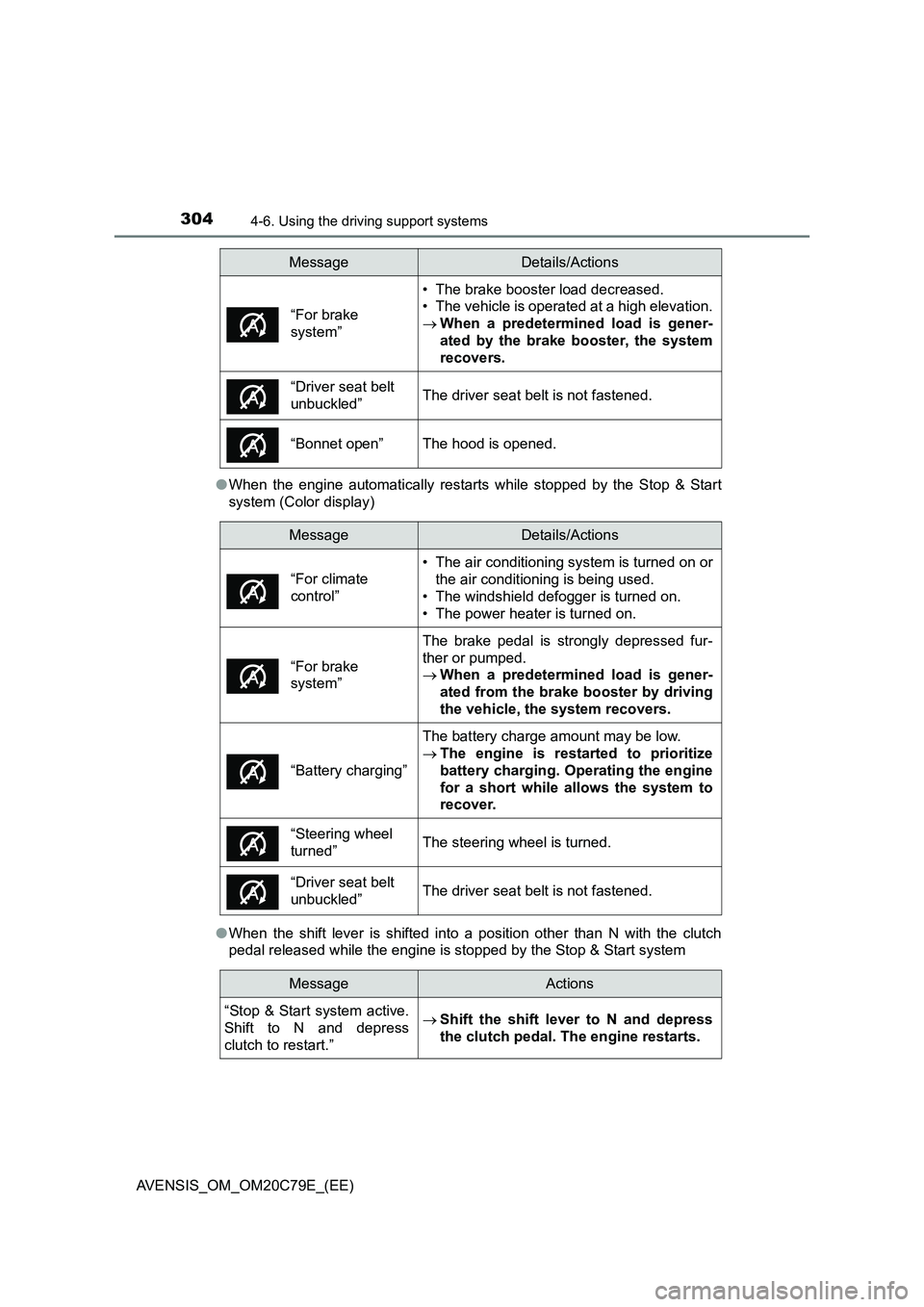
AVENSIS_OM_OM20C79E_(EE)●When the engine automatically restarts while stopped by the Stop & Start
system (Color display)
●When the shift lever is shifted into a position other than N with the clutch
pedal released while the engine is stopped by the Stop & Start system
“For brake
system”
• The brake booster load decreased.
• The vehicle is operated at a high elevation.
When a predetermined load is gener-
ated by the brake booster, the system
recovers.
“Driver seat belt
unbuckled”The driver seat belt is not fastened.
“Bonnet open”The hood is opened.
MessageDetails/Actions
• The air conditioning system is turned on or
the air conditioning is being used.
• The windshield defogger is turned on.
• The power heater is turned on.
“For brake
system”
The brake pedal is strongly depressed fur-
ther or pumped.
When a predetermined load is gener-
ated from the brake booster by driving
the vehicle, the system recovers.
“Battery charging”
The battery charge amount may be low.
The engine is restarted to prioritize
battery charging. Operating the engine
for a short while allows the system to
recover.
“Steering wheel
turned”The steering wheel is turned.
“Driver seat belt
unbuckled”The driver seat belt is not fastened.
MessageActions
“Stop & Start system active.
Shift to N and depress
clutch to restart.”
Shift the shift lever to N and depress
the clutch pedal. The engine restarts.
MessageDetails/Actions
“For climate
control”
Page 464 of 660
4647-3. Do-it-yourself maintenance
AVENSIS_OM_OM20C79E_(EE)■
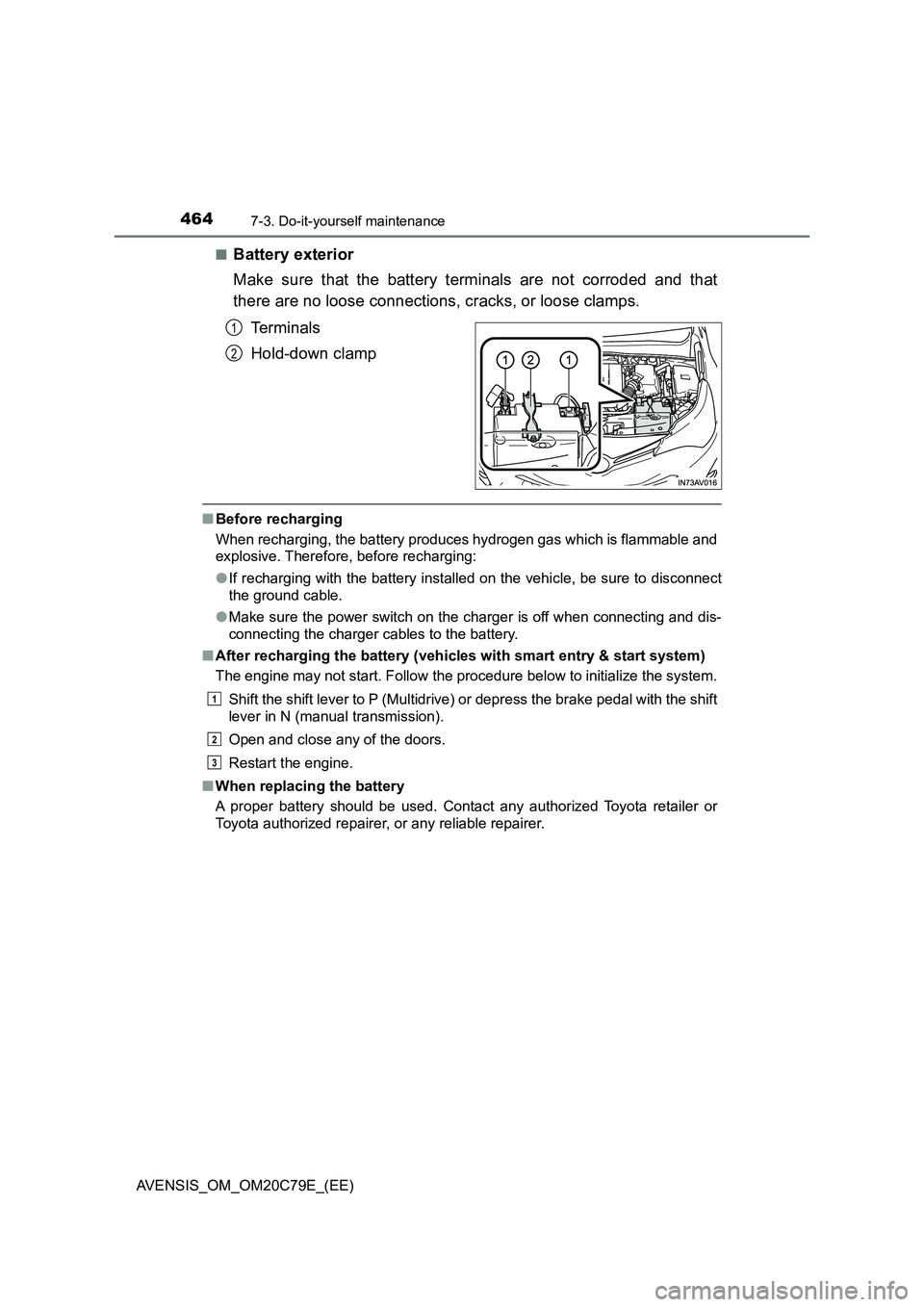
Battery exterior
Make sure that the battery terminals are not corroded and that
there are no loose connections, cracks, or loose clamps.
Te r m i n a l s
Hold-down clamp
■Before recharging
When recharging, the battery produces hydrogen gas which is flammable and
explosive. Therefore, before recharging:
●If recharging with the battery installed on the vehicle, be sure to disconnect
the ground cable.
●Make sure the power switch on the charger is off when connecting and dis-
connecting the charger cables to the battery.
■After recharging the battery (vehicles with smart entry & start system)
The engine may not start. Follow the procedure below to initialize the system.
Shift the shift lever to P (Multidrive) or depress the brake pedal with the shift
lever in N (manual transmission).
Open and close any of the doors.
Restart the engine.
■When replacing the battery
A proper battery should be used. Contact any authorized Toyota retailer or
Toyota authorized repairer, or any reliable repairer.
1
2
1
2
3
Page 466 of 660
4667-3. Do-it-yourself maintenance
AVENSIS_OM_OM20C79E_(EE)
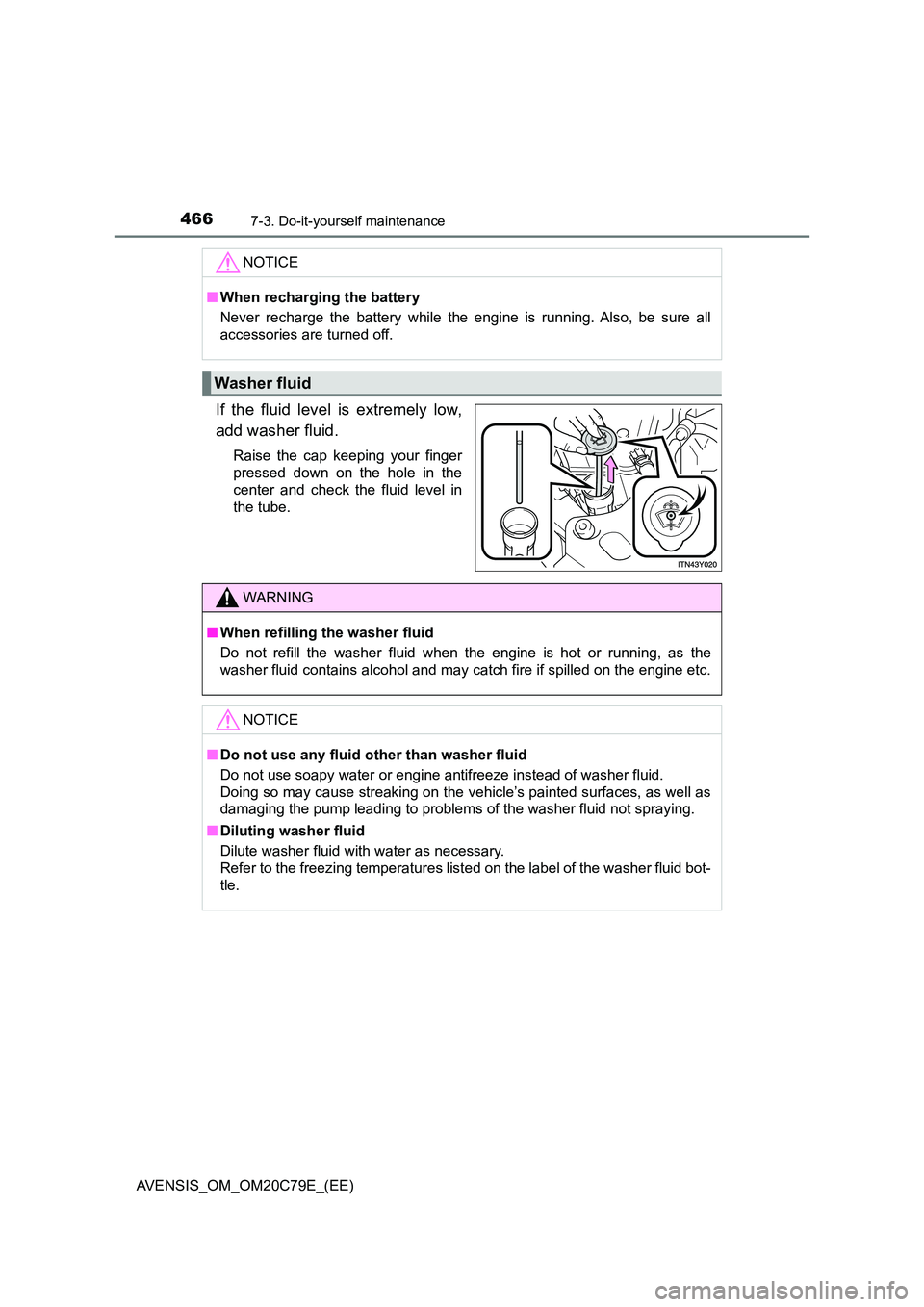
If the fluid level is extremely low,
add washer fluid.
Raise the cap keeping your finger
pressed down on the hole in the
center and check the fluid level in
the tube.
NOTICE
■ When recharging the battery
Never recharge the battery while the engine is running. Also, be sure all
accessories are turned off.
Washer fluid
WARNING
■ When refilling the washer fluid
Do not refill the washer fluid when the engine is hot or running, as the
washer fluid contains alcohol and may catch fire if spilled on the engine etc.
NOTICE
■ Do not use any fluid other than washer fluid
Do not use soapy water or engine antifreeze instead of washer fluid.
Doing so may cause streaking on the vehicle’s painted surfaces, as well as
damaging the pump leading to problems of the washer fluid not spraying.
■ Diluting washer fluid
Dilute washer fluid with water as necessary.
Refer to the freezing temperatures list ed on the label of the washer fluid bot-
tle.
Page 538 of 660

5388-2. Steps to take in an emergency
AVENSIS_OM_OM20C79E_(EE)
Indicates a malfunction in the vehicle’s charging
system
Immediately stop the vehicle in a safe place
and contact any authorized Toyota retailer
or Toyota authorized repairer, or any reli-
able repairer.
Indicates a malfunction in the brake system
Have the vehicle inspected by any autho-
rized Toyota retailer or Toyota authorized
repairer, or any reliable repairer immedi-
ately.
Continuing to drive the vehicle may be dan-
gerous.
(If equipped)
Indicates a malfunction in the steering lock sys-
tem
A buzzer also sounds.
Have the vehicle inspected by any autho-
rized Toyota retailer or Toyota authorized
repairer, or any reliable repairer.
Warning messageDetails/Actions
Page 597 of 660
5978-2. Steps to take in an emergency
AVENSIS_OM_OM20C79E_(EE)
8
When trouble arises
■Starting the engine when the battery is discharged (vehicles with Multid-
rive)
The engine cannot be started by push-starting.
■ To prevent battery discharge
● Turn off the headlights and the audio system while the engine is turned off.
● Turn off any unnecessary electrical components when the vehicle is running
at a low speed for an extended period, such as in heavy traffic, etc.
■ Charging the battery
The electricity stored in the battery will discharge gradually even when the
vehicle is not in use, due to natural discharge and the draining effects of cer-
tain electrical appliances. If the vehicle is left for a long time, the battery may
discharge, and the engine may be unable to start. (The battery recharges
automatically during driving.)
■ When the battery is removed or discharged
● Vehicles with smart entry & start system: In some cases, it may not be pos-
sible to unlock the doors using the smart entry & start system when the bat-
tery is discharged. Use the wireless remote control or the mechanical key to
lock or unlock the doors.
● Vehicles with smart entry & start system: The engine may not start on the
first attempt after the battery has recharged but will start normally after the
second attempt. This is not a malfunction.
● Vehicles with smart entry & start system: The engine switch mode is memo-
rized by the vehicle. When the battery is reconnected, the system will return
to the mode it was in before the battery was discharged. Before disconnect-
ing the battery, turn the engine switch off. If you are unsure what mode the
engine switch was in before the battery discharged, be especially careful
when reconnecting the battery.
● Vehicles with Stop & Start system:
After charging the battery or reconnecti ng the battery terminals, the Stop &
Start system may not automatically stop the engine for approximately 5 to
40 minutes.
■ When replacing the battery
● Use a battery that the case size is same as the previous one (LN2), 20 hour
rate capacity (20HR) is equivalent (60Ah) or greater, and performance rating
(CCA) is equivalent (356A) or greater.
• If the sizes differ, the battery cannot be properly secured.
• If the 20 hour rate capacity is low, even if the time period where the vehi-
cle is not used is a short time, the battery may discharge and the engine
may not be able to start.
Page 620 of 660

6209-1. Specifications
AVENSIS_OM_OM20C79E_(EE)
The fluid capacity is the quantity of reference. If replacement is neces-
sary, contact any authorized Toyota retailer or Toyota authorized
repairer, or any reliable repairer.
Electrical system
Battery
Open voltage at 20 C (68F): 12.6 12.8 V Fully charged
12.2 12.4 V Half charged
11 . 8 12.0 V Discharged
(Voltage is checked 20 minutes after
the engine and all the lights are
turned off.)
Charging rates 5 A max.
Multidrive
Fluid capacity
(reference)
2ZR-FAE engine7.5 L (7.9 qt., 6.6 Imp.qt.)
3ZR-FAE engine7.2 L (7.6 qt., 6.3 Imp.qt.)
Fluid typeToyota Genuine CVT Fluid FE
NOTICE
■ Multidrive fluid type
Using transmission fluid other than “Toyota Genuine CVT Fluid FE” may
cause deterioration in shift quality, locking up of your transmission accom-
panied by vibration, and ultimately dam age the transmission of your vehicle.