child TOYOTA BZ4X 2022 (in English) Service Manual
[x] Cancel search | Manufacturer: TOYOTA, Model Year: 2022, Model line: BZ4X, Model: TOYOTA BZ4X 2022Pages: 674, PDF Size: 120.02 MB
Page 370 of 674
368
Owners Manual_Europe_M42D76_en
5-4. Using the driving support systems
WARNING
• Be careful so that a necktie, scarf, or arm does not get caught. Keep
your upper body away from the steering wheel. Also, keep children away from the steering wheel.
• Long fingernails may be caught and when the steering wheel is rotating,
leading to injury.
• In an emergency, depress the
brake pedal to stop the vehicle, and then press the Advanced Park main switch to disable the system.
●Do not allow anyone to put their hands outside of a window while
this system is operating.
■Precautions for the cameras and
sensors
●Due to the characteristics of the camera lens, the position of and
distance to people and objects dis- played on the screen may differ from the actual situation. For details
on the following, refer to “Multime- dia owner’s manual”.
●Make sure to observe the precau-tions for using the Toyota parking assist-sensor ( P.348), otherwise
a sensor may not operate correctly, possibly leading to an accident.
●In situations such as the following, the sensors may not operate cor-rectly, possibly leading to an acci-
dent. Proceed carefully.
• When there is a parked vehicle next
to the target parking space, if the displayed target parking space is far from the actual target parking
space, a sensor may be mis- aligned. Have the vehicle inspected by any authorized Toyota retailer or
Toyota authorized repairer, or any reliable repairer.
• Do not install any accessories near the detection area of the sensors.
■To ensure correct operation of the Advanced Park
Observe the following precautions.
Failing to do so may result in the vehi- cle being unable to be driven safely and possibly leading to an accident.
●Do not use this system in situations such as the following:
• When in areas other than common parking spaces
• When the surface of the parking space is sand or gravel and is not
clearly defined with parking space lines
• When the parking space is not level, such as when on a slope or has differences in height
• Mechanical parking system
• Parking lot with a device which raises to contact the bottom of the vehicle
• When the road surface is frozen, slick, or covered with snow
• When it is extremely hot and the asphalt is melting
• When there is an object in front of the vehicle
• When there is an object between your vehicle and the target parking
spot or within the target parking spot (within the displayed blue box)
• When there is a gutter between your vehicle and the target parking space or within the target parking
spot (within the displayed blue box)
• When there is a hole or gutter in the
exit direction
• When in high pedestrian or vehicle
traffic areas
• When the parking space is in a
location that is difficult to park in (too narrow for your vehicle, etc.)
Page 431 of 674
429
6
Owners Manual_Europe_M42D76_en
6-1. Using the air conditioning system and defogger
Interior features
*: If equipped
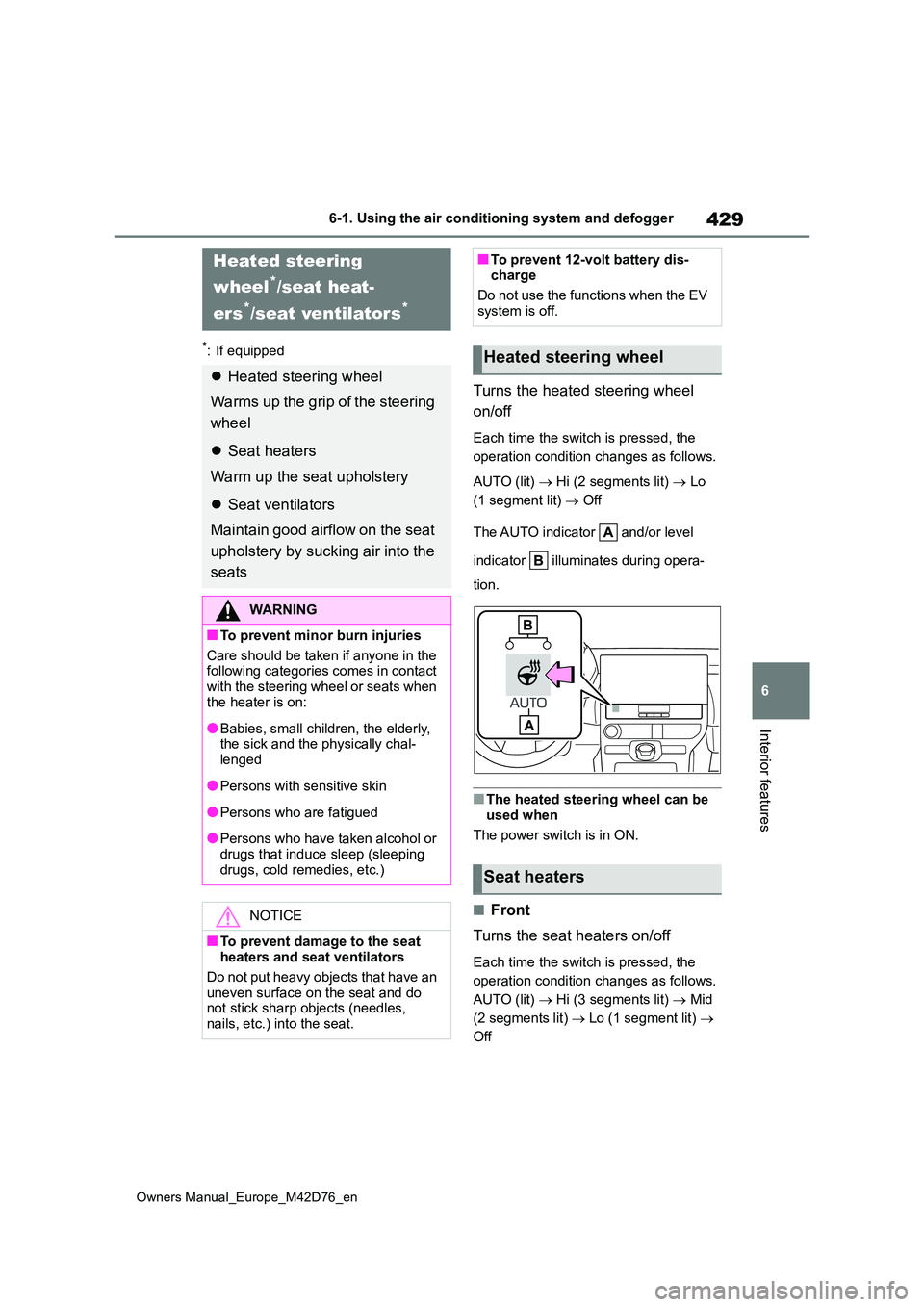
Turns the heated steering wheel
on/off
Each time the switch is pressed, the
operation condition changes as follows.
AUTO (lit) Hi (2 segments lit) Lo
(1 segment lit) Off
The AUTO indicator and/or level
indicator illuminates during opera-
tion.
■The heated steering wheel can be
used when
The power switch is in ON.
■Front
Turns the seat heaters on/off
Each time the switch is pressed, the
operation condition changes as follows.
AUTO (lit) Hi (3 segments lit) Mid
(2 segments lit) Lo (1 segment lit)
Off
Heated steering
wheel*/seat heat-
ers*/seat ventilators*
Heated steering wheel
Warms up the grip of the steering
wheel
Seat heaters
Warm up the seat upholstery
Seat ventilators
Maintain good airflow on the seat
upholstery by sucking air into the
seats
WARNING
■To prevent minor burn injuries
Care should be taken if anyone in the following categories comes in contact
with the steering wheel or seats when the heater is on:
●Babies, small children, the elderly, the sick and the physically chal-lenged
●Persons with sensitive skin
●Persons who are fatigued
●Persons who have taken alcohol or
drugs that induce sleep (sleeping drugs, cold remedies, etc.)
NOTICE
■To prevent damage to the seat heaters and seat ventilators
Do not put heavy objects that have an
uneven surface on the seat and do not stick sharp objects (needles, nails, etc.) into the seat.
■To prevent 12-volt battery dis-charge
Do not use the functions when the EV
system is off.
Heated steering wheel
Seat heaters
Page 443 of 674
441
6
Owners Manual_Europe_M42D76_en
6-3. Using the storage features
Interior features
WARNING
●Do not allow children to climb on the luggage cover. Climbing on the
luggage cover could result in dam- age to the luggage cover, possibly causing death or serious injury to
the child.
Page 445 of 674
443
6
Owners Manual_Europe_M42D76_en
6-4. Using the other interior features
Interior features
WARNING
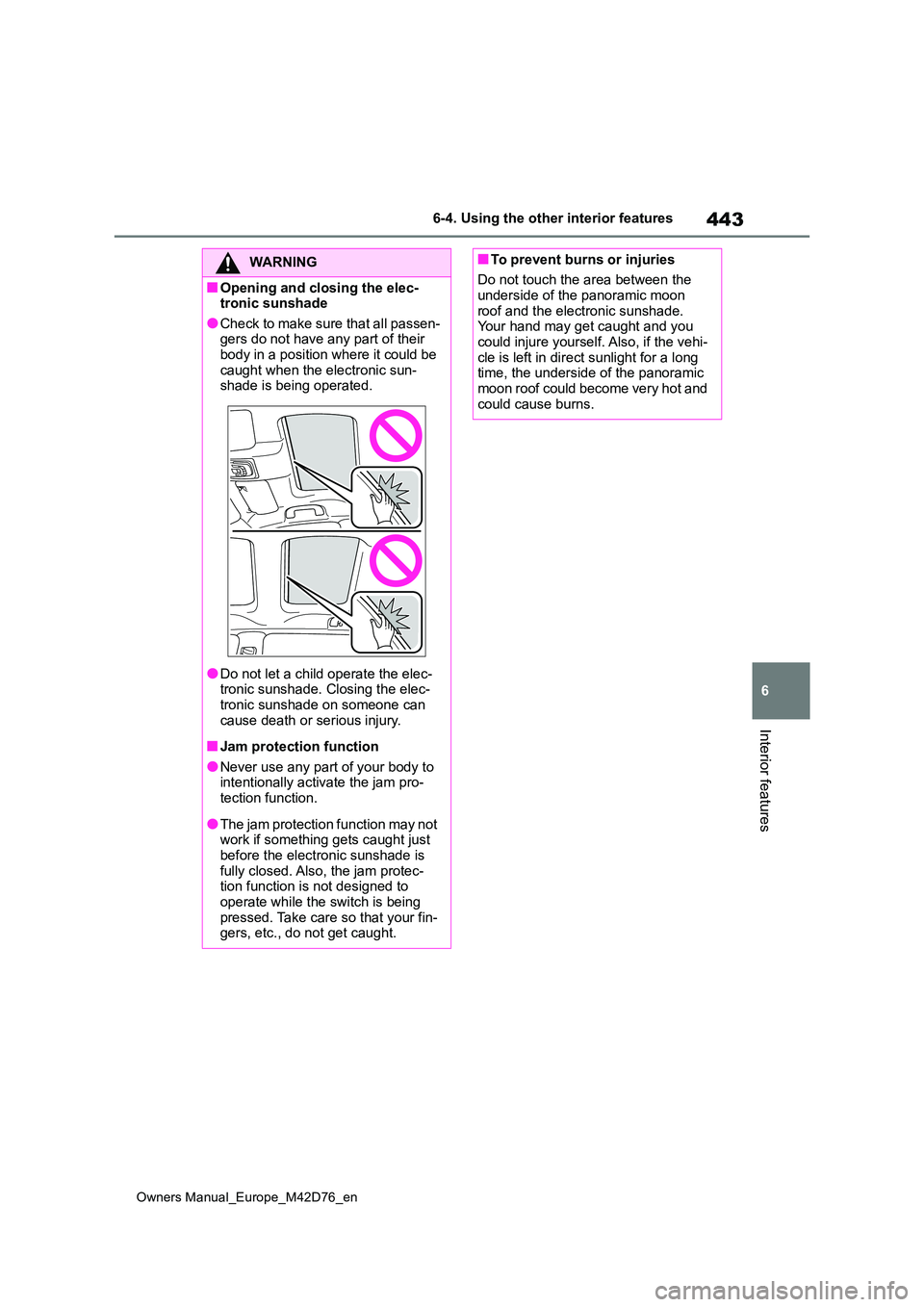
■Opening and closing the elec- tronic sunshade
●Check to make sure that all passen-gers do not have any part of their body in a position where it could be
caught when the electronic sun- shade is being operated.
●Do not let a child operate the elec-tronic sunshade. Closing the elec-tronic sunshade on someone can
cause death or serious injury.
■Jam protection function
●Never use any part of your body to intentionally activate the jam pro-tection function.
●The jam protection function may not work if something gets caught just
before the electronic sunshade is fully closed. Also, the jam protec-tion function is not designed to
operate while the switch is being pressed. Take care so that your fin-gers, etc., do not get caught.
■To prevent burns or injuries
Do not touch the area between the underside of the panoramic moon
roof and the electronic sunshade. Your hand may get caught and you could injure yourself. Also, if the vehi-
cle is left in direct sunlight for a long time, the underside of the panoramic moon roof could become very hot and
could cause burns.
Page 476 of 674
474
Owners Manual_Europe_M42D76_en
7-3. Do-it-yourself maintenance
connect the ground cable.
●Make sure the power switch on the charger is off when connecting and
disconnecting the charger cables to the 12-volt battery.
■After recharging/reconnecting the 12-volt battery
●The EV system may not start. Follow the procedure below to initialize the
system.
1 Shift the shift position to P.
2 Open and close any of the doors.
3 Restart the EV system.
●Unlocking the doors using the smart
entry & start system may not be possi- ble immediately after reconnecting the 12-volt battery. If this happens, use
the wireless remote control or the mechanical key to lock/unlock the doors.
●Start the EV system with the power switch in ACC. The EV system may
not start with the power switch turned off. However, the EV system will oper-ate normally from the second attempt.
●The power switch mode is recorded by the vehicle. If the 12-volt battery is
disconnected and reconnected, the vehicle will return the power switch mode to the status it was in before the
12-volt battery was disconnected. Make sure to turn off the power switch before disconnecting the 12-volt bat-
tery. Take extra care when connecting the 12-volt battery if the power switch mode prior to the 12-volt battery being
disconnected is unknown.
If the EV system will not start even after
multiple attempts at all the methods
above, contact any authorized Toyota
retailer or Toyota authorized repairer, or
any reliable repairer.
WARNING
■Chemicals in the 12-volt battery
Batteries contain poisonous and cor-
rosive sulfuric acid and may produce hydrogen gas which is flammable and explosive. To reduce the risk of death
or serious injury, take the following precautions while working on or near the 12-volt battery:
●Do not cause sparks by touching the 12-volt battery terminals with tools.
●Do not smoke or light a match near the 12-volt battery.
●Avoid contact with eyes, skin and clothes.
●Never inhale or swallow electrolyte.
●Wear protective safety glasses when working near the 12-volt bat-tery.
●Keep children away from the 12-volt battery.
■Where to safely charge the 12-volt battery
Always charge the 12-volt battery in an open area. Do not charge the 12-volt battery in a garage or closed
room where there is insufficient venti- lation.
■Emergency measures regarding electrolyte
●If electrolyte gets in your eyes
Flush your eyes with clean water for at least 15 minutes and get immedi-ate medical attention. If possible,
continue to apply water with a sponge or cloth while traveling to the nearest medical facility.
●If electrolyte gets on your skinWash the affected area thoroughly.
If you feel pain or burning, get med- ical attention immediately.
Page 502 of 674
500
Owners Manual_Europe_M42D76_en
7-3. Do-it-yourself maintenance
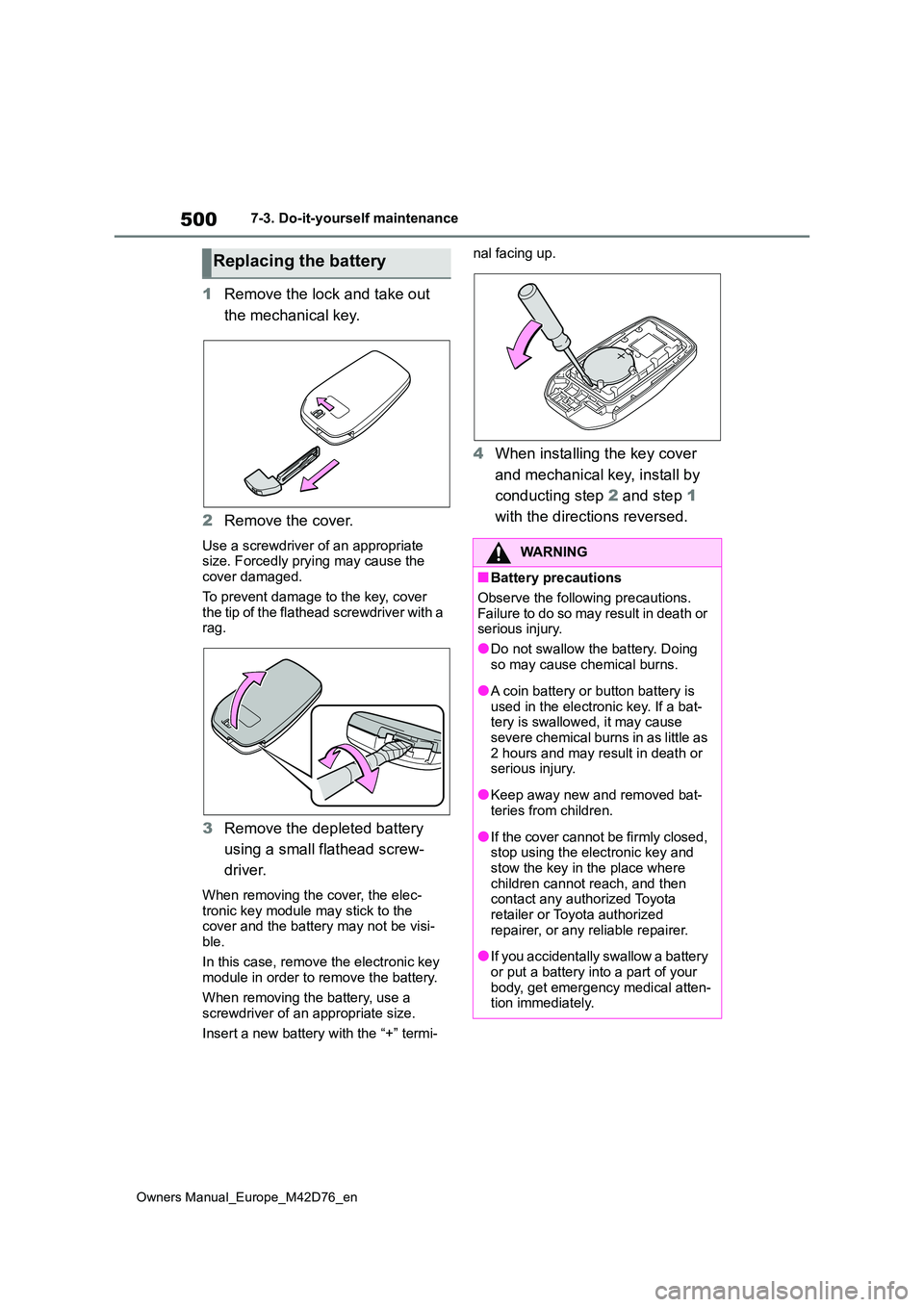
1Remove the lock and take out
the mechanical key.
2 Remove the cover.
Use a screwdriver of an appropriate size. Forcedly prying may cause the cover damaged.
To prevent damage to the key, cover the tip of the flathead screwdriver with a rag.
3 Remove the depleted battery
using a small flathead screw-
driver.
When removing the cover, the elec- tronic key module may stick to the cover and the battery may not be visi-
ble.
In this case, remove the electronic key module in order to remove the battery.
When removing the battery, use a screwdriver of an appropriate size.
Insert a new battery with the “+” termi-
nal facing up.
4 When installing the key cover
and mechanical key, install by
conducting step 2 and step 1
with the directions reversed.
Replacing the battery
WARNING
■Battery precautions
Observe the following precautions.
Failure to do so may result in death or serious injury.
●Do not swallow the battery. Doing
so may cause chemical burns.
●A coin battery or button battery is
used in the electronic key. If a bat- tery is swallowed, it may cause severe chemical burns in as little as
2 hours and may result in death or serious injury.
●Keep away new and removed bat-teries from children.
●If the cover cannot be firmly closed, stop using the electronic key and stow the key in the place where
children cannot reach, and then contact any authorized Toyota retailer or Toyota authorized
repairer, or any reliable repairer.
●If you accidentally swallow a battery
or put a battery into a part of your body, get emergency medical atten-tion immediately.
Page 545 of 674
543
8
Owners Manual_Europe_M42D76_en
8-2. Steps to take in an emergency
When trouble arises
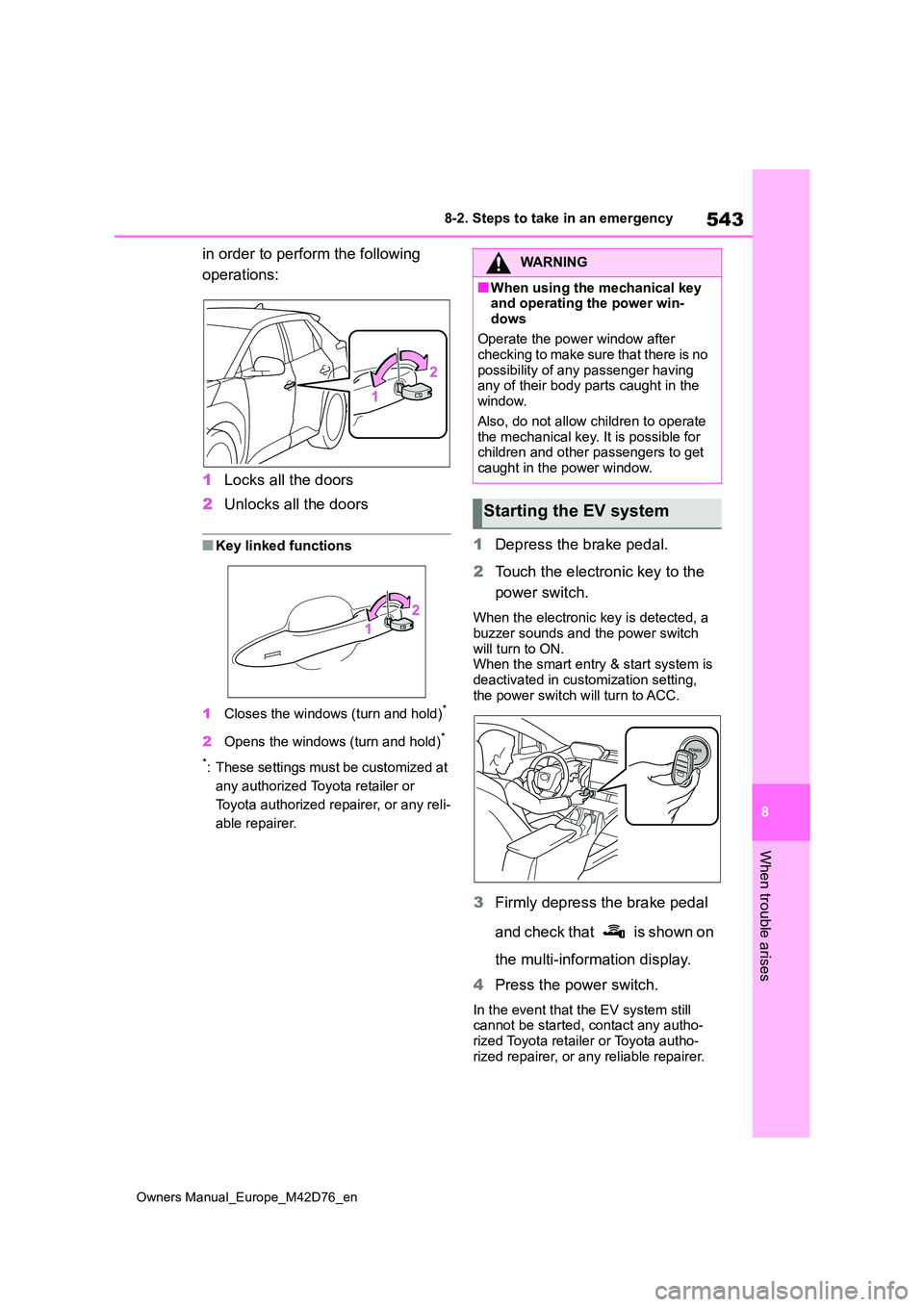
in order to perform the following
operations:
1 Locks all the doors
2 Unlocks all the doors
■Key linked functions
1 Closes the windows (turn and hold)*
2Opens the windows (turn and hold)*
*: These settings must be customized at
any authorized Toyota retailer or
Toyota authorized repairer, or any reli-
able repairer.
1 Depress the brake pedal.
2 Touch the electronic key to the
power switch.
When the electronic key is detected, a buzzer sounds and the power switch
will turn to ON. When the smart entry & start system is deactivated in customization setting,
the power switch will turn to ACC.
3 Firmly depress the brake pedal
and check that is shown on
the multi-information display.
4 Press the power switch.
In the event that the EV system still cannot be started, contact any autho-rized Toyota retailer or Toyota autho-
rized repairer, or any reliable repairer.
WARNING
■When using the mechanical key and operating the power win-
dows
Operate the power window after checking to make sure that there is no
possibility of any passenger having any of their body parts caught in the window.
Also, do not allow children to operate the mechanical key. It is possible for children and other passengers to get
caught in the power window.
Starting the EV system
Page 550 of 674
548
Owners Manual_Europe_M42D76_en
8-2. Steps to take in an emergency
For details, consult with at any autho-
rized Toyota retailer or Toyota autho- rized repairer, or any reliable repairer as soon as possible.
WARNING
■When removing the 12-volt bat-tery terminals
Always remove the negative (-) termi-
nal first. If the positive (+) terminal contacts any metal in the surrounding area when the positive (+) terminal is
removed, a spark may occur, leading to a fire in addition to electrical shocks and death or serious injury.
■Avoiding 12-volt battery fires or explosions
Observe the following precautions to prevent accidentally igniting the flam-mable gas that may be emitted from
the 12-volt battery:
●Make sure each jumper cable is connected to the correct terminal
and that it is not unintentionally in contact with any other than the intended terminal.
●Do not allow the other end of the jumper cable connected to the “+”
terminal to come into contact with any other parts or metal surfaces in the area, such as brackets or
unpainted metal.
●Do not allow the + and - clamps of
the jumper cables to come into con- tact with each other.
●Do not smoke, use matches, ciga-rette lighters or allow open flame near the 12-volt battery.
■12-volt battery precautions
The 12-volt battery contains poison- ous and corrosive acidic electrolyte,
while related parts contain lead and lead compounds. Observe the follow-ing precautions when handling the
12-volt battery:
●When working with the 12-volt bat- tery, always wear safety glasses
and take care not to allow any bat- tery fluids (acid) to come into con-tact with skin, clothing or the vehicle
body.
●Do not lean over the 12-volt battery.
●In the event that battery fluid (acid) comes into contact with the skin or
eyes, immediately wash the affected area with water and seek medical attention.
Place a wet sponge or cloth over the affected area until medical attention can be received.
●Always wash your hands after han-dling the 12-volt battery and other
battery-related parts.
●Do not allow children near the 12-
volt battery.
■When replacing the 12-volt bat-
tery
●When the vent plug is close to the hold down clamp, the battery fluid
(acid) may leak.
●For information regarding battery
replacement, contact any autho- rized Toyota retailer or Toyota authorized repairer, or any reliable
repairer.
NOTICE
■When handling jumper cables
When connecting the jumper cables,
ensure that they do not become entangled in the cooling fan.
Page 578 of 674
576
Owners Manual_Europe_M42D76_en
What to do if... (Troubleshooting)
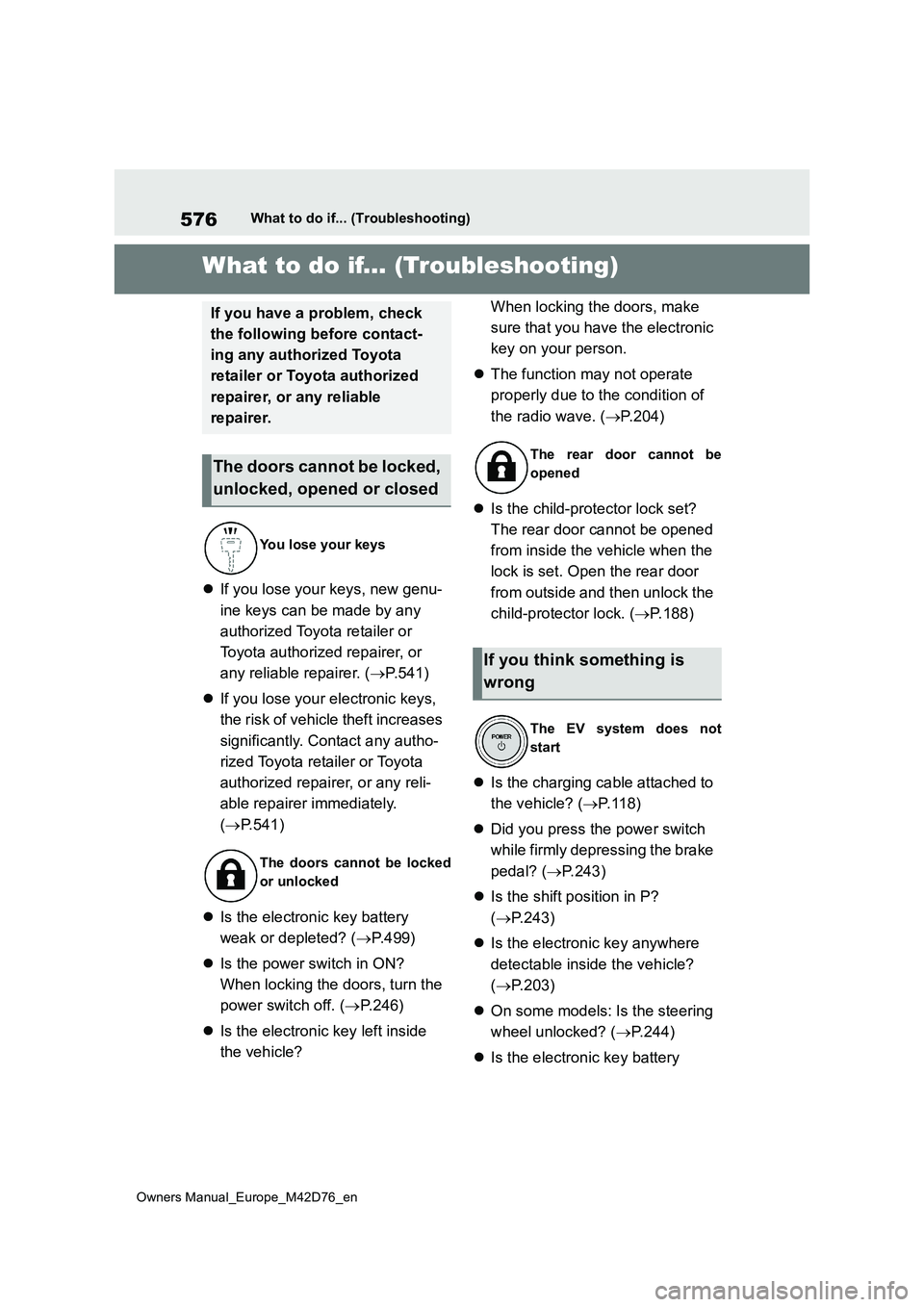
1-1.What to d o if... (Tro ublesho oting)What to do if... (Troubleshooting)
If you lose your keys, new genu-
ine keys can be made by any
authorized Toyota retailer or
Toyota authorized repairer, or
any reliable repairer. ( P.541)
If you lose your electronic keys,
the risk of vehicle theft increases
significantly. Contact any autho-
rized Toyota retailer or Toyota
authorized repairer, or any reli-
able repairer immediately.
( P.541)
Is the electronic key battery
weak or depleted? ( P.499)
Is the power switch in ON?
When locking the doors, turn the
power switch off. ( P. 2 4 6 )
Is the electronic key left inside
the vehicle?
When locking the doors, make
sure that you have the electronic
key on your person.
The function may not operate
properly due to the condition of
the radio wave. ( P.204)
Is the child-protector lock set?
The rear door cannot be opened
from inside the vehicle when the
lock is set. Open the rear door
from outside and then unlock the
child-protector lock. ( P.188)
Is the charging cable attached to
the vehicle? ( P. 1 1 8 )
Did you press the power switch
while firmly depressing the brake
pedal? ( P.243)
Is the shift position in P?
( P.243)
Is the electronic key anywhere
detectable inside the vehicle?
( P.203)
On some models: Is the steering
wheel unlocked? ( P.244)
Is the electronic key battery
If you have a problem, check
the following before contact-
ing any authorized Toyota
retailer or Toyota authorized
repairer, or any reliable
repairer.
The doors cannot be locked,
unlocked, opened or closed
You lose your keys
The doors cannot be locked
or unlocked
The rear door cannot be
opened
If you think something is
wrong
The EV system does not
start
Page 581 of 674
579
Owners Manual_Europe_M42D76_en
Alphabetical Index
Alphabetical Index
A
A/C ................................................. 420
Air conditioning filter................... 496
Automatic air conditioning system
................................................. 420
Front seat concentrated airflow
mode (S-FLOW) ...................... 425
Heated Windshield Defroster ..... 426
My Room Mode.......................... 145
Remote Air Conditioning System427
“SYNC”mode.............................. 423
ABS (Anti-lock Brake System) .... 406
Function ..................................... 406
Warning light .............................. 516
AC charging .................................. 121
AC charging cable .......................... 98
AC charging cable types ............ 100
CCID (Charging Circuit Interrupting
Device) .................................... 100
If the charging connector cannot be
unlocked .................................. 111
Indicator ..................................... 102
Maintenance .............................. 106
Replacing the plug-cord ............. 104
Safety functions ......................... 101
ACA (Active Cornering Assist) .... 406
Acoustic Vehicle Alerting System. 84
Active Cornering Assist (ACA) .... 406
Adaptive High-beam System (AHS)
..................................................... 262
AHB (Automatic High Beam) ....... 265
AHS (Adaptive High-beam System)
..................................................... 262
Air conditioning filter ................... 496
Air conditioning system............... 420
Air conditioning filter................... 496
Automatic air conditioning system
................................................. 420
Front seat concentrated airflow
mode (S-FLOW) ...................... 425
Heated Windshield Defroster ..... 426
Remote Air Conditioning System427
“SYNC” mode .............................423
Airbag manual on-off system ........ 47
Airbags ............................................ 39
Airbag manual on-off system ....... 47
Airbag operating conditions.......... 41
Airbag precautions for your child.. 44
Correct driving posture ................. 33
Curtain shield airbag operating con-
ditions......................................... 41
Curtain shield airbag precautions. 44
Front seat center airbag operating
conditions ................................... 41
General airbag precautions .......... 44
Locations of airbags ..................... 39
Modification and disposal of airbags
................................................... 46
Side airbag operating conditions .. 41
Side airbag precautions ............... 44
Side and curtain shield airbags oper-
ating conditions .......................... 41
Side and curtain shield airbags pre-
cautions...................................... 44
SRS airbags ................................. 39
SRS warning light.......................516
Alarm
Alarm ............................................ 77
Warning buzzer .......................... 515
ALL AUTO (“ECO”) control .......... 418
Antenna (smart entry & start system)
..................................................... 203
Anti-lock Brake System (ABS)..... 406
Function ..................................... 406
Warning light .............................. 516
Approach warning ........................ 313
Armrest .......................................... 452
Assist grips ...................................453
Audio system-linked display ....... 177
Automatic air conditioning system
..................................................... 420