warning light TOYOTA C-HR 2018 1.G Owner's Manual
[x] Cancel search | Manufacturer: TOYOTA, Model Year: 2018, Model line: C-HR, Model: TOYOTA C-HR 2018 1.GPages: 516, PDF Size: 9.32 MB
Page 78 of 516
782. Instrument cluster
C-HR_OM_USA_OM10526U
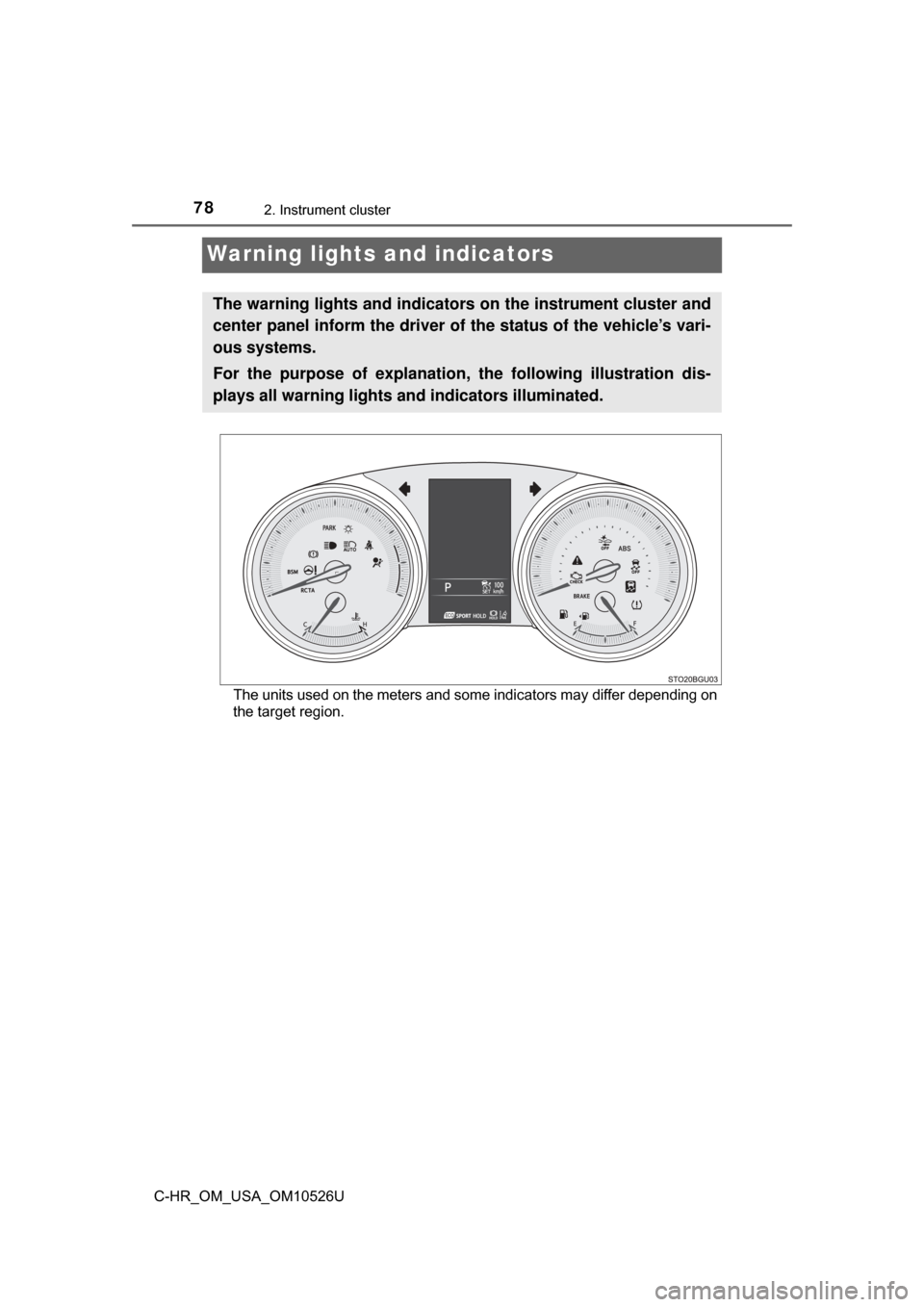
Warning lights and indicators
The units used on the meters and some indicators may differ depending on
the target region.
The warning lights and indicators on the instrument cluster and
center panel inform the driver of the status of the vehicle’s vari-
ous systems.
For the purpose of explanation, the following illustration dis-
plays all warning lights a nd indicators illuminated.
Page 79 of 516
792. Instrument cluster
2
Instrument cluster
C-HR_OM_USA_OM10526U
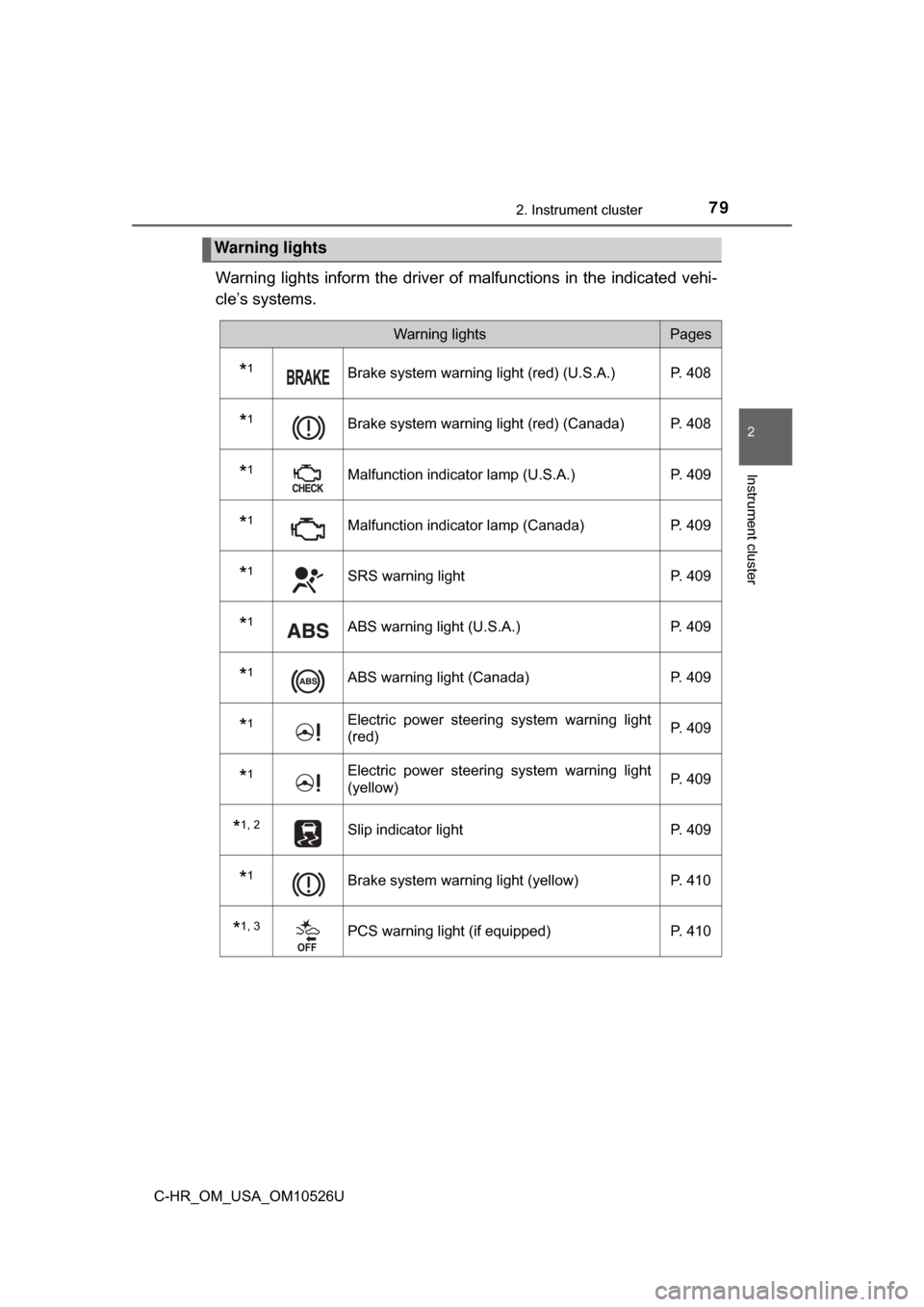
Warning lights inform the driver of malfunctions in the indicated vehi-
cle’s systems.
Warning lights
Warning lightsPages
*1Brake system warning light (red) (U.S.A.) P. 408
*1Brake system warning light (red) (Canada) P. 408
*1Malfunction indicator lamp (U.S.A.) P. 409
*1Malfunction indicator lamp (Canada)P. 409
*1SRS warning light P. 409
*1ABS warning light (U.S.A.)P. 409
*1ABS warning light (Canada)P. 409
*1Electric power steering system warning light
(red) P. 409
*1Electric power steering system warning light
(yellow)P. 409
*1, 2Slip indicator light
P. 409
*1Brake system warning light (yellow)P. 410
*1, 3PCS warning light (if equipped) P. 410
Page 80 of 516
802. Instrument cluster
C-HR_OM_USA_OM10526U
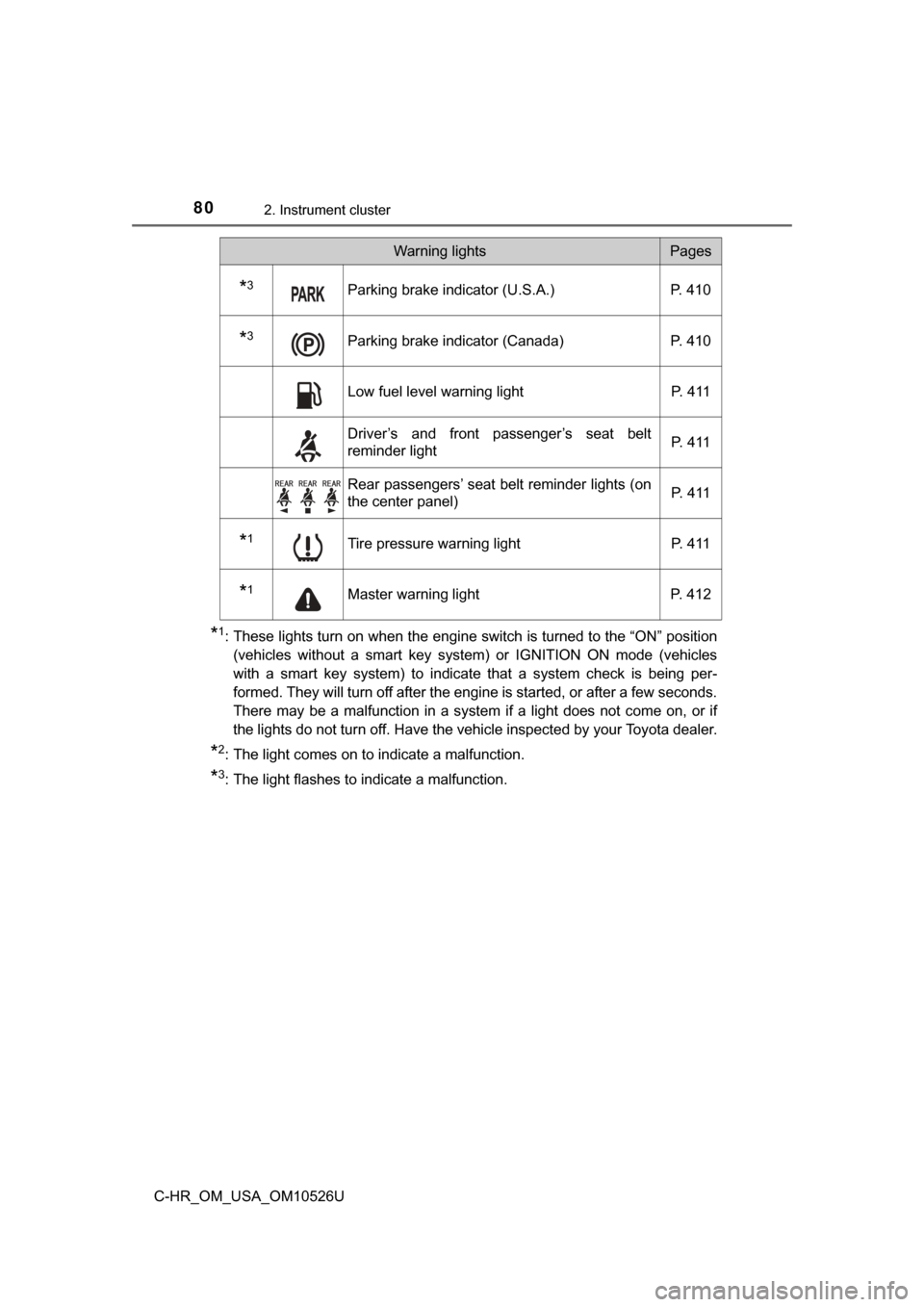
*1: These lights turn on when the engine switch is turned to the “ON” position(vehicles without a smart key system) or IGNITION ON mode (vehicles
with a smart key system) to indicate that a system check is being per-
formed. They will turn off after the engine is started, or after a few seconds.
There may be a malfunction in a system if a light does not come on, or if
the lights do not turn off. Have the vehicle inspected by your Toyota dealer.
*2: The light comes on to indicate a malfunction.
*3: The light flashes to indicate a malfunction.
*3Parking brake indicator (U.S.A.) P. 410
*3Parking brake indicator (Canada) P. 410
Low fuel level warning light P. 411
Driver’s and front passenger’s seat belt
reminder lightP. 4 1 1
Rear passengers’ seat belt reminder lights (on
the center panel)
P. 4 1 1
*1Tire pressure warning light
P. 411
*1Master warning lightP. 412
Warning lightsPages
Page 82 of 516
822. Instrument cluster
C-HR_OM_USA_OM10526U
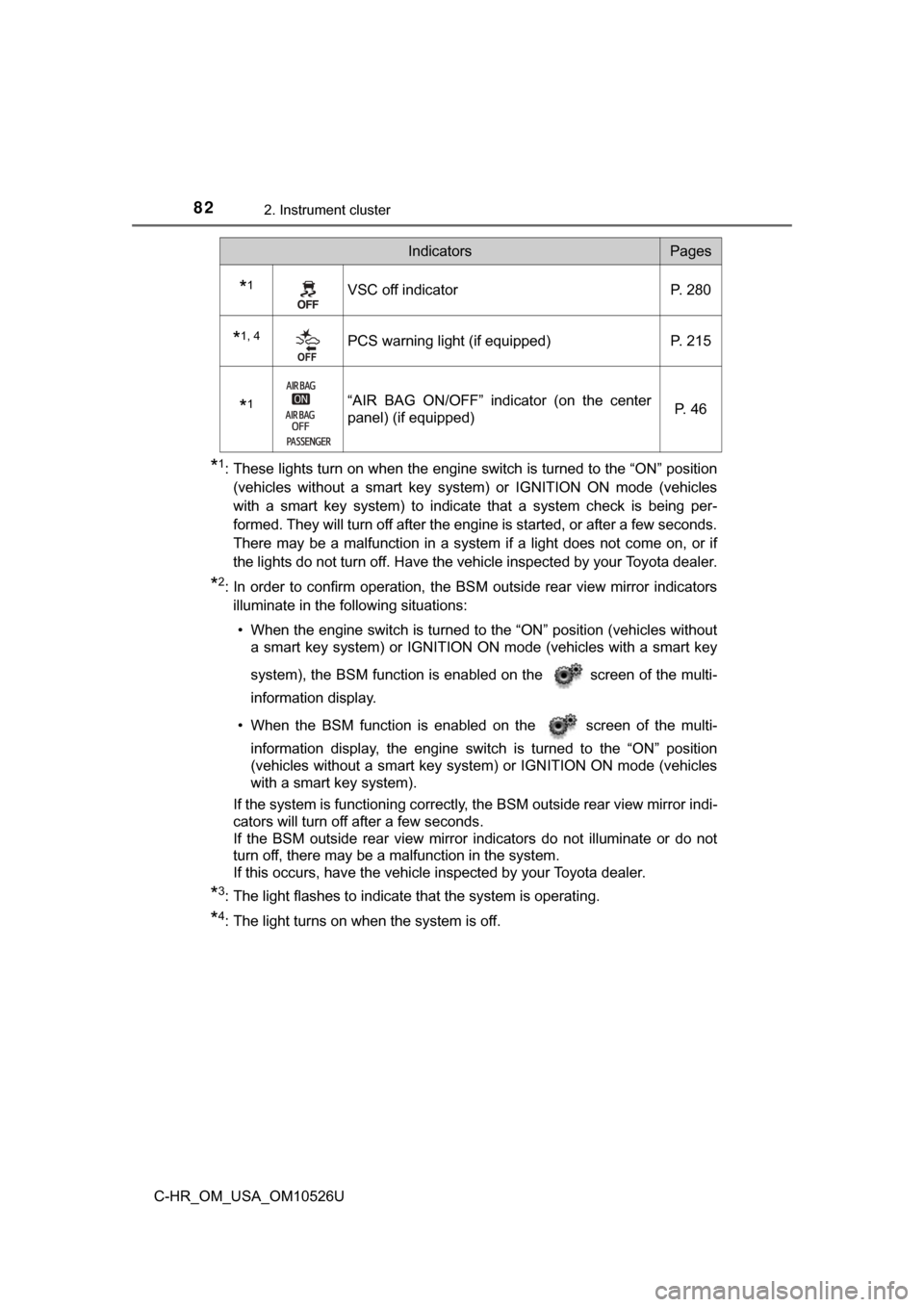
*1: These lights turn on when the engine switch is turned to the “ON” position(vehicles without a smart key system) or IGNITION ON mode (vehicles
with a smart key system) to indicate that a system check is being per-
formed. They will turn off after the engine is started, or after a few seconds.
There may be a malfunction in a system if a light does not come on, or if
the lights do not turn off. Have the vehicle inspected by your Toyota dealer.
*2: In order to confirm operation, the BS M outside rear view mirror indicators
illuminate in the following situations:
• When the engine switch is turned to the “ON” position (vehicles without a smart key system) or IGNITION ON mode (vehicles with a smart key
system), the BSM function is enabled on the screen of the multi-
information display.
• When the BSM function is enabled on the screen of the multi- information display, the engine switch is turned to the “ON” position
(vehicles without a smart key system) or IGNITION ON mode (vehicles
with a smart key system).
If the system is functioning correctly, the BSM outside rear view mirror indi-
cators will turn off after a few seconds.
If the BSM outside rear view mirror indicators do not illuminate or do not
turn off, there may be a malfunction in the system.
If this occurs, have the vehicle inspected by your Toyota dealer.
*3: The light flashes to indicate that the system is operating.
*4: The light turns on when the system is off.
*1VSC off indicator P. 280
*1, 4PCS warning light (if equipped) P. 215
*1“AIR BAG ON/OFF” indicator (on the center
panel) (if equipped) P. 4 6
IndicatorsPages
Page 84 of 516
842. Instrument cluster
C-HR_OM_USA_OM10526U
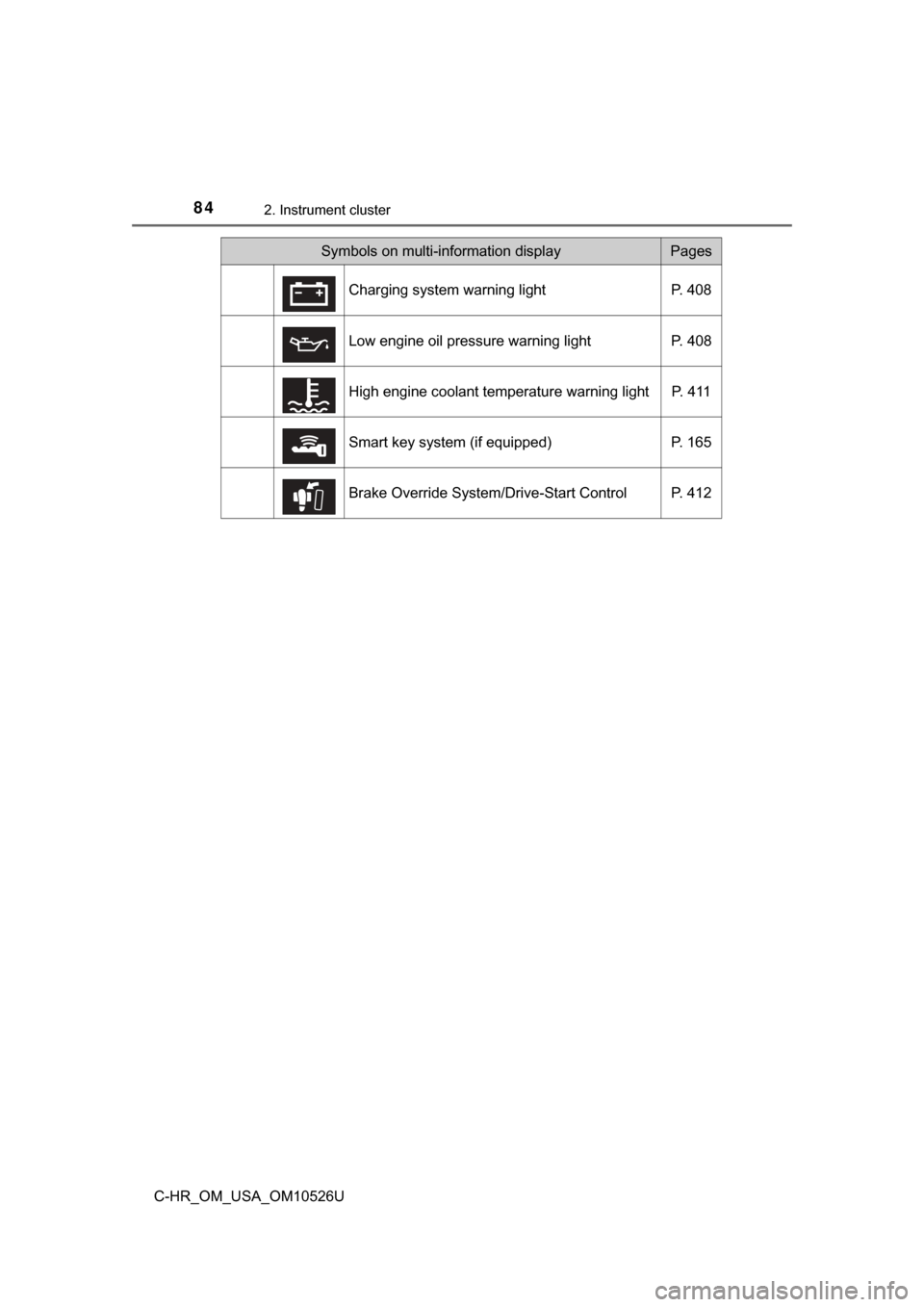
Symbols on multi-information displayPages
Charging system warning light P. 408
Low engine oil pressure warning light P. 408
High engine coolant temperature warning light P. 411
Smart key system (if equipped) P. 165
Brake Override System/Drive-Start Control P. 412
Page 85 of 516
852. Instrument cluster
2
Instrument cluster
C-HR_OM_USA_OM10526U
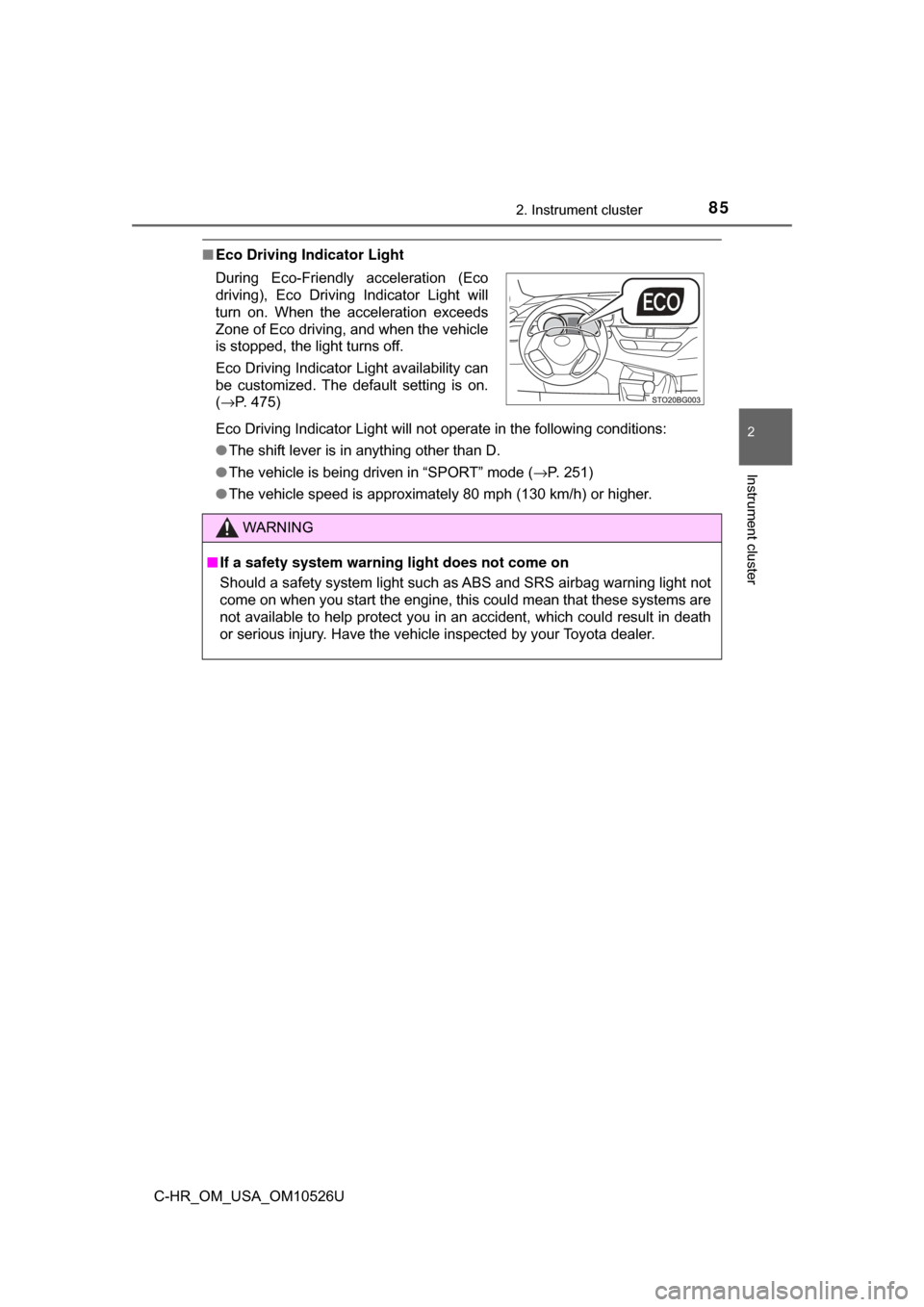
■Eco Driving Indicator Light
Eco Driving Indicator Light will not operate in the following conditions:
●The shift lever is in anything other than D.
● The vehicle is being driven in “SPORT” mode ( →P. 251)
● The vehicle speed is approximately 80 mph (130 km/h) or higher.
During Eco-Friendly acceleration (Eco
driving), Eco Driving Indicator Light will
turn on. When the acceleration exceeds
Zone of Eco driving, and when the vehicle
is stopped, the light turns off.
Eco Driving Indicator Light availability can
be customized. The default setting is on.
(
→P. 475)
WARNING
■ If a safety system warning light does not come on
Should a safety system light such as ABS and SRS airbag warning light not
come on when you start the engine, this could mean that these systems are
not available to help protect you in an accident, which could result in death
or serious injury. Have the vehicle inspected by your Toyota dealer.
Page 93 of 516

932. Instrument cluster
2
Instrument cluster
C-HR_OM_USA_OM10526U
●Vehicle Settings
Select the menu to set up the following item.
• (Tire pressure warning system) setup ( →P. 355)
Select to initialize the tire pressure warning system.
● Meter settings
Select the menu to set up the following items.
• Language
Select to change the language on the display.
•Units
Select to change the unit of measure for fuel consumption.
• (Eco Driving Indicator Light) setup
Select to activate/deactivate the Eco Driving Indicator Light
• Drive information 1 and 2
Select to select up to 2 items that will be displayed on a Drive informa-
tion screen, up to 2 Drive information screens can be set.
• Default settings
Registered or changed meter settings will be deleted or returned to their
default setting.
*: If equipped
Page 94 of 516
942. Instrument cluster
C-HR_OM_USA_OM10526U
■Setting items
●“Meter Settings” and “Vehicle Settings” setting items are not selectable
during driving and cannot be operated.
Also, the settings screen is temporarily canceled in the following situations.
• A warning message is displayed.
• The vehicle starts off.
● Settings for functions not equipped to the vehicle are not displayed.
● When a function is turned off, the related settings for that function are not
selectable.
■ Pop-up display
In some situations, such as when a switch operation is performed, a pop-up
display will be temporarily displayed on the multi-information display.
■ Liquid crystal display
Small spots or light spots may appear on the display. This phenomenon is
characteristic of liquid crystal displays, and there is no problem continuing to
use the display.
■ When disconnecting and reco nnecting battery terminals
The drive information will be reset.
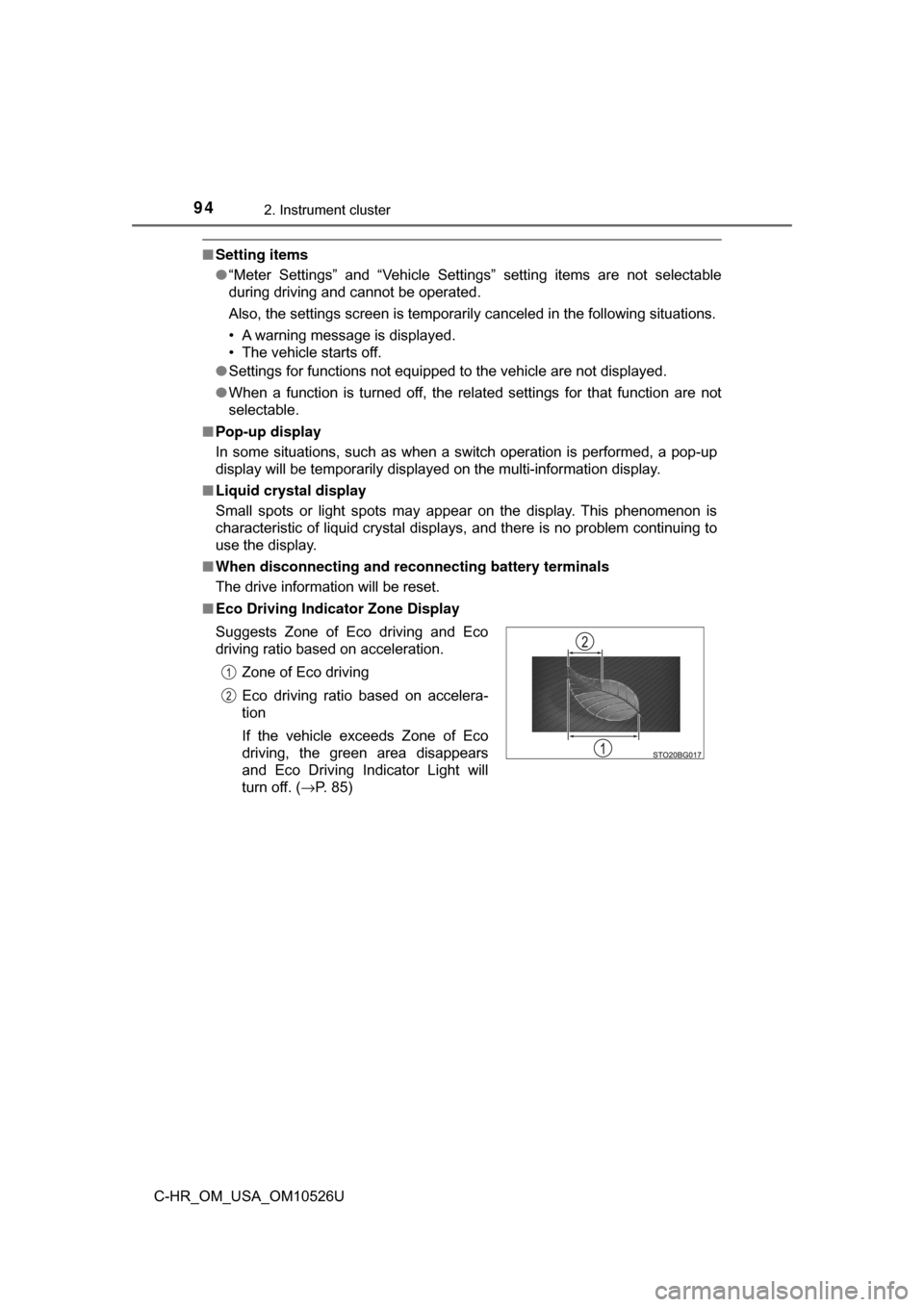
■ Eco Driving Indicator Zone Display
Suggests Zone of Eco driving and Eco
driving ratio based on acceleration.
Zone of Eco driving
Eco driving ratio based on accelera-
tion
If the vehicle exceeds Zone of Eco
driving, the green area disappears
and Eco Driving Indicator Light will
turn off. ( →P. 85)
Page 110 of 516
1103-2. Opening, closing and locking the doors
C-HR_OM_USA_OM10526U
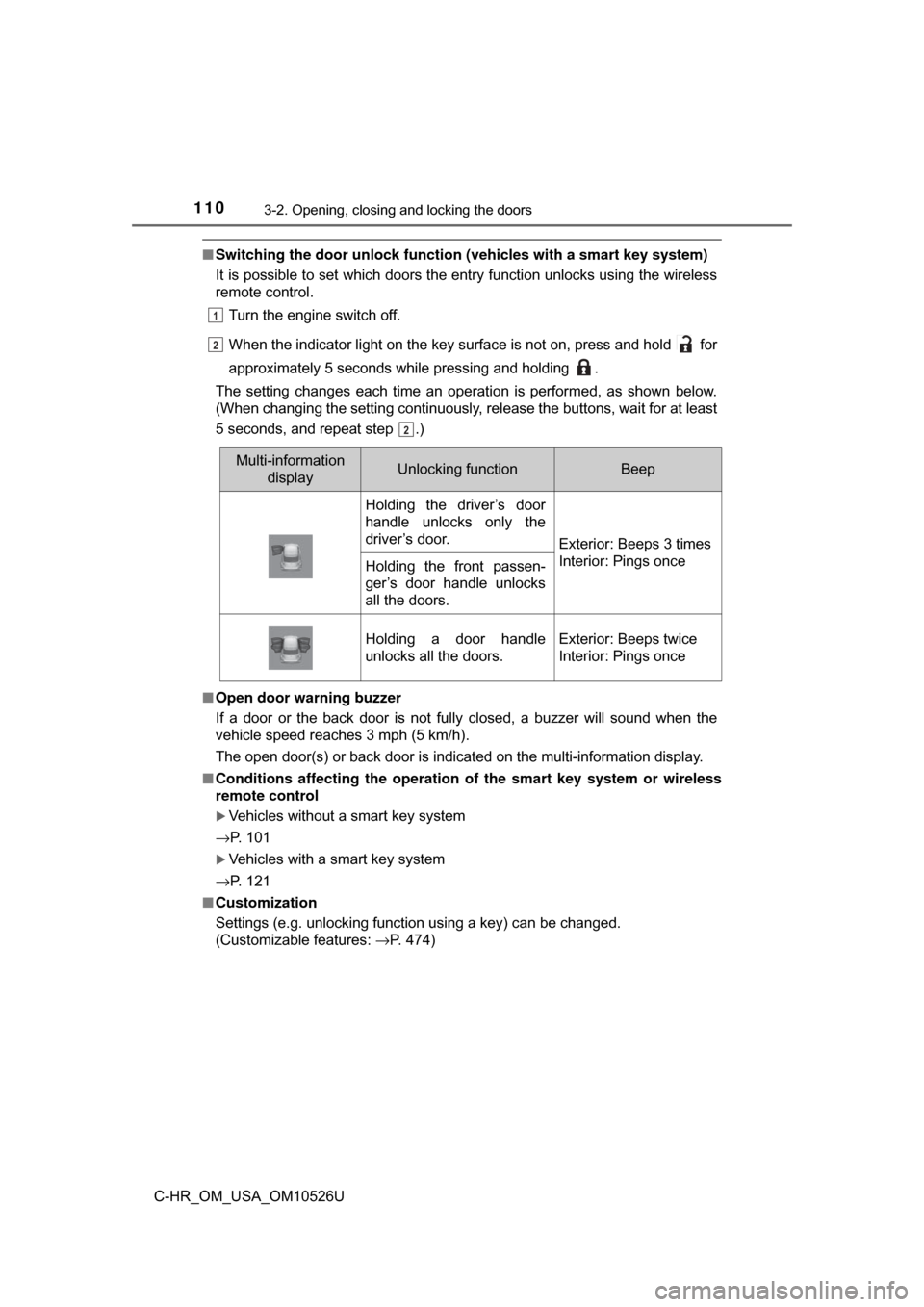
■Switching the door unlock functi on (vehicles with a smart key system)
It is possible to set which doors the entry function unlocks using the wireless
remote control.
Turn the engine switch off.
When the indicator light on the key surface is not on, press and hold for
approximately 5 seconds while pressing and holding .
The setting changes each time an operation is performed, as shown below.
(When changing the setting continuously, release the buttons, wait for at least
5 seconds, and repeat step .)
■ Open door warning buzzer
If a door or the back door is not fully closed, a buzzer will sound when the
vehicle speed reaches 3 mph (5 km/h).
The open door(s) or back door is indicated on the multi-information display.
■ Conditions affecting the operation of the smart key system or wireless
remote control
Vehicles without a smart key system
→P. 101
Vehicles with a smart key system
→P. 121
■ Customization
Settings (e.g. unlocking function using a key) can be changed.
(Customizable features: →P. 474)
1
22
2
Multi-information
displayUnlocking functionBeep
Holding the driver’s door
handle unlocks only the
driver’s door.
Exterior: Beeps 3 times
Interior: Pings once
Holding the front passen-
ger’s door handle unlocks
all the doors.
Holding a door handle
unlocks all the doors.Exterior: Beeps twice
Interior: Pings once
Page 113 of 516
1133-2. Opening, closing and locking the doors
3
Operation of each component
C-HR_OM_USA_OM10526U
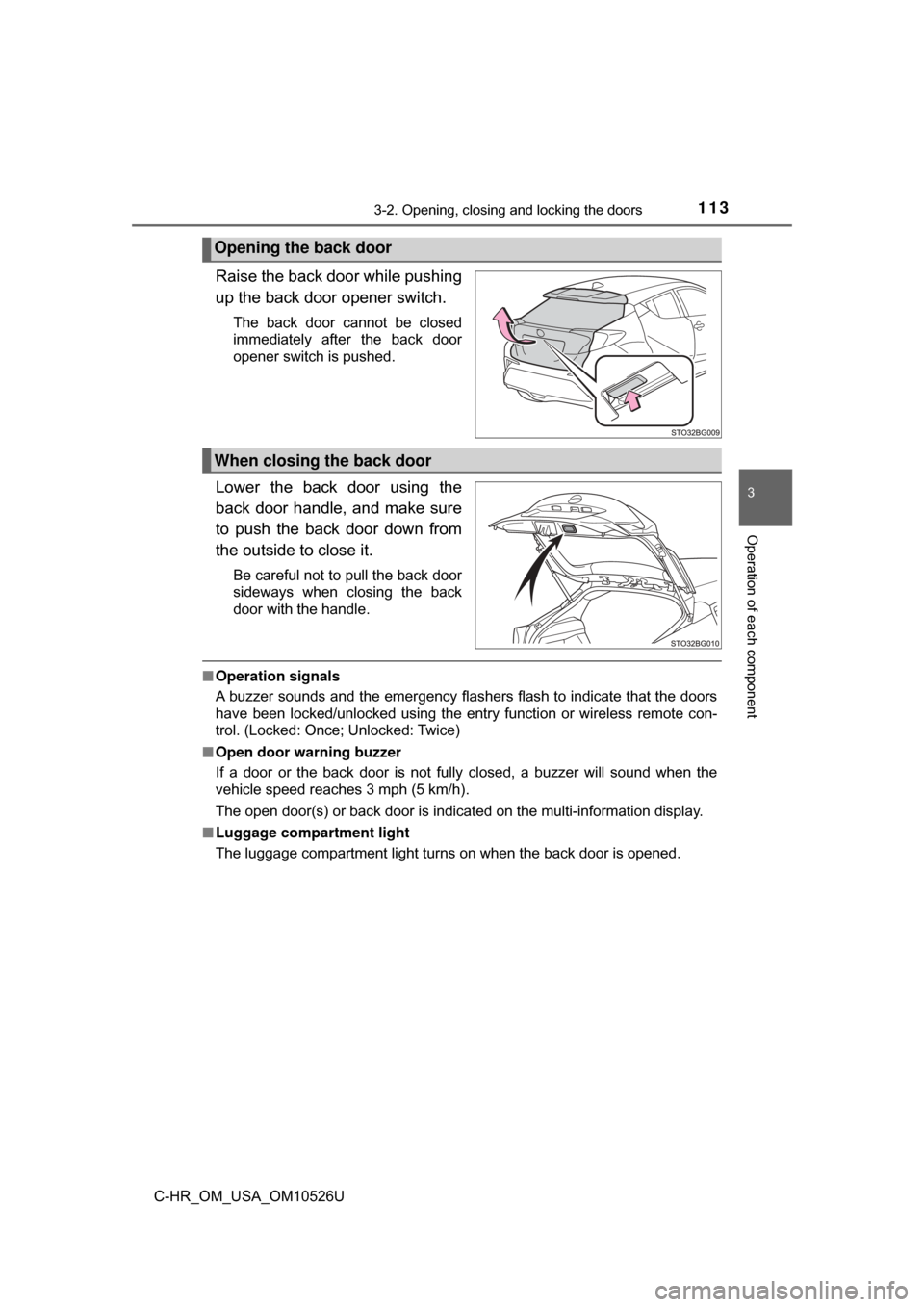
Raise the back door while pushing
up the back door opener switch.
The back door cannot be closed
immediately after the back door
opener switch is pushed.
Lower the back door using the
back door handle, and make sure
to push the back door down from
the outside to close it.
Be careful not to pull the back door
sideways when closing the back
door with the handle.
■Operation signals
A buzzer sounds and the emergency flashers flash to indicate that the doors
have been locked/unlocked using the entry function or wireless remote con-
trol. (Locked: Once; Unlocked: Twice)
■ Open door warning buzzer
If a door or the back door is not fully closed, a buzzer will sound when the
vehicle speed reaches 3 mph (5 km/h).
The open door(s) or back door is indicated on the multi-information display.
■ Luggage compartment light
The luggage compartment light turns on when the back door is opened.
Opening the back door
When closing the back door