glove box TOYOTA C-HR 2020 Owners Manual (in English)
[x] Cancel search | Manufacturer: TOYOTA, Model Year: 2020, Model line: C-HR, Model: TOYOTA C-HR 2020Pages: 536, PDF Size: 11.99 MB
Page 4 of 536

TABLE OF CONTENTS4
C-HR_OM_USA_OM10634U5-1. Using the air conditioning
system and defogger
Air conditioning system ..... 298
Heated steering wheel/ seat heaters .................... 306
5-2. Using the interior lights Interior lights list ................ 308• Interior lights ................. 309
• Personal lights .............. 310
5-3. Using the storage features
List of storage features...... 311 • Glove box...................... 312
• Console box .................. 312
• Bottle holders ................ 313
• Cup holders .................. 314
Luggage compartment features ........................... 315
5-4. Using the other interior features
Other interior features ....... 321 • Sun visors ..................... 321
• Vanity mirrors................ 321
• Power outlet .................. 322
• Assist grips ................... 323 6-1. Maintenance and care
Cleaning and protecting the vehicle exterior .......... 326
Cleaning and protecting the vehicle interior ........... 330
6-2. Maintenance Maintenance requirements ................... 333
General maintenance ........ 336
Emission inspection and maintenance (I/M)
programs ......................... 340
6-3. Do-it-yourself maintenance Do-it-yourself service precautions ...................... 341
Hood .................................. 344
Positioning a floor jack....... 346
Engine compartment ......... 347
Tires................................... 362
Tire inflation pressure ........ 372
Wheels............................... 376
Air conditioning filter .......... 379
Wireless remote control/electronic key
battery ............................. 383
Checking and replacing fuses ................................ 387
Headlight aim (vehicles with front fog lights) ......... 391
Light bulbs ......................... 393
5Interior features6Maintenance and care
Page 135 of 536

1353-2. Opening, closing and locking the doors
3
Operation of each component
C-HR_OM_USA_OM10634U■
Note for the entry function
●Even when the electronic key is within the effective range (det ection areas),
the system may not operate properly in the following cases:
• The electronic key is too close to the window or outside door handle, near
the ground, or in a high place when the doors are locked or unl ocked.
• The electronic key is near the ground or in a high place, or t oo close to
the rear bumper center when the back door is opened.
• The electronic key is on the instrument panel, luggage cover o r floor, or in
the door pockets or glove box when the engine is started or eng ine switch
modes are changed.
● Do not leave the electronic key on top of the instrument panel or near the
door pockets when exiting the vehicle. Depending on the radio w ave recep-
tion conditions, it may be detected by the antenna outside the cabin and the
door will become lockable from the outside, possibly trapping the electronic
key inside the vehicle.
● As long as the electronic key is within the effective range, th e doors may be
unlocked or locked by anyone.
● Even if the electronic key is not inside the vehicle, it may be possible to start
the engine if the electronic key is near the window.
● The doors may unlock if a large amount of water splashes on the door han-
dle, such as in the rain or in a car wash when the electronic k ey is within the
effective range. (The door will automatically be locked after a pproximately
60 seconds if the doors are not opened and closed.)
● If the wireless remote control is used to lock the doors when t he electronic
key is near the vehicle, there is a possibility that the door m ay not be
unlocked by the entry function. (Use the wireless remote contro l to unlock
the doors.)
Page 169 of 536

1694-1. Before driving
4
Driving
C-HR_OM_USA_OM10634U
WARNING
Observe the following precautions.
Failure to do so may result in death or serious injury.
■When the vehicle is parked
● Do not leave cigarette lighters in the vehicle. If a cigarette lighter is in a
place such as the glove box or on the floor, it may be lit acci dentally when
luggage is loaded or the seat is adjusted, causing a fire.
● Do not attach adhesive discs to the windshield or windows. Do n ot place
containers such as air fresheners on the instrument panel or da shboard.
Adhesive discs or containers may act as lenses, causing a fire in the vehi-
cle.
● Do not leave a door or window open if the curved glass is coate d with a
metallized film such as a silver-colored one. Reflected sunligh t may cause
the glass to act as a lens, causing a fire.
● Always apply the parking brake, shift the shift lever to P, stop the engine
and lock the vehicle.
Do not leave the vehicle unattended while the engine is running .
If the vehicle is parked with the shift lever in P but the park ing brake is not
set, the vehicle may start to move, possibly leading to an acci dent.
● Do not touch the exhaust pipes while the engine is running or i mmediately
after turning the engine off.
Doing so may cause burns.
■ When taking a nap in the vehicle
Always turn the engine off. Otherwise, if you accidentally move the shift
lever or depress the accelerator pedal, this could cause an acc ident or fire
due to engine overheating. Additionally, if the vehicle is park ed in a poorly
ventilated area, exhaust gases may collect and enter the vehicl e, leading to
death or a serious health hazard.
Page 297 of 536

297
5Interior features
C-HR_OM_USA_OM10634U5-1. Using the air conditioning
system and defogger
Air conditioning system ..... 298
Heated steering wheel/ seat heaters .................... 306
5-2. Using the interior lights Interior lights list ................ 308• Interior lights ................. 309
• Personal lights .............. 310
5-3. Using the storage features
List of storage features ..... 311 • Glove box...................... 312
• Console box .................. 312
• Bottle holders ................ 313
• Cup holders .................. 314
Luggage compartment features ........................... 315
5-4. Using the other interior features
Other interior features ....... 321 • Sun visors ..................... 321
• Vanity mirrors................ 321
• Power outlet .................. 322
• Assist grips ................... 323
Page 308 of 536
3085-2. Using the interior lights
C-HR_OM_USA_OM10634U
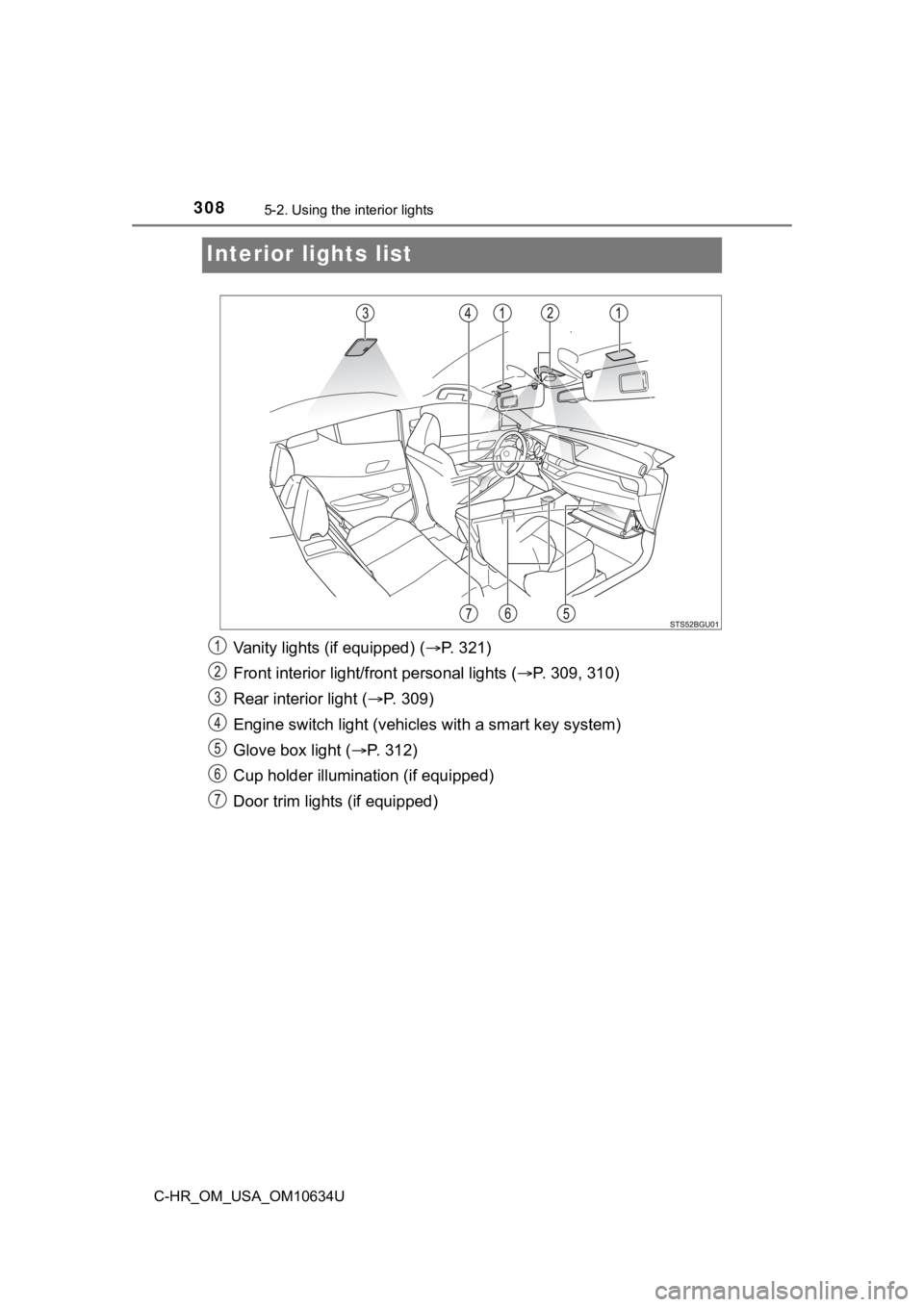
Interior lights list
Vanity lights (if equipped) ( P. 321)
Front interior light/fr ont personal lights ( P. 309, 310)
Rear interior light ( P. 309)
Engine switch light (vehicles with a smart key system)
Glove box light ( P. 312)
Cup holder illumination (if equipped)
Door trim lights (if equipped)
Page 311 of 536
3115-3. Using the storage features
5
Interior features
C-HR_OM_USA_OM10634U
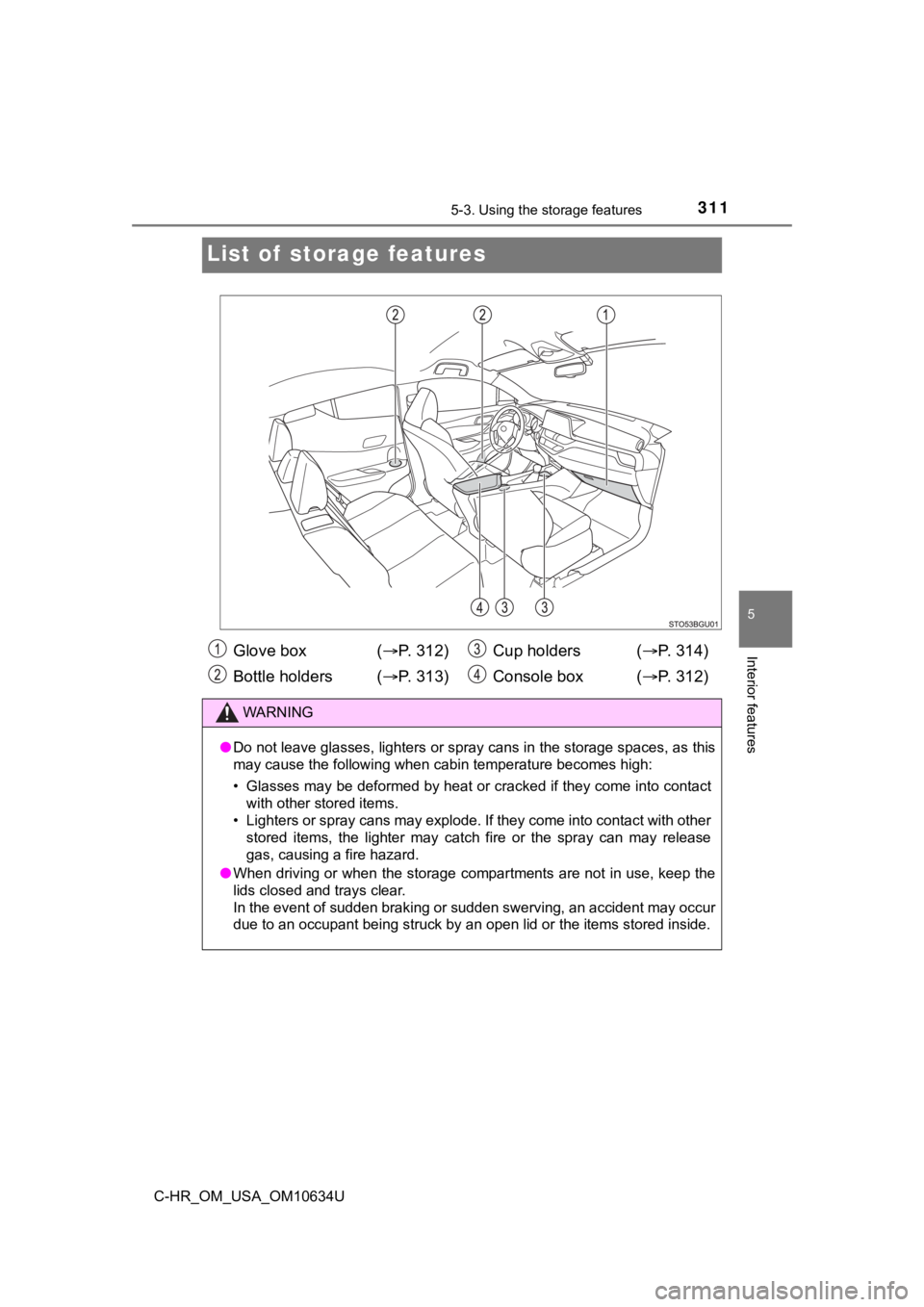
List of storage features
Glove box ( P. 3 1 2 )
Bottle holders ( P. 3 1 3 ) Cup holders (
P. 314)
Console box ( P. 312)
WARNING
●Do not leave glasses, lighters or spray cans in the storage spa ces, as this
may cause the following when cabin temperature becomes high:
• Glasses may be deformed by heat or cracked if they come into c ontact
with other stored items.
• Lighters or spray cans may explode. If they come into contact with other
stored items, the lighter may catch fire or the spray can may r elease
gas, causing a fire hazard.
● When driving or when the storage compartments are not in use, k eep the
lids closed and trays clear.
In the event of sudden braking or sudden swerving, an accident may occur
due to an occupant being struck by an open lid or the items sto red inside.
Page 312 of 536
3125-3. Using the storage features
C-HR_OM_USA_OM10634U
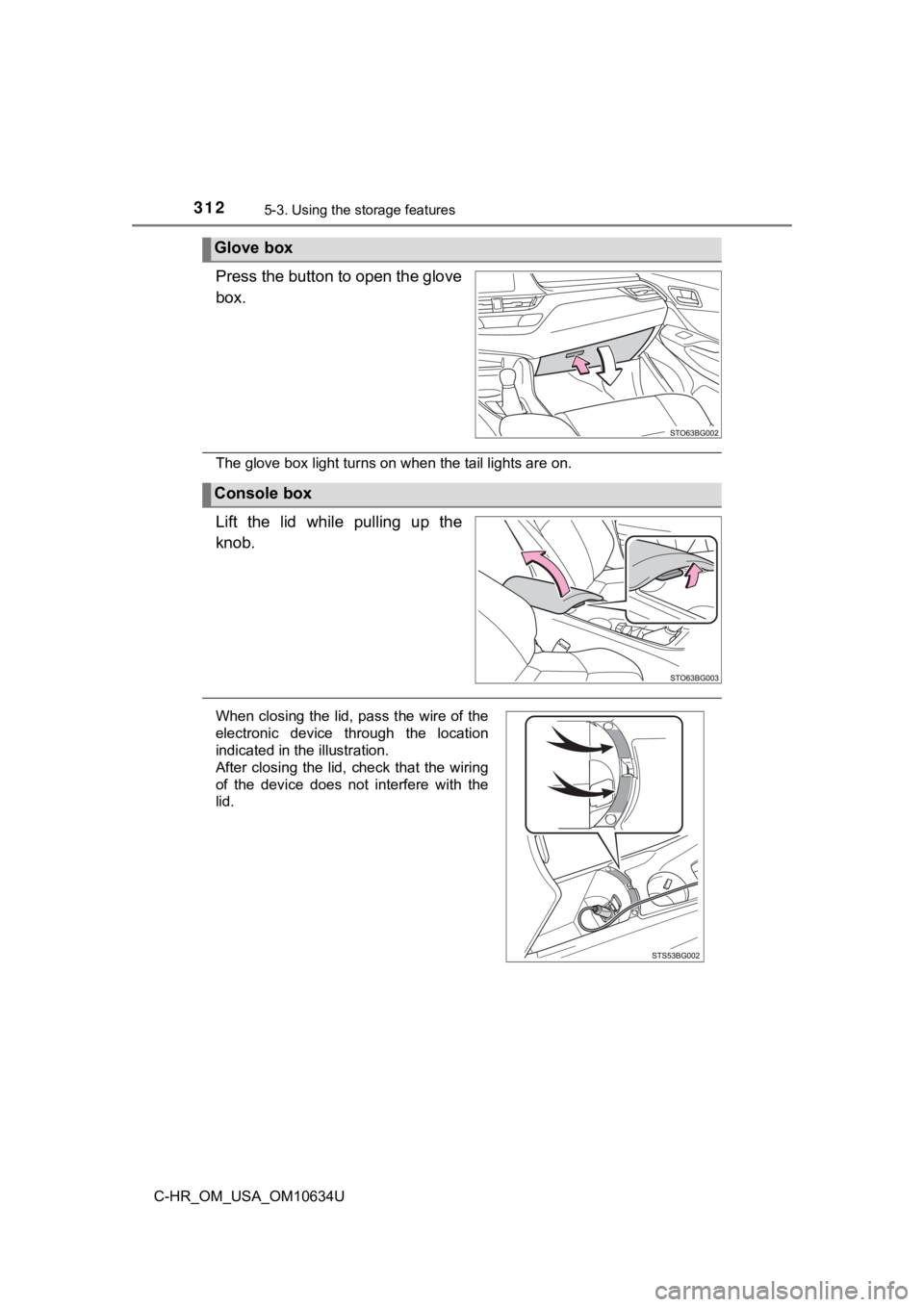
Press the button to open the glove
box.
The glove box light turns on when the tail lights are on.
Lift the lid while pulling up the
knob.
Glove box
Console box
When closing the lid, pass the wire of the
electronic device through the location
indicated in the illustration.
After closing the lid, check that the wiring
of the device does not interfere with the
lid.
Page 379 of 536
3796-3. Do-it-yourself maintenance
6
Maintenance and care
C-HR_OM_USA_OM10634U
Air conditioning filter
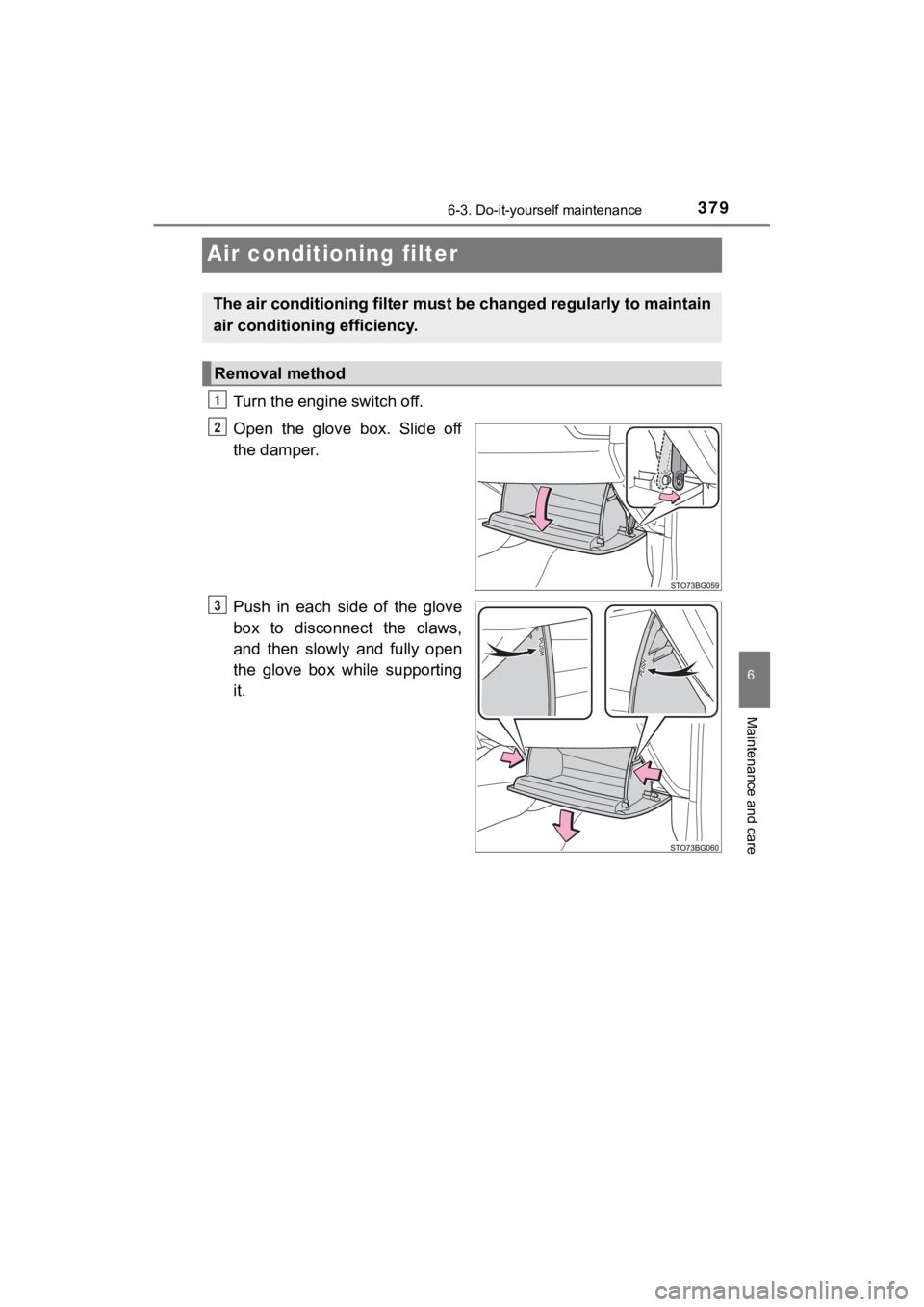
Turn the engine switch off.
Open the glove box. Slide off
the damper.
Push in each side of the glove
box to disconnect the claws,
and then slowly and fully open
the glove box while supporting
it.
The air conditioning filter must be changed regularly to maintain
air conditioning efficiency.
Removal method
1
2
3
Page 380 of 536
3806-3. Do-it-yourself maintenance
C-HR_OM_USA_OM10634U
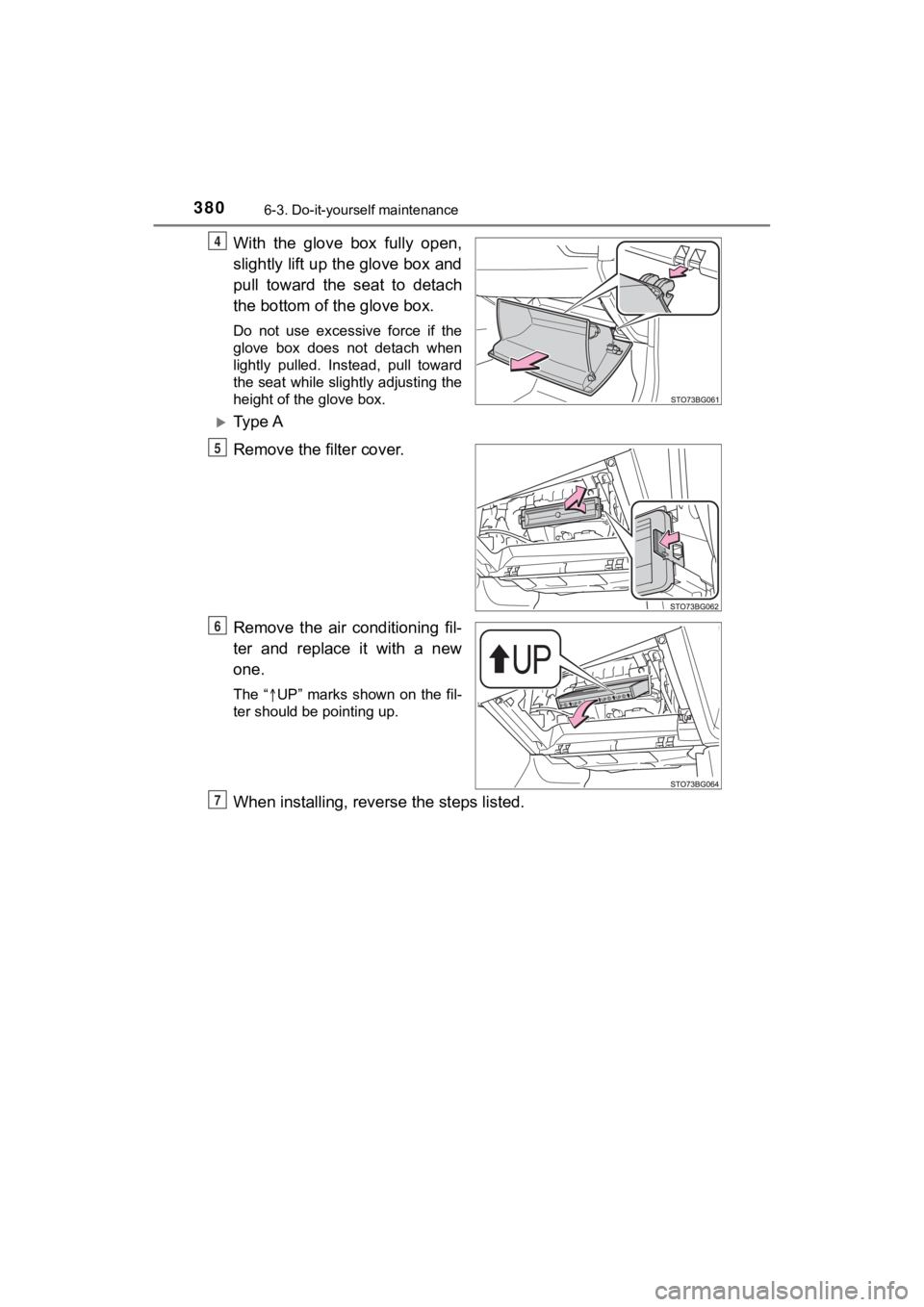
With the glove box fully open,
slightly lift up the glove box and
pull toward the seat to detach
the bottom of the glove box.
Do not use excessive force if the
glove box does not detach when
lightly pulled. Instead, pull toward
the seat while slightly adjusting the
height of the glove box.
Ty p e A
Remove the filter cover.
Remove the air conditioning fil-
ter and replace it with a new
one.
The “UP” marks shown on the fil-
ter should be pointing up.
When installing, rever se the steps listed.
4
5
6
7
Page 382 of 536
3826-3. Do-it-yourself maintenance
C-HR_OM_USA_OM10634U
■Checking interval
Inspect and replace the air conditioning filter according to th e maintenance
schedule. In dusty areas or areas with heavy traffic flow, earl y replacement
may be required. (For scheduled maintenance information, please refer to the
“Schedule maintenance guide” or “Owner’s Manual Supplement”.)
■ If air flow from the ven ts decreases dramatically
The filter may be clogged. Check the filter and replace if nece ssary.
NOTICE
■When using the air conditioning system
Make sure that a filter is always installed.
Using the air conditioning system without a filter may cause da mage to the
system.
■ When removing the glove box
Always follow the specified procedure to remove the glove box ( P. 379). If
the glove box is removed without following the specified proced ure, the
hinge of the glove box may become damaged.
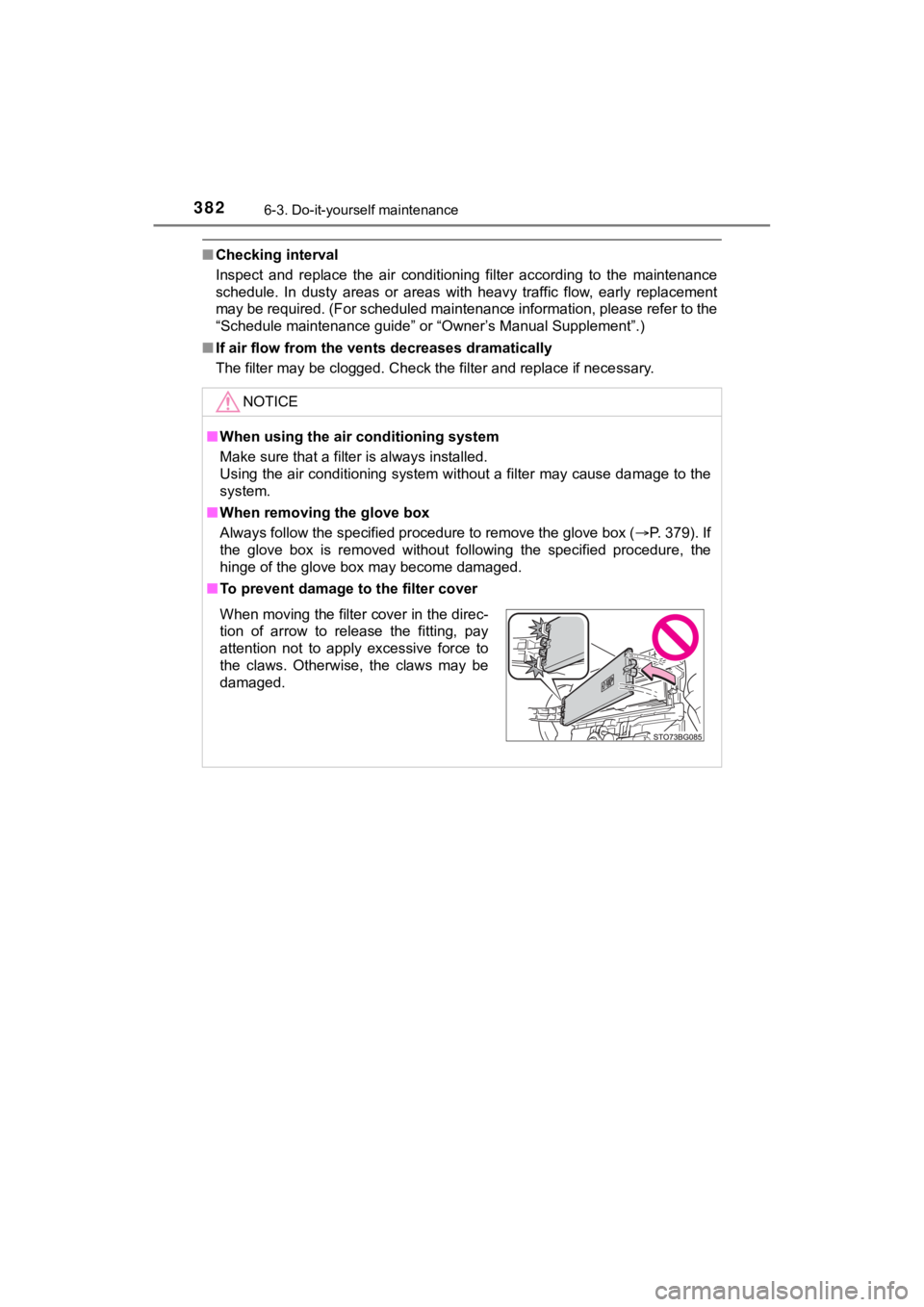
■ To prevent damage to the filter cover
When moving the filter cover in the direc-
tion of arrow to release the fitting, pay
attention not to apply excessive force to
the claws. Otherwise, the claws may be
damaged.