alarm TOYOTA C-HR 2022 User Guide
[x] Cancel search | Manufacturer: TOYOTA, Model Year: 2022, Model line: C-HR, Model: TOYOTA C-HR 2022Pages: 818, PDF Size: 113.75 MB
Page 200 of 818
1983-2. Opening, closing and locking the doors
C-HR_HV_OM_Europe_OM10720E
■Switching the door unlock function (vehicles with a smart entry & start
system equipped with entry function)
It is possible to set which doors the entry function unlocks us ing the wireless
remote control.
Turn the power switch off.
Cancel the intrusion sensor of the alarm system to prevent unin tended trig-
gering of the alarm while c hanging the settings. (if equipped) (P. 151)
When the indicator light on the key surface is not on, press an d hold for
approximately 5 seconds while pressing and holding .
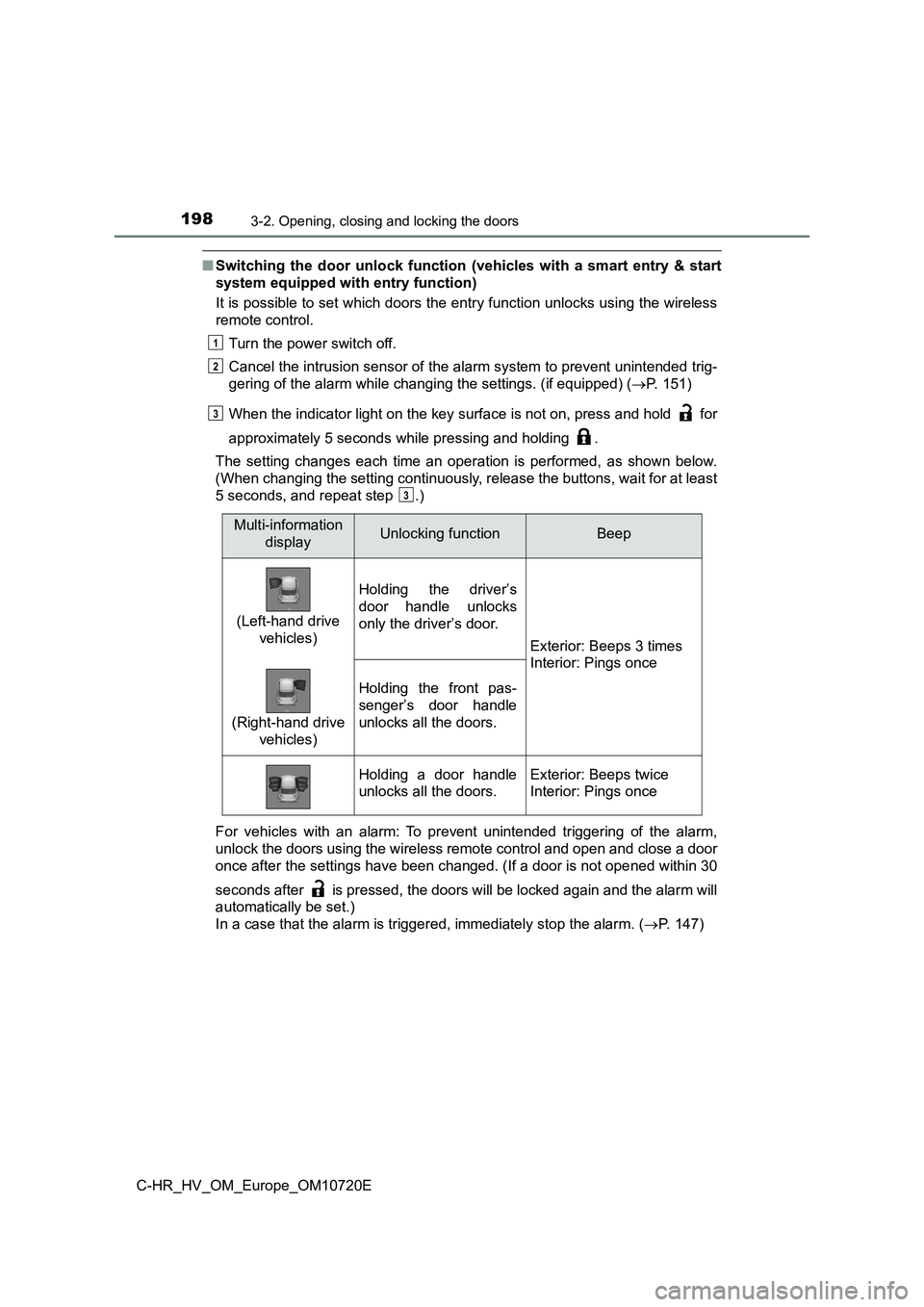
The setting changes each time an operation is performed, as sho wn below.
(When changing the setting continuously, release the buttons, w ait for at least
5 seconds, and repeat step .)
For vehicles with an alarm: To prevent unintended triggering of the alarm,
unlock the doors using the wireless remote control and open and close a door
once after the settings have been changed. (If a door is not op ened within 30
seconds after is pressed, the doors will be locked again and t he alarm will
automatically be set.)
In a case that the alarm is triggered, immediately stop the ala rm. (P. 147)
1
2
3
3
Multi-information
displayUnlocking functionBeep
(Left-hand drive
vehicles)
Holding the driver’s
door handle unlocks
only the driver’s door.
Exterior: Beeps 3 times
Interior: Pings once
(Right-hand drive
vehicles)
Holding the front pas-
senger’s door handle
unlocks all the doors.
Holding a door handle
unlocks all the doors.
Exterior: Beeps twice
Interior: Pings once
Page 210 of 818
2083-2. Opening, closing and locking the doors
C-HR_HV_OM_Europe_OM10720E
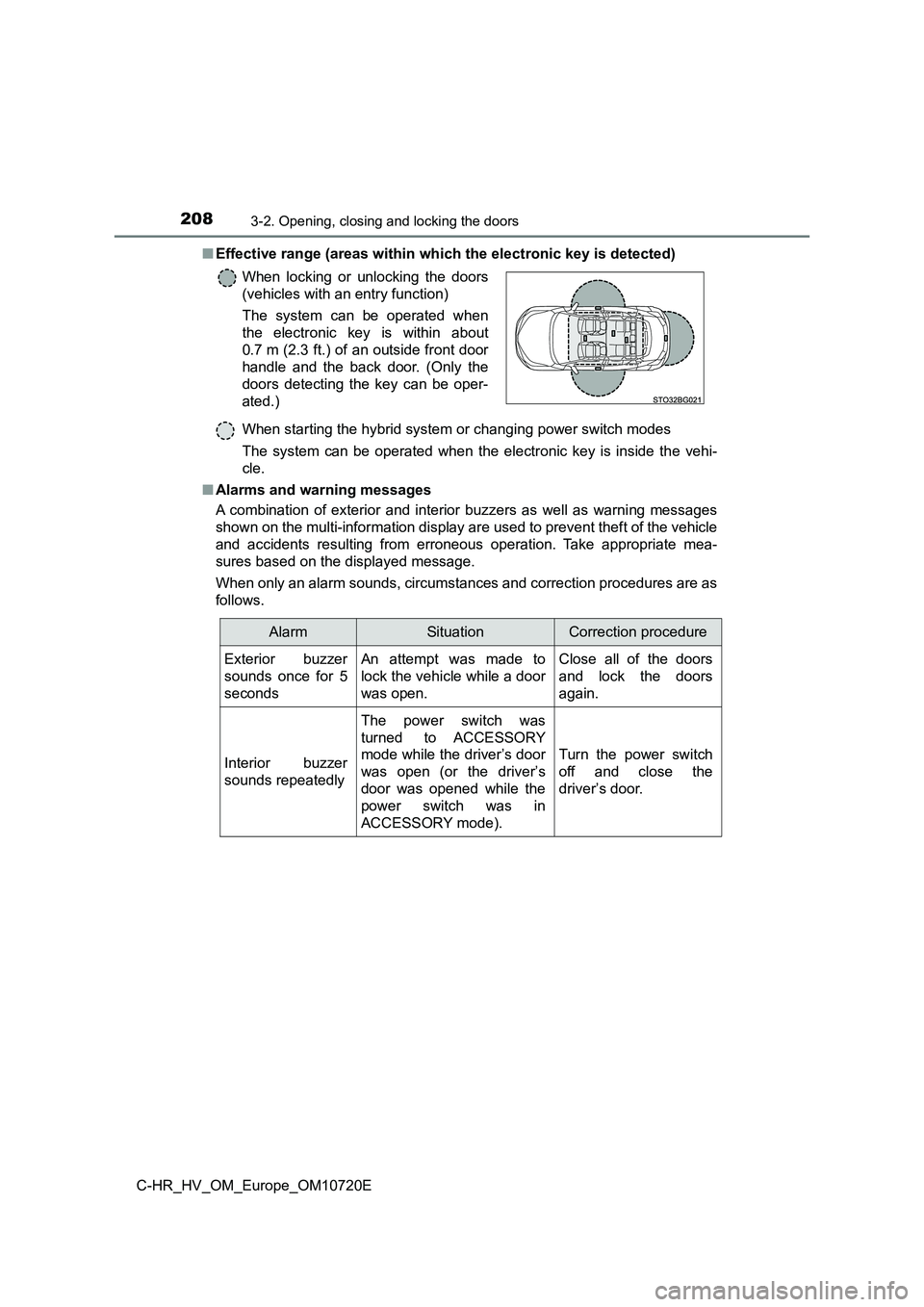
■ Effective range (areas within which the electronic key is detected)
When starting the hybrid system or changing power switch modes
The system can be operated when the electronic key is inside th e vehi-
cle.
■ Alarms and warning messages
A combination of exterior and interior buzzers as well as warni ng messages
shown on the multi-information display are used to prevent thef t of the vehicle
and accidents resulting from erroneous operation. Take appropri ate mea-
sures based on the displayed message.
When only an alarm sounds, circumstances and correction procedu res are as
follows.
When locking or unlocking the doors
(vehicles with an entry function)
The system can be operated when
the electronic key is within about
0.7 m (2.3 ft.) of an outside front door
handle and the back door. (Only the
doors detecting the key can be oper-
ated.)
AlarmSituationCorrection procedure
Exterior buzzer
sounds once for 5
seconds
An attempt was made to
lock the vehicle while a door
was open.
Close all of the doors
and lock the doors
again.
Interior buzzer
sounds repeatedly
The power switch was
turned to ACCESSORY
mode while the driver’s door
was open (or the driver’s
door was opened while the
power switch was in
ACCESSORY mode).
Turn the power switch
off and close the
driver’s door.
Page 214 of 818
2123-2. Opening, closing and locking the doors
C-HR_HV_OM_Europe_OM10720E
● If the electronic key is inside the vehicle and a door handle becomes wet
during a car wash, a message may be shown on the multi-informat ion dis-
play and a buzzer will sound outside the vehicle. To turn off t he alarm, lock
all the doors.
● The lock sensor may not work properly if it comes into contact with ice,
snow, mud, etc. Clean the lock sensor and attempt to operate it again.
● A sudden approach to the effective range or door handle may prevent the
doors from being unlocked. In this case, return the door handle to the origi-
nal position and check that the doors unlock before pulling the door handle
again.
● If there is another electronic key in the detection area, it may take slightly
longer to unlock the doors after the door handle is gripped.
● Fingernails may scrape against the door during operation of the door han-
dle. Be careful not to injure fingernails or damage the surface of the door.
■ When the vehicle is not driven for extended periods
● To prevent theft of the vehicle, do not leave the electronic key within 2 m
(6 ft.) of the vehicle.
● The smart entry & start system can be deactivated in advance. (P. 781)
■ To operate the system properly
Make sure to carry the electronic key when operating the system . Do not get
the electronic key too close to the vehicle when operating the system from the
outside of the vehicle.
Depending on the position and holding condition of the electron ic key, the key
may not be detected correctly and the system may not operate pr operly. (The
alarm may go off accidentally, or the door lock prevention func tion may not
operate.)
Page 750 of 818
7487-2. Steps to take in an emergency
C-HR_HV_OM_Europe_OM10720E
■Stopping the hybrid system
Set the parking brake, shift the shift lever to P and press the power switch as
you normally do when stopping the hybrid system.
■ Replacing the key battery
As the above procedure is a temporary measure, it is recommende d that the
electronic key battery be replaced immediately when the battery is depleted.
( P. 645)
■ Alarm (if equipped)
Using the mechanical key to lock the doors will not set the ala rm system.
If a door is unlocked using the mechanical key when the alarm s ystem is set,
the alarm may be triggered. ( P. 147)
■ Changing power switch modes
Release the brake pedal and press the power switch in step abo ve. The
hybrid system does not start and modes will be changed each tim e the switch
is pressed. ( P. 306)
■ When the electronic key does not work properly
● Make sure that the smart entry & start system has not been deactivated in
the customization setting. If it is off, turn the function on.
(Customizable features: P. 781)
● Check if battery-saving mode is set. If it is set, cancel the function.
( P. 209)
WARNING
■When using the mechanical key and operating the power windows
Operate the power window after checking to make sure that there is no pos-
sibility of any passenger having any of their body parts caught in the side
window. Also, do not allow children to operate the mechanical k ey. It is pos-
sible for children and other passengers to get caught in the po wer window.
3
Page 751 of 818
7497-2. Steps to take in an emergency
C-HR_HV_OM_Europe_OM10720E
7
When trouble arises
If the 12-volt batter y is discharged
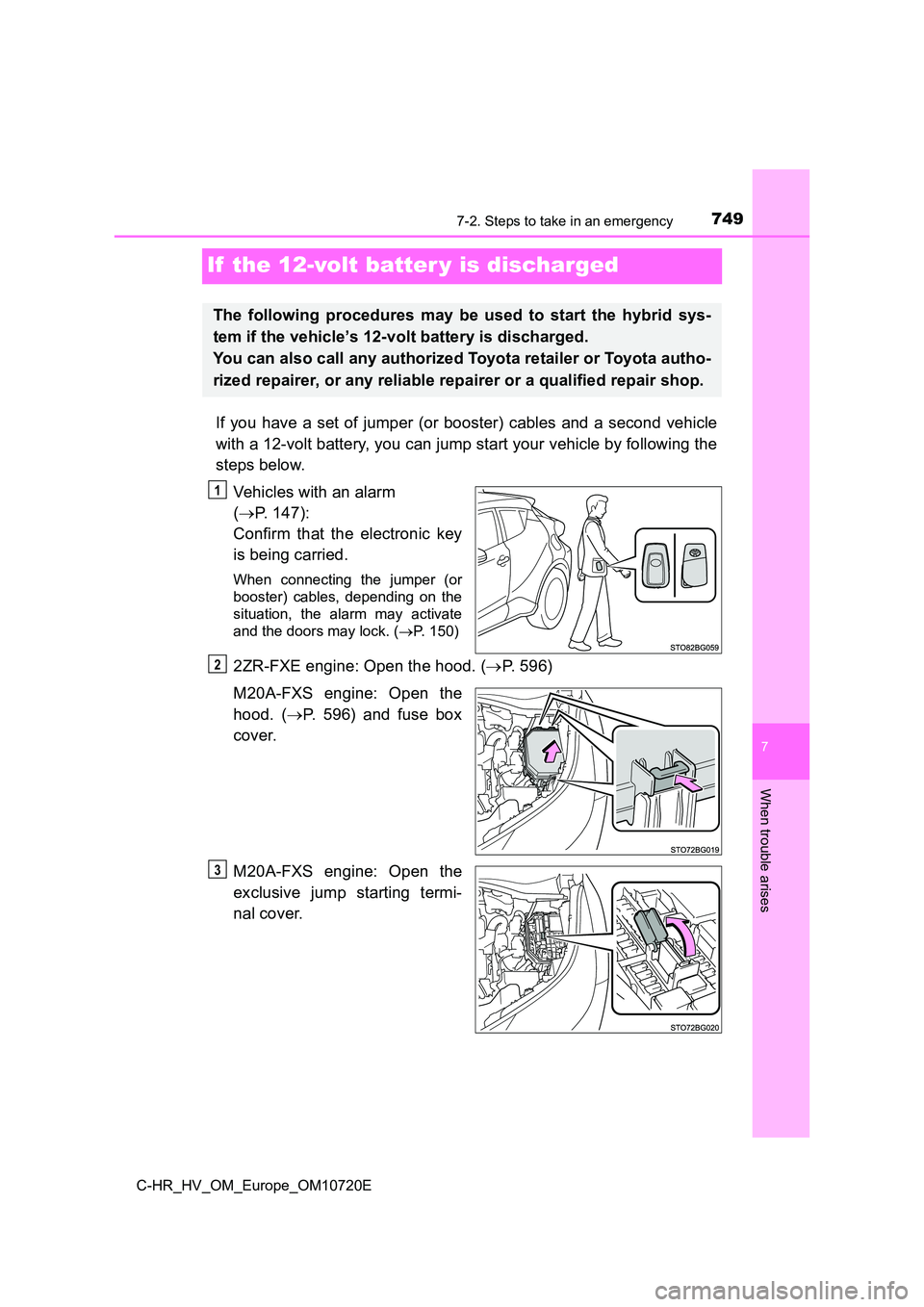
If you have a set of jumper (or booster) cables and a second vehicle
with a 12-volt battery, you can jump start your vehicle by foll owing the
steps below.
Vehicles with an alarm
( P. 147):
Confirm that the electronic key
is being carried.
When connecting the jumper (or
booster) cables, depending on the
situation, the alarm may activate
and the doors may lock. ( P. 150)
2ZR-FXE engine: Open the hood. (P. 596)
M20A-FXS engine: Open the
hood. ( P. 596) and fuse box
cover.
M20A-FXS engine: Open the
exclusive jump starting termi-
nal cover.
The following procedures may be used to start the hybrid sys-
tem if the vehicle’s 12-volt battery is discharged.
You can also call any authorized Toyota retailer or Toyota auth o-
rized repairer, or any reliable repairer or a qualified repair shop.
1
2
3
Page 787 of 818
7858-2. Customization
C-HR_HV_OM_Europe_OM10720E
8
Vehicle specifications
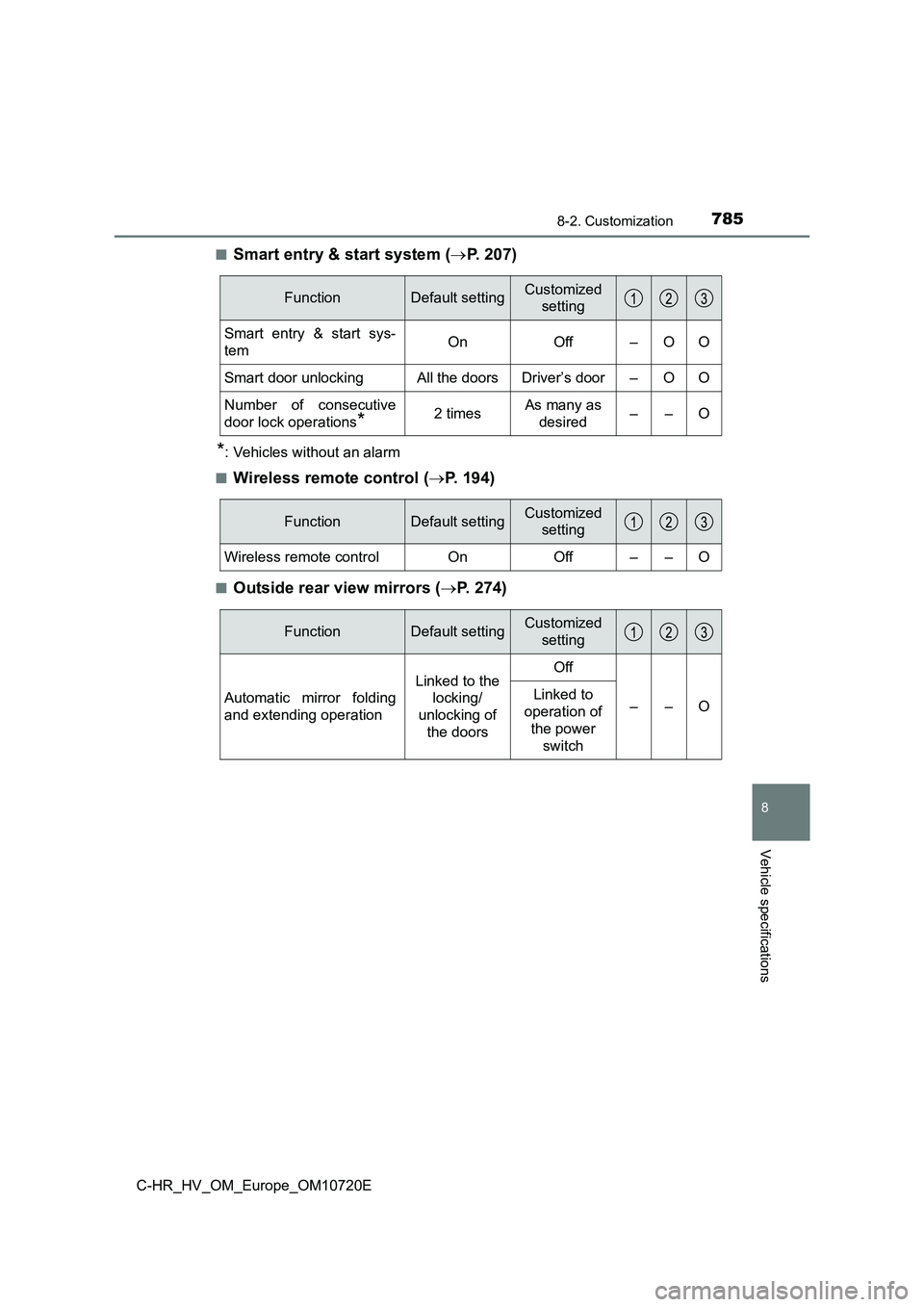
■Smart entry & start system (P. 207)
*: Vehicles without an alarm
■Wireless remote control ( P. 194)
■Outside rear view mirrors (P. 2 7 4 )
FunctionDefault settingCustomized
setting
Smart entry & start sys-
temOnOff–OO
Smart door unlockingAll the doorsDriver’s door–OO
Number of consecutive
door lock operations*2 timesAs many as
desired––O
FunctionDefault settingCustomized
setting
Wireless remote controlOnOff––O
FunctionDefault settingCustomized
setting
Automatic mirror folding
and extending operation
Linked to the
locking/
unlocking of
the doors
Off
––OLinked to
operation of
the power
switch
Page 800 of 818
798What to do if... (Troubleshooting)
C-HR_HV_OM_Europe_OM10720E
●The seat belt reminder light is flashing
Are the driver and the front passenger wearing the seat belts? (P. 685)
●The parking brake indicator is on
Is the parking brake released? ( P. 325)
Depending on the situation, other types of warning buzzer may a lso sound.
( P. 681, 692)
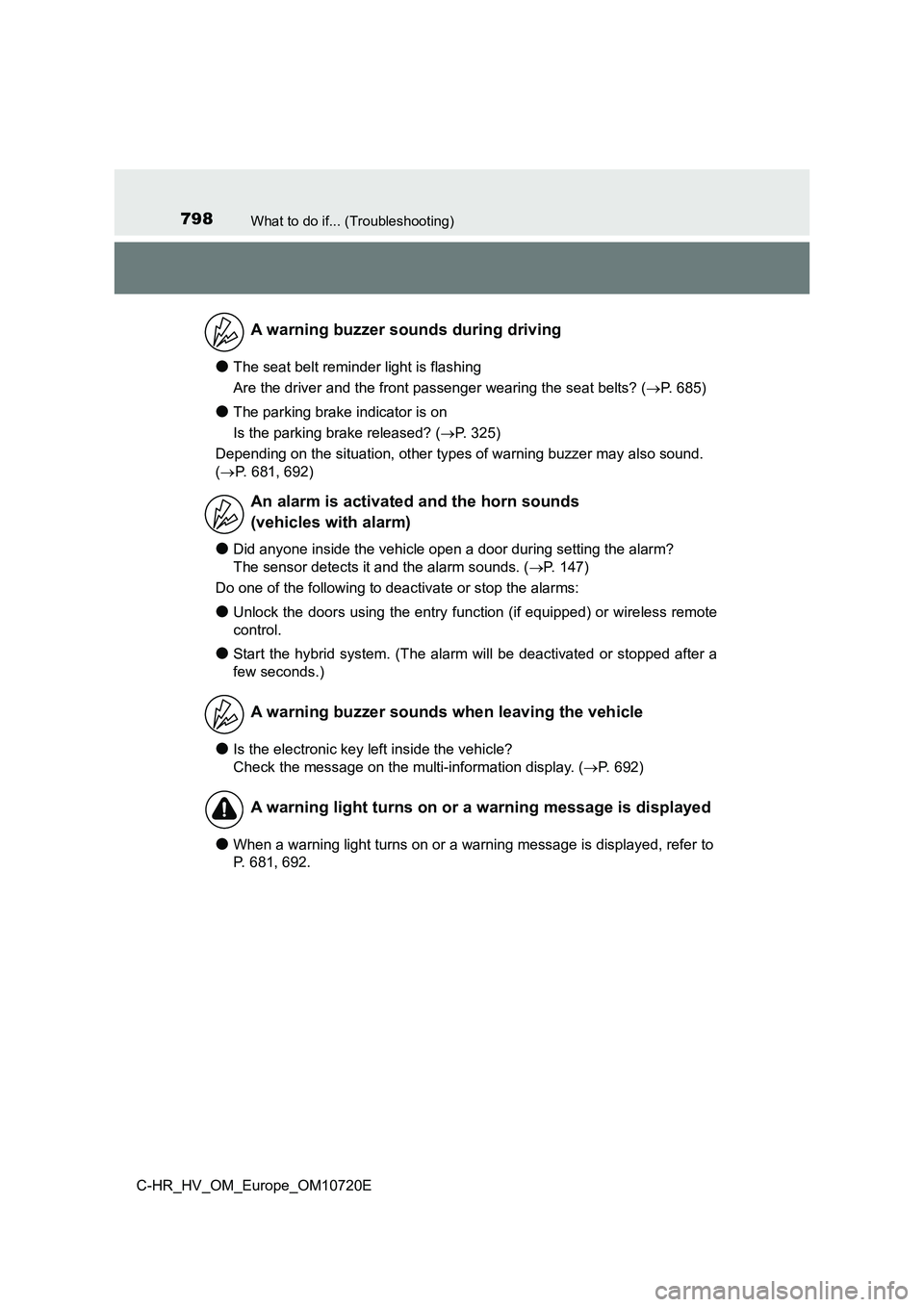
●Did anyone inside the vehicle open a door during setting the alarm?
The sensor detects it and the alarm sounds. ( P. 147)
Do one of the following to deactivate or stop the alarms:
●Unlock the doors using the entry function (if equipped) or wire less remote
control.
●Start the hybrid system. (The alarm will be deactivated or stop ped after a
few seconds.)
●Is the electronic key left inside the vehicle?
Check the message on the multi-information display. ( P. 692)
●When a warning light turns on or a warning message is displayed, refer to
P. 681, 692.
A warning buzzer sounds during driving
An alarm is activated and the horn sounds
(vehicles with alarm)
A warning buzzer sounds when leaving the vehicle
A warning light turns on or a warning message is displayed
Page 803 of 818
801Alphabetical index
C-HR_HV_OM_Europe_OM10720E
Alarm......................................... 147
Antenna
Smart entry & start system.... 207
Anti-lock brake system
(ABS) ...................................... 532
Function ................................ 532
Warning light ......................... 682
Approach warning
Dynamic radar cruise control
with full-speed range .......... 420
Assist grips .............................. 577
Audio input*
Audio system*
Automatic air conditioning
system
Air conditioning filter.............. 637
Automatic
air conditioning system ....... 548
Climate preference................ 551
Automatic headlight
leveling system...................... 337
Automatic High Beam ............. 338
Automatic light control
system .................................... 336
Auxiliary boxes ........................ 567
Back door ................................. 201
Back-up lights
Replacing light bulbs..... 660, 666
Wattage ................................ 778
Battery (12-volt battery)
Battery checking ........... 606, 612
If the 12-volt battery is
discharged .......................... 749
Preparing and
checking before winter ....... 543
Replacing .............................. 753
Warning light ......................... 681
Battery (traction battery)......... 123
Blind Spot Monitor (BSM) ....... 437
Bluetooth®*
Bottle holders .......................... 564
Brake
Fluid ...................................... 775
Parking brake........................ 325
Regenerative braking............ 120
Warning light ......................... 681
Brake assist ............................. 532
Brake Hold................................ 330
Brake Override System ........... 286
Break-in tips ............................. 287
Brightness control
Instrument cluster light
control................................. 173
BSM (Blind Spot Monitor) ....... 437
B
*: For vehicles with navigation/multimedia system, refer to
“Navigation and multimedia system Owner’s manual” or
“Multimedia owner’s manual”.
Page 816 of 818
814Alphabetical index
C-HR_HV_OM_Europe_OM10720E
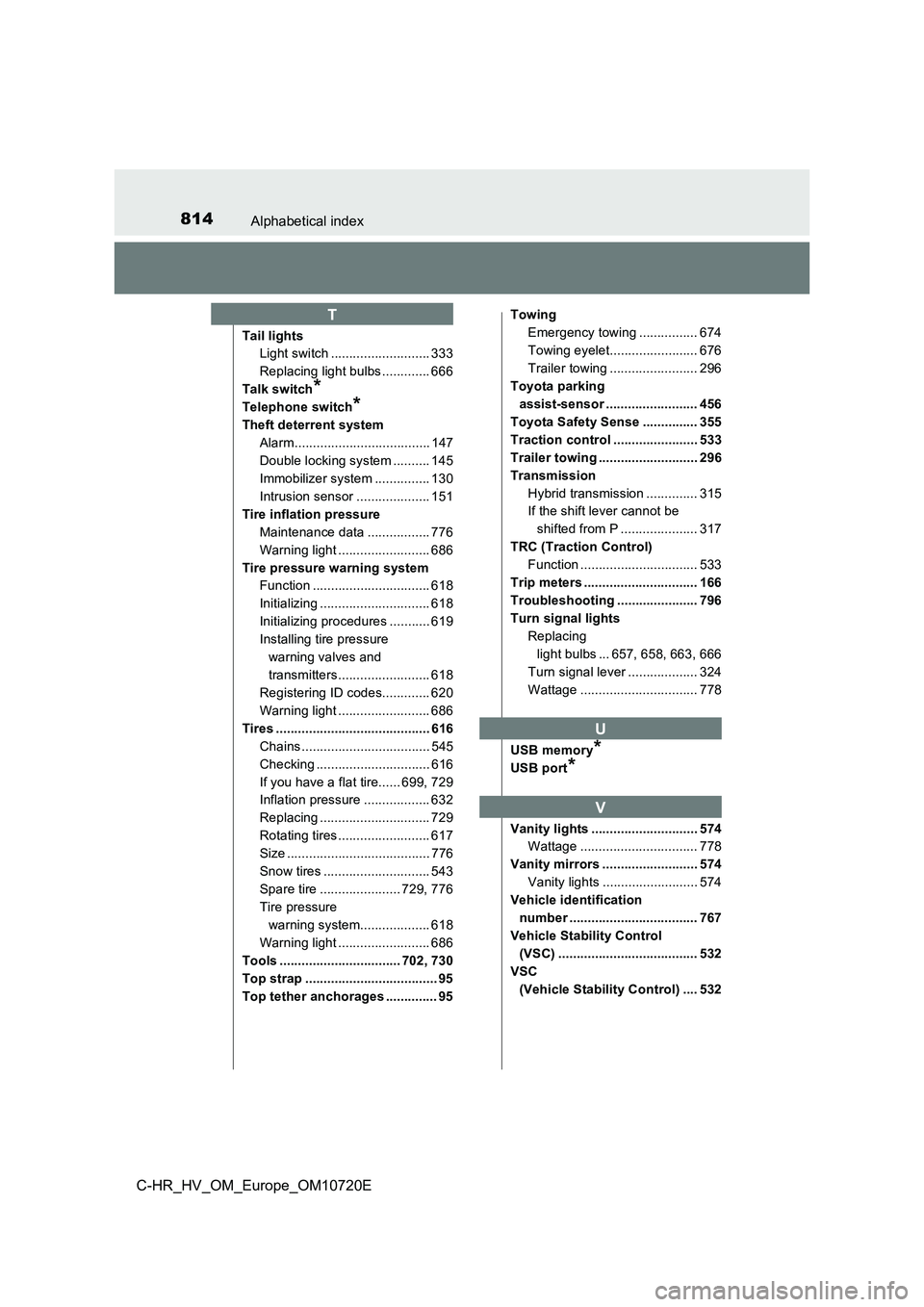
Tail lights
Light switch ........................... 333
Replacing light bulbs ............. 666
Talk switch*
Telephone switch*
Theft deterrent system
Alarm..................................... 147
Double locking system .......... 145
Immobilizer system ............... 130
Intrusion sensor .................... 151
Tire inflation pressure
Maintenance data ................. 776
Warning light ......................... 686
Tire pressure warning system
Function ................................ 618
Initializing .............................. 618
Initializing procedures ........... 619
Installing tire pressure
warning valves and
transmitters......................... 618
Registering ID codes............. 620
Warning light ......................... 686
Tires .......................................... 616
Chains ................................... 545
Checking ............................... 616
If you have a flat tire...... 699, 729
Inflation pressure .................. 632
Replacing .............................. 729
Rotating tires ......................... 617
Size ....................................... 776
Snow tires ............................. 543
Spare tire ...................... 729, 776
Tire pressure
warning system................... 618
Warning light ......................... 686
Tools ................................. 702, 730
Top strap .................................... 95
Top tether anchorages .............. 95
Towing
Emergency towing ................ 674
Towing eyelet........................ 676
Trailer towing ........................ 296
Toyota parking
assist-sensor ......................... 456
Toyota Safety Sense ............... 355
Traction control ....................... 533
Trailer towing ........................... 296
Transmission
Hybrid transmission .............. 315
If the shift lever cannot be
shifted from P ..................... 317
TRC (Traction Control)
Function ................................ 533
Trip meters ............................... 166
Troubleshooting ...................... 796
Turn signal lights
Replacing
light bulbs ... 657, 658, 663, 666
Turn signal lever ................... 324
Wattage ................................ 778
USB memory*
USB port*
Vanity lights ............................. 574
Wattage ................................ 778
Vanity mirrors .......................... 574
Vanity lights .......................... 574
Vehicle identification
number ................................... 767
Vehicle Stability Control
(VSC) ...................................... 532
VSC
(Vehicle Stability Control) .... 532
T
U
V