turn signal TOYOTA C_HR HYBRID 2017 User Guide
[x] Cancel search | Manufacturer: TOYOTA, Model Year: 2017, Model line: C_HR HYBRID, Model: TOYOTA C_HR HYBRID 2017Pages: 712, PDF Size: 49.31 MB
Page 304 of 712
3044-5. Using the driving support systems
C-HR_HV_OM_Europe_OM10538E
*: If the turn signal indicator is not operated when changing lanes, the mark
does not display.
In the following situations, the RSA system alerts the driver using a
warning display.
● When the vehicle speed exceeds the speed warning threshold
applied to the speed limit of the sign displayed on the multi-informa-
tion display, the sign color becomes inverted.
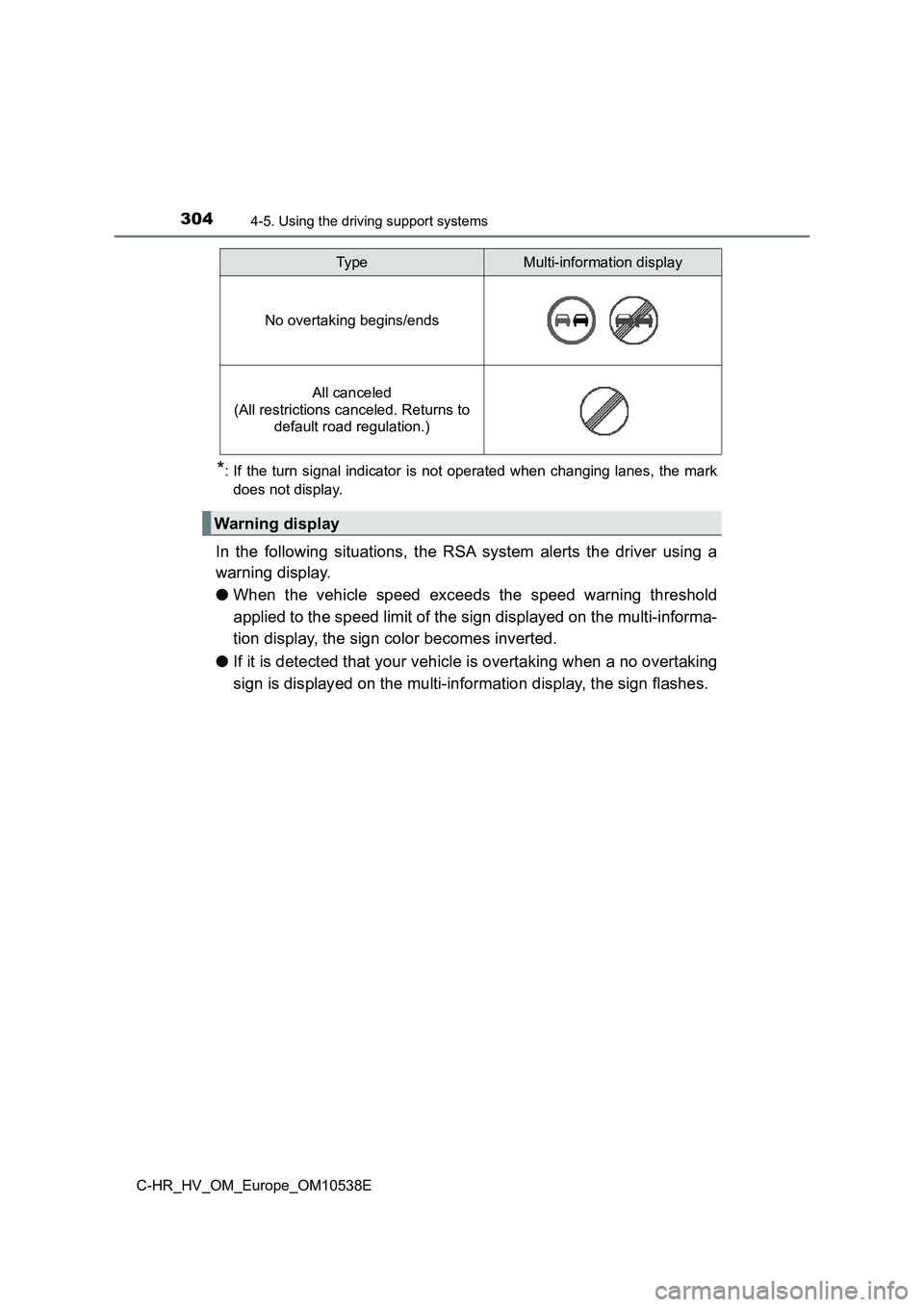
● If it is detected that your vehicle is overtaking when a no overtaking
sign is displayed on the multi-information display, the sign flashes.
No overtaking begins/ends
All canceled
(All restrictions canceled. Returns to
default road regulation.)
Warning display
Typ eMulti-information display
Page 335 of 712
335
4
4-5. Using the driving support systems
Driving
C-HR_HV_OM_Europe_OM10538E
BSM (Blind Spot Monitor)
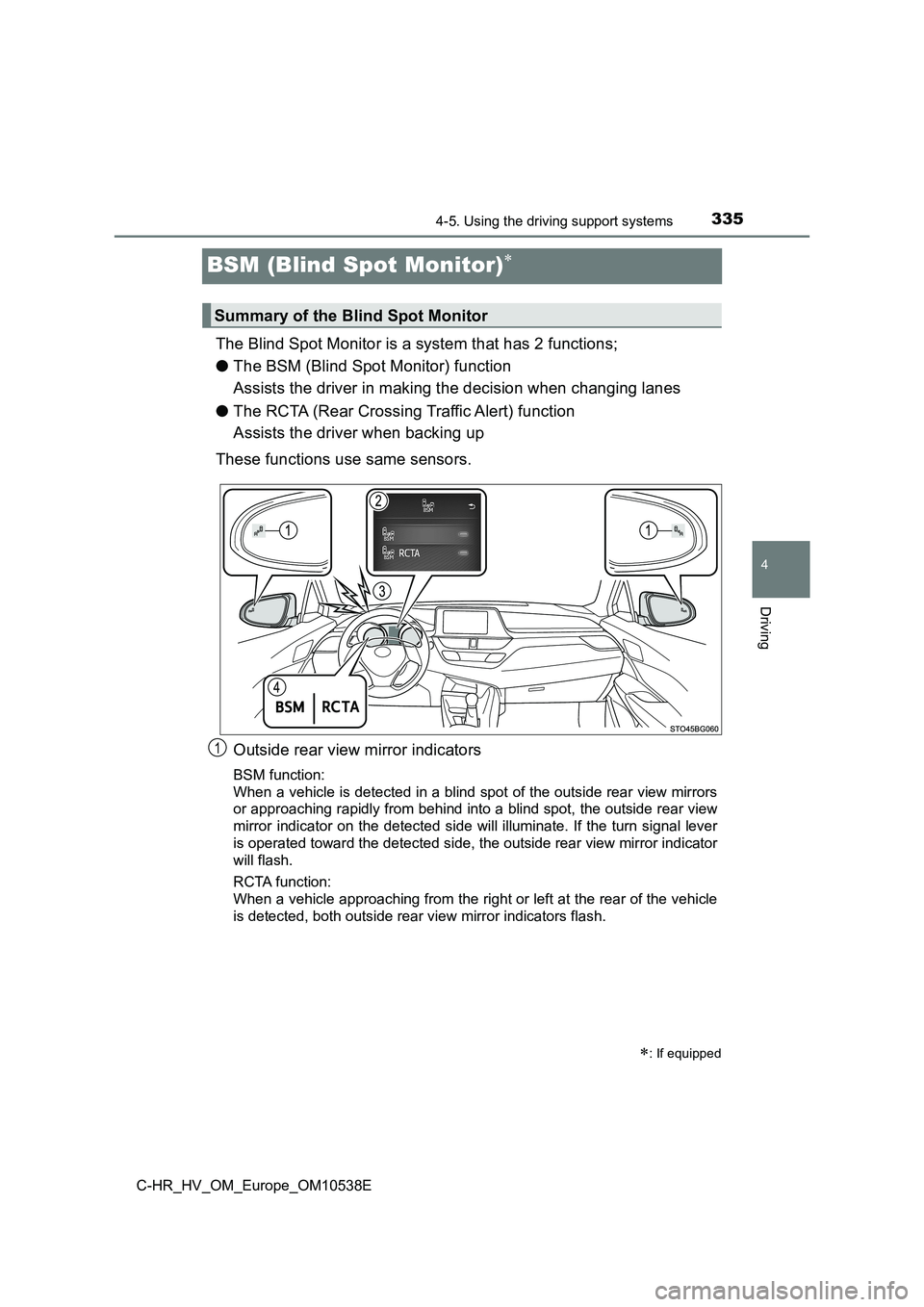
The Blind Spot Monitor is a system that has 2 functions;
● The BSM (Blind Spot Monitor) function
Assists the driver in making the decision when changing lanes
● The RCTA (Rear Crossing Traffic Alert) function
Assists the driver when backing up
These functions use same sensors.
Outside rear view mirror indicators
BSM function:
When a vehicle is detected in a blind spot of the outside rear view mirrors
or approaching rapidly from behind into a blind spot, the outside rear view
mirror indicator on the detected side will illuminate. If the turn signal lever
is operated toward the detected side, the outside rear view mirror indicator
will flash.
RCTA function:
When a vehicle approaching from the right or left at the rear of the vehicle
is detected, both outside rear view mirror indicators flash.
: If equipped
Summary of the Blind Spot Monitor
1
Page 369 of 712
3694-5. Using the driving support systems
4
Driving
C-HR_HV_OM_Europe_OM10538E
■Parking
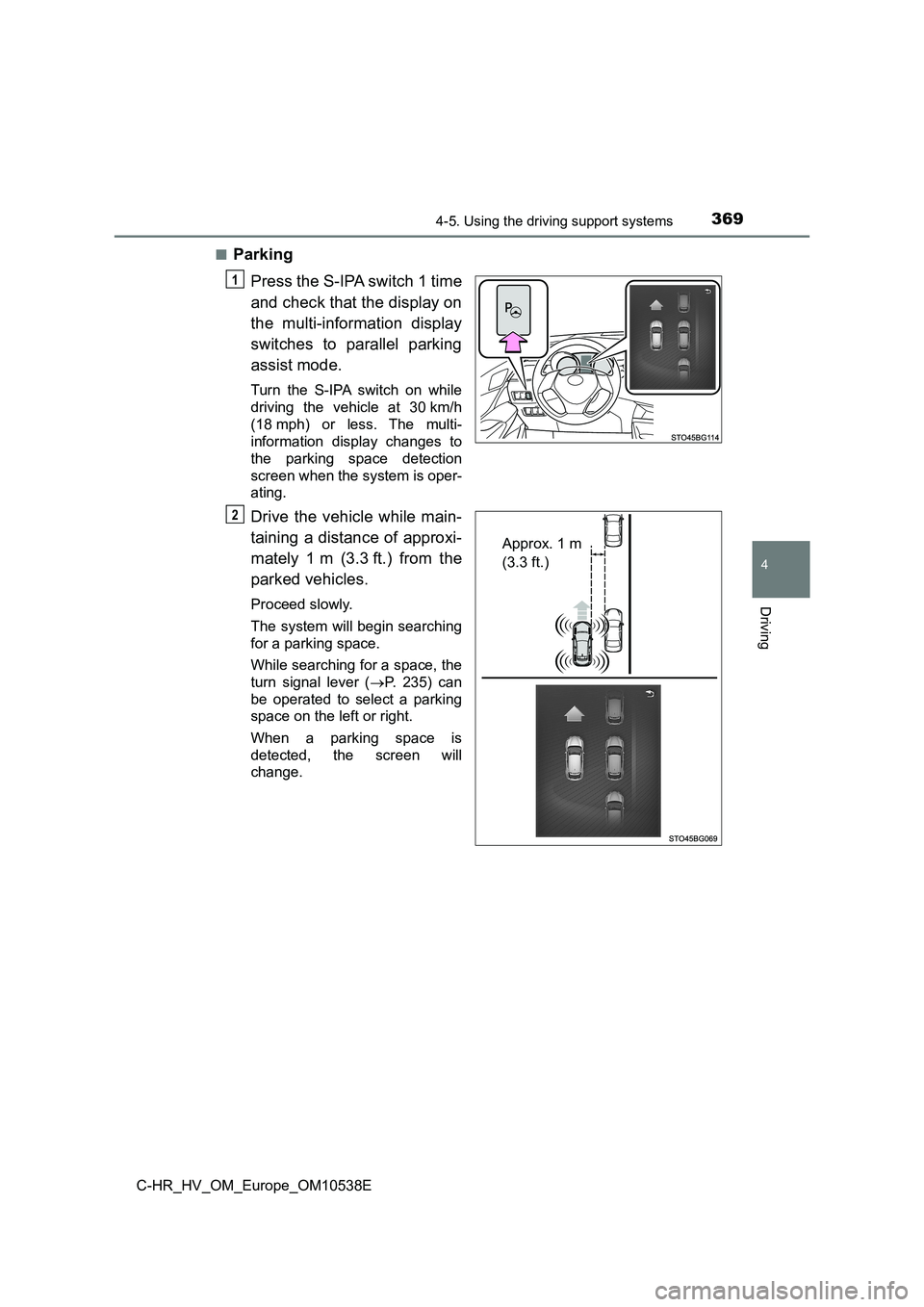
Press the S-IPA switch 1 time
and check that the display on
the multi-information display
switches to parallel parking
assist mode.
Turn the S-IPA switch on while
driving the vehicle at 30 km/h
(18 mph) or less. The multi-
information display changes to
the parking space detection
screen when the system is oper-
ating.
Drive the vehicle while main-
taining a distance of approxi-
mately 1 m (3.3 ft.) from the
parked vehicles.
Proceed slowly.
The system will begin searching
for a parking space.
While searching for a space, the
turn signal lever ( P. 235) can
be operated to select a parking
space on the left or right.
When a parking space is
detected, the screen will
change.
1
Approx. 1 m
(3.3 ft.)
2
Page 376 of 712
3764-5. Using the driving support systems
C-HR_HV_OM_Europe_OM10538E
■Parking
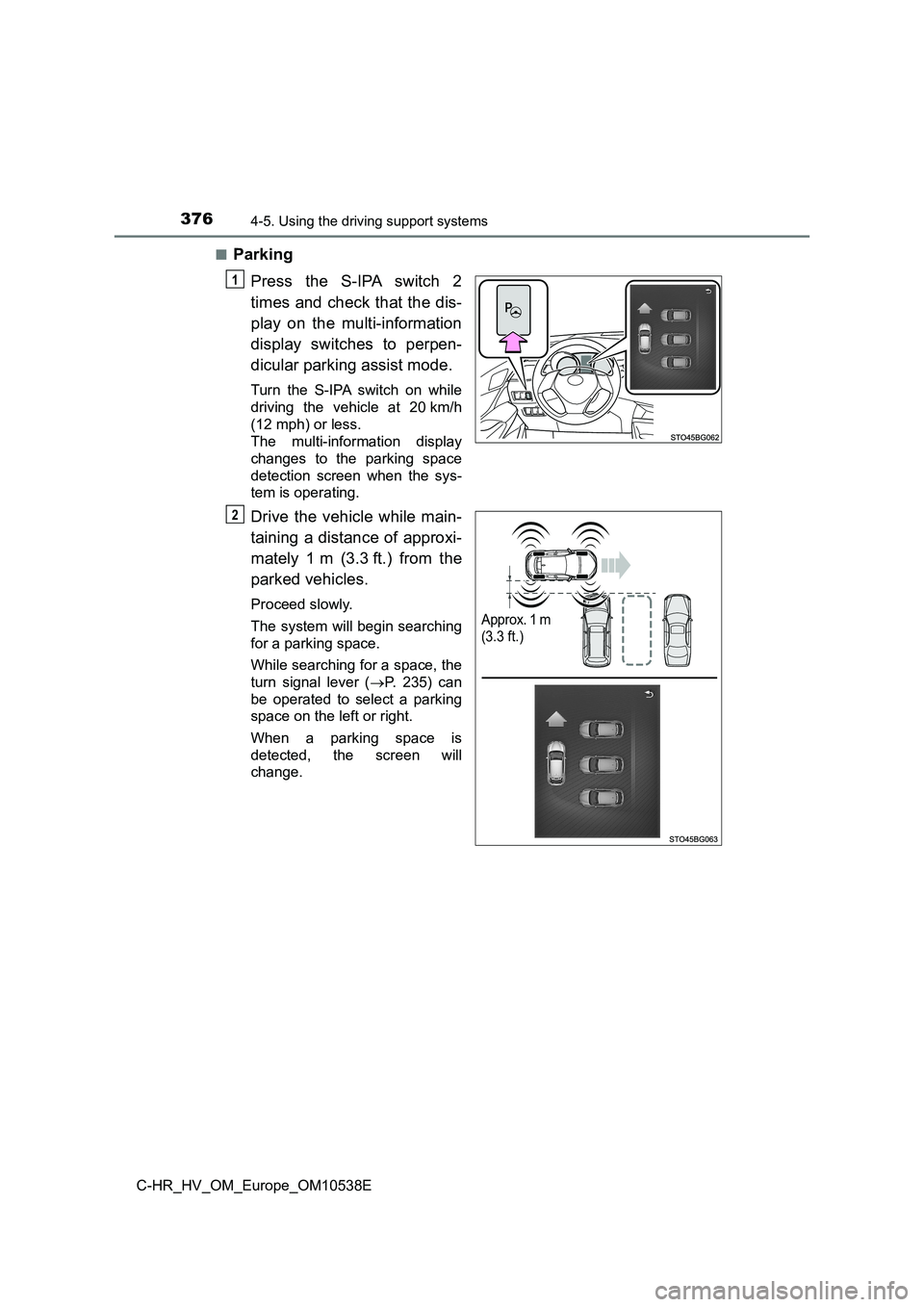
Press the S-IPA switch 2
times and check that the dis-
play on the multi-information
display switches to perpen-
dicular parking assist mode.
Turn the S-IPA switch on while
driving the vehicle at 20 km/h
(12 mph) or less.
The multi-information display
changes to the parking space
detection screen when the sys-
tem is operating.
Drive the vehicle while main-
taining a distance of approxi-
mately 1 m (3.3 ft.) from the
parked vehicles.
Proceed slowly.
The system will begin searching
for a parking space.
While searching for a space, the
turn signal lever ( P. 235) can
be operated to select a parking
space on the left or right.
When a parking space is
detected, the screen will
change.
1
Approx. 1 m
(3.3 ft.)
2
Page 382 of 712
3824-5. Using the driving support systems
C-HR_HV_OM_Europe_OM10538E
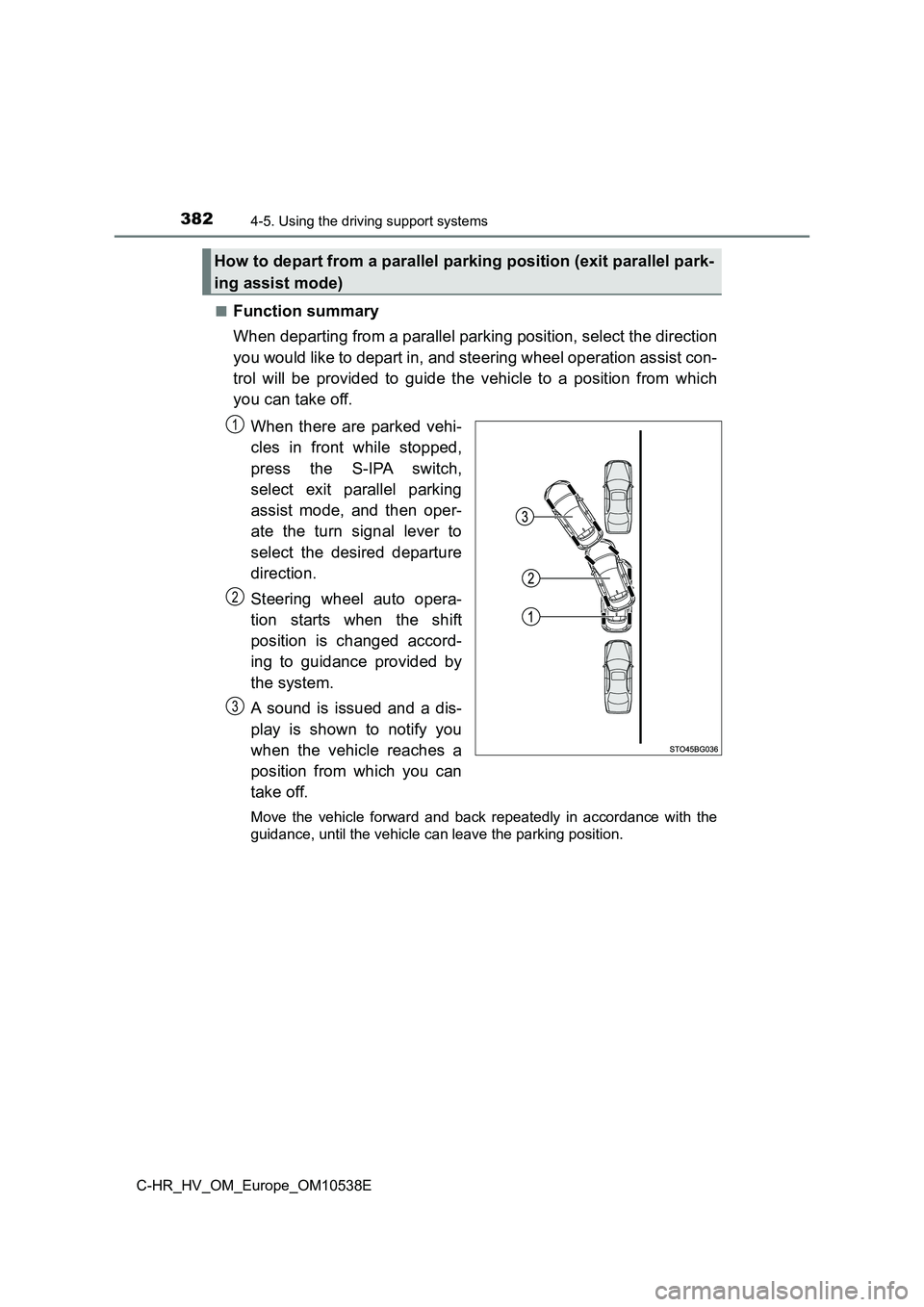
■Function summary
When departing from a parallel parking position, select the direction
you would like to depart in, and steering wheel operation assist con-
trol will be provided to guide the vehicle to a position from which
you can take off.
When there are parked vehi-
cles in front while stopped,
press the S-IPA switch,
select exit parallel parking
assist mode, and then oper-
ate the turn signal lever to
select the desired departure
direction.
Steering wheel auto opera-
tion starts when the shift
position is changed accord-
ing to guidance provided by
the system.
A sound is issued and a dis-
play is shown to notify you
when the vehicle reaches a
position from which you can
take off.
Move the vehicle forward and back repeatedly in accordance with the
guidance, until the vehicle can leave the parking position.
How to depart from a parallel parking position (exit parallel park-
ing assist mode)
1
2
3
Page 383 of 712
3834-5. Using the driving support systems
4
Driving
C-HR_HV_OM_Europe_OM10538E
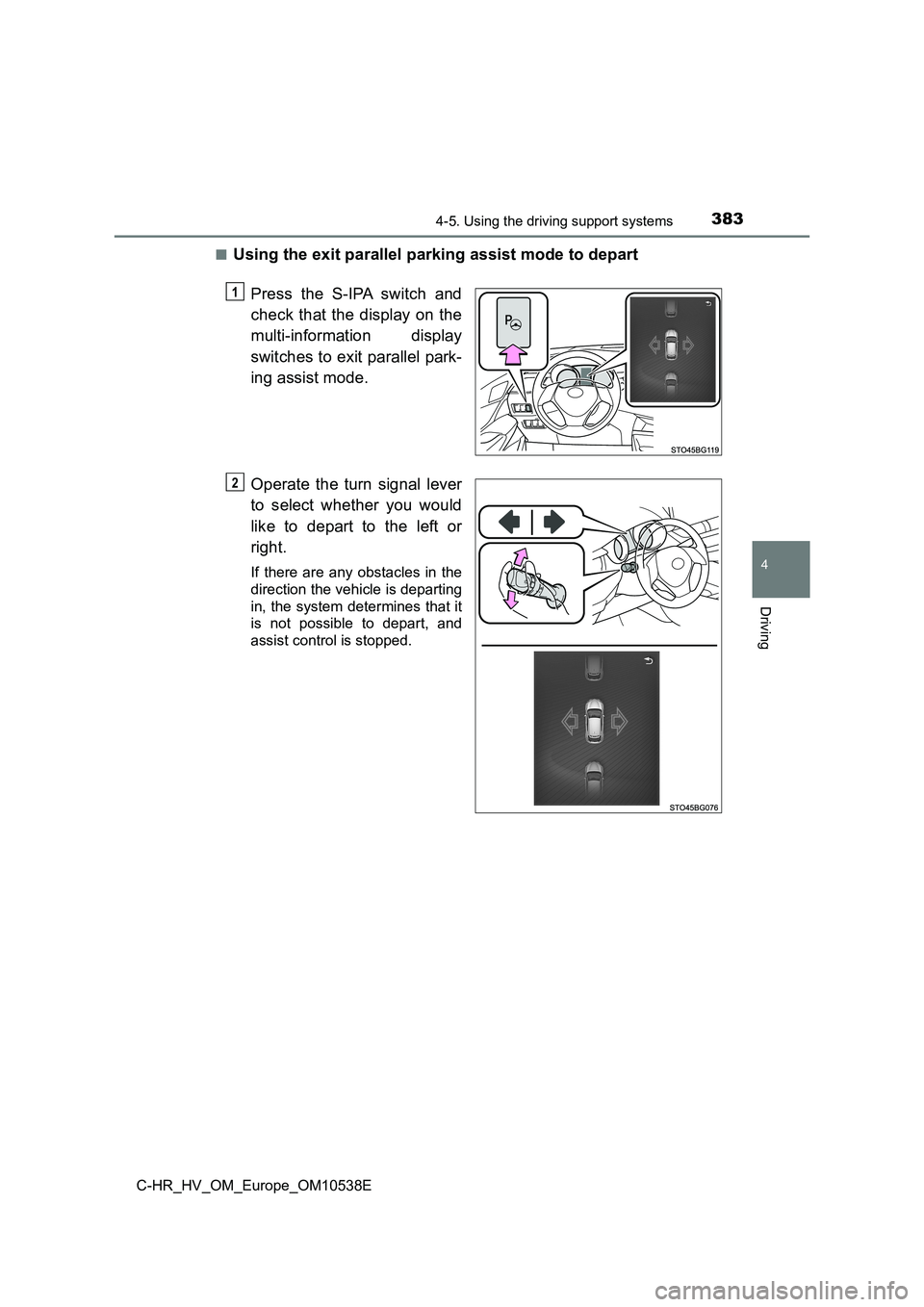
■Using the exit parallel parking assist mode to depart
Press the S-IPA switch and
check that the display on the
multi-information display
switches to exit parallel park-
ing assist mode.
Operate the turn signal lever
to select whether you would
like to depart to the left or
right.
If there are any obstacles in the
direction the vehicle is departing
in, the system determines that it
is not possible to depart, and
assist control is stopped.
1
2
Page 393 of 712
3934-5. Using the driving support systems
4
Driving
C-HR_HV_OM_Europe_OM10538E
“IPA Unavailable.”
The exit parallel park-
ing assist is operated
with obstacles on the
left and right sides or
an obstacle on the side
where the turn signal
lamp is on.
Use the exit parallel
parking assist with no
obstacles on the park-
ing side.
The 12-volt battery has
been removed and
reinstalled.
Drive the vehicle
straight ahead for
5 seconds or more at a
speed of approxi-
mately 35 km/h
(22 mph) or higher.
Possible system mal-
function.
Have the vehicle
inspected by any
authorized Toyota
retailer or Toyota autho-
rized repairer, or any
reliable repairer.
A sensor may be dirty
or covered with snow or
ice.
In such cases, clearing
the sensor should
return the system to
normal.
“IPA Unavailable,
Speed Too High.”
Excessive vehicle
speed (over 50 km/h
[31 mph])
Reduce vehicle speed
and turn the S-IPA
switch on.
• Perpendicular park-
ing assist mode:
20 km/h (12 mph) or
less
• Parallel parking
assist mode: 30 km/h
(18 mph) or less
MessageCauseWhat to do
Page 568 of 712
5687-3. Do-it-yourself maintenance
C-HR_HV_OM_Europe_OM10538E
Light bulbs
Check the wattage of the light bulb to be replaced. (P. 676)
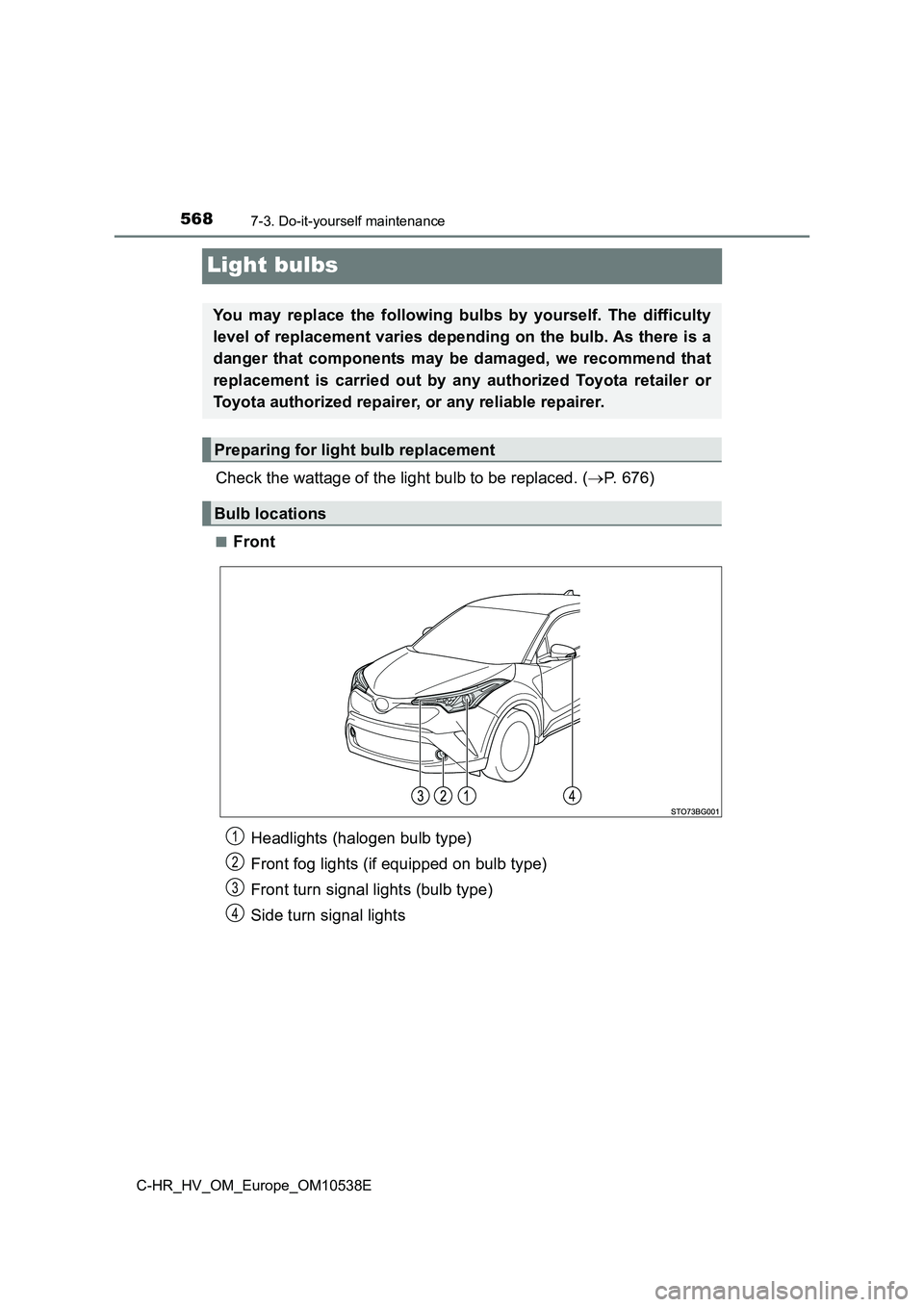
■Front
You may replace the following bulbs by yourself. The difficulty
level of replacement varies depending on the bulb. As there is a
danger that components may be damaged, we recommend that
replacement is carried out by any authorized Toyota retailer or
Toyota authorized repairer, or any reliable repairer.
Preparing for light bulb replacement
Bulb locations
Headlights (halogen bulb type)
Front fog lights (if equipped on bulb type)
Front turn signal lights (bulb type)
Side turn signal lights
1
2
3
4
Page 569 of 712
5697-3. Do-it-yourself maintenance
C-HR_HV_OM_Europe_OM10538E
7
Maintenance and care
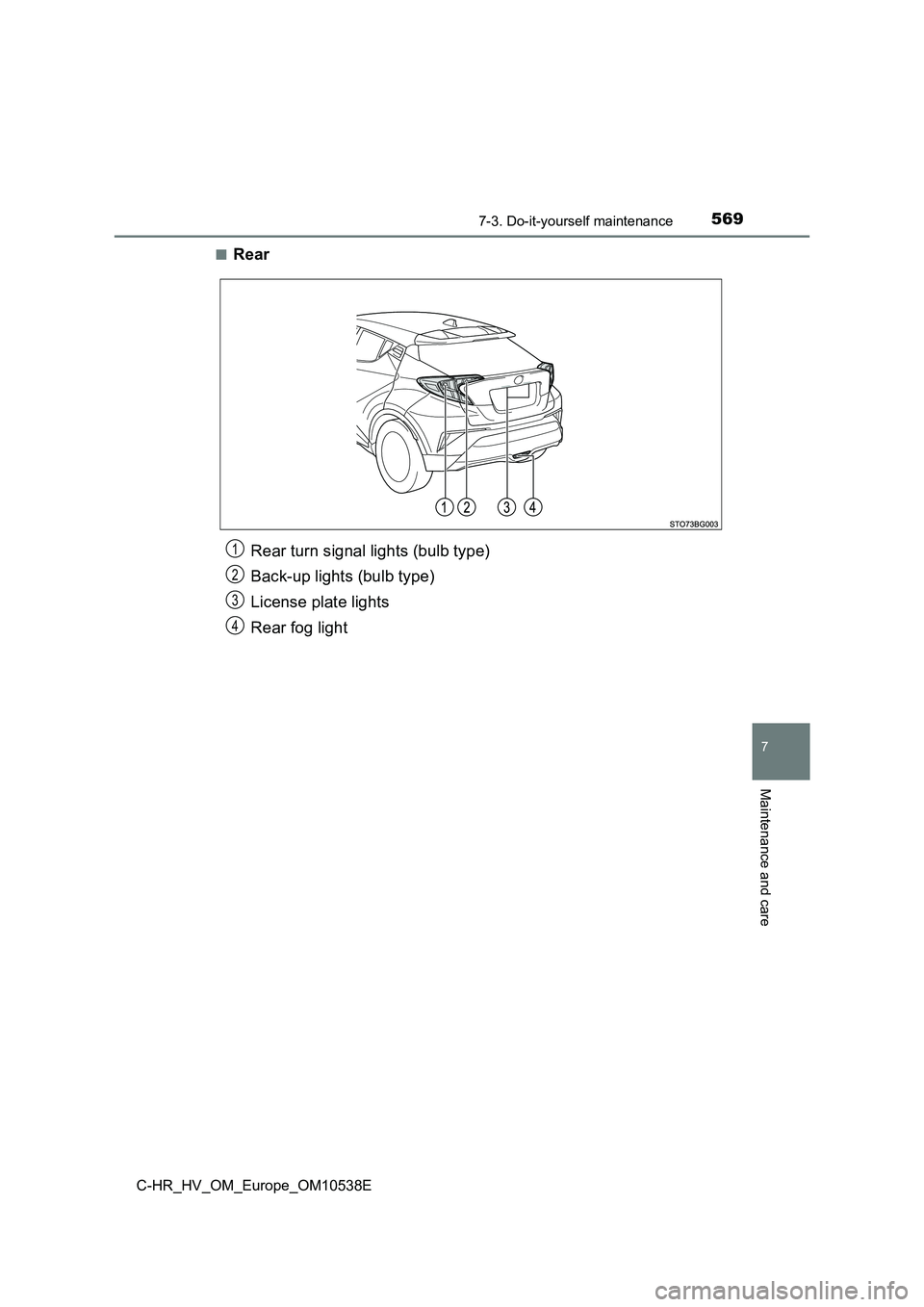
■Rear
Rear turn signal lights (bulb type)
Back-up lights (bulb type)
License plate lights
Rear fog light
1
2
3
4
Page 573 of 712
5737-3. Do-it-yourself maintenance
C-HR_HV_OM_Europe_OM10538E
7
Maintenance and care
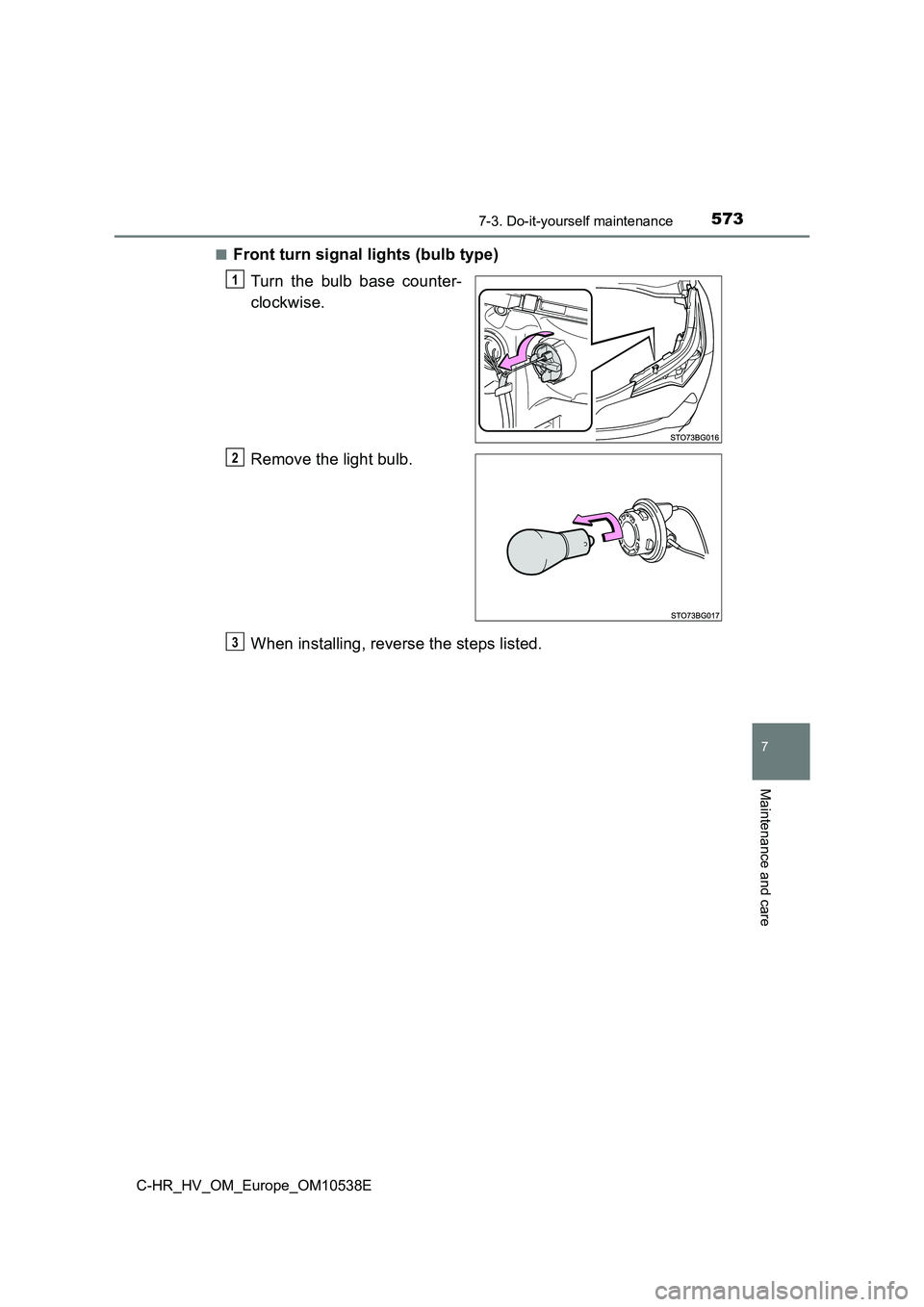
■Front turn signal lights (bulb type)
Turn the bulb base counter-
clockwise.
Remove the light bulb.
When installing, reverse the steps listed.
1
2
3