Key TOYOTA CAMRY 2008 XV40 / 8.G Owner's Manual
[x] Cancel search | Manufacturer: TOYOTA, Model Year: 2008, Model line: CAMRY, Model: TOYOTA CAMRY 2008 XV40 / 8.GPages: 476, PDF Size: 7.27 MB
Page 39 of 476

39
1-2. Opening, closing and locking the doors and trunk
1
Before driving
■
Security feature
If a door is not opened within approximately 60 seconds after the vehicle is
unlocked, the security feature automatically locks the vehicle again.
■ When the electronic key battery is fully depleted (vehicles with smart
key system)
P. 353
■ Conditions affecting operation
Vehicles with smart key system
P. 3 0 Vehicles without smart key system
The wireless remote control function may not operate normally in the follow-
ing situations.
● Near a TV tower, radio station, electr ic power plant, airport or other facil-
ity that generates strong radio waves
● When carrying a portable radio, cell ular phone or other wireless commu-
nication devices
● When multiple wireless keys are in the vicinity
● When the wireless key has come into contact with, or is covered by, a
metallic object
● When a wireless key (that emits radio waves) is being used nearby
● When the wireless key has been left near an electrical appliance such as
a personal computer
Page 41 of 476
41
1
1-2. Opening, closing and locking the doors and trunk
Before driving
Doors
The vehicle can be locked and unlocked using the entry function,
wireless remote control, key or door lock switch.
■Entry function (vehicles with smart key system)
P. 2 6
■ Wireless remote control (if equipped)
P. 3 7
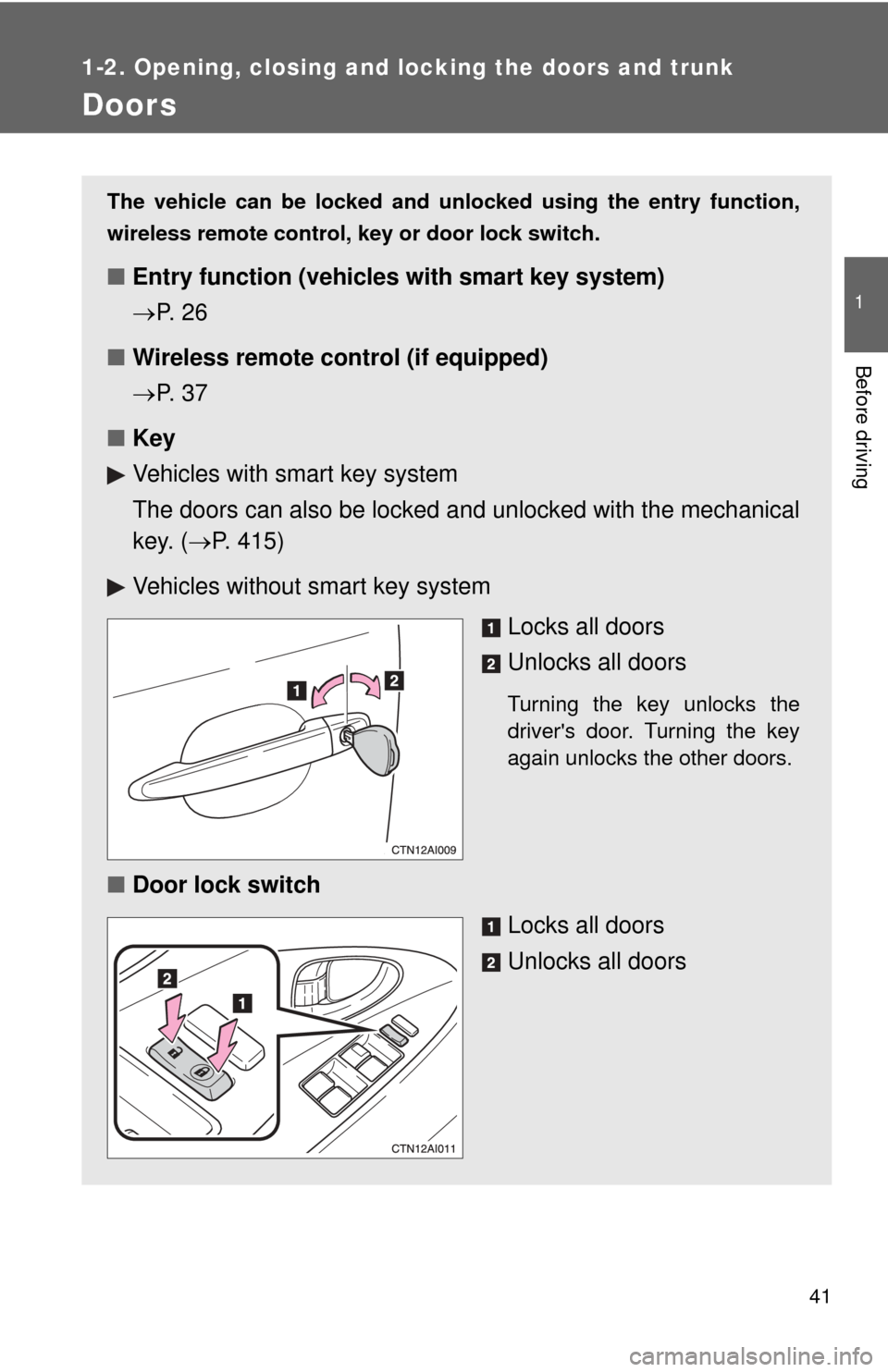
■ Key
Vehicles with smart key system
The doors can also be locked a nd unlocked with the mechanical
key. ( P. 415)
Vehicles without smart key system Locks all doors
Unlocks all doors
Turning the key unlocks the
driver's door. Turning the key
again unlocks the other doors.
■Door lock switch
Locks all doors
Unlocks all doors
Page 42 of 476
42 1-2. Opening, closing and locking the doors and trunk
Locking the front doors from the outside without a keyVehicles with smart key system
The door cannot be locked if the “ENGINE START STOP” switch is
in ACCESSORY or IGNITION ON mode, or the electronic key is
left inside the vehicle.
Depending on the position of the electronic key, the key may not be
detected correctly and the door may be locked.
Vehicles without smart key system
The door cannot be locked if either of the front doors is open and
the key is in the engine switch.
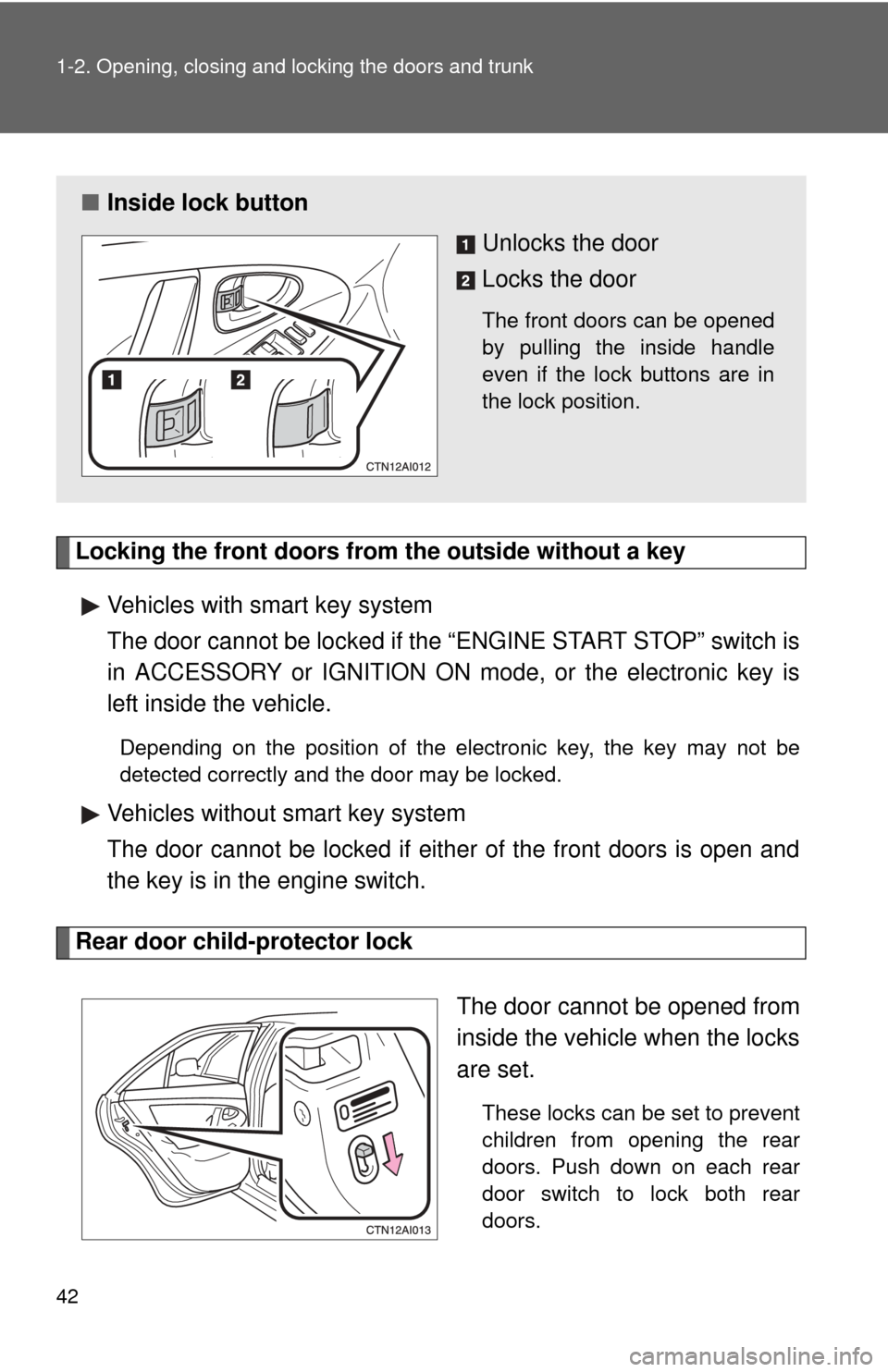
Rear door child-protector lock
The door cannot be opened from
inside the vehicle when the locks
are set.
These locks can be set to prevent
children from opening the rear
doors. Push down on each rear
door switch to lock both rear
doors.
■Inside lock button
Unlocks the door
Locks the door
The front doors can be opened
by pulling the inside handle
even if the lock buttons are in
the lock position.
Page 43 of 476

43
1-2. Opening, closing and locking the doors and trunk
1
Before driving
Automatic door locking and unlocking systems
The following functions can be set or cancelled:
*: Vehicles with an automatic transmission only
FunctionOperation
Shift position linked
door locking function
*
Shifting the shift lever out of P locks all
doors.
Shift position linked
door unlocking func-
tion
*
Shifting the shift lever to P unlocks all doors.
Speed linked door lock-
ing function All doors are locked when the vehicle speed is
approximately 12 mph (20 km/h) or higher.
Driver's door linked door
unlocking function
Vehicles with smart key system
All doors are unlocked when the driver's door
is opened within 10 seconds after turning the
“ENGINE START STOP” switch to ACCES-
SORY mode or OFF.
Vehicles without smart key system
All doors are unlocked when the driver's door
is opened within 10 seconds after turning the
engine switch to “ACC” or “LOCK”.
Page 44 of 476
44 1-2. Opening, closing and locking the doors and trunk
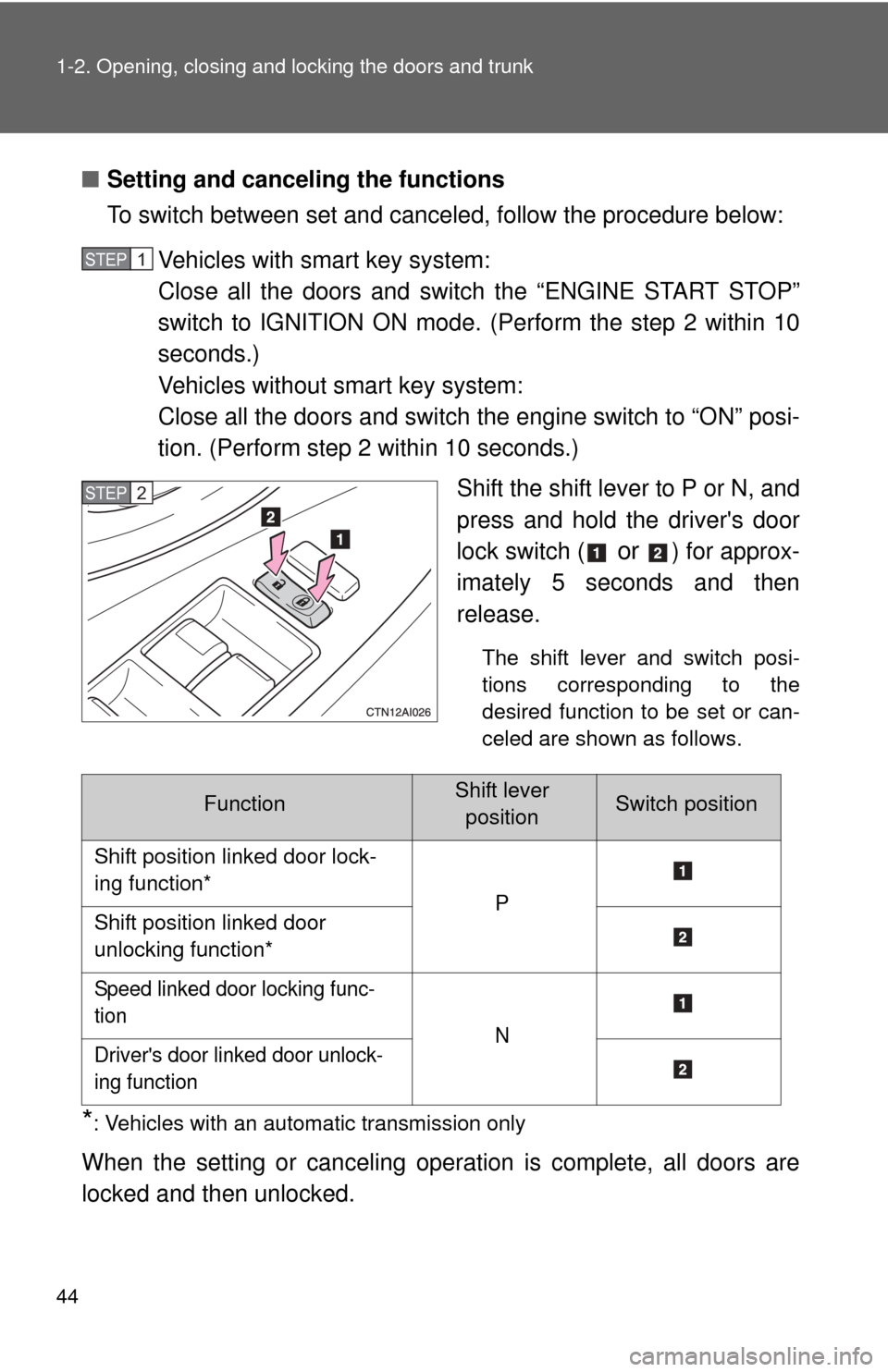
■Setting and canceling the functions
To switch between set and canceled, follow the procedure below:
Vehicles with smart key system:
Close all the doors and switch the “ENGINE START STOP”
switch to IGNITION ON mode. (Perform the step 2 within 10
seconds.)
Vehicles without smart key system:
Close all the doors and switch the engine switch to “ON” posi-
tion. (Perform step 2 within 10 seconds.)
Shift the shift lever to P or N, and
press and hold the driver's door
lock switch (
or ) for approx-
imately 5 seconds and then
release.
The shift lever and switch posi-
tions corresponding to the
desired function to be set or can-
celed are shown as follows.
*: Vehicles with an automatic transmission only
When the setting or canceling operation is complete, all doors are
locked and then unlocked.
STEP1
STEP2
FunctionShift lever positionSwitch position
Shift position linked door lock-
ing function* P
Shift position linked door
unlocking function*
Speed linked door locking func-
tion N
Driver's door linked door unlock-
ing function
Page 45 of 476

45
1-2. Opening, closing and locking the doors and trunk
1
Before driving
■
Customization that can be co nfigured at Toyota dealer
Settings (e.g. unlocking function using a key) can be changed. (Customiz-
able features P. 454)
CAUTION
■To prevent an accident
Observe the following precautions while driving the vehicle.
Failing to do so may result in a door opening and an occupant falling out,
resulting in death or serious injury.
●Always use a seat belt.
● Always lock the doors.
● Ensure that all doors are properly closed.
● Do not pull the inside handle of either of the front doors while driving.
● Set the rear door child protector locks when children are seated in the rear
seat.
Page 46 of 476
46
1-2. Opening, closing and locking the doors and trunk
Trunk
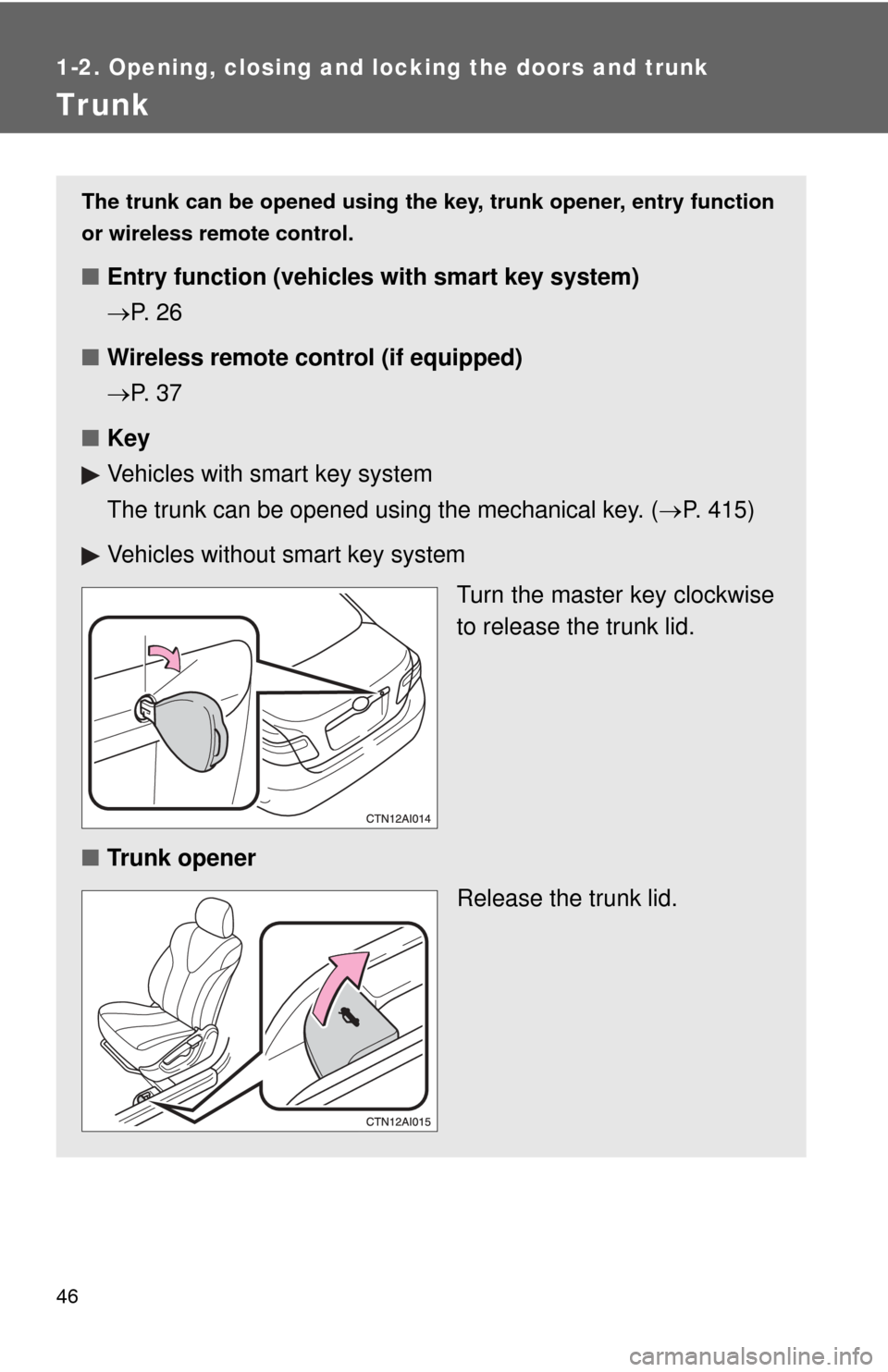
The trunk can be opened using the key, trunk opener, entry function
or wireless remote control.
■ Entry function (vehicles with smart key system)
P. 2 6
■ Wireless remote control (if equipped)
P. 3 7
■ Key
Vehicles with smart key system
The trunk can be opened using the mechanical key. ( P. 415)
Vehicles without smart key system Turn the master key clockwise
to release the trunk lid.
■ Trunk opener
Release the trunk lid.
Page 47 of 476
47
1-2. Opening, closing and locking the doors and trunk
1
Before driving
Luggage security system
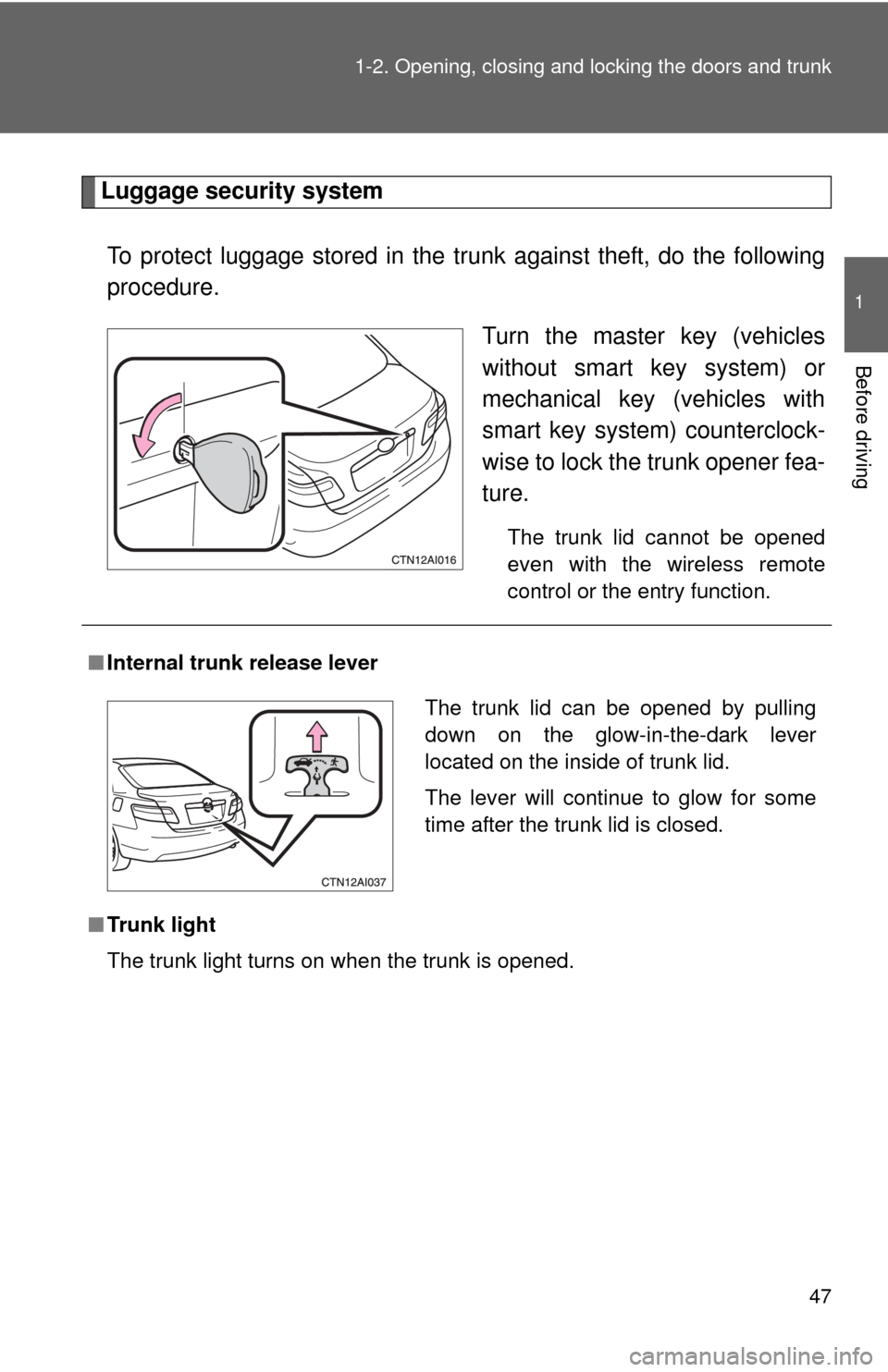
To protect luggage stored in the trunk against theft, do the following
procedure. Turn the master key (vehicles
without smart key system) or
mechanical key (vehicles with
smart key system) counterclock-
wise to lock the trunk opener fea-
ture.
The trunk lid cannot be opened
even with the wireless remote
control or the entry function.
■Internal trunk release lever
■ Trunk light
The trunk light turns on when the trunk is opened.
The trunk lid can be opened by pulling
down on the glow-in-the-dark lever
located on the inside of trunk lid.
The lever will continue to glow for some
time after the trunk lid is closed.
Page 64 of 476
64
1-3. Adjustable components (seats, mirrors, steering wheel)
Anti-glare inside rear view mirror
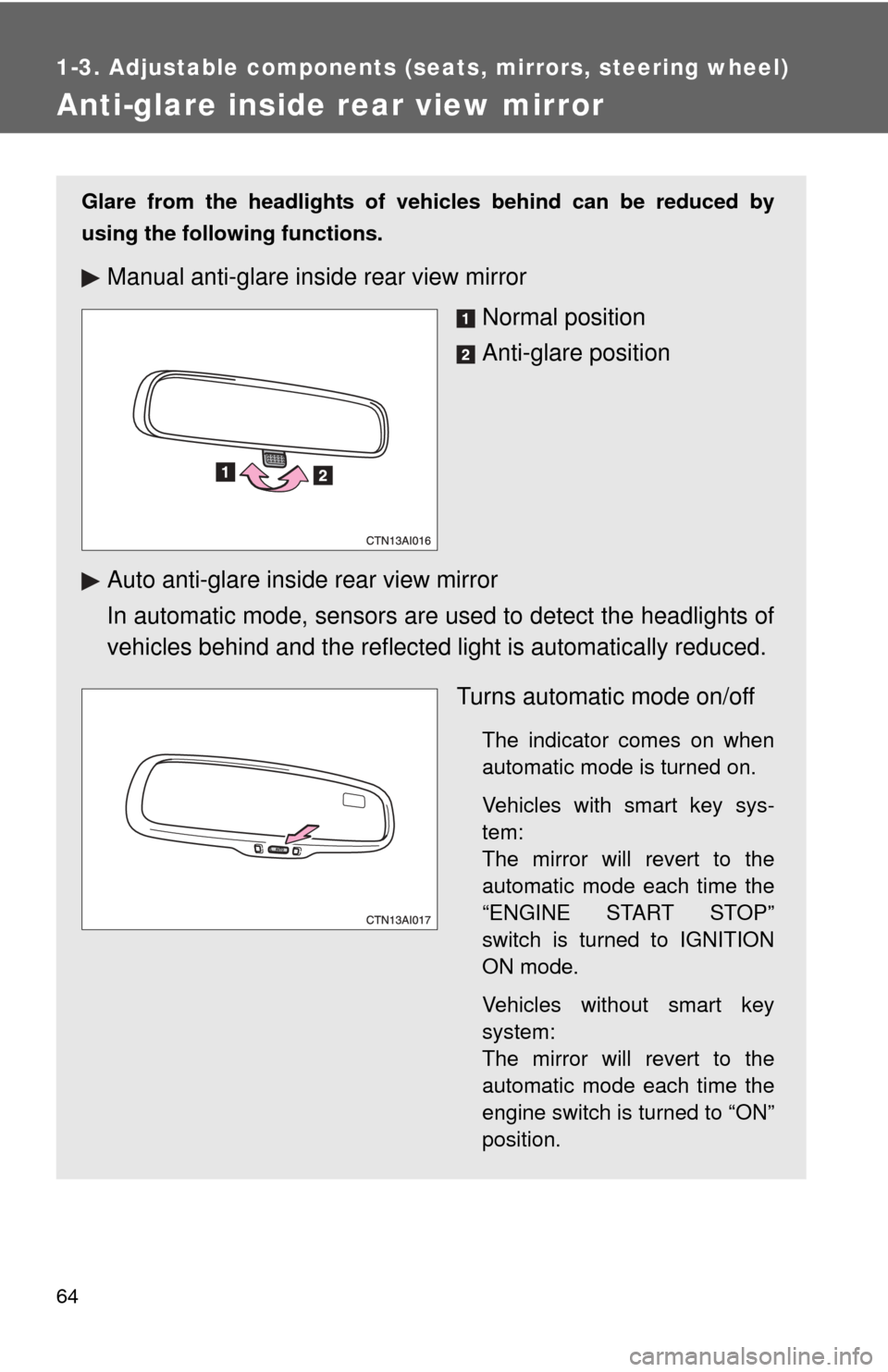
Glare from the headlights of vehicles behind can be reduced by
using the following functions.
Manual anti-glare inside rear view mirrorNormal position
Anti-glare position
Auto anti-glare inside rear view mirror
In automatic mode, sensors are used to detect the headlights of
vehicles behind and the reflecte d light is automatically reduced.
Turns automatic mode on/off
The indicator comes on when
automatic mode is turned on.
Vehicles with smart key sys-
tem:
The mirror will revert to the
automatic mode each time the
“ENGINE START STOP”
switch is turned to IGNITION
ON mode.
Vehicles without smart key
system:
The mirror will revert to the
automatic mode each time the
engine switch is turned to “ON”
position.
Page 66 of 476
66
1-3. Adjustable components (seats, mirrors, steering wheel)
Outside rear view mirrors
■Mirror angle can be adjusted when
Vehicles with smart key system
The “ENGINE START STOP” switch is in ACCESSORY or IGNITION ON
mode.
Vehicles without smart key system
The engine switch is in “ACC” or “ON” position.
■ When the mirrors are fogged up (vehicles with mirror defoggers)
Turn on the mirror defoggers to defog the mirrors. ( P. 199)
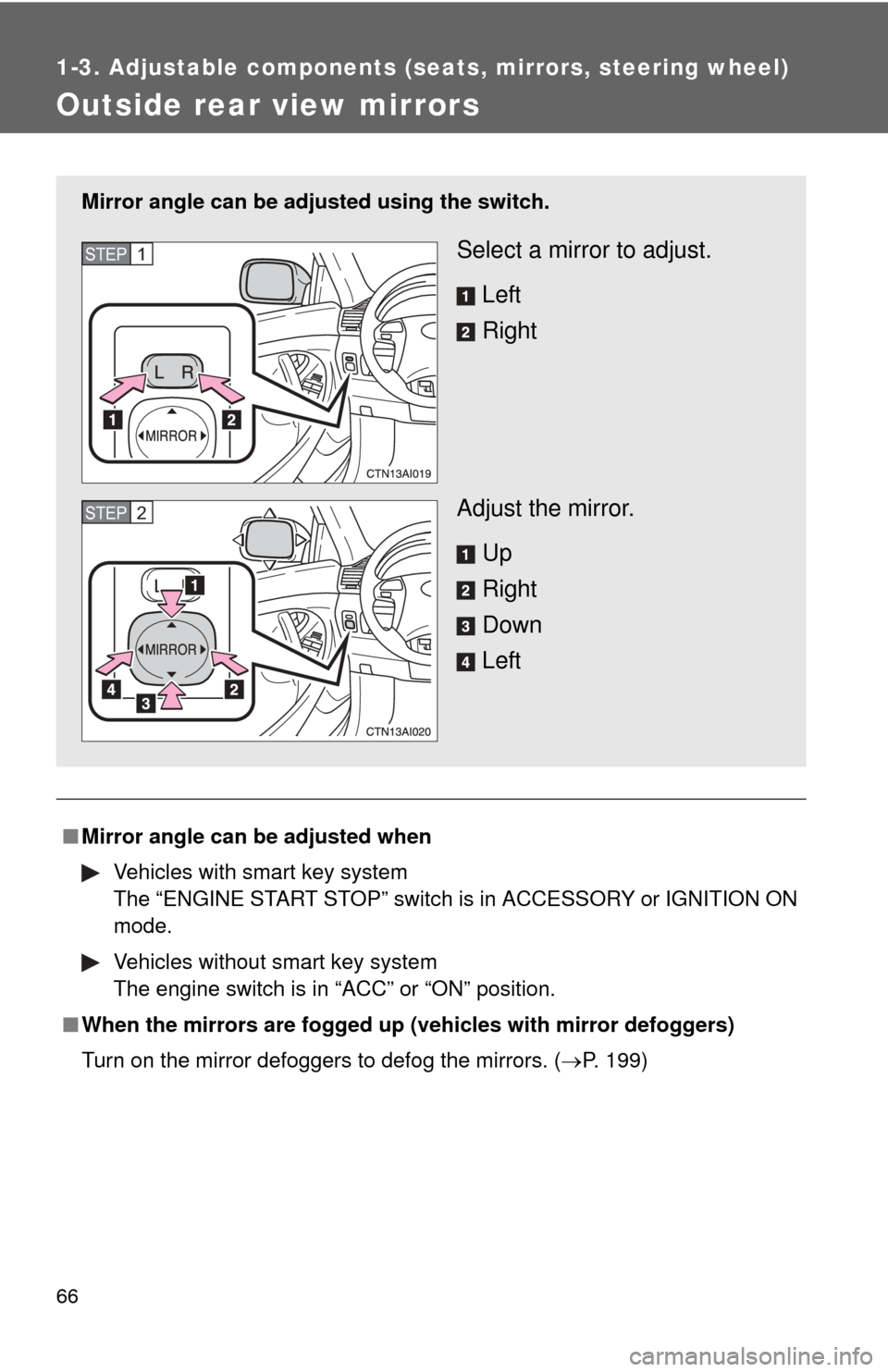
Mirror angle can be adjusted using the switch.
Select a mirror to adjust.
Left
Right
Adjust the mirror. Up
Right
Down
LeftSTEP1
STEP2