Headlight TOYOTA CAMRY 2014 XV50 / 9.G User Guide
[x] Cancel search | Manufacturer: TOYOTA, Model Year: 2014, Model line: CAMRY, Model: TOYOTA CAMRY 2014 XV50 / 9.GPages: 620, PDF Size: 7.47 MB
Page 193 of 620
193
2-3. Operating the lights and wipers
2
When driving
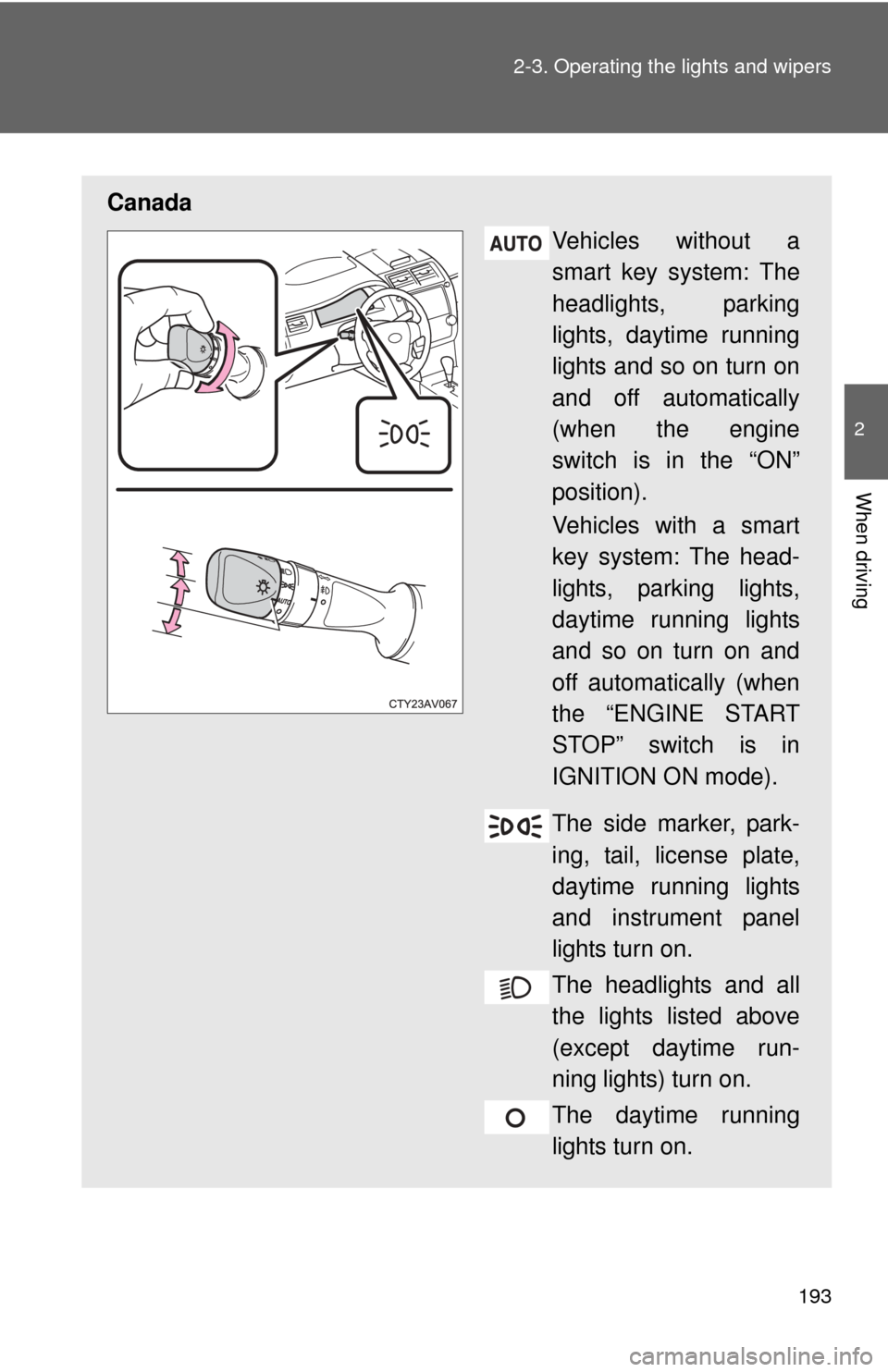
Canada
Vehicles without a
smart key system: The
headlights, parking
lights, daytime running
lights and so on turn on
and off automatically
(when the engine
switch is in the “ON”
position).
Vehicles with a smart
key system: The head-
lights, parking lights,
daytime running lights
and so on turn on and
off automatically (when
the “ENGINE START
STOP” switch is in
IGNITION ON mode).
The side marker, park-
ing, tail, license plate,
daytime running lights
and instrument panel
lights turn on.
The headlights and all
the lights listed above
(except daytime run-
ning lights) turn on.
The daytime running
lights turn on.
Page 194 of 620
194 2-3. Operating the lights and wipers
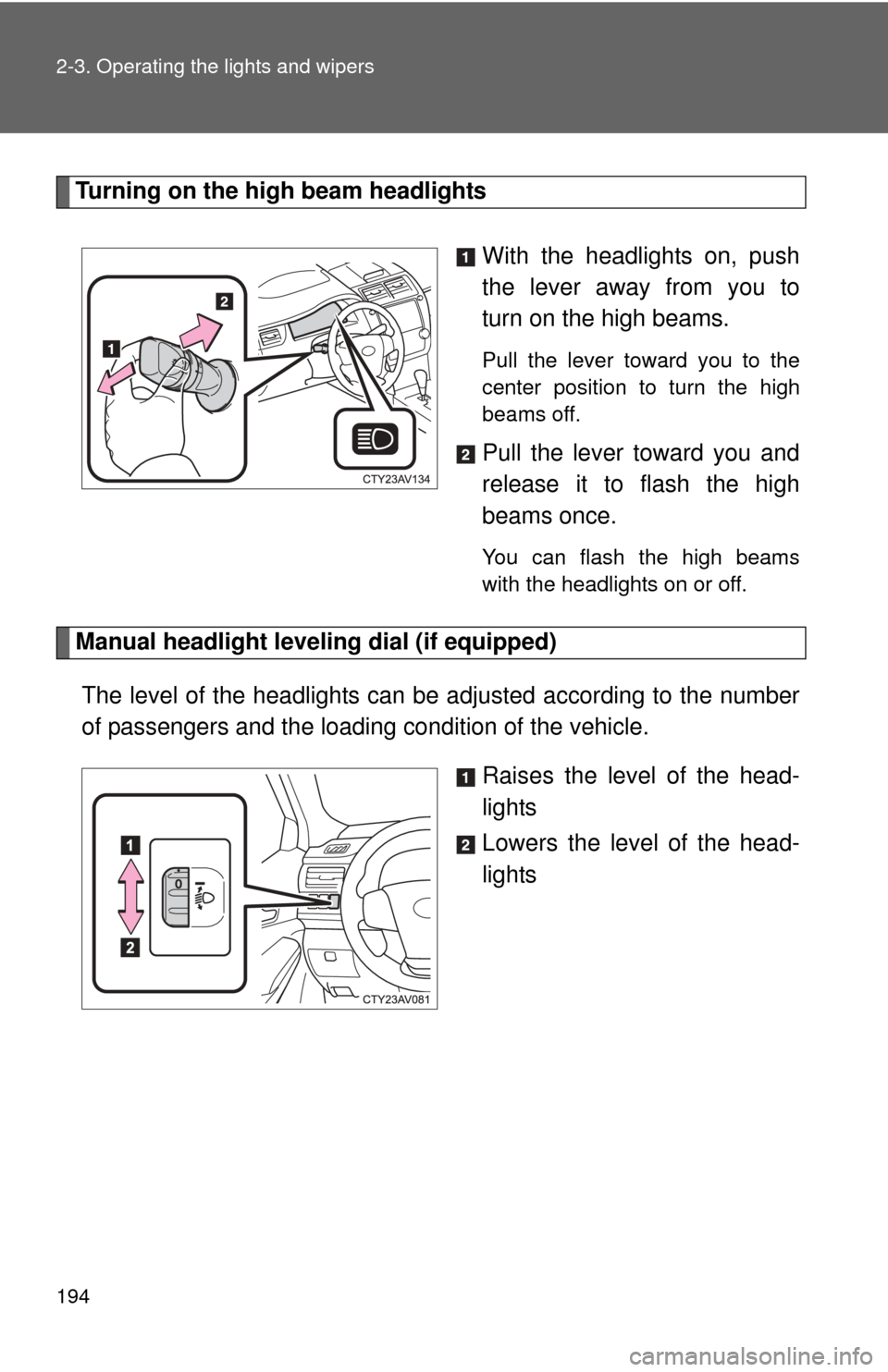
Turning on the high beam headlightsWith the headlights on, push
the lever away from you to
turn on the high beams.
Pull the lever toward you to the
center position to turn the high
beams off.
Pull the lever toward you and
release it to flash the high
beams once.
You can flash the high beams
with the headlights on or off.
Manual headlight leveling dial (if equipped)
The level of the headlights can be adjusted according to the number
of passengers and the loading condition of the vehicle.
Raises the level of the head-
lights
Lowers the level of the head-
lights
Page 195 of 620
195
2-3. Operating the lights and wipers
2
When driving
■
Guide to dial settings
■Daytime running light system
●To make your vehicle more visible to other drivers, the headlights turn on
automatically (at a reduced intensity) whenever the engine is started and
the parking brake is released. Daytime running lights are not designed for
use at night.
U.S.A.: Daytime running lights can be turned off by operating the switch.
● Compared to turning on the headlights, the daytime running light system
offers greater durability and consumes less electricity, so it can help
improve fuel economy.
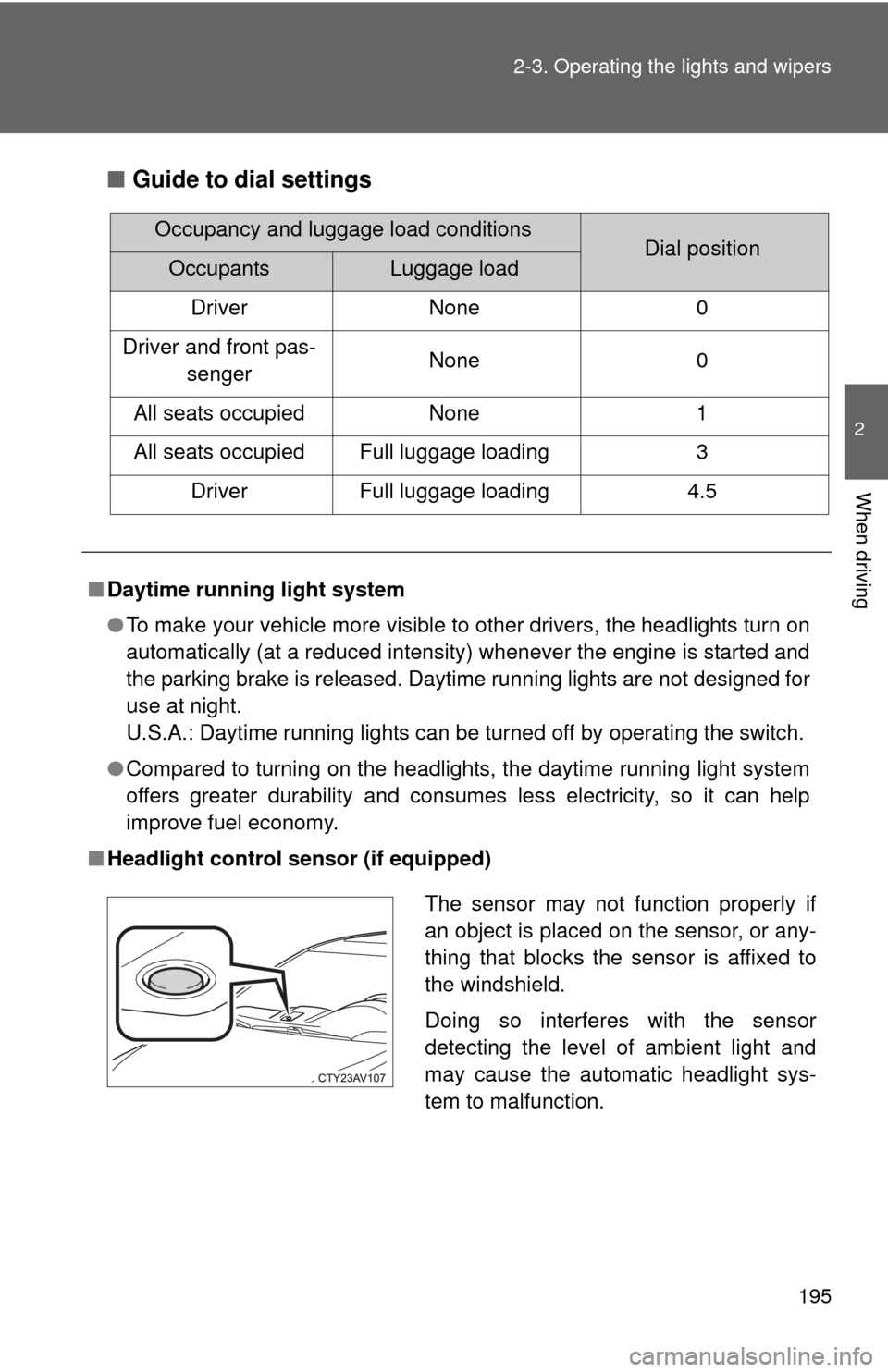
■ Headlight control sensor (if equipped)
Occupancy and luggage load conditionsDial positionOccupantsLuggage load
Driver None 0
Driver and front pas- senger None 0
All seats occupied None 1
All seats occupied Full luggage loading 3 Driver Full luggage loading 4.5
The sensor may not function properly if
an object is placed on the sensor, or any-
thing that blocks the sensor is affixed to
the windshield.
Doing so interferes with the sensor
detecting the level of ambient light and
may cause the automatic headlight sys-
tem to malfunction.
Page 196 of 620
196 2-3. Operating the lights and wipers
■Automatic light off system
Vehicles without a smart key system
●When the headlights are on: The headlights and tail lights turn off 30 sec-
onds after the engine switch is turned to the “ACC” or “LOCK” position
and a door is opened and closed. (Vehicles with a wireless remote con-
trol: The lights turn off immediately if on the key is pressed twice
after all the doors are closed.)
● When only the tail lights are on: The tail lights turn off automatically if the
engine switch is turned to the “ACC” or “LOCK” position and the driver’s
door is opened.
To turn the lights on again, turn the engine switch to “ON” position, or turn
the light switch off once and then back to or .
If any of the doors or trunk lid is kept open, the lights automatically turn off
after 20 minutes.
Vehicles with a smart key system
● When the headlights are on: The headlights and tail lights turn off 30 sec-
onds after the “ENGINE START STOP” switch is turned to ACCESSORY
mode or turned off and a door is opened and closed. (The lights turn off
immediately if on the key is pressed twice after all the doors are
closed.)
● When only the tail lights are on: The tail lights turn off automatically if the
“ENGINE START STOP” switch is turned to ACCESSORY mode or
turned off and the driver’s door is opened.
To turn the lights on again, turn the “ENGINE START STOP” switch to IGNI-
TION ON mode, or turn the light switch off once and then back to
or .
If any of the doors or trunk lid is kept open, the lights automatically turn off
after 20 minutes.
Page 197 of 620

197
2-3. Operating the lights and wipers
2
When driving
■
Light reminder buzzer (except when the light switch is in )
Vehicles without a smart key system
A buzzer sounds when the engine switch is turned “OFF” or to “ACC” posi-
tion and the driver's door is opened with the key removed from the engin\
e
switch while the lights are turned on.
Vehicles with a smart key system
A buzzer sounds when the “ENGINE START STOP” switch is turned off or
turned to ACCESSORY mode and the driver's door is opened while the
lights are turned on.
■ Battery-saving function
In order to prevent the vehicle battery from discharging, if the headlights
and/or tail lights are on when the engine switch is turned to the “LOCK” posi-
tion (vehicles without a smart key system) or when the “ENGINE START
STOP” switch is turned off (vehicles with a smart key system) the battery
saving function will operate and automatically turn off all the lights after
approximately 20 minutes.
When the engine switch is turned to the “ON” position (vehicles without a
smart key system) or when the “ENGINE START STOP” switch is turned to
IGNITION ON mode (vehicles with a smart key system), the battery-saving
function will be disabled.
When any of the following are performed, the battery-saving function is can-
celed once and then reactivated. All the lights will turn off automatically 20
minutes after the battery-saving function has been reactivated:
●When the headlight switch is operated
● When a door is opened or closed
■ Customization that can be co nfigured at Toyota dealer
Settings (e.g. light sensor sensitivity) can be changed.
(Customizable features P. 581)
NOTICE
■To prevent battery discharge
Do not leave the lights on longer than necessary when the engine is not run-
ning.
Page 199 of 620
199
2-3. Operating the lights and wipers
2
When driving
■
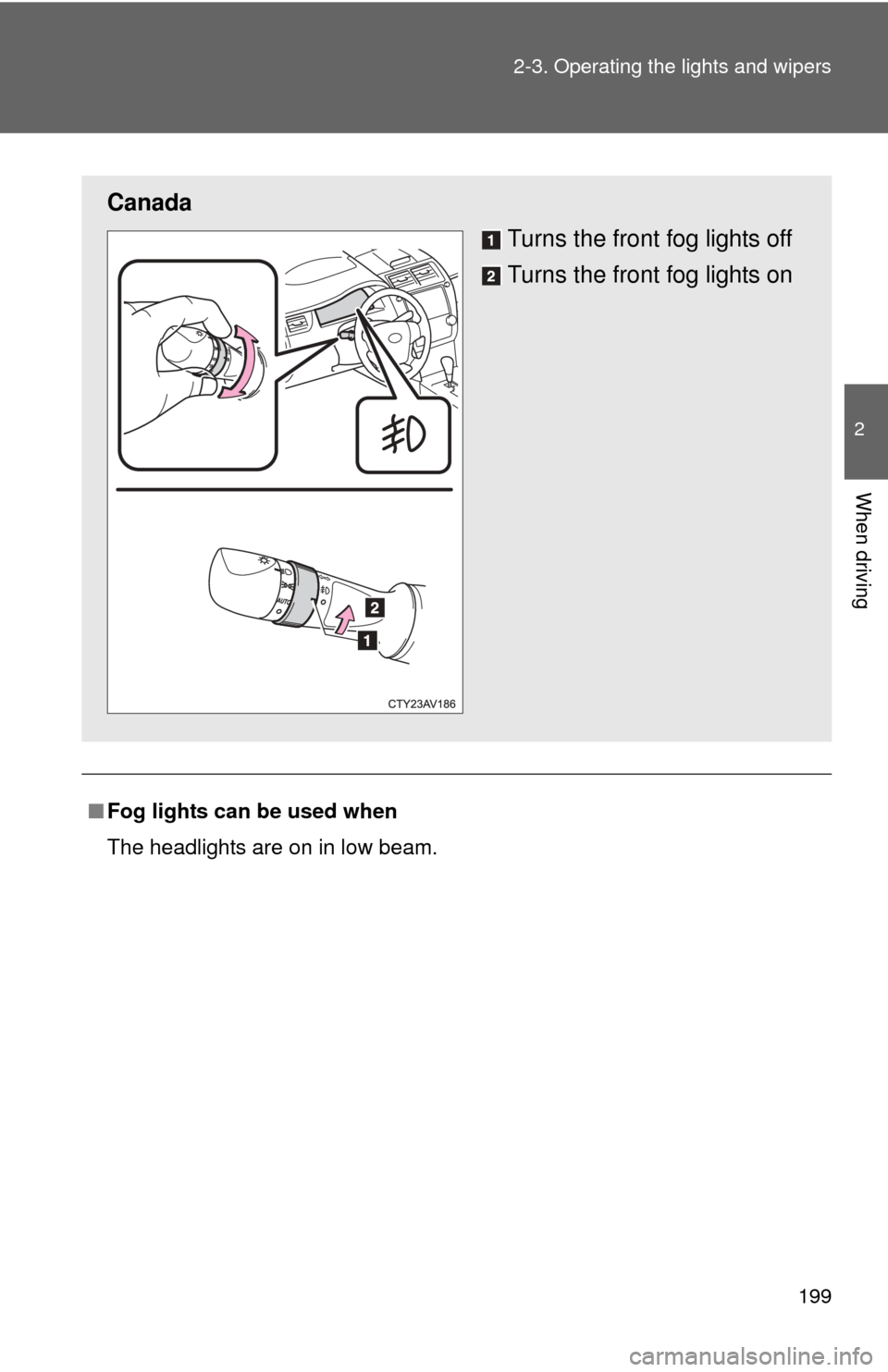
Fog lights can be used when
The headlights are on in low beam.
Canada
Turns the front fog lights off
Turns the front fog lights on
Page 272 of 620

272 3-2. Using the audio system
Adjusting the screen contrast/brightnessSelect “General” or “Camera” on the “Display Settings”
screen.
Adjust the display as desired by selecting “+” or “-”.
Day modeWhen the headlights are turned on, the screen dims.
However, the screen can be switc hed to day mode by selecting “Day
Mode”.
The screen will stay in day mode when the headlights are turned on until
“Day Mode” is selected again.
STEP1
STEP2
Page 367 of 620
367
3-2. Using the audio system
3
Interior features
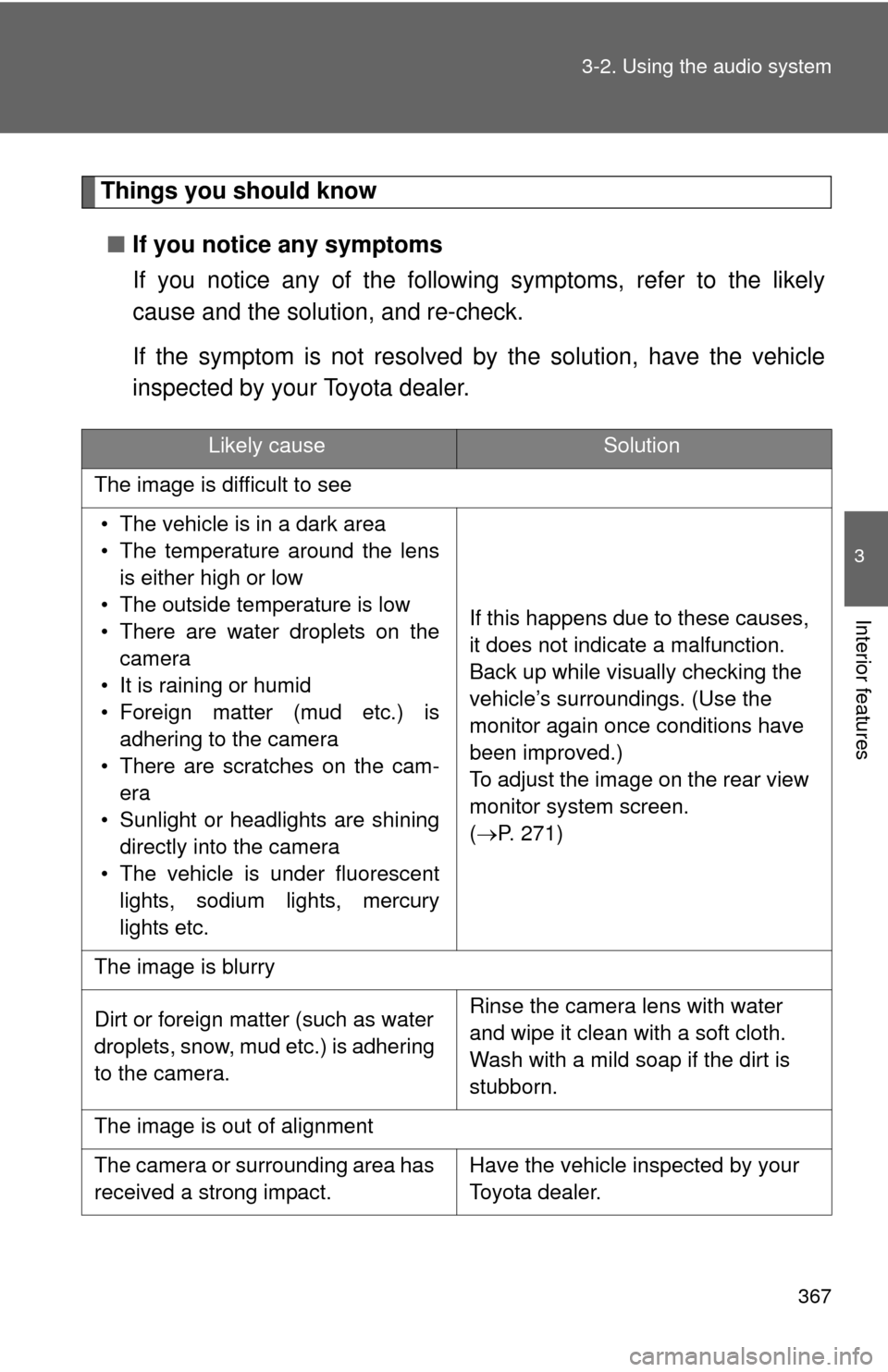
Things you should know
■ If you notice any symptoms
If you notice any of the following symptoms, refer to the likely
cause and the solution, and re-check.
If the symptom is not resolved by the solution, have the vehicle
inspected by your Toyota dealer.
Likely causeSolution
The image is difficult to see
• The vehicle is in a dark area
• The temperature around the lens is either high or low
• The outside temperature is low
• There are water droplets on the camera
• It is raining or humid
• Foreign matter (mud etc.) is adhering to the camera
• There are scratches on the cam- era
• Sunlight or headlights are shining directly into the camera
• The vehicle is under fluorescent lights, sodium lights, mercury
lights etc. If this happens due to these causes,
it does not indicate a malfunction.
Back up while visually checking the
vehicle’s surroundings. (Use the
monitor again once conditions have
been improved.)
To adjust the image on the rear view
monitor system screen.
(
P. 271)
The image is blurry
Dirt or foreign matter (such as water
droplets, snow, mud etc.) is adhering
to the camera. Rinse the camera lens with water
and wipe it clean with a soft cloth.
Wash with a mild soap if the dirt is
stubborn.
The image is out of alignment
The camera or surrounding area has
received a strong impact. Have the vehicle inspected by your
Toyota dealer.
Page 478 of 620

478 4-3. Do-it-yourself maintenance
FuseAmpereCircuit
1 METER-IG2 5 A Gauge and meters
2FAN*
150 A Electric cooling fans
3 H-LP CLN 30 A No circuit
4 HTR 50 A Air conditioning system
5 ALT 120 A Charging system
6 ABS NO.2 30 A Vehicle stability control system
7 ST/AM2 30 A Starter system, ECU-IG2 NO.1,
A/B, ECU-IG2 NO.2
8 H-LP-MAIN 30 A H-LP LH-LO, H-LP RH-LO, MNL
H-LP LVL, headlights (low beam)
9 ABS NO.1 50 A Vehicle stability control system
10 EPS 80 A Electric power steering
11 S-HORN 7.5 A S-HORN
12 HORN 10 A Horns
13 EFI NO.2 15 A Multiport fuel injection system/
sequential multiport fuel injection
system, electronic controlled trans-
mission
14 EFI NO.3 7.5 A*
2Multiport fuel injection system/
sequential multiport fuel injection
system
10 A*
1
15 INJ
7.5 AMultiport fuel injection system/
sequential multiport fuel injection
system
16 ECU-IG2 NO.3 7.5 A Multiport fuel injection system/
sequential multiport fuel injection
system, steering lock system, elec-
tronic controlled transmission
17 IGN 15 A Starter system
18 D/L-AM2 20 A No circuit
Page 479 of 620
479
4-3. Do-it-yourself maintenance
4
Maintenance and care
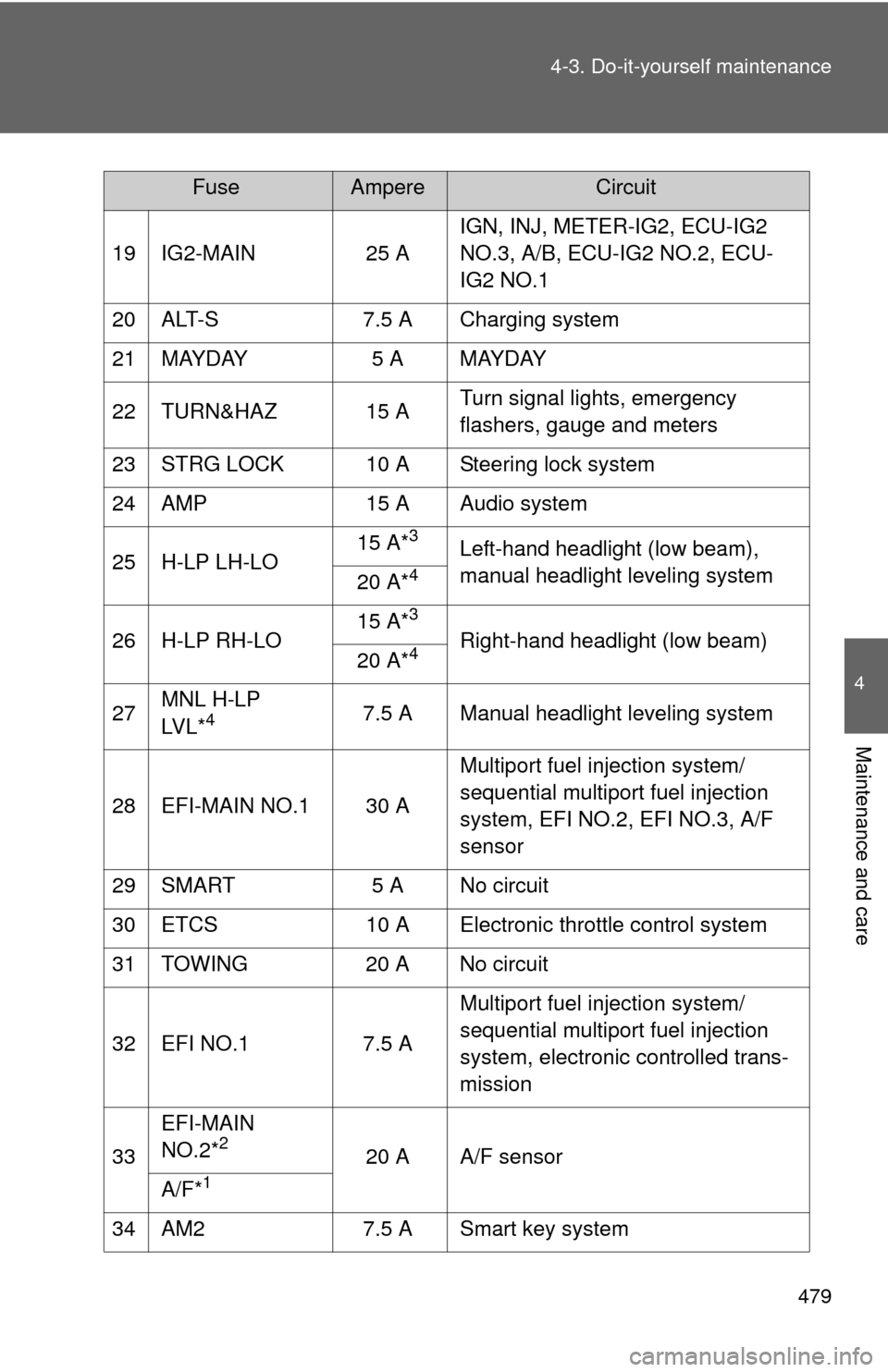
19 IG2-MAIN
25 AIGN, INJ, METER-IG2, ECU-IG2
NO.3, A/B, ECU-IG2 NO.2, ECU-
IG2 NO.1
20 ALT-S 7.5 A Charging system
21 MAYDAY 5 A MAYDAY
22 TURN&HAZ 15 A Turn signal lights, emergency
flashers, gauge and meters
23 STRG LOCK 10 A Steering lock system
24 AMP 15 A Audio system
25 H-LP LH-LO 15 A*
3Left-hand headlight (low beam),
manual headlight leveling system
20 A*
4
26 H-LP RH-LO 15 A*
3
Right-hand headlight (low beam)
20 A*4
27 MNL H-LP
LV L *47.5 A Manual headlight leveling system
28 EFI-MAIN NO.1 30 A Multiport fuel injection system/
sequential multiport fuel injection
system, EFI NO.2, EFI NO.3, A/F
sensor
29 SMART 5 A No circuit
30 ETCS 10 A Electronic throttle control system
31 TOWING 20 A No circuit
32 EFI NO.1 7.5 A Multiport fuel injection system/
sequential multiport fuel injection
system, electronic controlled trans-
mission
33 EFI-MAIN
NO.2*
220 A A/F sensor
A/F*
1
34 AM2 7.5 A Smart key system
FuseAmpereCircuit