screw TOYOTA CAMRY 2014 XV50 / 9.G Owners Manual
[x] Cancel search | Manufacturer: TOYOTA, Model Year: 2014, Model line: CAMRY, Model: TOYOTA CAMRY 2014 XV50 / 9.GPages: 620, PDF Size: 7.47 MB
Page 435 of 620
435
4-3. Do-it-yourself maintenance
4
Maintenance and care
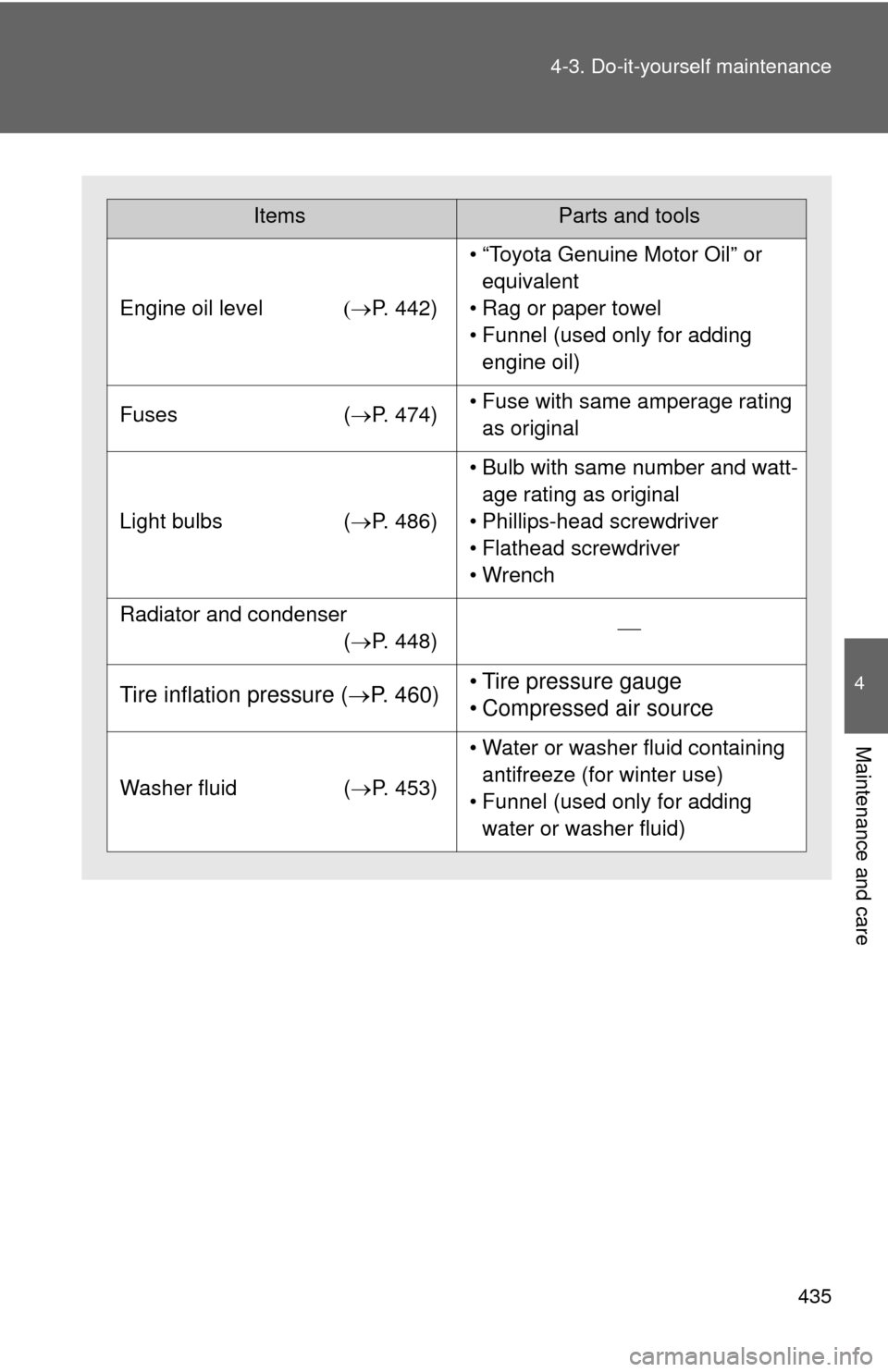
ItemsParts and tools
Engine oil level
P. 442)
• “Toyota Genuine Motor Oil” or
equivalent
• Rag or paper towel
• Funnel (used only for adding engine oil)
Fuses (P. 474)• Fuse with same amperage rating
as original
Light bulbs (P. 486)
• Bulb with same number and watt-
age rating as original
• Phillips-head screwdriver
• Flathead screwdriver
• Wrench
Radiator and condenser
(P. 448)
Tire inflation pressure ( P. 460)• Tire pressure gauge
• Compressed air source
Washer fluid (P. 453)
• Water or washer fluid containing
antifreeze (for winter use)
• Funnel (used only for adding water or washer fluid)
Page 469 of 620
469
4-3. Do-it-yourself maintenance
4
Maintenance and care
Wireless remote control/electronic key batter y
: If equipped
Replace the battery with a new one if it is depleted.
■You will need the following items:
●Flathead screwdriver
● Small flathead screwdriver
● Lithium battery CR2016 (vehicles without a smart key sys-
tem), or CR2032 (vehicles with a smart key system)
■ Replacing the battery (vehicles without a smart key system)
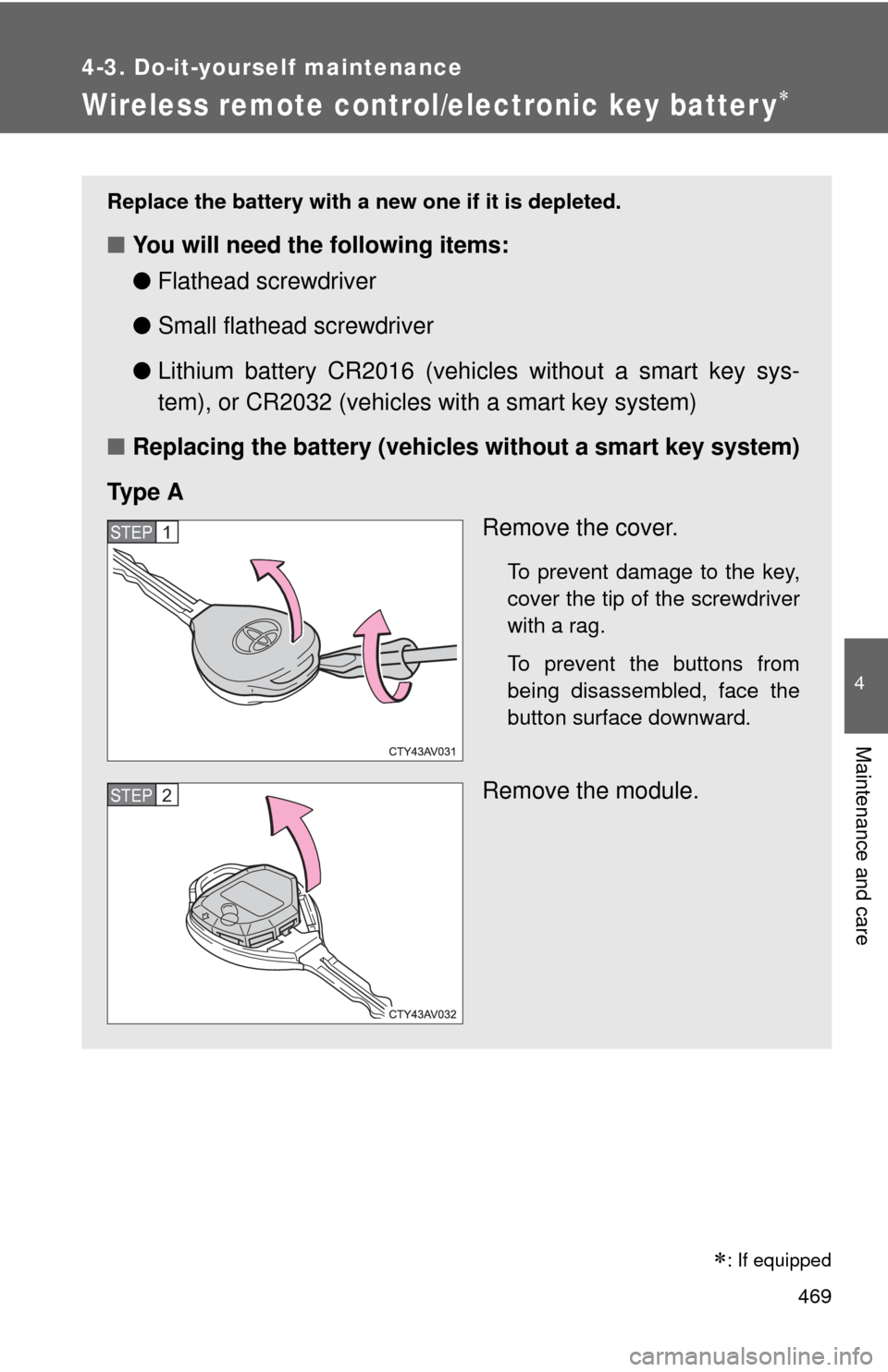
Ty p e A Remove the cover.
To prevent damage to the key,
cover the tip of the screwdriver
with a rag.
To prevent the buttons from
being disassembled, face the
button surface downward.
Remove the module.
STEP1
STEP2
Page 470 of 620
470 4-3. Do-it-yourself maintenance
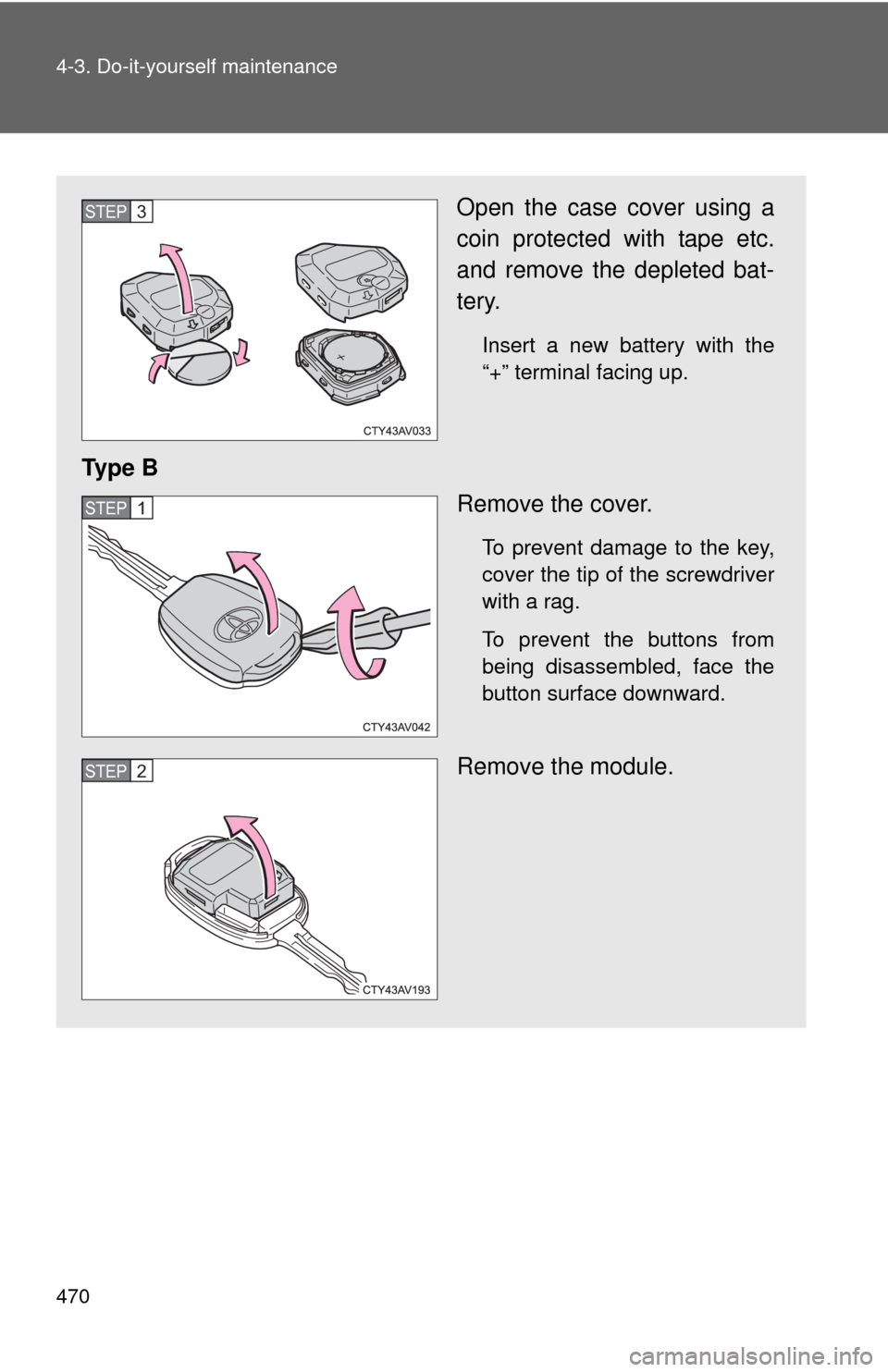
Open the case cover using a
coin protected with tape etc.
and remove the depleted bat-
tery.
Insert a new battery with the
“+” terminal facing up.
Ty p e BRemove the cover.
To prevent damage to the key,
cover the tip of the screwdriver
with a rag.
To prevent the buttons from
being disassembled, face the
button surface downward.
Remove the module.
STEP3
STEP1
STEP2
Page 471 of 620
471
4-3. Do-it-yourself maintenance
4
Maintenance and care
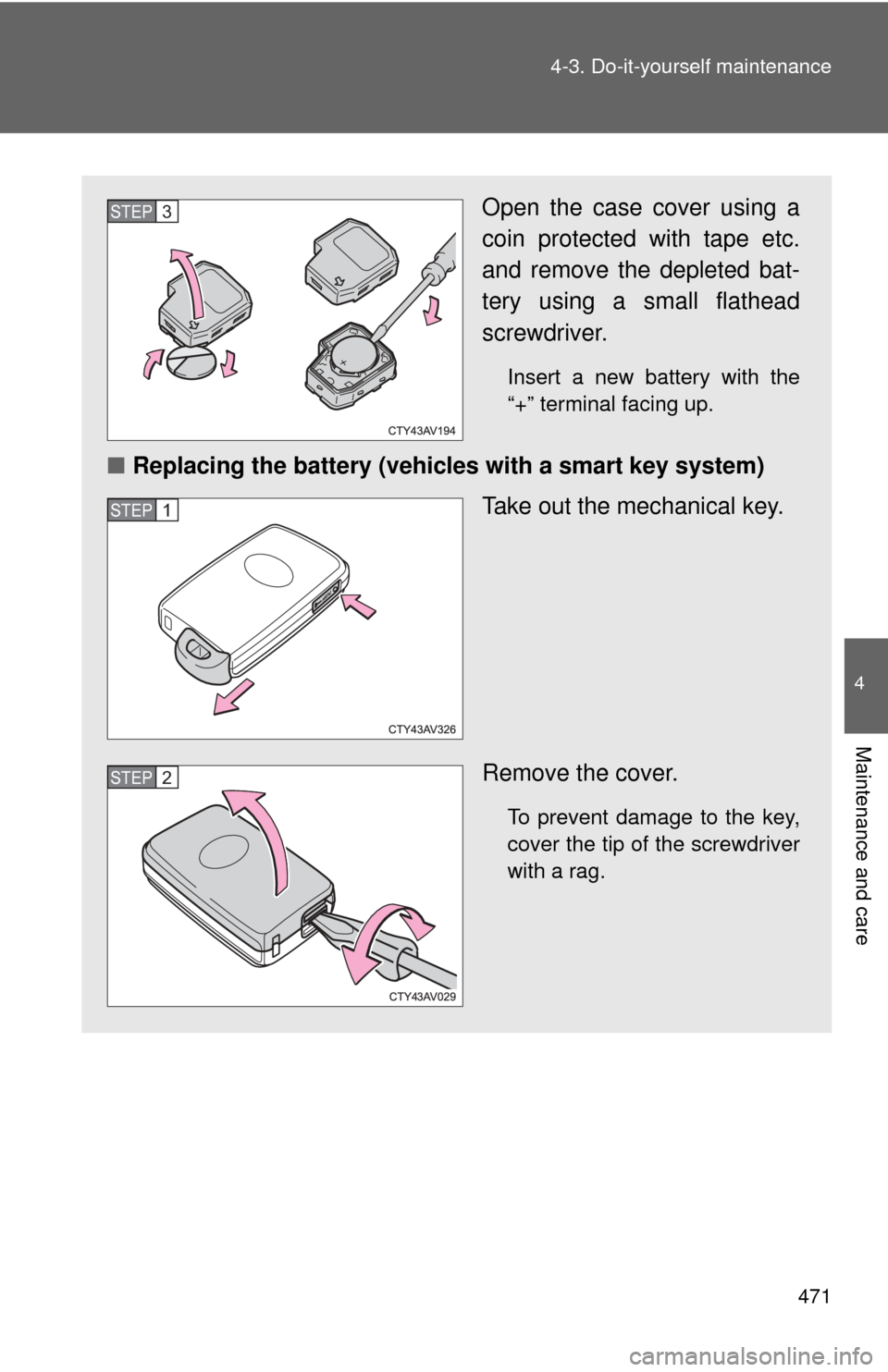
Open the case cover using a
coin protected with tape etc.
and remove the depleted bat-
tery using a small flathead
screwdriver.
Insert a new battery with the
“+” terminal facing up.
■
Replacing the battery (vehicles with a smart key system)
Take out the mechanical key.
Remove the cover.
To prevent damage to the key,
cover the tip of the screwdriver
with a rag.
STEP3
STEP1
STEP2
Page 472 of 620
472 4-3. Do-it-yourself maintenance
■Use a CR2016 (vehicles without a smart key system) or CR2032 (vehi-
cles with a smart key syste m) lithium battery
● Batteries can be purchased at your Toyota dealer, local electrical appli-
ance shops or camera stores.
● Replace only with the same or equivalent type recommended by the
manufacturer.
● Dispose of used batteries according to local laws.
■ If the key battery is depleted
The following symptoms may occur:
●The smart key system and wireless remote control will not function prop-
erly.
● The operational range will be reduced.
CAUTION
■Removed battery and other parts
These parts are small and if swallowed by a child, they can cause choking.
Keep away from children. Failure to do so could result in death or serious
injury.
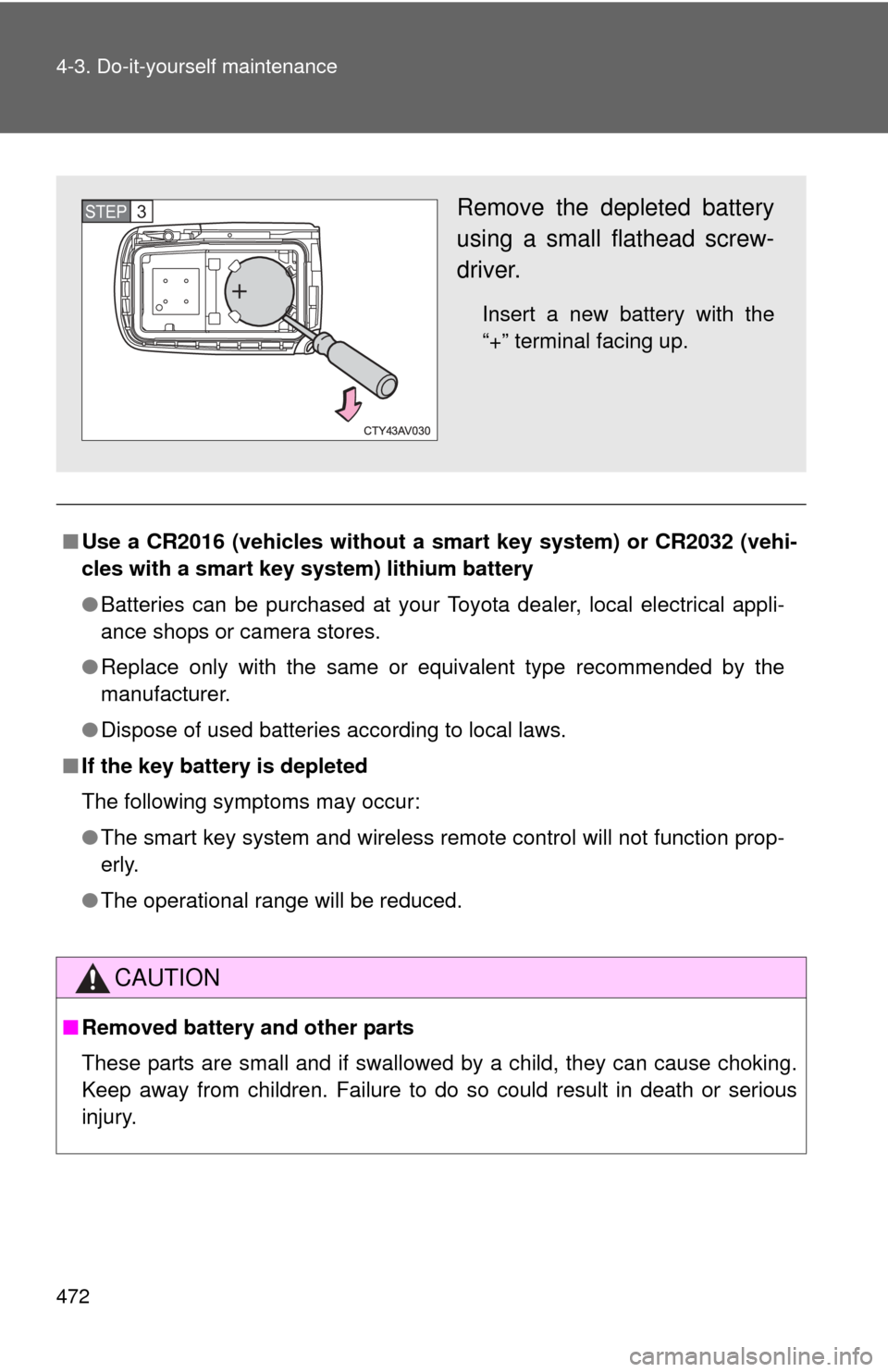
Remove the depleted battery
using a small flathead screw-
driver.
Insert a new battery with the
“+” terminal facing up.
STEP3
Page 530 of 620

530 5-2. Steps to take in an emergency
CAUTION
■Replacing a flat tire
●Do not touch the disc wheels or the area around the brakes immedi-
ately after the vehicle has been driven.
After the vehicle has been driven the disc wheels and the area around
the brakes will be extremely hot. Touching these areas with hands, feet
or other body parts while changing a tire, etc. may result in burns.
●Failure to follow these precautions could cause the wheel nuts to
loosen and the tire to fall off, resulting in death or serious injury.
• Have the wheel nuts tightened with a torque wrench to 76 ft•lbf (103 N•m, 10.5 kgf•m) as soon as po ssible after changing wheels.
• Do not attach a heavily damaged wh eel ornament, as it may fly off
the wheel while the vehicle is moving.
• When installing a tire, only use wheel nuts that have been specifi- cally designed for that wheel.
• If there are any cracks or deformations in the bolt screws, nut threads or bolt holes of the wheel, have the vehicle inspected by
your Toyota dealer.
• When installing the wheel nuts, be sure to install them with the
tapered ends facing inward. ( P. 465)
Page 534 of 620
534
5-2. Steps to take in an emergency
If the shift lever cannot be shifted from P
If the shift lever cannot be shifted with your foot on the brake pedal,
there may be a problem with the shift lock system (a system to pre-
vent accidental operation of the shift lever). Have the vehicle
inspected by your Toyo ta dealer immediately.
The following steps may be used as an emergency measure to
ensure that the shift lever can be shifted:
Set the parking brake.
Vehicles without a smart ke y system: Turn the engine
switch to the “ACC” position.
Vehicles with a smart key system: Turn the “ENGINE
START STOP” switch to ACCESSORY mode.
Depress the brake pedal.
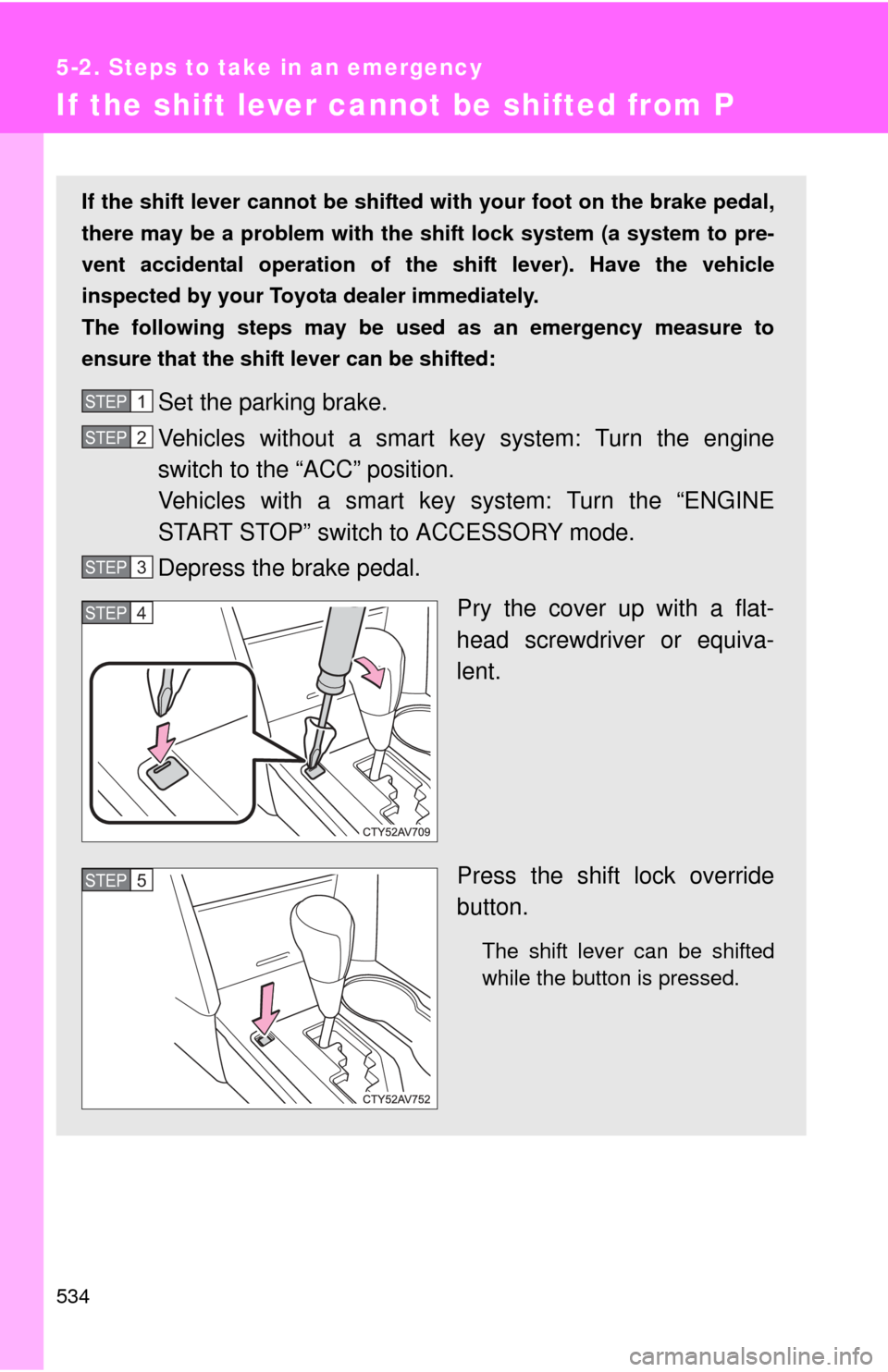
Pry the cover up with a flat-
head screwdriver or equiva-
lent.
Press the shift lock override
button.
The shift lever can be shifted
while the button is pressed.
STEP1
STEP2
STEP3
STEP4
STEP5