trunk TOYOTA CAMRY 2014 XV50 / 9.G Owners Manual
[x] Cancel search | Manufacturer: TOYOTA, Model Year: 2014, Model line: CAMRY, Model: TOYOTA CAMRY 2014 XV50 / 9.GPages: 620, PDF Size: 7.47 MB
Page 2 of 620

TABLE OF CONTENTSIndex
2
1-1. Key informationKeys ..................................... 30
1-2. Opening, closing and locking the doors and
trunk
Smart key system................. 34
Wireless remote control ....... 49
Doors.................................... 55
Trunk .................................... 61
1-3. Adjustable components (seats, mirrors,
steering wheel)
Front seats ........................... 65
Rear seats ............................ 68
Head restraints ..................... 70
Seat belts ............................. 72
Steering wheel ..................... 79
Anti-glare inside rear view mirror.......................... 80
Outside rear view mirrors ..... 82
1-4. Opening and closing the windows and moon roof
Power windows .................... 84
Moon roof ............................. 87
1-5. Refueling Opening the fuel tank cap .... 91 1-6. Theft deterrent system
Engine immobilizer system ................................ 96
Alarm .................................... 99
1-7. Safety information Correct driving posture ....... 102
SRS airbags ....................... 104
Front passenger occupant classification system ......... 116
Child restraint systems ....... 122
Installing child restraints ..... 126
2-1. Driving procedures Driving the vehicle .............. 136
Engine (ignition) switch (vehicles without a
smart key system) ............ 147
Engine (ignition) switch (vehicles with a
smart key system) ............ 150
Automatic transmission (vehicles without paddle
shift switches) ................... 157
Automatic transmission (vehicles with paddle
shift switches) ................... 161
Turn signal lever ................. 168
Parking brake ..................... 170
Horn .................................... 171
1Before driving
2When driving
Page 4 of 620

TABLE OF CONTENTSIndex
4
Detailed Bluetooth®
system settings ................ 314
Listening to Bluetooth
®
audio ................................ 316
Using a Bluetooth
®
phone ............................... 318
Making a call ...................... 320
Receiving a call .................. 324
Speaking on the phone ...... 325
Bluetooth
® phone
message function ............. 329
Using the steering wheel switches ........................... 334
Bluetooth
® phone
settings ............................. 335
Contact/Call history settings ............................. 337
What to do if... (Troubleshooting) ............. 348
Bluetooth
®.......................... 352
Voice command system .............................. 357
Rear view monitor system .............................. 360
3-3. Using the interior lights Interior lights list ................. 371
• Interior lights .................... 372
• Personal lights ................. 373 3-4. Using the storage
features
List of storage features ....... 375
• Glove box ......................... 376
• Console box ..................... 377
• Coin holder ....................... 378
• Bottle holders ................... 379
• Cup holders ...................... 380
• Auxiliary boxes ................. 382
3-5. Other interior features Sun visors ........................... 384
Vanity mirrors ..................... 385
Clock................................... 386
Outside temperature display .............................. 387
Ashtray ............................... 389
Power outlets ...................... 390
Seat heaters ....................... 393
Armrest ............................... 395
Assist grips ......................... 396
Coat hooks ......................... 397
Floor mat ............................ 398
Trunk features .................... 400
Garage door opener ........... 401
Compass ............................ 408
Safety Connect ................... 412
Page 9 of 620
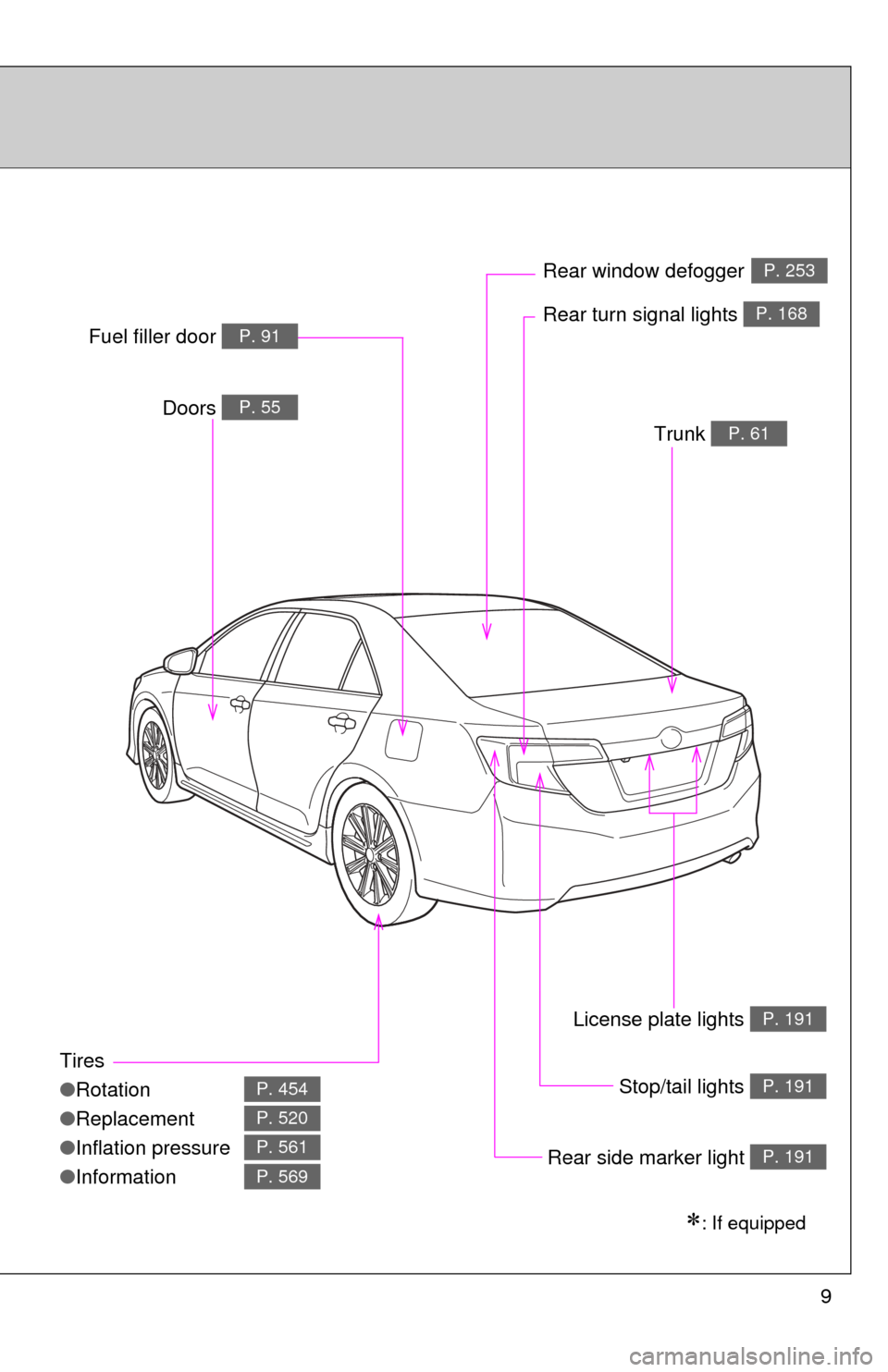
9
Tires
●Rotation
● Replacement
● Inflation pressure
● Information
P. 454
P. 520
P. 561
P. 569
Trunk P. 61
Doors P. 55
Rear turn signal lights P. 168
Rear window defoggerP. 253
Stop/tail lights P. 191
Rear side marker light P. 191
Fuel filler door P. 91
License plate lights P. 191
: If equipped
Page 15 of 620
15
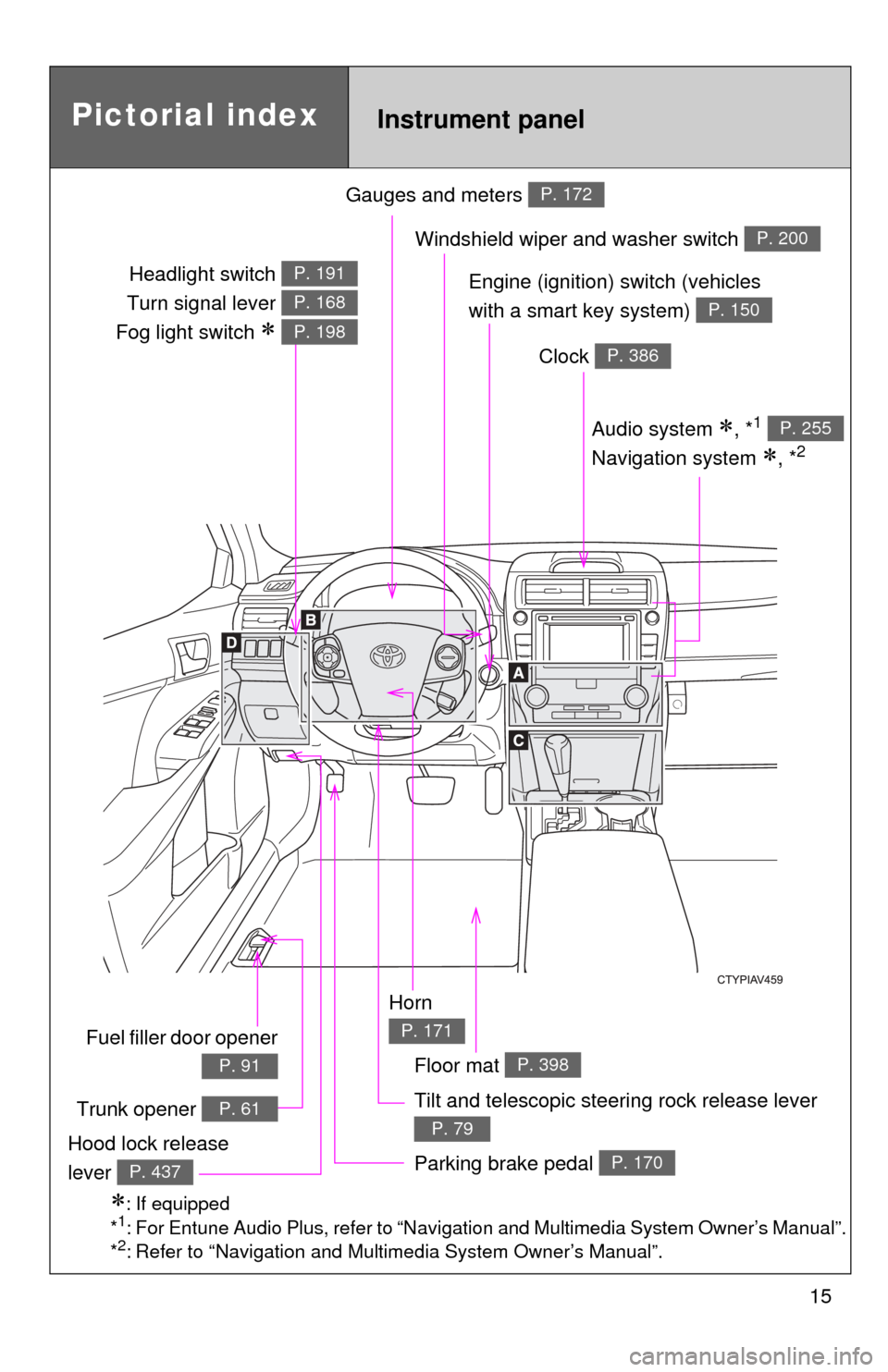
Gauges and meters P. 172
Tilt and telescopic steering rock release lever
P. 79
Pictorial indexInstrument panel
Audio system , *1
Navigation system
, *2
P. 255
Windshield wiper and washer switch P. 200
Clock P. 386
Parking brake pedal P. 170Hood lock release
lever
P. 437
: If equipped
*1: For Entune Audio Plus, refer to “Navigation and Multimedia System Owner’s Manual”.
*2: Refer to “Navigation and Multimedia System Owner’s Manual”.
Horn
P. 171
Engine (ignition) switch (vehicles
with a smart key system)
P. 150
Headlight switch
Turn signal lever
Fog light switch
P. 191
P. 168
P. 198
Fuel filler door opener
P. 91
Trunk opener P. 61
Floor mat P. 398
Page 29 of 620
Before driving1
29
1-1. Key informationKeys ................................... 30
1-2. Opening, closing and locking the doors
and trunk
Smart key system .............. 34
Wireless remote control ..... 49
Doors ................................. 55
Trunk .................................. 61
1-3. Adjustable components (seats, mirrors,
steering wheel)
Front seats ......................... 65
Rear seats.......................... 68
Head restraints................... 70
Seat belts ........................... 72
Steering wheel ................... 79
Anti-glare inside rear view mirror ....................... 80
Outside rear view mirrors.............................. 82 1-4. Opening and closing
the windows and
moon roof
Power windows .................. 84
Moon roof ........................... 87
1-5. Refueling Opening the fuel tank cap ........................... 91
1-6. Theft deterrent system Engine immobilizer system ............................. 96
Alarm.................................. 99
1-7. Safety information Correct driving posture..... 102
SRS airbags ..................... 104
Front passenger occupant classification system ...... 116
Child restraint systems.......................... 122
Installing child restraints ........................ 126
Page 34 of 620
34
1-2. Opening, closing and locking the doors and trunk
Smart key system
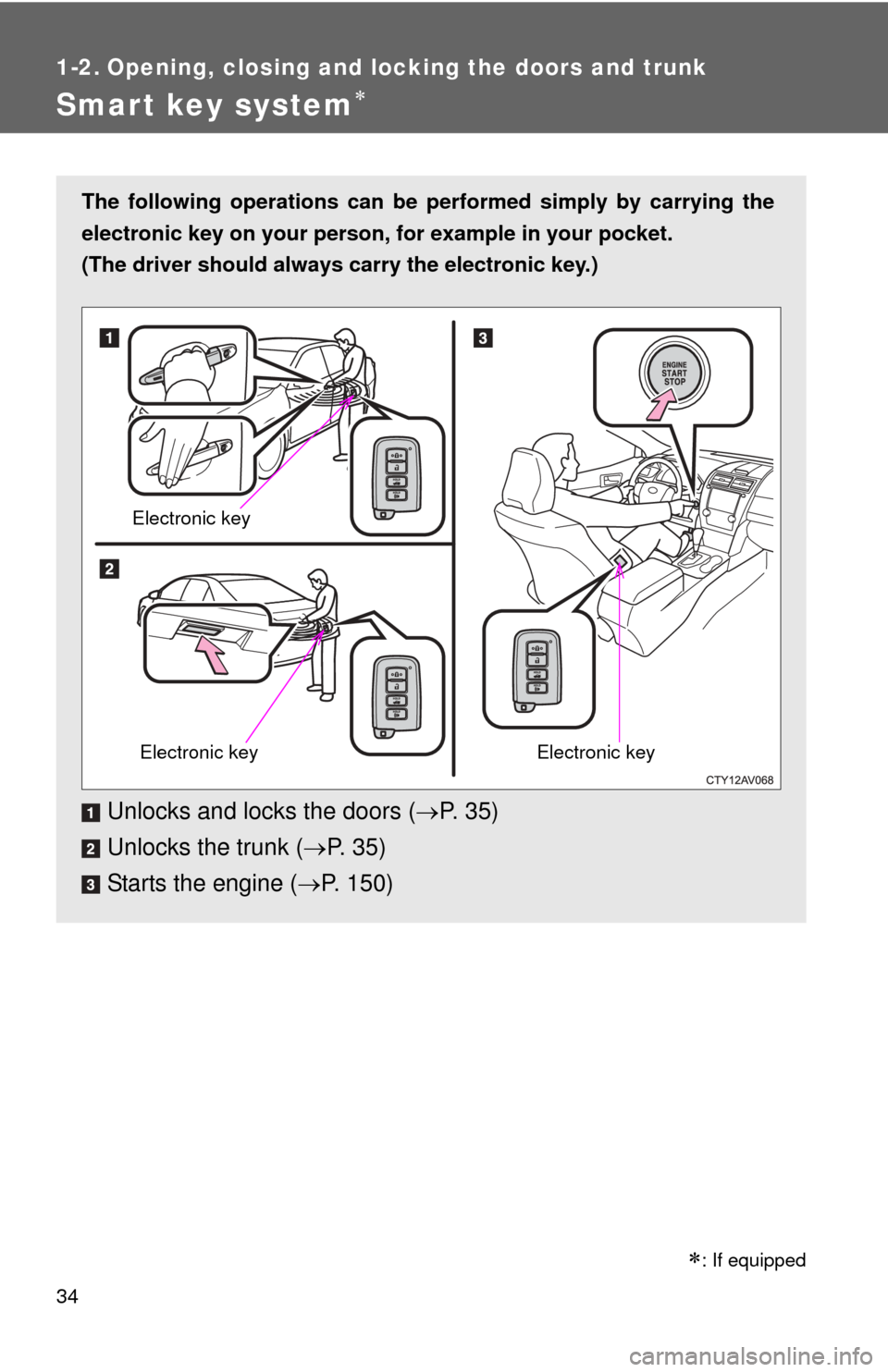
The following operations can be performed simply by carrying the
electronic key on your person, for example in your pocket.
(The driver should always carry the electronic key.)
Unlocks and locks the doors ( P. 35)
Unlocks the trunk ( P. 3 5 )
Starts the engine ( P. 150)
Electronic key
Electronic keyElectronic key
: If equipped
Page 35 of 620
35
1-2. Opening, closing and locking the doors and trunk
1
Before driving
Unlocking and locking the door
s (front door handles only)
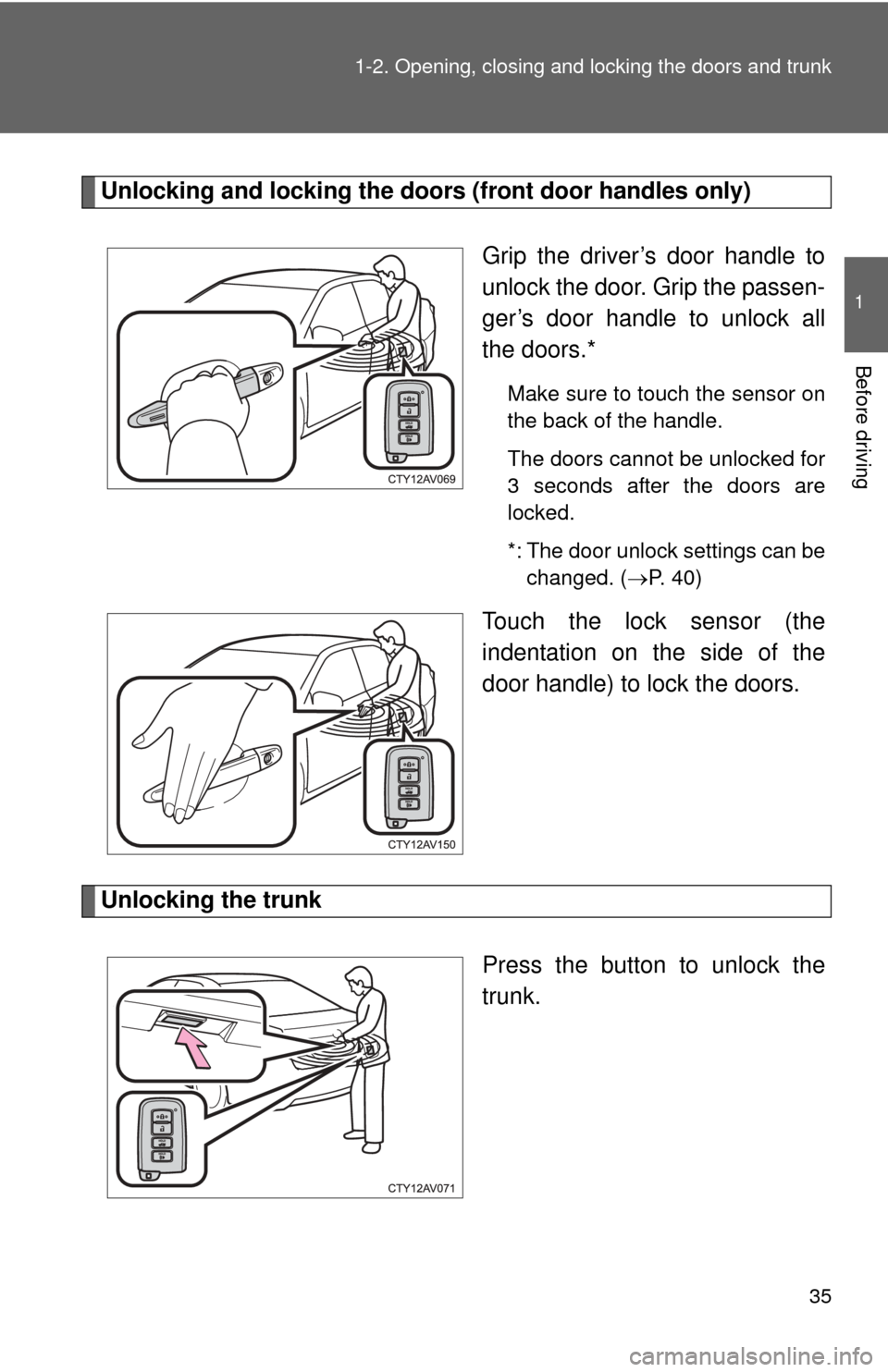
Grip the driver’s door handle to
unlock the door. Grip the passen-
ger’s door handle to unlock all
the doors.*
Make sure to touch the sensor on
the back of the handle.
The doors cannot be unlocked for
3 seconds after the doors are
locked.
*: The door unlock settings can bechanged. ( P. 40)
Touch the lock sensor (the
indentation on the side of the
door handle) to lock the doors.
Unlocking the trunk
Press the button to unlock the
trunk.
Page 36 of 620
36 1-2. Opening, closing and locking the doors and trunk
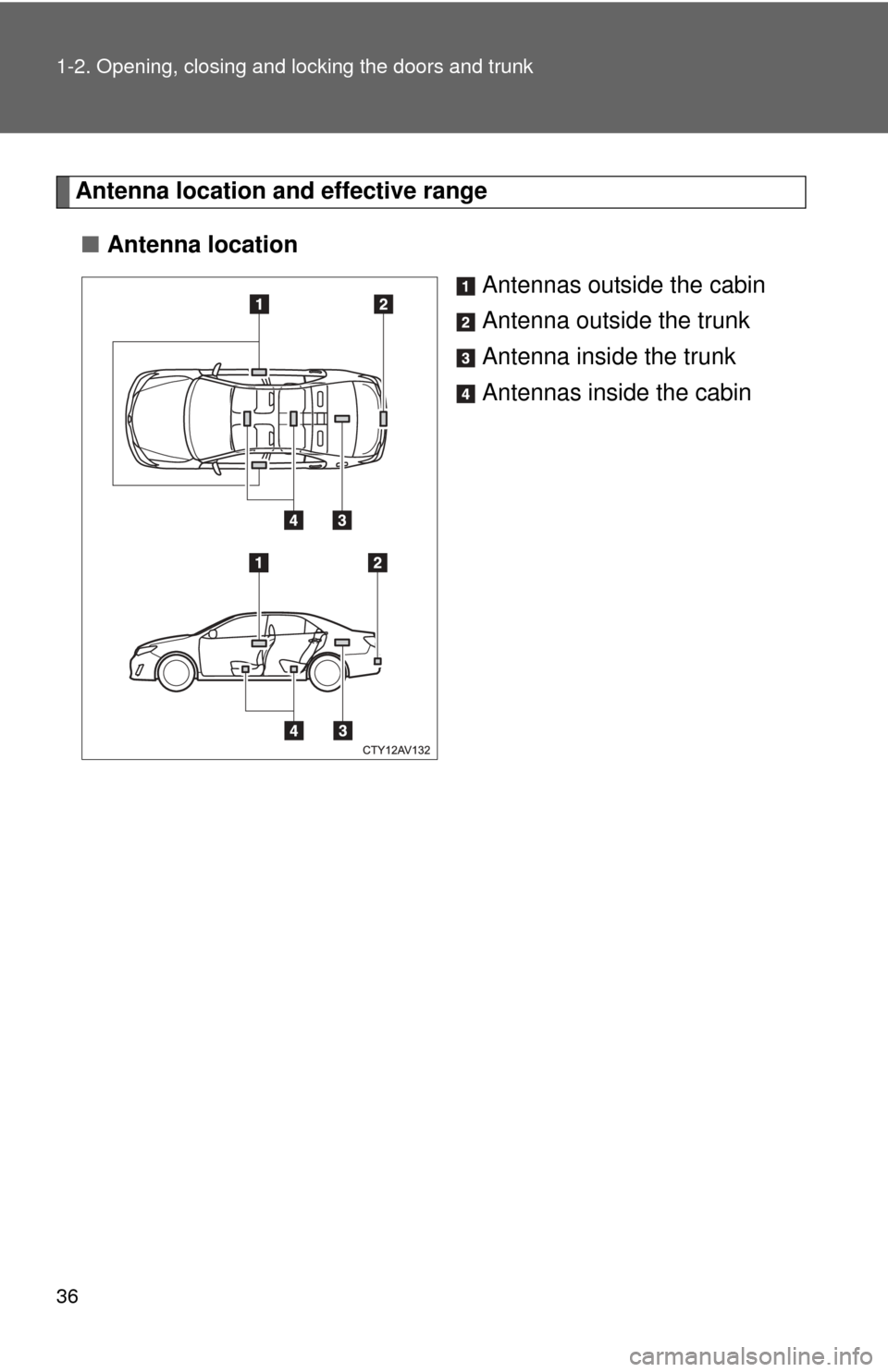
Antenna location and effective range
■ Antenna location
Antennas outside the cabin
Antenna outside the trunk
Antenna inside the trunk
Antennas inside the cabin
Page 37 of 620
37
1-2. Opening, closing and locking the doors and trunk
1
Before driving
■
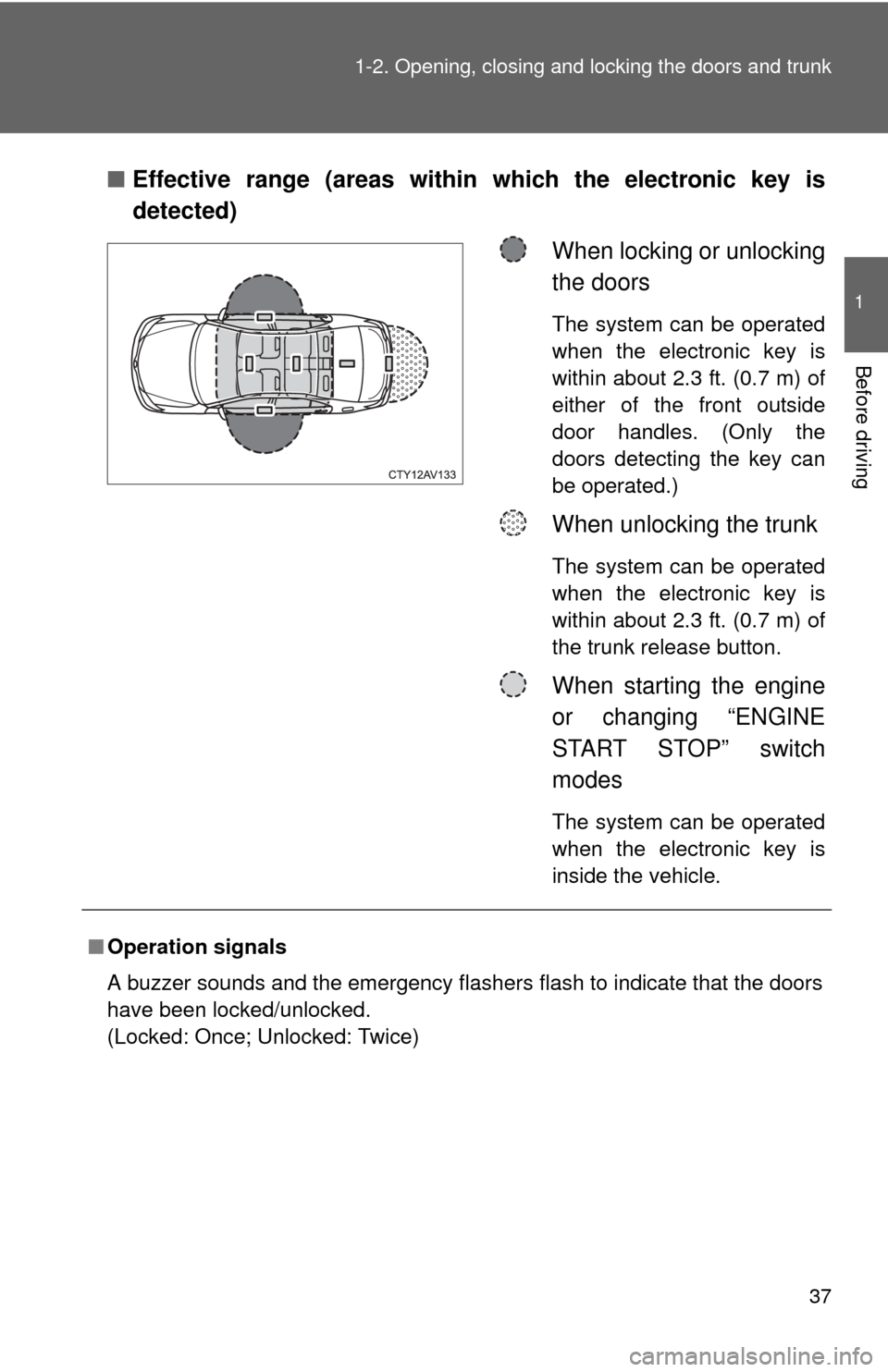
Effective range (areas within which the electronic key is
detected)
When locking or unlocking
the doors
The system can be operated
when the electronic key is
within about 2.3 ft. (0.7 m) of
either of the front outside
door handles. (Only the
doors detecting the key can
be operated.)
When unlocking the trunk
The system can be operated
when the electronic key is
within about 2.3 ft. (0.7 m) of
the trunk release button.
When starting the engine
or changing “ENGINE
START STOP” switch
modes
The system can be operated
when the electronic key is
inside the vehicle.
■Operation signals
A buzzer sounds and the emergency flashers flash to indicate that the doors
have been locked/unlocked.
(Locked: Once; Unlocked: Twice)
Page 38 of 620
38 1-2. Opening, closing and locking the doors and trunk
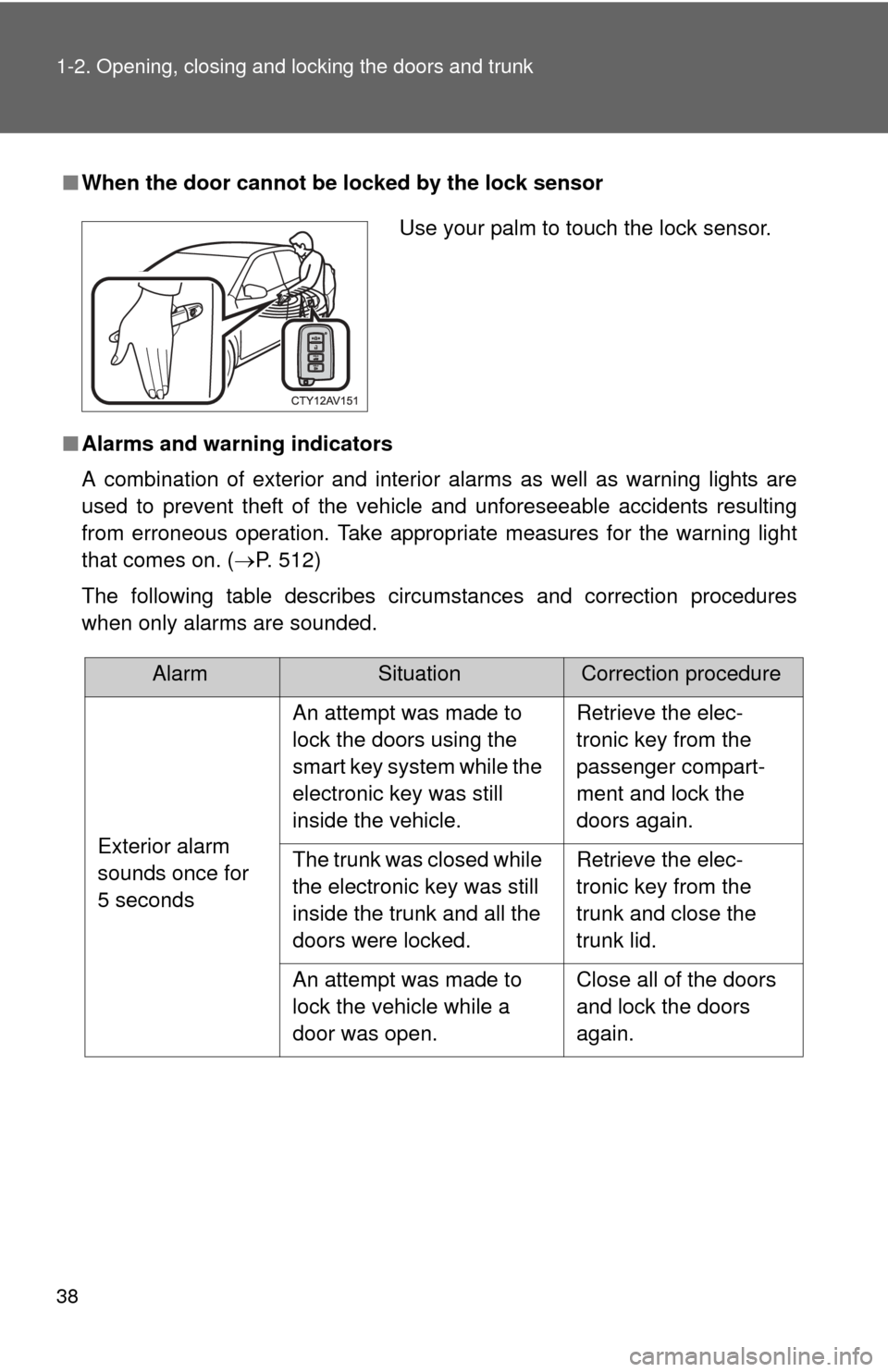
■When the door cannot be locked by the lock sensor
■ Alarms and warning indicators
A combination of exterior and interior alarms as well as warning lights are
used to prevent theft of the vehicle and unforeseeable accidents resulting
from erroneous operation. Take appropria te measures for the warning light
that comes on. ( P. 512)
The following table describes circumstances and correction procedures
when only alarms are sounded.
Use your palm to touch the lock sensor.
AlarmSituationCorrection procedure
Exterior alarm
sounds once for
5 seconds An attempt was made to
lock the doors using the
smart key system while the
electronic key was still
inside the vehicle.
Retrieve the elec-
tronic key from the
passenger compart-
ment and lock the
doors again.
The trunk was closed while
the electronic key was still
inside the trunk and all the
doors were locked. Retrieve the elec-
tronic key from the
trunk and close the
trunk lid.
An attempt was made to
lock the vehicle while a
door was open. Close all of the doors
and lock the doors
again.