brake TOYOTA CAMRY 2014 XV50 / 9.G Quick Reference Guide
[x] Cancel search | Manufacturer: TOYOTA, Model Year: 2014, Model line: CAMRY, Model: TOYOTA CAMRY 2014 XV50 / 9.GPages: 32, PDF Size: 2.47 MB
Page 3 of 32
OVERVIEW
FEATURES/OPERATIONS
SAFETY AND EMERGENCY FEATURES
1
2014
Camry
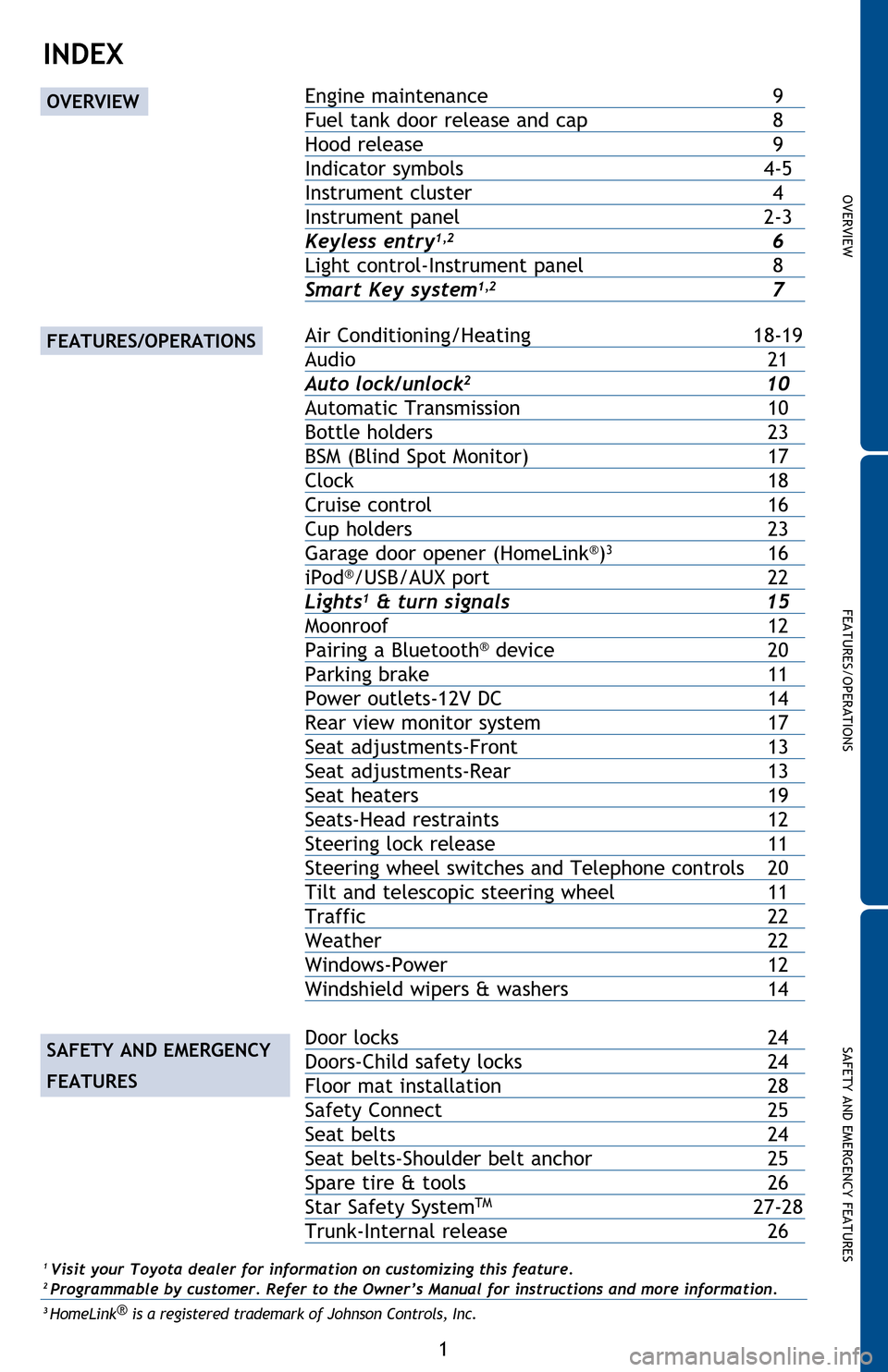
INDEX
Engine maintenance 9
Fuel tan k door release and cap
8
Hood release
9
Indicator symbols
4-5
Instrument cluster
4
Instrument panel
2-3
Keyless entry1,2 6
Light control-Instrument panel
8
Smart Key system1,2 7
Air Conditioning/Heating 18-19
Audio
21
Auto loc
k/unlock
2 10
Automatic Transmission
10
Bottle holders
23
BSM (Blind
Spot Monitor)
17
Clock
18
Cruise
control
16
Cup holders
23
Garage door
opener (HomeLink
®)3 16
iPod®/USB/AUX port 22
Lights1 & turn signals 15
Moonroof
12
Pairing a Blueto
oth
® device 20
Parking brake
11
Power outlets-12V DC
14
Rear view monit
or system
17
Seat adjustments-Front
13
Seat adjustments-Rear
13
Seat hea
ters
19
Seats-Head restraints
12
Steering lock release
11
Steering wheel
switches and Telephone controls
20
Tilt and telescop
ic steering wheel
11
Traffic
22
Weather
22
Windows-Power
12
Windshield
wipers & washers
14
Door locks 24
Doors-Child safety locks
24
Floor mat
installation
28
Safety Connect
25
Seat belts
24
Seat belts-Shoulder
belt anchor
25
Spare tire
& tools
26
Star Safety
System
TM 27-28
Trunk-Internal release
26
1 Visit your Toyota dealer for information on customizing this feature.2 Programmable by customer. Refer to the Owner’s Manual for instructions and more information.3 HomeLink ®
is a registered trademark of Johnson Controls, Inc.
OVERVIEW
FEATURES/OPERATIONS
SAFETY AND EMERGENCY
FEATURES
2014_5_Camry.indd 112/20/13 9:41 PM
Page 6 of 32
4
OVERVIEW
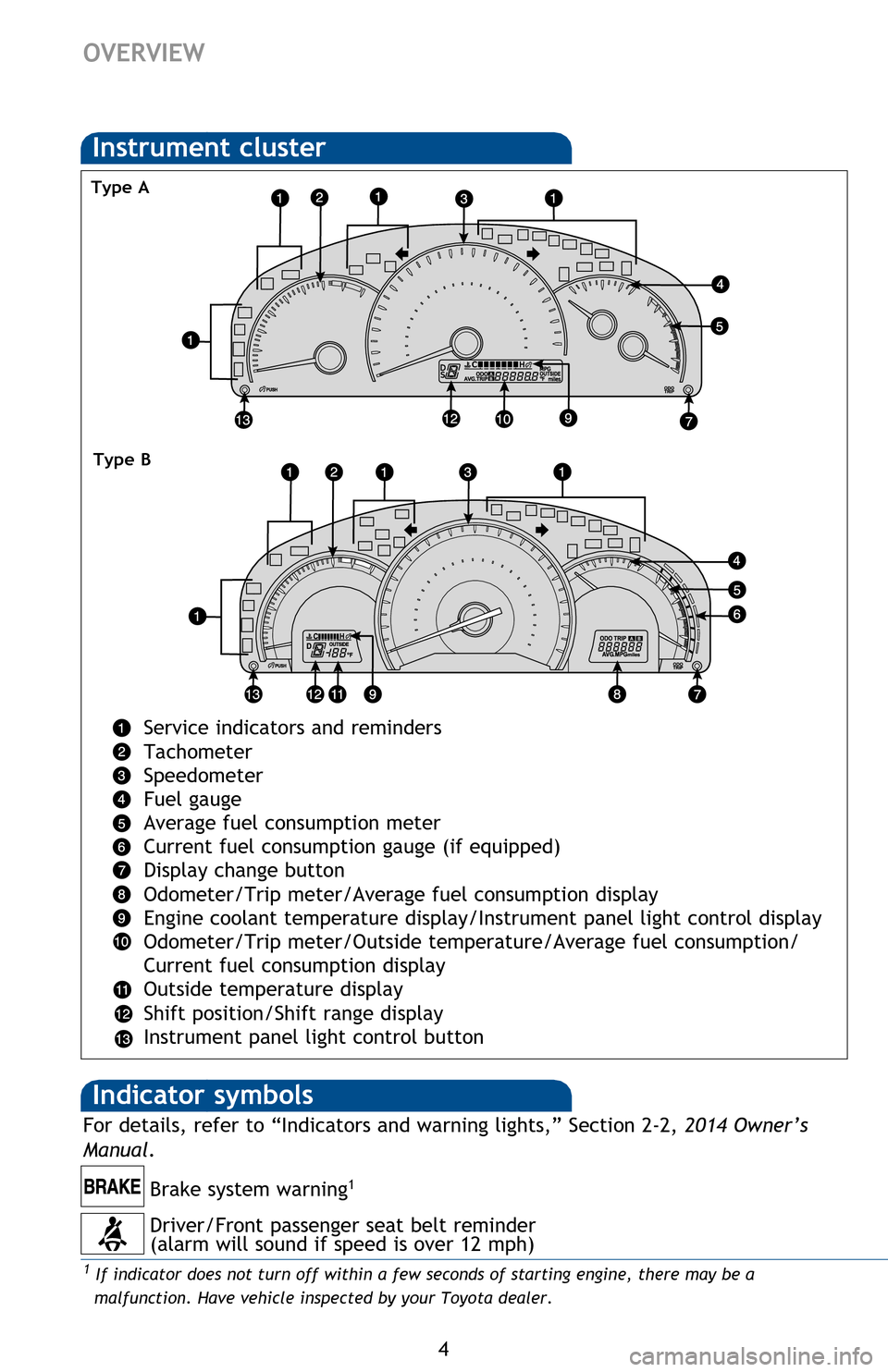
Instrument cluster
Service indicators and reminders
Tachometer
Speedometer
Fuel gauge
Average fuel consumption meter
Current fuel consumption gauge (if equipped)
Display change button
Odometer/Trip meter/Average fuel consumption display
Engine coolant temperature display/Instrument panel light control display
Odometer/Trip meter/Outside temperature/Average fuel consumption/
Current fuel consumption display
Outside temperature display
Shift position/Shift range display
Instrument panel light control button
2 If this light flashes, refer to “Cruise control,” Section 2-4, 2014 Owner’s Manual.3 Light flashes in yellow to indicate a malfunction. Light flashes quickly in green to indicate that
the steering lock has not been released.
Driver/Front passenger seat belt reminder
(alarm will sound if speed is over 12 mph)
Type A
Type B
Indicator symbols
Brake system warning1
For details, refer to “Indicators and warning lights,” Section 2-2, 2014 Owner’s
Manual .
1 If indicator does not turn off within a few seconds of starting engine, there may be a
malfunction. Have vehicle inspected by your Toyota dealer.
2014_5_Camry.indd 412/20/13 9:48 PM
Page 7 of 32
OVERVIEW
FEATURES/OPERATIONS
SAFETY AND EMERGENCY FEATURES
5
Service indicators and reminders
Tachometer
Speedometer
Fuel gauge
Average fuel consumption meter
Current fuel consumption gauge (if equipped)
Display change button
Odometer/Trip meter/Average fuel consumption display
Engine coolant temperature display/Instrument panel light control display
Odometer/Trip meter/Outside temperature/Average fuel consumption/
Current fuel consumption display
Outside temperature display
Shift position/Shift range display
Instrument panel light control button
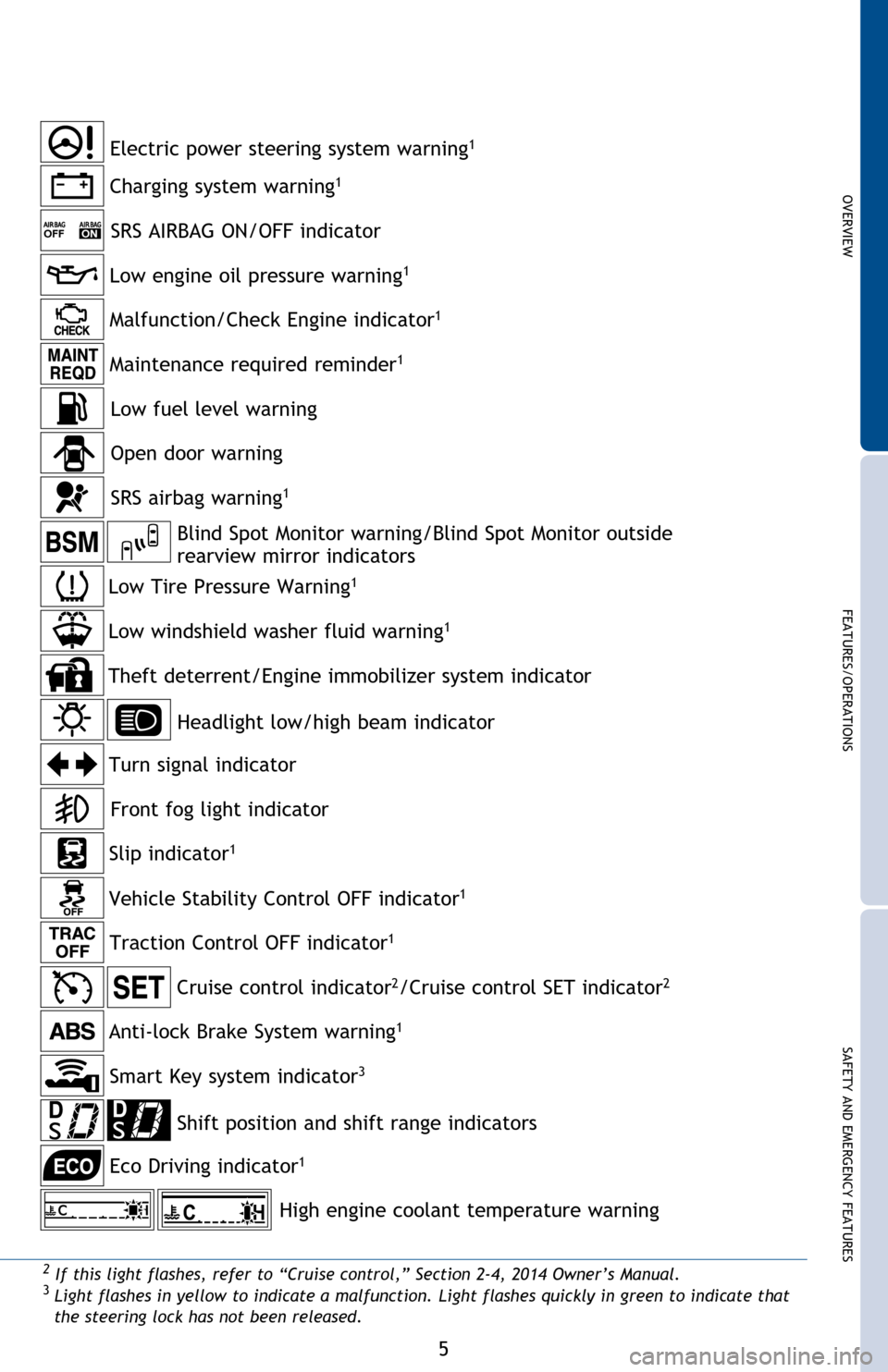
Charging system warning1
SRS AIRBAG ON/OFF indicator
2 If this light flashes, refer to “Cruise control,” Section 2-4, 2014 Owner’s Manual.3 Light flashes in yellow to indicate a malfunction. Light flashes quickly in green to indicate that
the steering lock has not been released.
Headlight low/high beam indicator
Turn signal indicator
Slip indicator
1
Cruise control indicator2/Cruise control SET indicator2
Low Tire Pressure Warning1
Theft deterrent/Engine immobilizer system indicator
Open door warning
SRS airbag warning1
Low windshield washer fluid warning1
Electric power steering system warning1
Low engine oil pressure warning1
Malfunction/Check Engine indicator1
Maintenance required reminder1
Low fuel level warning
Front fog light indicator
Smart Key system indicator
3
Anti-lock Brake System warning1
For details, refer to “Indicators and warning lights,” Section 2-2, 2014 Owner’s
Manual .
1 If indicator does not turn off within a few seconds of starting engine, there may be a
malfunction. Have vehicle inspected by your Toyota dealer.
Traction Control OFF indicator1
Vehicle Stability Control OFF indicator1
Shift position and shift range indicators
Eco Driving indicator
1
Blind Spot Monitor warning/Blind Spot Monitor outside
rearview mirror indicators
High engine coolant temperature warning
2014_5_Camry.indd 512/20/13 9:48 PM
Page 8 of 32
6
OVERVIEW
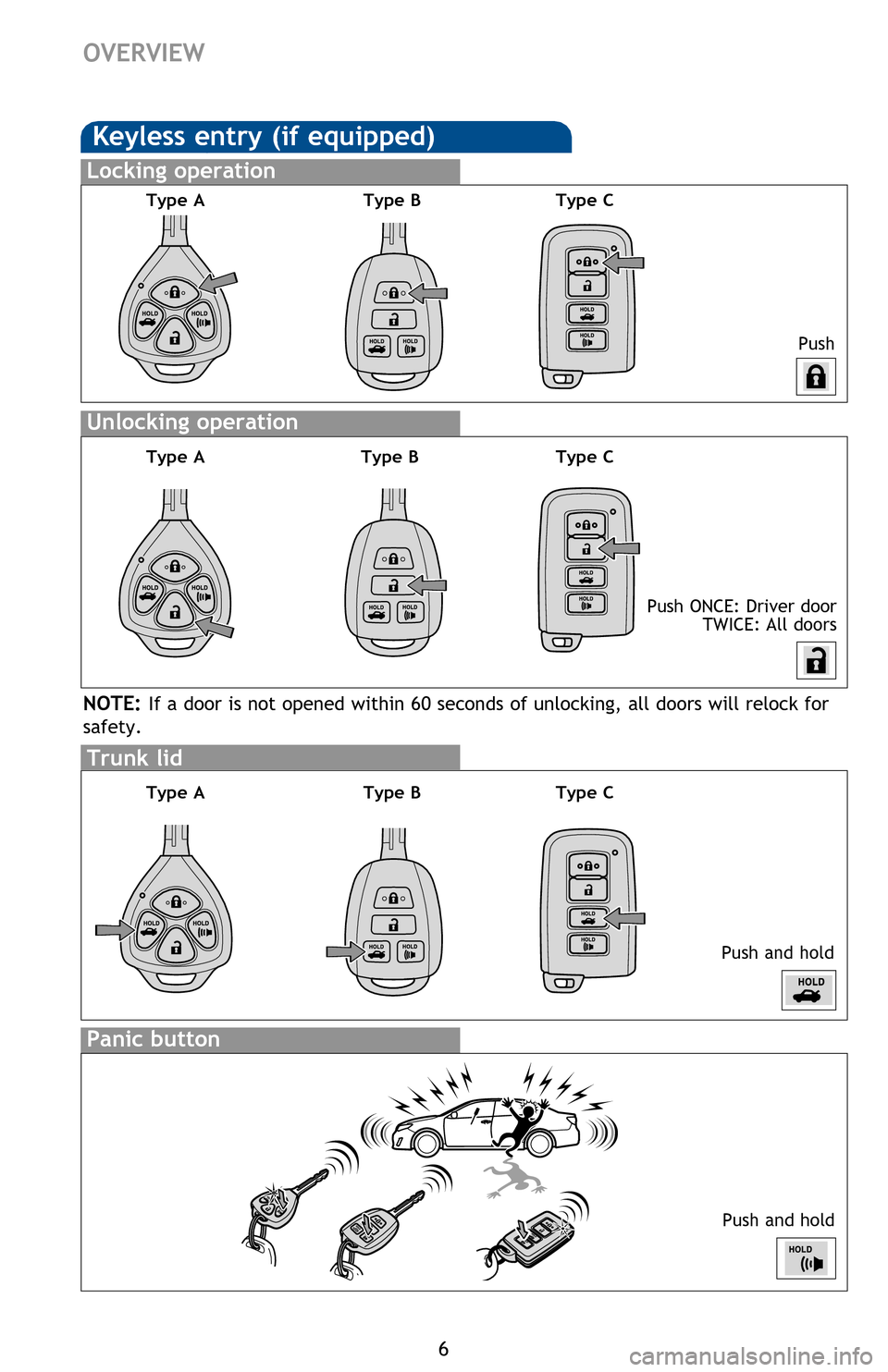
Keyless entry (if equipped)
Push
Push ONCE: Driver door
TWICE: All doors
Locking operation
Unlocking operation
Type A Type B
Smart Key system (if equipped)
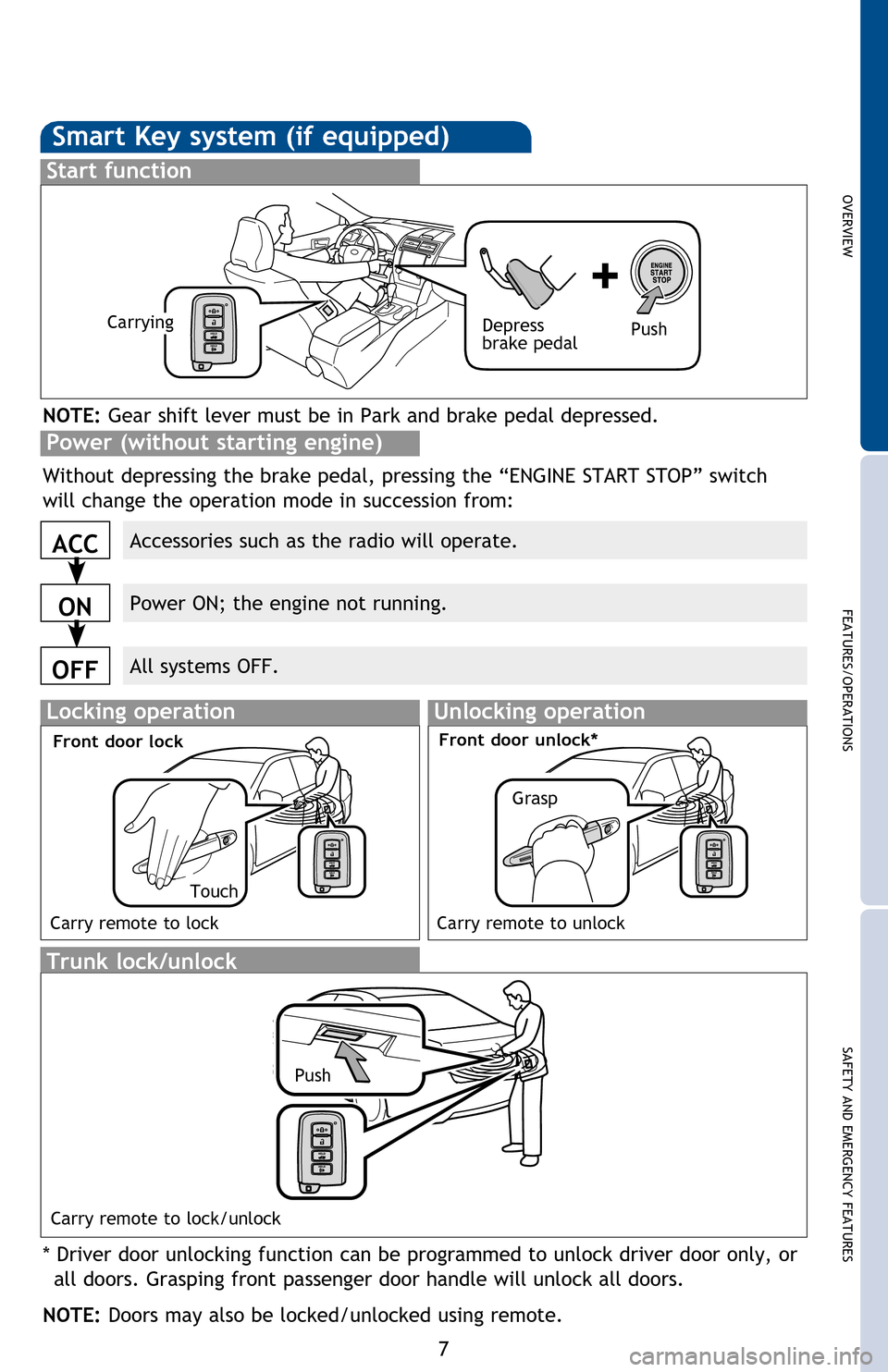
Start function
ACC
ON
OFF
NOTE: Gear shift lever must be in Park and brake pedal depressed.
Without depressing the brake pedal, pressing the “ENGINE START STOP” switch
will change the operation mode in succession from:
* Driver door unlocking function can be programmed to unlock driver door only, or
all doors. Grasping front passenger door handle will unlock all doors.
NOTE: Doors may also be locked/unlocked using remote.
Power (without starting engine)
Panic button
Push and hold
NOTE: If a door is not opened within 60 seconds of unlocking, all doors will relock for
safety.
Trunk lid
Push and holdTrunk lock/unlock
Locking operation
Carry remote to lock
Front door lock
Carry remote to lock/unlock
Type C
Type A
Type A Type B
Type B Type C
Type C
2014_5_Camry.indd 612/20/13 9:42 PM
Page 9 of 32
OVERVIEW
FEATURES/OPERATIONS
SAFETY AND EMERGENCY FEATURES
7
Push
Push ONCE: Driver door
TWICE: All doors
Smart Key system (if equipped)
Start function
Accessories such as the radio will operate.
Power ON; the engine not running.
All systems OFF.
ACC
ON
OFF
NOTE: Gear shift lever must be in Park and brake pedal depressed.
Push
Depress
brake pedalCarrying
Without depressing the brake pedal, pressing the “ENGINE START STOP” switch
will change the operation mode in succession from:
* Driver door unlocking function can be programmed to unlock driver door only, or
all doors. Grasping front passenger door handle will unlock all doors.
NOTE: Doors may also be locked/unlocked using remote.
Power (without starting engine)
Push and hold
NOTE: If a door is not opened within 60 seconds of unlocking, all doors will relock for
safety.
Push and holdTrunk lock/unlock
Push
Locking operationUnlocking operation
Carry remote to lock Carry remote to unlock
Front door lock
Carry remote to lock/unlock
Front door unlock*
TouchGrasp
2014_5_Camry.indd 712/20/13 9:42 PM
Page 12 of 32
10
FEATURES/OPERATIONS
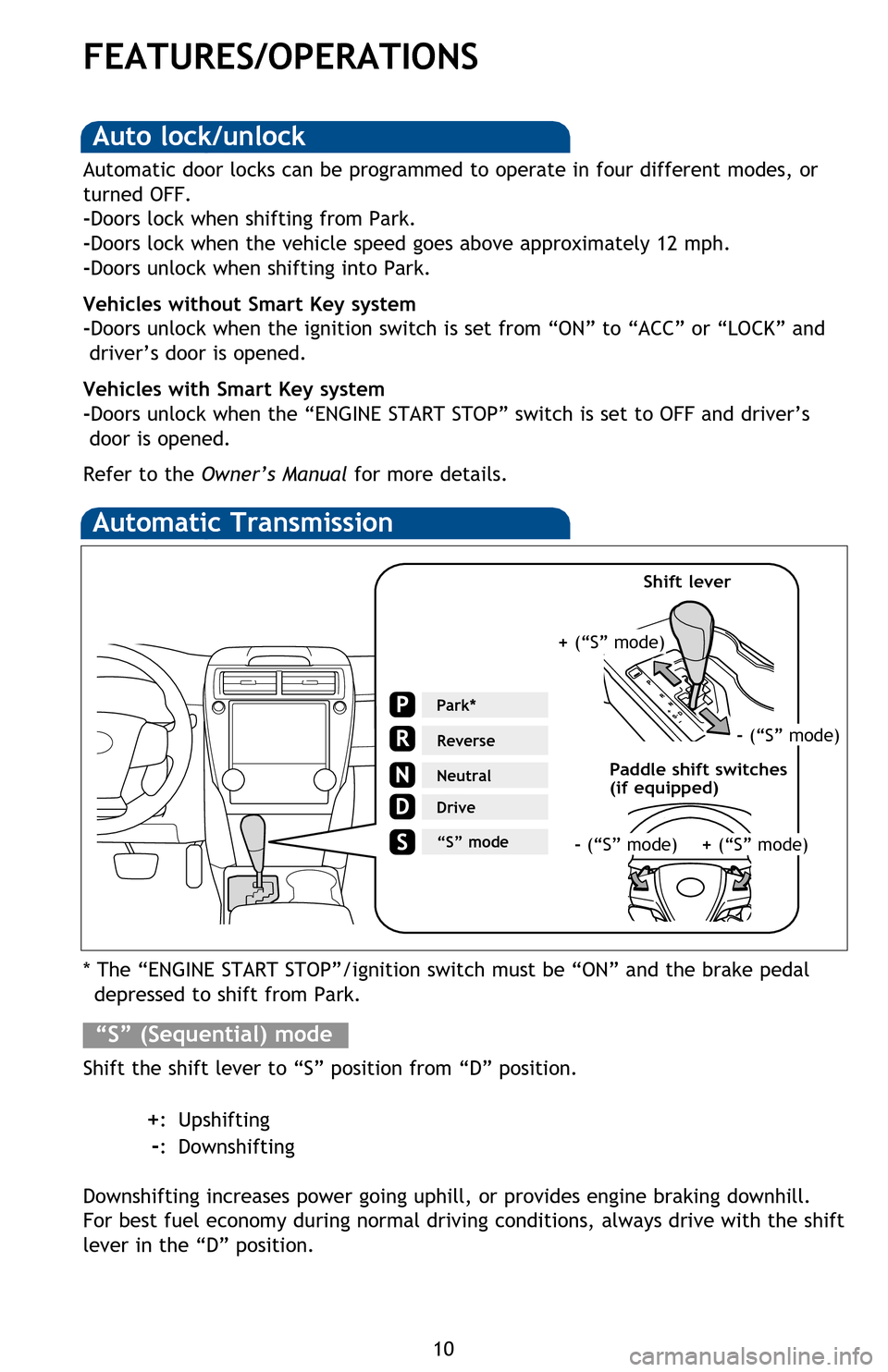
Automatic Transmission
* The “ENGINE START STOP”/ignition switch must be “ON” and the brake pedal depressed to shift from Park.
Shift the shift lever to “S” position from “D” position.
+: Upshifting
-: Downshifting
Downshifting increases power going uphill, or provides engine braking downhill.
For best fuel economy during normal driving conditions, always drive with the shift
lever in the “D” position.
“S” (Sequential) mode
Steering lock release
Smart Key system*
Parking brake
Park*
Reverse
Neutral
Drive
N
“S” mode
Auto lock/unlock
Automatic door locks can be programmed to operate in four different modes, or
turned OFF.
-Doors lock when shifting from Park.
-Doors lock when the vehicle speed goes above approximately 12 mph.
-Doors unlock when shifting into Park.
Vehicles without Smart Key system
-Doors unlock when the ignition switch is set from “ON” to “ACC” or “LOCK” and driver’s door is opened.
Vehicles with Smart Key system
-Doors unlock when the “ENGINE START STOP” switch is set to OFF and driver’s door is opened.
Refer to the Owner’s Manual for more details.
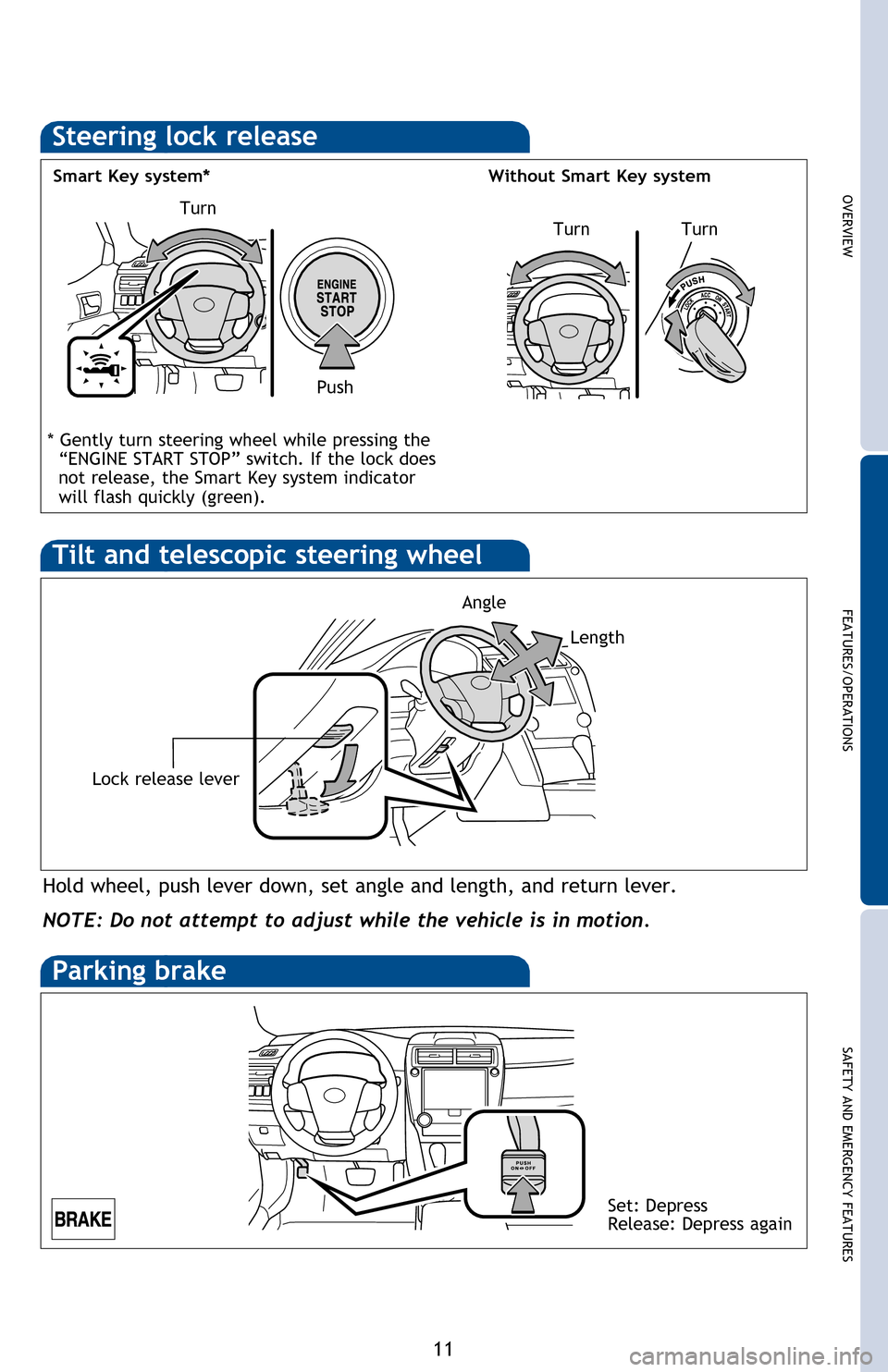
Hold wheel, push lever down, set angle and length, and return lever.
NOTE: Do not attempt to adjust while the vehicle is in motion.
Tilt and telescopic steering wheel
* Gently turn steering wheel while pressing the
“ENGINE START STOP” switch. If the lock does
not release, the Smart Key system indicator
will flash quickly (green).
+ (“S” mode)
- (“S” mode)
+ (“S” mode)- (“S” mode)
Paddle shift switches
(if equipped) Shift lever
2014_5_Camry.indd 1012/20/13 9:43 PM
Page 13 of 32
OVERVIEW
FEATURES/OPERATIONS
SAFETY AND EMERGENCY FEATURES
11
* The “ENGINE START STOP”/ignition switch must be “ON” and the brake pedal depressed to shift from Park.
Shift the shift lever to “S” position from “D” position.
+: Upshifting
-: Downshifting
Downshifting increases power going uphill, or provides engine braking downhill.
For best fuel economy during normal driving conditions, always drive with the shift
lever in the “D” position.
Steering lock release
Turn
Turn
Smart Key system*
Without Smart Key system
Push
Turn
Parking brake
Automatic door locks can be programmed to operate in four different modes, or
turned OFF.
-Doors lock when shifting from Park.
-Doors lock when the vehicle speed goes above approximately 12 mph.
-Doors unlock when shifting into Park.
Vehicles without Smart Key system
-Doors unlock when the ignition switch is set from “ON” to “ACC” or “LOCK” and
driver’s door is opened.
Vehicles with Smart Key system
-Doors unlock when the “ENGINE START STOP” switch is set to OFF and driver’s door is opened.
Refer to the Owner’s Manual for more details.
Set: Depress
Release: Depress again
Hold wheel, push lever down, set angle and length, and return lever.
Lock release lever
NOTE: Do not attempt to adjust while the vehicle is in motion.
Tilt and telescopic steering wheel
* Gently turn steering wheel while pressing the
“ENGINE START STOP” switch. If the lock does
not release, the Smart Key system indicator
will flash quickly
(green).
Angle
Length
- (“S” mode)
+ (“S” mode)
2014_5_Camry.indd 1112/20/13 9:43 PM
Page 18 of 32
16
FEATURES/OPERATIONS
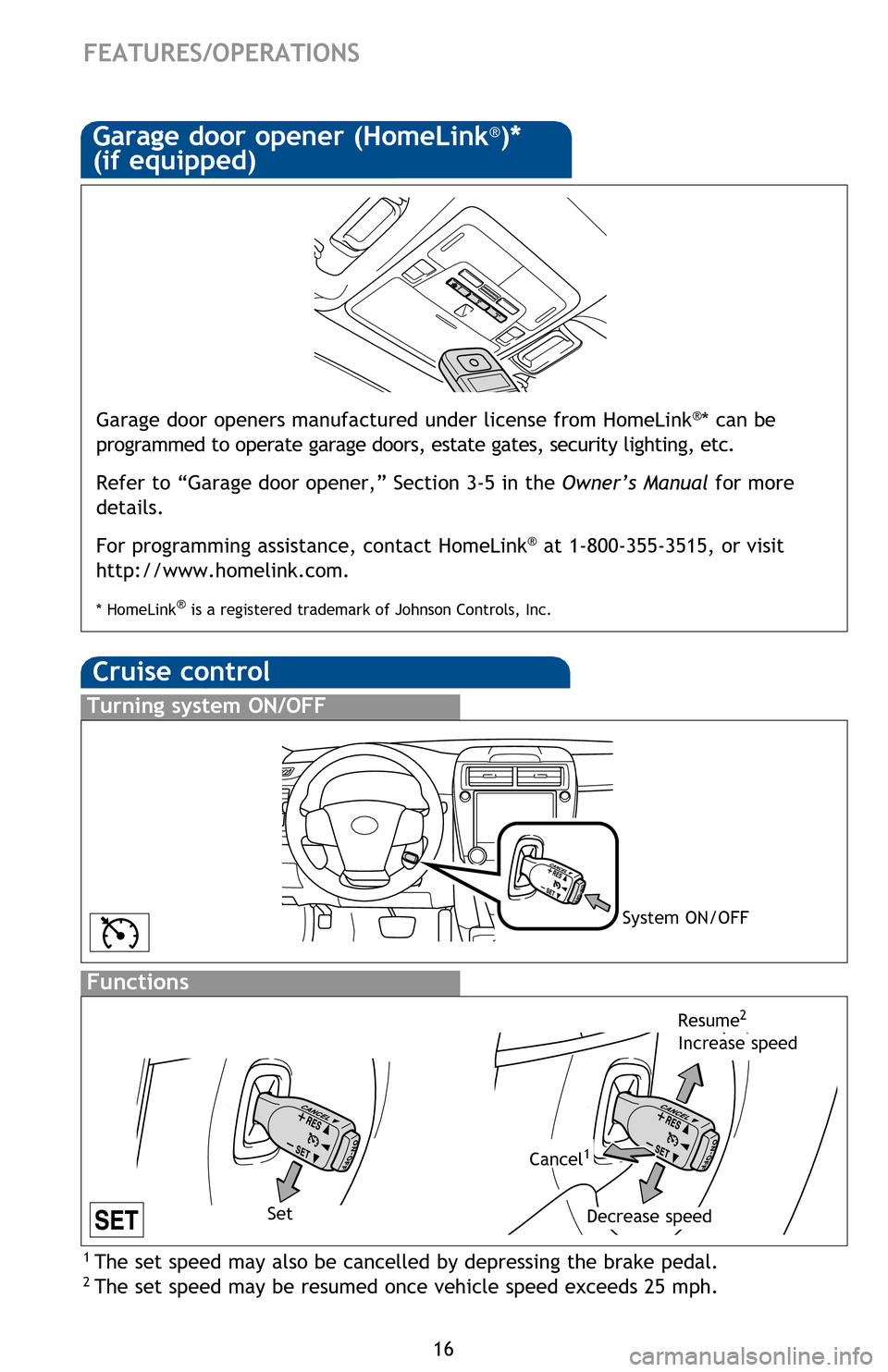
Cruise control
1 The set speed may also be cancelled by depressing the brake pedal.2 The set speed may be resumed once vehicle speed exceeds 25 mph.
Turning system ON/OFF
Functions
System ON/OFF
Increase speed
Decrease speed
Cancel1
Resume2
Garage door opener (HomeLink®)*
(if equipped)
3-5. Other interior feature s
Garage door openers manufactured under license from HomeLink®* can be
programmed to operate garage doors, estate gates, security lighting, etc\
.
Refer to “Garage door opener,” Section 3-5 in the Owner’s Manual for more
details.
For programming assistance, contact HomeLink
® at 1-800-355-3515, or visit
http://www.homelink.com.
* HomeLink® is a registered trademark of Johnson Controls, Inc.
Set
BSM (Blind Spot Monitor)(if equipped)
The Blind Spot Monitor is a system that has two functions:
• The Blind Spot Monitor function (assists the driver in decision-making when changing lanes)
• The Rear Cross Traffic Alert function (assists the driver when backing up)
The Blind Spot Monitor function uses radar sensors to detect vehicles that are
traveling in an adjacent lane in the area that is not reflected in the outside rear
view mirror (the blind spot), and advises the driver of the vehicles existence via
the outside rear view mirror indicator.
Refer to the Owner‘s Manual for more details on this system before attempting
to use it.
Rear view monitor system
The rear view monitor system displays an image of the view from the bumper
of the rear area of the vehicle. The camera for the rear view monitor system is
located above the license plate.
To adjust the image on the rear view monitor screen, press the “SETUP” button
and select “Display” on the “Setup” screen. Select “Camera” to adjust the
screen contrast and brightness.
Refer to the Owner‘s Manual for more details on this system.
2014_5_Camry.indd 1612/20/13 9:43 PM
Page 19 of 32
OVERVIEW
FEATURES/OPERATIONS
SAFETY AND EMERGENCY FEATURES
17
1 The set speed may also be cancelled by depressing the brake pedal.2 The set speed may be resumed once vehicle speed exceeds 25 mph.
Increase speed
Garage door openers manufactured under license from HomeLink®* can be
programmed to operate garage doors, estate gates, security lighting, etc\
.
Refer to “Garage door opener,” Section 3-5 in the Owner’s Manual for more
details.
For programming assistance, contact HomeLink
® at 1-800-355-3515, or visit
http://www.homelink.com.
* HomeLink® is a registered trademark of Johnson Controls, Inc.
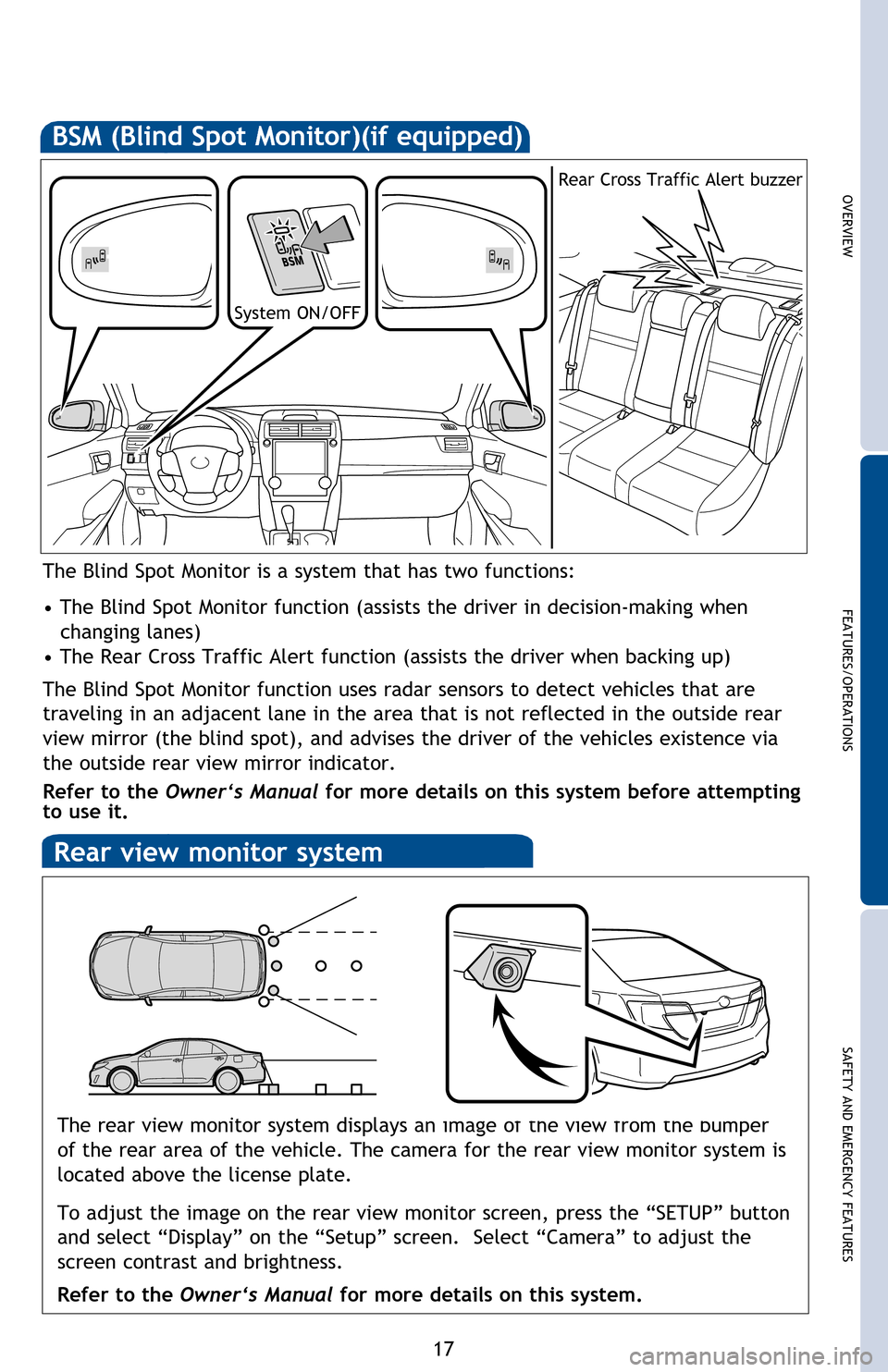
BSM (Blind Spot Monitor)(if equipped)
The Blind Spot Monitor is a system that has two functions:
• The Blind Spot Monitor function (assists the driver in decision-making when changing lanes)
• The Rear Cross Traffic Alert function (assists the driver when backing up)
The Blind Spot Monitor function uses radar sensors to detect vehicles that are
traveling in an adjacent lane in the area that is not reflected in the outside rear
view mirror (the blind spot), and advises the driver of the vehicles existence via
the outside rear view mirror indicator.
Refer to the Owner‘s Manual for more details on this system before attempting
to use it.
System ON/OFF Rear Cross Traffic Alert buzzer
Rear view monitor system
The rear view monitor system displays an image of the view from the bumper
of the rear area of the vehicle. The camera for the rear view monitor system is
located above the license plate.
To adjust the image on the rear view monitor screen, press the “SETUP” button
and select “Display” on the “Setup” screen. Select “Camera” to adjust the
screen contrast and brightness.
Refer to the Owner‘s Manual for more details on this system.
2014_5_Camry.indd 1712/20/13 9:45 PM
Page 28 of 32
26
Star Safety SystemTM
VSC helps prevent loss of traction during cornering by reducing engine power and
applying brake force to selected wheels.
Toyota’s VSC monitors steering angle and the direction your vehicle is traveling.
When it senses that the front or rear wheels begin to lose traction, VSC reduces
engine power and applies braking to selected wheels. This helps restore traction
and vehicle control.
Vehicle Stability Control (VSC)
Anti-Lock Brake System (ABS)
ABS helps prevent brakes from locking up by “pulsing” brake pressure to each
wheel. This limits brake lockup and helps provide directional control for the
current road conditions.
Toyota’s ABS sensors detect which wheels are locking up and limits wheel lockup
by “pulsing” each wheel’s brakes independently. Pulsing releases brake pressure
repeatedly for fractions of a second. This helps the tires attain the traction that
current road conditions will allow, helping you to stay in directional control.
Brake Assist (BA)
Brake Assist is designed to detect sudden or “panic” braking, and then add braking
pressure to help decrease the vehicle’s stopping distance. When there’s only a
split second to react, Brake Assist can add additional brake pressure more quickly
than just the driver alone can. VSC helps prevent loss of traction during cornering by reducing engine power, and
Traction Control helps maintain traction on loose gravel and wet, icy, or uneven
surfaces by applying brake force to the spinning wheel(s).
Toyota’s TRAC sensors are activated when one of the drive wheels starts to slip.
TRAC limits engine output and applies the brakes to the spinning wheel. This
transfers power to the wheels that still have traction to help keep you on track.
Traction Control (TRAC)
Electronic Brake Force Distribution (EBD)
Toyota’s ABS technology has Electronic Brake-force Distribution (EBD) to help
maintain control and balance when braking. Abrupt stops can cause a vehicle
to tilt forward, reducing the braking power of the rear wheels. EBD responds to
sudden stops by redistributing brake force to enhance the braking effectiveness of
all four wheels.
SAFETY AND EMERGENCY FEATURES
All new Toyota vehicles come standard with the Star Safety SystemTM, which
combines Vehicle Stability Control (VSC), Traction Control (TRAC), Anti-lock
Braking System (ABS), Electronic Brake-force Distribution (EBD), Brake Assist (BA)
and Smart Stop Technology (SST).
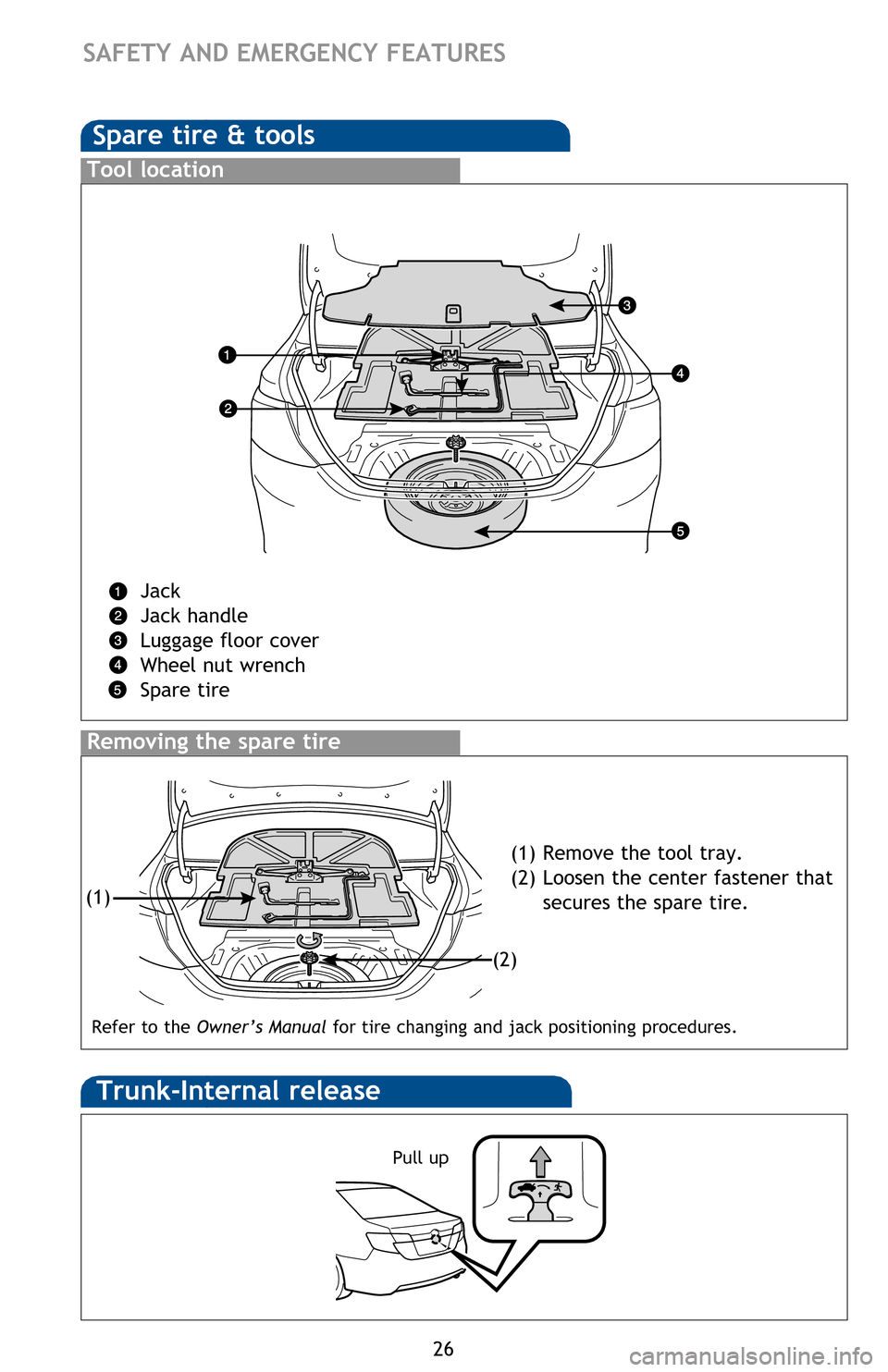
Spare tire & tools
Tool location
Jack
Jack handle
Luggage floor cover
Wheel nut wrench
Spare tire
Removing the spare tire
(1) Remove the tool tray.
(2) Loosen the center fastener that secures the spare tire.
Trunk-Internal release
Pull up
(1)
(2)
Refer to the Owner’s Manual for tire changing and jack positioning procedures.
2014_5_Camry.indd 2612/20/13 9:45 PM