radio TOYOTA CAMRY 2015 XV50 / 9.G Navigation Manual
[x] Cancel search | Manufacturer: TOYOTA, Model Year: 2015, Model line: CAMRY, Model: TOYOTA CAMRY 2015 XV50 / 9.GPages: 296, PDF Size: 4.22 MB
Page 91 of 296
91
2. RADIO OPERATION
Camry_Navi_U
AUDIO SYSTEM
3
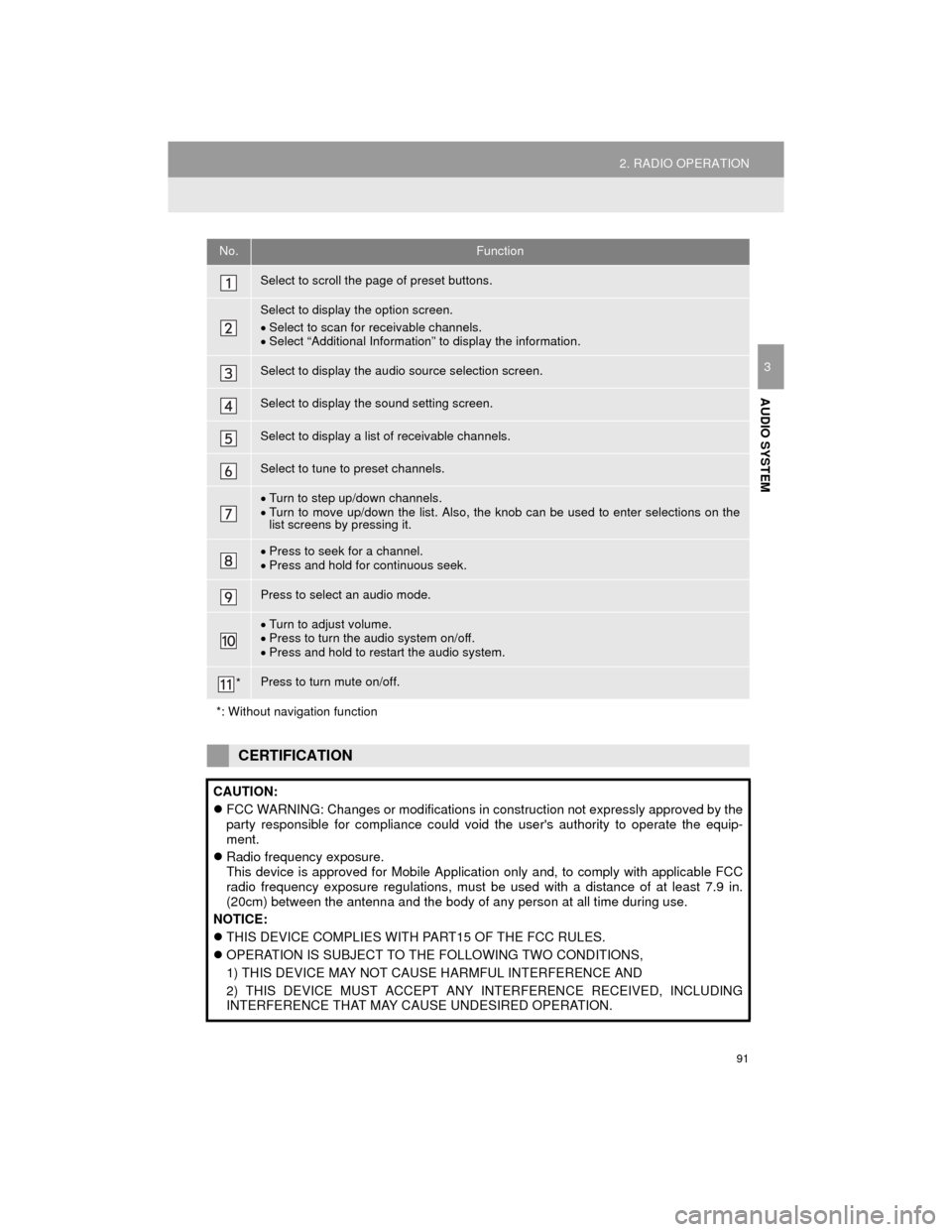
No.Function
Select to scroll the page of preset buttons.
Select to display the option screen.
Select to scan for receivable channels.
Select “Additional Information” to display the information.
Select to display the audio source selection screen.
Select to display the sound setting screen.
Select to display a list of receivable channels.
Select to tune to preset channels.
Turn to step up/down channels.
Turn to move up/down the list. Also, the knob can be used to enter selections on the
list screens by pressing it.
Press to seek for a channel.
Press and hold for continuous seek.
Press to select an audio mode.
Turn to adjust volume.
Press to turn the audio system on/off.
Press and hold to restart the audio system.
*Press to turn mute on/off.
*: Without navigation function
CERTIFICATION
CAUTION:
FCC WARNING: Changes or modifications in construction not expressly approved by the
party responsible for compliance could void the user's authority to operate the equip-
ment.
Radio frequency exposure.
This device is approved for Mobile Application only and, to comply with applicable FCC
radio frequency exposure regulations, must be used with a distance of at least 7.9 in.
(20cm) between the antenna and the body of any person at all time during use.
NOTICE:
THIS DEVICE COMPLIES WITH PART15 OF THE FCC RULES.
OPERATION IS SUBJECT TO THE FOLLOWING TWO CONDITIONS,
1) THIS DEVICE MAY NOT CAUSE HARMFUL INTERFERENCE AND
2) THIS DEVICE MUST ACCEPT ANY INTERFERENCE RECEIVED, INCLUDING
INTERFERENCE THAT MAY CAUSE UNDESIRED OPERATION.
Page 92 of 296
92
2. RADIO OPERATION
Camry_Navi_U
HOW TO SUBSCRIBE TO AN
XM Satellite Radio
To listen to a satellite radio broadcast
in the vehicle, a subscription to the XM
Satellite Radio service is necessary.
An XM Satellite Radio is a tuner de-
signed exclusively to receive broad-
casts provided under a separate
subscription. Availability is limited to
the 48 contiguous U.S. states and
some Canadian provinces.
HOW TO SUBSCRIBE
It is necessary to enter into a separate
service agreement with XM Satellite
Radio in order to receive satellite
broadcast programming in the vehicle.
Additional activation and service sub-
scription fees apply that are not includ-
ed in the purchase price of the vehicle
and digital satellite tuner.
For complete information on subscrip-
tion rates and terms, or to subscribe to
XM Satellite Radio:
U.S.A.
Refer to
www.siriusxm.com or call
1-866-635-2349.
Canada
Refer to www.xmradio.ca
or call
1-877-438-9677.
INFORMATION
● XM Radio Services Legal Disclaimers
and Warnings
• Fees and Taxes Subscription fee,
taxes, one time activation fee, and
other fees may apply. Subscription
fee is consumer only. All fees and
programming subject to change.
Subscriptions subject to Customer
Agreement available at www.siri-
usxm.com. (U.S.A.) or www.xmra-
dio.ca (Canada) XM service only
available in the 48 contiguous United
States and Canada.
Explicit Language Notice Channels
with frequent explicit language are
indicated with an “XL” preceding the
channel name. Channel blocking is
available for XM Satellite Radio
receivers by notifying XM at;
U.S.A. Customers:
Visit www.siriusxm.com or calling
1-866-635-2349
Canadian Customers:
Visit www.xmradio.ca or calling
1-877-438-9677
● It is prohibited to copy, decompile, disas-
semble, reverse engineer, hack, manip-
ulate, or otherwise make available any
technology or software incorporated in
receivers compatible with the XM Satel-
lite Radio System or that support the XM
website, the Online Service or any of its
content. Furthermore, the AMBE
® voice
compression software included in this
product is protected by intellectual prop-
erty rights including patent rights, copy-
rights, and trade secrets of Digital Voice
Systems, Inc.
● Note: this applies to XM receivers only
and not XM Ready devices.
Page 93 of 296
93
2. RADIO OPERATION
Camry_Navi_U
AUDIO SYSTEM
3
INFORMATION
●XM Radio Services Descriptions
• Radio and Entertainment XM offers more than 170 satellite radio
channels of commercial-free music
and premier sports, news, talk, and
entertainment. XM is broadcast via sat-
ellites to millions of listeners across the
continental United States. XM sub-
scribers listen to XM on satellite radio
receivers for the car, home, and porta-
ble use. More information about XM is
available online at www.siriusxm.com
(U.S.A.) or www.xmradio.ca (Canada).
● XM Radio Services Subscription
Instructions
• For XM Services requiring a subscrip- tion (such as XM Radio, and some
Infotainment & data services), the fol-
lowing paragraph shall be included.
Required XM Radio and some Infotain-
ment & data services monthly sub-
scriptions sold separately after trial
period. Subscription fee is consumer
only. All fees and programming subject
to change. Subscriptions are subject to
the Customer Agreement available at
www.siriusxm.com (U.S.A.) or
www.xmradio.ca (Canada). XM service
only available in the 48 contiguous
United States (U.S.A.) or 10 Canadian
provinces (Canada). 2011 Sirius XM
Radio Inc. Sirius, XM and all related
marks and logos are trademarks of Sir-
ius XM Radio Inc. All other marks,
channel names and logos are the
property of their respective owners.
For more information, program sched-
ules, and to subscribe or extend sub-
scription after complimentary trial
period; more information is available
at:
USA Customers:
Visit www.siriusxm.com or call
1-866-635-2349
Canadian Customers:
Visit www.xmradio.ca or call
1-877-438-9677
INFORMATION
● XM Satellite Radio is solely responsible
for the quality, availability and content of
the satellite radio services provided,
which are subject to the terms and con-
ditions of the XM Satellite Radio cus-
tomer service agreement.
● Customers should have their radio ID
ready; the radio ID can be found by tun-
ing to “Ch 000” on the radio. For details,
see “DISPLAYING THE RADIO ID”
below.
● All fees and programming are the
responsibility of XM Satellite Radio and
are subject to change.
SATELLITE TUNER
TECHNOLOGY NOTICE
Toyota’s satellite radio tuners are
awarded Type Approval Certificates
from XM Satellite Radio Inc. as proof of
compatibility with the services offered
by XM Satellite Radio.
INFORMATION
● Satellite tuner
The tuner supports only Audio Services
(Music and Talk) and the accompanying
Text Information of XM
® Satellite Radio.
Page 94 of 296
94
2. RADIO OPERATION
Camry_Navi_U
If “Ch 000” is selected using the “TUNE/
SCROLL” knob, the ID code, which is 8
alphanumeric characters, will be dis-
played. If another channel is selected, the
ID code will no longer be displayed. The
channel (000) alternates between display-
ing the radio ID and the specific radio
code.
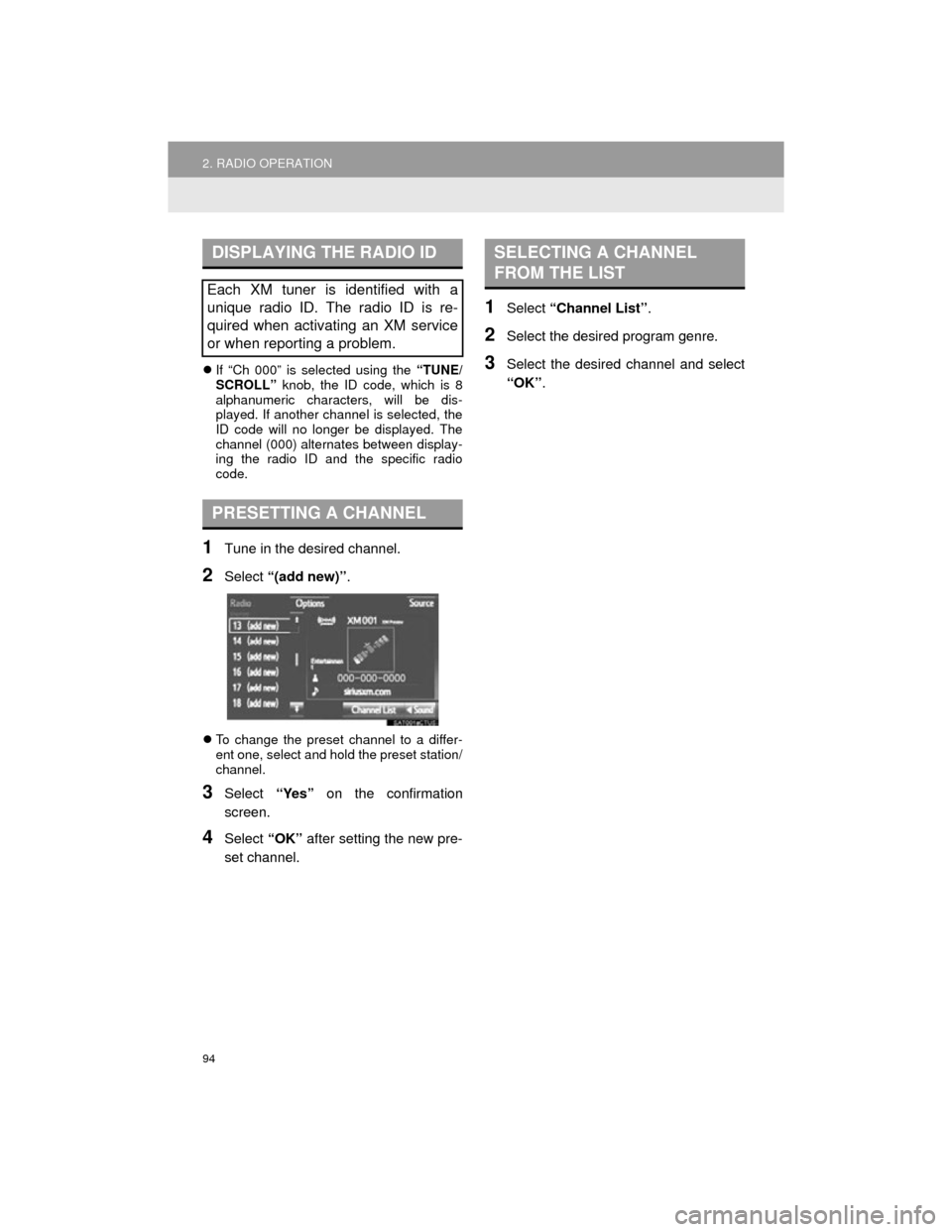
1Tune in the desired channel.
2Select “(add new)” .
To change the preset channel to a differ-
ent one, select and hold the preset station/
channel.
3Select “Yes” on the confirmation
screen.
4Select “OK” after setting the new pre-
set channel.
1Select “Channel List” .
2Select the desired program genre.
3Select the desired channel and select
“OK”.
DISPLAYING THE RADIO ID
Each XM tuner is identified with a
unique radio ID. The radio ID is re-
quired when activating an XM service
or when reporting a problem.
PRESETTING A CHANNEL
SELECTING A CHANNEL
FROM THE LIST
Page 95 of 296
95
2. RADIO OPERATION
Camry_Navi_U
AUDIO SYSTEM
3
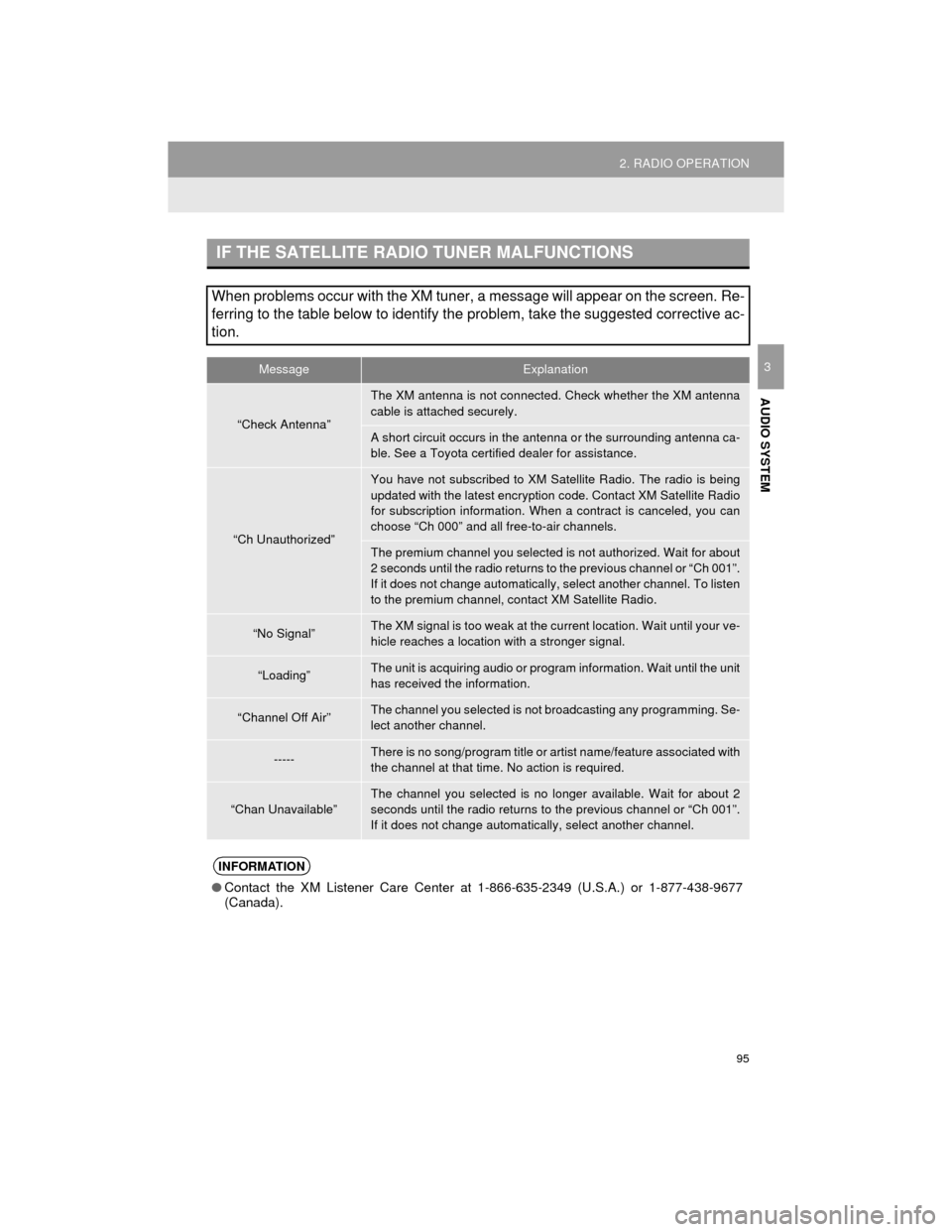
IF THE SATELLITE RADIO TUNER MALFUNCTIONS
When problems occur with the XM tuner, a message will appear on the screen. Re-
ferring to the table below to identify the problem, take the suggested corrective ac-
tion.
MessageExplanation
“Check Antenna”
The XM antenna is not connected. Check whether the XM antenna
cable is attached securely.
A short circuit occurs in the antenna or the surrounding antenna ca-
ble. See a Toyota certified dealer for assistance.
“Ch Unauthorized”
You have not subscribed to XM Satellite Radio. The radio is being
updated with the latest encryption code. Contact XM Satellite Radio
for subscription information. When a contract is canceled, you can
choose “Ch 000” and all free-to-air channels.
The premium channel you selected is not authorized. Wait for about
2 seconds until the radio returns to the previous channel or “Ch 001”.
If it does not change automatically , select another channel. To listen
to the premium channel, contact XM Satellite Radio.
“No Signal”The XM signal is too weak at the current location. Wait until your ve-
hicle reaches a location with a stronger signal.
“Loading”The unit is acquiring audio or program information. Wait until the unit
has received the information.
“Channel Off Air”The channel you selected is not broadcasting any programming. Se-
lect another channel.
-----There is no song/program title or ar tist name/feature associated with
the channel at that time. No action is required.
“Chan Unavailable”The channel you selected is no longer available. Wait for about 2
seconds until the radio returns to the previous channel or “Ch 001”.
If it does not change automatically, select another channel.
INFORMATION
● Contact the XM Listener Care Center at 1-866-635-2349 (U.S.A.) or 1-877-438-9677
(Canada).
Page 96 of 296
96
2. RADIO OPERATION
Camry_Navi_U
3. INTERNET RADIO*
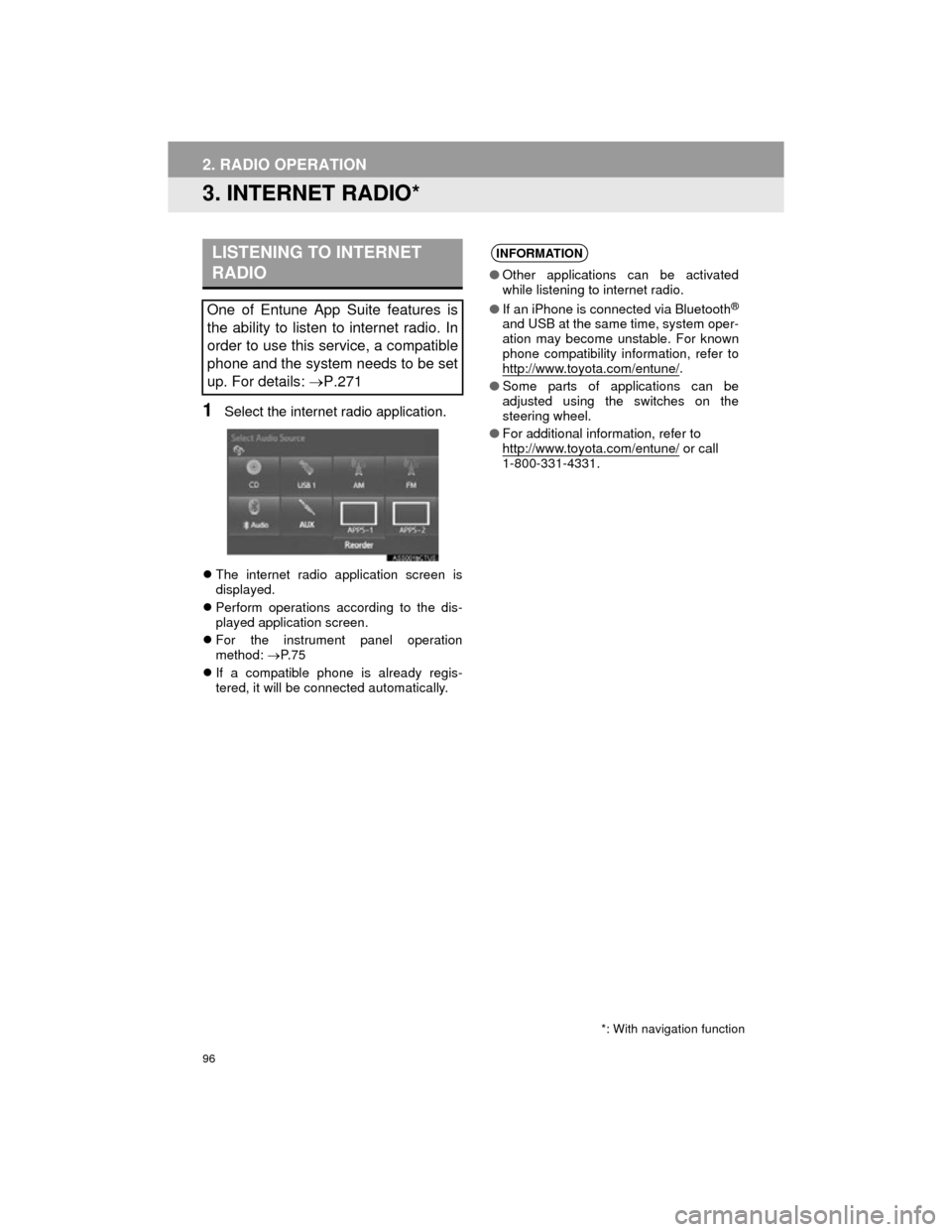
1Select the internet radio application.
The internet radio application screen is
displayed.
Perform operations according to the dis-
played application screen.
For the instrument panel operation
method: P. 7 5
If a compatible phone is already regis-
tered, it will be connected automatically.
LISTENING TO INTERNET
RADIO
One of Entune App Suite features is
the ability to listen to internet radio. In
order to use this service, a compatible
phone and the system needs to be set
up. For details: P.271
*: With navigation function
INFORMATION
● Other applications can be activated
while listening to internet radio.
● If an iPhone is connected via Bluetooth
®
and USB at the same time, system oper-
ation may become unstable. For known
phone compatibility information, refer to
http://www.toyota.com/entune/
.
● Some parts of applications can be
adjusted using the switches on the
steering wheel.
● For additional information, refer to
http://www.toyota.com/entune/
or call
1-800-331-4331.
Page 111 of 296
111
3. MEDIA OPERATION
Camry_Navi_U
AUDIO SYSTEM
3
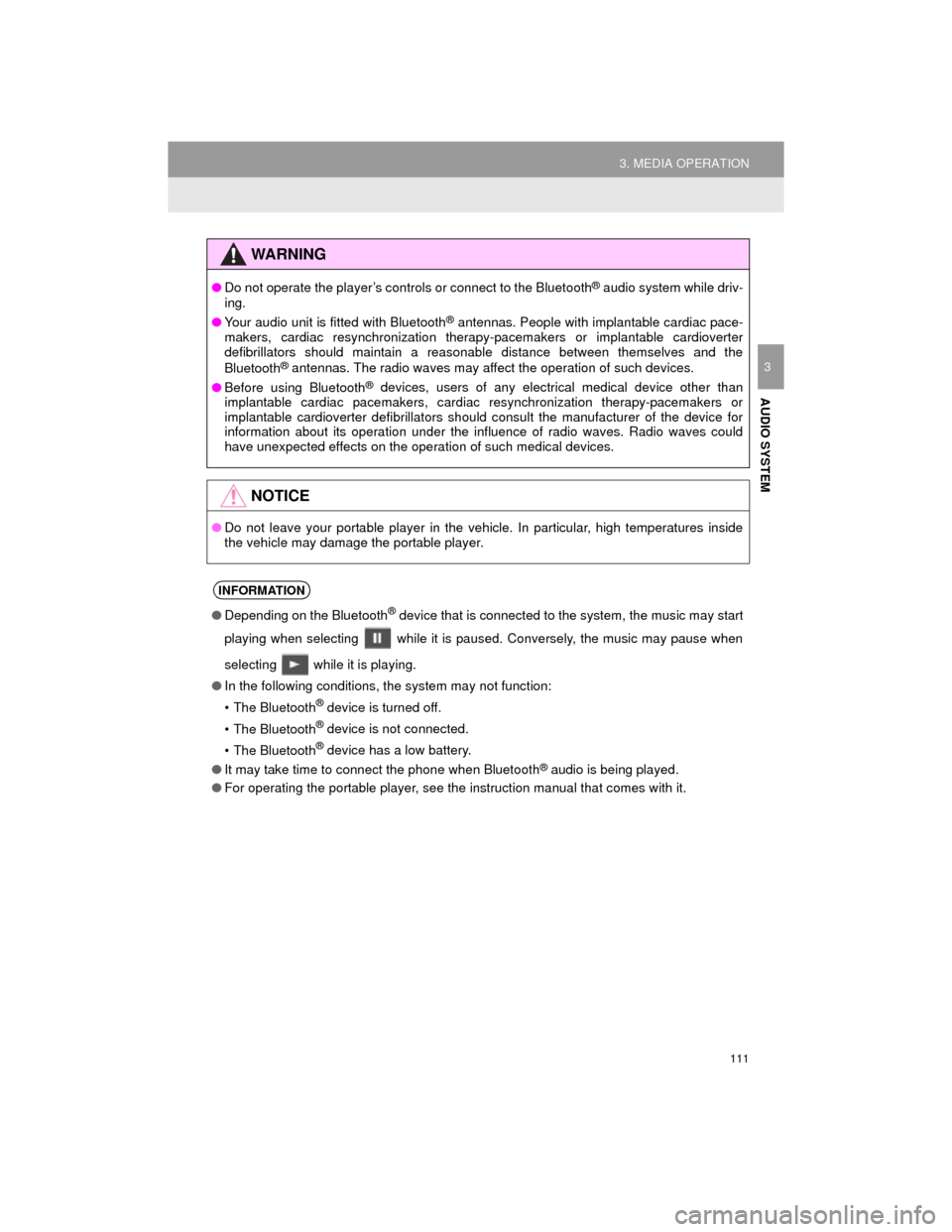
WARNING
●Do not operate the player’s controls or connect to the Bluetooth® audio system while driv-
ing.
● Your audio unit is fitted with Bluetooth
® antennas. People with implantable cardiac pace-
makers, cardiac resynchronization therapy-pacemakers or implantable cardioverter
defibrillators should maintain a reasonable distance between themselves and the
Bluetooth
® antennas. The radio waves may affect the operation of such devices.
● Before using Bluetooth
® devices, users of any electrical medical device other than
implantable cardiac pacemakers, cardiac resynchronization therapy-pacemakers or
implantable cardioverter defibrillators should consult the manufacturer of the device for
information about its operation under the influence of radio waves. Radio waves could
have unexpected effects on the operation of such medical devices.
NOTICE
● Do not leave your portable player in the vehicle. In particular, high temperatures inside
the vehicle may damage the portable player.
INFORMATION
●Depending on the Bluetooth® device that is connected to the system, the music may start
playing when selecting while it is paused. Conversely, the music may pause when
selecting while it is playing.
● In the following conditions, the system may not function:
• The Bluetooth
® device is turned off.
• The Bluetooth
® device is not connected.
• The Bluetooth
® device has a low battery.
● It may take time to connect the phone when Bluetooth
® audio is being played.
● For operating the portable player, see the instruction manual that comes with it.
Page 117 of 296
117
4. AUDIO REMOTE CONTROLS
Camry_Navi_U
AUDIO SYSTEM
3
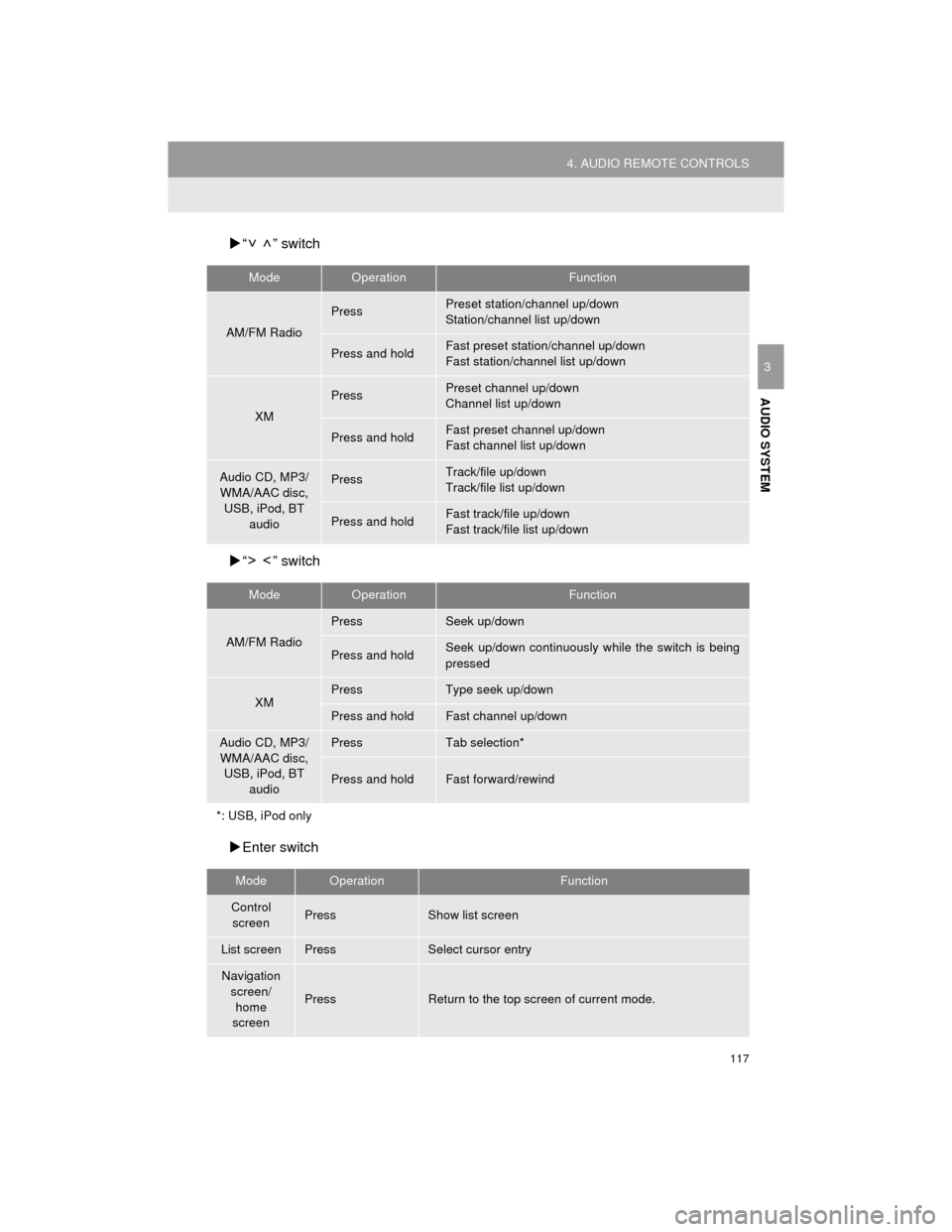
“ ” switch
“ ” switch
Enter switch
ModeOperationFunction
AM/FM Radio
PressPreset station/channel up/down
Station/channel list up/down
Press and holdFast preset station/channel up/down
Fast station/channel list up/down
XM
PressPreset channel up/down
Channel list up/down
Press and holdFast preset channel up/down
Fast channel list up/down
Audio CD, MP3/
WMA/AAC disc,
USB, iPod, BT audioPressTrack/file up/down
Track/file list up/down
Press and holdFast track/file up/down
Fast track/file list up/down
ModeOperationFunction
AM/FM Radio
PressSeek up/down
Press and holdSeek up/down continuously while the switch is being
pressed
XMPressType seek up/down
Press and holdFast channel up/down
Audio CD, MP3/WMA/AAC disc, USB, iPod, BT
audioPressTab selection*
Press and holdFast forward/rewind
*: USB, iPod only
ModeOperationFunction
Control screenPressShow list screen
List screenPressSelect cursor entry
Navigation screen/
home
screen
PressReturn to the top screen of current mode.
Page 119 of 296
119
Camry_Navi_U
AUDIO SYSTEM
3
5. SETUP
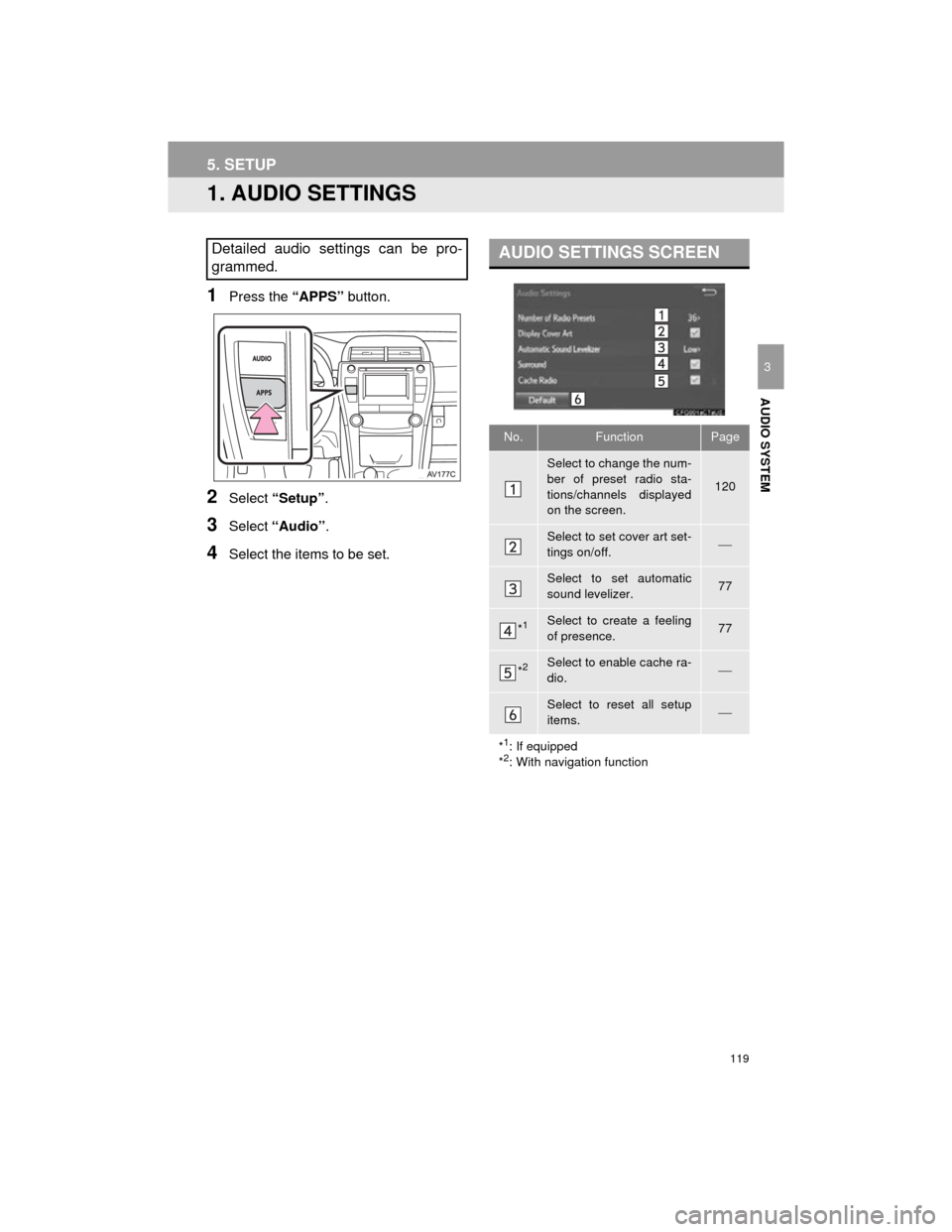
1. AUDIO SETTINGS
1Press the “APPS” button.
2Select “Setup” .
3Select “Audio”.
4Select the items to be set.
Detailed audio settings can be pro-
grammed.AUDIO SETTINGS SCREEN
No.FunctionPage
Select to change the num-
ber of preset radio sta-
tions/channels displayed
on the screen.
120
Select to set cover art set-
tings on/off.
Select to set automatic
sound levelizer.77
*1Select to create a feeling
of presence.77
*2Select to enable cache ra-
dio.
Select to reset all setup
items.
*
1: If equipped
*2: With navigation function
Page 120 of 296
120
5. SETUP
Camry_Navi_U
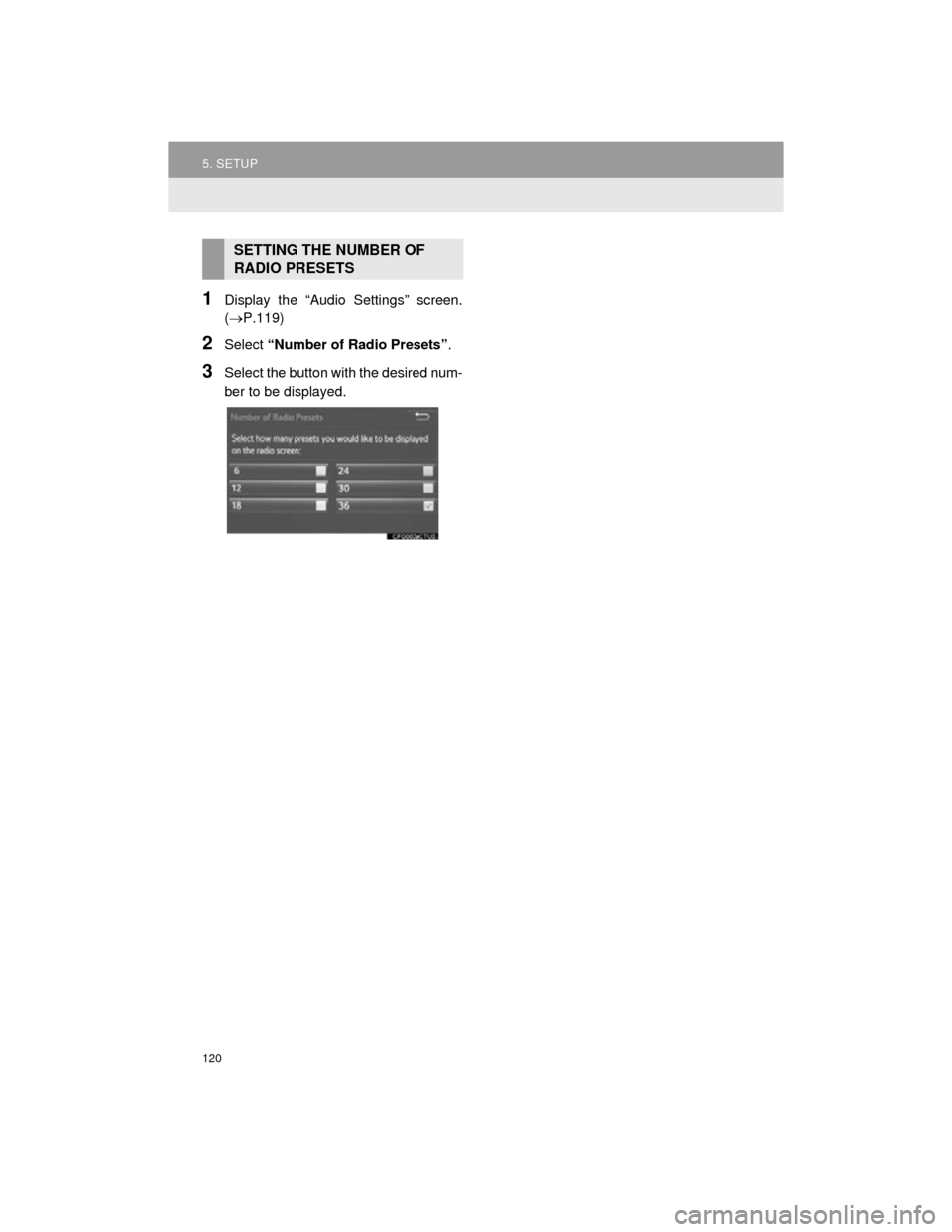
1Display the “Audio Settings” screen.
(P.119)
2Select “Number of Radio Presets” .
3Select the button with the desired num-
ber to be displayed.
SETTING THE NUMBER OF
RADIO PRESETS