AUX TOYOTA CAMRY 2015 XV50 / 9.G Navigation Manual
[x] Cancel search | Manufacturer: TOYOTA, Model Year: 2015, Model line: CAMRY, Model: TOYOTA CAMRY 2015 XV50 / 9.GPages: 296, PDF Size: 4.22 MB
Page 9 of 296

9
Camry_Navi_U
1
2
3
4
5
6
7
9
8
1. BASIC OPERATION........................ 72
QUICK REFERENCE ............................ 72
SOME BASICS ...................................... 74
2. RADIO OPERATION ....................... 80
AM/FM RADIO....................................... 80
XM Satellite Radio ................................. 90
INTERNET RADIO ................................ 96
3. MEDIA OPERATION ....................... 97
CD ......................................................... 97
USB MEMORY .................................... 100
iPod ..................................................... 104
Bluetooth
® AUDIO ............................... 108
AUX ..................................................... 114
4. AUDIO REMOTE CONTROLS ................................. 116
STEERING SWITCHES ...................... 116
5. SETUP ........................................... 119
AUDIO SETTINGS .............................. 119
6. TIPS FOR OPERATING THE AUDIO SYSTEM .................. 121
OPERATING INFORMATION ............. 121
1. VOICE COMMAND SYSTEM OPERATION ................................ 132
VOICE COMMAND SYSTEM.............. 132
CASUAL SPEECH
RECOGNIZATION ............................ 138
COMMAND LIST ................................. 139
1. USEFUL INFORMATION .............. 142
RECEIVING WEATHER INFORMATION ................................. 142
RECEIVING TRAFFIC MAP INFORMATION ................................. 144
DATA SERVICES SETTINGS ............. 145
1. REAR VIEW MONITOR SYSTEM ...................................... 148
REAR VIEW MONITOR SYSTEM ....... 148
REAR VIEW MONITOR SYSTEM
PRECAUTIONS ................................ 150
THINGS YOU SHOULD KNOW .......... 155
1. PHONE OPERATION (HANDS-FREE SYSTEM
FOR CELLULAR PHONES)........ 158
QUICK REFERENCE .......................... 158
SOME BASICS .................................... 159
CALLING ON THE Bluetooth
®
PHONE .............................................. 162
RECEIVING ON THE Bluetooth
®
PHONE .............................................. 167
TALKING ON THE Bluetooth
®
PHONE .............................................. 168
Bluetooth
® PHONE MESSAGE
FUNCTION ........................................ 171
2. SETUP ........................................... 176
PHONE/MESSAGE SETTINGS .......... 176
3. WHAT TO DO IF... ....................... 188
TROUBLESHOOTING ......................... 188
3AUDIO SYSTEM
4VOICE COMMAND SYSTEM
5INFORMATION
6PERIPHERAL MONITORING
SYSTEM
7PHONE
Page 46 of 296

46
2. Bluetooth® SETTINGS
Camry_Navi_U
U.S.A. (Without navigation function)
Canada (Without navigation function)
CERTIFICATION
FCC ID: AJDK066
This device complies with part 15 of the
FCC Rules. Operation is subject to the
following two conditions: (1) This device
may not cause harmful interference,
and (2) this device must accept any
interference received, including
interference that may cause undesired
operation.
CAUTION:
FCC WARNING: Changes or modifica-
tions not expressly approved by the
party responsible for compliance could
void the user’s authority to operate the
equipment.
CAUTION: Radio Frequency Radiation
Exposure
This equipment complies with FCC radi-
ation exposure limits set forth for an
uncontrolled environment and meets the
FCC radio frequency (RF) Exposure
Guidelines in Supplement C to OET65.
This equipment should be installed and
operated keeping the radiator at least
20cm or more away from person’s body
(excluding extremities: hands, wrists,
feet and ankles).
Co-location: This transmitter must not
be co-located or operated in conjunction
with any other antenna or transmitter.
IC: 775E-K066
This device complies with Part 15 of
FCC Rules and Industry Canada
licence-exempt RSS standard(s). Oper-
ation is subject to the following two con-
ditions: (1) this device may not cause
interference, and (2) this device must
accept any interference, including inter-
ference that may cause undesired oper-
ation of this device.
Le présent appareil est conforme aux la
partie 15 des règles de la FCC et CNR
d'Industrie Canada applicables aux
appareils radio exempts de licence.
L'exploitation est autorisée aux deux
conditions suivantes: (1) l'appareil ne
doit pas produire de brouillage, et (2)
l'utilisateur de l'appareil doit accepter
tout brouillage radioélectrique subi,
même si le brouillage est susceptible
d'en compromettre le fonctionnement.
Page 47 of 296

47
2. Bluetooth® SETTINGS
Camry_Navi_U
BASIC FUNCTION
2
U.S.A. (With navigation function)CAUTION:
CAUTION: Radio Frequency Radiation
Exposure
This equipment complies with FCC/IC
radiation exposure limits set forth for an
uncontrolled environment and meets the
FCC radio frequency (RF) Exposure
Guidelines in Supplement C to OET65
and RSS-102 of the IC radio frequency
(RF) Exposure rules. This equipment
should be installed and operated keep-
ing the radiator at least 20cm or more
away from person’s body (excluding
extremities: hands, wrists, feet and
ankles).
Cet équipement est conforme aux lim-
ites d’exposition aux rayonnements
énoncées pour un environnement non
contrôlé et respecte les règles les
radioélectriques (RF) de la FCC lignes
directrices d'exposition dans le Supplé-
ment C à OET65 et d’exposition aux
fréquences radioélectriques (RF) CNR-
102 de l’IC. Cet équipement doit être
installé et utilisé en gardant une dis-
tance de 20 cm ou plus entre le disposi-
tif rayonnant et le corps (à l’exception
des extrémités : mains, poignets, pieds
et chevilles).
The Bluetooth
® antenna cannot be
removed (or replaced) by user.
L'antenne Bluetooth
® ne peut pas être
supprimé (ou remplacé) par l'utilisateur.
FCC ID: BABFT0044D
This device complies with part 15 of the
FCC Rules. Operation is subject to the
following two conditions: (1) This device
may not cause harmful interference,
and (2) this device must accept any
interference received, including
interference that may cause undesired
operation.
CAUTION:
FCC WARNING: Changes or modifica-
tions not expressly approved by the
party responsible for compliance could
void the user’s authority to operate the
equipment.
CAUTION: Radio Frequency Radiation
Exposure
This equipment complies with FCC radi-
ation exposure limits set forth for an
uncontrolled environment and meets the
FCC radio frequency (RF) Exposure
Guidelines. This equipment should be
installed and operated keeping the radi-
ator at least 20cm or more away from
person's body in normal use position.
Co-location: This transmitter must not
be co-located or operated in conjunction
with any other antenna or transmitter.
Page 70 of 296
70
Camry_Navi_U
1. QUICK REFERENCE ..................... 72
2. SOME BASICS............................... 74
TURNING THE SYSTEM ON AND OFF ...................................... 75
SELECTING AN AUDIO SOURCE ........ 75
DISC SLOT ............................................ 76
USB/AUX PORT .................................... 77
SOUND SETTINGS ............................... 77
VOICE COMMAND SYSTEM ................ 79
1. AM/FM RADIO ............................... 80
OVERVIEW ............................................ 80
PRESETTING A STATION .................... 83
SELECTING A STATION FROM THE LIST ............................................. 83
CACHING A RADIO PROGRAM ........... 84
RADIO BROADCAST DATA SYSTEM .............................................. 85
TRAFFIC ANNOUNCEMENT (FM RADIO) ......................................... 86
USING HD Radio™ TECHNOLOGY.................................... 86
AVAILABLE HD Radio™ TECHNOLOGY.................................... 87
TROUBLESHOOTING GUIDE ............... 89
2. XM Satellite Radio ........................ 90
OVERVIEW ............................................ 90
HOW TO SUBSCRIBE TO AN XM Satellite Radio...................................... 92
DISPLAYING THE RADIO ID................. 94
PRESETTING A CHANNEL ................... 94
SELECTING A CHANNEL FROM THE LIST ............................................. 94
IF THE SATELLITE RADIO TUNER MALFUNCTIONS ................................ 95
3. INTERNET RADIO......................... 96
LISTENING TO INTERNET RADIO ....... 96
1BASIC OPERATION2RADIO OPERATION
3
AUDIO SYSTEM
Page 71 of 296
3
71
Camry_Navi_U
4
5
6
7
8
9
1
2
3
1. CD .................................................. 97
OVERVIEW ........................................... 97
PLAYING AN AUDIO CD ...................... 99
PLAYING AN MP3/WMA/AAC DISC.................................................... 99
2. USB MEMORY ............................. 100
OVERVIEW ......................................... 100
PLAYING A USB AUDIO ..................... 103
3. iPod .............................................. 104
OVERVIEW ......................................... 104
iPod AUDIO ......................................... 107
iPod VIDEO ......................................... 107
4. Bluetooth® AUDIO ...................... 108
OVERVIEW ......................................... 108
CONNECTING A Bluetooth®
DEVICE ............................................. 113
LISTENING TO Bluetooth
®
AUDIO ............................................... 113
5. AUX .............................................. 114
OVERVIEW ......................................... 114
1. STEERING SWITCHES............... 116
1. AUDIO SETTINGS ...................... 119
AUDIO SETTINGS SCREEN............... 119
1. OPERATING INFORMATION ......................... 121
RADIO.................................................. 121
CD PLAYER AND DISC ...................... 122
iPod ...................................................... 124
FILE INFORMATION ........................... 125
TERMS ................................................ 128
ERROR MESSAGES ........................... 129
3MEDIA OPERATION4AUDIO REMOTE CONTROLS
5SETUP
6TIPS FOR OPERATING THE
AUDIO SYSTEM
AUDIO SYSTEM
Page 73 of 296
73
1. BASIC OPERATION
Camry_Navi_U
AUDIO SYSTEM
3
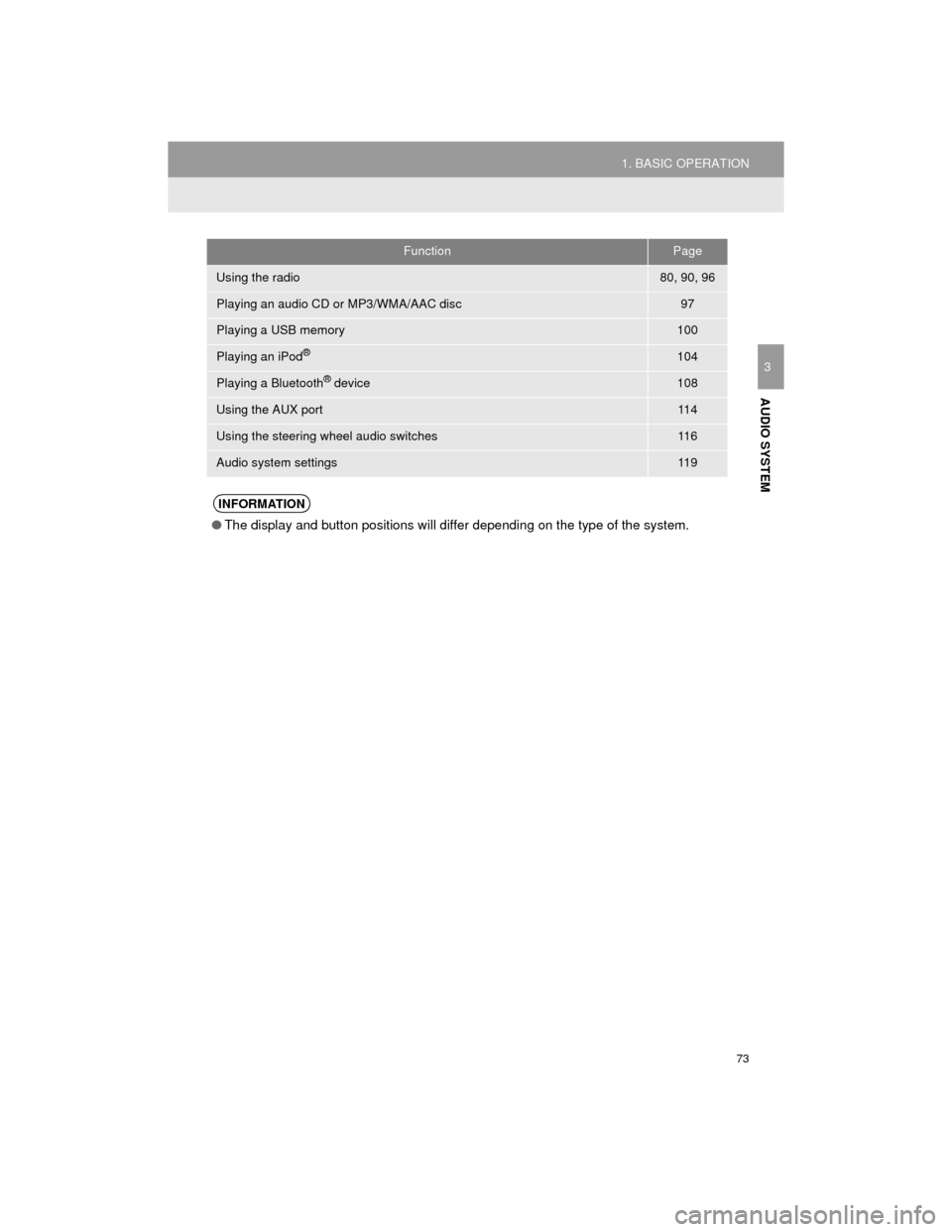
FunctionPage
Using the radio80, 90, 96
Playing an audio CD or MP3/WMA/AAC disc97
Playing a USB memory100
Playing an iPod®104
Playing a Bluetooth® device108
Using the AUX port11 4
Using the steering wheel audio switches11 6
Audio system settings11 9
INFORMATION
●The display and button positions will differ depending on the type of the system.
Page 77 of 296
77
1. BASIC OPERATION
Camry_Navi_U
AUDIO SYSTEM
3
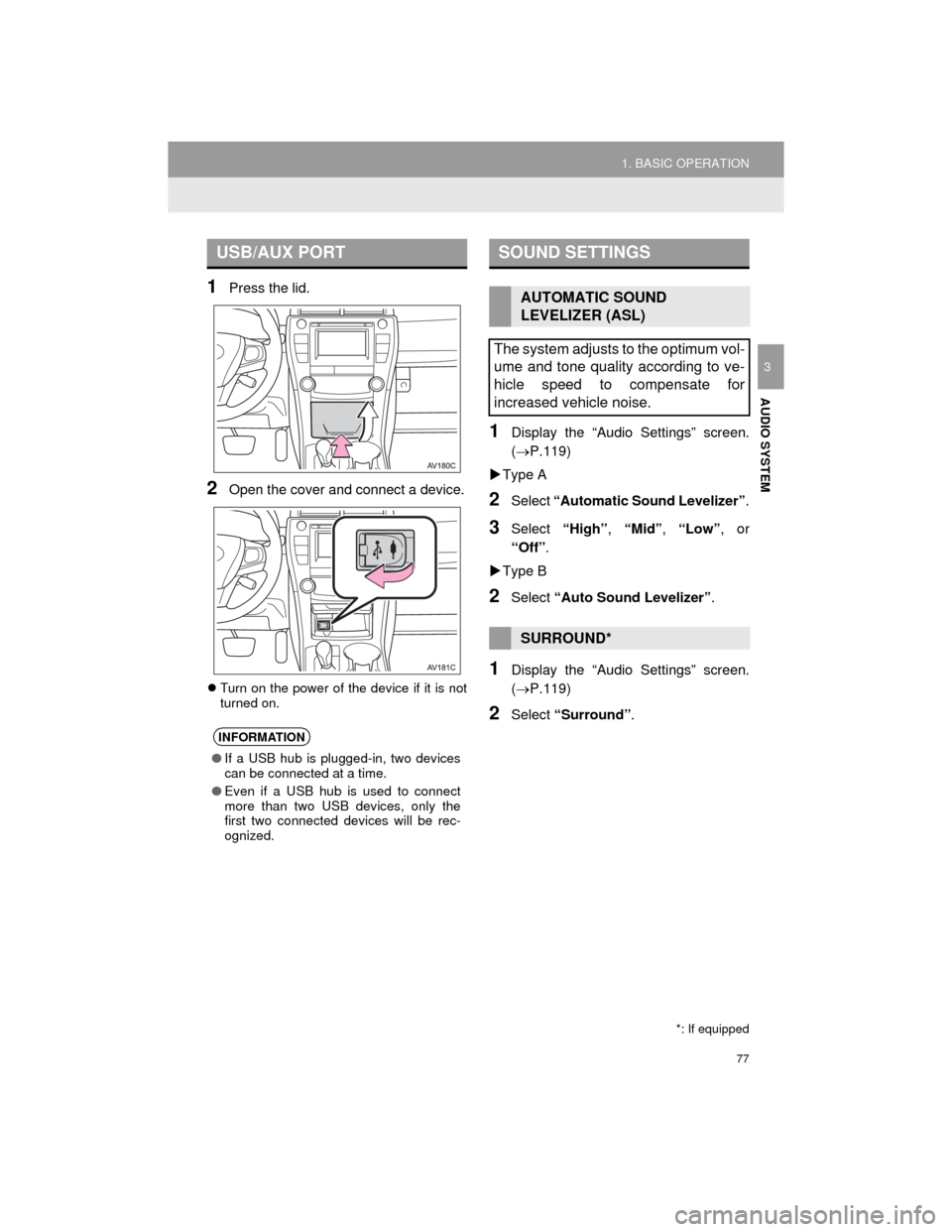
1Press the lid.
2Open the cover and connect a device.
Turn on the power of the device if it is not
turned on.
1Display the “Audio Settings” screen.
(P.119)
Type A
2Select “Automatic Sound Levelizer” .
3Select “High”, “Mid”, “Low”, or
“Off” .
Type B
2Select “Auto Sound Levelizer” .
1Display the “Audio Settings” screen.
(P.119)
2Select “Surround” .
USB/AUX PORT
INFORMATION
●If a USB hub is plugged-in, two devices
can be connected at a time.
● Even if a USB hub is used to connect
more than two USB devices, only the
first two connected devices will be rec-
ognized.
SOUND SETTINGS
AUTOMATIC SOUND
LEVELIZER (ASL)
The system adjusts to the optimum vol-
ume and tone quality according to ve-
hicle speed to compensate for
increased vehicle noise.
SURROUND*
*: If equipped
Page 114 of 296
114
3. MEDIA OPERATION
Camry_Navi_U
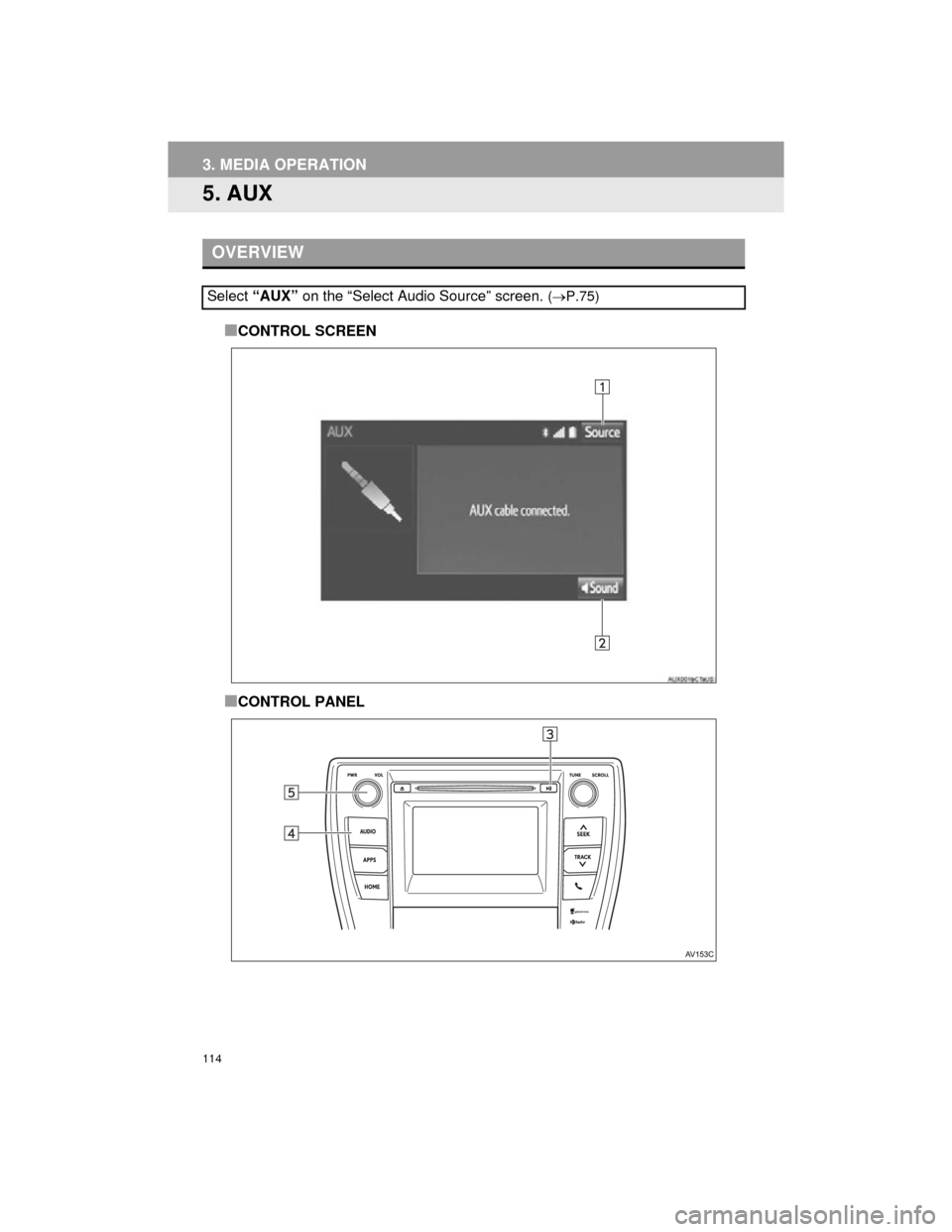
5. AUX
■CONTROL SCREEN
■CONTROL PANEL
OVERVIEW
Select “AUX” on the “Select Audio Source” screen. (P.75)
Page 116 of 296
116
Camry_Navi_U
4. AUDIO REMOTE CONTROLS
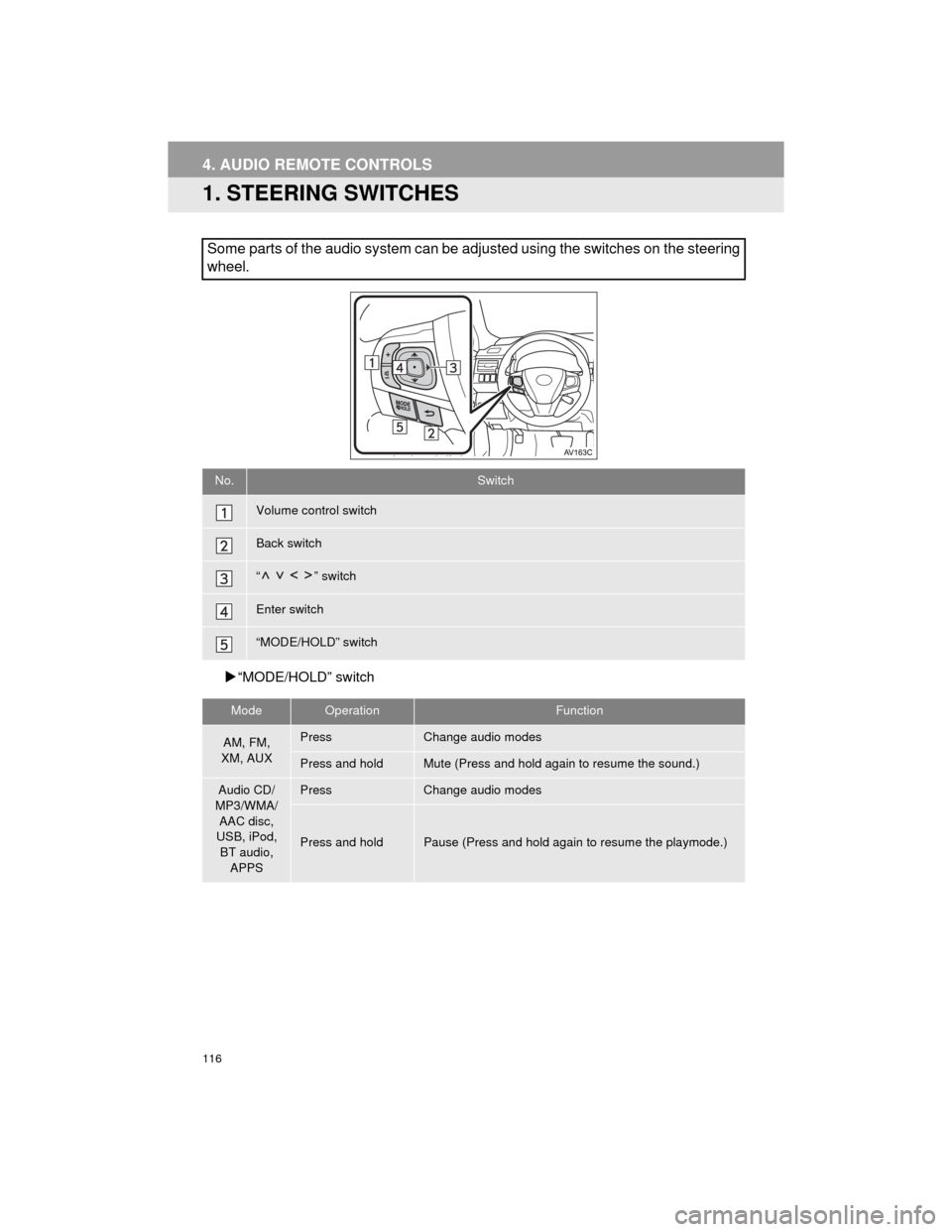
1. STEERING SWITCHES
“MODE/HOLD” switch
Some parts of the audio system can be adjusted using the switches on the steering
wheel.
No.Switch
Volume control switch
Back switch
“ ” switch
Enter switch
“MODE/HOLD” switch
ModeOperationFunction
AM, FM,
XM, AUXPressChange audio modes
Press and holdMute (Press and hold again to resume the sound.)
Audio CD/
MP3/WMA/ AAC disc,
USB, iPod,
BT audio, APPSPressChange audio modes
Press and holdPause (Press and hold again to resume the playmode.)
Page 282 of 296

282
ALPHABETICAL INDEX
Camry_Navi_U
A
AAC.......................................................... 97
AM............................................................ 80
APPS button ............................................ 12
“Apps” screen........................................... 14
AUDIO button........................................... 12
Audio settings ........................................ 119
AUX........................................................ 114
B
Bluetooth®................................................ 42
Profiles ................................................. 44
Registering a Bluetooth
® audio
player ................................................ 43
Registering a Bluetooth
® phone ........... 42
Bluetooth® audio .................................... 108
Connecting a Bluetooth® device ........ 113
Listening to Bluetooth® audio ............. 113
Bluetooth® phone................................... 158
Bluetooth® phone message function ..... 171
C
Calling on the Bluetooth® phone ............ 162
Casual speech recognization ................. 138
CD ............................................................ 97
Playing an audio CD ............................. 99
Playing an MP3/WMA/AAC disc ........... 99
Command list ......................................... 139
D
Data services settings ............................ 145
Setting download methods ................. 145
Destination search screen...................... 214
Driver settings .......................................... 65