key TOYOTA CAMRY 2017 XV50 / 9.G Owners Manual
[x] Cancel search | Manufacturer: TOYOTA, Model Year: 2017, Model line: CAMRY, Model: TOYOTA CAMRY 2017 XV50 / 9.GPages: 568, PDF Size: 13.15 MB
Page 484 of 568
4848-2. Steps to take in an emergency
CAMRY_U (OM33C64U)
Set the parking brake.
Vehicles without a smart key system: Turn the engine switch to the
“ACC” position.
Vehicles with a smart key system: Turn the engine switch to
ACCESSORY mode.
Depress the brake pedal.
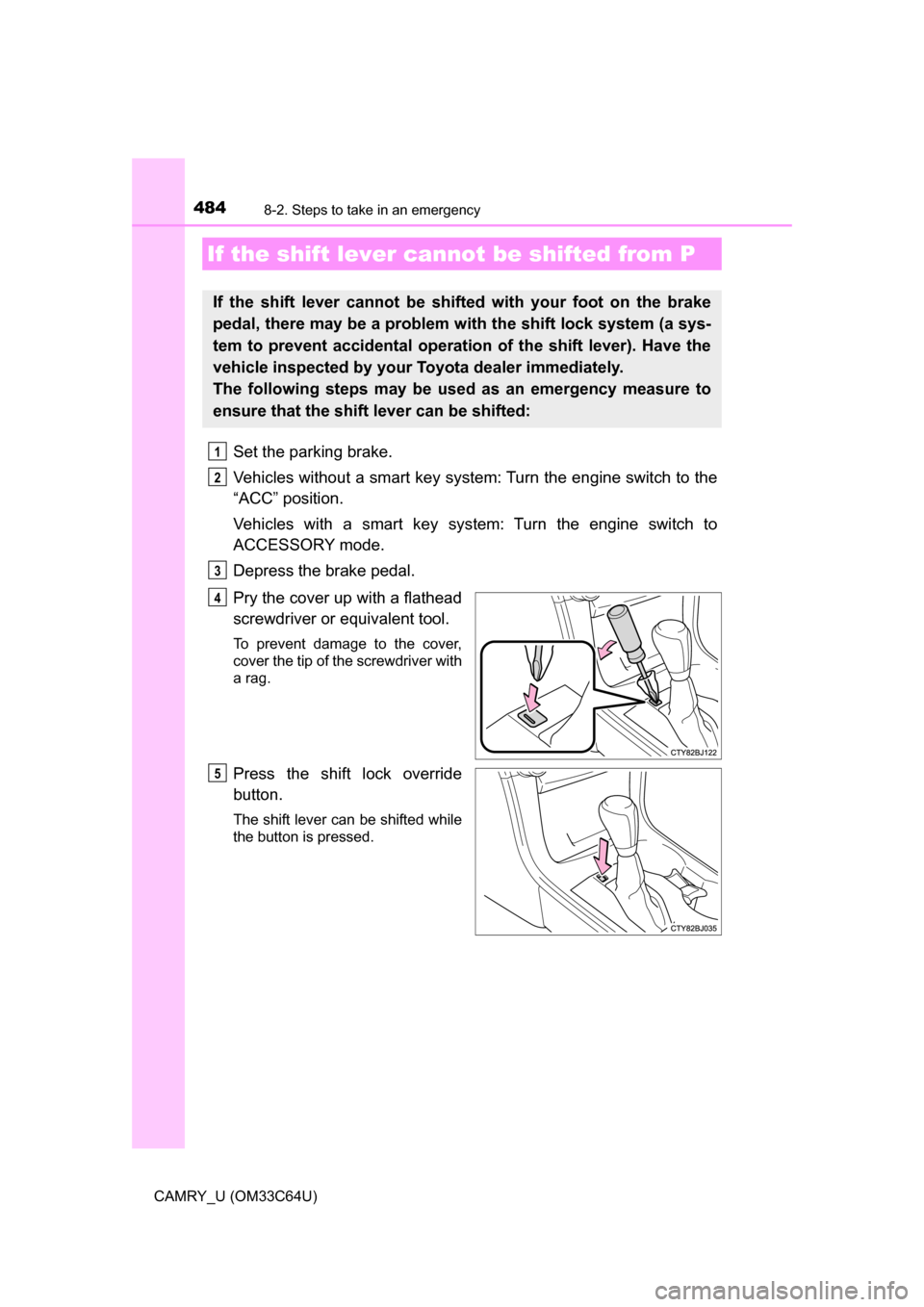
Pry the cover up with a flathead
screwdriver or equivalent tool.
To prevent damage to the cover,
cover the tip of the screwdriver with
a rag.
Press the shift lock override
button.
The shift lever can be shifted while
the button is pressed.
If the shift lever cannot be shifted from P
If the shift lever cannot be shifted with your foot on the brake
pedal, there may be a problem with the shift lock system (a sys-
tem to prevent accidental operation of the shift lever). Have the
vehicle inspected by your Toyota dealer immediately.
The following steps may be used as an emergency measure to
ensure that the shift lever can be shifted:
1
2
3
4
5
Page 485 of 568
4858-2. Steps to take in an emergency
8
When trouble arises
CAMRY_U (OM33C64U)
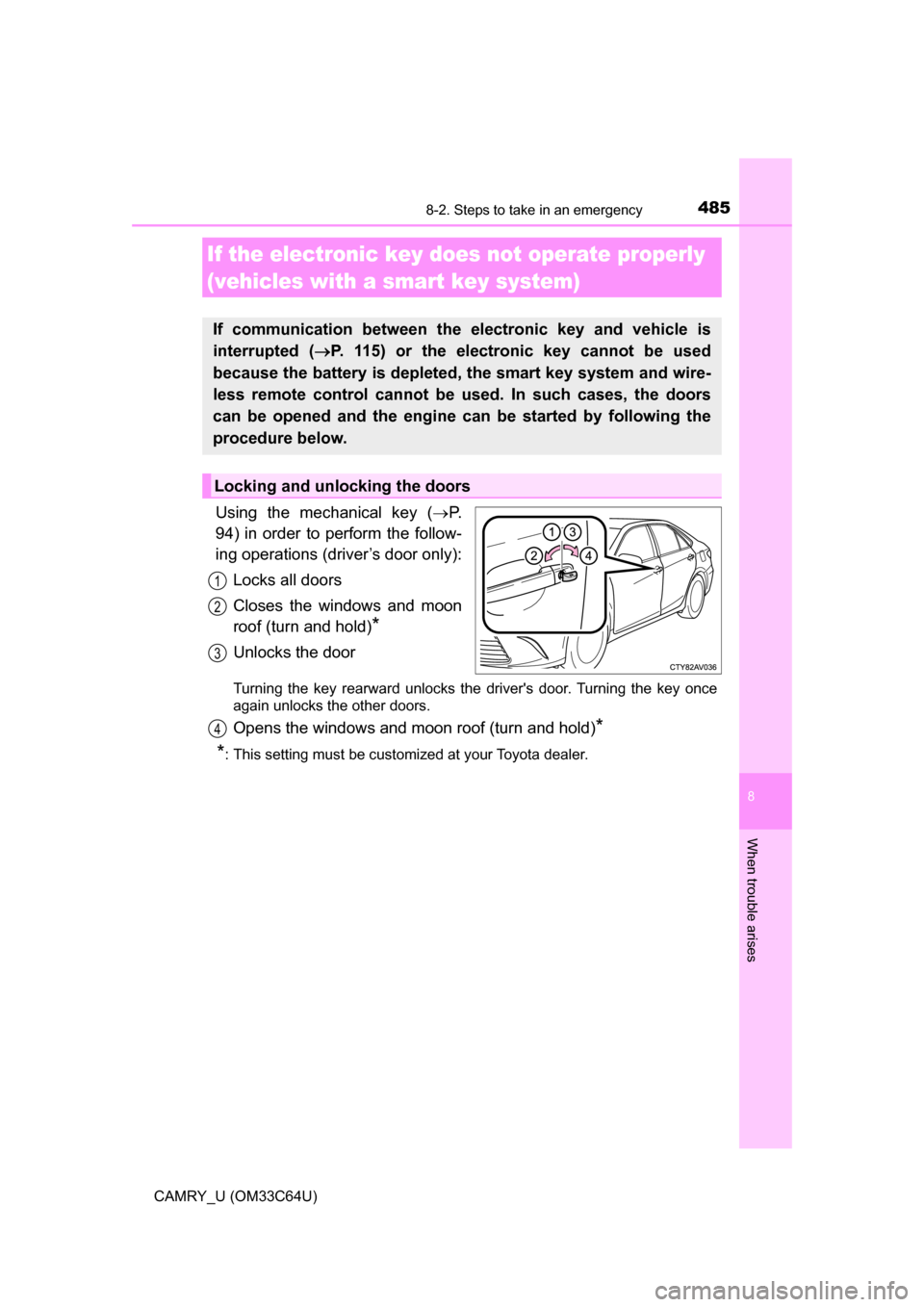
Using the mechanical key (P.
94) in order to perform the follow-
ing operations (driver’s door only):
Locks all doors
Closes the windows and moon
roof (turn and hold)
*
Unlocks the door
Turning the key rearward unlocks the driver's door. Turning the key once
again unlocks the other doors.
Opens the windows and moon roof (turn and hold)*
*
: This setting must be customized at your Toyota dealer.
If the electronic key does not operate properly
(vehicles with a smart key system)
If communication between the electronic key and vehicle is
interrupted ( P. 115) or the electronic key cannot be used
because the battery is depleted, the smart key system and wire-
less remote control cannot be used. In such cases, the doors
can be opened and the engine ca n be started by following the
procedure below.
Locking and unlocking the doors
1
2
3
4
Page 486 of 568
4868-2. Steps to take in an emergency
CAMRY_U (OM33C64U)
Ensure that the shift lever is in P and firmly depress the brake
pedal.
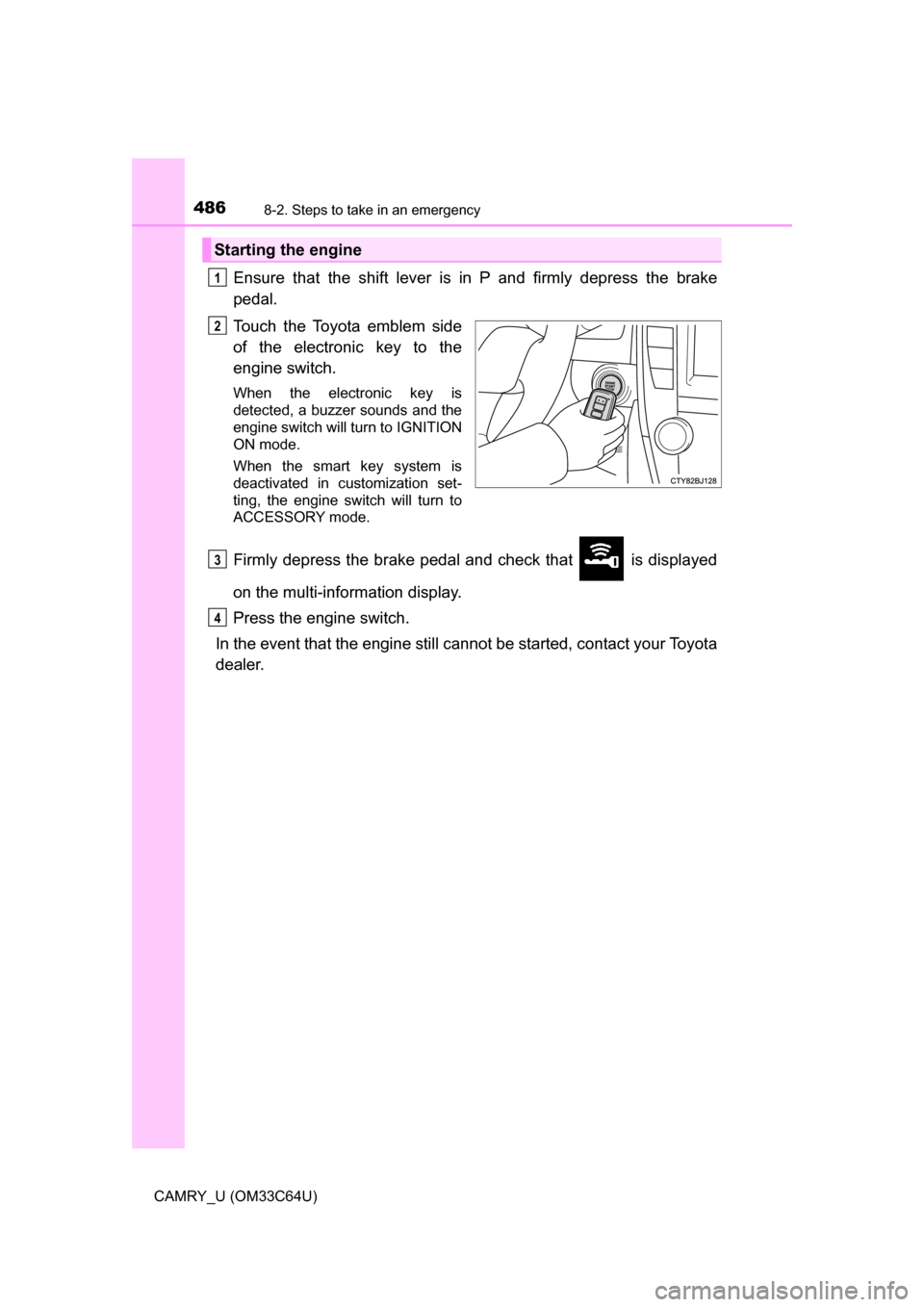
Touch the Toyota emblem side
of the electronic key to the
engine switch.
When the electronic key is
detected, a buzzer sounds and the
engine switch will turn to IGNITION
ON mode.
When the smart key system is
deactivated in customization set-
ting, the engine switch will turn to
ACCESSORY mode.
Firmly depress the brake pedal and check that is displayed
on the multi-information display.
Press the engine switch.
In the event that the engine still ca nnot be started, contact your Toyota
dealer.
Starting the engine
1
2
3
4
Page 487 of 568
4878-2. Steps to take in an emergency
8
When trouble arises
CAMRY_U (OM33C64U)
■Stopping the engine
Shift the shift lever to P and press the engine switch as you normally do when
stopping the engine.
■ Replacing the key battery
As the above procedure is a temporary measure, it is recommended that the
electronic key battery be replaced immediately when the battery is depleted.
(P. 420)
■ Changing engine switch modes
Release the brake pedal and press the engine switch in step above.
The engine does not start and modes will be changed each time the switch is
pressed. (P. 156)
■ When the electronic key does not work properly
●Make sure that the smart key system has not been deactivated in the cus-
tomization setting. If it is off, turn the function on.
(Customizable features P. 523)
● Check if battery-saving mode is set. If it is set, cancel the function.
(P. 114)
WARNING
■ When using the mechanical key an d operating the power windows or
moon roof (if equipped)
Operate the power window or moon roof after checking to make sure that
there is no possibility of any passenger having any of their body parts
caught in the window or moon roof. Also, do not allow children to operate
the mechanical key. It is possible for children and other passengers to get
caught in the power window or moon roof.
3
Page 488 of 568
4888-2. Steps to take in an emergency
CAMRY_U (OM33C64U)
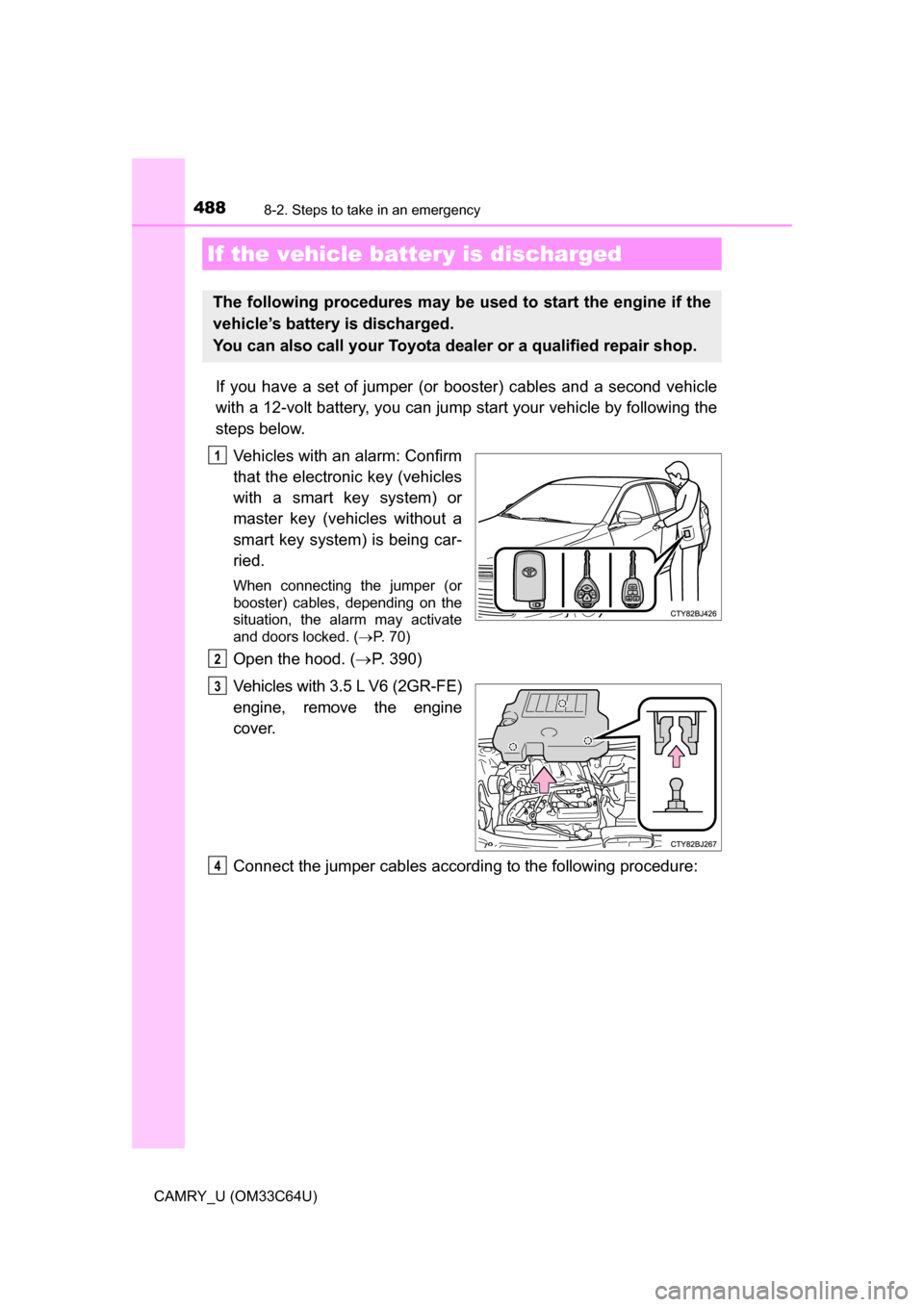
If you have a set of jumper (or booster) cables and a second vehicle
with a 12-volt battery, you can jump start your vehicle by following the
steps below.
Vehicles with an alarm: Confirm
that the electronic key (vehicles
with a smart key system) or
master key (vehicles without a
smart key system) is being car-
ried.
When connecting the jumper (or
booster) cables, depending on the
situation, the alarm may activate
and doors locked. ( P. 70)
Open the hood. ( P. 390)
Vehicles with 3.5 L V6 (2GR-FE)
engine, remove the engine
cover.
Connect the jumper cables according to the following procedure:
If the vehicle bat tery is discharged
The following procedures may be used to start the engine if the
vehicle’s battery is discharged.
You can also call your Toyota de aler or a qualified repair shop.
1
2
3
4
Page 490 of 568
4908-2. Steps to take in an emergency
CAMRY_U (OM33C64U)
Start the engine of the second vehicle. Increase the engine speed
slightly and maintain at that level for approximately 5 minutes to
recharge the batter y of your vehicle.
Vehicles with a smart key system: Open and close any of the doors
of your vehicle with the engine switch off.
Vehicles without a smart key system:
Maintain the engine speed of the second vehicle and turn the
engine switch to the “ON” position, then start the vehicle's engine.
Vehicles with a smart key system:
Maintain the engine speed of the second vehicle and turn the
engine switch to IGNITION ON mode, then start the vehicle's
engine.
Once the vehicle’s engine has star ted, remove the jumper cables in
the exact reverse order from which they were connected.
Once the engine starts, have the v ehicle inspected at your Toyota
dealer as soon as possible.
■ Starting the engine when the battery is discharged
The engine cannot be started by push-starting.
■ To prevent battery discharge
●Turn off the headlights and the audio system while the engine is off.
● Turn off any unnecessary electrical components when the vehicle is running
at a low speed for an extended period, such as in heavy traffic.
■ Charging the battery
The electricity stored in the battery will discharge gradually even when the
vehicle is not in use, due to natural discharge and the draining effects of cer-
tain electrical appliances. If the vehicle is left for a long time, the battery may
discharge, and the engine may be unable to start. (The battery recharges
automatically during driving.)
■ When recharging or replacing the battery
●Vehicles with a smart key system: In some cases, it may not be possible to
unlock the doors using the smart key system when the battery is dis-
charged. Use the wireless remote control or the mechanical key to lock or
unlock the doors.
● Vehicles with a smart key system: The engine may not start on the first
attempt after the battery has recharged but will start normally after the sec-
ond attempt. This is not a malfunction.
5
6
7
8
Page 491 of 568
4918-2. Steps to take in an emergency
8
When trouble arises
CAMRY_U (OM33C64U)●
Vehicles with a smart key system: The engine switch mode is memorized by
the vehicle. When the battery is reconnected, the system will return to the
mode it was in before the battery was discharged. Before disconnecting the
battery, turn the engine switch off.
If you are unsure what mode the engine switch was in before the battery dis-
charged, be especially careful when reconnecting the battery.
WARNING
■Avoiding battery fires or explosions
Observe the following precautions to prevent accidentally igniting the flam-
mable gas that may be emitted from the battery:
● Make sure each jumper cable is connected to the correct terminal and that
it is not unintentionally in contact with any other than the intended terminal.
● Do not allow the other end of the jumper cable connected to the “+” termi-
nal to come into contact with any other parts or metal surfaces in the area,
such as brackets or unpainted metal.
● Do not allow the + and - clamps of the jumper cables to come into contact
with each other.
● Do not smoke, use matches, cigarette lighters or allow open flame near
the battery.
■ Battery precautions
The battery contains poisonous and corrosive acidic electrolyte, while
related parts contain lead and lead compounds. Observe the following pre-
cautions when handling the battery:
● When working with the battery, always wear safety glasses and take care
not to allow any battery fluids (acid) to come into contact with skin, clothing
or the vehicle body.
● Do not lean over the battery.
● In the event that battery fluid comes into contact with the skin or eyes,
immediately wash the affected area with water and seek medical attention.
Place a wet sponge or cloth over the affected area until medical attention
can be received.
● Always wash your hands after handling the battery support, terminals, and
other battery-related parts.
● Do not allow children near the battery.
NOTICE
■ When handling jumper cables
When connecting the jumper cables, ensure that they do not become entan-
gled in the cooling fan or engine drive belt.
Page 526 of 568
5269-2. Customization
CAMRY_U (OM33C64U)
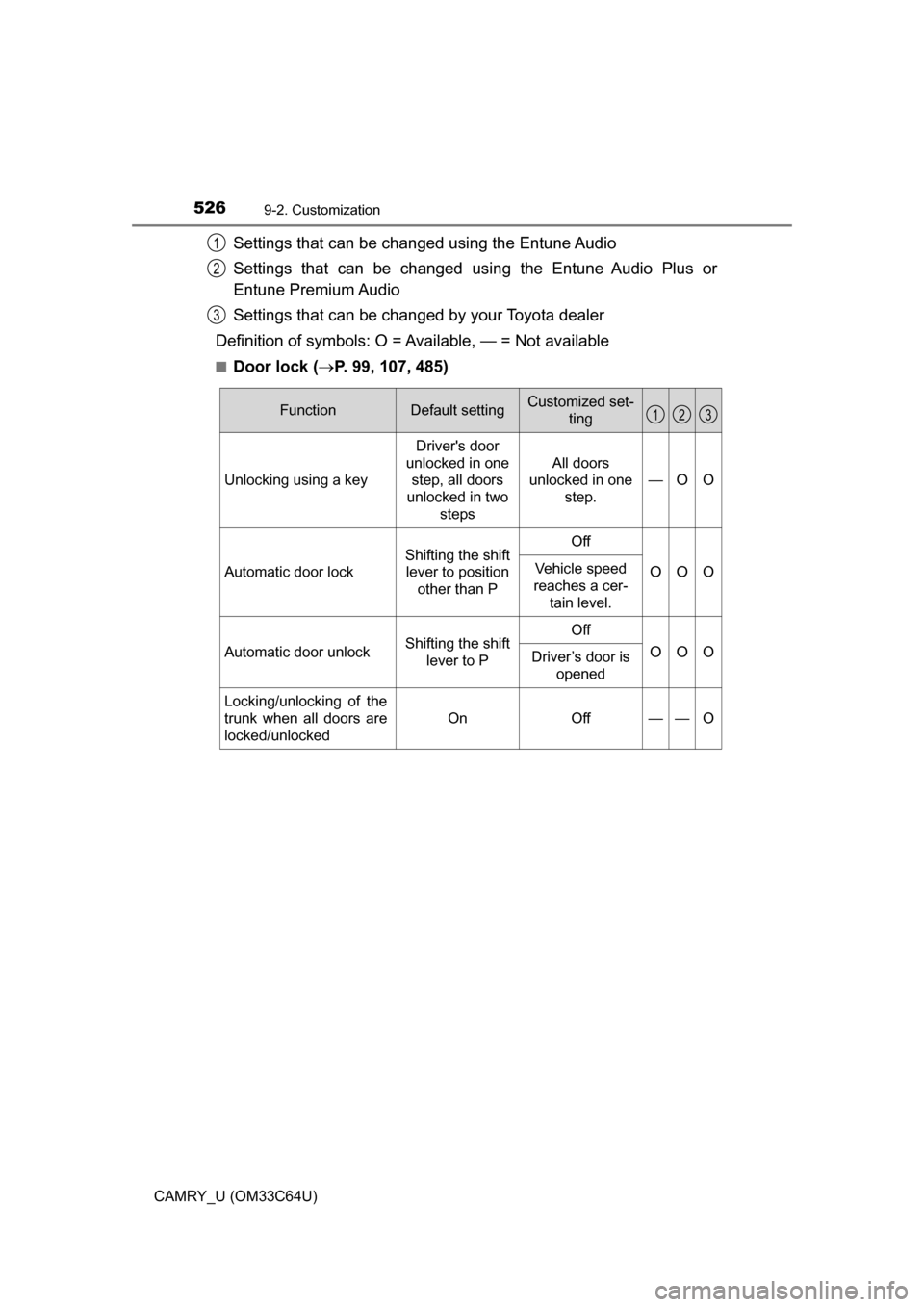
Settings that can be changed using the Entune Audio
Settings that can be changed using the Entune Audio Plus or
Entune Premium Audio
Settings that can be changed by your Toyota dealer
Definition of symbols: O = Av ailable, — = Not available
■Door lock (P. 99, 107, 485)
1
2
3
FunctionDefault settingCustomized set-
ting
Unlocking using a key Driver's door
unlocked in one step, all doors
unlocked in two steps All doors
unlocked in one
step. —O O
Automatic door lock
Shifting the shift
lever to position other than POff
OOOVehicle speed
reaches a cer- tain level.
Automatic door unlockShifting the shift lever to POff
OOODriver’s door is
opened
Locking/unlocking of the
trunk when all doors are
locked/unlocked
OnOff——O
123
Page 527 of 568
5279-2. Customization
9
Vehicle specifications
CAMRY_U (OM33C64U)■
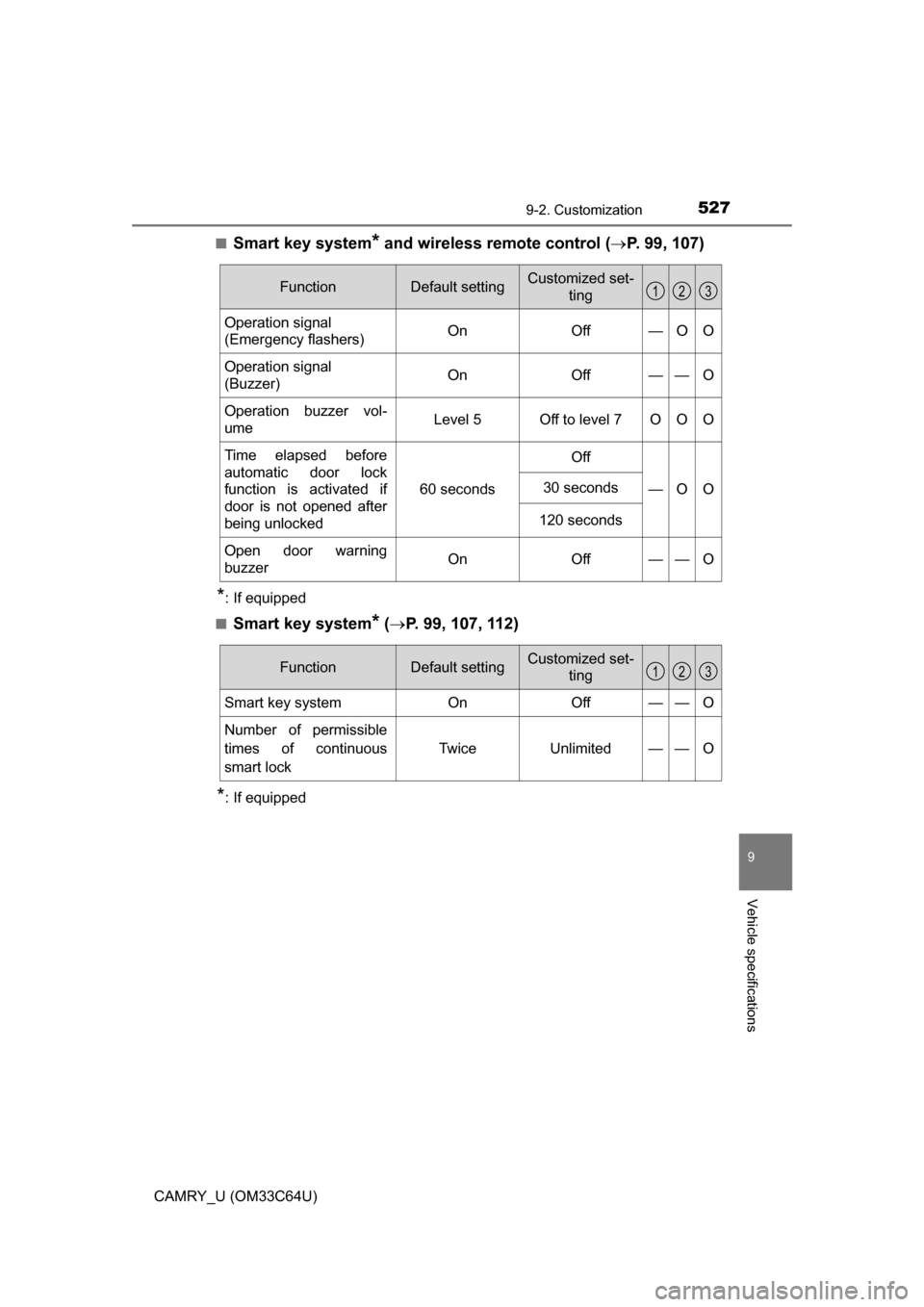
Smart key system* and wireless remote control (
P. 99, 107)
*: If equipped
■
Smart key system* ( P. 99, 107, 112)
*: If equipped
FunctionDefault settingCustomized set-
ting
Operation signal
(Emergency flashers) On Off — O O
Operation signal
(Buzzer) On Off — — O
Operation buzzer vol-
ume Level 5 Off to level 7 O O O
Time elapsed before
automatic door lock
function is activated if
door is not opened after
being unlocked 60 seconds
Off
—O O
30 seconds
120 seconds
Open door warning
buzzerOnOff — —O
123
FunctionDefault settingCustomized set-ting
Smart key systemOnOff——O
Number of permissible
times of continuous
smart lock Twice Unlimited — — O
123
Page 528 of 568
5289-2. Customization
CAMRY_U (OM33C64U)■
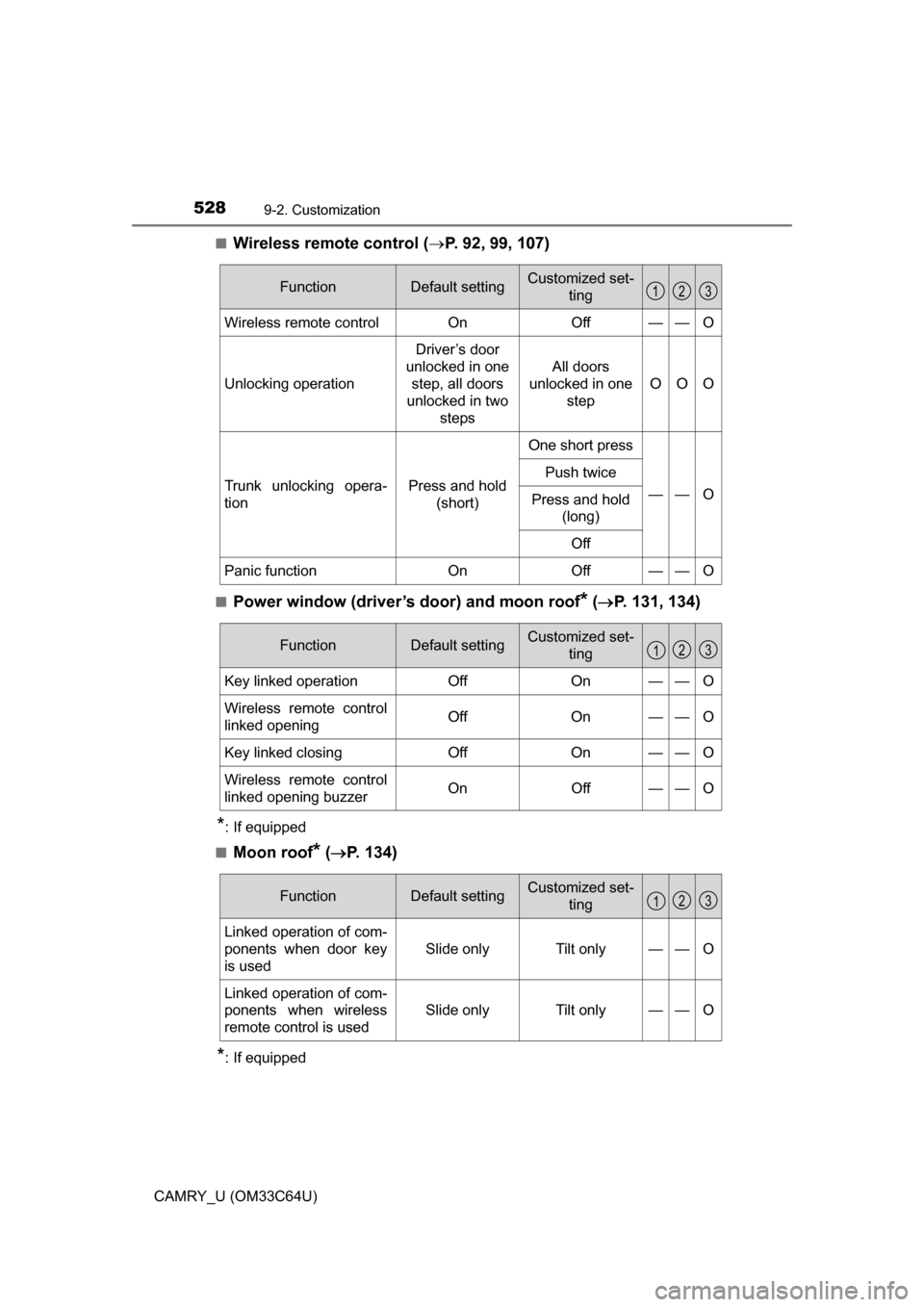
Wireless remote control (
P. 92, 99, 107)
■Power window (driver’s door) and moon roof* ( P. 131, 134)
*: If equipped
■
Moon roof* ( P. 134)
*: If equipped
FunctionDefault settingCustomized set-
ting
Wireless remote controlOnOff——O
Unlocking operation
Driver’s door
unlocked in one step, all doors
unlocked in two
steps
All doors
unlocked in one step
OOO
Trunk unlocking opera-
tionPress and hold (short)
One short press
——O
Push twice
Press and hold (long)
Off
Panic functionOnOff——O
123
FunctionDefault settingCustomized set- ting
Key linked operationOffOn——O
Wireless remote control
linked openingOffOn——O
Key linked closingOffOn——O
Wireless remote control
linked opening buzzerOnOff——O
123
FunctionDefault settingCustomized set-ting
Linked operation of com-
ponents when door key
is used
Slide onlyTilt only——O
Linked operation of com-
ponents when wireless
remote control is used
Slide onlyTilt only——O
123