lock TOYOTA CAMRY 2017 XV50 / 9.G Owners Manual
[x] Cancel search | Manufacturer: TOYOTA, Model Year: 2017, Model line: CAMRY, Model: TOYOTA CAMRY 2017 XV50 / 9.GPages: 568, PDF Size: 13.15 MB
Page 485 of 568
4858-2. Steps to take in an emergency
8
When trouble arises
CAMRY_U (OM33C64U)
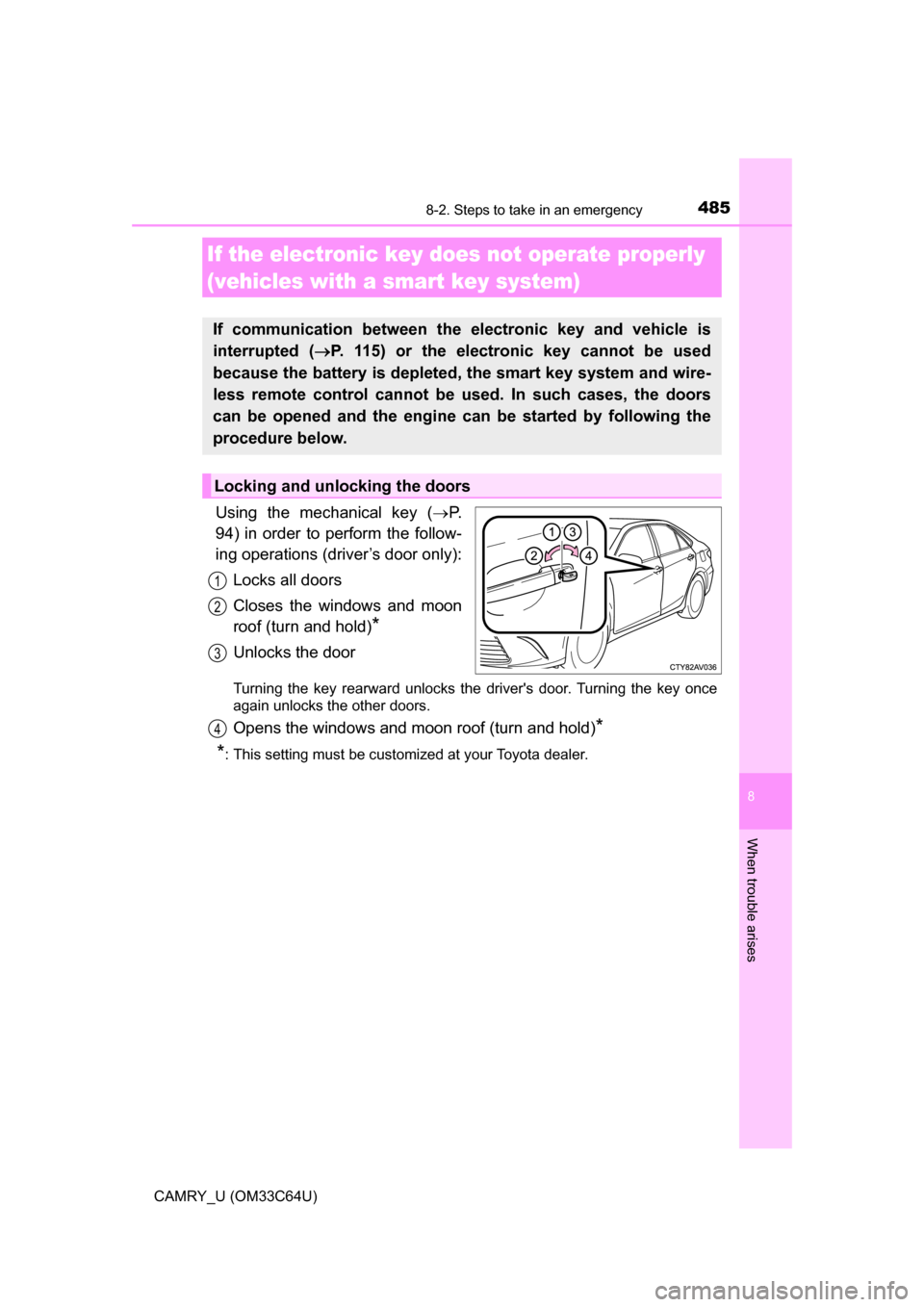
Using the mechanical key (P.
94) in order to perform the follow-
ing operations (driver’s door only):
Locks all doors
Closes the windows and moon
roof (turn and hold)
*
Unlocks the door
Turning the key rearward unlocks the driver's door. Turning the key once
again unlocks the other doors.
Opens the windows and moon roof (turn and hold)*
*
: This setting must be customized at your Toyota dealer.
If the electronic key does not operate properly
(vehicles with a smart key system)
If communication between the electronic key and vehicle is
interrupted ( P. 115) or the electronic key cannot be used
because the battery is depleted, the smart key system and wire-
less remote control cannot be used. In such cases, the doors
can be opened and the engine ca n be started by following the
procedure below.
Locking and unlocking the doors
1
2
3
4
Page 488 of 568
4888-2. Steps to take in an emergency
CAMRY_U (OM33C64U)
If you have a set of jumper (or booster) cables and a second vehicle
with a 12-volt battery, you can jump start your vehicle by following the
steps below.
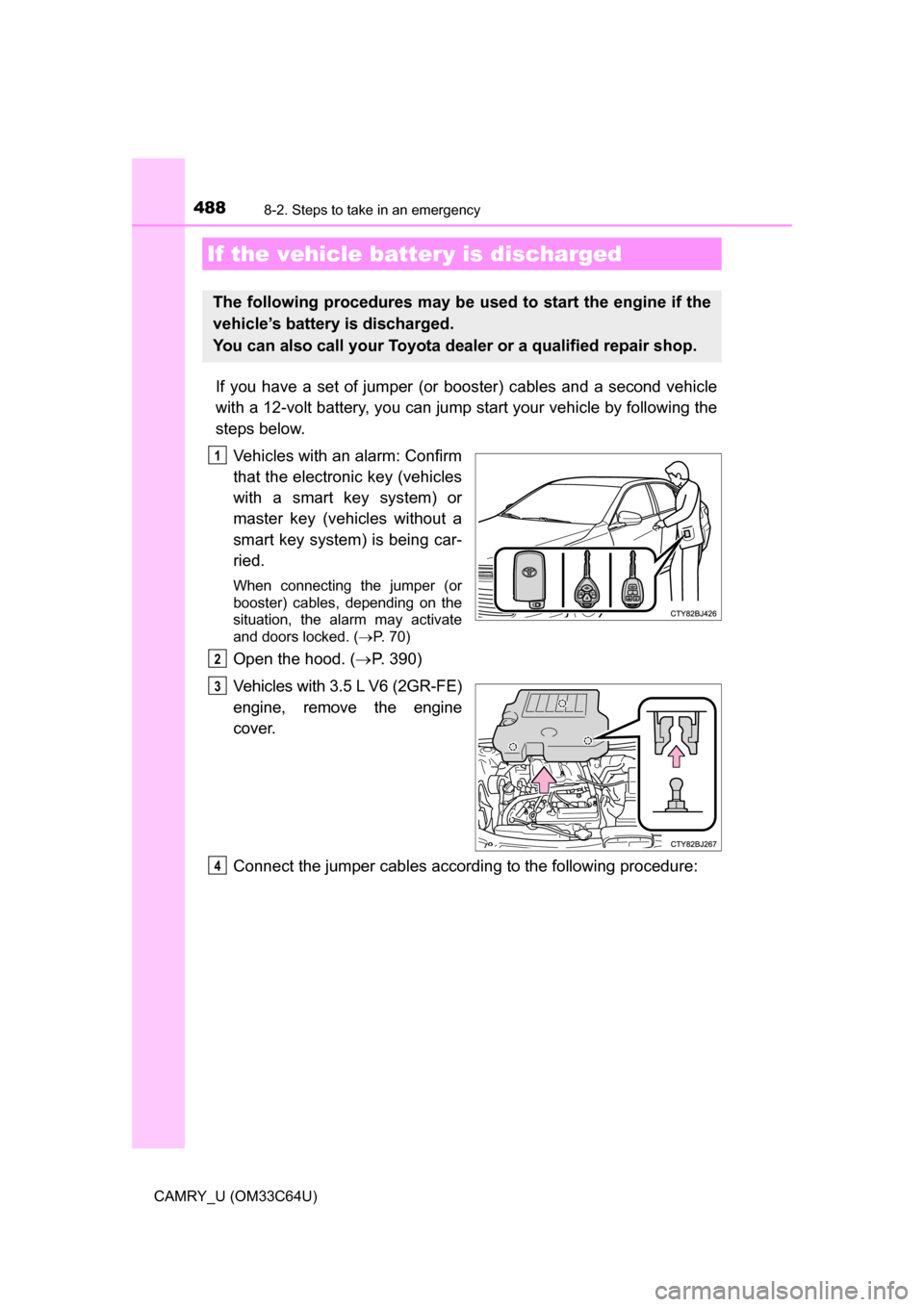
Vehicles with an alarm: Confirm
that the electronic key (vehicles
with a smart key system) or
master key (vehicles without a
smart key system) is being car-
ried.
When connecting the jumper (or
booster) cables, depending on the
situation, the alarm may activate
and doors locked. ( P. 70)
Open the hood. ( P. 390)
Vehicles with 3.5 L V6 (2GR-FE)
engine, remove the engine
cover.
Connect the jumper cables according to the following procedure:
If the vehicle bat tery is discharged
The following procedures may be used to start the engine if the
vehicle’s battery is discharged.
You can also call your Toyota de aler or a qualified repair shop.
1
2
3
4
Page 490 of 568
4908-2. Steps to take in an emergency
CAMRY_U (OM33C64U)
Start the engine of the second vehicle. Increase the engine speed
slightly and maintain at that level for approximately 5 minutes to
recharge the batter y of your vehicle.
Vehicles with a smart key system: Open and close any of the doors
of your vehicle with the engine switch off.
Vehicles without a smart key system:
Maintain the engine speed of the second vehicle and turn the
engine switch to the “ON” position, then start the vehicle's engine.
Vehicles with a smart key system:
Maintain the engine speed of the second vehicle and turn the
engine switch to IGNITION ON mode, then start the vehicle's
engine.
Once the vehicle’s engine has star ted, remove the jumper cables in
the exact reverse order from which they were connected.
Once the engine starts, have the v ehicle inspected at your Toyota
dealer as soon as possible.
■ Starting the engine when the battery is discharged
The engine cannot be started by push-starting.
■ To prevent battery discharge
●Turn off the headlights and the audio system while the engine is off.
● Turn off any unnecessary electrical components when the vehicle is running
at a low speed for an extended period, such as in heavy traffic.
■ Charging the battery
The electricity stored in the battery will discharge gradually even when the
vehicle is not in use, due to natural discharge and the draining effects of cer-
tain electrical appliances. If the vehicle is left for a long time, the battery may
discharge, and the engine may be unable to start. (The battery recharges
automatically during driving.)
■ When recharging or replacing the battery
●Vehicles with a smart key system: In some cases, it may not be possible to
unlock the doors using the smart key system when the battery is dis-
charged. Use the wireless remote control or the mechanical key to lock or
unlock the doors.
● Vehicles with a smart key system: The engine may not start on the first
attempt after the battery has recharged but will start normally after the sec-
ond attempt. This is not a malfunction.
5
6
7
8
Page 499 of 568
4999-1. Specifications
9
Vehicle specifications
CAMRY_U (OM33C64U)■
Vehicle identification number
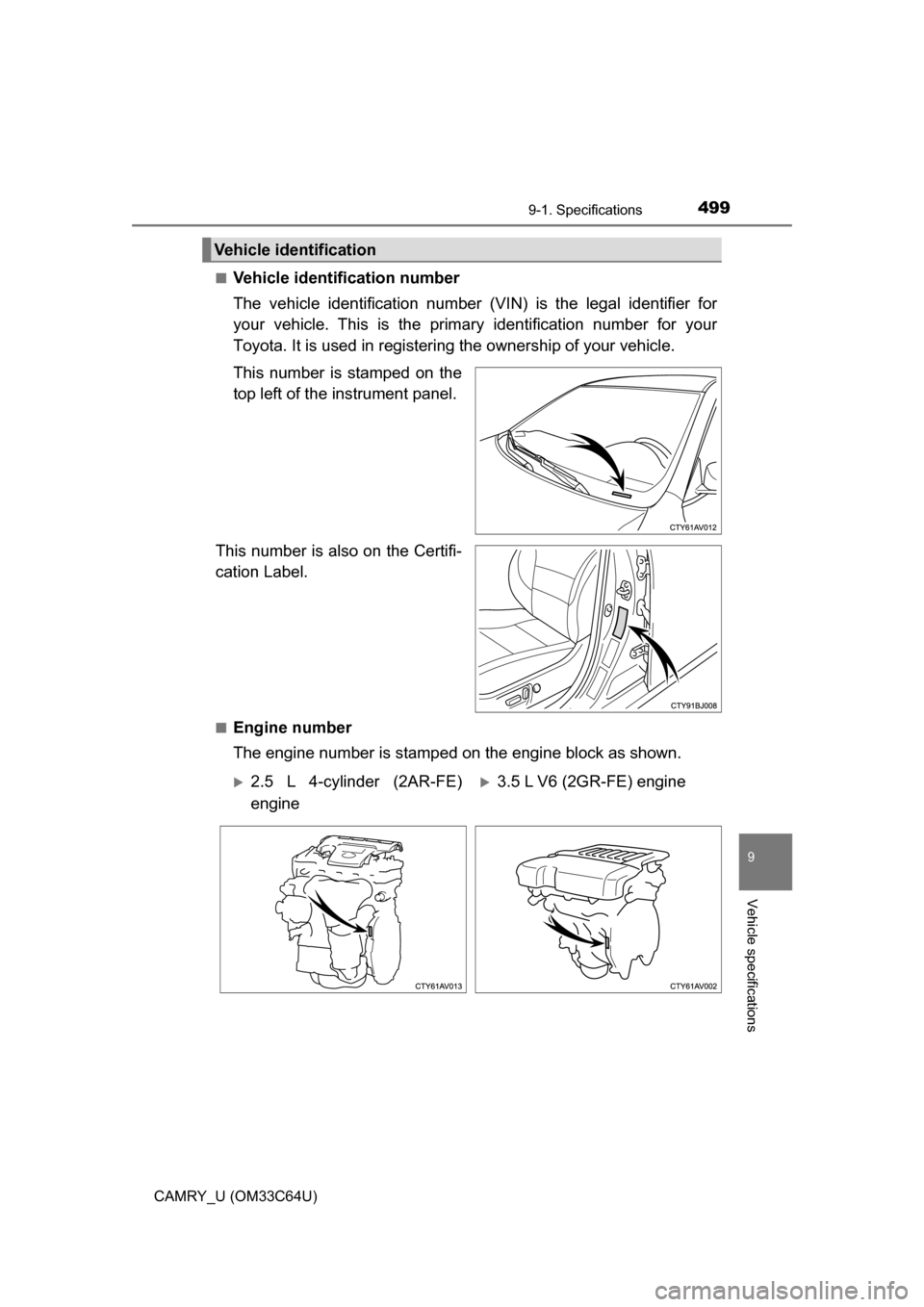
The vehicle identification number (VIN) is the legal identifier for
your vehicle. This is the primary identification number for your
Toyota. It is used in registering the ownership of your vehicle.
This number is stamped on the
top left of the instrument panel.
This number is also on the Certifi-
cation Label.
■Engine number
The engine number is stampe d on the engine block as shown.
Vehicle identification
2.5 L 4-cylinder (2AR-FE)
engine3.5 L V6 (2GR-FE) engine
Page 503 of 568
5039-1. Specifications
9
Vehicle specifications
CAMRY_U (OM33C64U)
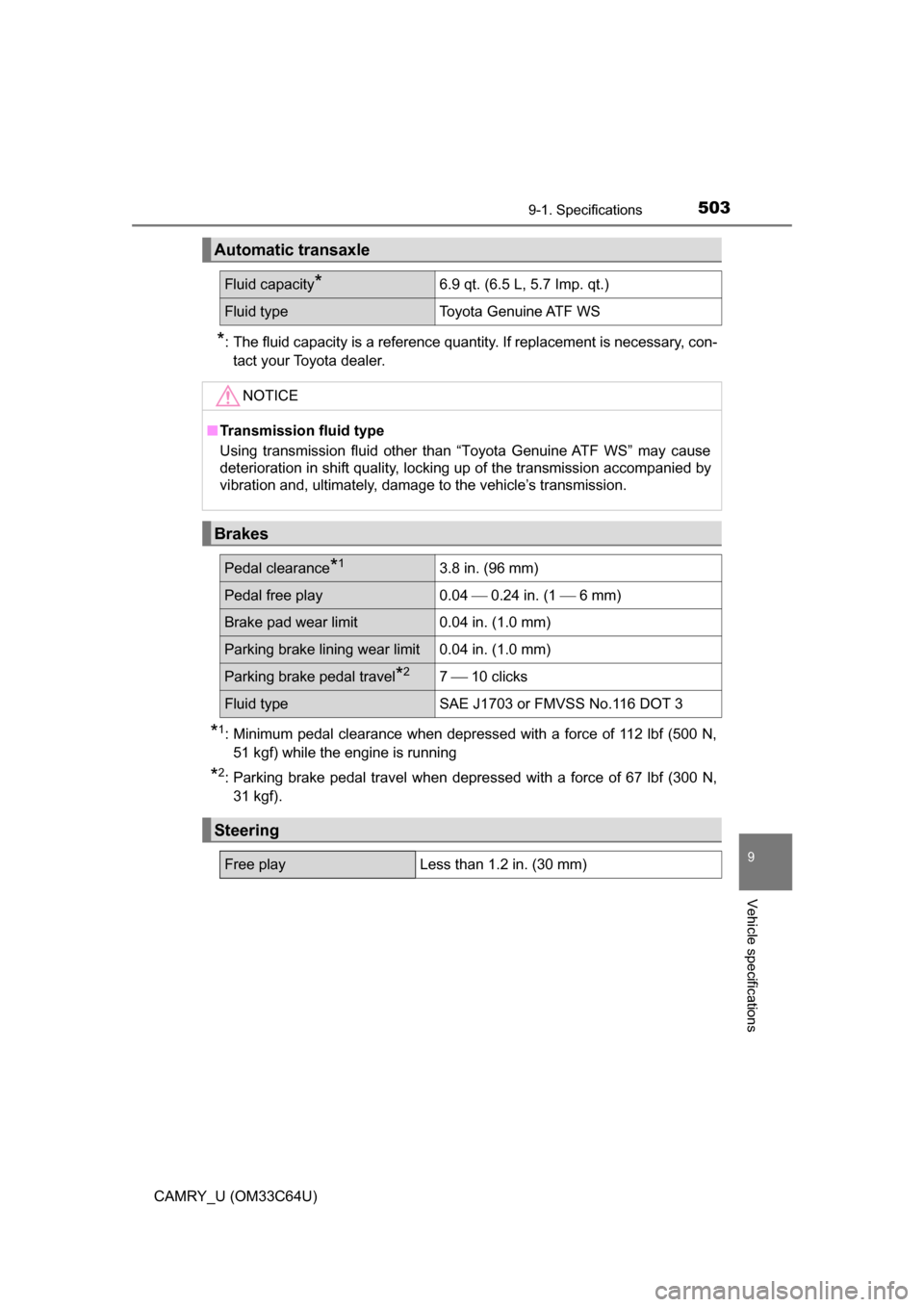
*: The fluid capacity is a reference quantity. If replacement is necessary, con-tact your Toyota dealer.
*1: Minimum pedal clearance when depressed with a force of 112 lbf (500 N,51 kgf) while the engine is running
*2: Parking brake pedal travel when depre ssed with a force of 67 lbf (300 N,
31 kgf).
Automatic transaxle
Fluid capacity*6.9 qt. (6.5 L, 5.7 Imp. qt.)
Fluid type Toyota Genuine ATF WS
NOTICE
■Transmission fluid type
Using transmission fluid other than “Toyota Genuine ATF WS” may cause
deterioration in shift quality, locking up of the transmission accompanied by
vibration and, ultimately, damage to the vehicle’s transmission.
Brakes
Pedal clearance*13.8 in. (96 mm)
Pedal free play 0.04 0.24 in. (1 6 mm)
Brake pad wear limit0.04 in. (1.0 mm)
Parking brake lining wear limit0.04 in. (1.0 mm)
Parking brake pedal travel*27 10 clicks
Fluid type SAE J1703 or FMVSS No.116 DOT 3
Steering
Free playLess than 1.2 in. (30 mm)
Page 526 of 568
5269-2. Customization
CAMRY_U (OM33C64U)
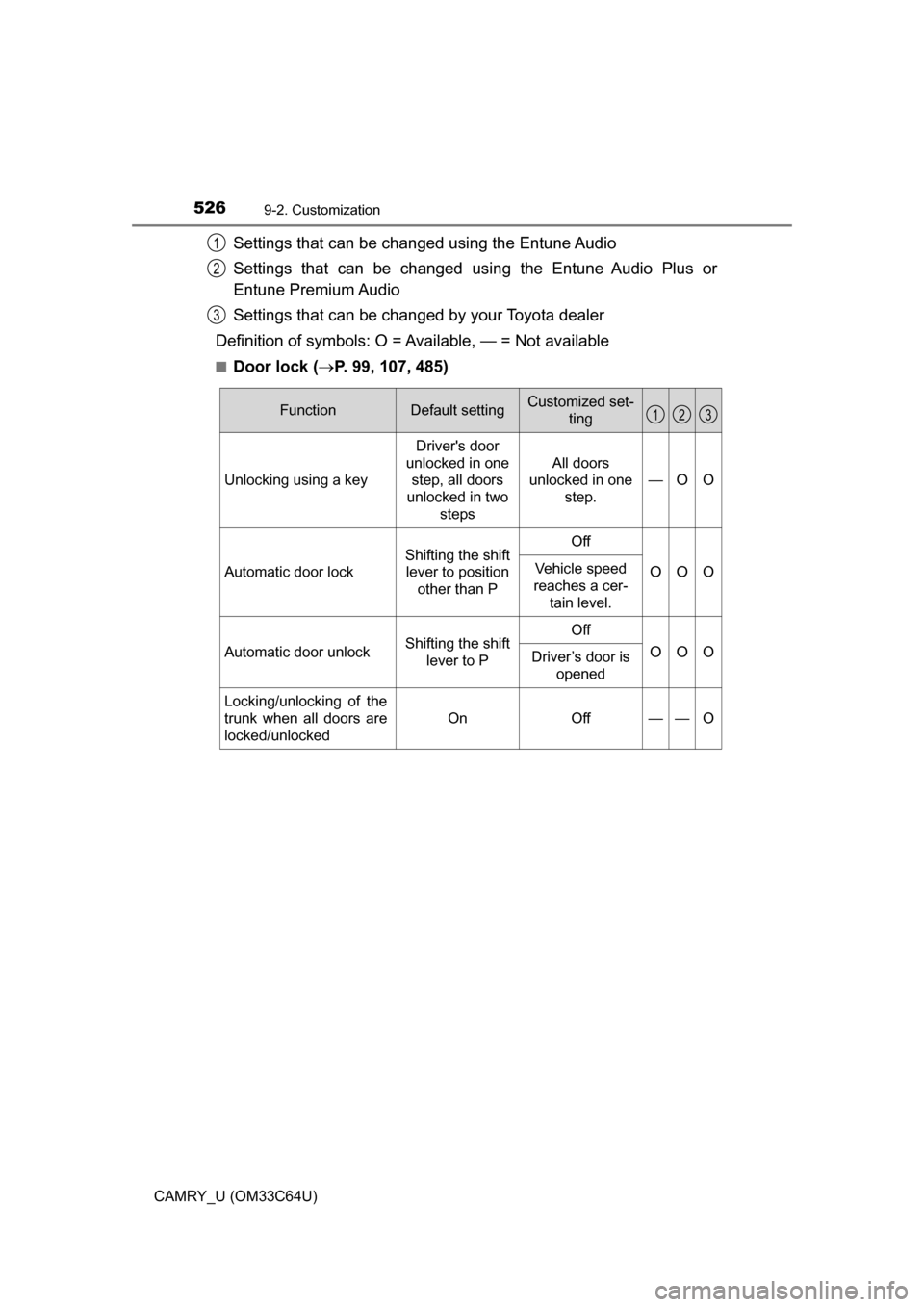
Settings that can be changed using the Entune Audio
Settings that can be changed using the Entune Audio Plus or
Entune Premium Audio
Settings that can be changed by your Toyota dealer
Definition of symbols: O = Av ailable, — = Not available
■Door lock (P. 99, 107, 485)
1
2
3
FunctionDefault settingCustomized set-
ting
Unlocking using a key Driver's door
unlocked in one step, all doors
unlocked in two steps All doors
unlocked in one
step. —O O
Automatic door lock
Shifting the shift
lever to position other than POff
OOOVehicle speed
reaches a cer- tain level.
Automatic door unlockShifting the shift lever to POff
OOODriver’s door is
opened
Locking/unlocking of the
trunk when all doors are
locked/unlocked
OnOff——O
123
Page 527 of 568
5279-2. Customization
9
Vehicle specifications
CAMRY_U (OM33C64U)■
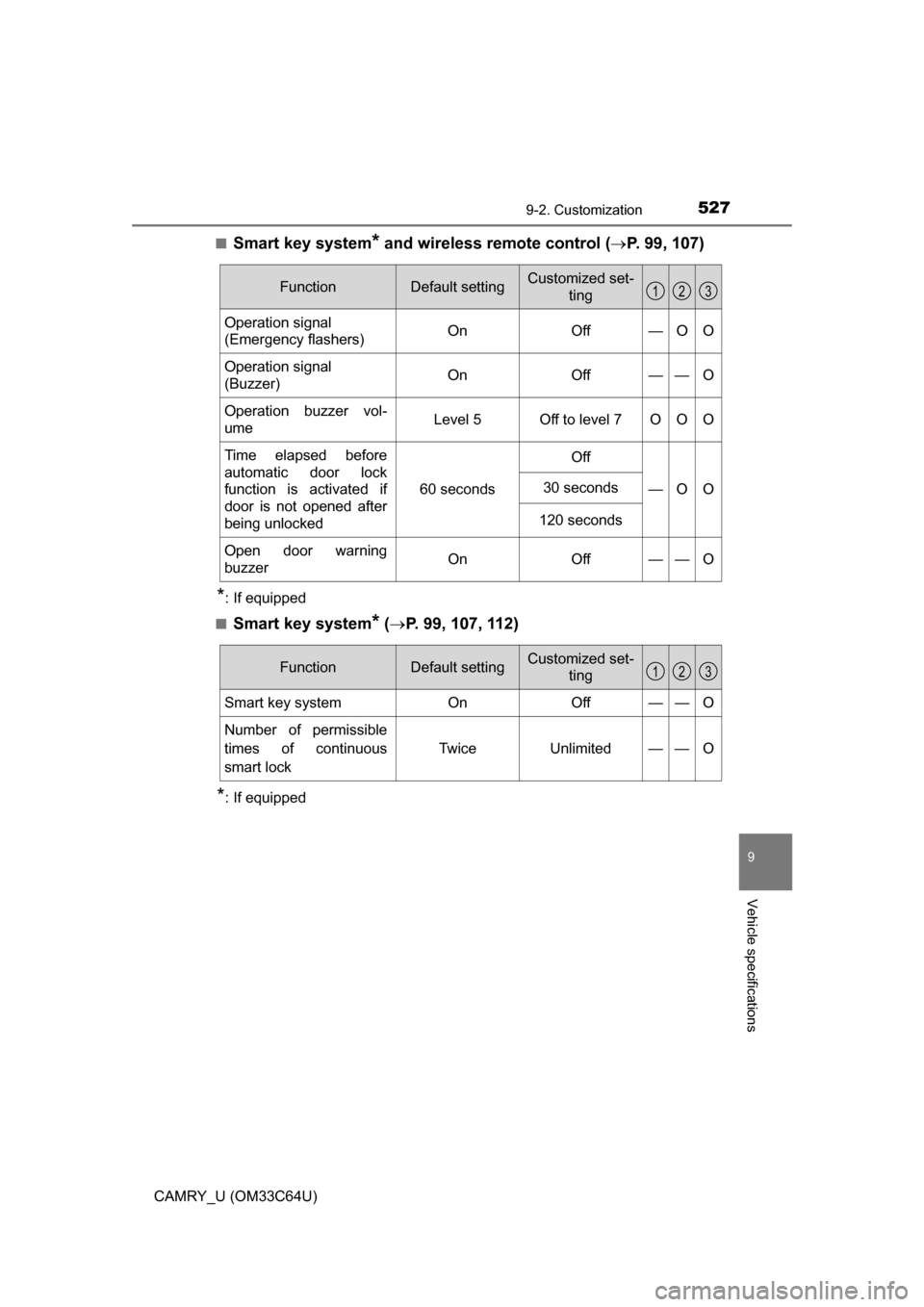
Smart key system* and wireless remote control (
P. 99, 107)
*: If equipped
■
Smart key system* ( P. 99, 107, 112)
*: If equipped
FunctionDefault settingCustomized set-
ting
Operation signal
(Emergency flashers) On Off — O O
Operation signal
(Buzzer) On Off — — O
Operation buzzer vol-
ume Level 5 Off to level 7 O O O
Time elapsed before
automatic door lock
function is activated if
door is not opened after
being unlocked 60 seconds
Off
—O O
30 seconds
120 seconds
Open door warning
buzzerOnOff — —O
123
FunctionDefault settingCustomized set-ting
Smart key systemOnOff——O
Number of permissible
times of continuous
smart lock Twice Unlimited — — O
123
Page 528 of 568
5289-2. Customization
CAMRY_U (OM33C64U)■
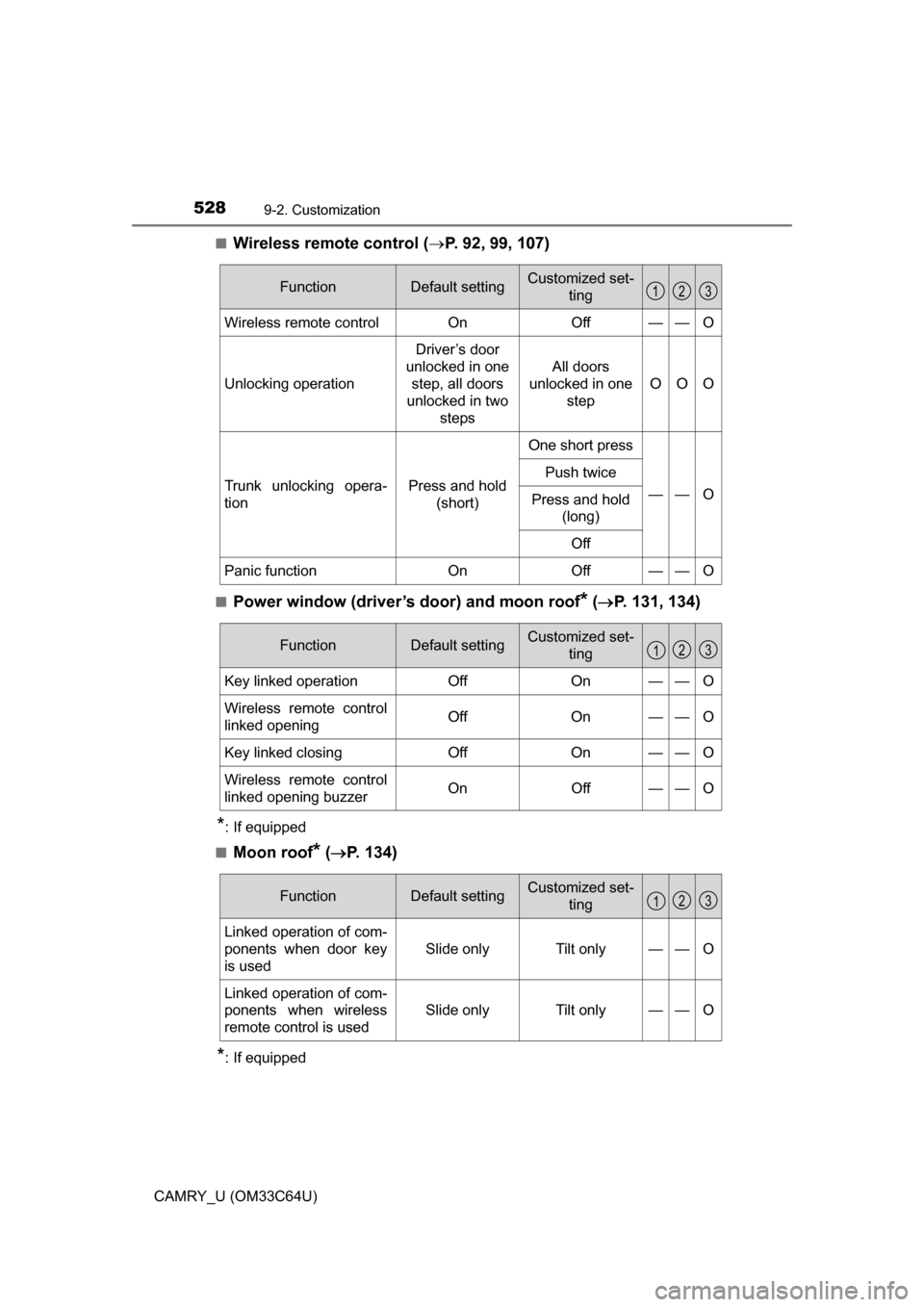
Wireless remote control (
P. 92, 99, 107)
■Power window (driver’s door) and moon roof* ( P. 131, 134)
*: If equipped
■
Moon roof* ( P. 134)
*: If equipped
FunctionDefault settingCustomized set-
ting
Wireless remote controlOnOff——O
Unlocking operation
Driver’s door
unlocked in one step, all doors
unlocked in two
steps
All doors
unlocked in one step
OOO
Trunk unlocking opera-
tionPress and hold (short)
One short press
——O
Push twice
Press and hold (long)
Off
Panic functionOnOff——O
123
FunctionDefault settingCustomized set- ting
Key linked operationOffOn——O
Wireless remote control
linked openingOffOn——O
Key linked closingOffOn——O
Wireless remote control
linked opening buzzerOnOff——O
123
FunctionDefault settingCustomized set-ting
Linked operation of com-
ponents when door key
is used
Slide onlyTilt only——O
Linked operation of com-
ponents when wireless
remote control is used
Slide onlyTilt only——O
123
Page 530 of 568
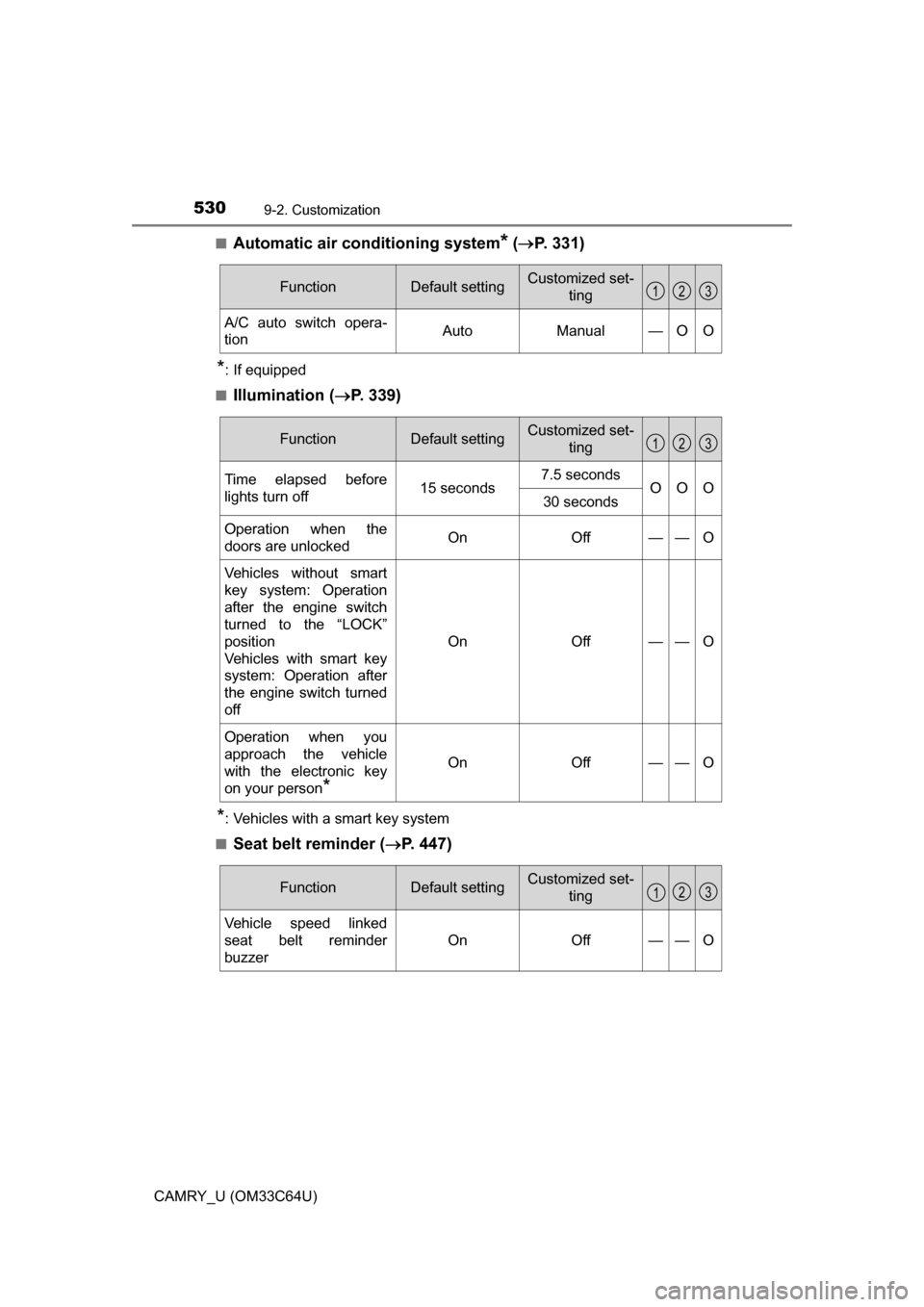
5309-2. Customization
CAMRY_U (OM33C64U)■
Automatic air conditioning system* (
P. 331)
*: If equipped
■
Illumination ( P. 339)
*: Vehicles with a smart key system
■
Seat belt reminder ( P. 447)
FunctionDefault settingCustomized set-
ting
A/C auto switch opera-
tionAutoManual—OO
123
FunctionDefault settingCustomized set-ting
Time elapsed before
lights turn off15 seconds7.5 secondsOOO30 seconds
Operation when the
doors are unlockedOnOff——O
Vehicles without smart
key system: Operation
after the engine switch
turned to the “LOCK”
position
Vehicles with smart key
system: Operation after
the engine switch turned
off
OnOff——O
Operation when you
approach the vehicle
with the electronic key
on your person
*
OnOff——O
123
FunctionDefault settingCustomized set-ting
Vehicle speed linked
seat belt reminder
buzzer
OnOff——O
123
Page 548 of 568
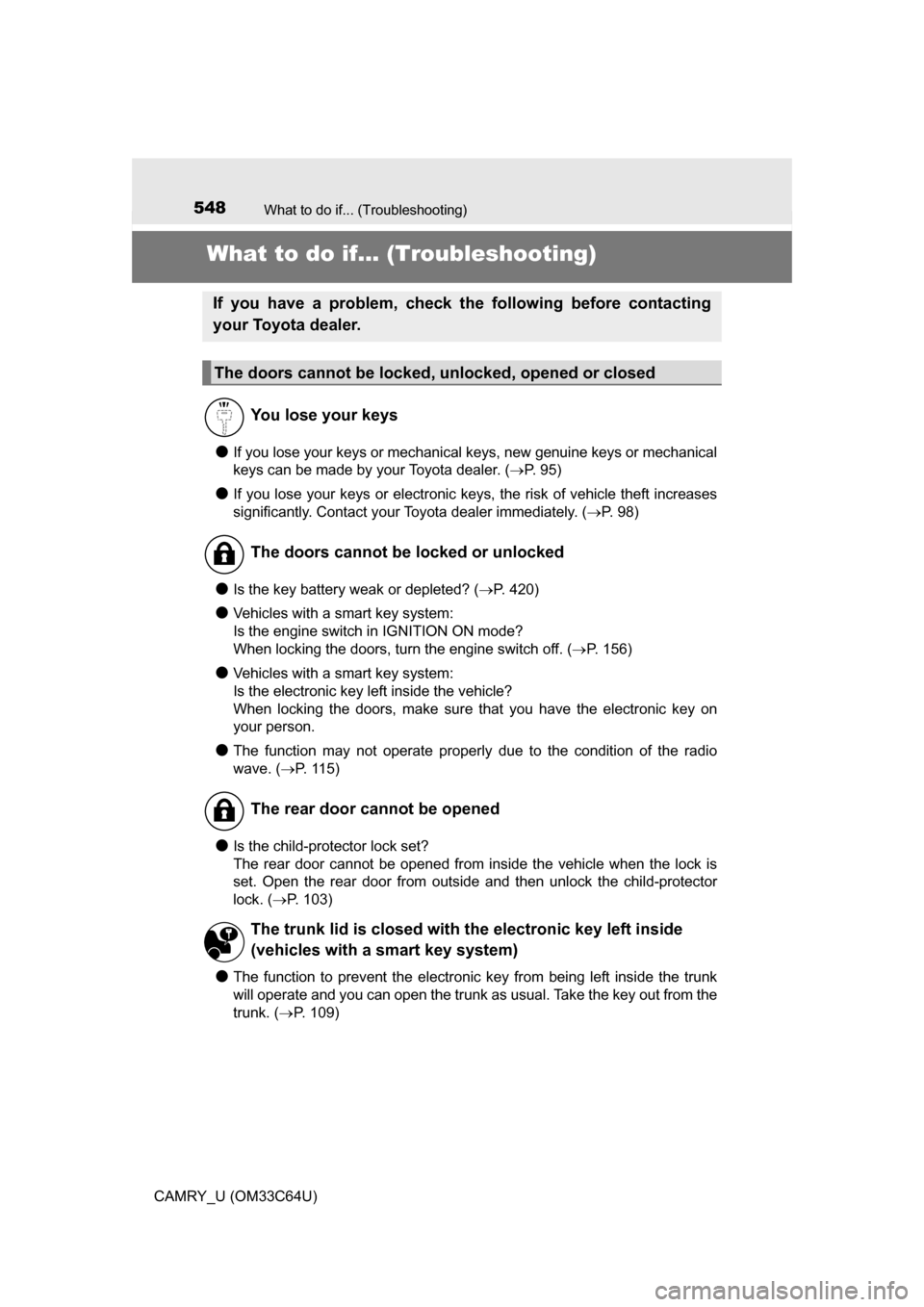
548
CAMRY_U (OM33C64U)
What to do if... (Troubleshooting)
What to do if... (Troubleshooting)
●If you lose your keys or mechanical keys, new genuine keys or mechanical
keys can be made by your Toyota dealer. ( P. 95)
●If you lose your keys or electronic keys, the risk of vehicle theft increases
significantly. Contact your Toyota dealer immediately. (P. 98)
●Is the key battery weak or depleted? ( P. 420)
●Vehicles with a smart key system:
Is the engine switch in IGNITION ON mode?
When locking the doors, turn the engine switch off. ( P. 156)
●Vehicles with a smart key system:
Is the electronic key left inside the vehicle?
When locking the doors, make sure that you have the electronic key on
your person.
●The function may not operate properly due to the condition of the radio
wave. ( P. 115)
●Is the child-protector lock set?
The rear door cannot be opened from inside the vehicle when the lock is
set. Open the rear door from outside and then unlock the child-protector
lock. (P. 103)
●The function to prevent the electronic key from being left inside the trunk
will operate and you can open the trunk as usual. Take the key out from the
trunk. ( P. 109)
If you have a problem, check the following before contacting
your Toyota dealer.
The doors cannot be locked, unlocked, opened or closed
You lose your keys
The doors cannot be locked or unlocked
The rear door cannot be opened
The trunk lid is closed with the electronic key left inside
(vehicles with a smart key system)