turn signal TOYOTA CAMRY 2017 XV50 / 9.G User Guide
[x] Cancel search | Manufacturer: TOYOTA, Model Year: 2017, Model line: CAMRY, Model: TOYOTA CAMRY 2017 XV50 / 9.GPages: 568, PDF Size: 13.15 MB
Page 260 of 568
2605-4. Using the radio
CAMRY_U (OM33C64U)
Search for desired stations by turning the “TUNE/SCROLL” knob or
pressing the “ ” or “ ” button on “SEEK/TRACK”.
Select “(add new)”.
To change the preset station to a different one, select and hold the preset
station.
Select “Yes”.
Select “OK” after setting the new preset station.
■Refreshing the station list Select “Refresh” on the “Station List” screen.
To cancel the refresh, select “Cancel Refresh”.
■Reception sensitivity
●Maintaining perfect radio reception at all times is difficult due to the continu-
ally changing position of the antenna, differences in signal strength and sur-
rounding objects, such as trains, transmitters, etc.
● The radio antenna is mounted inside the rear window. To maintain clear
radio reception, do not attach metallic window tinting or other metallic
objects to the antenna wire mounted inside the rear window.
Setting station presets
1
2
3
4
1
Page 285 of 568
2855-7. Connecting Bluetooth®
5
Audio system
CAMRY_U (OM33C64U)
When auto connection has failed or “Bluetooth* Power” is turned off,
you must connect the Bluetooth® device manually.
Follow the steps in “Connecting a Bluetooth
® device” from step .
( P. 284)
*: Bluetooth is a registered trademark of Bluetooth SIG, Inc.
Registering an additional device
Select “Select Device” on the Bluetooth
® audio control screen.
For more information: P. 2 8 2
Selecting a registered device
Select “Select Device” on the Bluetooth
® audio control screen.
For more information: P. 2 8 4
■Reconnecting a Bluetooth® phone
If the system cannot connect due to poor signal strength with the engine
switch in the “ACC” or “ON” position (vehicles without a smart key system) or
ACCESSORY or IGNITION ON mode (vehicles with a smart key system), the
system will automatically attempt to reconnect.
If the system is attempting to connect to a Bluetooth
® phone and the
Bluetooth® phone is turned off and then back on, the system will attempt to
reconnect.
Manual connection
Connecting a Bluetooth® audio player
11
1
2
1
2
Page 405 of 568
4057-3. Do-it-yourself maintenance
7
Maintenance and care
CAMRY_U (OM33C64U)■
How to initialize the tire pressure warning system
Park the vehicle in a safe place and turn the engine switch off.
Initialization cannot be performed while the vehicle is moving.
Adjust the tire inflation pressure to the specified cold tire inflation
pressure level. ( P. 504)
Make sure to adjust the tire pressu re to the specified cold tire infla-
tion pressure level. The tire pressure warning system will operate
based on this pressure level.
Vehicles without a smart key system:
Turn the engine switch to the “ON” position.
Vehicles with a smart key system:
Turn the engine switch to IGNITION ON mode.
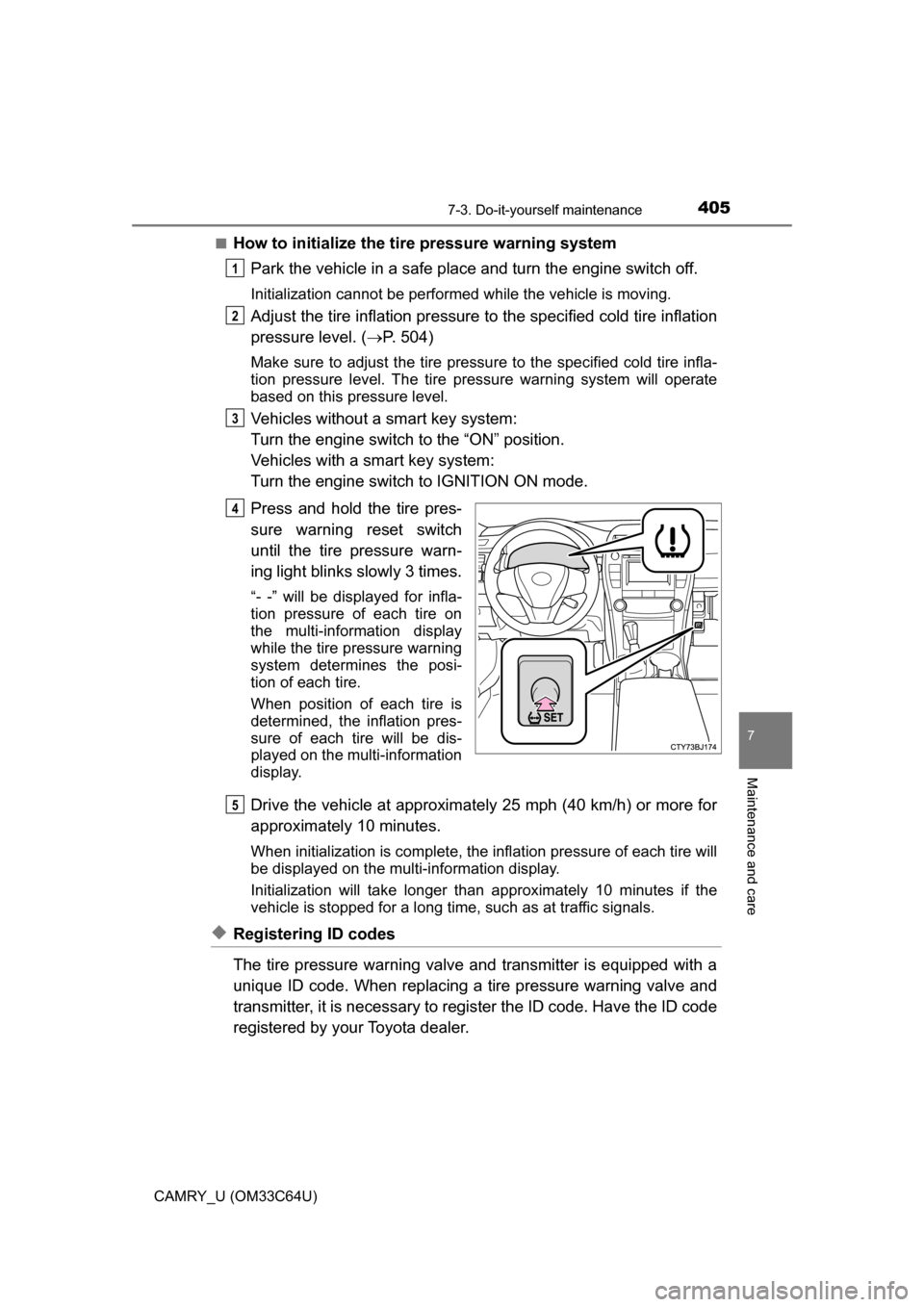
Press and hold the tire pres-
sure warning reset switch
until the tire pressure warn-
ing light blinks slowly 3 times.
“- -” will be displayed for infla-
tion pressure of each tire on
the multi-information display
while the tire pressure warning
system determines the posi-
tion of each tire.
When position of each tire is
determined, the inflation pres-
sure of each tire will be dis-
played on the multi-information
display.
Drive the vehicle at approximately 25 mph (40 km/h) or more for
approximately 10 minutes.
When initialization is co mplete, the inflation pre ssure of each tire will
be displayed on the multi-information display.
Initialization will take longer than approximat ely 10 minutes if the
vehicle is stopped for a long time, such as at traffic signals.
◆Registering ID codes
The tire pressure warning valve and transmitter is equipped with a
unique ID code. When replacing a tire pressure warning valve and
transmitter, it is necessary to register the ID code. Have the ID code
registered by your Toyota dealer.
1
2
3
4
5
Page 427 of 568
4277-3. Do-it-yourself maintenance
7
Maintenance and care
CAMRY_U (OM33C64U)
Check the wattage of the light bulb to be replaced. (P. 506)
Light bulbs
You may replace the following bulb s yourself. The difficulty level
of replacement varies depending on the bulb. If necessary bulb
replacement seems difficult to perform, contact your Toyota
dealer.
For more information about replacing other light bulbs, contact
your Toyota dealer.
Preparing for light bulb replacement
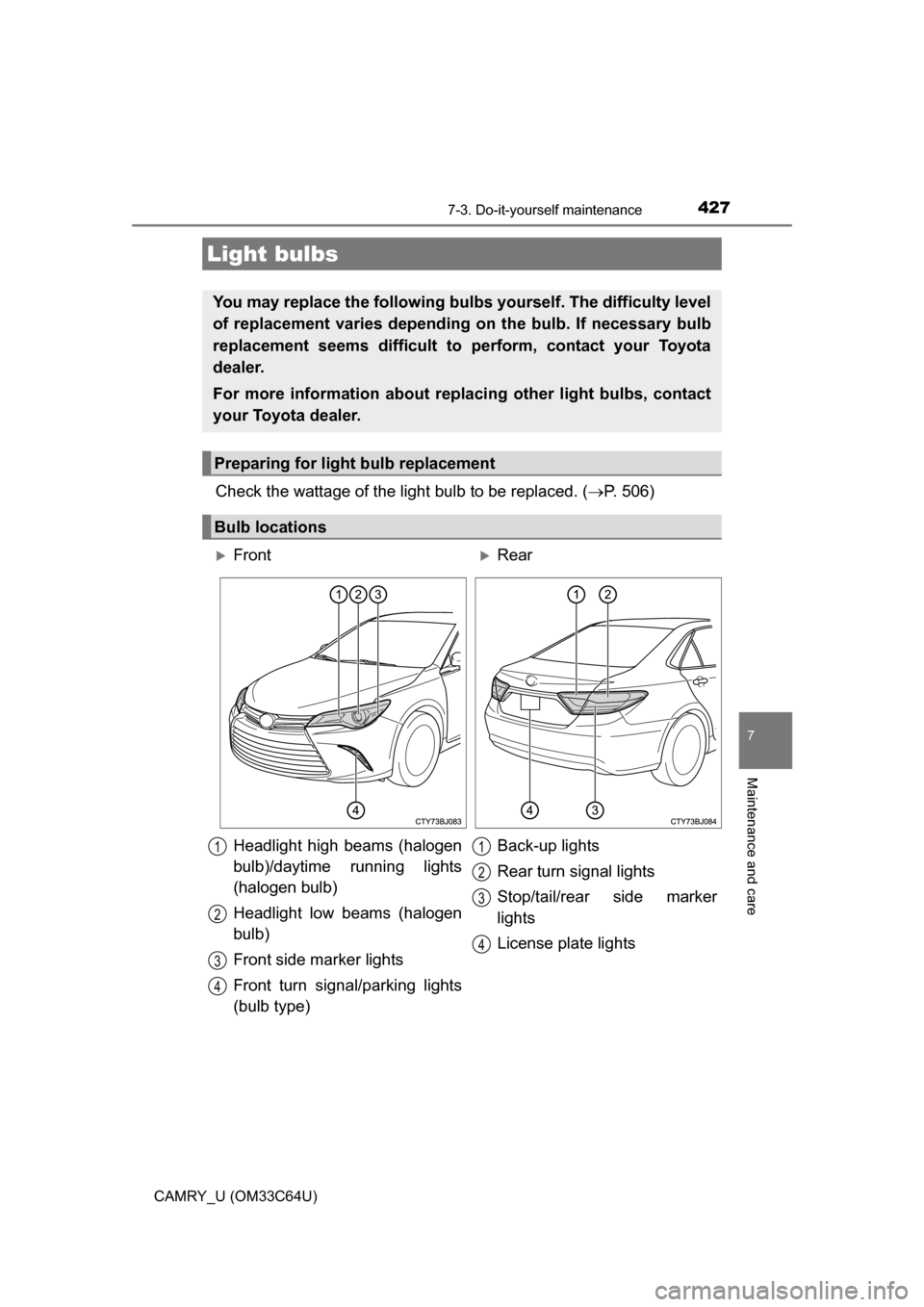
Bulb locations
FrontRear
Headlight high beams (halogen
bulb)/daytime running lights
(halogen bulb)
Headlight low beams (halogen
bulb)
Front side marker lights
Front turn signal/parking lights
(bulb type) Back-up lights
Rear turn signal lights
Stop/tail/rear side marker
lights
License plate lights
1
2
3
4
1
2
3
4
Page 430 of 568
4307-3. Do-it-yourself maintenance
CAMRY_U (OM33C64U)■
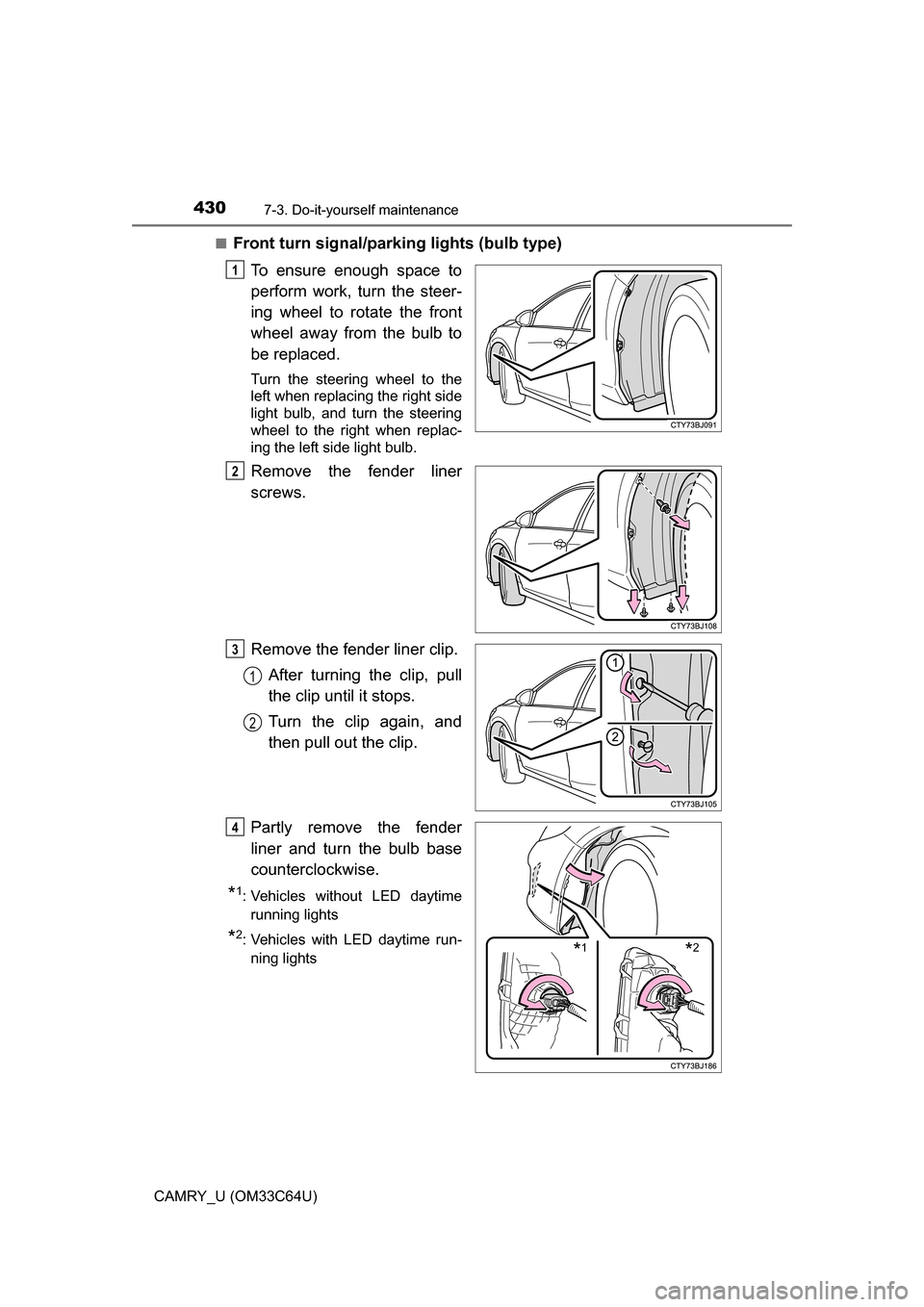
Front turn signal/parking lights (bulb type)
To ensure enough space to
perform work, turn the steer-
ing wheel to rotate the front
wheel away from the bulb to
be replaced.
Turn the steering wheel to the
left when replacing the right side
light bulb, and turn the steering
wheel to the right when replac-
ing the left side light bulb.
Remove the fender liner
screws.
Remove the fender liner clip.After turning the clip, pull
the clip until it stops.
Turn the clip again, and
then pull out the clip.
Partly remove the fender
liner and turn the bulb base
counterclockwise.
*1: Vehicles without LED daytime running lights
*2: Vehicles with LED daytime run-ning lights
1
2
3
1
2
*1*2
4
Page 431 of 568

4317-3. Do-it-yourself maintenance
7
Maintenance and care
CAMRY_U (OM33C64U)
Remove the light bulb.
When installing, reverse the steps listed.
■Stop/tail/rear side marker lights and rear turn signal lights
Open the trunk lid and
remove the luggage trim
cover clips. ( P. 435)
Pull the hook while depress-
ing the button.
Partly remove the luggage
trim cover.
5
6
1
2
3
Page 432 of 568

4327-3. Do-it-yourself maintenance
CAMRY_U (OM33C64U)
Turn the bulb base counter-
clockwise.Rear turn signal light
Stop/tail/rear side marker
light
Remove the light bulb. Rear turn signal light
Stop/tail/rear side marker
light
When installing, reve rse the steps listed.4
1
2
5
1
2
6
Page 438 of 568

438
CAMRY_U (OM33C64U)
8-1. Essential information
Press the switch.
All the turn signal lights will flash.
To turn them off, press the switch
once again.
■Emergency flashers
If the emergency flashers are used for a long time while the engine is not
operating, the battery may discharge.
Emergency flashers
The emergency flashers are used to warn other drivers when the
vehicle has to be stopped in th e road due to a breakdown, etc.
Page 506 of 568
5069-1. Specifications
CAMRY_U (OM33C64U)
*1: Light bulbs not listed in this table are LED bulbs.
*2: If equipped
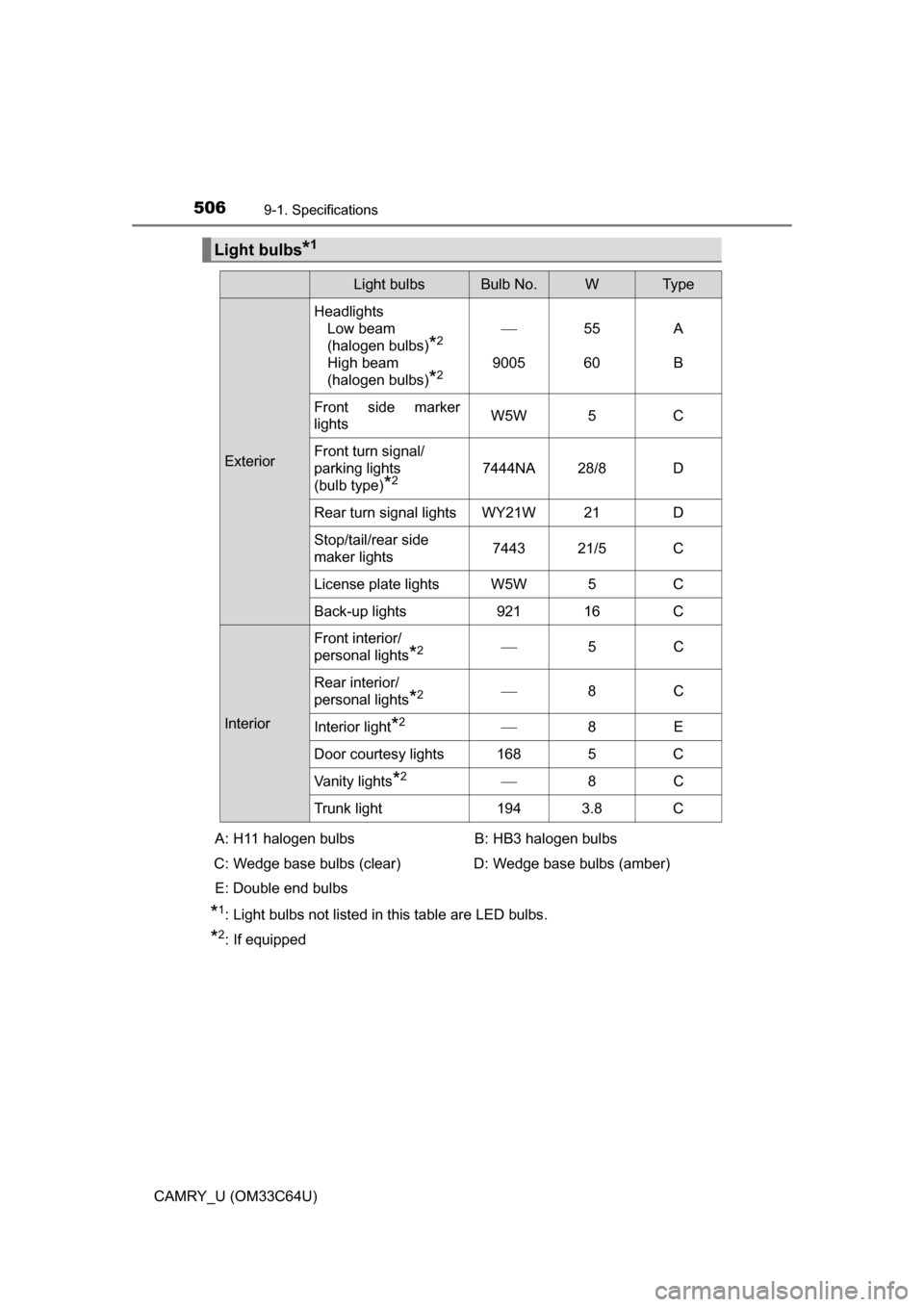
Light bulbs*1
Light bulbsBulb No.WTy p e
ExteriorHeadlights
Low beam
(halogen bulbs)
*2
High beam
(halogen bulbs)
*2
9005 55
60A
B
Front side marker
lights W5W 5 C
Front turn signal/
parking lights
(bulb type)
*27444NA 28/8 D
Rear turn signal lights WY21W 21 D
Stop/tail/rear side
maker lights 7443 21/5 C
License plate lights W5W 5 C
Back-up lights 921 16 C
Interior Front interior/
personal lights
*2
5C
Rear interior/
personal lights
*2 8C
Interior light
*2 8E
Door courtesy lights 168 5 C
Vanity lights
*2 8C
Trunk light 194 3.8 C
A: H11 halogen bulbs
C: Wedge base bulbs (clear)
E: Double end bulbs B: HB3 halogen bulbs
D: Wedge base bulbs (amber)
Page 529 of 568
5299-2. Customization
9
Vehicle specifications
CAMRY_U (OM33C64U)■
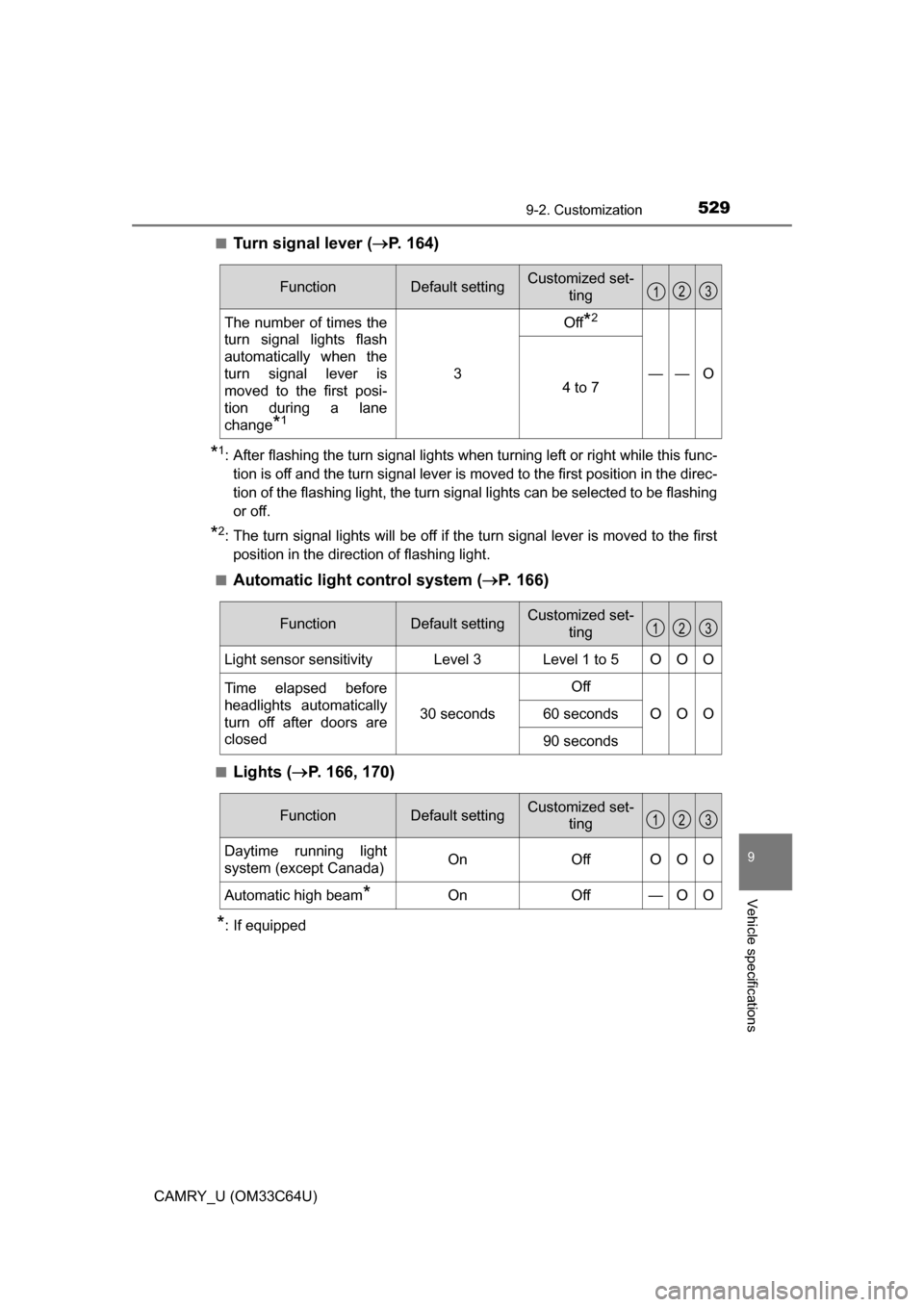
Turn signal lever (
P. 164)
*1: After flashing the turn signal lights when turning left or right while this func-
tion is off and the turn signal lever is moved to the first position in the direc-
tion of the flashing light, the turn signal lights can be selected to be flashing
or off.
*2: The turn signal lights will be off if the turn signal lever is moved to the firstposition in the direction of flashing light.
■
Automatic light control system ( P. 166)
■Lights ( P. 166, 170)
*: If equipped
FunctionDefault settingCustomized set-
ting
The number of times the
turn signal lights flash
automatically when the
turn signal lever is
moved to the first posi-
tion during a lane
change
*1
3
Off*2
——O4 to 7
123
FunctionDefault settingCustomized set-
ting
Light sensor sensitivityLevel 3Level 1 to 5OOO
Time elapsed before
headlights automatically
turn off after doors are
closed
30 seconds
Off
OOO60 seconds
90 seconds
123
FunctionDefault settingCustomized set-ting
Daytime running light
system (except Canada)OnOffOOO
Automatic high beam*OnOff—OO
123