lock TOYOTA CAMRY 2017 XV50 / 9.G Owner's Manual
[x] Cancel search | Manufacturer: TOYOTA, Model Year: 2017, Model line: CAMRY, Model: TOYOTA CAMRY 2017 XV50 / 9.GPages: 568, PDF Size: 13.15 MB
Page 93 of 568
933-1. Key information
3
Operation of each component
CAMRY_U (OM33C64U)
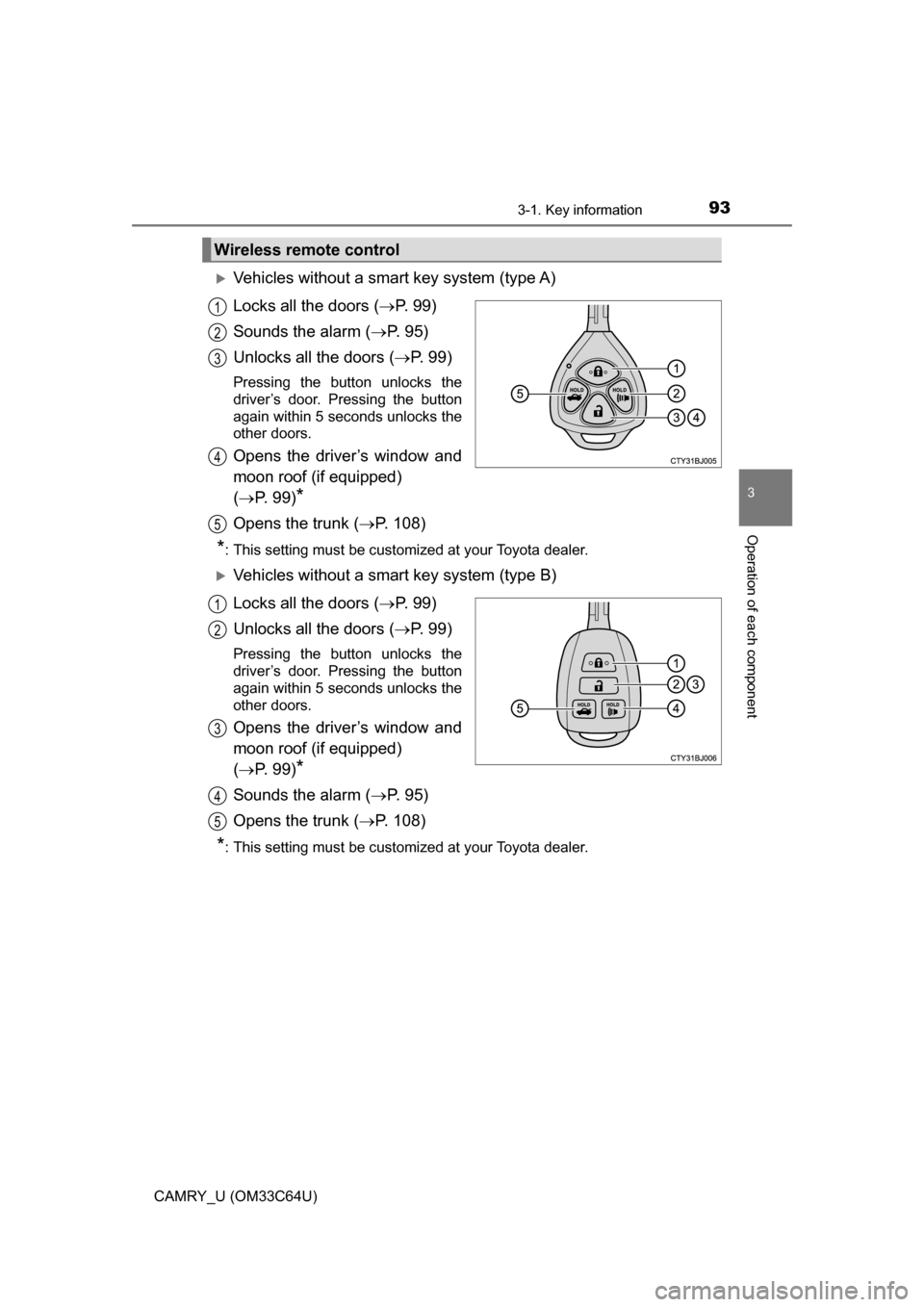
Vehicles without a smart key system (type A)
Locks all the doors (P. 9 9 )
Sounds the alarm ( P. 9 5 )
Unlocks all the doors ( P. 9 9 )
Pressing the button unlocks the
driver’s door. Pressing the button
again within 5 seconds unlocks the
other doors.
Opens the driver’s window and
moon roof (if equipped)
( P. 99)
*
Opens the trunk ( P. 108)
*: This setting must be customized at your Toyota dealer.
Vehicles without a smart key system (type B)
Locks all the doors ( P. 9 9 )
Unlocks all the doors ( P. 9 9 )
Pressing the button unlocks the
driver’s door. Pressing the button
again within 5 seconds unlocks the
other doors.
Opens the driver’s window and
moon roof (if equipped)
( P. 99)
*
Sounds the alarm ( P. 9 5 )
Opens the trunk ( P. 108)
*: This setting must be customized at your Toyota dealer.
Wireless remote control
1
2
3
4
5
1
2
3
4
5
Page 94 of 568
943-1. Key information
CAMRY_U (OM33C64U)
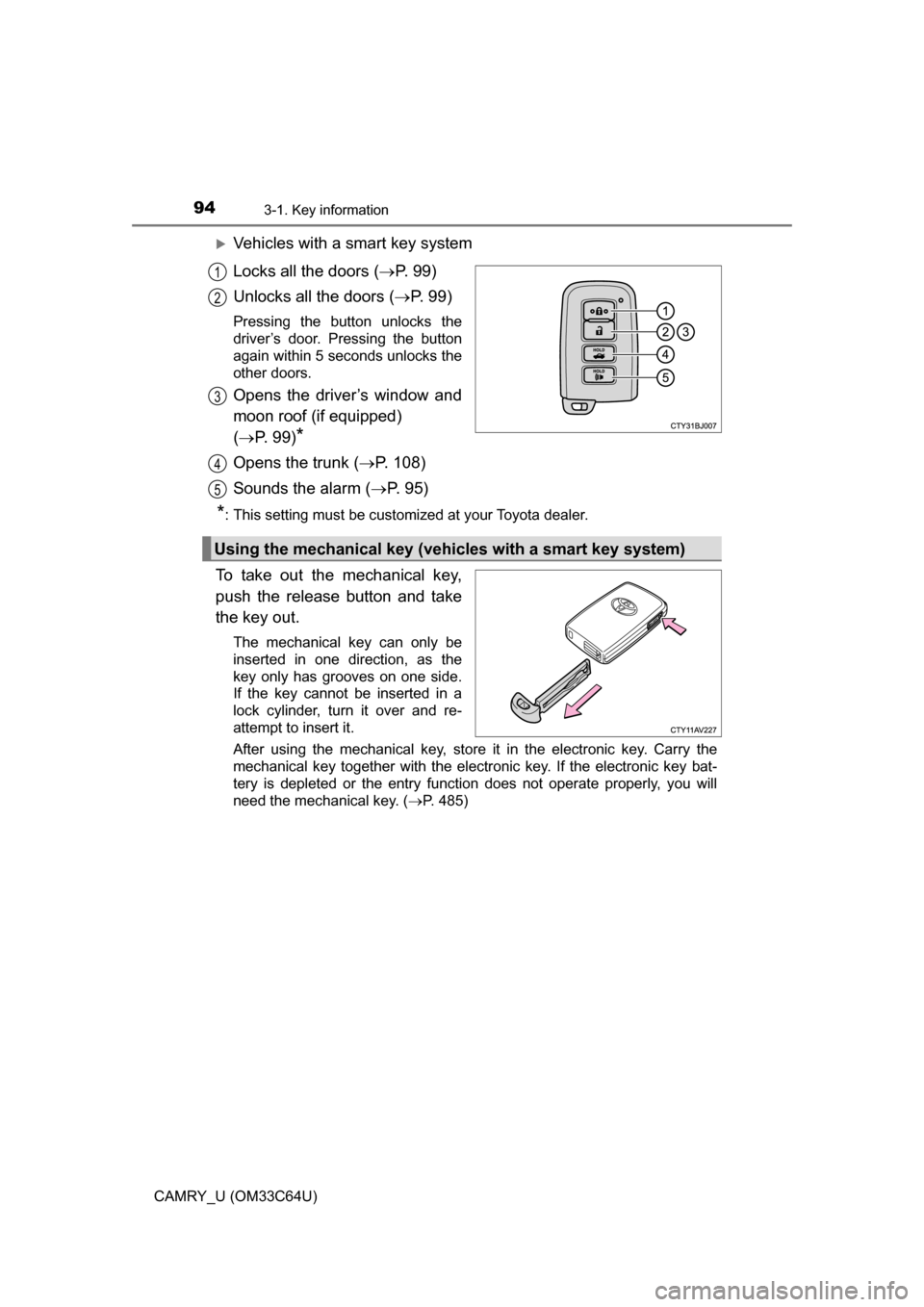
Vehicles with a smart key system
Locks all the doors (P. 9 9 )
Unlocks all the doors ( P. 9 9 )
Pressing the button unlocks the
driver’s door. Pressing the button
again within 5 seconds unlocks the
other doors.
Opens the driver’s window and
moon roof (if equipped)
( P. 99)
*
Opens the trunk ( P. 108)
Sounds the alarm ( P. 9 5 )
*: This setting must be customized at your Toyota dealer.
To take out the mechanical key,
push the release button and take
the key out.
The mechanical key can only be
inserted in one direction, as the
key only has grooves on one side.
If the key cannot be inserted in a
lock cylinder, turn it over and re-
attempt to insert it.
After using the mechanical key, store it in the electronic key. Carry the
mechanical key together with the electronic key. If the electronic key bat-
tery is depleted or the entry function does not operate properly, you will
need the mechanical key. ( P. 485)
1
2
3
4
Using the mechanical key (vehic les with a smart key system)
5
Page 95 of 568
953-1. Key information
3
Operation of each component
CAMRY_U (OM33C64U)
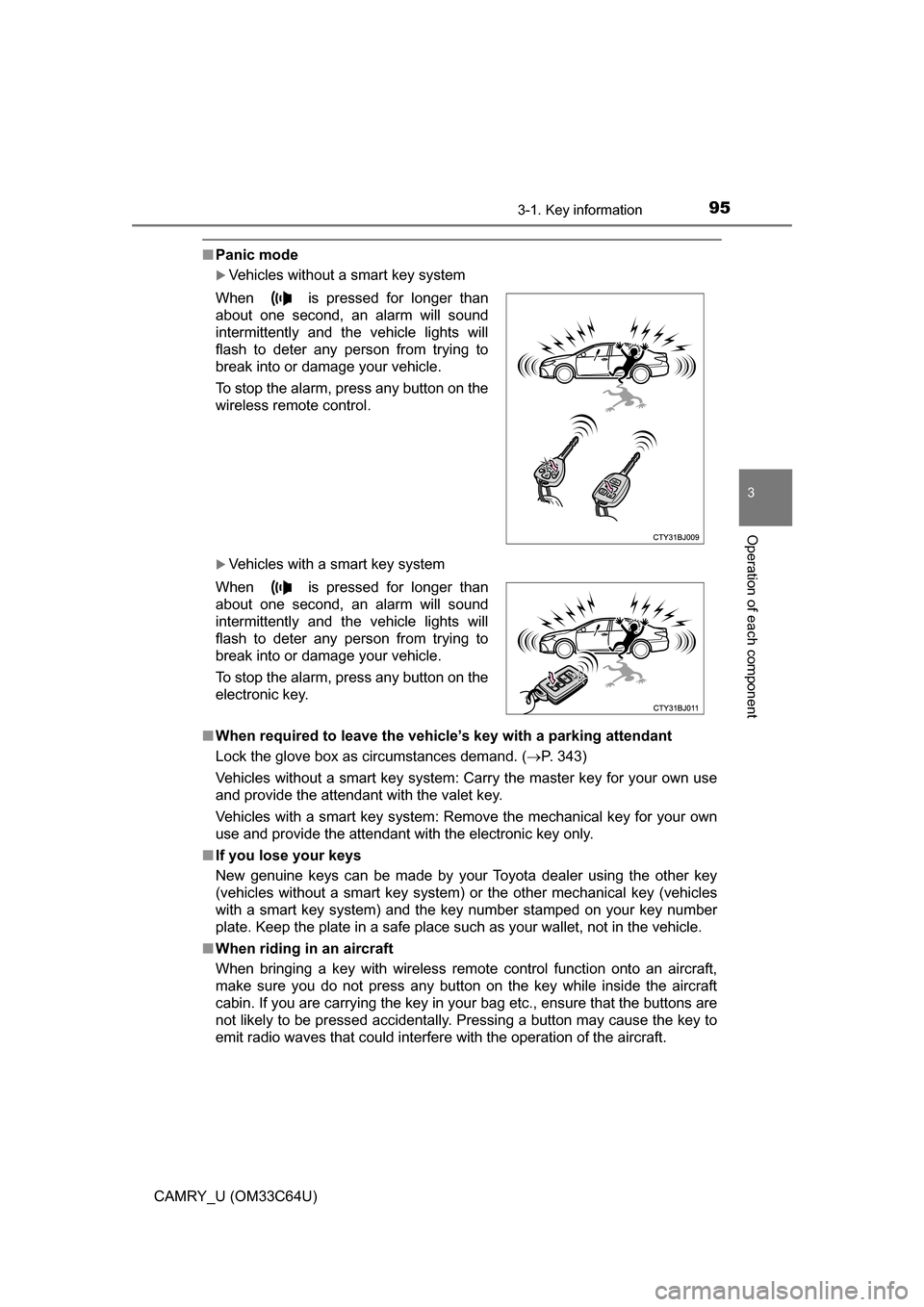
■Panic mode
Vehicles without a smart key system
Vehicles with a smart key system
■ When required to leave the vehicle’s key with a parking attendant
Lock the glove box as circumstances demand. ( P. 343)
Vehicles without a smart key system: Carry the master key for your own use
and provide the attendant with the valet key.
Vehicles with a smart key system: Remove the mechanical key for your own
use and provide the attendant with the electronic key only.
■ If you lose your keys
New genuine keys can be made by your Toyota dealer using the other key
(vehicles without a smart key system) or the other mechanical key (vehicles
with a smart key system) and the key number stamped on your key number
plate. Keep the plate in a safe place such as your wallet, not in the vehicle.
■ When riding in an aircraft
When bringing a key with wireless remote control function onto an aircraft,
make sure you do not press any button on the key while inside the aircra\
ft
cabin. If you are carrying the key in your bag etc., ensure that the buttons are
not likely to be pressed accidentally. Pressing a button may cause the key to
emit radio waves that could interfere with the operation of the aircraft. When is pressed for longer than
about one second, an alarm will sound
intermittently and the vehicle lights will
flash to deter any person from trying to
break into or damage your vehicle.
To stop the alarm, press any button on the
wireless remote control.
When is pressed for longer than
about one second, an alarm will sound
intermittently and the vehicle lights will
flash to deter any person from trying to
break into or damage your vehicle.
To stop the alarm, press any button on the
electronic key.
Page 99 of 568
99
3
Operation of each component
CAMRY_U (OM33C64U)
3-2. Opening, closing and locking the doors
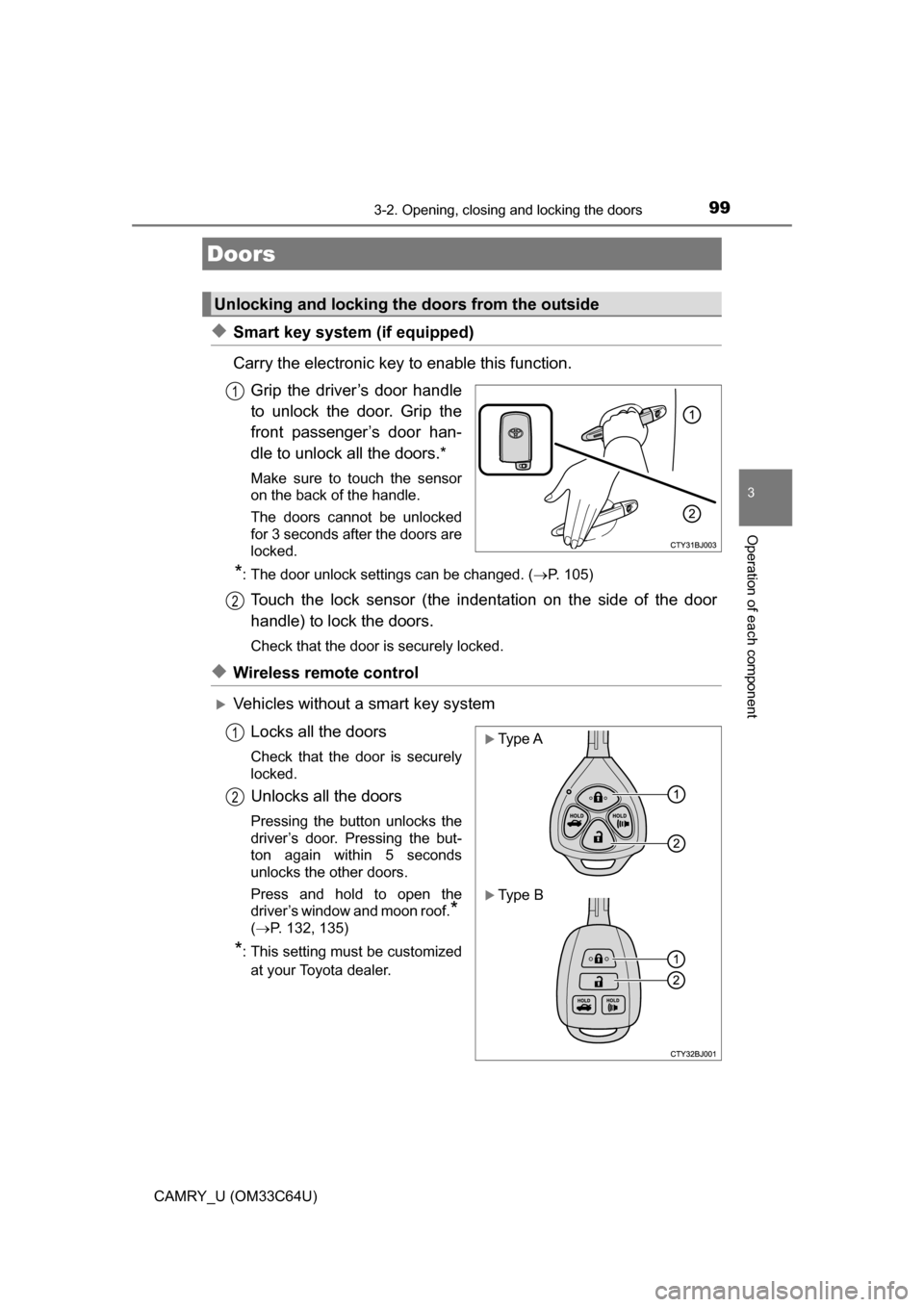
◆Smart key system (if equipped)
Carry the electronic key to enable this function.Grip the driver’s door handle
to unlock the door. Grip the
front passenger’s door han-
dle to unlock all the doors.*
Make sure to touch the sensor
on the back of the handle.
The doors cannot be unlocked
for 3 seconds after the doors are
locked.
*: The door unlock settings can be changed. ( P. 105)
Touch the lock sensor (the indentation on the side of the door
handle) to lock the doors.
Check that the door is securely locked.
◆Wireless remote control
Vehicles without a smart key system
Locks all the doors
Check that the door is securely
locked.
Unlocks all the doors
Pressing the button unlocks the
driver’s door. Pressing the but-
ton again within 5 seconds
unlocks the other doors.
Press and hold to open the
driver’s window and moon roof.
*
(P. 132, 135)
*: This setting must be customized
at your Toyota dealer.
Doors
Unlocking and locking the doors from the outside
1
2
Type A
Type B
1
2
Page 100 of 568
1003-2. Opening, closing and locking the doors
CAMRY_U (OM33C64U)
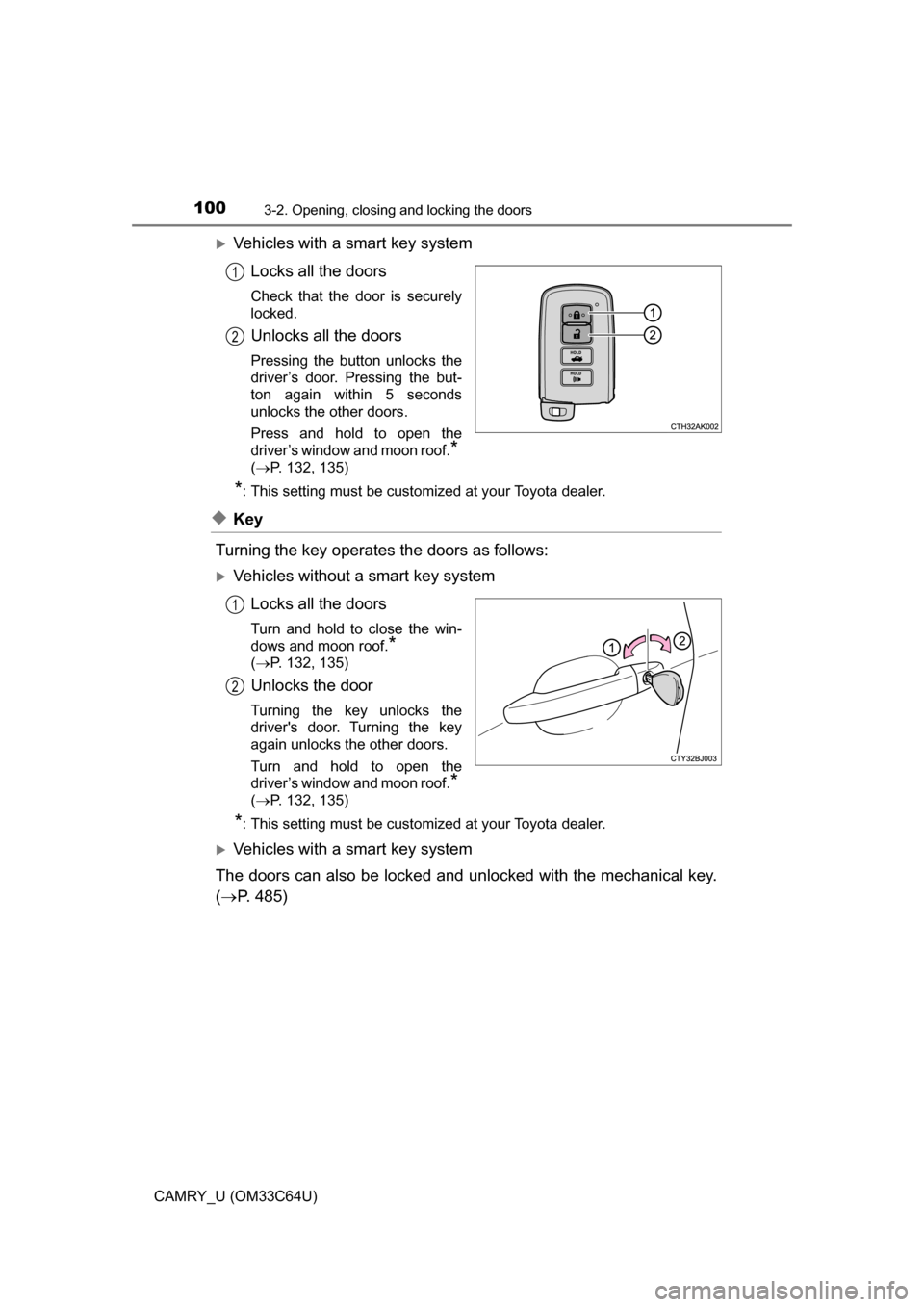
Vehicles with a smart key systemLocks all the doors
Check that the door is securely
locked.
Unlocks all the doors
Pressing the button unlocks the
driver’s door. Pressing the but-
ton again within 5 seconds
unlocks the other doors.
Press and hold to open the
driver’s window and moon roof.
*
(P. 132, 135)
*: This setting must be customized at your Toyota dealer.
◆Key
Turning the key operates the doors as follows:
Vehicles without a smart key system Locks all the doors
Turn and hold to close the win-
dows and moon roof.
*
(P. 132, 135)
Unlocks the door
Turning the key unlocks the
driver's door. Turning the key
again unlocks the other doors.
Turn and hold to open the
driver’s window and moon roof.
*
(P. 132, 135)
*: This setting must be customized at your Toyota dealer.
Vehicles with a smart key system
The doors can also be locked and unlocked with the mechanical key.
( P. 485)
1
2
1
2
Page 101 of 568
1013-2. Opening, closing and locking the doors
3
Operation of each component
CAMRY_U (OM33C64U)
■Operation signals
Doors:
A buzzer sounds and the emergency flashers flash to indicate that the doors
have been locked/unlocked. (Locked: Once; Unlocked: Twice)
Driver’s window and moon roof:
A buzzer sounds to indicate that the driver’s window and moon roof are open-
ing.
■ Security feature
If a door is not opened within approximately 60 seconds after the vehicle is
unlocked, the security feature automatically locks the vehicle again.
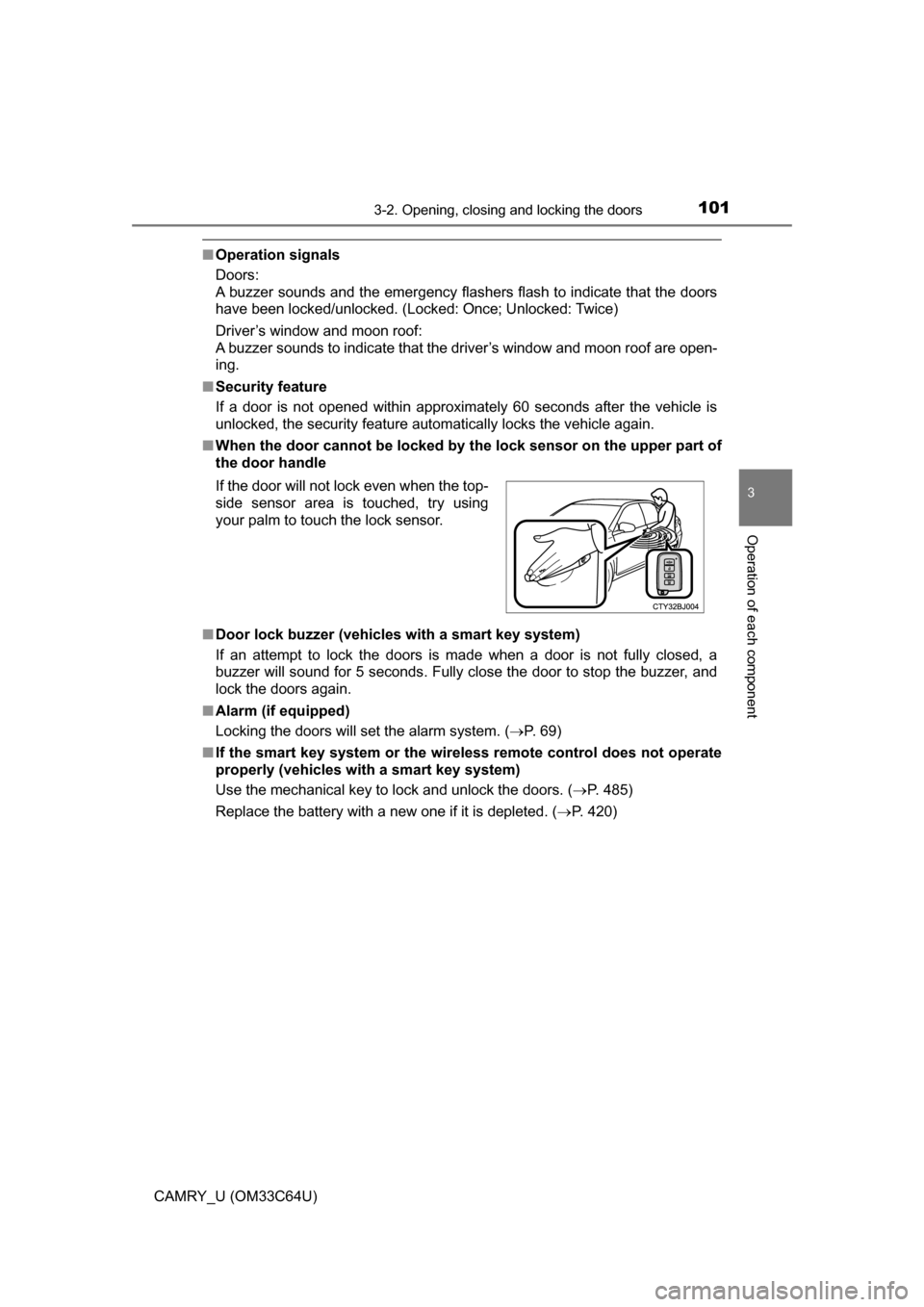
■ When the door ca nnot be locked by the lock sen sor on the upper part of
the door handle
■ Door lock buzzer (vehicles with a smart key system)
If an attempt to lock the doors is made when a door is not fully closed, a
buzzer will sound for 5 seconds. Fully close the door to stop the buzzer, and
lock the doors again.
■ Alarm (if equipped)
Locking the doors will set the alarm system. ( P. 69)
■ If the smart key system or the wireless remote control does not operate
properly (vehicles with a smart key system)
Use the mechanical key to lock and unlock the doors. ( P. 485)
Replace the battery with a new one if it is depleted. ( P. 420)
If the door will not lock even when the top-
side sensor area is touched, try using
your palm to touch the lock sensor.
Page 102 of 568
1023-2. Opening, closing and locking the doors
CAMRY_U (OM33C64U)
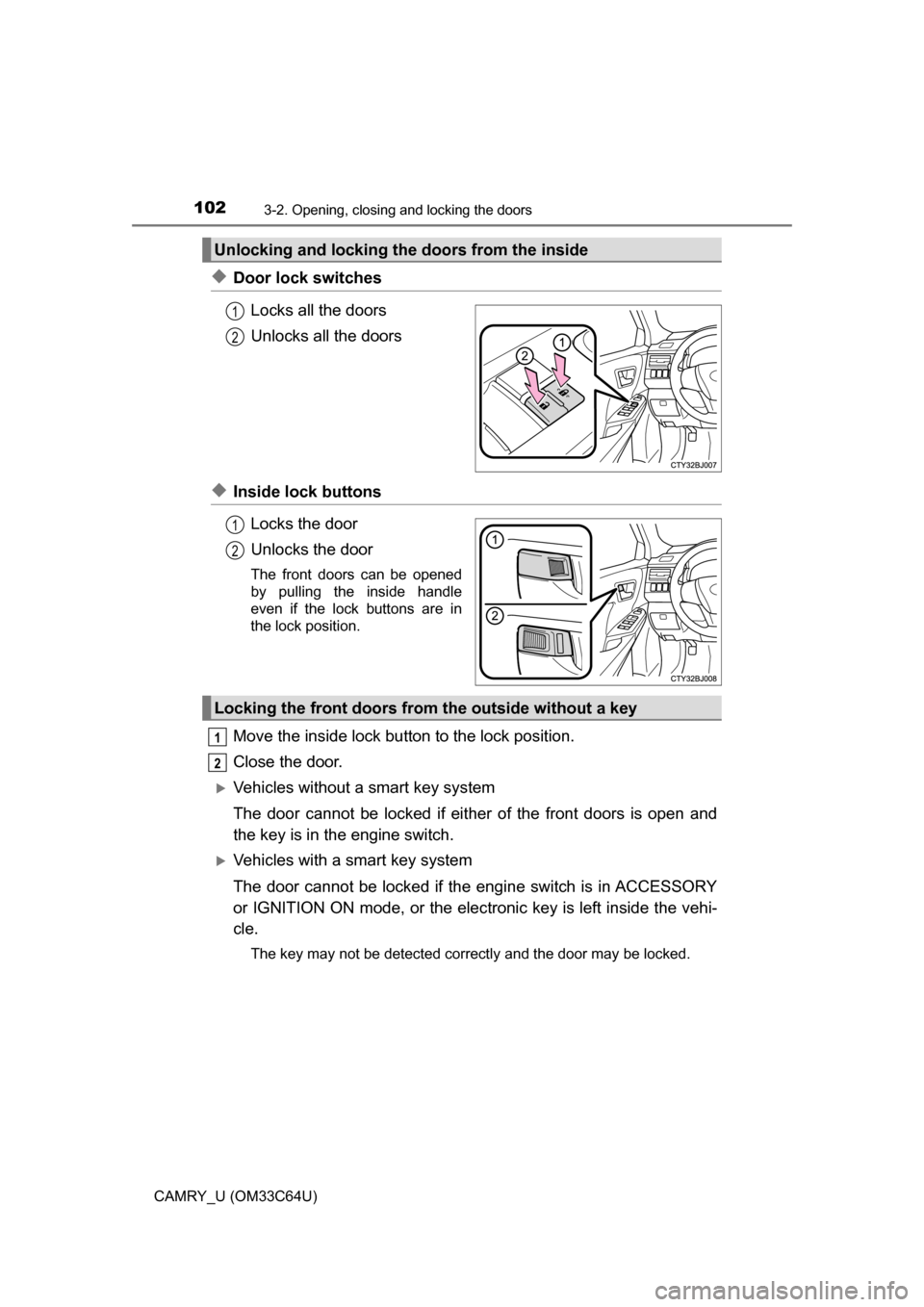
◆Door lock switchesLocks all the doors
Unlocks all the doors
◆Inside lock buttonsLocks the door
Unlocks the door
The front doors can be opened
by pulling the inside handle
even if the lock buttons are in
the lock position.
Move the inside lock button to the lock position.
Close the door.
Vehicles without a smart key system
The door cannot be locked if eit her of the front doors is open and
the key is in the engine switch.
Vehicles with a smart key system
The door cannot be locked if t he engine switch is in ACCESSORY
or IGNITION ON mode, or the elec tronic key is left inside the vehi-
cle.
The key may not be detected correctly and the door may be locked.
Unlocking and locking the doors from the inside
1
2
1
2
Locking the front doors from the outside without a key
1
2
Page 103 of 568
1033-2. Opening, closing and locking the doors
3
Operation of each component
CAMRY_U (OM33C64U)
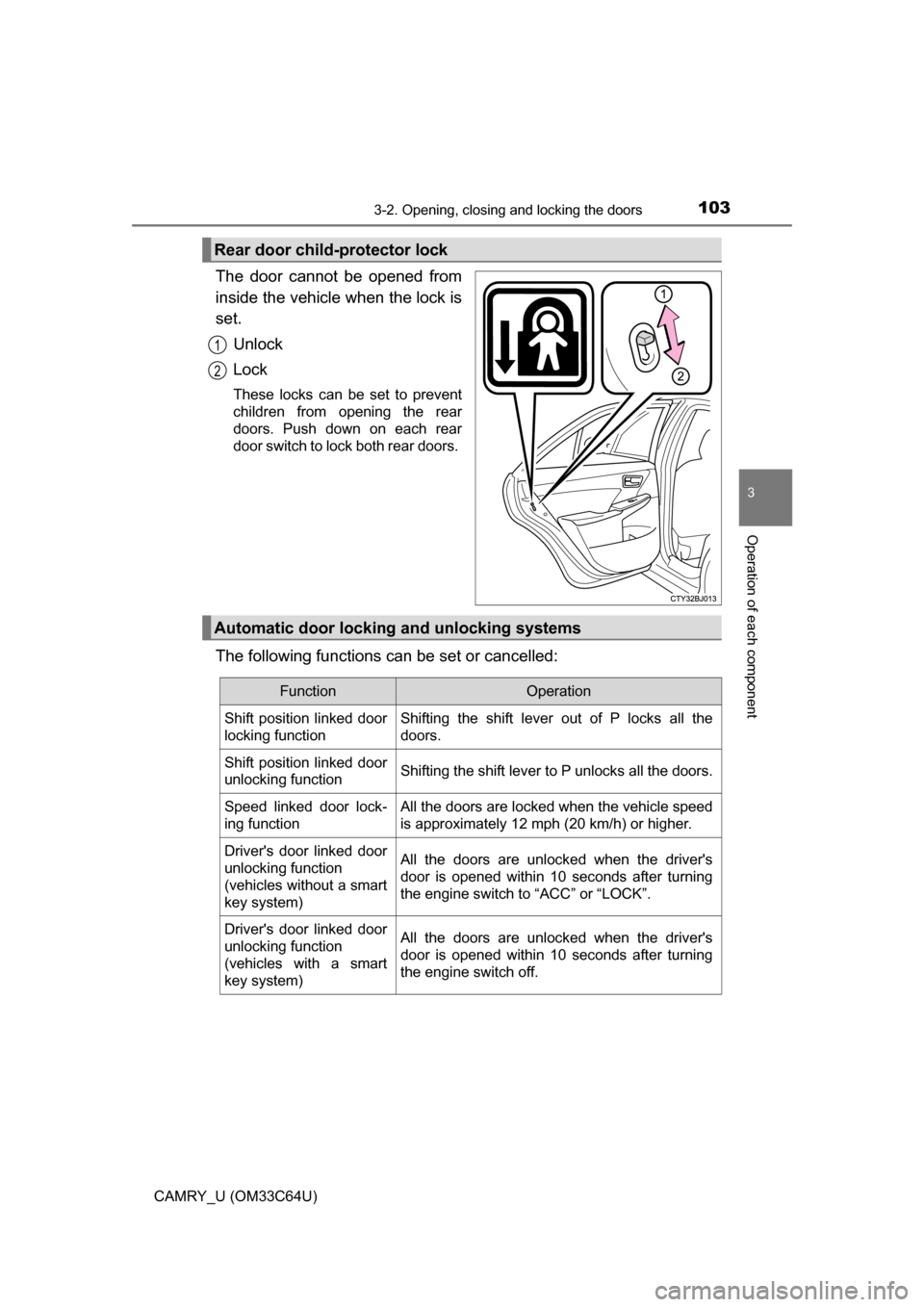
The door cannot be opened from
inside the vehicle when the lock is
set.Unlock
Lock
These locks can be set to prevent
children from opening the rear
doors. Push down on each rear
door switch to lock both rear doors.
The following functions can be set or cancelled:
Rear door child-protector lock
1
2
Automatic door lockin g and unlocking systems
FunctionOperation
Shift position linked door
locking function Shifting the shift lever out of P locks all the
doors.
Shift position linked door
unlocking function Shifting the shift lever to P unlocks all the doors.
Speed linked door lock-
ing function All the doors are locked when the vehicle speed
is approximately 12 mph (20 km/h) or higher.
Driver's door linked door
unlocking function
(vehicles without a smart
key system) All the doors are unlocked when the driver's
door is opened within 10 seconds after turning
the engine switch to “ACC” or “LOCK”.
Driver's door linked door
unlocking function
(vehicles with a smart
key system) All the doors are unlocked when the driver's
door is opened within 10 seconds after turning
the engine switch off.
Page 104 of 568
1043-2. Opening, closing and locking the doors
CAMRY_U (OM33C64U)■
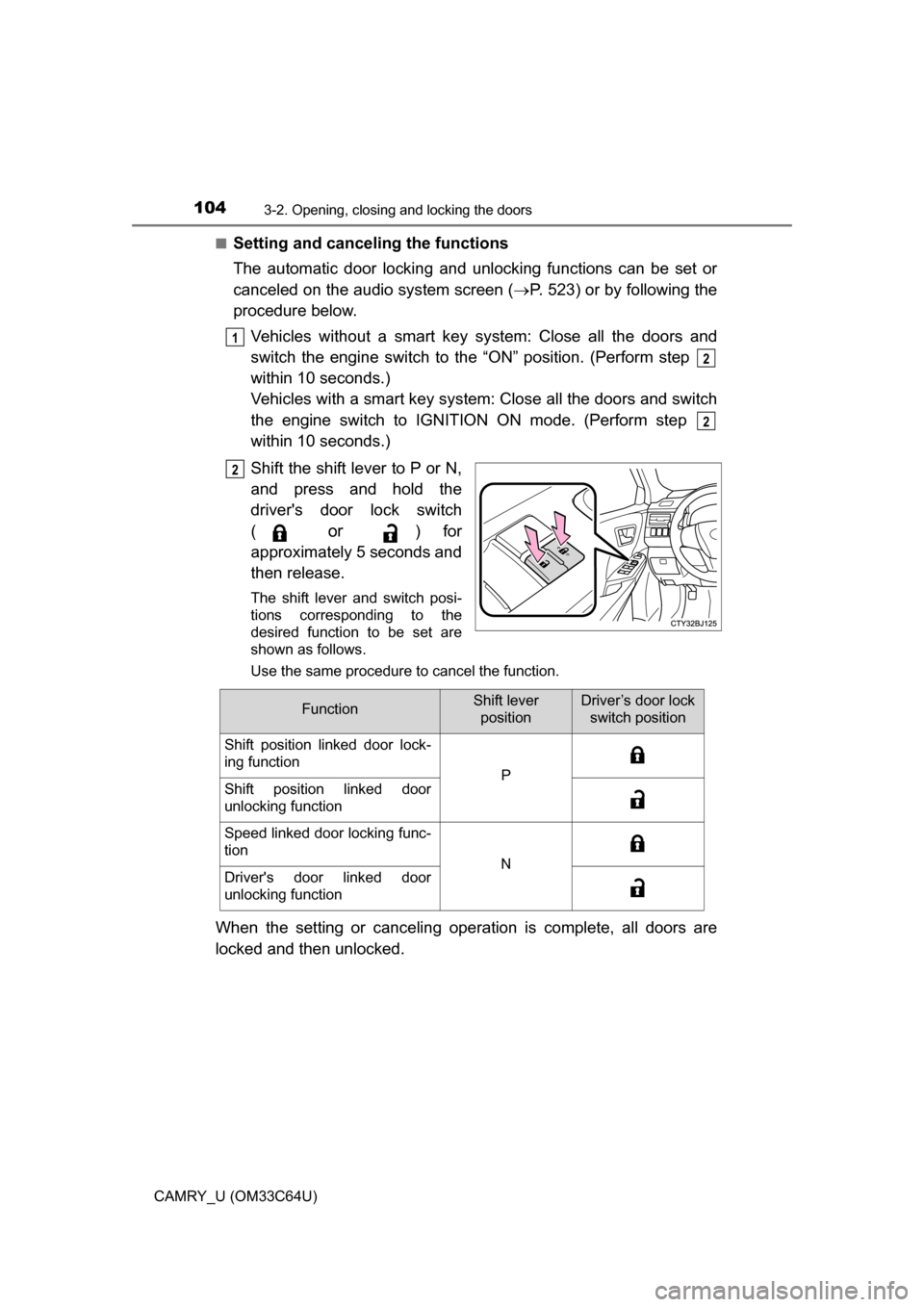
Setting and canceling the functions
The automatic door locking and unlocking functions can be set or
canceled on the audio system screen (
P. 523) or by following the
procedure below.
Vehicles without a smart key sy stem: Close all the doors and
switch the engine switch to the “ON” position. (Perform step
within 10 seconds.)
Vehicles with a smart key system: Close all the doors and switch
the engine switch to IGNITION ON mode. (Perform step
within 10 seconds.)
Shift the shift lever to P or N,
and press and hold the
driver's door lock switch
(
or ) for
approximately 5 seconds and
then release.
The shift lever and switch posi-
tions corresponding to the
desired function to be set are
shown as follows.
Use the same procedure to cancel the function.
When the setting or canceling operation is complete, all doors are
locked and then unlocked.
1
2
2
2
FunctionShift lever positionDriver’s door lock switch position
Shift position linked door lock-
ing function
PShift position linked door
unlocking function
Speed linked door locking func-
tion
NDriver's door linked door
unlocking function
Page 105 of 568
1053-2. Opening, closing and locking the doors
3
Operation of each component
CAMRY_U (OM33C64U)
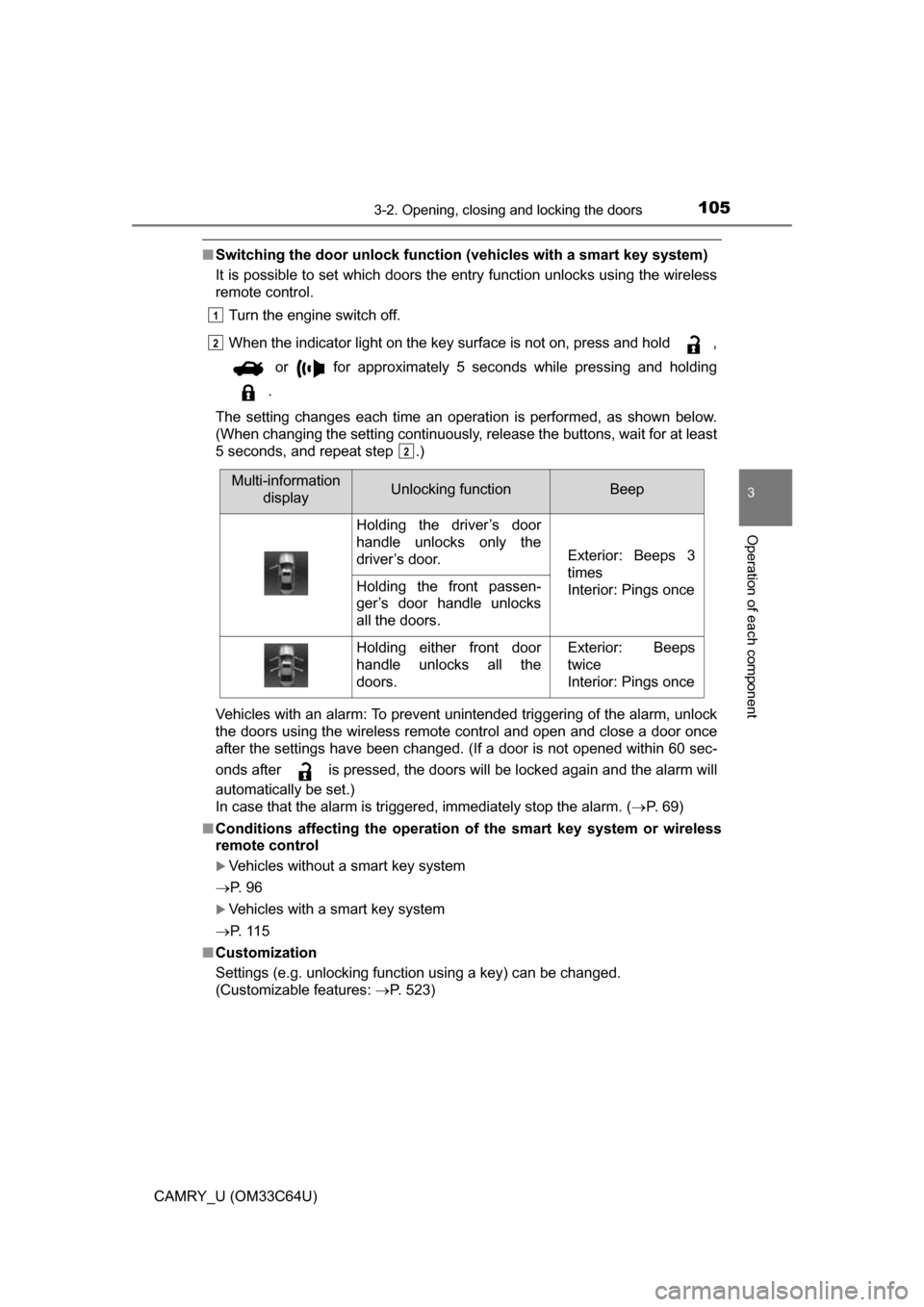
■Switching the door unlock functi on (vehicles with a smart key system)
It is possible to set which doors the entry function unlocks using the wireless
remote control.
Turn the engine switch off.
When the indicator light on the key surface is not on, press and hold ,
or for approximately 5 seconds while pressing and holding
.
The setting changes each time an operation is performed, as shown below.
(When changing the setting continuously, release the buttons, wait for at least
5 seconds, and repeat step .)
Vehicles with an alarm: To prevent unintended triggering of the alarm, unlock
the doors using the wireless remote control and open and close a door once
after the settings have been changed. (If a door is not opened within 6\
0 sec-
onds after is pressed, the doors will be locked again and the alarm will
automatically be set.)
In case that the alarm is triggered, immediately stop the alarm. ( P. 69)
■ Conditions affecting the operation of the smart key system or wireless
remote control
Vehicles without a smart key system
P. 9 6
Vehicles with a smart key system
P. 1 1 5
■ Customization
Settings (e.g. unlocking function using a key) can be changed.
(Customizable features: P. 523)
1
2
2
Multi-information
displayUnlocking functionBeep
Holding the driver’s door
handle unlocks only the
driver’s door.
Exterior: Beeps 3
times
Interior: Pings once
Holding the front passen-
ger’s door handle unlocks
all the doors.
Holding either front door
handle unlocks all the
doors.Exterior: Beeps
twice
Interior: Pings once