language TOYOTA CAMRY 2018 Owners Manual (in English)
[x] Cancel search | Manufacturer: TOYOTA, Model Year: 2018, Model line: CAMRY, Model: TOYOTA CAMRY 2018Pages: 612, PDF Size: 10.63 MB
Page 95 of 612
952. Instrument cluster
2
Instrument cluster
CAMRY_U (01999-06139)■
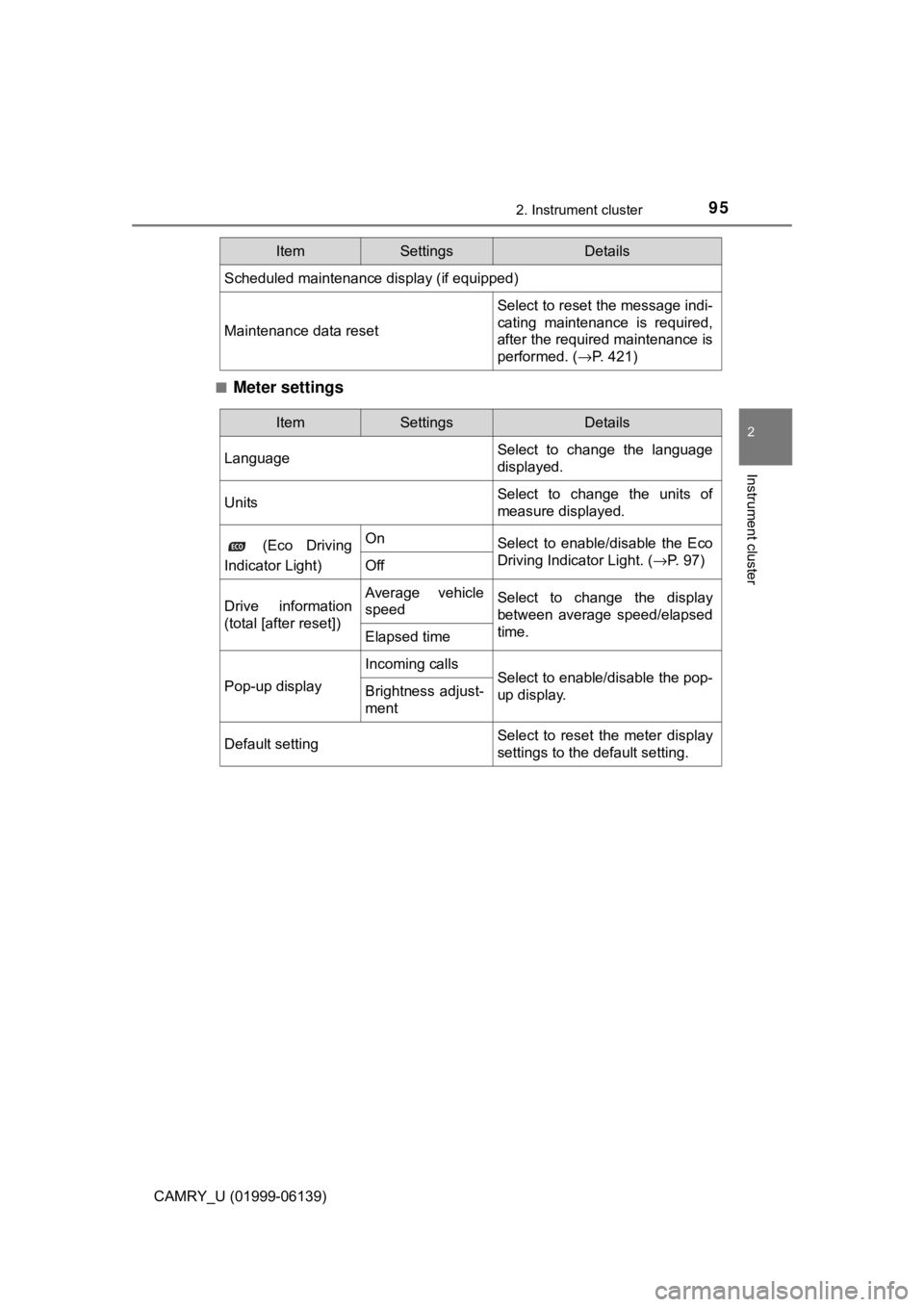
Meter settings
Scheduled maintenance display (if equipped)
Maintenance data reset
Select to reset the message indi-
cating maintenance is required,
after the required maintenance is
performed. (
→P. 421)
ItemSettingsDetails
ItemSettingsDetails
Language Select to change the language
displayed.
UnitsSelect to change the units of
measure displayed.
(Eco Driving
Indicator Light)OnSelect to enable/disable the Eco
Driving Indicator Light. ( →P. 97)
Off
Drive information
(total [after reset])Average vehicle
speedSelect to change the display
between average speed/elapsed
time.
Elapsed time
Pop-up display
Incoming callsSelect to enable/disable the pop-
up display.Brightness adjust-
ment
Default settingSelect to reset the meter display
settings to the default setting.
Page 109 of 612
1092. Instrument cluster
2
Instrument cluster
CAMRY_U (01999-06139)■
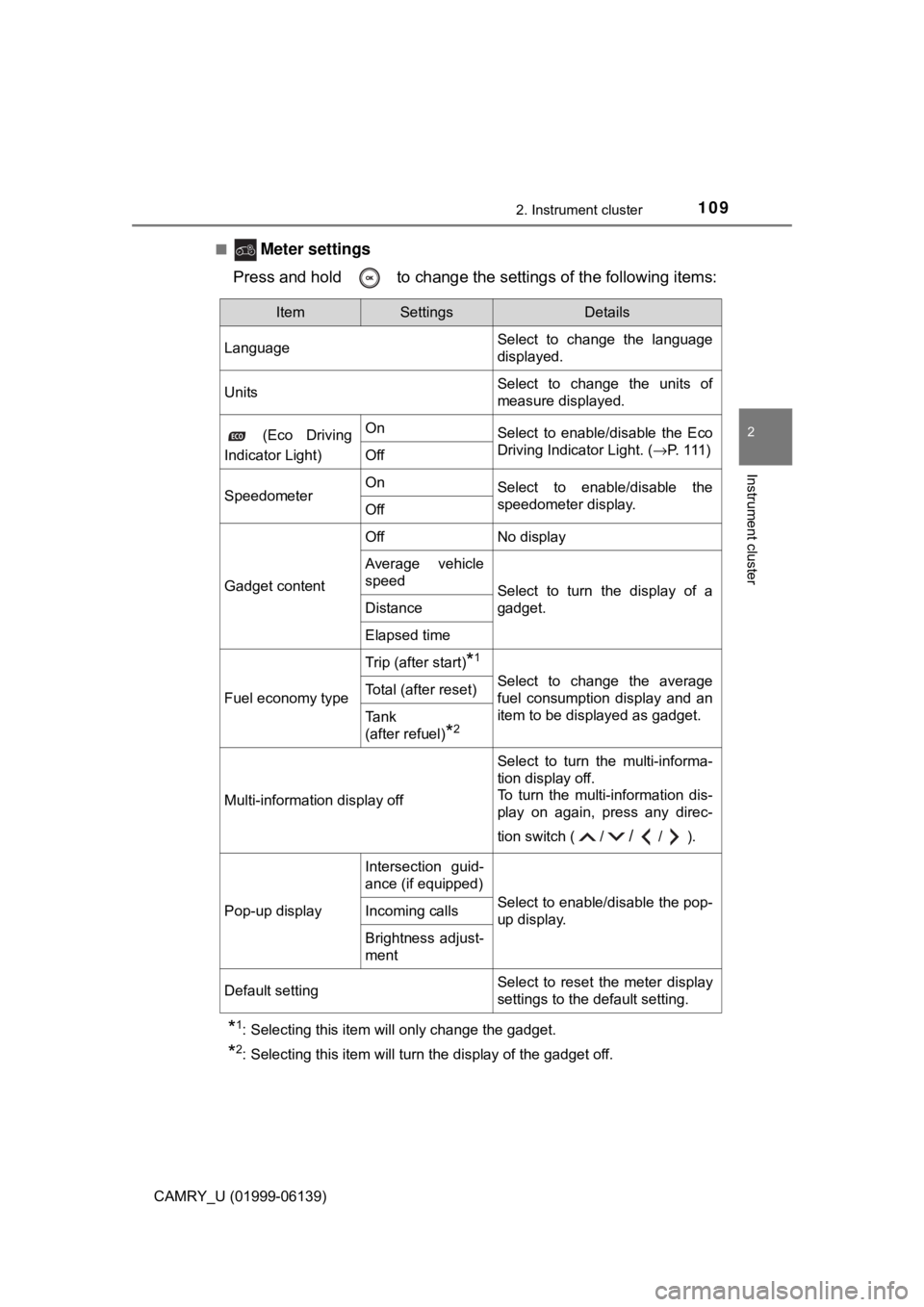
Meter settings
Press and hold to change the settings of the following items:
*1: Selecting this item will only change the gadget.
*2: Selecting this item will turn the display of the gadget off.
ItemSettingsDetails
Language Select to change the language
displayed.
UnitsSelect to change the units of
measure displayed.
(Eco Driving
Indicator Light)OnSelect to enable/disable the Eco
Driving Indicator Light. ( →P. 1 1 1 )
Off
SpeedometerOnSelect to enable/disable the
speedometer display.
Off
Gadget content
OffNo display
Average vehicle
speed
Select to turn the display of a
gadget.
Distance
Elapsed time
Fuel economy type
Trip (after start)*1
Select to change the average
fuel consumption display and an
item to be displayed as gadget.Total (after reset)
Tank
(after refuel)
*2
Multi-information display off
Select to turn the multi-informa-
tion display off.
To turn the multi-information dis-
play on again, press any direc-
tion switch ( /
//).
Pop-up display
Intersection guid-
ance (if equipped)
Select to enable/disable the pop-
up display.Incoming calls
Brightness adjust-
ment
Default settingSelect to reset the meter display
settings to the default setting.
Page 404 of 612
4045-4. Other interior features
CAMRY_U (01999-06139)
■Safety Connect Services Information
●Phone calls using the vehicle’s Bluetooth® technology will not be possible
during Safety Connect.
● Safety Connect is available beginning Fall 2009 on select Toyota models (in
the contiguous United States only). Contact with the Safety Connect
response center is dependent upon the telematics device being in operative
condition, cellular connection availability, and GPS satellite signal reception,
which can limit the ability to reach the response center or receive emer-
gency service support. Enrollment and Telematics Subscription Service
Agreement are required. A variety of subscription terms are available;
charges vary by subscription term selected and location.
● Automatic Collision Notification, Emergency Assistance and Stolen Vehicle
Location are available in the United States, including Hawaii and Alaska,
Puerto Rico and Canada, and Enhanced Roadside Assistance are available
in the United States, Puerto Rico and Canada.
● Automatic Collision Notification, Emergency Assistance, Stolen Vehicle and
Enhanced Road Assistance are not available in the U.S. Virgin Islands.
For vehicles first sold in the U.S. Virgin Islands, no Safety Connect services
are available in or outside the U.S. Virgin Islands.
● Safety Connect services are not subject to section 255 of the Telecommuni-
cations Act and the device is not TTY compatible.
■ Languages
The Safety Connect response center will offer support in multiple languages.
The Safety Connect system will offer voice prompts in English, Spanish, and
French. Please indicate your language of choice when enrolling.
■ When contacting th e response center
You may be unable to contact the response center if the network is busy.
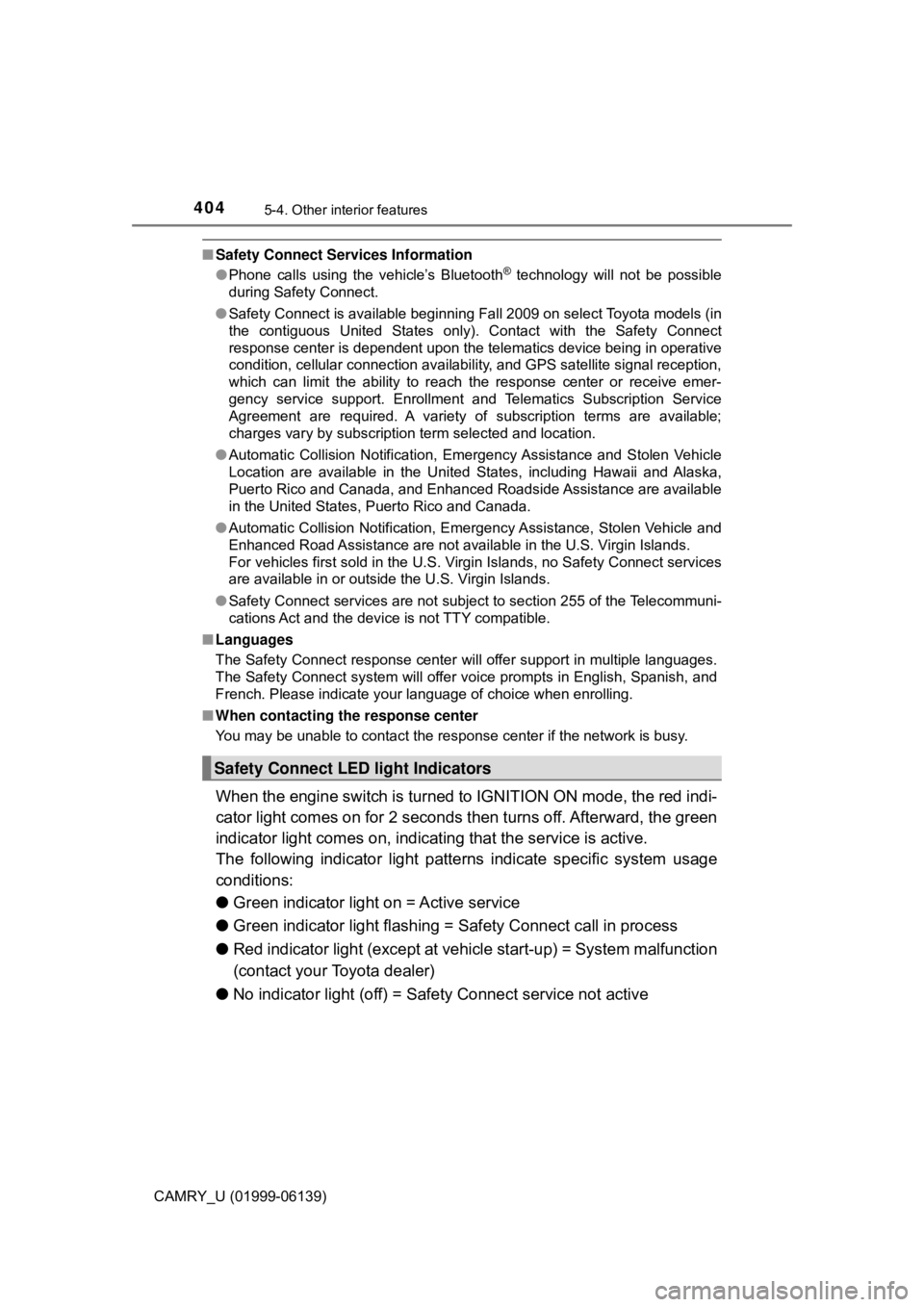
When the engine switch is turned to IGNITION ON mode, the red indi-
cator light comes on for 2 seconds then turns off. Afterward, the green
indicator light comes on, indicating that the service is active.
The following indicator light pattern s indicate specific system usage
conditions:
● Green indicator light on = Active service
● Green indicator light flashing = Sa fety Connect call in process
● Red indicator light (except at vehicle start-up) = System malfunction
(contact your Toyota dealer)
● No indicator light (off) = Safety Connect service not active
Safety Connect LE D light Indicators
Page 568 of 612
5688-2. Customization
CAMRY_U (01999-06139)
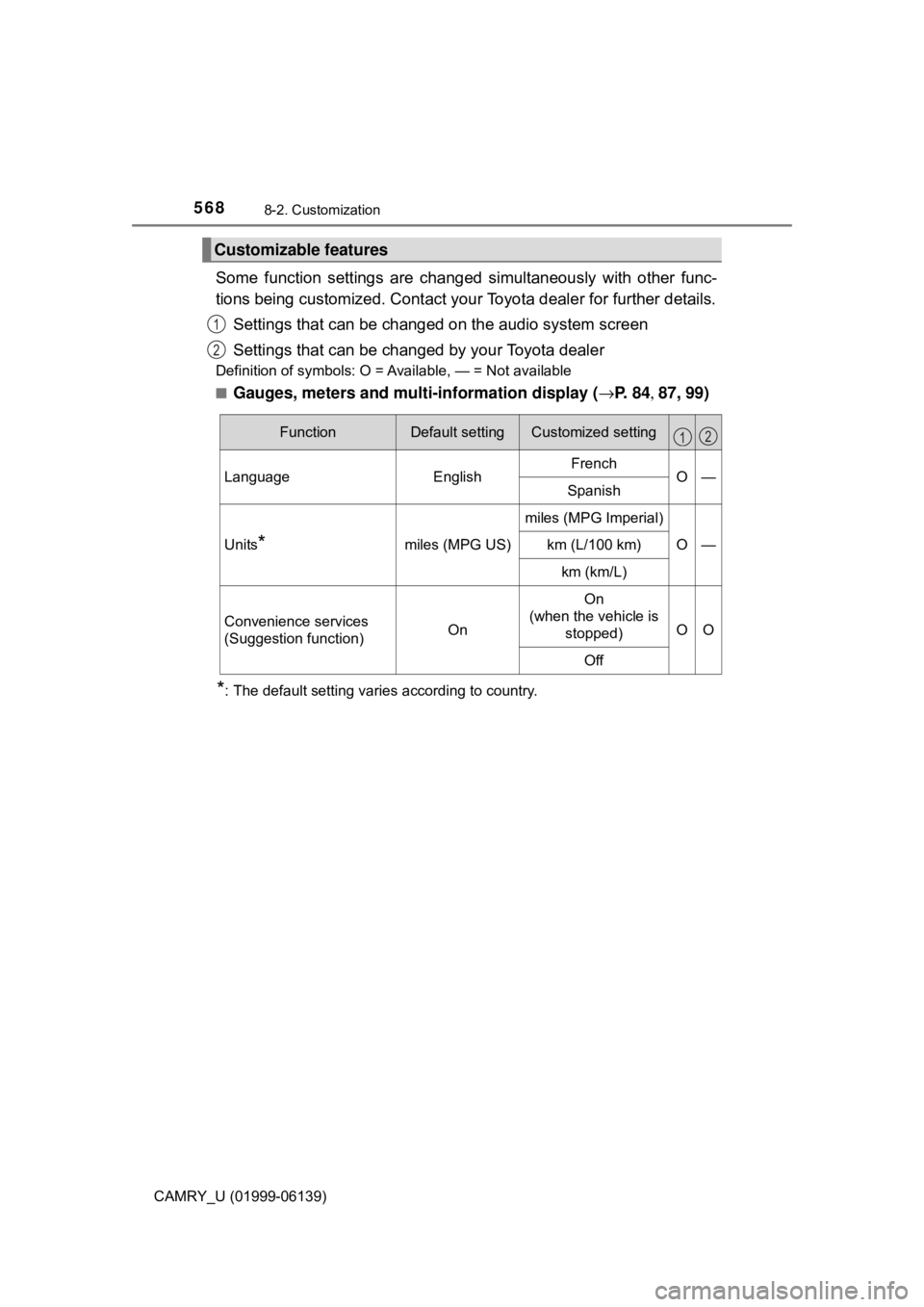
Some function settings are changed simultaneously with other func-
tions being customized. Contact your Toyota dealer for further details.
Settings that can be changed on the audio system screen
Settings that can be changed by your Toyota dealer
Definition of symbols: O = Available, — = Not available
■
Gauges, meters and mult i-information display (→P. 8 4 , 87, 99)
*: The default setting varies according to country.
Customizable features
1
2
FunctionDefault settingCustomized setting
LanguageEnglishFrenchO—Spanish
Units*miles (MPG US)
miles (MPG Imperial)
O—km (L/100 km)
km (km/L)
Convenience services
(Suggestion function)On
On
(when the vehicle is stopped)
OO
Off
12
Page 602 of 612
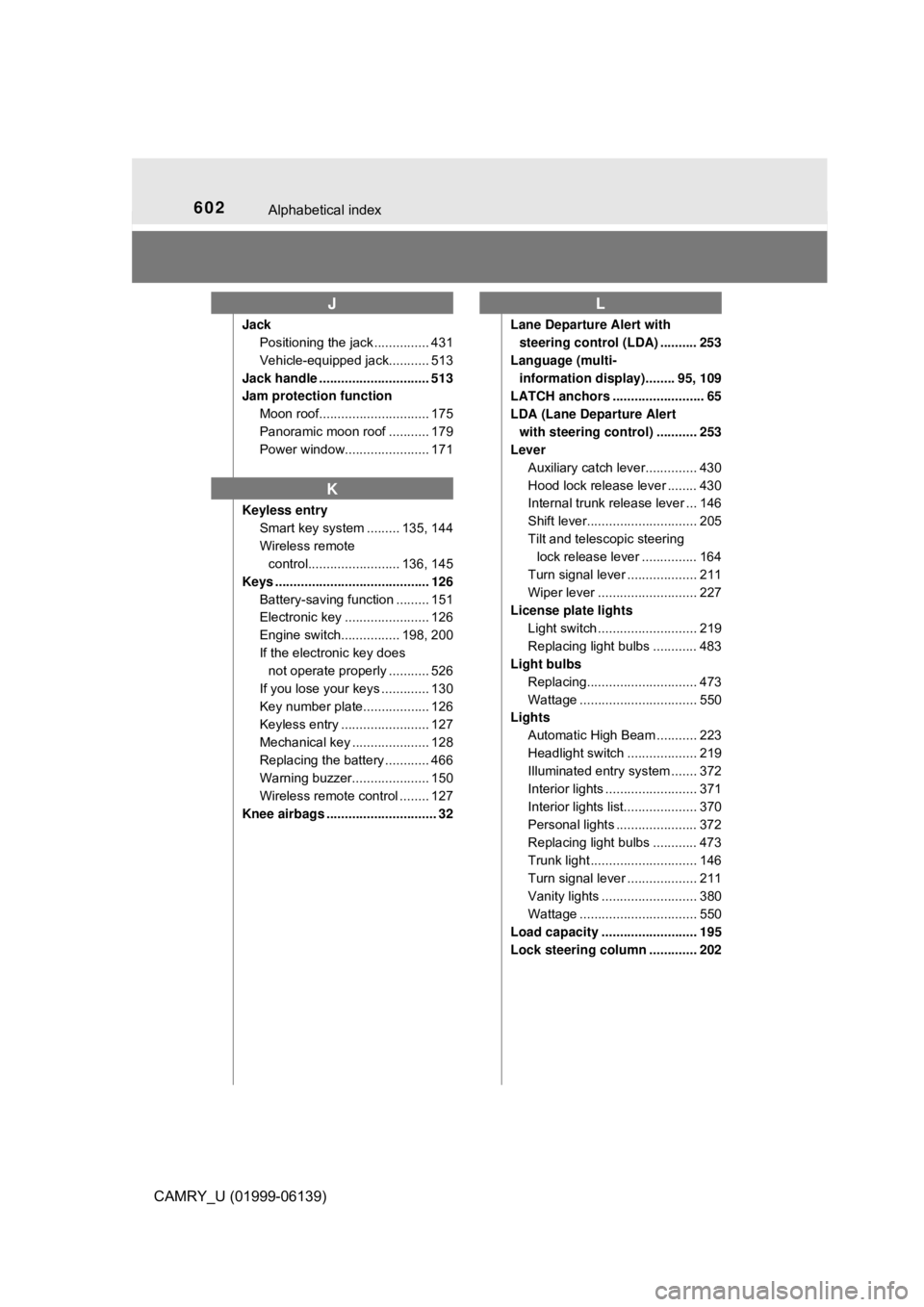
602Alphabetical index
CAMRY_U (01999-06139)
JackPositioning the jack ............... 431
Vehicle-equipped jack........... 513
Jack handle .............................. 513
Jam protection function Moon roof.............................. 175
Panoramic moon roof ........... 179
Power window....................... 171
Keyless entry Smart key system ......... 135, 144
Wireless remote control......................... 136, 145
Keys .......................................... 126 Battery-saving function ......... 151
Electronic key ....................... 126
Engine switch................ 198, 200
If the electronic key does not operate properly ........... 526
If you lose your keys ............. 130
Key number plate.................. 126
Keyless entry ........................ 127
Mechanical key ..................... 128
Replacing the battery ............ 466
Warning buzzer..................... 150
Wireless remote control ........ 127
Knee airbags .............................. 32 Lane Departure Alert with
steering control (LDA) .......... 253
Language (multi- information display)........ 95, 109
LATCH anchors ......................... 65
LDA (Lane Departure Alert
with steering control) ........... 253
Lever
Auxiliary catch lever.............. 430
Hood lock release lever ........ 430
Internal trunk release lever ... 146
Shift lever.............................. 205
Tilt and telescopic steering lock release lever ............... 164
Turn signal lever ................... 211
Wiper lever ........................... 227
License plate lights
Light switch ........................... 219
Replacing light bulbs ............ 483
Light bulbs
Replacing.............................. 473
Wattage ................................ 550
Lights
Automatic High Beam ........... 223
Headlight switch ................... 219
Illuminated entry system ....... 372
Interior lights ......................... 371
Interior lights list.................... 370
Personal lights ...................... 372
Replacing light bulbs ............ 473
Trunk light ............................. 146
Turn signal lever ................... 211
Vanity lights .......................... 380
Wattage ................................ 550
Load capacity .......................... 195
Lock steering column ............. 202
J
K
L
Page 603 of 612
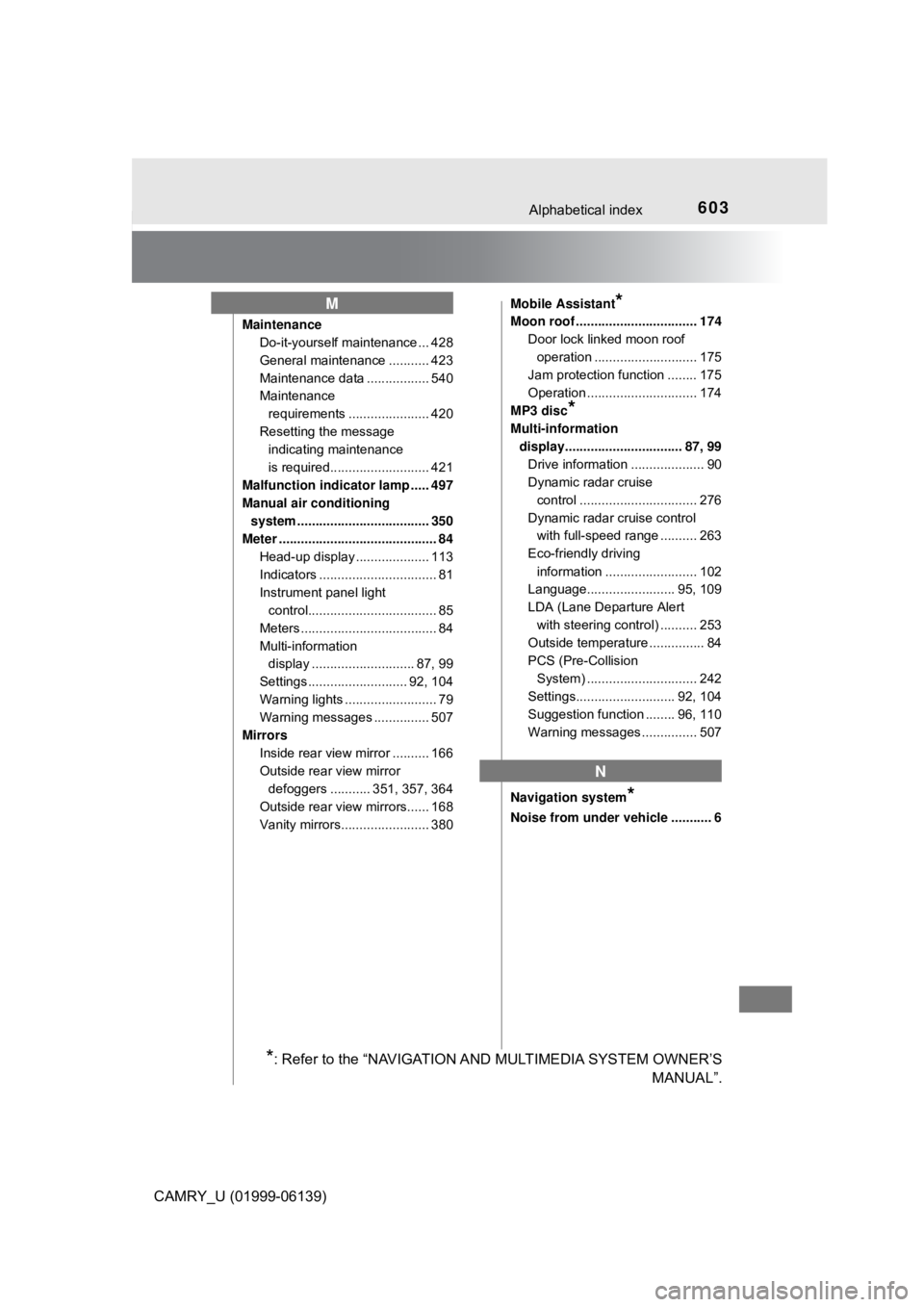
603Alphabetical index
CAMRY_U (01999-06139)
MaintenanceDo-it-yourself maintenance ... 428
General maintenance ........... 423
Maintenance data ................. 540
Maintenance
requirements ...................... 420
Resetting the message indicating maintenance
is required........................... 421
Malfunction indicator lamp ..... 497
Manual air conditioning system .................................... 350
Meter ........................................... 84 Head-up display .................... 113
Indicators ................................ 81
Instrument panel light control................................... 85
Meters ..................................... 84
Multi-information display ............................ 87, 99
Settings ........................... 92, 104
Warning lights ......................... 79
Warning messages ............... 507
Mirrors Inside rear view mirror .......... 166
Outside rear view mirror defoggers ........... 351, 357, 364
Outside rear view mirrors...... 168
Vanity mirrors........................ 380 Mobile Assistant
*
Moon roof ................................. 174
Door lock linked moon roof operation ............................ 175
Jam protection function ........ 175
Operation .............................. 174
MP3 disc
*
Multi-information display................................ 87, 99 Drive information .................... 90
Dynamic radar cruise control ................................ 276
Dynamic radar cruise control with full-speed range .......... 263
Eco-friendly driving information ......................... 102
Language........................ 95, 109
LDA (Lane Departure Alert
with steering control) .......... 253
Outside temperature ............... 84
PCS (Pre-Collision
System) .............................. 242
Settings........................... 92, 104
Suggestion function ........ 96, 110
Warning messages ............... 507
Navigation system
*
Noise from under vehicle ........... 6
M
N
*: Refer to the “NAVIGATION AND MULTIMEDIA SYSTEM OWNER’S MANUAL”.