alarm TOYOTA CAMRY 2018 (in English) User Guide
[x] Cancel search | Manufacturer: TOYOTA, Model Year: 2018, Model line: CAMRY, Model: TOYOTA CAMRY 2018Pages: 612, PDF Size: 13.73 MB
Page 146 of 612
1463-2. Opening, closing and locking the doors
CAMRY_U (01999-06122)
■Tr u n k l i g h t
The trunk light turns on when the trunk is opened.
■Function to prevent the trunk being locked with the electronic key inside
(vehicles with a smart key system)
●When all doors are locked, closing the trunk lid with the electronic key left
inside the trunk will sound an alarm.
In this case, the trunk lid can be opened by pressing the trunk release but-
ton on the trunk lid.
●If the spare electronic key is put in the trunk with all the doors locked, the
key confinement prevention function is activated so the trunk can be
opened. In order to prevent theft, take all electronic keys with you when
leaving the vehicle.
●If the electronic key is put in the trunk with all the doors locked, the key may
not be detected depending on the location of the key and the surrounding
radio wave conditions. In this case, the key confinement prevention function
cannot be activated, causing the doors to lock when the trunk is closed.
Make sure to check where the key is before closing the trunk.
●The key confinement prevention function cannot be activated if any one of
the doors is unlocked. In this case, open the trunk using the trunk opener.
■Open trunk warning buzzer
If the vehicle reaches a speed of 3 mph (5 km/h), the master warning light
flashes and a buzzer sounds to indicate that the trunk is not yet fully closed.
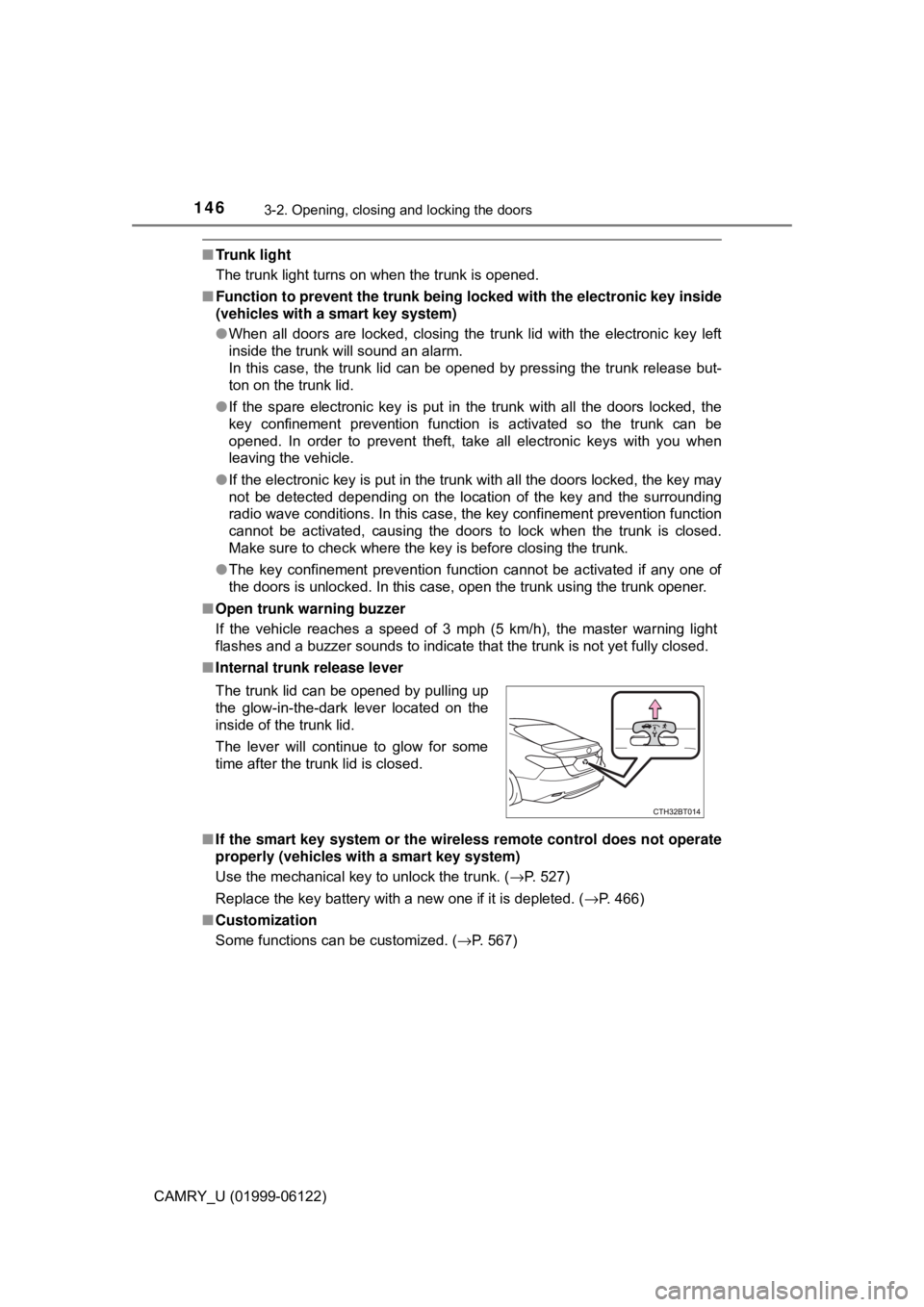
■Internal trunk release lever
■If the smart key system or the wireless remote control does not operate
properly (vehicles with a smart key system)
Use the mechanical key to unlock the trunk. (→P. 527)
Replace the key battery with a new one if it is depleted. (→P. 466)
■Customization
Some functions can be customized. (→P. 567) The trunk lid can be opened by pulling up
the glow-in-the-dark lever located on the
inside of the trunk lid.
The lever will continue to glow for some
time after the trunk lid is closed.
Page 150 of 612
1503-2. Opening, closing and locking the doors
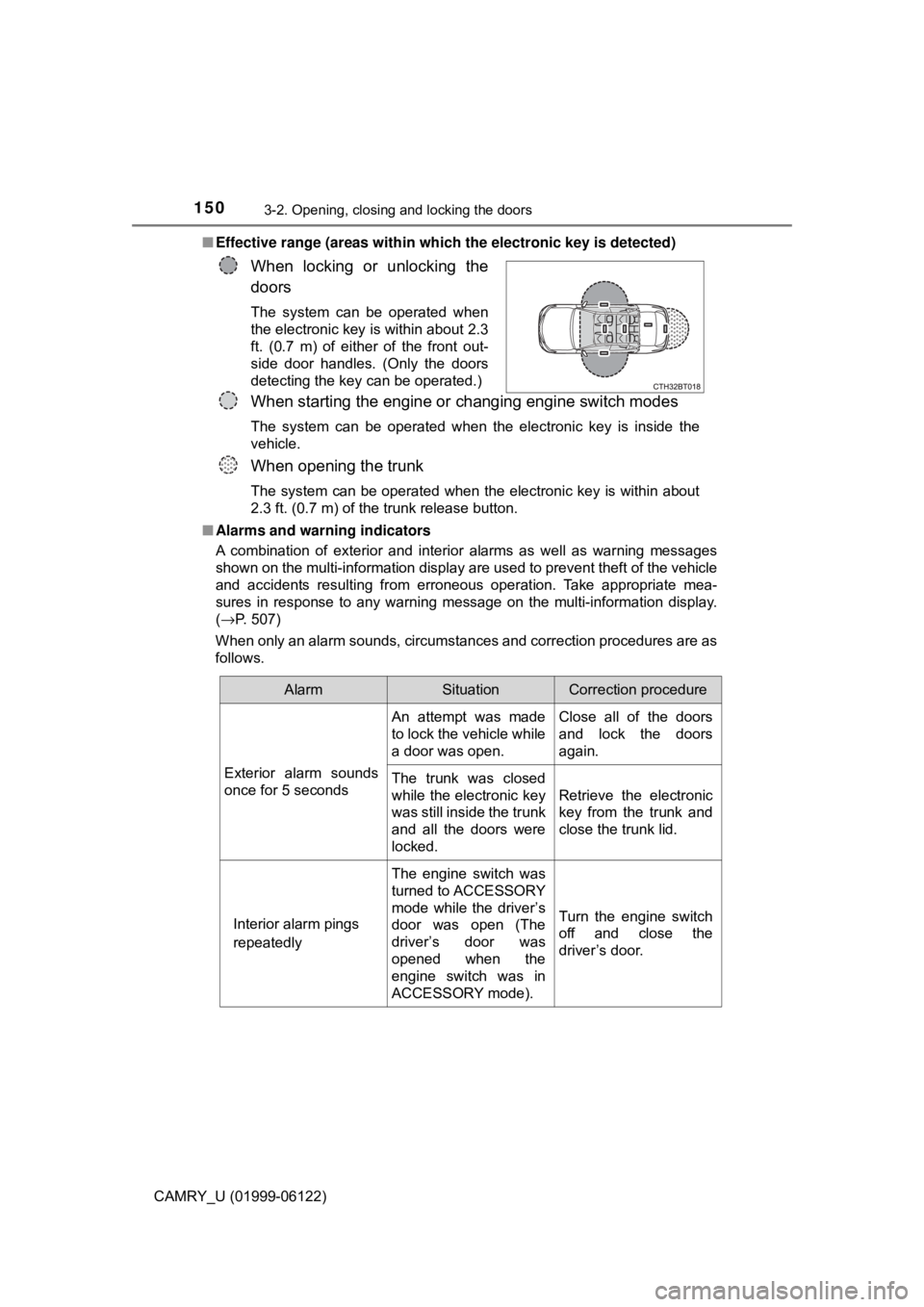
CAMRY_U (01999-06122)■Effective range (areas within which the electronic key is detected)
■Alarms and warning indicators
A combination of exterior and interior alarms as well as warning messages
shown on the multi-information display are used to prevent theft of the vehicle
and accidents resulting from erroneous operation. Take appropriate mea-
sures in response to any warning message on the multi-information display.
(→P. 507)
When only an alarm sounds, circumstances and correction procedures are as
follows.
When locking or unlocking the
doors
The system can be operated when
the electronic key is within about 2.3
ft. (0.7 m) of either of the front out-
side door handles. (Only the doors
detecting the key can be operated.)
When starting the engine or changing engine switch modes
The system can be operated when the electronic key is inside the
vehicle.
When opening the trunk
The system can be operated when the electronic key is within about
2.3 ft. (0.7 m) of the trunk release button.
AlarmSituationCorrection procedure
Exterior alarm sounds
once for 5 secondsAn attempt was made
to lock the vehicle while
a door was open.Close all of the doors
and lock the doors
again.
The trunk was closed
while the electronic key
was still inside the trunk
and all the doors were
locked.Retrieve the electronic
key from the trunk and
close the trunk lid.
Interior alarm pings
repeatedlyThe engine switch was
turned to ACCESSORY
mode while the driver’s
door was open (The
driver’s door was
opened when the
engine switch was in
ACCESSORY mode).Turn the engine switch
off and close the
driver’s door.
Page 153 of 612

1533-2. Opening, closing and locking the doors
3
Operation of each component
CAMRY_U (01999-06122)●If the wireless remote control is used to lock the doors when the electronic
key is near the vehicle, there is a possibility that the door may not be
unlocked by the entry function. (Use the wireless remote control to unlock
the doors.)
●Touching the door lock sensor while wearing gloves may delay or prevent
lock operation. Remove the gloves and touch the lock sensor again.
●When the lock operation is performed using the lock sensor, recognition sig-
nals will be shown up to two consecutive times. After this, no recognition
signals will be given.
*
●If the door handle becomes wet while the electronic key is within the effec-
tive range, the door may lock and unlock repeatedly. In this case, follow the
following correction procedures to wash the vehicle:
• Place the electronic key in a location 6 ft. (2 m) or more away from the
vehicle. (Take care to ensure that the key is not stolen.)
• Set the electronic key to battery-saving mode to disable the smart key
system. (→P. 151)
●If the electronic key is inside the vehicle and a door handle becomes wet
during a car wash, a message may be shown on the multi-information dis-
play and a buzzer will sound outside the vehicle. To turn off the alarm, lock
all the doors.
●The lock sensor may not work properly if it comes into contact with ice,
snow, mud, etc. Clean the lock sensor and attempt to operate it again.
●A sudden approach to the effective range or door handle may prevent the
doors from being unlocked. In this case, return the door handle to the origi-
nal position and check that the doors unlock before pulling the door handle
again.
●If there is another electronic key in the detection area, it may take slightly
longer to unlock the doors after the door handle is gripped.
●Fingernails may scrape against the door during operation of the door han-
dle. Be careful not to injure fingernails or damage the surface of the door.
*: This setting can be customized at your Toyota dealer.
Page 154 of 612

1543-2. Opening, closing and locking the doors
CAMRY_U (01999-06122)■When the vehicle is not driven for extended periods
●To prevent theft of the vehicle, do not leave the electronic key within 6 ft. (2
m) of the vehicle.
●The smart key system can be deactivated in advance. (→P. 567)
●Setting the electronic key to battery-saving mode helps to reduce key bat-
tery depletion. (→P. 151)
■To operate the system properly
Make sure to carry the electronic key when operating the system. Do not get
the electronic key too close to the vehicle when operating the system from the
outside of the vehicle.
Depending on the position and holding condition of the electronic key, the key
may not be detected correctly and the system may not operate properly. (The
alarm may go off accidentally, or the door lock prevention function may not
operate.)
■If the smart key system does not operate properly
●Locking and unlocking the doors and trunk: Use the mechanical key.
(→P. 526)
●Starting the engine: →P. 527
■Customization
Some functions can be customized. (→P. 567)
■If the smart key system has been deactivated in a customized setting
●Locking and unlocking the doors and opening the trunk:
Use the wireless remote control or mechanical key. (→P. 136, 145, 526)
●Starting the engine and changing engine switch modes: →P. 527
●Stopping the engine: →P. 200
Page 172 of 612

1723-5. Opening and closing the windows
CAMRY_U (01999-06122)●If the door window cannot be opened and closed even when performing the
above operations, perform the following procedure for function initialization.
Vehicles without a smart key system:
Turn the engine switch to the “ON” position.
Vehicles with a smart key system:
Turn the engine switch to IGNITION ON mode.
Pull and hold the power window switch in the one-touch closing direction
and completely close the door window.
Release the power window switch for a moment, resume pulling the
switch in the one-touch closing direction, and hold it there for approxi-
mately 6 seconds or more.
Press and hold the power window switch in the one-touch opening direc-
tion. After the door window is completely opened, continue holding the
switch for an additional 1 second or more.
Release the power window switch for a moment, resume pushing the
switch in the one-touch opening direction, and hold it there for approxi-
mately 4 seconds or more.
Pull and hold the power window switch in the one-touch closing direction
again. After the door window is completely closed, continue holding the
switch for a further 1 second or more.
If you release the switch while the window is moving, start again from the
beginning.
If the window reverses and cannot be fully closed or opened, have the vehicle
inspected by your Toyota dealer.
■Door lock linked window operation
●Vehicles without a smart key system: The power windows can be opened
and closed using the key.
* (→P. 137)
Vehicles with a smart key system: The power windows can be opened and
closed using the mechanical key.
* (→P. 526)
●The power windows can be opened using the wireless remote control.
*
(→P. 136)
*: These settings must be customized at your Toyota dealer.
■Alarm (if equipped)
The alarm may be triggered if the alarm is set and a power window is closed
using the door lock linked power window operation function. (→P. 75)
■Power windows open warning buzzer
A buzzer sounds and a message is shown on the multi-information display in
the instrument cluster when the engine switch is turned off and the driver’s
door is opened with the power windows open.
■Customization
Some functions can be customized. (→P. 567)
1
2
3
4
5
6
Page 176 of 612

1763-5. Opening and closing the windows
CAMRY_U (01999-06122)■When the moon roof does not close normally
Perform the following procedure:
●If the moon roof closes but then re-opens slightly
Stop the vehicle.
Press and hold the “CLOSE” switch.
*1
The moon roof will close, reopen and pause for approximately 10 sec-
onds.
*2 Then it will close again, tilt up and pause for approximately 1 sec-
ond. Finally, it will tilt down, open and close.
Check to make sure that the moon roof is completely closed and then
release the switch.
●If the moon roof tilts down but then tilts back up
Stop the vehicle.
Press and hold the “UP” switch
*1 until the moon roof moves into the tilt
up position and stops.
Release the “UP” switch once and then press and hold the “UP” switch
again.
*1
The moon roof will pause for approximately 10 seconds in the tilt up posi-
tion.
*2 Then it will adjust slightly and pause for approximately 1 second.
Finally, it will tilt down, open and close.
Check to make sure that the moon roof is completely closed and then
release the switch.
*1: If the switch is released at the incorrect time, the procedure will have to
be performed again from the beginning.
*2: If the switch is released after the above mentioned 10 second pause,
automatic operation will be disabled. In that case, press and hold the
“CLOSE” or “UP” switch, and the moon roof will tilt up and pause for
approximately 1 second. Then it will tilt down, open and close. Check to
make sure that the moon roof is completely closed and then release the
switch.
If the moon roof does not fully close even after performing the above proce-
dure correctly, have the vehicle inspected by your Toyota dealer.
■Alarm
The alarm may be triggered if the alarm is set and the moon roof is closed
using the door lock linked moon roof operation function. (→P. 75)
■Moon roof open warning buzzer
A buzzer sounds and a message is shown on the multi-information display in
the instrument cluster when the engine switch is turned off and the driver's
door is opened with the moon roof open.
■Customization
Some functions can be customized. (→P. 567)
1
2
3
1
2
3
4
Page 180 of 612

1803-5. Opening and closing the windows
CAMRY_U (01999-06122)■Closing both the panoramic moon roof and electronic sunshade
Slide the
switch forward.
The electronic sunshade will close to the half-open position and pause. The
panoramic moon roof will then fully close. Then the electronic sunshade will
fully close.
■When the panoramic moon roof or electronic sunshade does not close
normally
Perform the following procedure:
Stop the vehicle.
Turn the engine switch to IGNITION ON mode.
Slide and hold the switch or switch forward. Continue pressing
the switch for approximately 10 seconds after the panoramic moon roof or
electronic sunshade closes and reopens. The panoramic moon roof and
electronic sunshade will start to close.
*
Check that the panoramic moon roof and electronic sunshade are fully
closed and release the switch.
*: If the switch is released at the incorrect time, the procedure will have to be
performed again from the beginning.
If the panoramic moon roof or electronic sunshade does not fully close even
after performing the above procedure correctly, have the vehicle inspected by
your Toyota dealer.
■Alarm
The alarm may be triggered if the alarm is set and the panoramic moon roof is
closed using the door lock linked panoramic moon roof operation function.
(→P. 75)
■Panoramic moon roof open warning buzzer
A buzzer sounds and a message is shown on the multi-information display in
the instrument cluster when the engine switch is turned off and the driver’s
door is opened with the panoramic moon roof open.
■Customization
Some functions can be customized. (→P. 567)
1
2
3
4
Page 529 of 612
5297-2. Steps to take in an emergency
CAMRY_U (01999-06122)
7
When trouble arises
If you have a set of jumper (or booster) cables and a second vehicle
with a 12-volt battery, you can jump start your vehicle by following the
steps below.
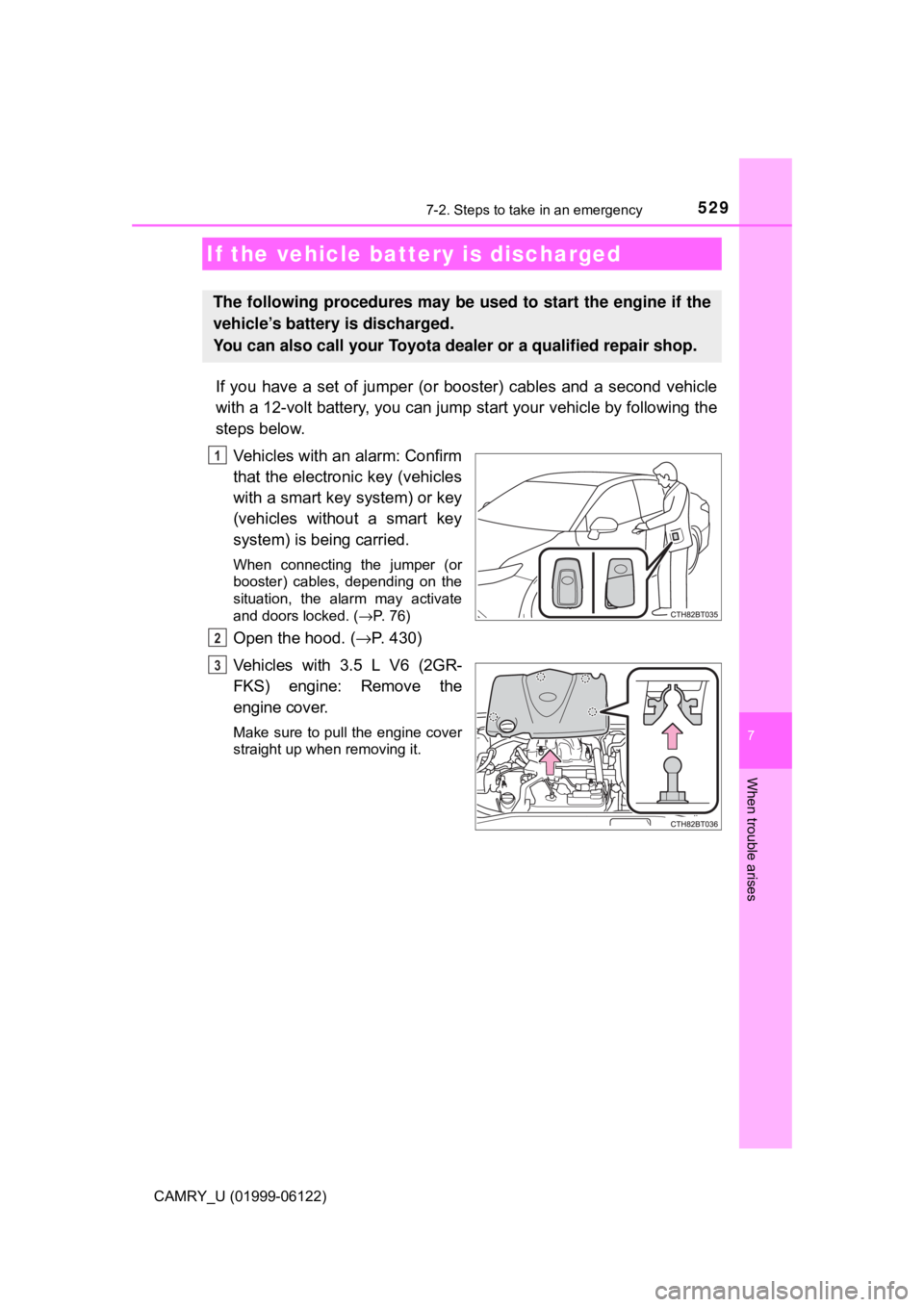
Vehicles with an alarm: Confirm
that the electronic key (vehicles
with a smart key system) or key
(vehicles without a smart key
system) is being carried.
When connecting the jumper (or
booster) cables, depending on the
situation, the alarm may activate
and doors locked. (→P. 76)
Open the hood. (→P. 430)
Vehicles with 3.5 L V6 (2GR-
FKS) engine: Remove the
engine cover.
Make sure to pull the engine cover
straight up when removing it.
If the vehicle battery is discharged
The following procedures may be used to start the engine if the
vehicle’s battery is discharged.
You can also call your Toyota dealer or a qualified repair shop.
1
2
3
Page 595 of 612
595What to do if... (Troubleshooting)
CAMRY_U (01999-06122)
●Did anyone inside the vehicle open a door during setting the alarm?
The sensor detects it and the alarm sounds. (→P. 74)
●Vehicles without a smart key system:
To stop the alarm, turn the engine switch to the “ON” position or start the
engine.
Vehicles with a smart key system:
To stop the alarm, turn the engine switch to IGNITION ON mode or start
the engine.
●Is the message displayed on the multi-information display?
Check the message on the multi-information display. (→P. 507)
●When a warning light turns on or a warning message is displayed, refer to
P. 497, 507.
●Stop the vehicle in a safe place and replace the flat tire with the spare
tire. (→P. 512)
●Try the procedure for when the vehicle becomes stuck in mud, dirt, or
snow. (→P. 537)
An alarm is activated and the horn sounds
(vehicles with an alarm)
A warning buzzer sounds when leaving the vehicle
(vehicles with a smart key system)
A warning light turns on or a warning message is displayed
When a problem has occurred
If you have a flat tire
The vehicle becomes stuck
Page 596 of 612

596
CAMRY_U (01999-06122)
Alphabetical index
Alphabetical index
AAC disc*
A/C ............................ 350, 355, 361
Air conditioning filter ............. 464
Automatic air
conditioning
system ........................ 355, 361
Manual air conditioning
system ................................ 350
ABS
(Anti-lock Brake System)...... 294
Warning light ......................... 497
Air conditioning filter .............. 464
Air conditioning
system .................... 350, 355, 361
Air conditioning filter ............. 464
Automatic air
conditioning
system ........................ 355, 361
Manual air conditioning
system ................................ 350
Airbags ....................................... 32
Airbag operating conditions .... 41
Airbag precautions for
your child .............................. 35
Airbag warning light .............. 497
Correct driving posture ........... 24
Curtain shield airbag
operating conditions ............. 41
Curtain shield airbag
precautions ........................... 38
Front passenger occupant
classification system............. 45
General airbag precautions .... 35
Locations of airbags................ 32
Modification and disposal
of airbags.............................. 40
Side airbag operating
conditions ............................. 41Side airbag precautions .......... 35
Side and curtain shield
airbags operating
conditions ............................. 41
Side and curtain shield
airbags precautions .............. 35
SRS airbag instructions for
Canadian owners ............... 581
SRS airbags ........................... 32
Alarm .......................................... 74
Anchor brackets ........................ 54
Antennas
(smart key system) ............... 149
Anti-lock Brake System
(ABS) ...................................... 294
Warning light......................... 497
Approach warning ........... 271, 283
Armrest..................................... 393
Assist grips .............................. 393
Audio system
*
Automatic air
conditioning system ..... 355, 361
Air conditioning filter ............. 464
Automatic High Beam ............. 223
Automatic light control
system.................................... 219
Automatic transmission ......... 205
If the shift lever
cannot be shifted from P .... 209
Paddle shift switches ............ 207
S mode ................................. 206
AUX port
*
Auxiliary boxes ........................ 377
A