remote control TOYOTA CAMRY HV 2009 User Guide
[x] Cancel search | Manufacturer: TOYOTA, Model Year: 2009, Model line: CAMRY HV, Model: TOYOTA CAMRY HV 2009Pages: 444, PDF Size: 6.46 MB
Page 50 of 444
50
1-3. Opening, closing and locking the doors
Doors
The vehicle can be locked and unlocked using the entry function,
wireless remote control, key or door lock switch.
■Entry function
→P. 3 7
■ Wireless remote control
→P. 4 7
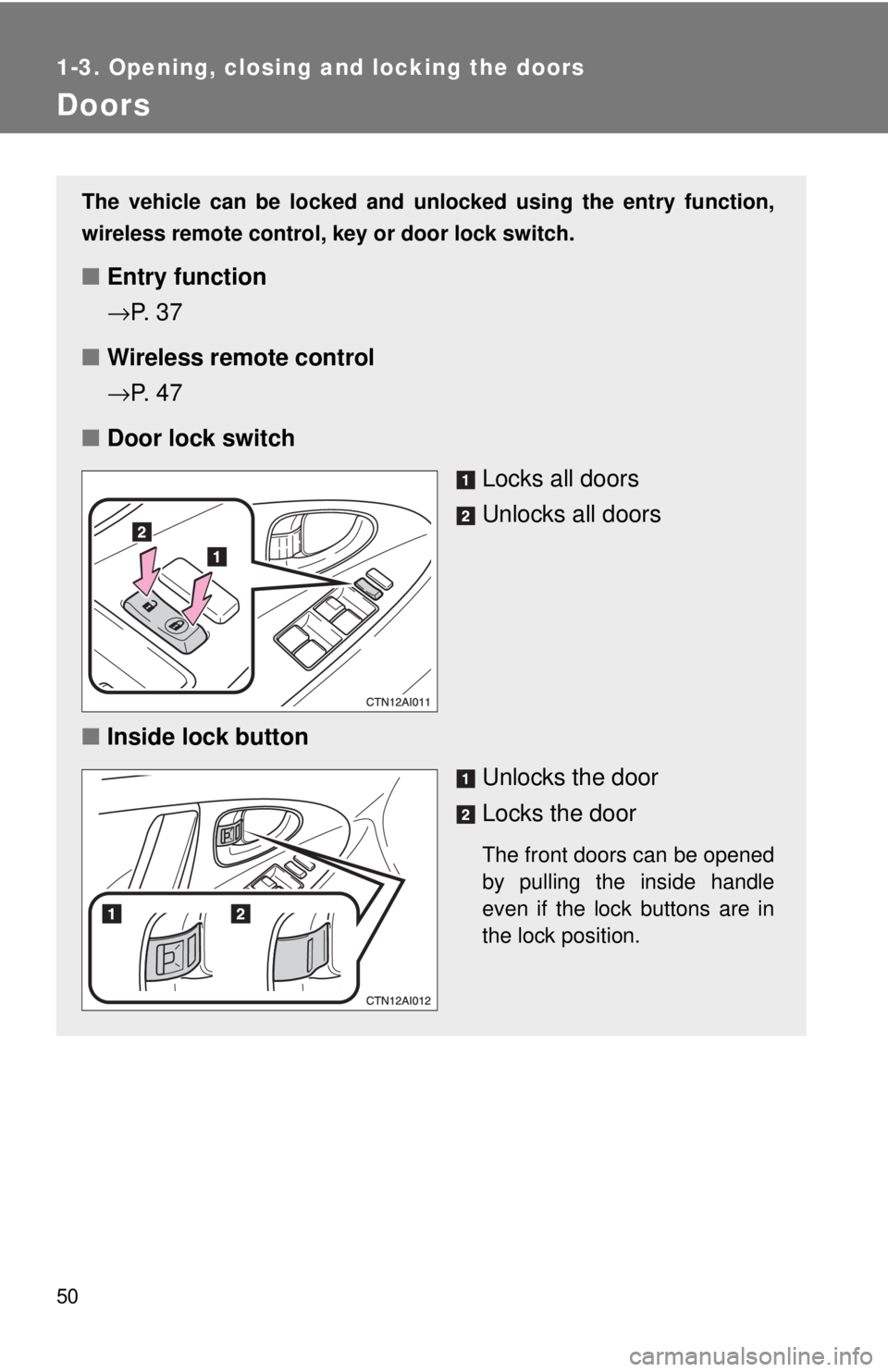
■ Door lock switch
Locks all doors
Unlocks all doors
■ Inside lock button
Unlocks the door
Locks the door
The front doors can be opened
by pulling the inside handle
even if the lock buttons are in
the lock position.
Page 54 of 444
54
1-3. Opening, closing and locking the doors
Trunk
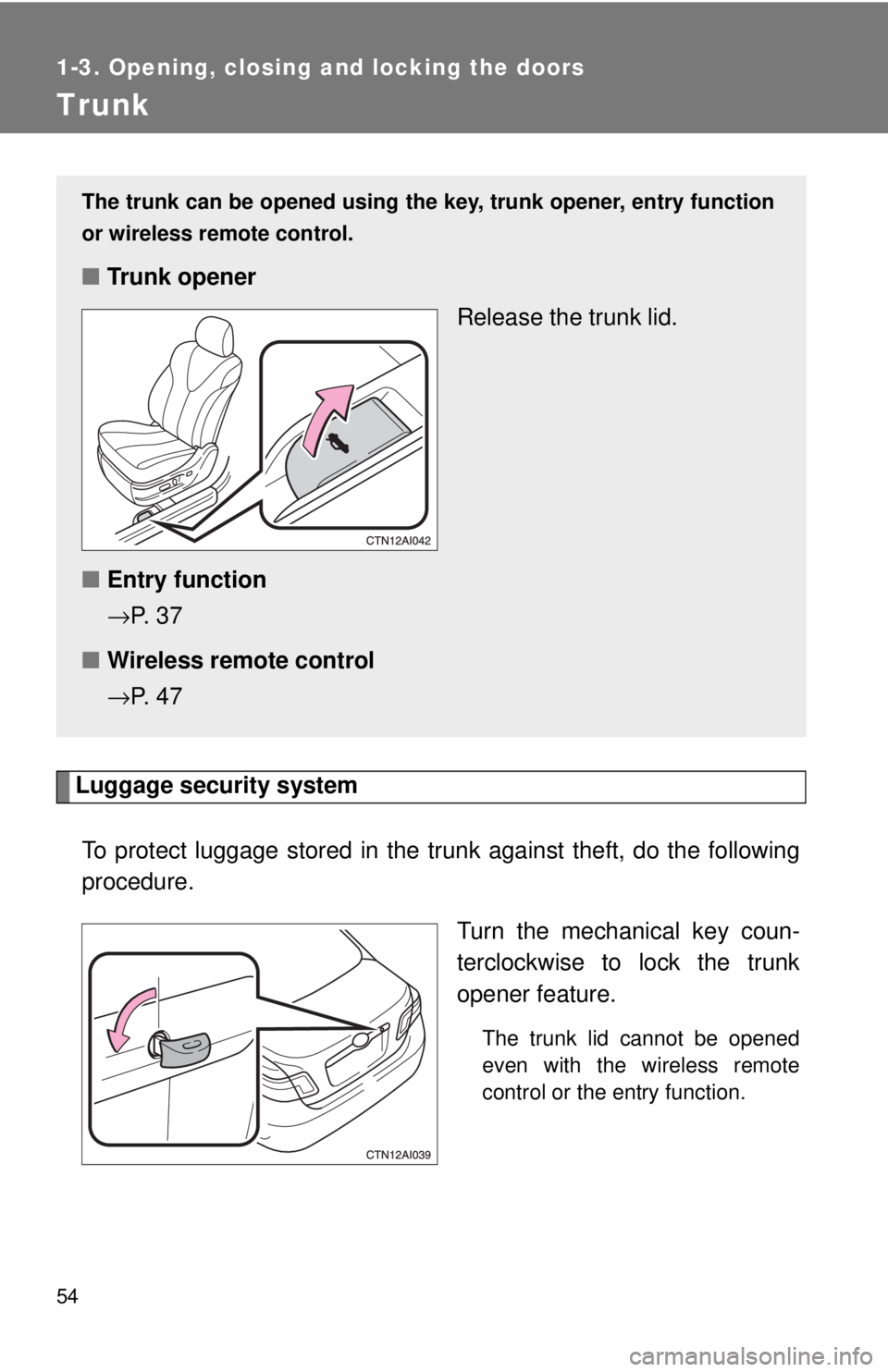
Luggage security systemTo protect luggage stored in the trun k against theft, do the following
procedure.
Turn the mechanical key coun-
terclockwise to lock the trunk
opener feature.
The trunk lid cannot be opened
even with the wireless remote
control or the entry function.
The trunk can be opened using th e key, trunk opener, entry function
or wireless remote control.
■ Trunk opener
Release the trunk lid.
■ Entry function
→P. 3 7
■ Wireless remote control
→P. 4 7
Page 264 of 444
264
3-6. Other interior features
Garage door opener (if equipped)
The garage door opener (HomeLink Universal Transceiver) is manufac-
tured under license from HomeLink.
Programming HomeLink (for U.S. owners)
The HomeLink
compatible transceiver in your vehicle has 3 buttons
which can be programmed to operate 3 different devices. Refer to the
programming method below appropriate for the device.
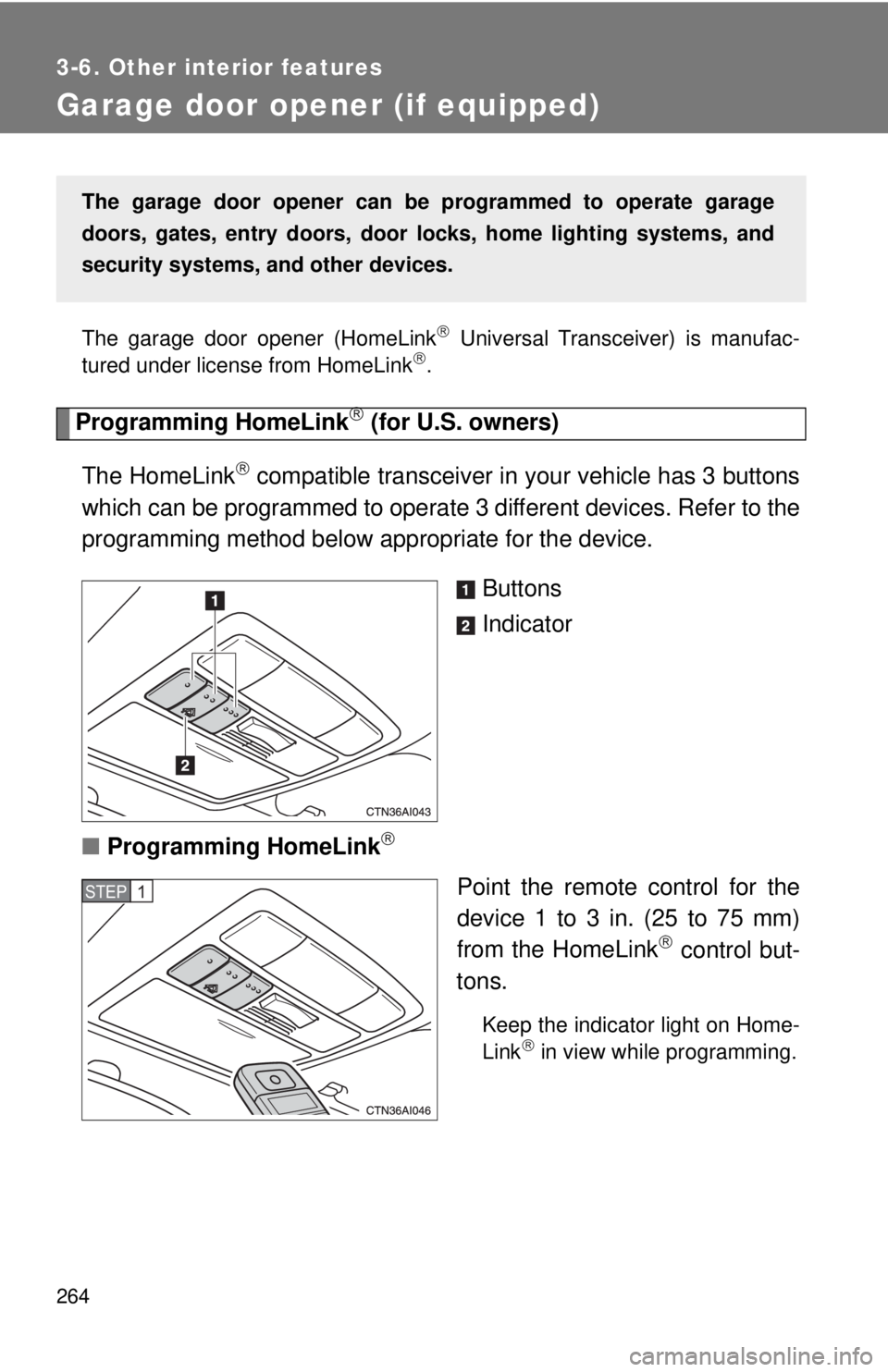
Buttons
Indicator
■ Programming HomeLink
Point the remote control for the
device 1 to 3 in. (25 to 75 mm)
from the HomeLink
control but-
tons.
Keep the indicator light on Home-
Link in view while programming.
The garage door opener can be programmed to operate garage
doors, gates, entry doors, door locks, hom e lighting systems, and
security systems, and other devices.
STEP1
Page 266 of 444
266 3-6. Other interior features
■Programming a Rolling Code system (for U.S. owners)
If your device is Rolling Code equipped, follow the steps under the
heading “Programming HomeLink
” before proceeding with the
steps listed below.
Locate the training button on the ceiling-mounted garage door
opener motor. The exact location and color of the button may
vary by brand of garage door opener.
Refer to the operation manual supplied with the garage door opener
for the location of the training button.
Press the training button.
Press and release the vehicle’s programmed HomeLink
but-
ton twice. The garage door may open.
If the garage door opens, the programming process is complete. If
the door does not open, press and release the button a third time.
This third press and release will complete the programming process
by opening the garage door.
The ceiling-mounted garage door opener motor should now recog-
nize the HomeLink
transceiver and operate the garage door.
Repeat the steps above to program another rolling code sys-
tem for any of the remaining HomeLink buttons.
■ Programming an entry gate (fo r U.S. owners)/Programming all
devices in the Canadian market
Place your transmitter 1 to 3 in. (25 to 75 mm) away from the
surface of HomeLink
.
Keep the indicator light on HomeLink in view while programming.
Press and hold the selected HomeLink button.
Repeatedly press and release (cycle) the device’s remote
control button for two seconds each until step 4 is complete.
When the indicator light on the HomeLink
compatible trans-
ceiver starts to flash rapidly, release the buttons.
STEP1
STEP2
STEP3
STEP4
STEP1
STEP2
STEP3
STEP4
Page 268 of 444
268 3-6. Other interior features
■Before programming
●Install a new battery in the transmitter.
● The battery side of the transmitter must be pointed away from Home-
Link
.
■ Certification for the garage door opener
This device complies with Part 15 of the FCC Rules and with RSS-210 of the
IC Rules.
Operation is subject to the following two conditions: (1) This device may not
cause harmful interference, and (2) this device must accept any interference
received, including interference that may cause undesired operation.
WARNING: This transmitter has been tested and complies with FCC and IC
rules. Changes or modifications not expressly approved by the party respon-
sible for compliance could void the user's authority to operate the device.
CAUTION
■When programming a garage door or other remote control device
The garage door may operate, so ensure people and objects are out of dan-
ger to prevent potential harm.
■ Conforming to federal safety standards
Do not use the HomeLink
compatible transceiver with any garage door
opener or device that lacks safety stop and reverse features as required by
federal safety standards.
This includes any garage door that cannot detect an obstruction object. A
door or device without these features increases the risk of death or serious
injury.
Page 323 of 444
323
4-3. Do-it-yourself maintenance
4
Maintenance and care
■
If the key battery is discharged
The following symptoms may occur.
●The smart key system and wireless remote control will not function prop-
erly.
● The operational range is reduced.
■ Use a CR1632 lithium battery
●Batteries can be purchased at your Toyota dealer, jewelers, or camera
stores.
● Replace only with the same or equivalent type recommended by your
Toyota dealer.
● Dispose of used batteries according to the local laws.
CAUTION
■Removed battery and other parts
Keep away from children.
These parts are small and if swallowed by a child they can cause choking.
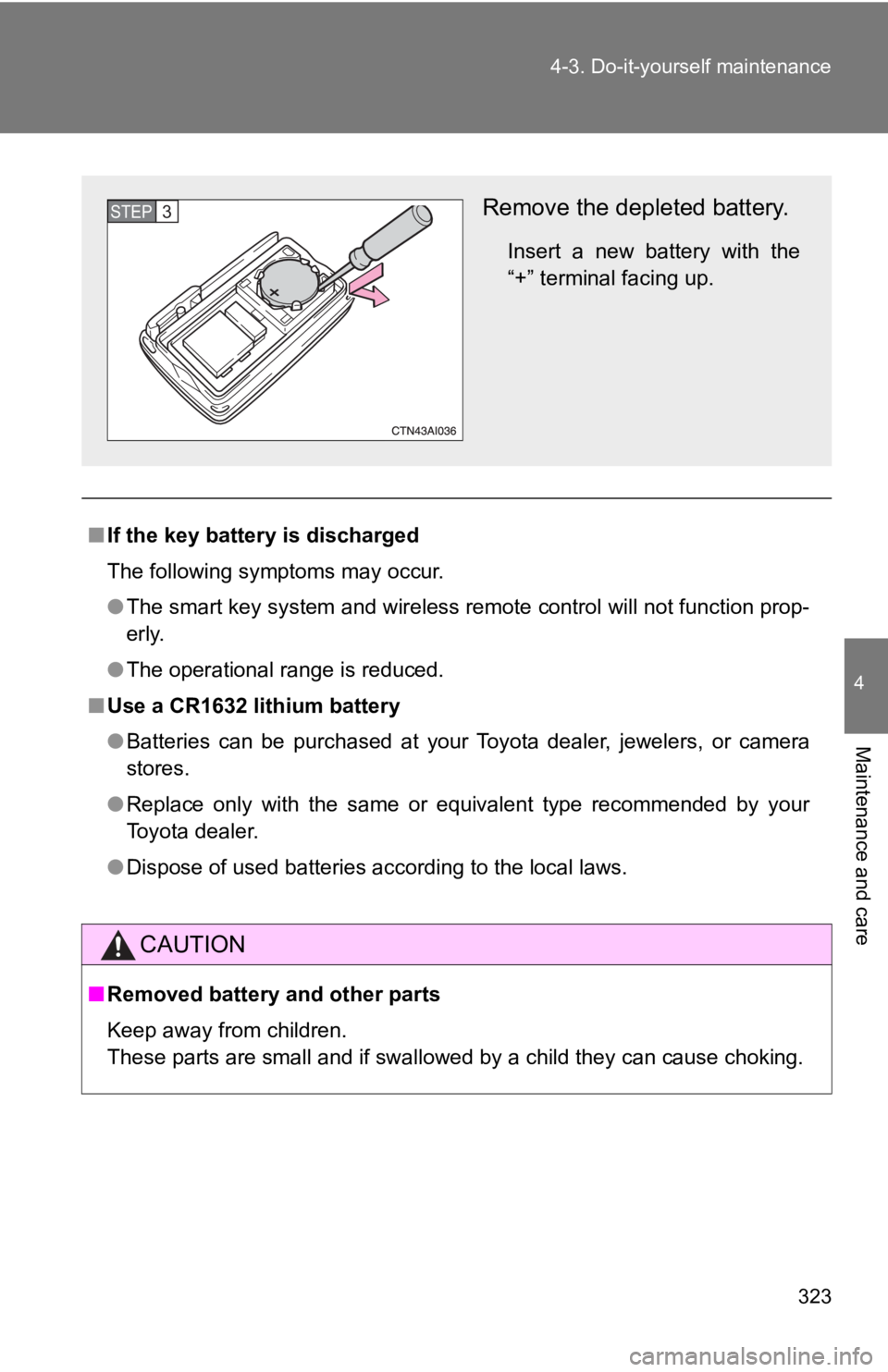
Remove the depleted battery.
Insert a new battery with the
“+” terminal facing up.
STEP3
Page 324 of 444

324 4-3. Do-it-yourself maintenance
NOTICE
■For normal operation after replacing the battery
Observe the following precautions to prevent accidents.
●Always work with dry hands.
Moisture may cause the battery to rust.
● Do not touch or move any other components inside the remote control.
● Do not bend either of the battery terminals.
Page 422 of 444

422 6-2. Customization
Wireless
remote con-
trol
(
→P. 47)Wireless remote control On Off
Unlocking operation
Driver's door
unlocked in one step, all doors
unlocked in two steps All doors
unlocked in one step.
Automatic door lock
function to be activated
if door is not opened
after being unlocked On Off
Time elapsed before
automatic door lock
function is activated if
door is not opened after
being unlocked 60 seconds
30 seconds
120 seconds
Operation signal
(Emergency flashers) On
Off
Operation signal
(Buzzer) On
Off
Door lock buzzer OnOff
Panic function OnOff
Trunk unlocking func-
tion On
Off
Trunk unlocking opera-
tion Press and holdPress twice
One short press
ItemFunctionDefault settingCustomized setting
Page 436 of 444

436 Alphabetical index
Garage door opener................. 264
Gas station information........... 444
Gauges ...................................... 139
Glove box.................................. 248
Glove box light ......................... 248
Grocery bag hooks .................. 263
Hands-free phone system (for cellular phone)Bluetooth
®............................. 213
Hands-free phone system (for cellular phone) .............. 213
Head restraints
Adjusting ................................59
Headlights Replacing light bulbs ............. 336
Switch.................................... 149
Wattage ................................. 405
Heaters
Seat heater............................ 259
Side mirror............................. 182
Hood .......................................... 288
Hooks
Cargo hook............................ 263
Grocery bag hooks ................263
Hybrid system Emergency shut off system .....26
Energy monitor/consumption screen..............26
High voltage components........25
Power switch ......................... 131
I/M test....................................... 284
Identification Engine ................................... 396
Vehicle .................................. 396
Ignition switch .......................... 131
Illuminated entry system ......... 244
Immobilizer system....................83
Indicator lights ......................... 142 Initialization
Items to initialize ................... 424
Inside rear view mirror .............. 69
Interior lights Interior lights ......................... 244
Switch ................................... 245
Wattage................................. 405
Jack Positioning a floor jack .......... 289
Replacing the wheel.............. 368
Jack handle .............................. 368
Keyless entry ............................. 47
Keys Electronic key.......................... 34
If you lose your keys ............. 381
If your electronic key battery is discharged .......... 382
Key number............................. 34
Keyless entry .......................... 47
Keys ........................................ 34
Mechanical key ....................... 34
Wireless remote control key.... 47
License plate lights Wattage................................. 405
Light bulbs Replacing .............................. 336
Wattage................................. 405
Lights Door courtesy lights .............. 244
Headlights switch .................. 149
Interior light switch ................ 245
Personal light switch ............. 246
Replacing light bulbs ............. 336
Turn signal lever ................... 137
Vanity lights........................... 254
Wattage................................. 405
Load capacity ........................... 165
Lock steering column.............. 133
G
H
I
J
K
L
Page 440 of 444

440 Alphabetical index
Wireless remote control keyReplacing the battery ............ 322
Wireless remote control ..........47
WMA disc .................................. 199