light TOYOTA CAMRY HV 2009 Workshop Manual
[x] Cancel search | Manufacturer: TOYOTA, Model Year: 2009, Model line: CAMRY HV, Model: TOYOTA CAMRY HV 2009Pages: 444, PDF Size: 6.46 MB
Page 153 of 444
153
2-3. Operating the lights and wipers
2
When driving
Windshield wipers and washer
■The windshield wipers and washer can be operated when
The “POWER” switch is in ON mode.
■ If no windshield washer fluid sprays
Check that the washer nozzles are not blocked and if there is washer fluid in
the windshield washer fluid reservoir.
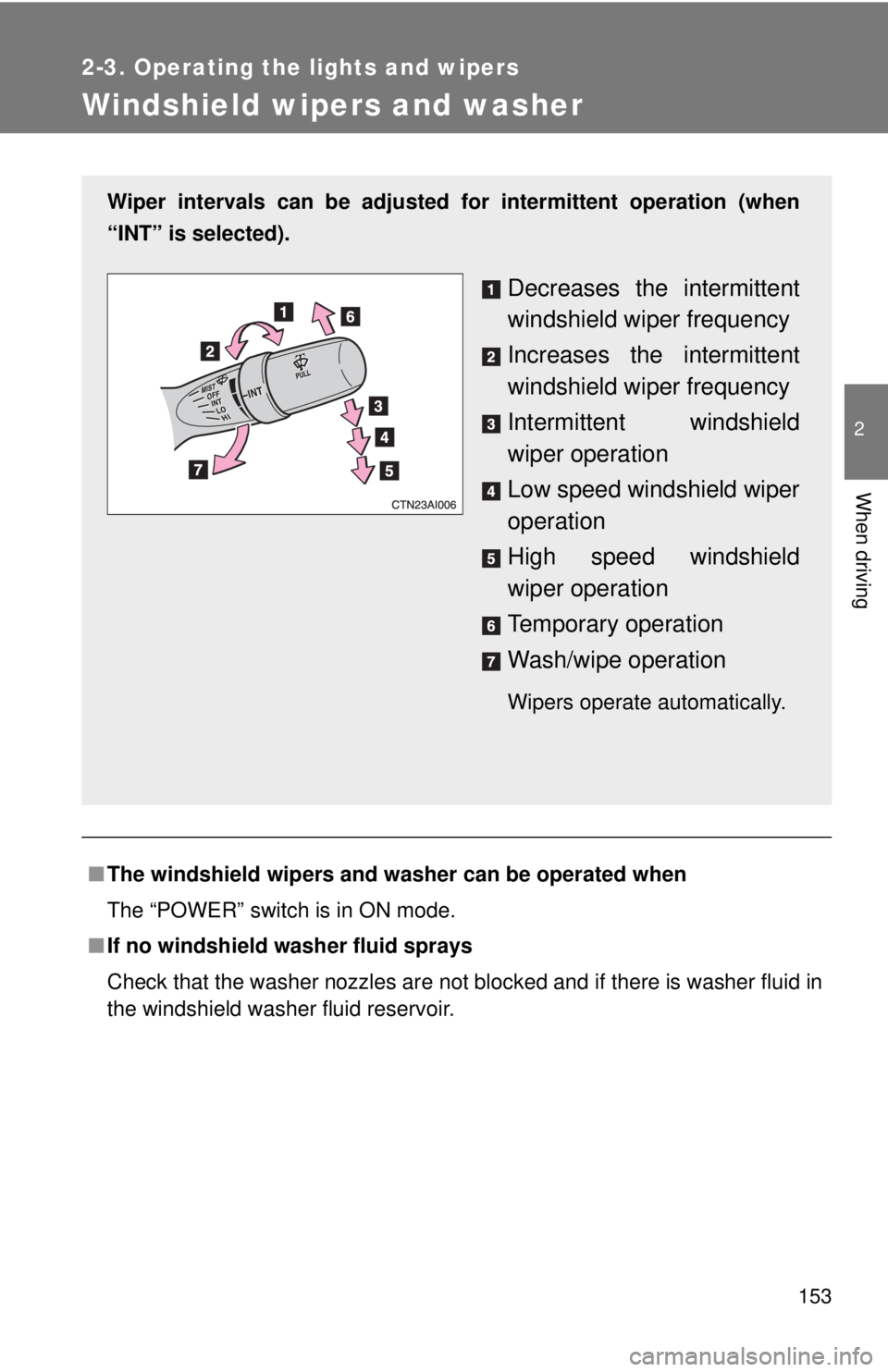
Wiper intervals can be adjusted for intermittent operation (when
“INT” is selected).
Decreases the intermittent
windshield wiper frequency
Increases the intermittent
windshield wiper frequency
Intermittent windshield
wiper operation
Low speed windshield wiper
operation
High speed windshield
wiper operation
Temporary operation
Wash/wipe operation
Wipers operate automatically.
Page 154 of 444

154 2-3. Operating the lights and wipers
NOTICE
■When the windshield is dry
Do not use the wipers, as they may damage the windshield.
■ When there is no washer fluid spray from the nozzle
Damage to the washer fluid pump may be caused if the lever is pulled
toward you and held continually.
■ When a nozzle becomes blocked
Do not try to clear it with a pin or other object. The nozzle will be damaged.
Page 155 of 444
155
2
When driving
2-4. Using other driving systems
Cruise control
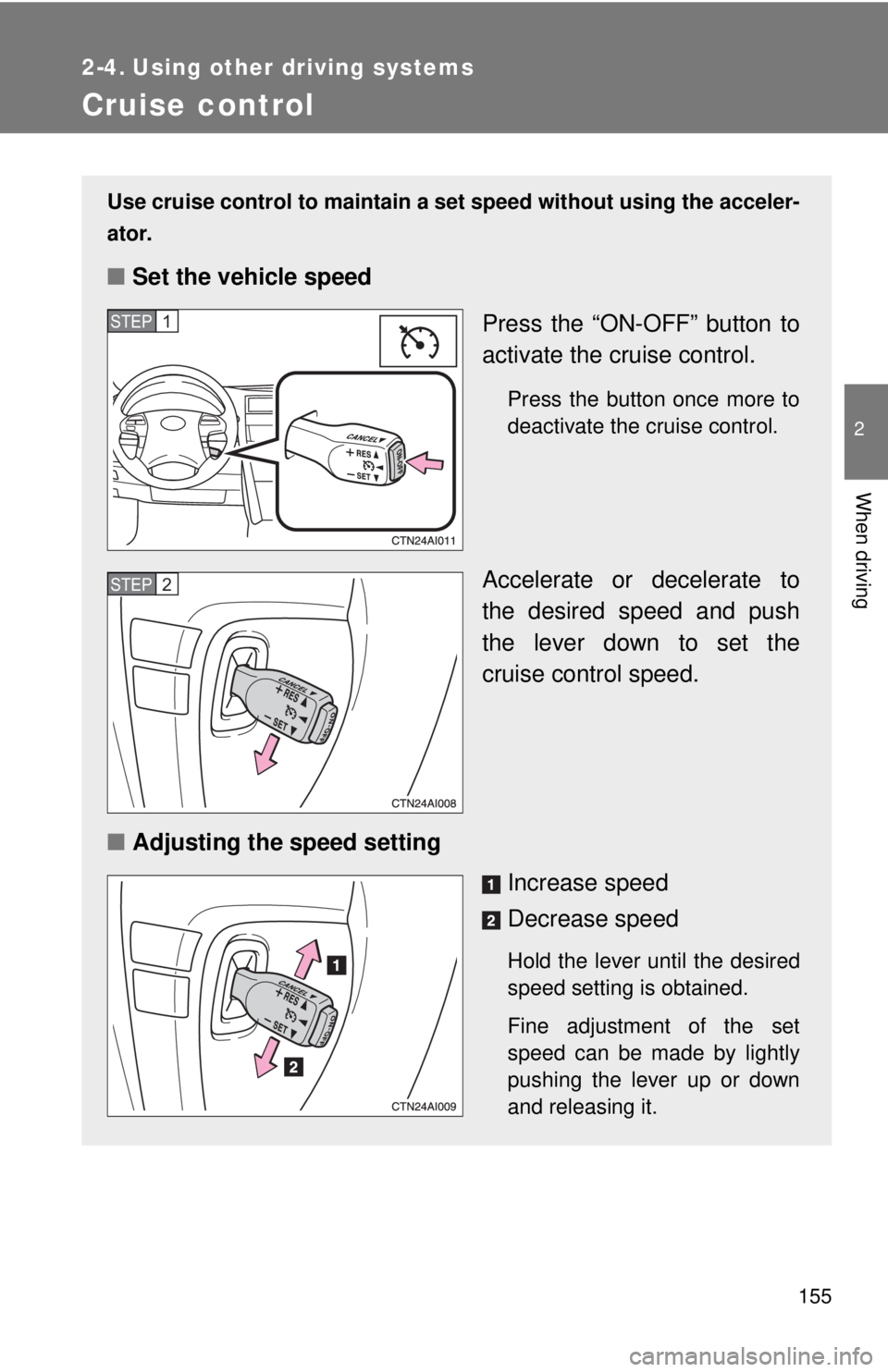
Use cruise control to maintain a set speed without using the acceler-
ator.
■ Set the vehicle speed
Press the “ON-OFF” button to
activate the cruise control.
Press the button once more to
deactivate the cruise control.
Accelerate or decelerate to
the desired speed and push
the lever down to set the
cruise control speed.
■ Adjusting the speed setting
Increase speed
Decrease speed
Hold the lever until the desired
speed setting is obtained.
Fine adjustment of the set
speed can be made by lightly
pushing the lever up or down
and releasing it.
STEP1
STEP2
Page 156 of 444
156 2-4. Using other driving systems
■Fine adjustment of the set speed
Adjustment of the set speed by approximately 1.0 mph (1.6 km/h) can be
made by lightly pressing the lever up or down and releasing it.
■ Cruise control can be set when
●The shift lever is in D.
● Vehicle speed is between approximately 25 mph and 125 mph (40 km/h
and 200 km/h).
■ Accelerating
The vehicle can be accelerated normally.
■ Automatic cruise control cancellation
The set speed is automatically canceled in any of the following situations.
●Actual vehicle speed falls more than 10 mph (16 km/h) below the preset
vehicle speed.
At this time, the memorized set speed is not retained.
● Actual vehicle speed is below 25 mph (40 km/h).
● VSC is activated.
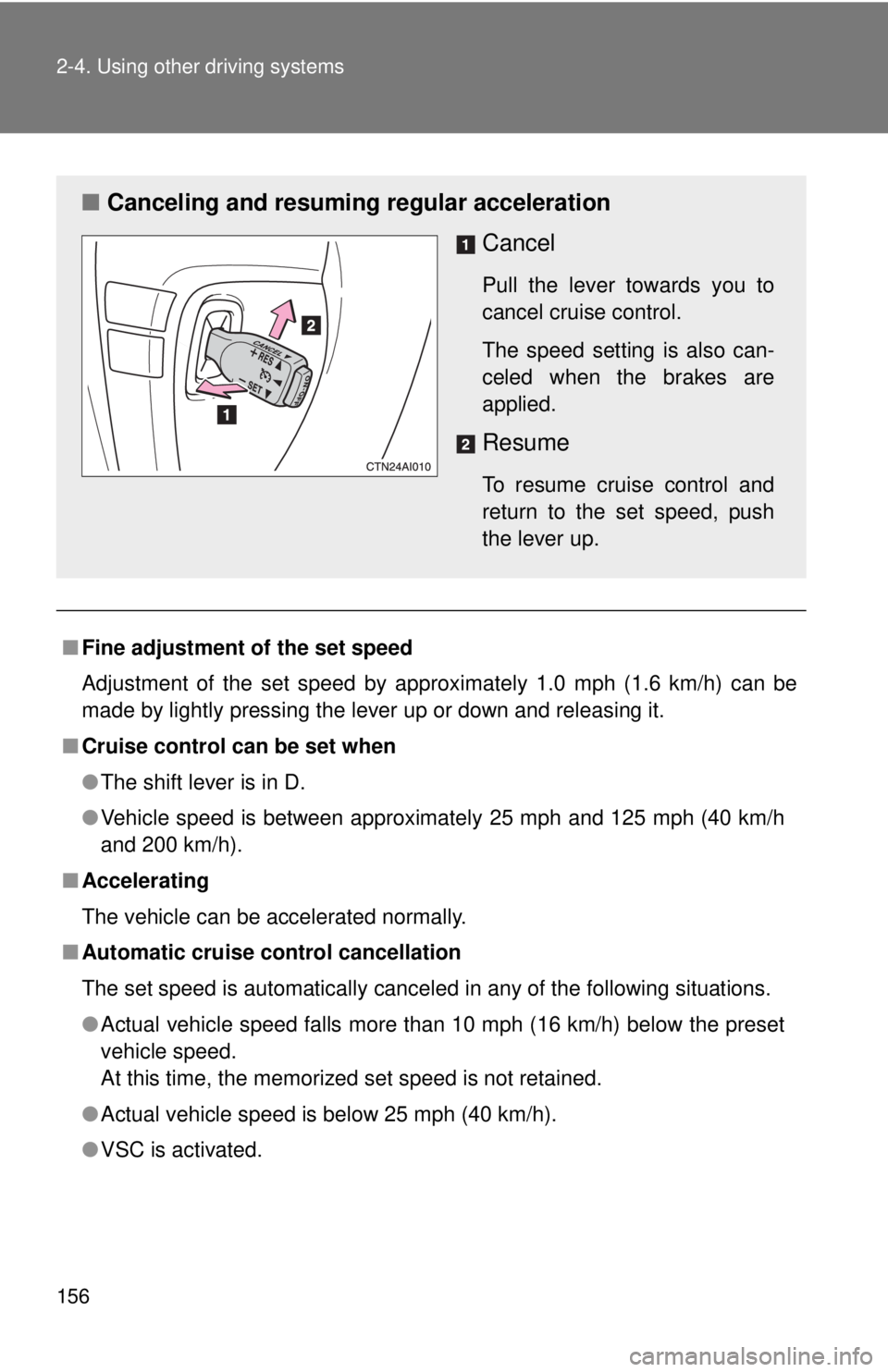
■ Canceling and resuming regular acceleration
Cancel
Pull the lever towards you to
cancel cruise control.
The speed setting is also can-
celed when the brakes are
applied.
Resume
To resume cruise control and
return to the set speed, push
the lever up.
Page 157 of 444

157
2-4. Using other
driving systems
2
When driving
■If the cruise control indicator light flashes
Press the “ON-OFF” button once to deactivate the system, and then press
the button again to reactivate the system.
If the cruise control speed cannot be set or if the cruise control cancels
immediately after being activated, there may be a malfunction in the cruise
control system. Contact your Toyota dealer and have your Toyota inspected.
CAUTION
■To avoid operating the cruise control by mistake
Keep the “ON-OFF” button off when not in use.
■ Situations unsuitable for cruise control
Do not use cruise control in any of the following situations.
Doing so may result in control of the vehicle being lost and could cause seri-
ous or fatal accident.
●In heavy traffic
● On roads with sharp bends
● On winding roads
● On slippery roads, such as those covered with rain, ice or snow
● On steep hills
Page 161 of 444

161
2-4. Using other
driving systems
2
When driving
CAUTION
■When VSC is activated
The slip indicator light flashes and a warning buzzer sounds. Always drive
carefully. Reckless driving may cause an accident. Exercise particular care
when the indicator light flashes and a buzzer sounds.
■ Replacing tires
Make sure that all tires are of the same size, brand, tread pattern and total
load capacity. In addition, make sure that the tires are inflated to the recom-
mended tire pressure level.
The ABS and VSC system will not function correctly if different tires are fitted
on the vehicle.
Contact your Toyota dealer for further information when replacing tires or
wheels.
■ Handling of tires and suspension
Using tires with any kind of problem or modifying the suspension will affect
the driving assist systems, and may cause the system to malfunction.
Page 173 of 444
Interior features3
173
3-3. Using the hands-free phone system
(for cellular phone) ...... 213
Hands-free phone system (for cellular phone)
features (CD player with
changer only) ................. 213
Using the hands-free phone system
(for cellular phone) ......... 216
Making a phone call ......... 224
Setting a cellular phone ............................. 228
Security and system setup .............................. 233
Using the phone book ...... 237
3-4. Using the interior lights ............................. 244
Interior lights list ............... 244
• Interior light .................... 245
• Personal lights ............... 246 3-5. Using the storage
features ......................... 247
List of storage features .... 247
• Glove box....................... 248
• Console box ................... 248
• Cup holders ................... 250
• Auxiliary boxes ............... 251
3-6. Other interior features ......................... 253
Sun visors ........................ 253
Vanity mirrors ................... 254
Clock ................................ 255
Ashtrays ........................... 256
Power outlet ..................... 257
Seat heaters..................... 259
Armrest ............................ 261
Floor mat .......................... 262
Trunk features .................. 263
Garage door opener......... 264
Compass .......................... 269
Page 180 of 444
180 3-1. Using the air conditioning system and defogger
■Using the automatic mode
Fan speed is adjusted automatically in accordance with the temperature set-
ting and ambient conditions. As a result, the following may occur.
●The system may switch automatically to recirculated air mode when the
coolest temperature setting is selected in summer.
● Immediately after
is pressed, the fan may stop for a while until
warm or cool air is ready to flow.
● Cool air may flow to the area around the upper body when the heater is
on.
■ Using the system in recirculated air mode
The windows will fog up more easily if the recirculated air mode is used for
an extended period.
■ When the “ECO HEAT/COOL” mode is canceled
●The temperature control is set at “LO” (the lowest temperature) or “HI”
(the highest temperature).
● The air flow is set in the floor/windshield mode or windshield mode.
● The “ECO HEAT/COOL” switch is pushed again.
■ Window defogger feature
Recirculated air mode may automatically switch to outside air mode in situa-
tions where the windows need to be defogged.
■ When outside air temperat ure approaches 32°F (0°C)
The air conditioning system may not operate even when
is pressed.
■ When the indicator light on flashes
Press
and turn off the air conditioning system before turning it on
once more. There may be a problem in the air conditioning system if the indi-
cator light continues to flash. Turn the air conditioning system off and have it
inspected by your Toyota dealer.
■ Windshield air flow button
When the “POWER” switch is set at ON mode after the 12-volt battery is
reconnected, the indicator light on the button may flash and a motor sound
may be heard. This does not indicate a malfunction.
Page 181 of 444
181
3-1. Using the air conditioning system
and defogger
3
Interior features
■Plasmacluster *
This air conditioning system adopts plasmacluster technology, which helps
to keep good air quality in the cabin by emitting positive and negative ions
through the driver's side vent.
A slight noise may be heard during operation. This is not a malfunction. Also,
static electricity may be discharged near the driver's side vent due to the
high voltage used to operate the system.
To clean the drive's side vent, turn the system off and wipe the vent using a
soft cloth.
*Plasmacluster technology is manufactured under license from the SHARP
Corporation.
“Plasmacluster ” is a trademark of the SHARP Corporation.
CAUTION
■ To prevent the windshield from fogging up
Do not use during cool air operation in extremely humid weather.
The difference between the temperature of the outside air and that of the
windshield can cause the outer surface of the windshield to fog up, blocking
your vision.
■ Plasmacluster
Do not disassemble or repair the system because it contains high voltage
parts. Call your Toyota dealer if the system needs repair.
NOTICE
■ To prevent the 12-volt battery from being discharged
Do not leave the air conditioning system on longer than necessary when the
hybrid system is off.
■ To prevent damage to the Plasmacluster
Do not insert anything into the driver's side vent, attach anything to it, or use
sprays around the drive's side vent. These things may cause the system not
to work properly.
Page 198 of 444
198 3-2. Using the audio system
NOTICE
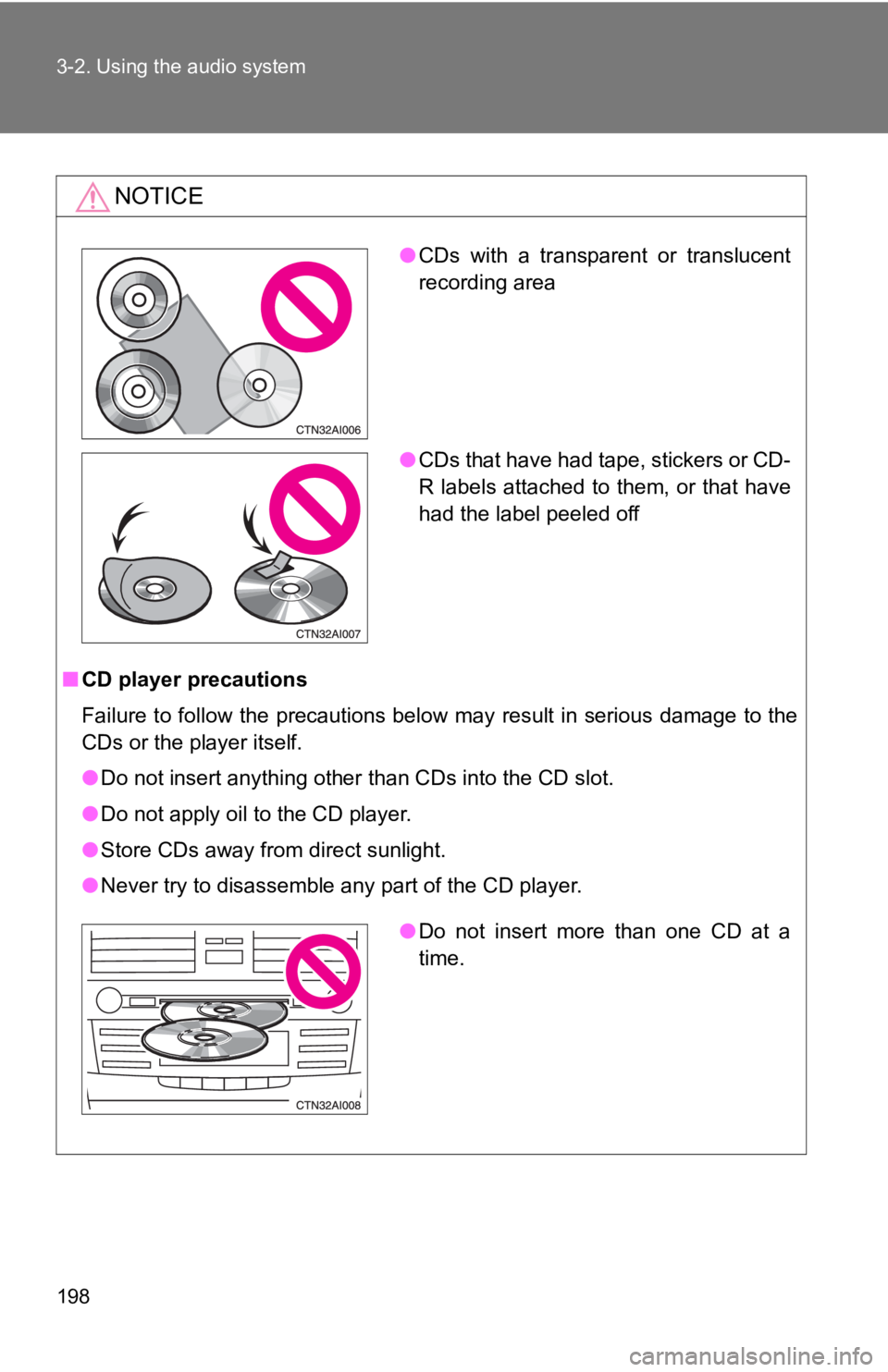
■CD player precautions
Failure to follow the precautions below may result in serious damage to the
CDs or the player itself.
●Do not insert anything other than CDs into the CD slot.
● Do not apply oil to the CD player.
● Store CDs away from direct sunlight.
● Never try to disassemble any part of the CD player.
●CDs with a transparent or translucent
recording area
● CDs that have had tape, stickers or CD-
R labels attached to them, or that have
had the label peeled off
●Do not insert more than one CD at a
time.