ECO mode TOYOTA CAMRY HV 2011 Owner's Manual
[x] Cancel search | Manufacturer: TOYOTA, Model Year: 2011, Model line: CAMRY HV, Model: TOYOTA CAMRY HV 2011Pages: 508, PDF Size: 8.76 MB
Page 310 of 508
310
3-7. Other interior features
Floor mat
CAUTION
Observe the following precautions.
Failure to do so may cause the driver's floor mat to slip, possibly interfering
with the pedals while driving. An unexpectedly high speed may result or it may
become difficult to stop the vehicle, leading to a serious accident.
■When installing the driver's floor mat
●Do not use floor mats designed for other models or different model year
vehicles, even if they are Toyota Genuine floor mats.
● Only use floor mats designed for the driver's seat.
● Always install the floor mat securely using the retaining hooks (clips) pro-
vided.
● Do not use two or more floor mats on top of each other.
● Do not place the floor mat bottom-side up or upside-down.
■ Before driving
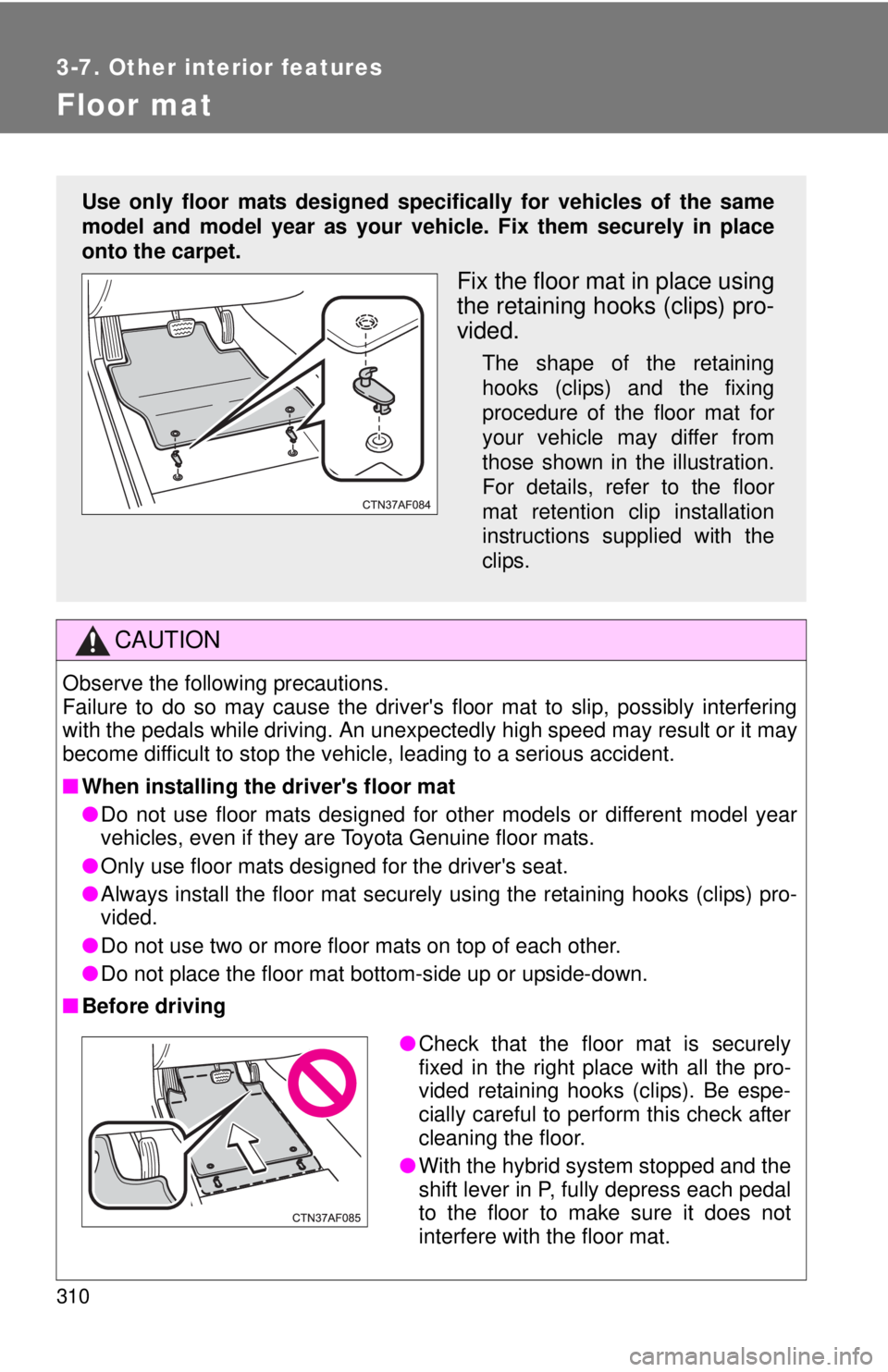
Use only floor mats designed specifically for vehicles of the same
model and model year as your vehic le. Fix them securely in place
onto the carpet.
Fix the floor mat in place using
the retaining hooks (clips) pro-
vided.
The shape of the retaining
hooks (clips) and the fixing
procedure of the floor mat for
your vehicle may differ from
those shown in the illustration.
For details, refer to the floor
mat retention clip installation
instructions supplied with the
clips.
● Check that the floor mat is securely
fixed in the right place with all the pro-
vided retaining hooks (clips). Be espe-
cially careful to perform this check after
cleaning the floor.
● With the hybrid system stopped and the
shift lever in P, fully depress each pedal
to the floor to make sure it does not
interfere with the floor mat.
Page 337 of 508

337
4-3. Do-it-yourself maintenance
4
Maintenance and care
CAUTION
The engine compartment contains many mechanisms and fluids that may
move suddenly, become hot, or become electrically energized. To avoid death
or serious injury observe the following precautions.
■
When working on the engine compartment
●Make sure that the indicator on the “POWER” switch and the “READY”
indicator are both off.
● Keep hands, clothing, and tools away from the moving fan and engine
drive belt.
● Be careful not to touch the engine, power control unit, radiator, exhaust
manifold, etc. right after driving as they may be hot. Oil and other fluids
may also be hot.
● Do not leave anything that may burn easily, such as paper or rags, in the
engine compartment.
● Do not smoke, cause sparks or expose an open flame to fuel. Fuel fumes
are flammable.
■ When working near the electric c ooling fans or radiator grille
Be sure the “POWER” switch is turned OFF.
With the “POWER” switch in ON mode, the electric cooling fans may auto-
matically start to run if the air conditioning is on and/or the coolant tempera-
ture is high. ( P. 348)
■ Safety glasses
Wear safety glasses to prevent flying or falling material, fluid spray, etc. from
getting in the eyes.
NOTICE
■If you remove the air cleaner
Driving with the air cleaner removed may cause excessive engine wear due
to dirt in the air. Also, a backfire could cause a fire in the engine compart-
ment.
Page 344 of 508

344 4-3. Do-it-yourself maintenance
■Engine oil consumption
●The amount of engine oil consumed depends on the oil viscosity, the
quality of the oil and the way the vehicle is driven.
● More oil is consumed under driving conditions such as high speeds and
frequent acceleration and deceleration.
● A new engine consumes more oil.
● When judging the amount of oil consumption, keep in mind that the oil
may have become diluted, making it difficult to judge the true level accu-
rately.
● Oil consumption: Max. 1.1 qt./600 miles, 0.9 Imp. qt./600 miles (1.0 L per
1000 km)
● If you consume more than 1.1 qt. (1.0 L, 0.9 Imp. qt.) every 600 miles
(1000 km), contact your Toyota dealer.
■ After changing the engine oil (U.S.A. only)
To reset the oil change system, follow the procedure below:
Turn off the hybrid system with the trip meter A reading shown.
(P. 150)
The “POWER” switch must be set in ON mode while holding down
the trip meter reset knob. A message “OIL MILEAGE RESET
MODE” will appear on the display.
Hold down the knob for at least 5 seconds. A message “COM-
PLETE” will appear and the message “OIL MILEAGE RESET
MODE” goes off.
STEP1
STEP2
STEP3
Page 361 of 508

361
4-3. Do-it-yourself maintenance
4
Maintenance and care
CAUTION
■When inspecting or replacing tires
Observe the following precautions to prevent accidents.
Failure to do so may cause damage to parts of the drive train, as well as
dangerous handling characteristics, which may lead to an accident
resulting in death
or serious injury.
●Do not mix tires of different ma kes, models or tread patterns.
Also, do not mix tires of remarkably different treadwear.
●Do not use tire sizes other than those recommended by Toyota.
●Do not mix differently constructed tires (radial, bias-belted, or bias-ply
tires).
●Do not mix summer, all season and winter tires.
■When initializing the tire pressure warning system
Do not press the tire pressure warnin g reset switch without first adjusting
the tire inflation pressure to the spec ified level. Otherwise, the tire pres-
sure warning light may not come on ev en if the tire inflation pressure is
low, or it may come on when the tire inflation pressure is actually normal.
Page 404 of 508

404 5-2. Steps to take in an emergency
■When a tire is replaced with a spare tire
The compact spare tire is not equipped with the tire pressure warning
valve and transmitter. If a tire goes flat, the tire pressure warning light will
not turn off even though the flat tire is replaced with the spare tire.
Replace the spare tire with the repair ed tire and adjust the proper tire
inflation pressure. The ti re pressure warning light will turn off after a few
minutes.
■If the tire pressure warning system is inoperative
The tire pressure warning system will be disabled in the following condi-
tions:
(When the condition becomes normal, the system will work properly.)
●If tires not equipped with tire pressure warning valves and transmit-
ters are used.
●If the ID code on the tire pressure warning valves and transmitters is
not registered in the tire pressure warning computer.
●If the tire inflation pressure is 73 psi (500 kPa, 5.1 kgf/cm2 or bar) or
higher.
The tire pressure warning system may be disabled in the following condi-
tions:
(When the condition becomes normal, the system will work properly.)
●If electronic devices or facilities using similar radio wave frequencies
are nearby.
●If a radio set at similar frequencies is in use in the vehicle.
●If a window tint that affects the radio wave signals is installed.
●If there is a lot of snow or ice on the vehicle, in particular around the
wheels or wheel housings.
●If non-genuine Toyota wheels are used. (Even if you use Toyota
wheels, the tire pressu re warning system may not work properly with
some types of tires.)
●If tire chains are used.
■If the tire pressure warning light comes on after blinking frequently
for 1 minute
If the tire pressure warning light comes on after blinking frequently for 1
minute when the “POWER” switch is turned to ON mode, have it
checked by your Toyota dealer.
Page 430 of 508
430 5-2. Steps to take in an emergency
Emergency start function
When the hybrid system does not start, the following steps can be
used as an interim measure to start the hybrid system if the
“POWER” switch is functioning normally.Set the parking brake.
Shift the shift lever to P.
Turn the “POWER” switch to ACCESSORY mode.
Press and hold the “POWER” switch for about 15 seconds
while depressing the brake pedal firmly.
Even if the hybrid system can be started using the above steps, the
system may be malfunctioning. Ha ve the vehicle checked by your
Toyota dealer.
■ The interior lights and headlights do not turn on, or the horn
does not sound.
One of the following may be the cause of the problem.
●One or both of the 12-volt ba ttery terminals may be discon-
nected.
● The 12-volt battery may be discharged. ( P. 436)
● There may be a malfunction in the steering lock system.
Contact your Toyota dealer if the problem cannot be repaired, or if
repair procedures are unknown.
STEP1
STEP2
STEP3
STEP4
Page 434 of 508
434 5-2. Steps to take in an emergency
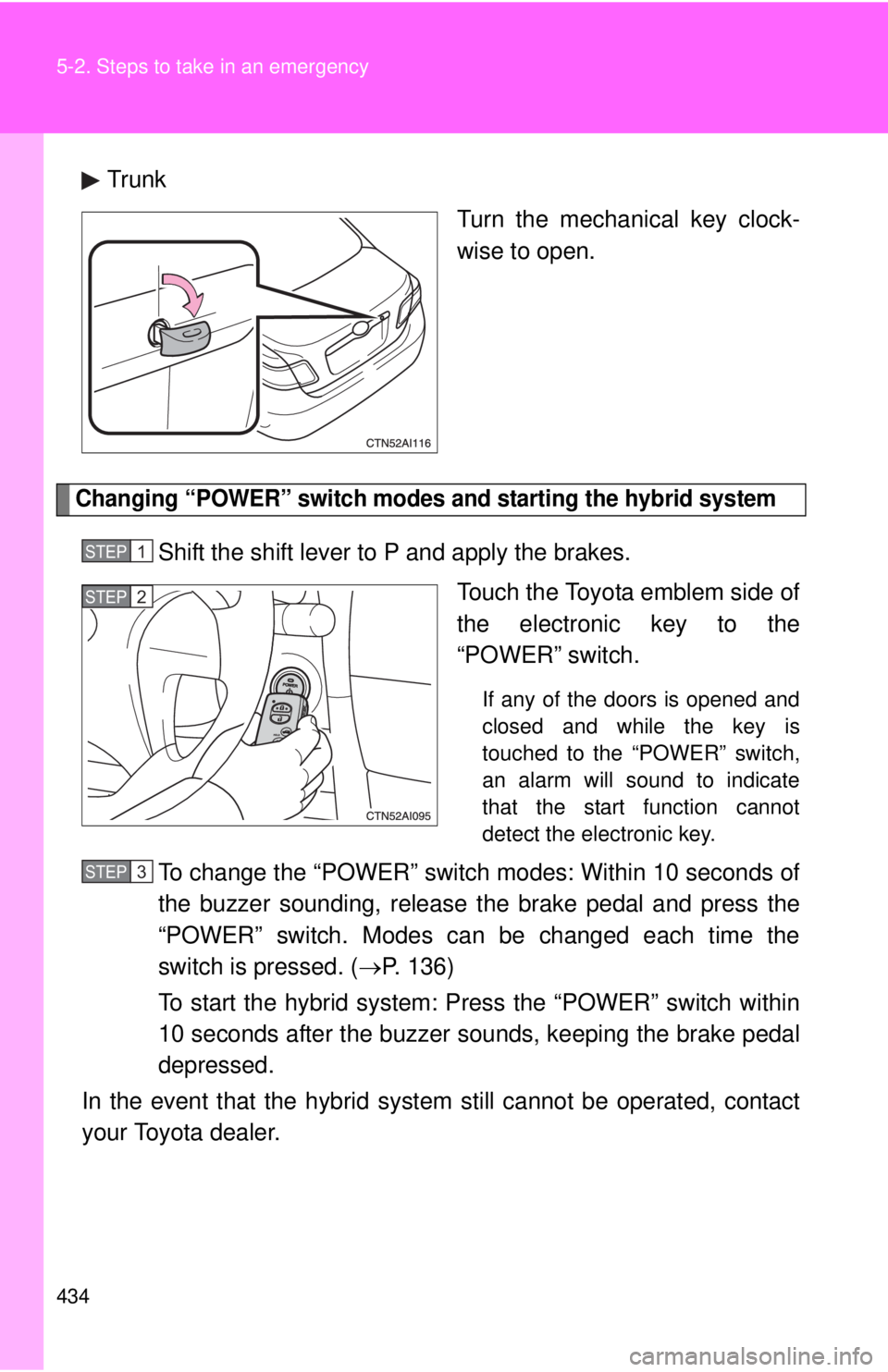
TrunkTurn the mechanical key clock-
wise to open.
Changing “POWER” switch modes and starting the hybrid system
Shift the shift lever to P and apply the brakes.Touch the Toyota emblem side of
the electronic key to the
“POWER” switch.
If any of the doors is opened and
closed and while the key is
touched to the “POWER” switch,
an alarm will sound to indicate
that the start function cannot
detect the electronic key.
To change the “POWER” switch modes: Within 10 seconds of
the buzzer sounding, release t he brake pedal and press the
“POWER” switch. Modes can be changed each time the
switch is pressed. ( P. 136)
To start the hybrid system: Press the “POWER” switch within
10 seconds after the buzzer s ounds, keeping the brake pedal
depressed.
In the event that the hybrid system still cannot be operated, contact
your Toyota dealer.
STEP1
STEP2
STEP3
Page 437 of 508
5
When trouble arises
437
5-2. Steps to take in an emergency
■
Avoiding a discharged 12-volt battery
●Turn off the headlights and the audio system while the hybrid system is
turned off.
● Turn off any unnecessary electrical components when the vehicle is run-
ning at a low speed for an extended period, such as in heavy traffic, etc.
■ When the 12-volt battery is removed or discharged
The hybrid system may not start. ( P. 351)
■ Starting the hybrid system when the 12-volt battery is discharged
The hybrid system cannot be started by push-starting.
Start the engine of the seco nd vehicle. Increase the gaso-
line engine speed slightly and maintain at that level for
approximately 5 minutes to recharge the 12-volt battery of
your vehicle.
Open and close any of the doors with the “POWER” switch
OFF.
Maintain the engine speed of the second vehicle and turn
the “POWER” switch to ON mode, then start the hybrid sys-
tem.
Make sure the “READY” indicator comes on. If the indicator
does not comes on, contact your Toyota dealer.
Once the hybrid system has started, remove the jumper
cables in the exact reverse order in which they were con-
nected.
Once the hybrid system starts, have the vehicle checked at your
Toyota dealer as soon as possible.STEP3
STEP4
STEP5
STEP6
Page 471 of 508

471
6-1. Specifications
6
Vehicle specifications
Tire related termMeaning
Innerliner separation The parting of the innerliner from cord material
in the carcass
Intended outboard
sidewall (a) The sidewall that contains a whitewall,
bears white lettering, or bears manufac-
turer, brand, and/or model name molding
that is higher or deeper than the same
molding on the other sidewall of the tire, or
(b) The outward facing sidewall of an asym- metrical tire that has a particular side that
must always face outward when mounted
on a vehicle
Light truck (LT) tire A tire designated by its manufacturer as prima-
rily intended for use on lightweight trucks or
multipurpose passenger vehicles
Load rating The maximum load that a tire is rated to carry
for a given inflation pressure
Maximum load rating The load rating for a tire at the maximum per-
missible inflation pressure for that tire
Maximum permissible
inflation pressure The maximum cold inflation pressure to which
a tire may be inflated
Measuring rim The rim on which a tire is fitted for physical
dimension requirements
Open splice Any parting at any junction of tread, sidewall, or
innerliner that extends to cord material
Outer diameter The overall diameter of an inflated new tire
Overall width The linear distance between the exteriors of
the sidewalls of an inflated tire, including eleva-
tions due to labeling, decorations, or protective
bands or ribs
Passenger car tire A tire intended for use on passenger cars, mul-
tipurpose passenger vehicles, and trucks, that
have a gross vehicle weight rating (GVWR) of
10,000 lb. or less.