mirror TOYOTA CAMRY HV 2011 Owner's Guide
[x] Cancel search | Manufacturer: TOYOTA, Model Year: 2011, Model line: CAMRY HV, Model: TOYOTA CAMRY HV 2011Pages: 508, PDF Size: 8.76 MB
Page 181 of 508
Interior features3
181
3-3. Using the Bluetooth®
audio system
Bluetooth
® audio
system ........................... 242
Using the Bluetooth
®
audio system.................. 245
Operating a Bluetooth
®
enabled portable
player ............................. 250
Setting up a Bluetooth
®
enabled portable
player ............................. 252
Bluetooth
® audio system
setup .............................. 257
3-4. Using the hands-free phone system
(for cellular phone)
Hands-free phone system (for cellular phone)
features .......................... 258
Using the hands-free phone system
(for cellular phone) ......... 262
Making a phone call ......... 270
Setting a cellular phone ... 274
Security and system setup .............................. 279
Using the phone book ...... 283 3-5. Using the interior lights
Interior lights list ............... 291
• Interior light ..................... 292
• Personal lights ................ 293
3-6. Using the storage features List of storage features .... 294
• Glove box........................ 295
• Console box .................... 295
• Cup holders .................... 297
• Auxiliary boxes................ 298
3-7. Other interior features Sun visors ........................ 301
Vanity mirrors ................... 302
Clock ................................ 303
Ashtray ............................. 304
Power outlet ..................... 305
Seat heaters..................... 307
Armrest ............................ 309
Floor mat .......................... 310
Trunk features .................. 311
Garage door opener......... 313
Compass .......................... 319
Page 191 of 508
191
3-1. Using the air conditioning system and defogger
3
Interior features
Rear window and outside rear view mirror defoggers
■Outside rear view mirror defoggers (if equipped)
Turning the rear window defogger on will turn the outside rear view mirror
defoggers on.
CAUTION
■Outside rear view mirror defoggers (if equipped)
The surfaces of the outside rear view mirrors become hot. Do not touch
them to prevent from burning yourself.
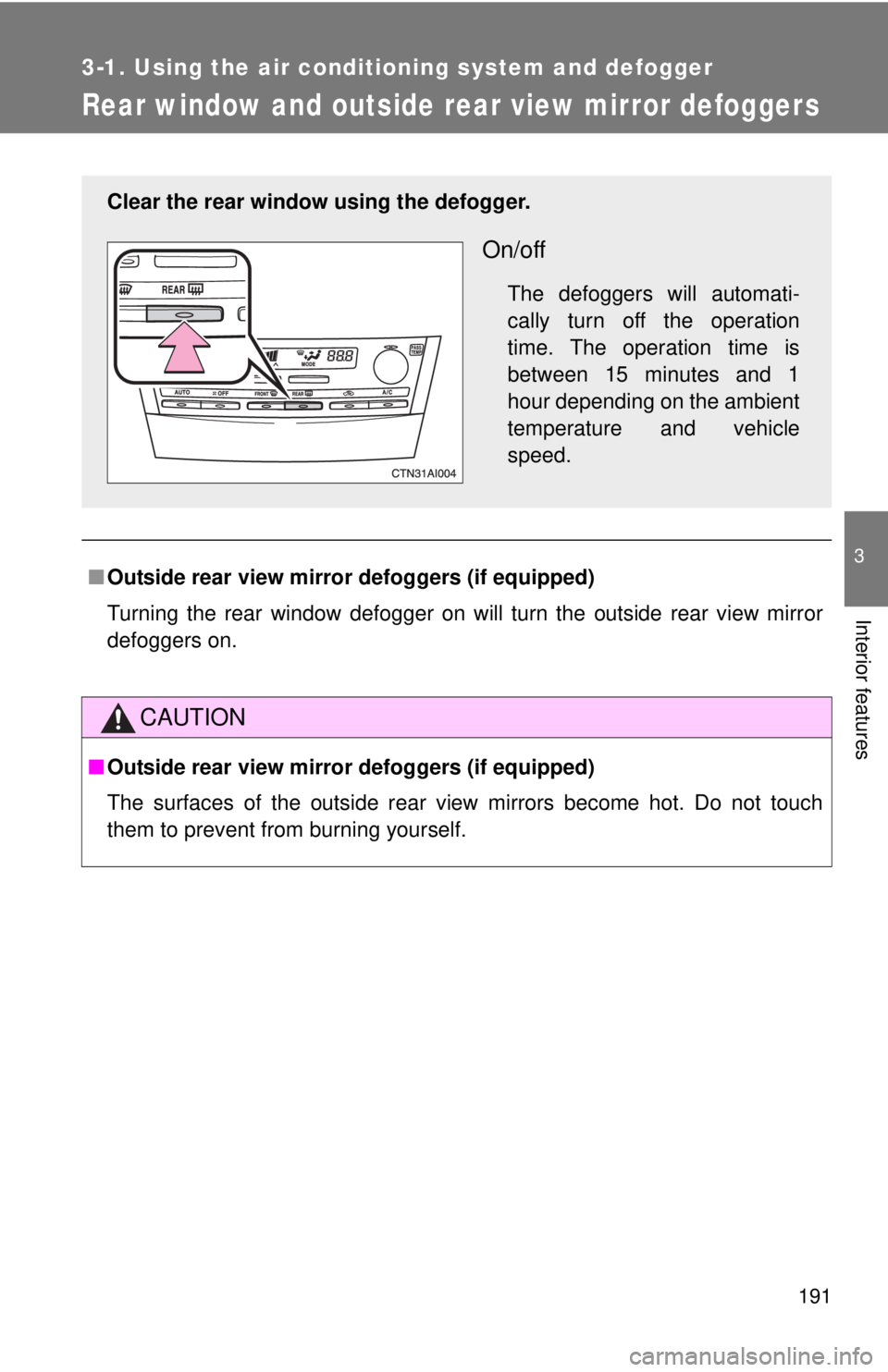
Clear the rear window using the defogger.
On/off
The defoggers will automati-
cally turn off the operation
time. The operation time is
between 15 minutes and 1
hour depending on the ambient
temperature and vehicle
speed.
Page 302 of 508
302
3-7. Other interior features
Vanity mirrors
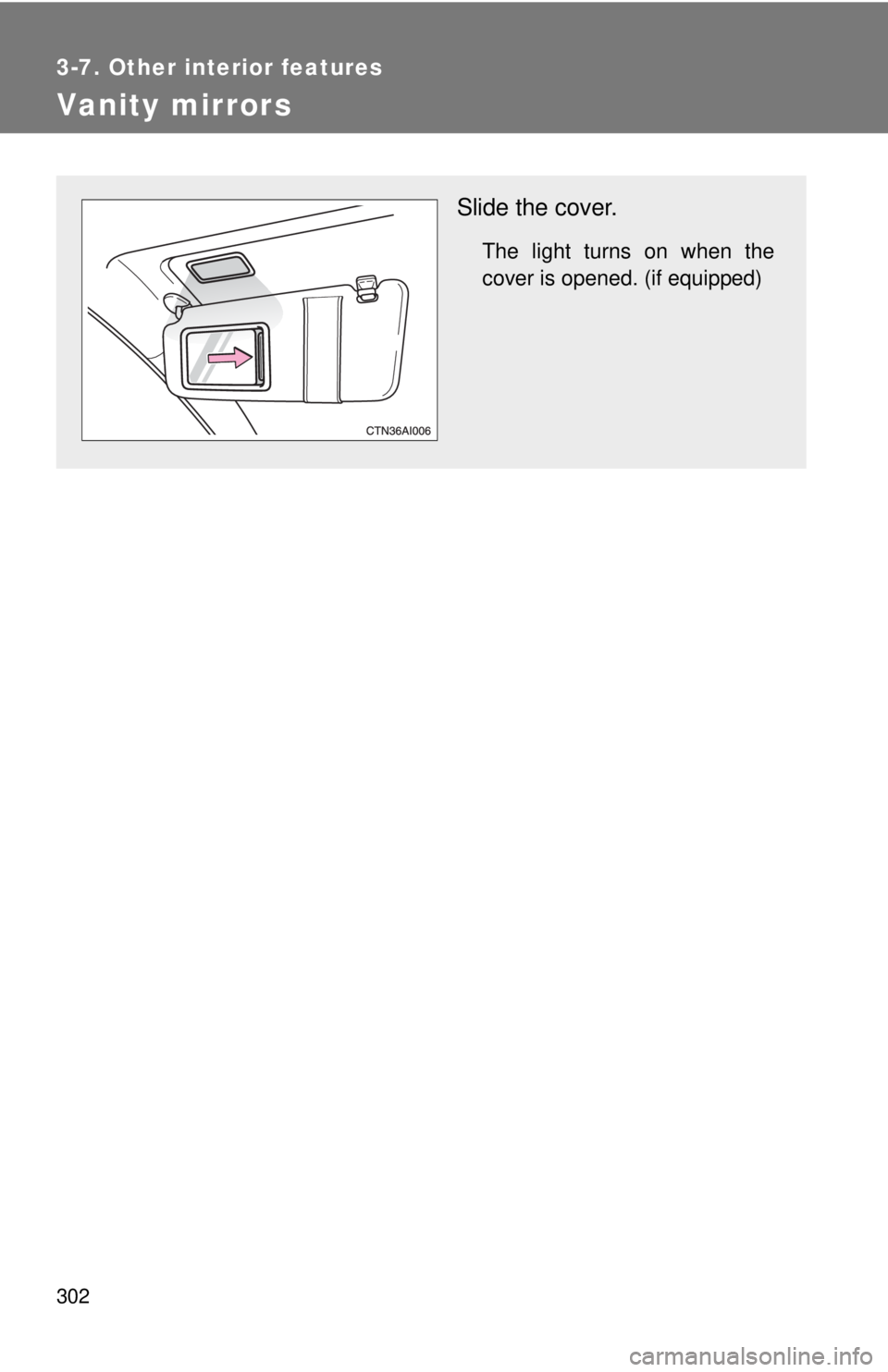
Slide the cover.
The light turns on when the
cover is opened. (if equipped)
Page 319 of 508
319
3-7. Other interior features
3
Interior features
Compass
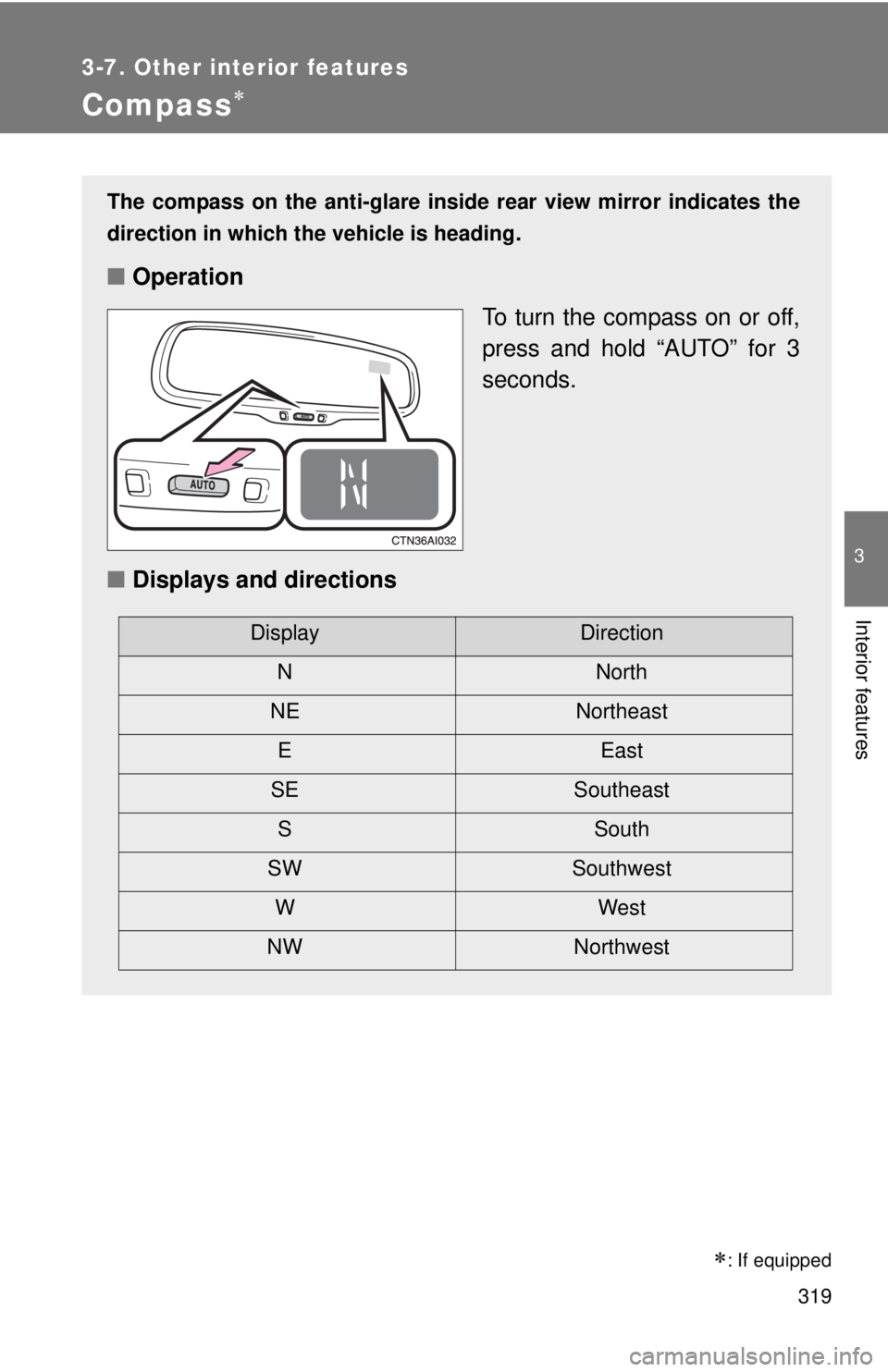
The compass on the anti-glare inside rear view mirror indicates the
direction in which the vehicle is heading.
■Operation
To turn the compass on or off,
press and hold “AUTO” for 3
seconds.
■ Displays and directions
DisplayDirection
NNorth
NE Northeast EEast
SE Southeast S South
SW Southwest
WWest
NW Northwest
: If equipped
Page 321 of 508

321
3-7. Other interior features
3
Interior features
■
Circling calibration
Stop the vehicle in a place where it is safe to drive in a circle.
Press and hold “AUTO” for 9
seconds.
C appears on the compass dis-
play.
Drive the vehicle at 5 mph (8 km/
h) or less in a circle until a direc-
tion is displayed.
If there is not enough space to
drive in a circle, drive around the
block until the direction is dis-
played.
STEP1
STEP2
STEP3
■Conditions unfavorable for correct operation
The compass may not show the correct direction in the following situations:
●The vehicle is stopped immediately after turning.
● The vehicle is on an inclined surface.
● The vehicle is in a place where the earth's magnetic field is subject to
interference by artificial magnetic fields (underground car park/parking
lot, under a steel tower, between buildings, roof car park/parking lot, near
an intersection, near a large vehicle, etc.).
● The vehicle has become magnetized.
(There is a magnet or metal object near the anti-glare inside rear view
mirror.)
● The 12-volt battery has been disconnected.
● A door is open.
Page 322 of 508

322 3-7. Other interior features
CAUTION
■While driving the vehicle
Do not adjust the display. Be sure to adjust the display only when the vehicle
is stopped.
■ When doing the circling calibration
Be sure to secure a wide space, and watch out for people and vehicles in the
neighborhood. Do not violate any local traffic rules while performing circling
calibration.
NOTICE
■To avoid compass malfunctions
Do not place magnets or any metal objects near the anti-glare inside rear
view mirror.
Doing this may cause a malfunction of the compass sensor.
■ To ensure normal operation of the compass
●Do not perform circling calibration of the compass in a place where the
earth's magnetic field is subject to interference by artificial magnetic fields.
● During calibration, do not operate electric systems (moon roof, power win-
dows, etc.) as they may interfere with the calibration.
Page 324 of 508
324
4-1. Maintenance and care
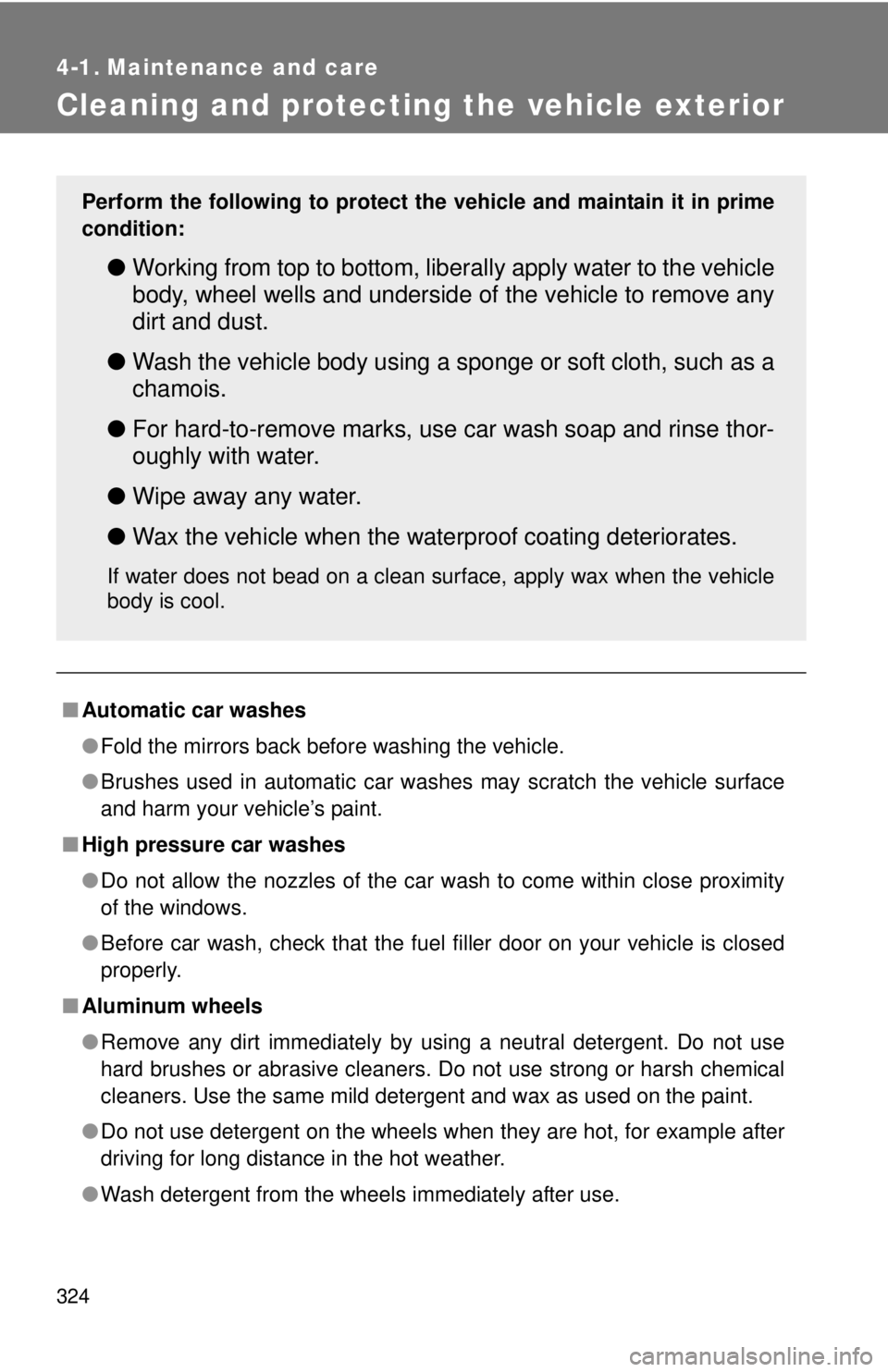
Cleaning and protecting the vehicle exterior
■Automatic car washes
●Fold the mirrors back before washing the vehicle.
● Brushes used in automatic car washes may scratch the vehicle surface
and harm your vehicle’s paint.
■ High pressure car washes
●Do not allow the nozzles of the car wash to come within close proximity
of the windows.
● Before car wash, check that the fuel filler door on your vehicle is closed
properly.
■ Aluminum wheels
●Remove any dirt immediately by using a neutral detergent. Do not use
hard brushes or abrasive cleaners. Do not use strong or harsh chemical
cleaners. Use the same mild detergent and wax as used on the paint.
● Do not use detergent on the wheels when they are hot, for example after
driving for long distance in the hot weather.
● Wash detergent from the wheels immediately after use.
Perform the following to protect the vehicle and maintain it in prime
condition:
● Working from top to bottom, liber ally apply water to the vehicle
body, wheel wells and underside of the vehicle to remove any
dirt and dust.
● Wash the vehicle body using a sponge or soft cloth, such as a
chamois.
● For hard-to-remove marks, use car wash soap and rinse thor-
oughly with water.
● Wipe away any water.
● Wax the vehicle when the waterproof coating deteriorates.
If water does not bead on a clean surface, apply wax when the vehicle
body is cool.
Page 383 of 508
383
4-3. Do-it-yourself maintenance
4
Maintenance and care
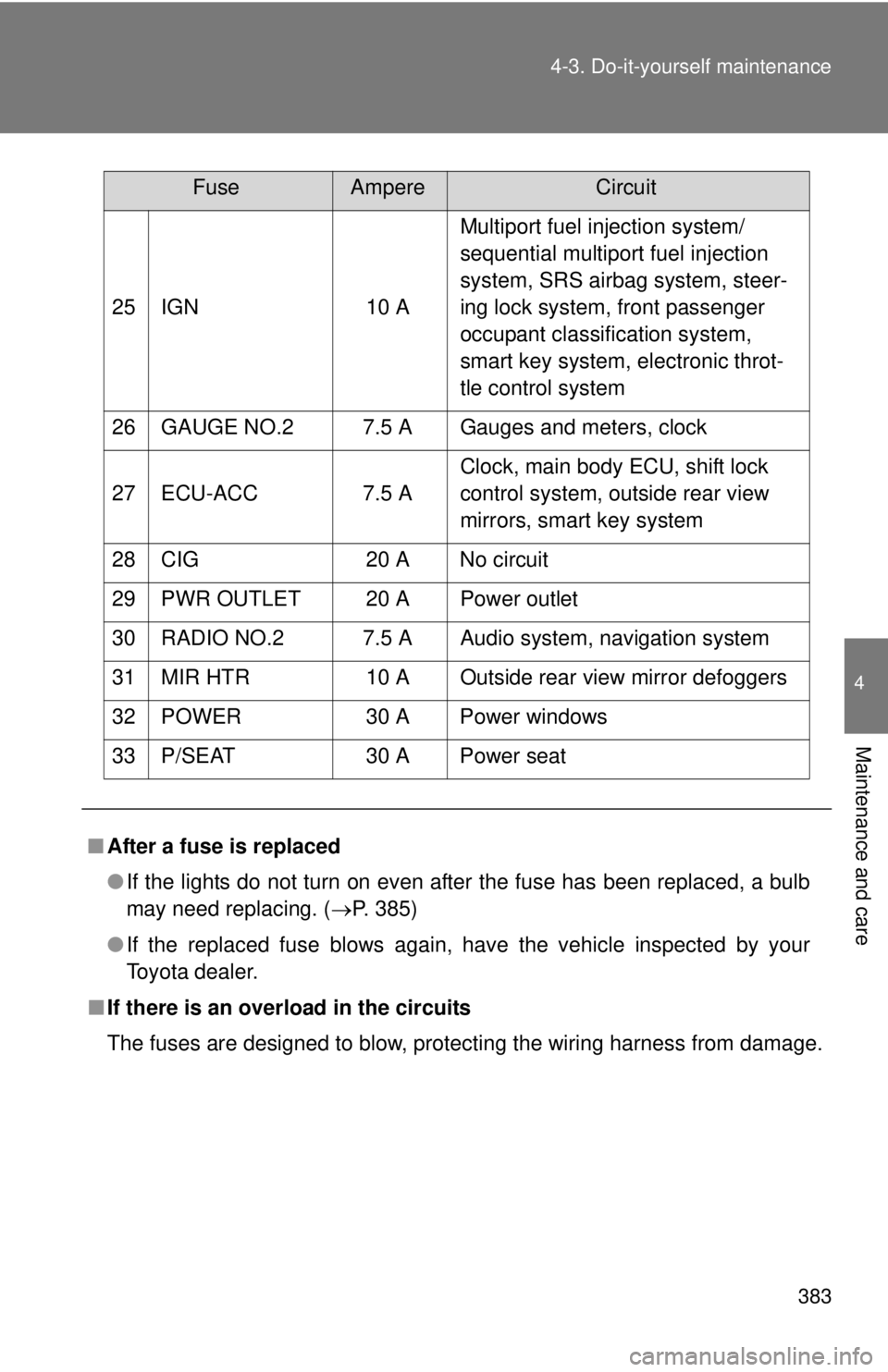
25 IGN
10 AMultiport fuel injection system/
sequential multiport fuel injection
system, SRS airbag system, steer-
ing lock system, front passenger
occupant classification system,
smart key system, electronic throt-
tle control system
26 GAUGE NO.2 7.5 A Gauges and meters, clock
27 ECU-ACC 7.5 A Clock, main body ECU, shift lock
control system, outside rear view
mirrors, smart key system
28 CIG 20 A No circuit
29 PWR OUTLET 20 A Power outlet
30 RADIO NO.2 7.5 A Audio system, navigation system
31 MIR HTR 10 A Outside rear view mirror defoggers
32 POWER 30 A Power windows
33 P/SEAT 30 A Power seat
■ After a fuse is replaced
●If the lights do not turn on even after the fuse has been replaced, a bulb
may need replacing. ( P. 385)
● If the replaced fuse blows again, have the vehicle inspected by your
Toyota dealer.
■ If there is an overload in the circuits
The fuses are designed to blow, protecting the wiring harness from damage.
FuseAmpereCircuit
Page 499 of 508

499
Alphabetical index
Daytime running light
system ................................... 156
Defogger Rear window......................... 191
Side mirror ............................ 191
Dimension ................................ 450
Dinghy towing ......................... 178
Display Trip information .................... 151
Warning message ................ 408
Do-it-yourself maintenance .... 335
Door courtesy light
Door courtesy light ............... 291
Wattage ................................ 458
Doors Door glasses .......................... 77
Door lock .................... 37, 48, 51
Side mirrors ............................ 75
Driver's seat belt reminder light ........................................ 402
Driving Break-in tips ......................... 125
Correct posture....................... 90
Procedures ........................... 124
Winter driving tips ................. 173 “ECO HEAT/COOL” switch .....182
Electronic key
If your electronic key battery is discharged...........433
Electric power steering ...........165
Emergency flashers
Switch....................................392
Emergency, in case of
If a warning light turns on ......399
If a warning message is displayed.............................408
If the electronic key does not operate properly............ 433
If the hybrid system
will not start .........................429
If the shift lever cannot be shifted from P......................431
If the vehicle has discharged 12-volt battery .....................436
If the warning buzzer
sounds ................................399
If you have a flat tire .............419
If you lose your keys .............432
If you think something is wrong ..................................396
If your vehicle becomes
stuck ...................................444
If your vehicle has to be stopped in an emergency ...446
If your vehicle needs to be towed ..................................393
If your vehicle overheats .......440DE
Page 501 of 508

501
Alphabetical index
Hands-free phone system
(for cellular phone)
Hands-free phone system (for cellular phone) ............. 258
Hazard lights
Switch ................................... 392
Head restraints Adjusting ................................ 62
Headlights Replacing light bulbs ............ 385
Switch ................................... 154
Wattage ................................ 458
Heaters Seat heater ........................... 307
Side mirror ............................ 191
Hood ......................................... 338
Hooks Cargo hook ........................... 311
Grocery bag hooks ............... 311
Horn .......................................... 143
Hybrid system
Emergency shut off system .... 26
Energy monitor/consumption screen ............. 26
High voltage components ....... 25
Power switch ........................ 135
I/M test ...................................... 334
Identification Engine .................................. 450
Vehicle.................................. 450
Ignition switch ......................... 135
Illuminated entry system ........ 291
Immobilizer system ................... 88
Indicator lights ........................ 147
Initialization Items to initialize ................... 477
Inside rear view mirror.............. 73
Interior lights Interior lights ......................... 291
Switch ................................... 292
Wattage ................................ 458 Jack
Positioning a floor jack ..........339
Vehicle-equipped jack ...........419
Jack handle ..............................419
Keyless entry..............................48
Keys Electronic key ..........................35
If you lose your keys .............432
If your electronic key battery is discharged...........433
Key number .............................35
Keyless entry...........................48
Keys ........................................35
Mechanical key .......................35
Wireless remote control key ....48
License plate lights Wattage .................................458
Light bulbs Replacing ..............................385
Wattage .................................458
Lights Door courtesy lights ..............291
Emergency flasher switch .....392
Hazard light switch ................392
Headlights switch ..................154
Interior light switch ................292
Personal light switch .............293
Replacing light bulbs .............385
Turn signal lever....................141
Vanity lights ...........................302
Wattage .................................458
Load capacity ...........................172
Lock steering column ..............137H
I
J
K
L