buttons TOYOTA CAMRY HV 2011 Owners Manual
[x] Cancel search | Manufacturer: TOYOTA, Model Year: 2011, Model line: CAMRY HV, Model: TOYOTA CAMRY HV 2011Pages: 508, PDF Size: 8.76 MB
Page 36 of 508
36 1-2. Key information
■When riding in an aircraft
When bringing an electronic key onto an aircraft, make sure you do not
press any buttons on the electronic key while inside the aircraft cabin. If you
are carrying an electronic key in your bag etc, ensure that the buttons are
not likely to be pressed accidentally. Pressing a button may cause the elec-
tronic key to emit radio waves that could interfere with the operation of the
aircraft.
NOTICE
■To prevent key damage
●Do not subject the keys to strong shocks, expose them to high tempera-
tures by placing them in direct sunlight, or get them wet.
● Do not expose the keys to electromagnetic materials or attach any mate-
rial that blocks electromagnetic waves to the key surface.
● Do not disassemble the electronic key.
Page 42 of 508
42 1-3. Opening, closing and locking the doors
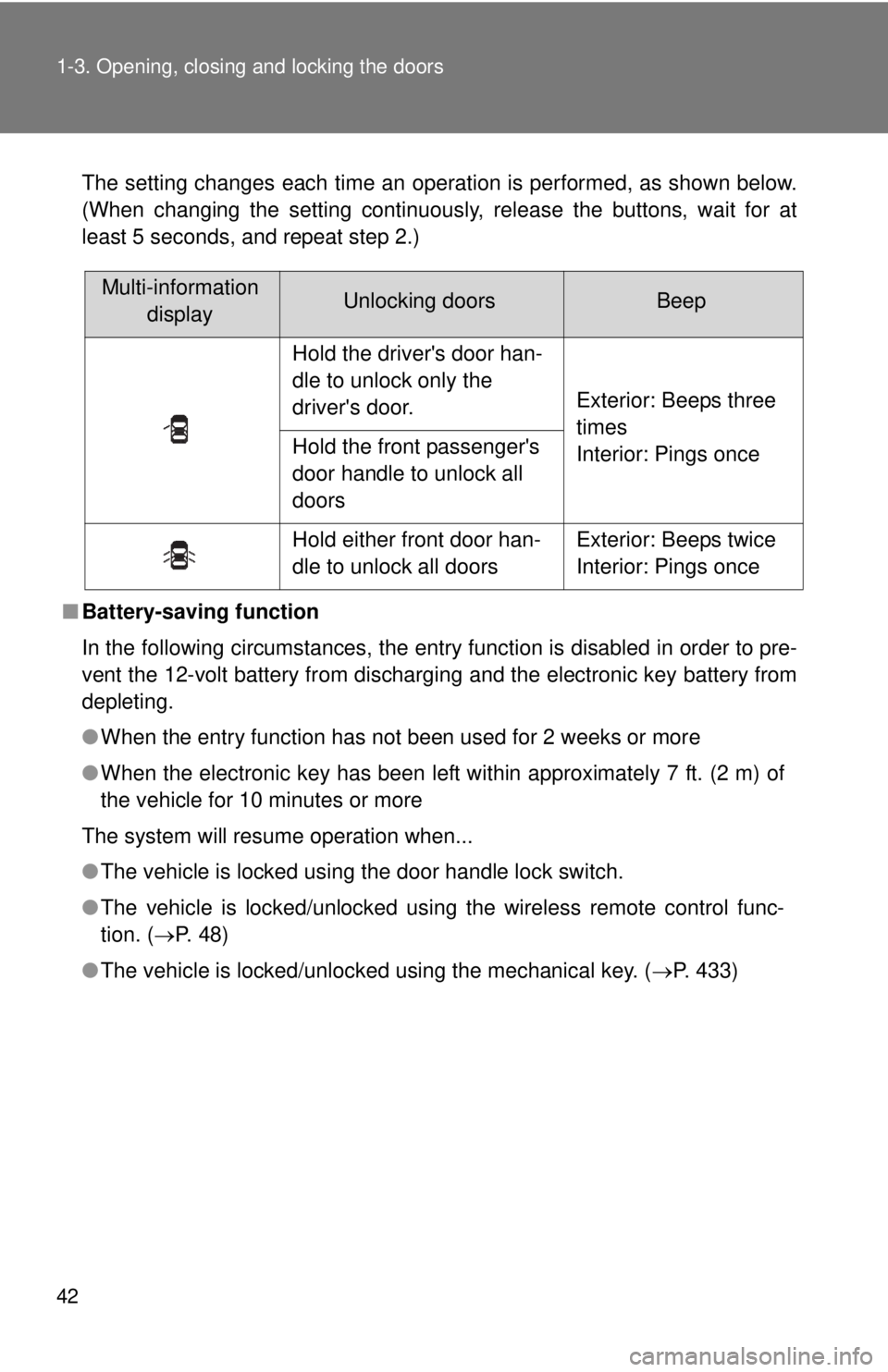
The setting changes each time an operation is performed, as shown below.
(When changing the setting continuously, release the buttons, wait for at
least 5 seconds, and repeat step 2.)
■ Battery-saving function
In the following circumstances, the entry function is disabled in order to pre-
vent the 12-volt battery from discharging and the electronic key battery from
depleting.
●When the entry function has not been used for 2 weeks or more
● When the electronic key has been left within approximately 7 ft. (2 m) of
the vehicle for 10 minutes or more
The system will resume operation when...
● The vehicle is locked using the door handle lock switch.
● The vehicle is locked/unlocked using the wireless remote control func-
tion. ( P. 4 8 )
● The vehicle is locked/unlocked using the mechanical key. ( P. 433)
Multi-information
displayUnlocking doorsBeep
Hold the driver's door han-
dle to unlock only the
driver's door. Exterior: Beeps three
times
Interior: Pings once
Hold the front passenger's
door handle to unlock all
doors
Hold either front door han-
dle to unlock all doors Exterior: Beeps twice
Interior: Pings once
Page 51 of 508
51
1
1-3. Opening, closing and locking the doors
Before driving
Doors
The vehicle can be locked and unlocked using the entry function,
wireless remote control, key or door lock switch.
■Entry function
P. 3 7
■ Wireless remote control
P. 4 8
■ Key
P. 433
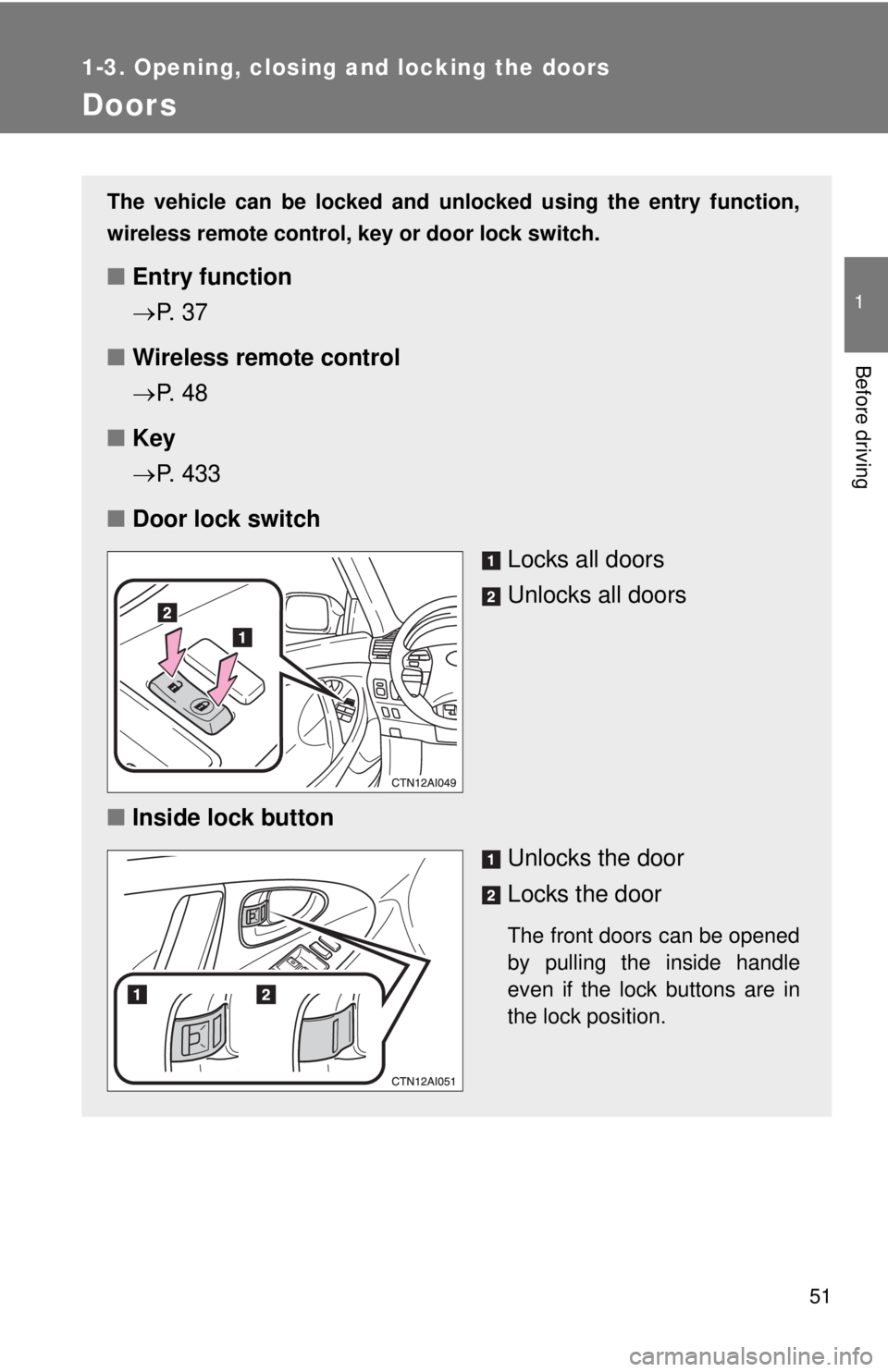
■ Door lock switch
Locks all doors
Unlocks all doors
■ Inside lock button
Unlocks the door
Locks the door
The front doors can be opened
by pulling the inside handle
even if the lock buttons are in
the lock position.
Page 54 of 508
54 1-3. Opening, closing and locking the doors
■Customization that can be co nfigured at Toyota dealer
Settings (e.g. unlocking function using a key) can be changed.
(Customizable features P. 474)
CAUTION
■To prevent an accident
Observe the following precautions while driving the vehicle.
Failing to do so may result in a door opening and an occupant falling out,
resulting in death or serious injury.
●Always use a seat belt.
● Always lock the doors.
● Ensure that all doors are properly closed.
● Do not pull the inside handle of the doors while driving.
The doors may be opened and the passengers are thrown out of the vehi-
cle and it may result in serious injury or death.
Be especially careful for the front doors, as the doors may be opened even
if the inside lock buttons are in locked position.
● Set the rear door child protector locks when children are seated in the rear
seat.
Page 195 of 508
195
3-2. Using the audio system
3
Interior features
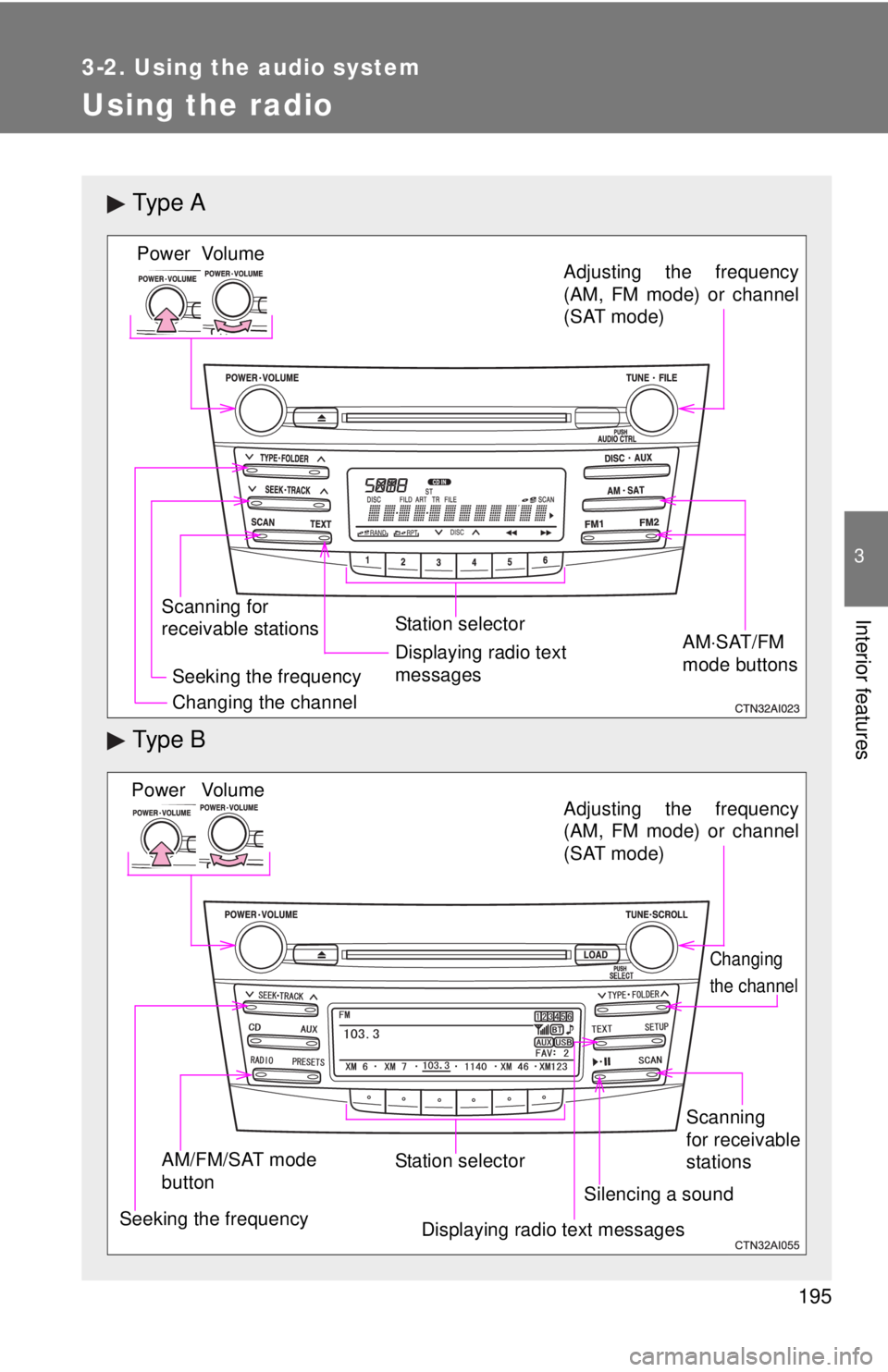
Using the radio
Ty p e A
Ty p e B
Vo lu m e
Scanning for
receivable stations Station selector
Seeking the frequency Adjusting the frequency
(AM, FM mode) or channel
(SAT mode)
AMSAT/FM
mode buttonsPower
Displaying radio text
messages
Changing the channel
AM/FM/SAT mode
button Station selector
Seeking the frequency Adjusting the frequency
(AM, FM mode) or channel
(SAT mode)
Displaying radio text messages
Changing
the channel
Scanning
for receivable
stations
Vo lu m e
Power
Silencing a sound
Page 202 of 508
202
3-2. Using the audio system
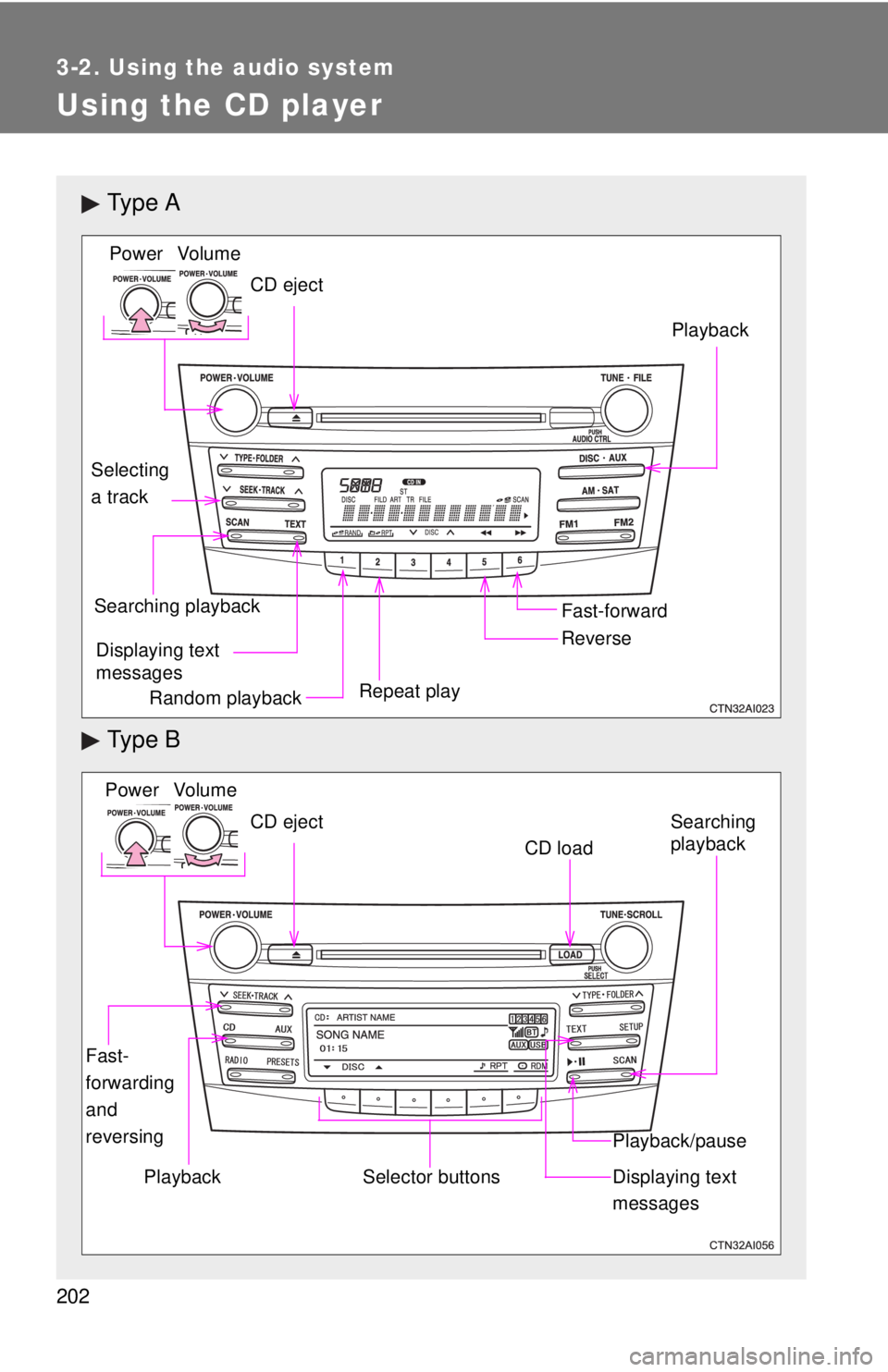
Using the CD player
Ty p e A
Ty p e B
Vo lu m e
Random playback Repeat play Playback
Power
CD eject
Displaying text
messages
Selecting
a track
Fast-forward
Reverse
Searching playback
Vo lu m e
Power
CD eject
Fast-
forwarding
and
reversingSearching
playback
CD load
Playback/pause
Displaying text
messagesSelector buttonsPlayback
Page 210 of 508
210
3-2. Using the audio system
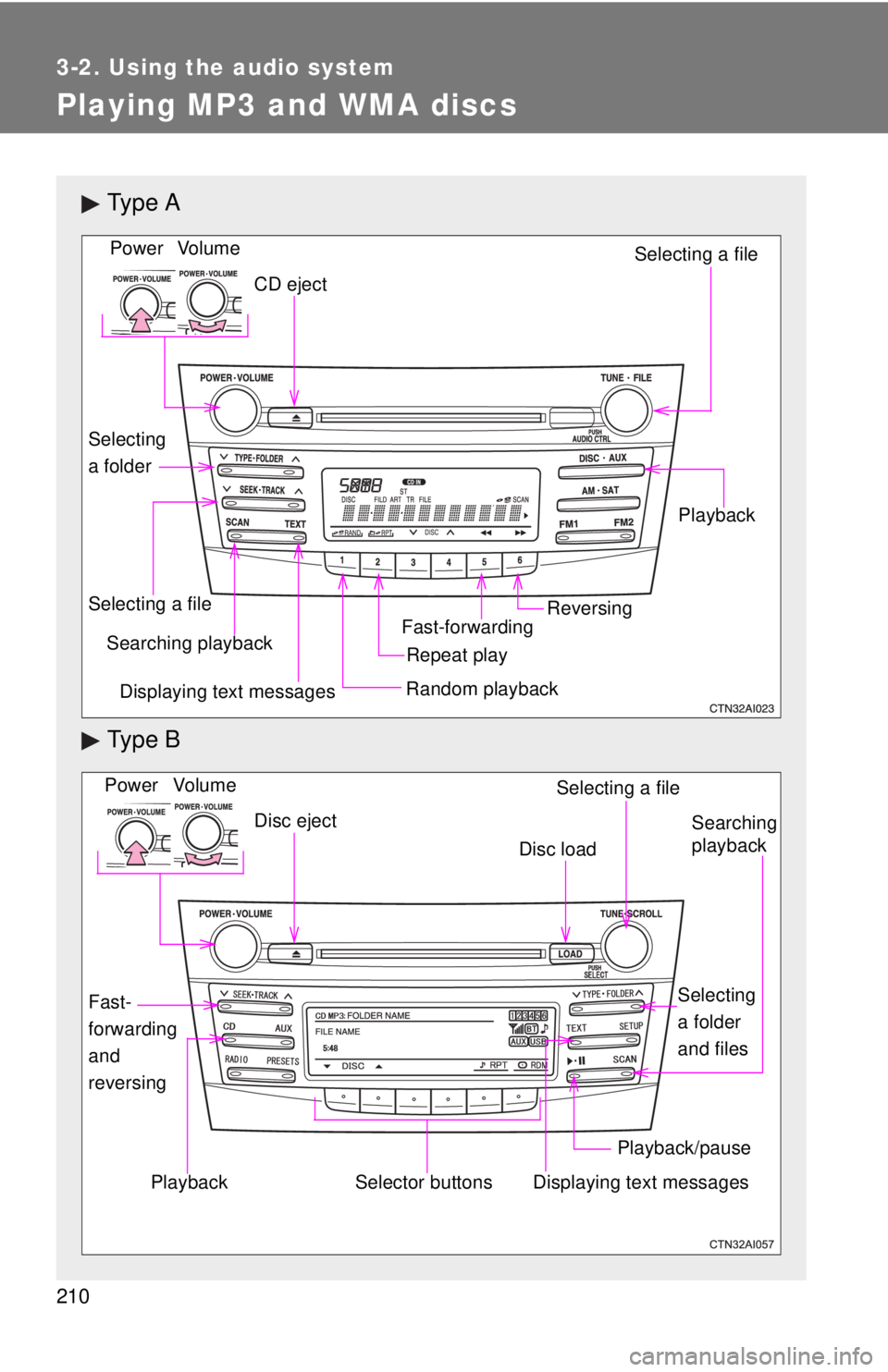
Playing MP3 and WMA discs
Ty p e A
Ty p e B
Vo lu m eRandom playbackSelecting a file
Playback
Power
CD eject
Displaying text messages
Selecting a file
Repeat playSearching playback
Selecting
a folder
Fast-forwardingReversing
Vo lu m e
Fast-
forwarding
and
reversing Power
Disc eject
Selector buttons
Searching
playback
Selecting
a folder
and files
Disc load
Playback/pause
Displaying text messages
Selecting a file
Playback
Page 218 of 508
218
3-2. Using the audio system
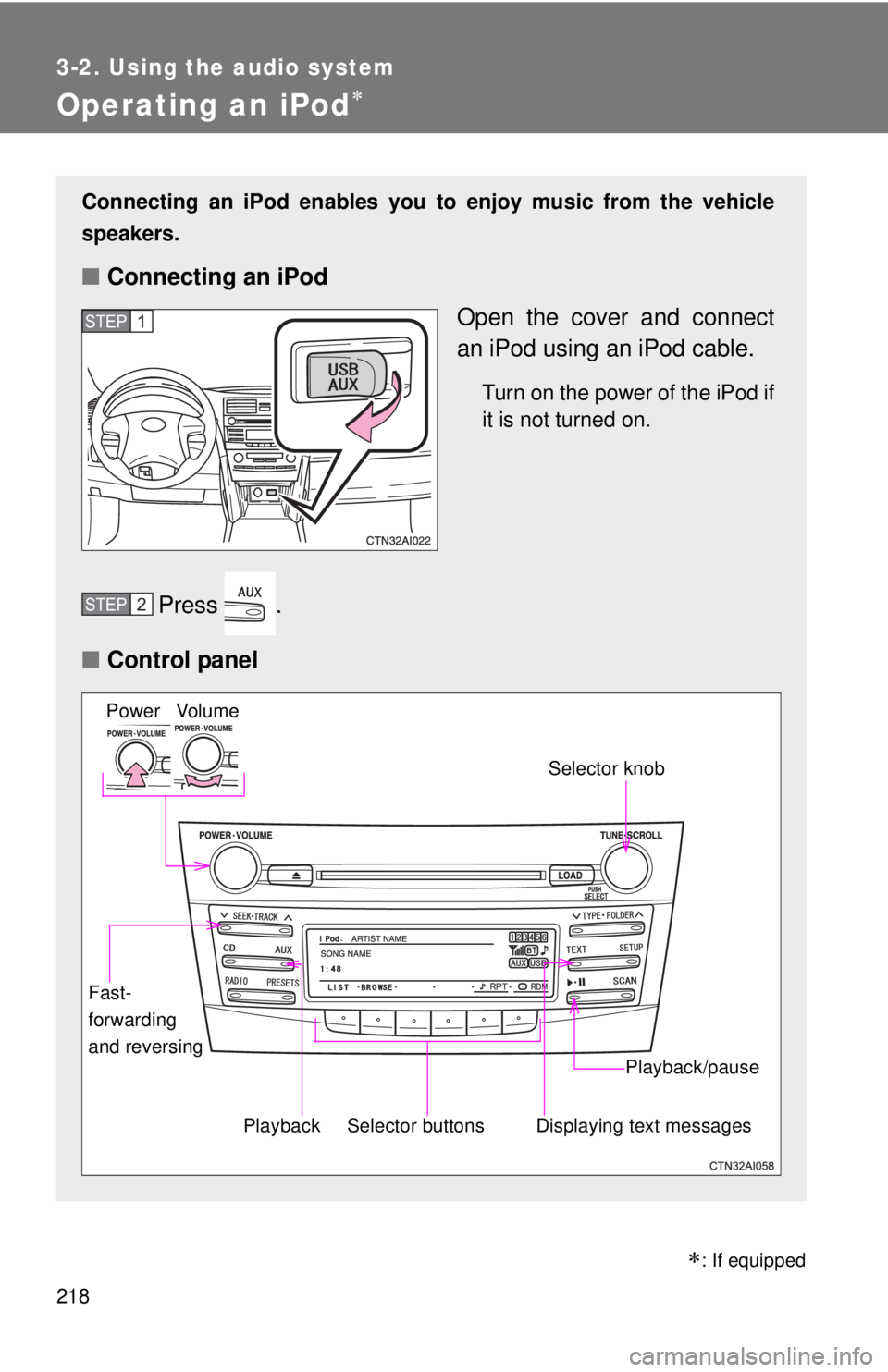
Operating an iPod
Connecting an iPod enables you to enjoy music from the vehicle
speakers.
■ Connecting an iPod
Open the cover and connect
an iPod using an iPod cable.
Turn on the power of the iPod if
it is not turned on.
Press .
■ Control panel
STEP1
STEP2
Selector buttons
Fast-
forwarding
and reversing
Vo lu m e
Power
Playback/pause
Displaying text messages
Selector knob
Playback
: If equipped
Page 225 of 508
225
3-2. Using the audio system
3
Interior features
Operating a USB memor y
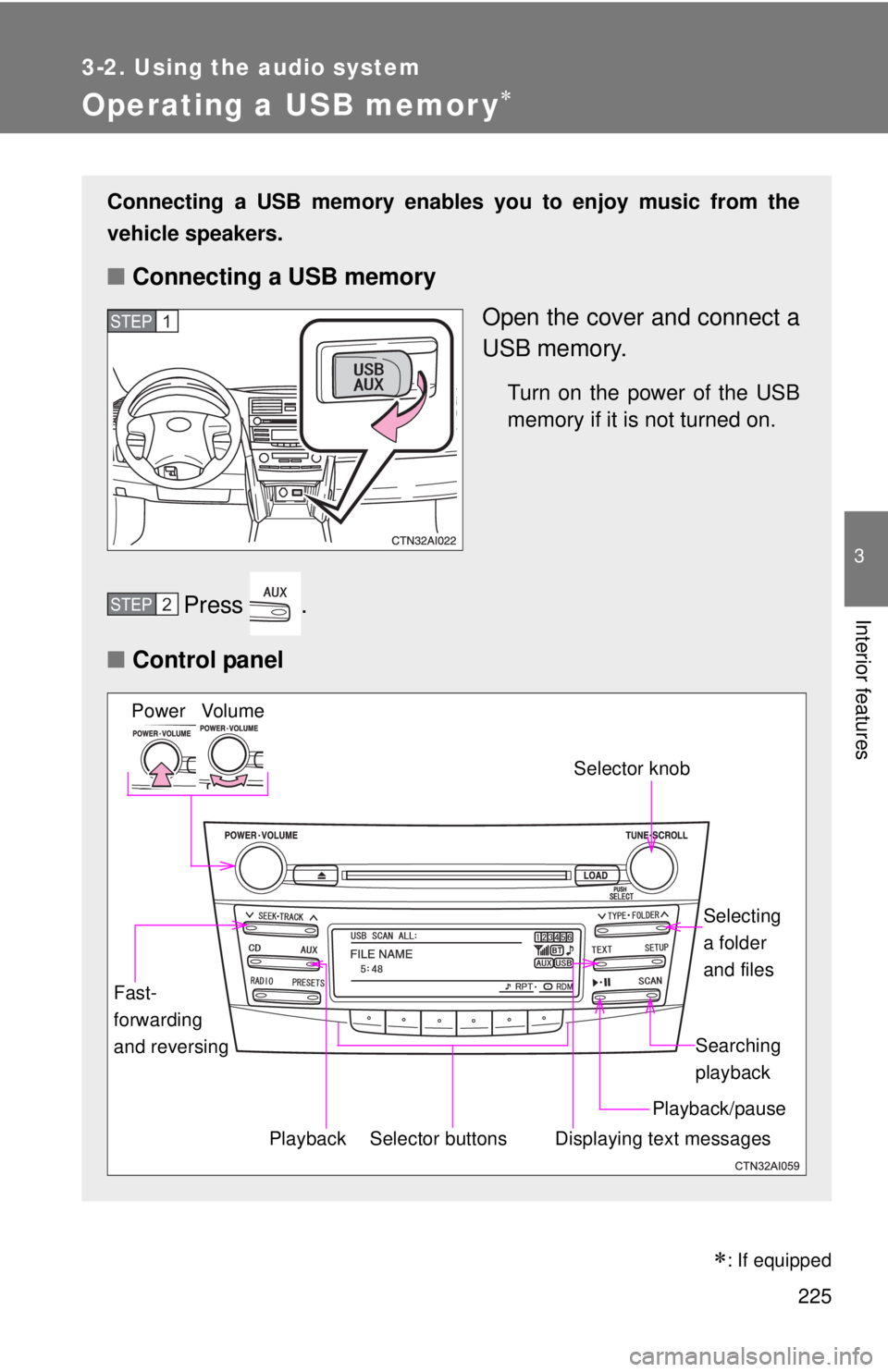
Connecting a USB memory enables you to enjoy music from the
vehicle speakers.
■Connecting a USB memory
Open the cover and connect a
USB memory.
Turn on the power of the USB
memory if it is not turned on.
Press .
■ Control panel
STEP1
STEP2
Selector buttons
Fast-
forwarding
and reversing
Vo lu m e
Power
Playback/pause Searching
playback
Displaying text messages
Selector knob
Selecting
a folder
and files
Playback
: If equipped
Page 232 of 508
232
3-2. Using the audio system
Optimal use of the audio system
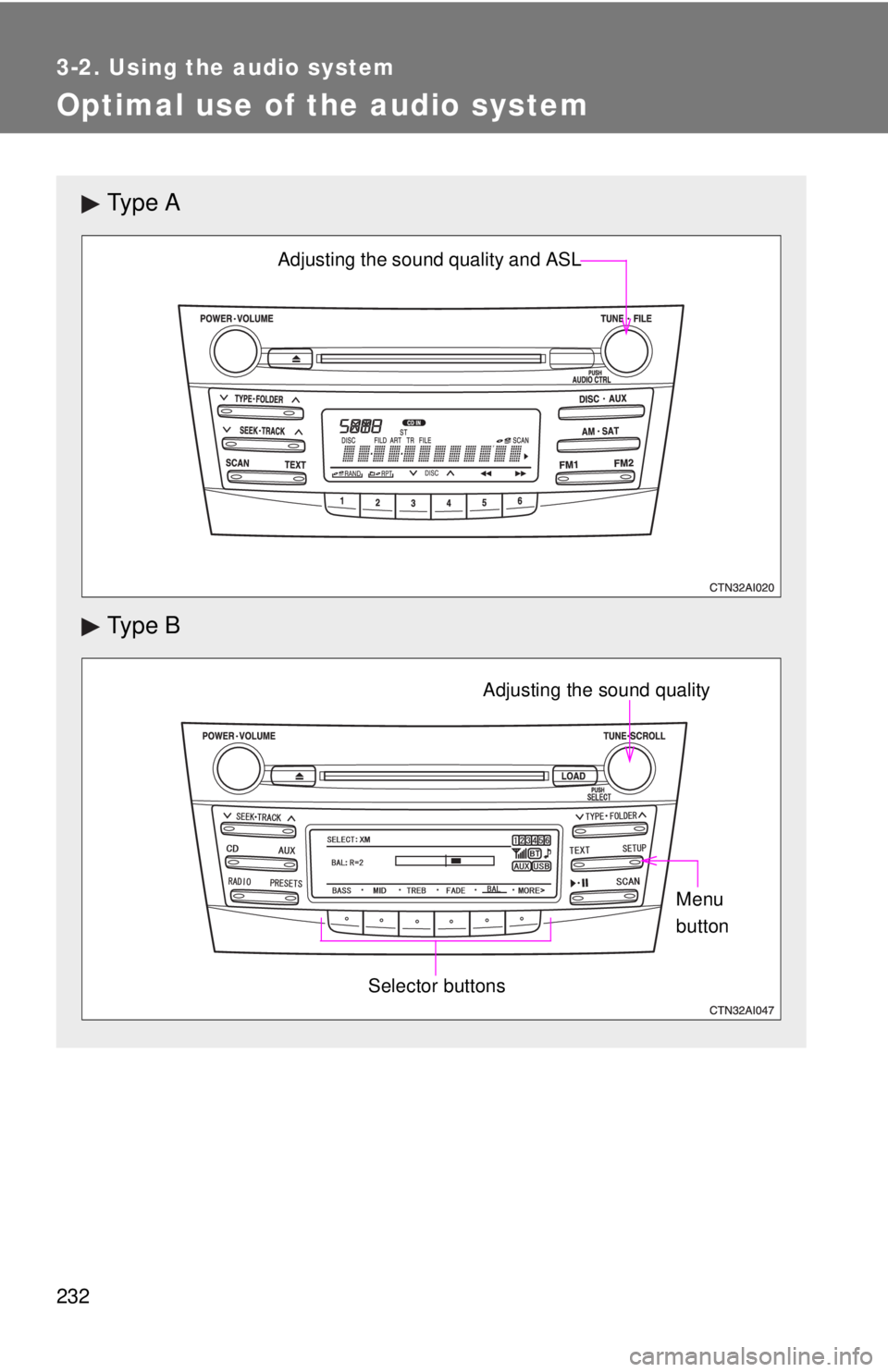
Ty p e A
Ty p e B
Adjusting the sound quality and ASL
Selector buttons
Adjusting the sound qualityMenu
button