lock TOYOTA CAMRY HV 2012 Owners Manual
[x] Cancel search | Manufacturer: TOYOTA, Model Year: 2012, Model line: CAMRY HV, Model: TOYOTA CAMRY HV 2012Pages: 536, PDF Size: 6.29 MB
Page 398 of 536
398 4-3. Do-it-yourself maintenance
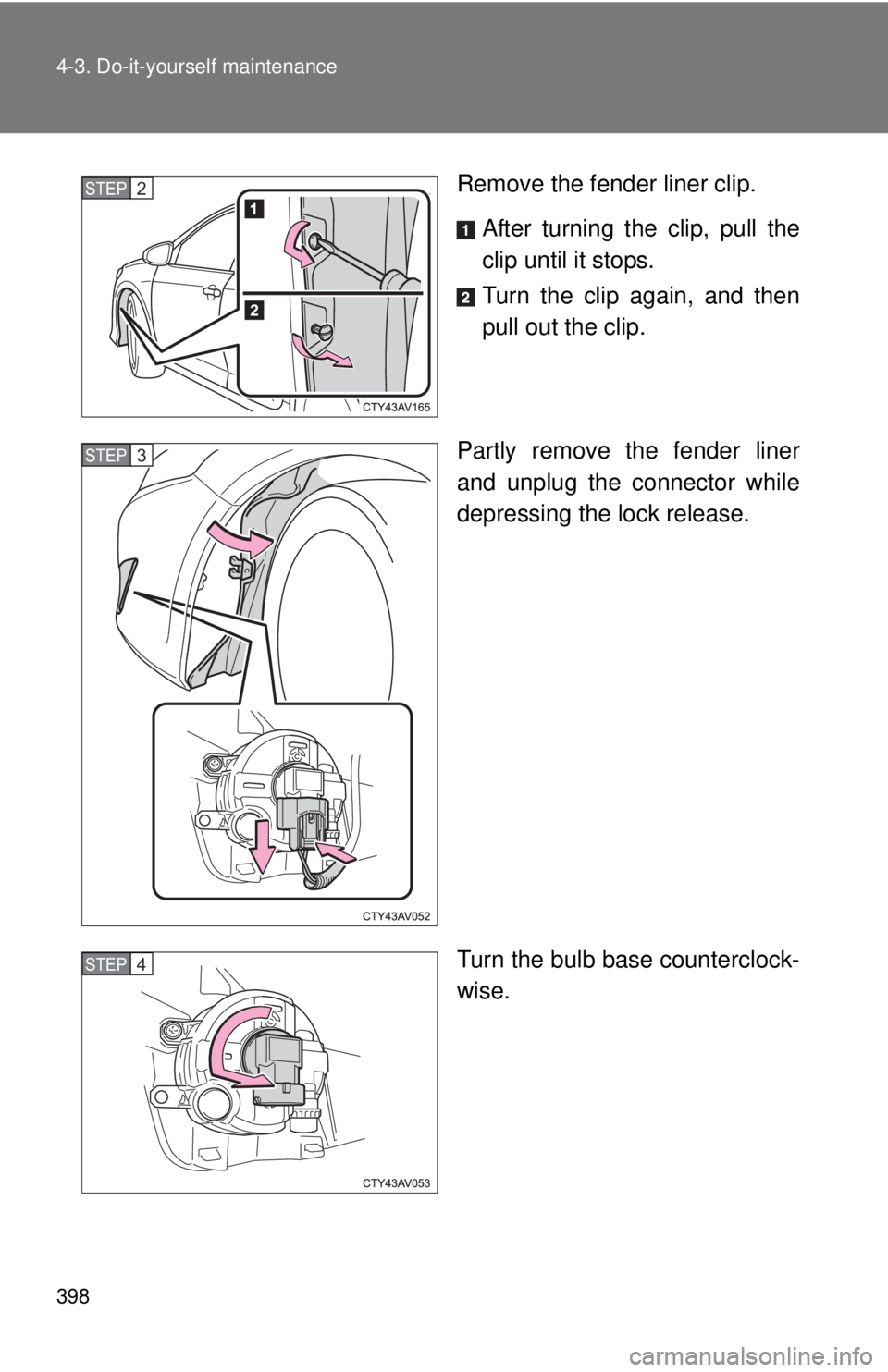
Remove the fender liner clip.After turning the clip, pull the
clip until it stops.
Turn the clip again, and then
pull out the clip.
Partly remove the fender liner
and unplug the connector while
depressing the lock release.
Turn the bulb base counterclock-
wise.STEP2
STEP3
STEP4
Page 399 of 536
399
4-3. Do-it-yourself maintenance
4
Maintenance and care
■
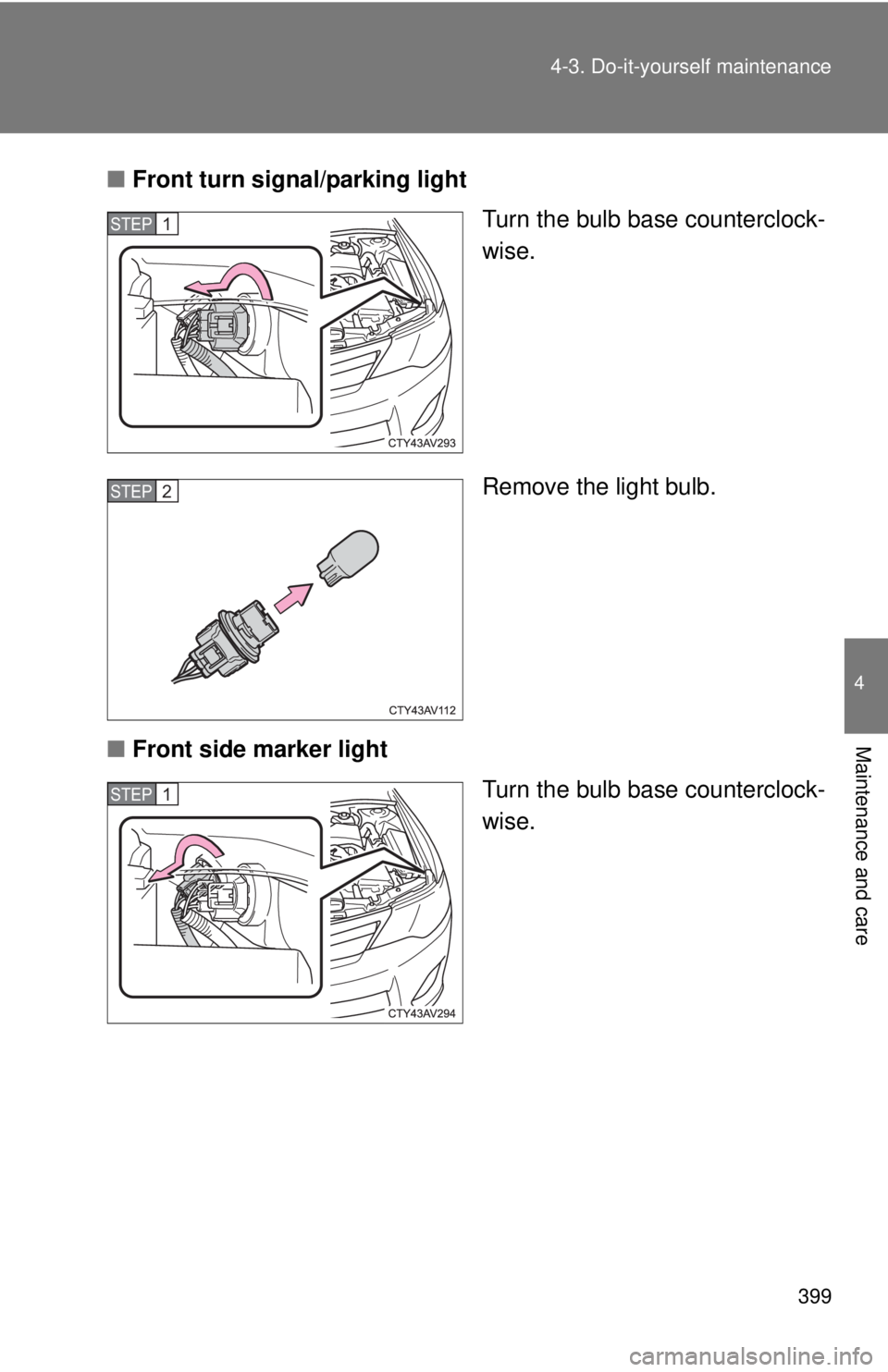
Front turn signal/parking light
Turn the bulb base counterclock-
wise.
Remove the light bulb.
■ Front side marker light
Turn the bulb base counterclock-
wise.
STEP1
STEP2
STEP1
Page 401 of 536
401
4-3. Do-it-yourself maintenance
4
Maintenance and care
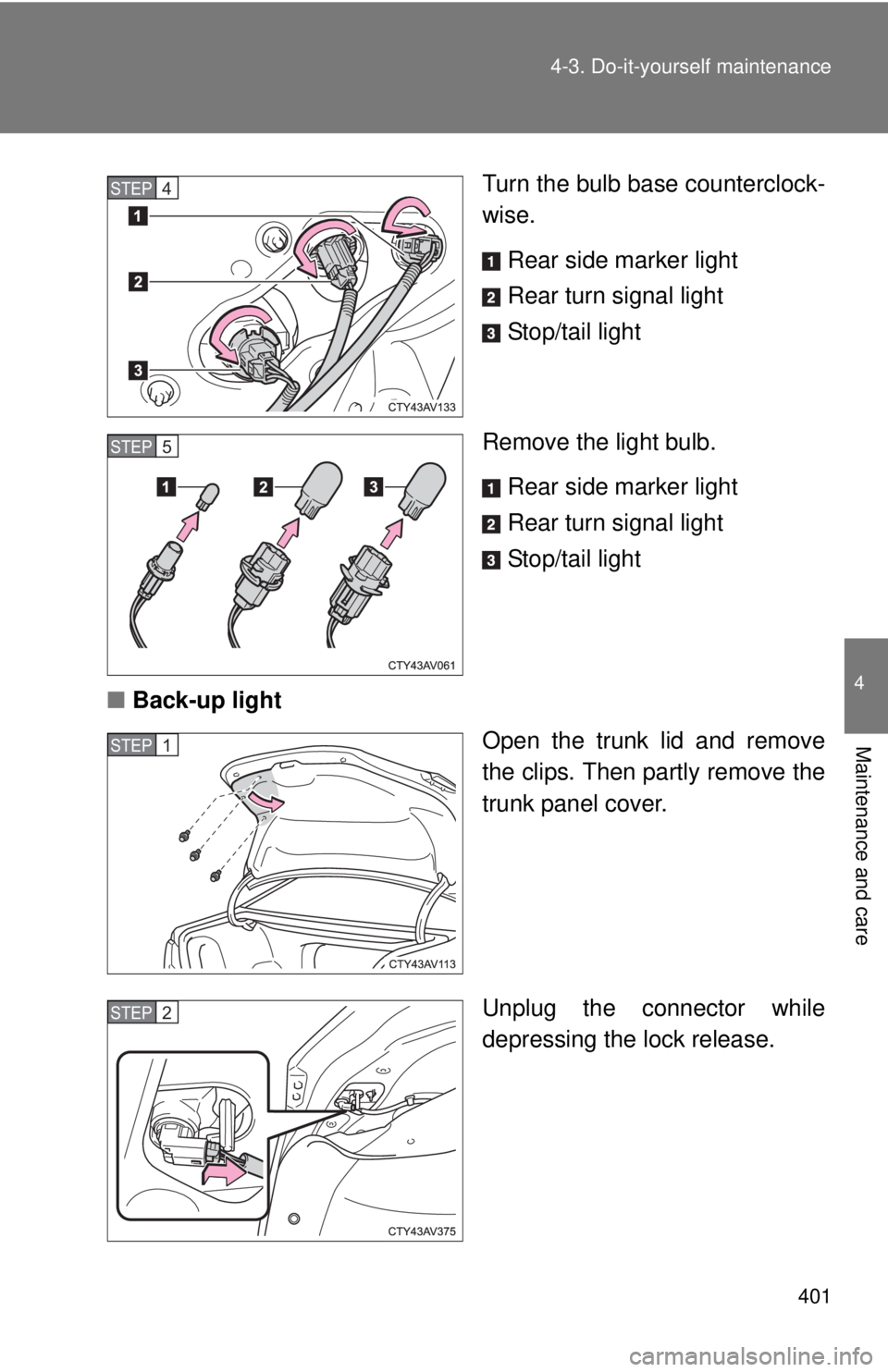
Turn the bulb base counterclock-
wise.
Rear side marker light
Rear turn signal light
Stop/tail light
Remove the light bulb. Rear side marker light
Rear turn signal light
Stop/tail light
■ Back-up light
Open the trunk lid and remove
the clips. Then partly remove the
trunk panel cover.
Unplug the connector while
depressing the lock release.STEP4
STEP5
STEP1
STEP2
Page 402 of 536
402 4-3. Do-it-yourself maintenance
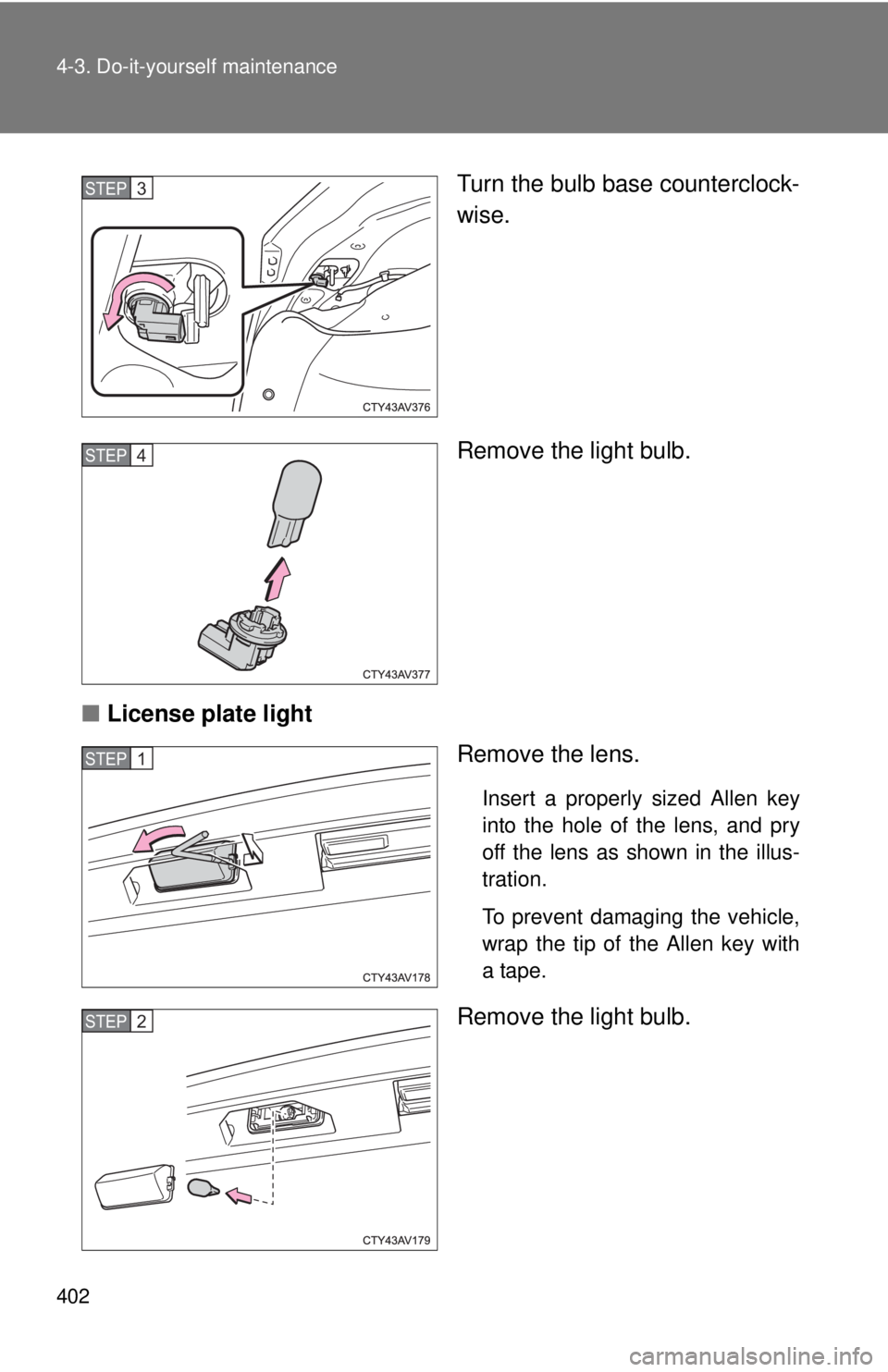
Turn the bulb base counterclock-
wise.
Remove the light bulb.
■ License plate light
Remove the lens.
Insert a properly sized Allen key
into the hole of the lens, and pry
off the lens as shown in the illus-
tration.
To prevent damaging the vehicle,
wrap the tip of the Allen key with
a tape.
Remove the light bulb.
STEP3
STEP4
STEP1
STEP2
Page 405 of 536
405
4-3. Do-it-yourself maintenance
4
Maintenance and care
CAUTION
■
Discharge headlights (if equipped)
●Contact your Toyota dealer before replacing the discharge headlights
(including light bulbs).
● Do not touch the discharge headlight’s high voltage socket when the head-
lights are turned on.
An extremely high voltage of 30000 V will be discharged and could result
in serious injury or death by electric shock.
● Do not attempt to take apart or repair the low beam discharge headlight
bulbs, connectors, power supply circuits, or related components.
Doing so could result in electric shock and serious injury or death.
■ To prevent damage or fire
Make sure bulbs are fully seated and locked.
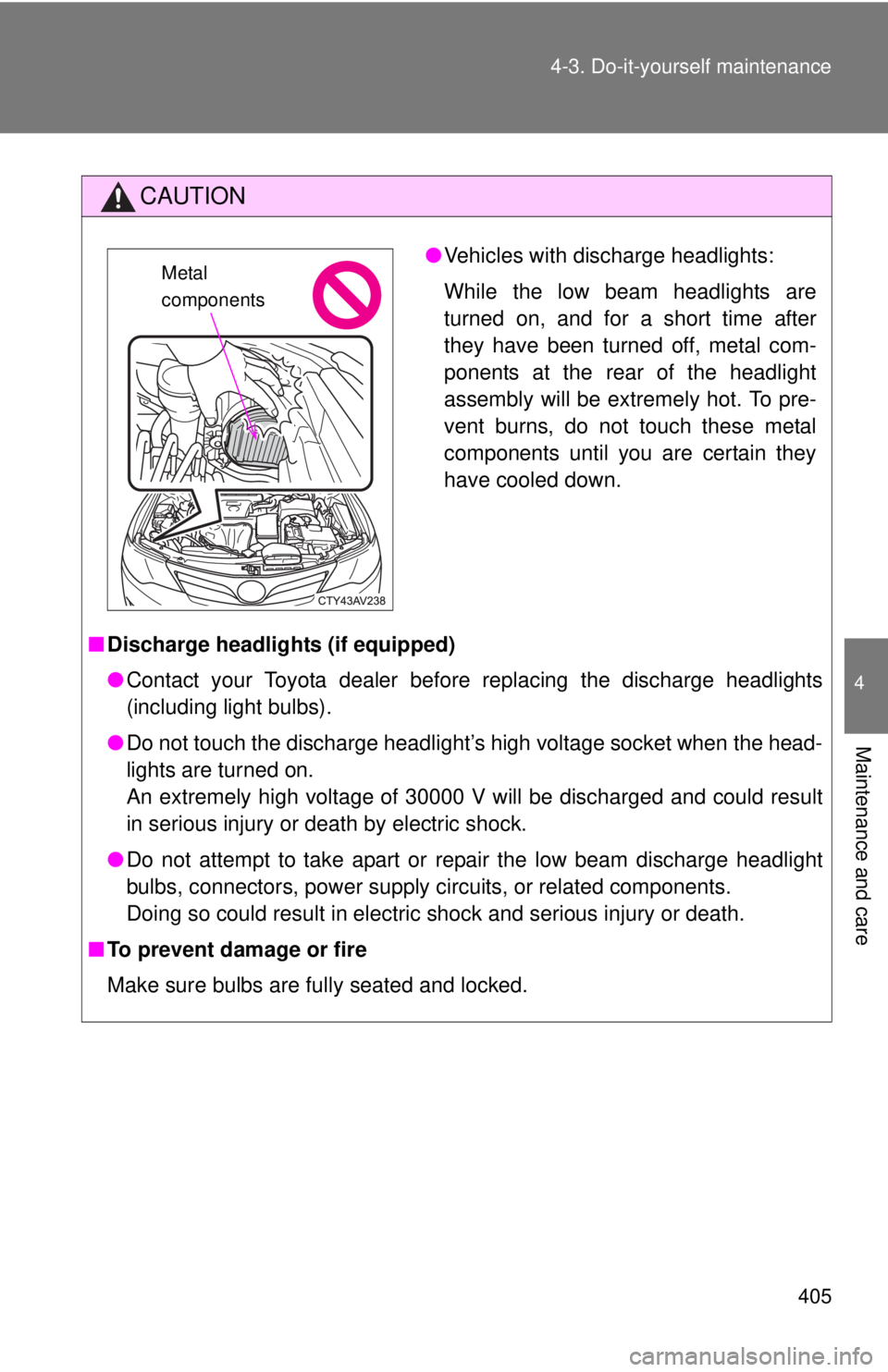
●Vehicles with discharge headlights:
While the low beam headlights are
turned on, and for a short time after
they have been turned off, metal com-
ponents at the rear of the headlight
assembly will be extremely hot. To pre-
vent burns, do not touch these metal
components until you are certain they
have cooled down.Metal
components
Page 425 of 536
5
When trouble arises
425
5-2. Steps to take in an emergency
Have the vehicle inspected immediately.
A buzzer sounds and a warning message is shown on the multi-infor-
mation display. Failure to investig ate the cause of the following warn-
ings may lead to the system operating abnormally and possibly
cause an accident. Have the vehicle inspected by your Toyota dealer
immediately.
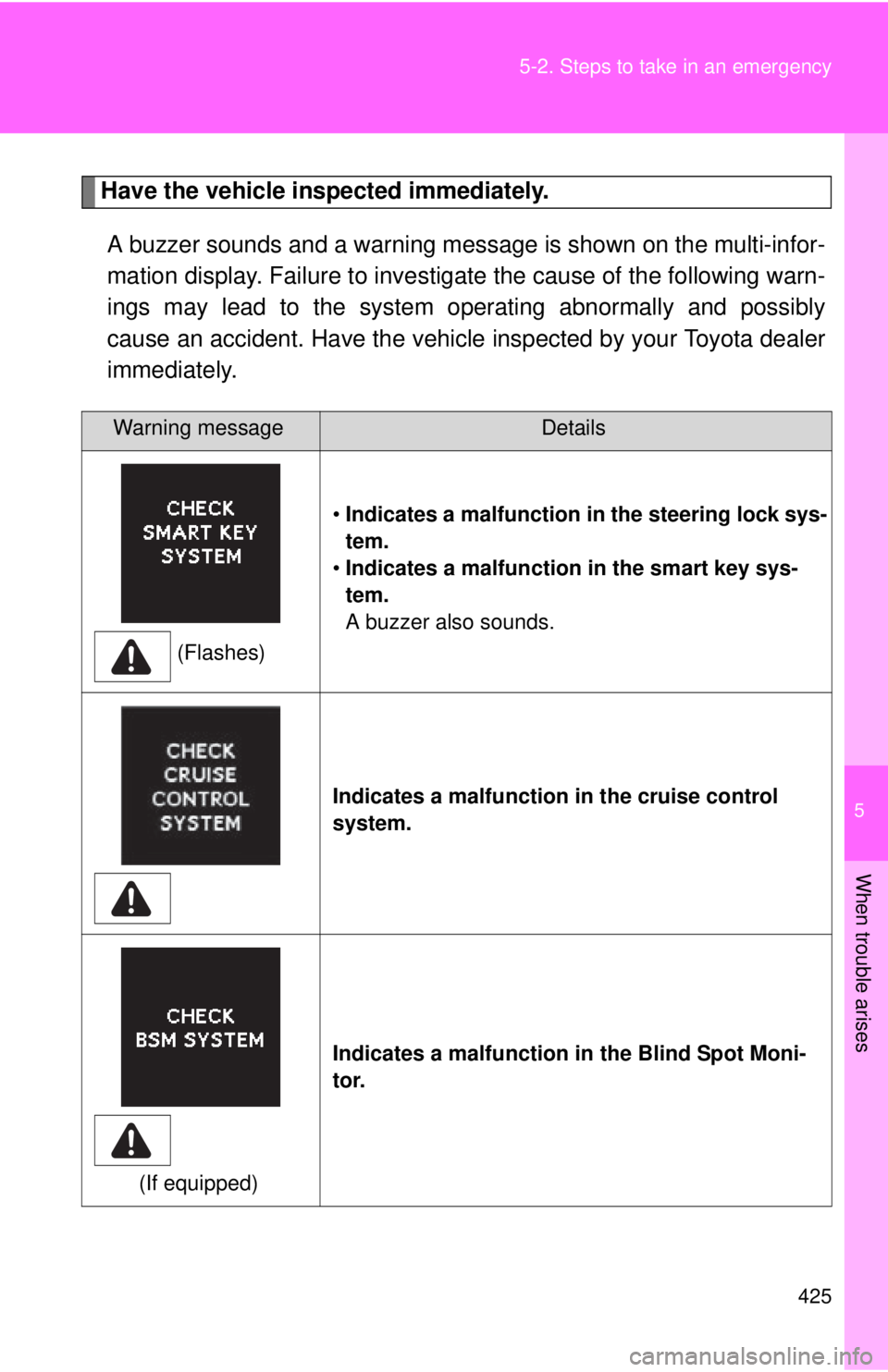
Warning messageDetails
(Flashes) •
Indicates a malfunction in the steering lock sys-
tem.
• Indicates a malfunction in the smart key sys-
tem.
A buzzer also sounds.
Indicates a malfunction in the cruise control
system.
(If equipped) Indicates a malfunction in the Blind Spot Moni-
tor.
Page 435 of 536
5
When trouble arises
435
5-2. Steps to take in an emergency
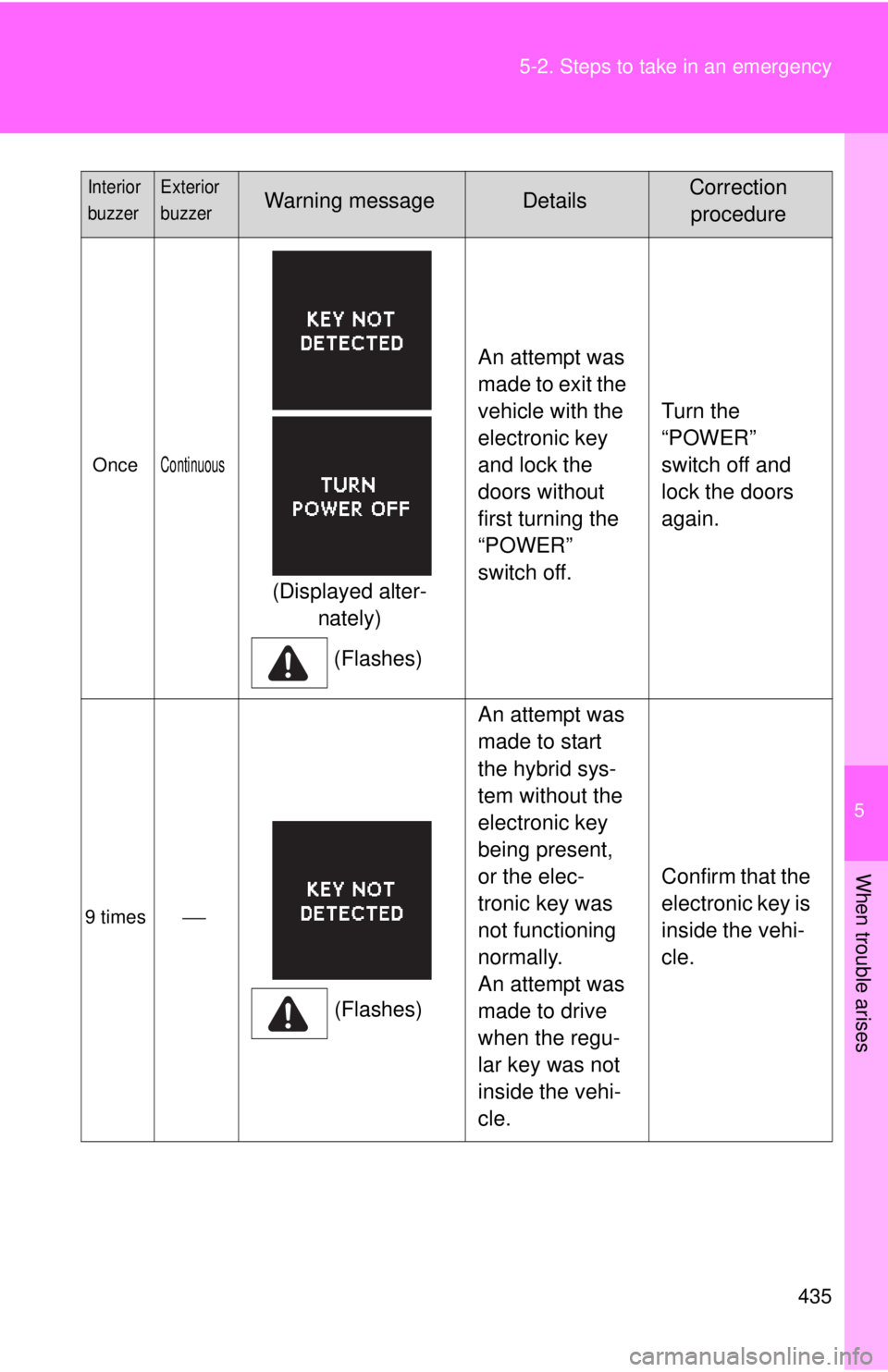
OnceContinuous
(Displayed alter-
nately)
(Flashes) An attempt was
made to exit the
vehicle with the
electronic key
and lock the
doors without
first turning the
“POWER”
switch off.
Turn the
“POWER”
switch off and
lock the doors
again.
9 times
(Flashes)An attempt was
made to start
the hybrid sys-
tem without the
electronic key
being present,
or the elec-
tronic key was
not functioning
normally.
An attempt was
made to drive
when the regu-
lar key was not
inside the vehi-
cle.
Confirm that the
electronic key is
inside the vehi-
cle.
Interior
buzzerExterior
buzzerWarning messageDetailsCorrection
procedure
Page 437 of 536
5
When trouble arises
437
5-2. Steps to take in an emergency
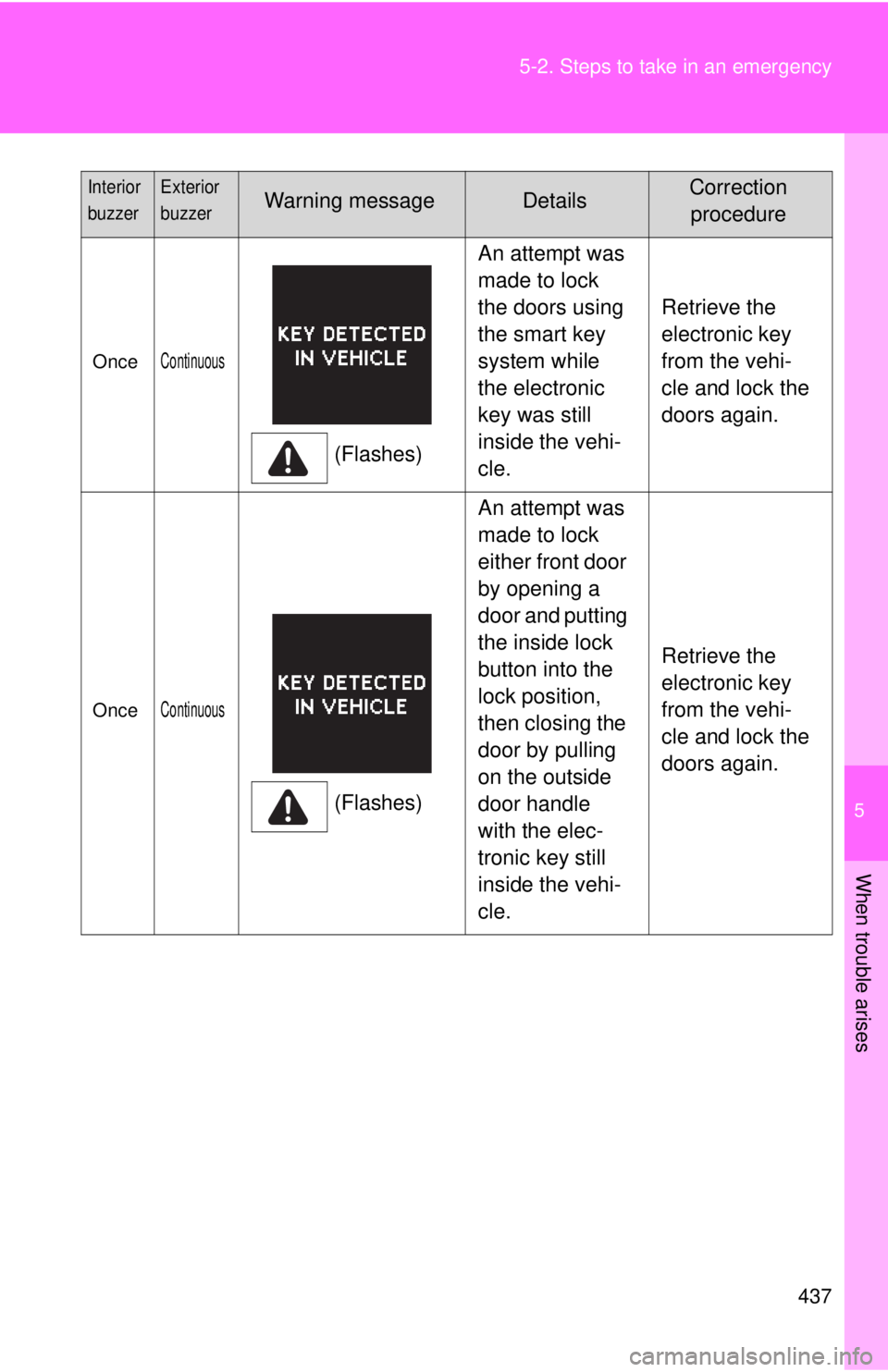
OnceContinuous
(Flashes)
An attempt was
made to lock
the doors using
the smart key
system while
the electronic
key was still
inside the vehi-
cle.
Retrieve the
electronic key
from the vehi-
cle and lock the
doors again.
OnceContinuous
(Flashes)An attempt was
made to lock
either front door
by opening a
door and putting
the inside lock
button into the
lock position,
then closing the
door by pulling
on the outside
door handle
with the elec-
tronic key still
inside the vehi-
cle.
Retrieve the
electronic key
from the vehi-
cle and lock the
doors again.
Interior
buzzerExterior
buzzerWarning messageDetailsCorrection
procedure
Page 438 of 536
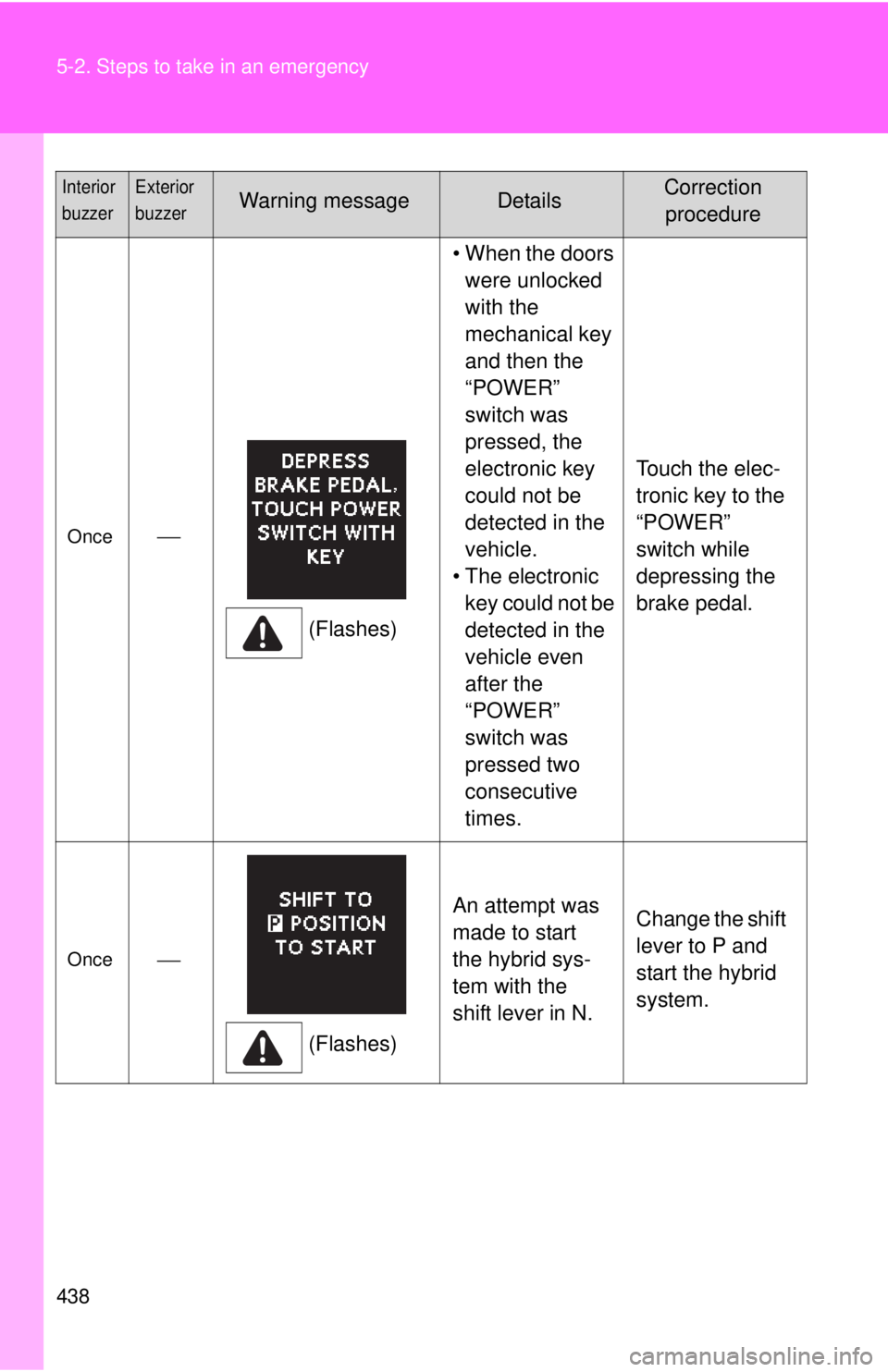
438 5-2. Steps to take in an emergency
Once(Flashes)• When the doors
were unlocked
with the
mechanical key
and then the
“POWER”
switch was
pressed, the
electronic key
could not be
detected in the
vehicle.
• The electronic key could not be
detected in the
vehicle even
after the
“POWER”
switch was
pressed two
consecutive
times. Touch the elec-
tronic key to the
“POWER”
switch while
depressing the
brake pedal.
Once
(Flashes)An attempt was
made to start
the hybrid sys-
tem with the
shift lever in N.
Change the shift
lever to P and
start the hybrid
system.
Interior
buzzerExterior
buzzerWarning messageDetailsCorrection
procedure
Page 440 of 536
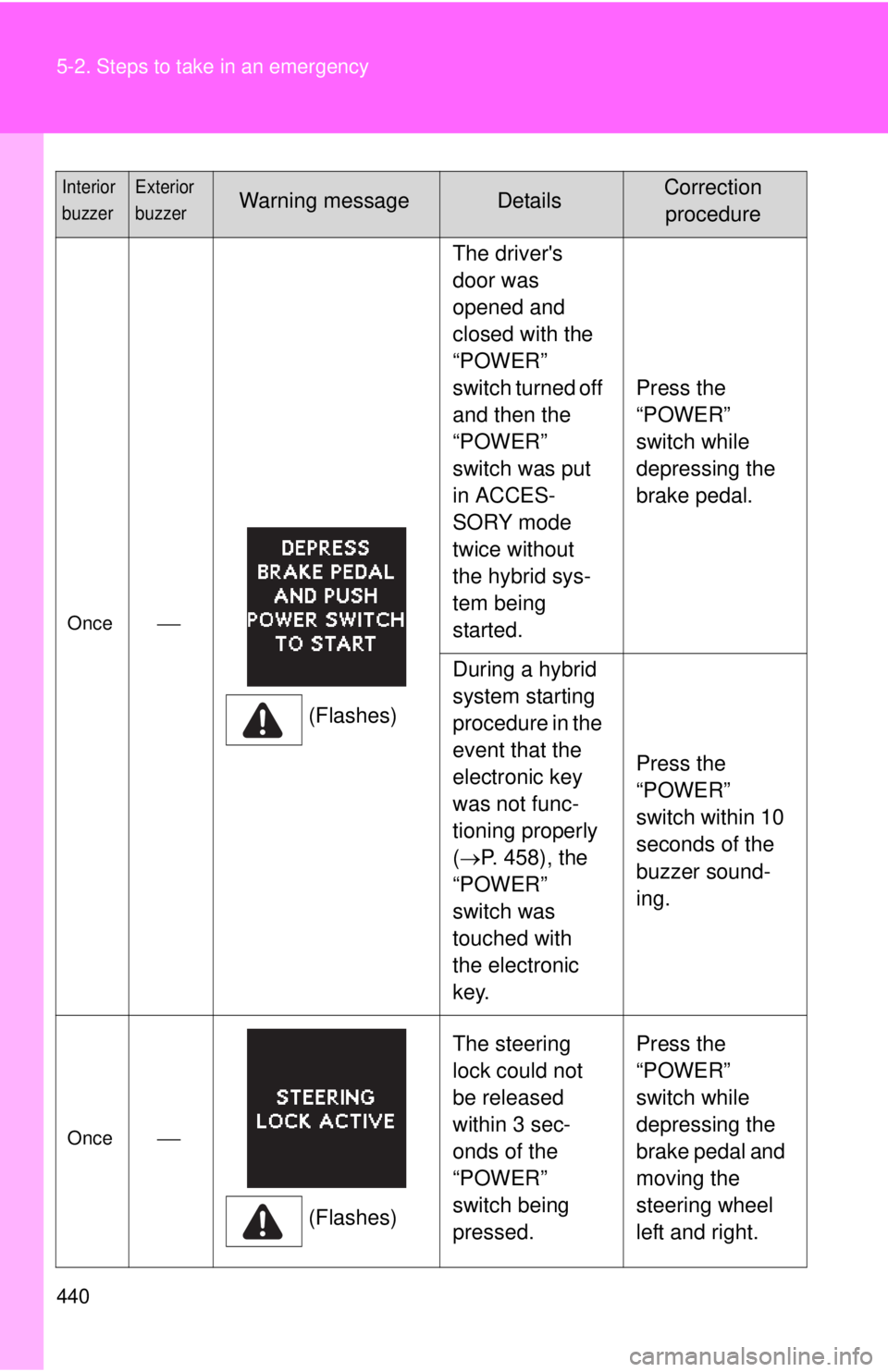
440 5-2. Steps to take in an emergency
Once(Flashes)The driver's
door was
opened and
closed with the
“POWER”
switch turned off
and then the
“POWER”
switch was put
in ACCES-
SORY mode
twice without
the hybrid sys-
tem being
started.
Press the
“POWER”
switch while
depressing the
brake pedal.
During a hybrid
system starting
procedure in the
event that the
electronic key
was not func-
tioning properly
( P. 458), the
“POWER”
switch was
touched with
the electronic
key. Press the
“POWER”
switch within 10
seconds of the
buzzer sound-
ing.
Once
(Flashes)The steering
lock could not
be released
within 3 sec-
onds of the
“POWER”
switch being
pressed. Press the
“POWER”
switch while
depressing the
brake pedal and
moving the
steering wheel
left and right.
Interior
buzzerExterior
buzzerWarning messageDetailsCorrection
procedure