battery TOYOTA CAMRY HV 2012 User Guide
[x] Cancel search | Manufacturer: TOYOTA, Model Year: 2012, Model line: CAMRY HV, Model: TOYOTA CAMRY HV 2012Pages: 536, PDF Size: 6.29 MB
Page 37 of 536

37
1-1. Hybrid system
1
Before driving
CAUTION
■
Road accident cautions
Observe the following precautions to reduce the risk of death or serious
injury:
●Pull your vehicle off the road, shift the shift lever to P, apply the parking
brake, and turn the hybrid system off.
● Do not touch the high voltage parts, cables or connectors.
● If electric wires are exposed inside or outside your vehicle, an electric
shock may occur. Never touch exposed electric wires.
● If a fluid leak occurs, do not touch the fluid as it may be strong alkaline
electrolyte from the hybrid battery (traction battery). If it comes into contact
with your skin or eyes, wash it off immediately with a large amount of water
or, if possible, boric acid solution. Seek immediate medical attention.
● If a fire occurs in the hybrid vehicle, leave the vehicle as soon as possible.
Never use a fire extinguisher that is not meant for electric fires. Using even
a small amount of water may be dangerous.
● If your vehicle needs to be towed, do so with the front wheels raised. If the
wheels connected to the electric motor (traction motor) are on the ground
when towing, the motor may continue to generate electricity. This may
cause a fire. (
P. 409)
● Carefully inspect the ground under the vehicle. If you find that liquid has
leaked onto the ground, the fuel system may have been damaged. Leave
the vehicle as soon as possible.
■ Nickel-metal hydride battery
Your vehicle contains a sealed nickel-metal hydride battery. If disposed of
improperly, it is hazardous to the environment and there is a risk of severe
burns and electrical shock that may result in death or serious injury.
■ Emergency shut off system
●Carefully check to see if there are exposed high voltage parts or cables.
Never touch the parts or cables. (P. 33)
● Carefully inspect the ground under the vehicle. If you find that liquid has
leaked onto the ground, the fuel system may have been damaged. Leave
the vehicle as soon as possible.
Page 38 of 536

38 1-1. Hybrid system
NOTICE
■Hybrid battery air vent
●Do not place foreign objects over or in front of the air vent. The hybrid bat-
tery (traction battery) may overheat and be damaged.
● Clean the air vent regularly to prevent the hybrid battery (traction battery)
from overheating.
● Do not wet the air vent as this may cause a short circuit and damage the
hybrid battery (traction battery).
● Do not carry large amounts of water such as water cooler bottles in the
vehicle. If water spills onto the hybrid battery (traction battery), the battery
may be damaged.
Page 42 of 536
42 1-1. Hybrid system
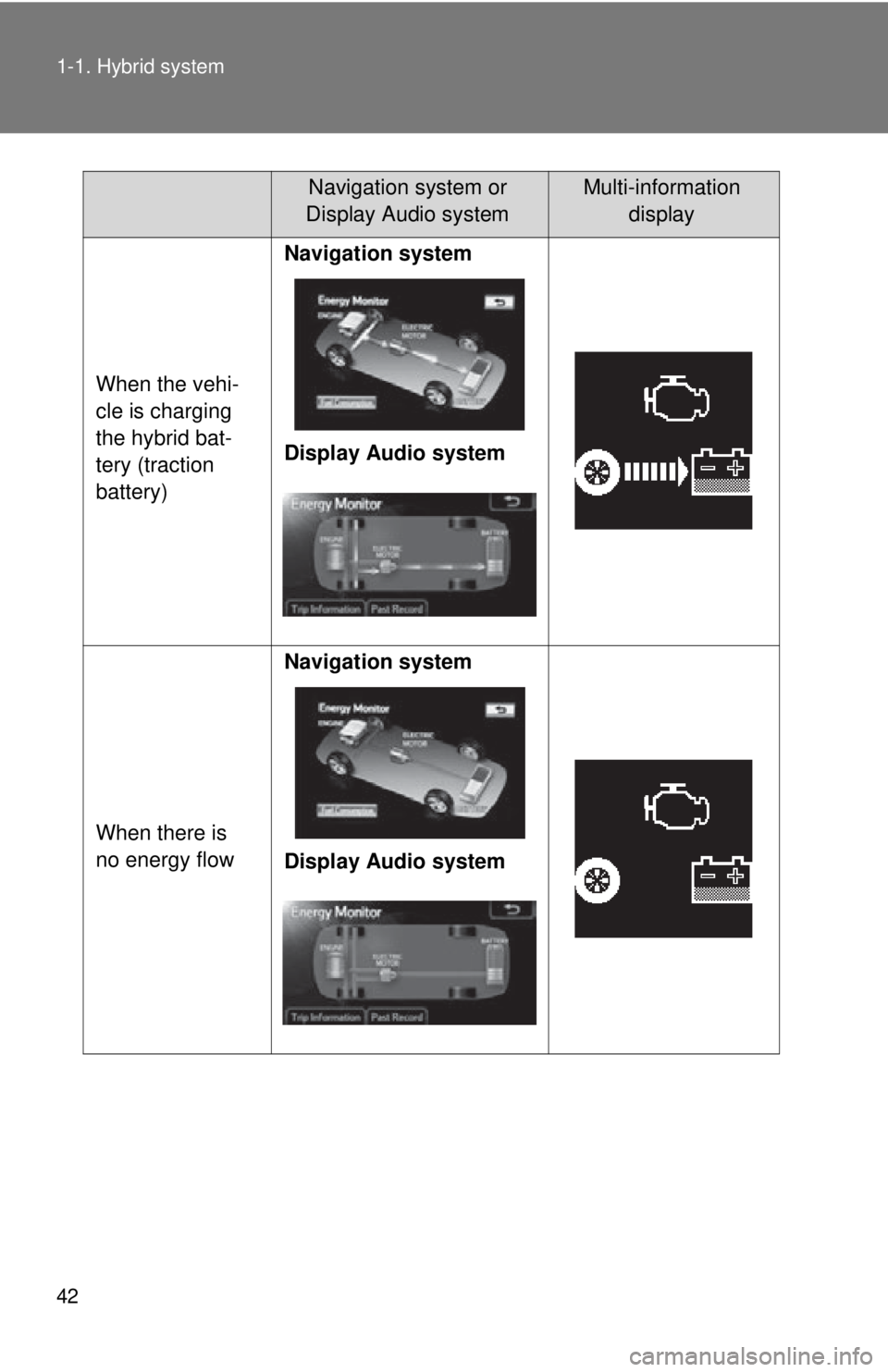
When the vehi-
cle is charging
the hybrid bat-
tery (traction
battery)Navigation system
Display Audio system
When there is
no energy flow Navigation system
Display Audio system
Navigation system or
Display Audio systemMulti-information display
Page 43 of 536
43
1-1. Hybrid system
1
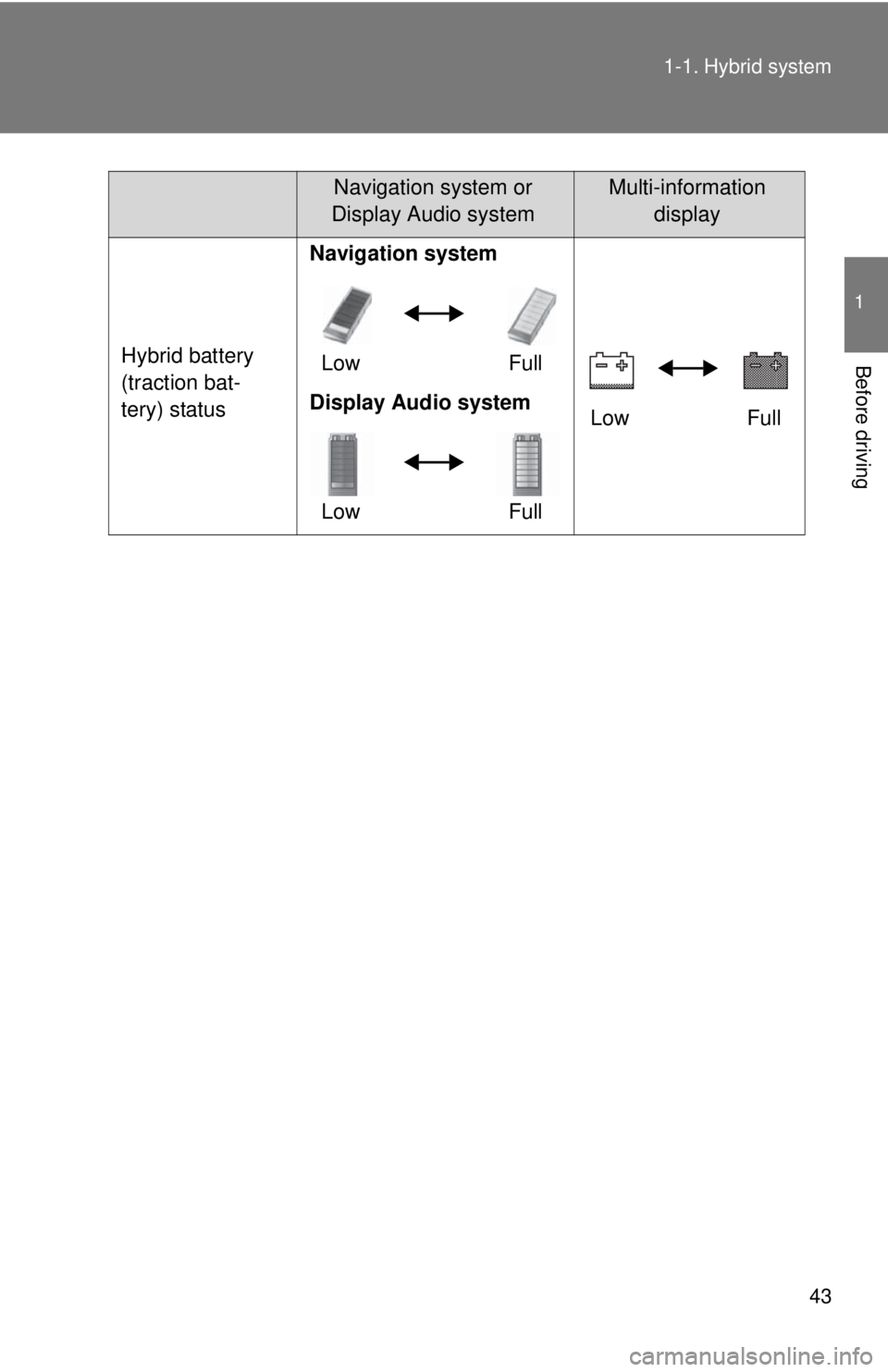
Before drivingHybrid battery
(traction bat-
tery) status
Navigation system
Low Full
Low Full
Display Audio system
Low Full
Navigation system or
Display Audio systemMulti-information display
Page 50 of 536
50
1-2. Key information
Keys
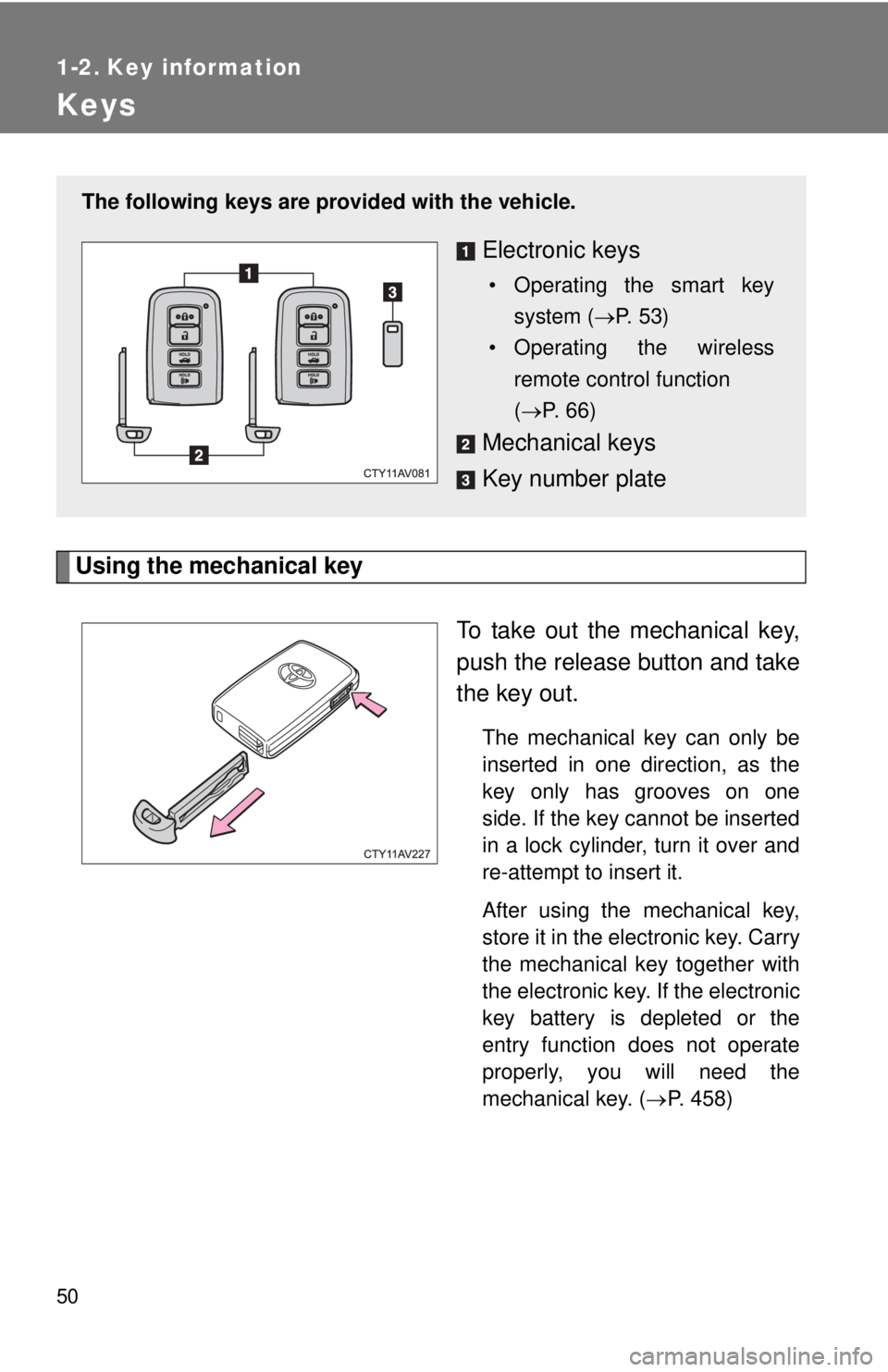
Using the mechanical keyTo take out the mechanical key,
push the release button and take
the key out.
The mechanical key can only be
inserted in one direction, as the
key only has grooves on one
side. If the key cannot be inserted
in a lock cylinder, turn it over and
re-attempt to insert it.
After using the mechanical key,
store it in the electronic key. Carry
the mechanical key together with
the electronic key. If the electronic
key battery is depleted or the
entry function does not operate
properly, you will need the
mechanical key. (P. 458)
The following keys are provid ed with the vehicle.
Electronic keys
• Operating the smart key
system ( P. 53)
• Operating the wireless remote control function
( P. 66)
Mechanical keys
Key number plate
Page 59 of 536
59
1-3. Opening, closing and locking the doors and trunk
1
Before driving
■
Battery-saving function
The battery-saving function will be activated in order to prevent the elec-
tronic key battery and the 12-volt battery from being discharged while the
vehicle is not in operation for a long time.
●In the following situations, the smart key system may take some time to
unlock the doors.
• The electronic key has been left in an area of approximately 6 ft. (2 m)
of the outside of the vehicle for 10 minutes or longer.
• The smart key system has not been used for 5 days or longer.
● If the smart key system has not been used for 14 days or longer, the
doors cannot be unlocked at any doors except the driver’s door. In this
case, take hold of the driver’s door handle, or use the wireless remote
control or the mechanical key, to unlock the doors.
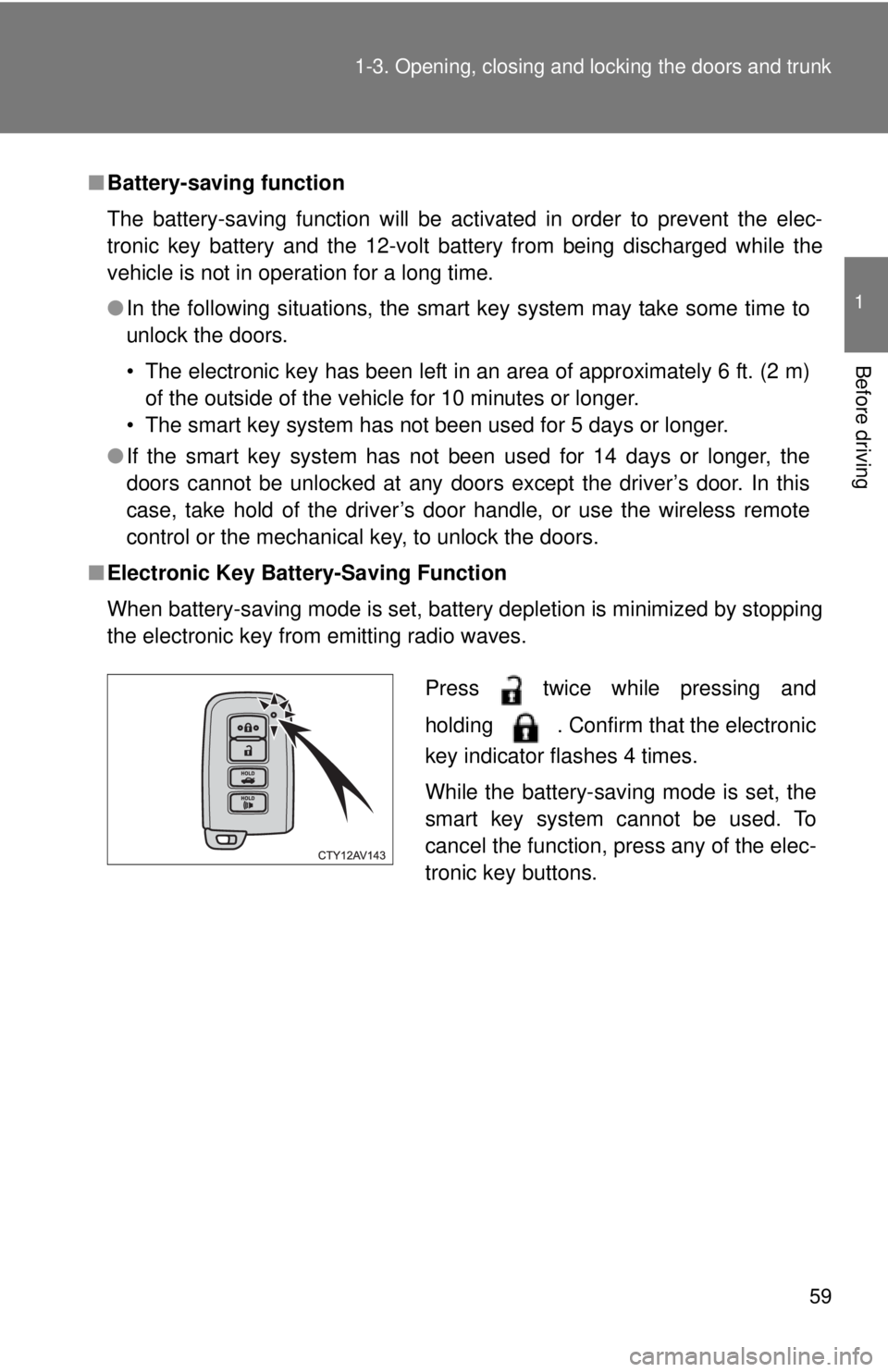
■ Electronic Key Batter y-Saving Function
When battery-saving mode is set, battery depletion is minimized by stopping
the electronic key from emitting radio waves.
Press twice while pressing and
holding . Confirm that the electronic
key indicator flashes 4 times.
While the battery-saving mode is set, the
smart key system cannot be used. To
cancel the function, press any of the elec-
tronic key buttons.
Page 60 of 536

60 1-3. Opening, closing and locking the doors and trunk
■Conditions affecting operation
The smart key system uses weak radio waves. In the following situations,
the communication between the electronic key and the vehicle may be
affected, preventing the smart key system, wireless remote control and
engine immobilizer system from operating properly.
(Ways of coping: P. 458)
● When the electronic key battery is depleted
● Near a TV tower, electric power plant, gas station, radio station, large dis-
play, airport or other facility that generates strong radio waves or electri-
cal noise
● When the electronic key is in contact with, or is covered by the following
metallic objects
• Cards to which aluminum foil is attached
• Cigarette boxes that have aluminum foil inside
• Metallic wallets or bags
• Coins
• Hand warmers made of metal
• Media such as CDs and DVDs
● When other wireless key (that emit radio waves) is being used nearby
● When carrying the electronic key together with the following devices that
emit radio waves
• A portable radio, cellular phone, cordless phone or other wireless com-
munication device
• Another vehicle’s electronic key or a wireless key that emits radio waves
• Personal computers or personal digital assistants (PDAs)
• Digital audio players
• Portable game systems
● If window tint with a metallic content or metallic objects are attached to
the rear window
● When the electronic key is placed near a battery charger or electronic
devices
Page 62 of 536

62 1-3. Opening, closing and locking the doors and trunk
■Notes for locking the doors
●Touching the door lock sensor while wearing gloves may delay or prevent
lock operation. Remove the gloves and touch the lock sensor again.
● When the lock operation is performed using the lock sensor, recognition
signals will be shown up to two consecutive times. After this, no recogni-
tion signals will be given.
● If the door handle becomes wet while the electronic key is within the
effective range, the door may lock and unlock repeatedly. In that case,
follow the following correction procedures to wash the vehicle:
• Place the electronic key in a location 6 ft. (2 m) or more away from the
vehicle. (Take care to ensure that the key is not stolen.)
• Set the electronic key to battery-saving mode to disable the smart key system. ( P. 59)
● If the electronic key is inside the vehicle and a door handle becomes wet
during a car wash, a message may be shown on the multi-information
display and a buzzer will sound outside the vehicle. To turn off the alarm,
lock all the doors.
● The lock sensor may not work properly if it comes into contact with ice,
snow, mud, etc. Clean the lock sensor and attempt to operate it again.
■ Notes for the unlocking function
●A sudden approach to the effective range or door handle may prevent the
doors from being unlocked. In this case, return the door handle to the
original position and check that the doors unlock before pulling the door
handle again.
● Gripping the door handle when wearing a glove may not unlock the door.
Remove the gloves and touch the sensor on the back of the handle
again.
● If the door handle becomes wet while the electronic key is within the
effective range, the door may lock and unlock repeatedly. In that case,
follow the following correction procedures to wash the vehicle:
• Place the electronic key in a location 6 ft. (2 m) or more away from the
vehicle. (Take care to ensure that the key is not stolen.)
• Set the electronic key to battery-saving mode to disable the smart key system. ( P. 59)
● If there is another electronic key in the detection area, it may take slightly
longer to unlock the doors after the door handle is gripped.
Page 63 of 536

63
1-3. Opening, closing and locking the doors and trunk
1
Before driving
■
When the vehicle is not dr iven for extended periods
● To prevent theft of the vehicle, do not leave the electronic key within 6 ft.
(2 m) of the vehicle.
● The smart key system can be deactivated in advance. ( P. 498)
■ Alarm (if equipped)
Using the smart key system to lock the doors will set the alarm system.
(P. 110)
■ To operate the system properly
Make sure to carry the electronic key when operating the system. Do not get
the electronic key too close to the vehicle when operating the system from
the outside of the vehicle.
Depending on the position and holding condition of the electronic key, the
key may not be detected correctly and the system may not operate properly.
(The alarm may go off accidentally, or the door lock prevention function may
not operate.)
■ If the smart key system does not operate properly
● Locking and unlocking the doors: Use the mechanical key. ( P. 458)
● Starting the hybrid system: P. 458
■ Electronic key battery depletion
●The standard battery life is 1 to 2 years.
● If the battery becomes low, an alarm will sound in the cabin when the
hybrid system stops. (P. 433)
● As the electronic key always receives radio waves, the battery will
become depleted even if the electronic key is not used. The following
symptoms indicate that the electronic key battery may be depleted.
Replace the battery when necessary. ( P. 382)
• The smart key system or the wireless remote control does not operate.
• The detection area becomes smaller.
• The LED indicator on the key surface does not turn on.
Page 64 of 536

64 1-3. Opening, closing and locking the doors and trunk
●To avoid serious deterioration, do not leave the electronic key within 3 ft.
(1 m) of the following electrical appliances that produce a magnetic field:
•TVs
• Personal computers
• Cellular phones, cordless phones and battery chargers
• Recharging cellular phones or cordless phones
• Glass top ranges
• Table lamps
■ When the electronic key battery is fully depleted
P. 382
■ If the smart key system has been d eactivated in a customized setting
● Locking and unlocking the doors: Use the wireless remote control or
mechanical key. ( P. 66, 458)
● Starting the hybrid system and changing “POWER” switch modes:
P. 459
● Stopping the hybrid system: P. 159
■ Customization that can be co nfigured at Toyota dealer
Settings (e. g. smart key system) can be changed.
(Customizable features: P. 498)
■ Certification for the smart key system
U.S.A.
FCC ID: NI4TMLF10-4
FCC ID: NI4TMLF10-5
FCC ID: HYQ23AAB
FCC ID: HYQ14FBA
NOTE:
This device complies with Part 15 of the FCC Rules. Operation is subject to
the following two conditions: (1) this device may not cause harmful interfer-
ence, and (2) this device must accept any interference received, including
interference that may cause undesired operation.
FCC WARNING:
Changes or modifications not expressly approved by the party responsible
for compliance could void the user's authority to operate the equipment.