rear view mirror TOYOTA CAMRY HV 2012 User Guide
[x] Cancel search | Manufacturer: TOYOTA, Model Year: 2012, Model line: CAMRY HV, Model: TOYOTA CAMRY HV 2012Pages: 536, PDF Size: 6.29 MB
Page 95 of 536
95
1
1-4. Adjustable components (seats, mirrors, steering wheel)
Before driving
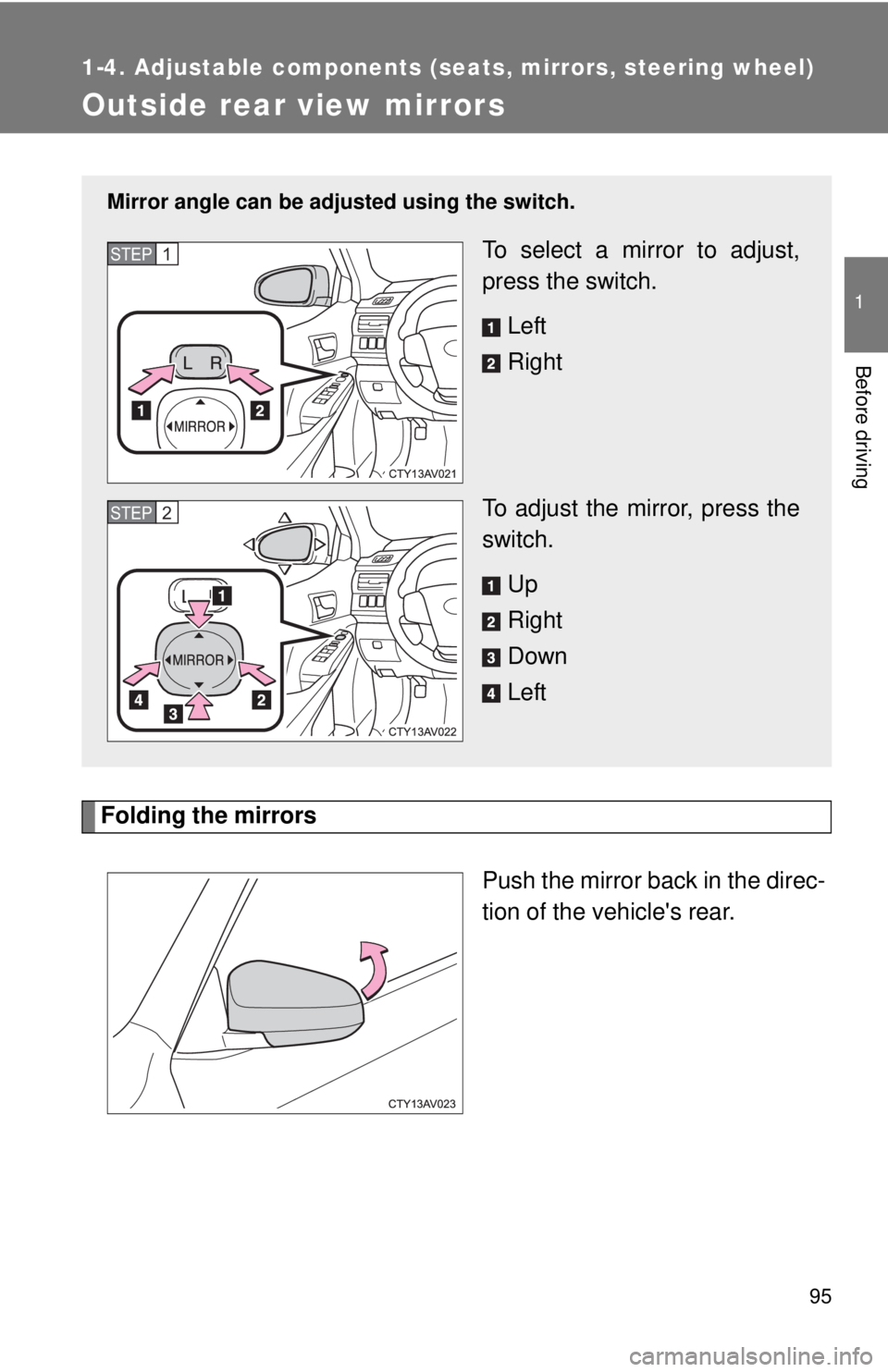
Outside rear view mirrors
Folding the mirrorsPush the mirror back in the direc-
tion of the vehicle's rear.
Mirror angle can be adjusted using the switch.
To select a mirror to adjust,
press the switch.
Left
Right
To adjust the mirror, press the
switch. Up
Right
Down
LeftSTEP1
STEP2
Page 96 of 536

96 1-4. Adjustable components (seats, mirrors, steering wheel)
■Mirror angle can be adjusted when
The “POWER” switch is in ACCESSORY or ON mode.
■ When the mirrors are fogged up (vehicles with mirror defoggers)
Turn on the mirror defoggers to defog the mirrors. ( P. 239)
CAUTION
■When driving the vehicle
Observe the following precautions while driving.
Failure to do so may result in loss of control of the vehicle and cause an
accident, resulting in death or serious injury.
●Do not adjust the mirrors while driving.
● Do not drive with the mirrors folded.
● Both the driver and passenger side mirrors must be extended and properly
adjusted before driving.
■ When a mirror is moving
To avoid personal injury and mirror malfunction, be careful not to get your
hand caught by the moving mirror.
■ When the mirror defogg ers are operating (vehicles with mirror defog-
gers)
Do not touch the rear view mirror surfaces, as they can become very hot and
burn you.
Page 152 of 536

152 2-1. Driving procedures
CAUTION
●Do not shift the shift lever to P while the vehicle is moving.
Doing so can damage the transmission and may result in a loss of vehicle\
control.
● Do not shift the shift lever to R while the vehicle is moving forward.
Doing so can damage the transmission and may result in a loss of vehicle\
control.
● Do not shift the shift lever to D while the vehicle is moving backward.
Doing so can damage the transmission and may result in a loss of vehicle\
control.
● Moving the shift lever to N while the vehicle is moving will disengage the
hybrid system. Engine braking is not available with the hybrid system dis-
engaged.
● During normal driving, do not turn off the hybrid system. Turning the hybrid
system off while driving will not cause loss of steering or braking control,
but the power assist to these systems will be lost. This will make it more
difficult to steer and brake, so you should pull over and stop the vehicle as
soon as it is safe to do so.
However, in the event of an emergency, such as if it becomes impossible
to stop the vehicle in the normal way: P. 470
● Use engine braking (downshift) to maintain a safe speed when driving
down a steep hill.
Using the brakes continuously may cause the brakes to overheat and lose
effectiveness. ( P. 169)
● Do not adjust the position of the steering wheel, the seat, or the inside or
outside rear view mirrors while driving.
Doing so may result in a loss of vehicle control that can cause accidents,
resulting in death or serious injury.
● Always check that all passengers' arms, heads or other parts of their body
are not outside the vehicle, as this may result in death or serious injury.
Page 180 of 536
180
2-2. Instrument cluster
Indicators and warning lights
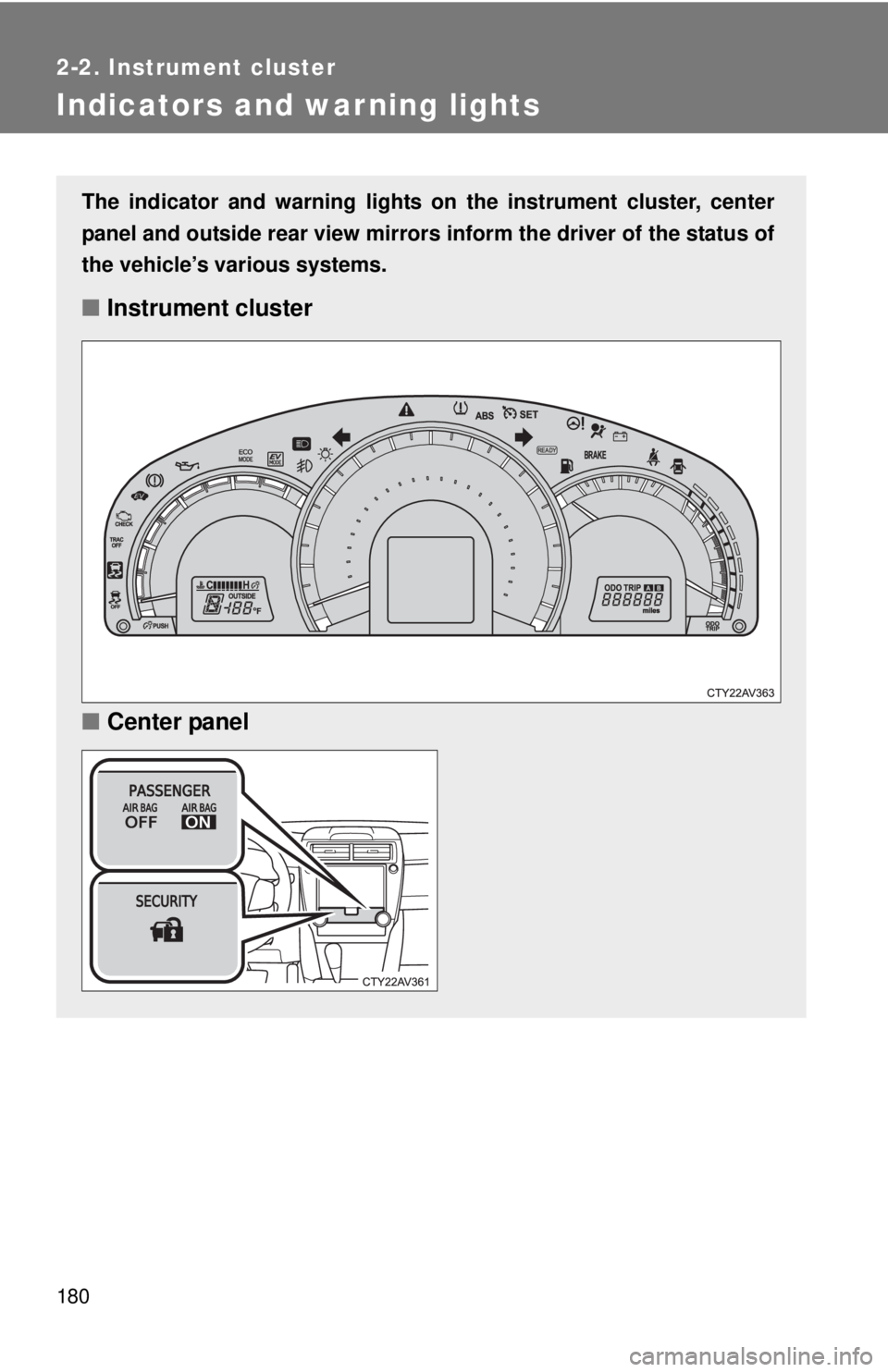
The indicator and warning lights on the instrument cluster, center
panel and outside rear view mirrors inform the driver of the status of
the vehicle’s various systems.
■ Instrument cluster
■ Center panel
Page 181 of 536
181
2-2. Instrument cluster
2
When driving
■
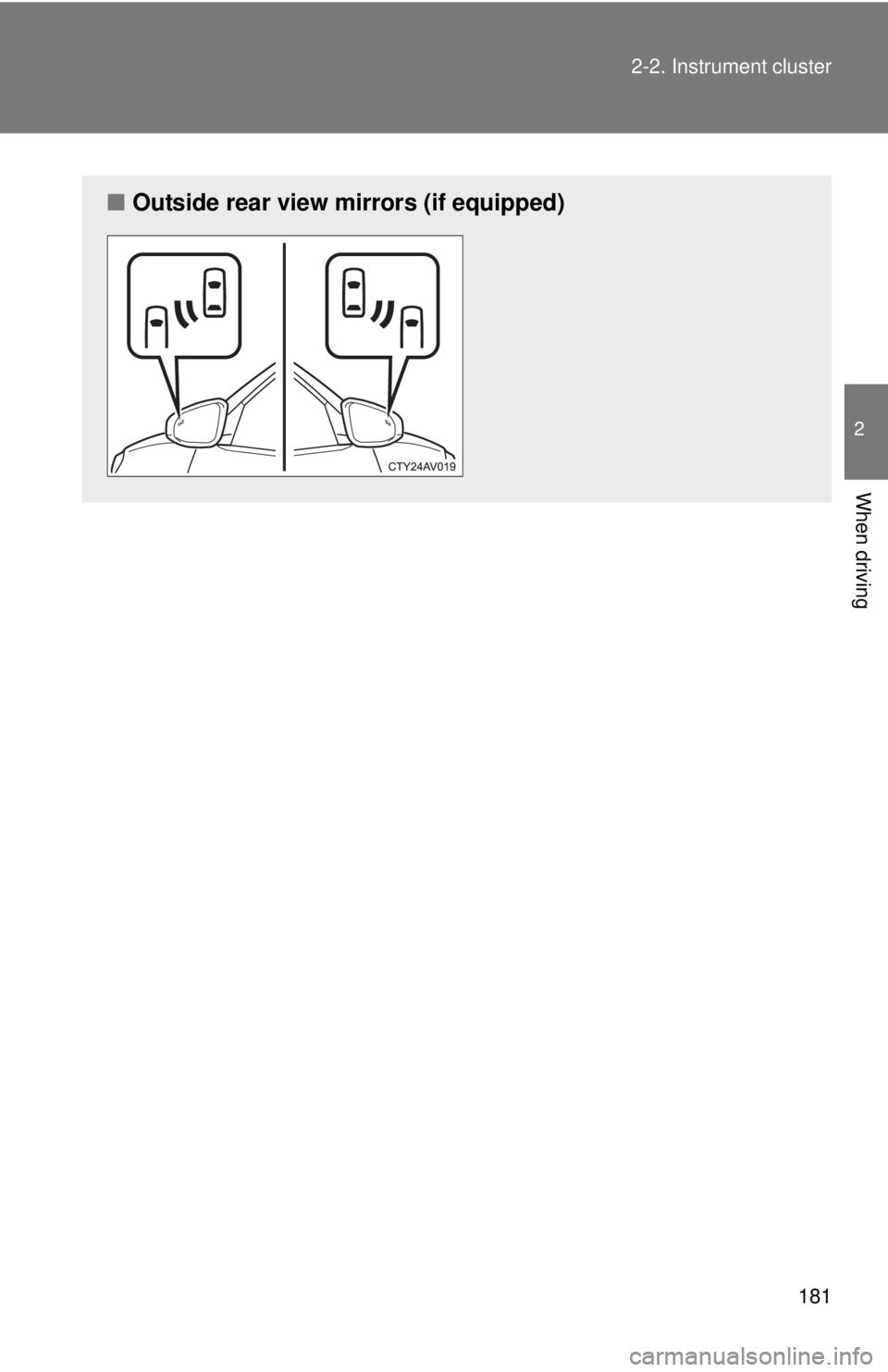
Outside rear view mirrors (if equipped)
Page 182 of 536
182 2-2. Instrument cluster
■Indicators
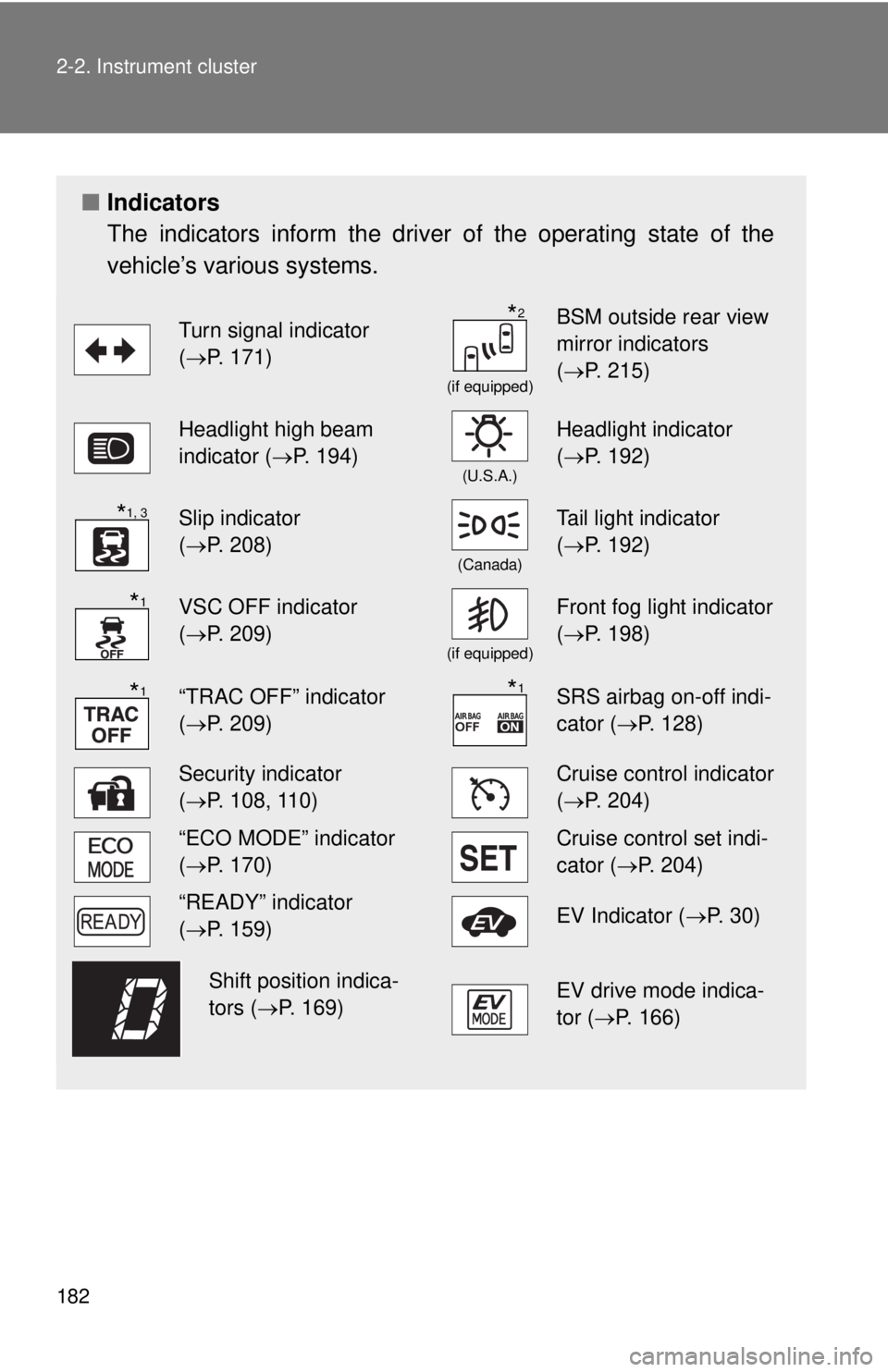
The indicators inform the driver of the operating state of the
vehicle’s various systems.
Turn signal indicator
(P. 171)
(if equipped)
BSM outside rear view
mirror indicators
( P. 215)
Headlight high beam
indicator ( P. 194)
(U.S.A.)
Headlight indicator
(P. 192)
Slip indicator
(P. 208)
(Canada)
Tail light indicator
( P. 192)
VSC OFF indicator
(P. 209)
(if equipped)
Front fog light indicator
( P. 198)
“TRAC OFF” indicator
(P. 209)SRS airbag on-off indi-
cator (P. 128)
Security indicator
(P. 108, 110)Cruise control indicator
( P. 204)
“ECO MODE” indicator
(P. 170)Cruise control set indi-
cator (P. 204)
“READY” indicator
(P. 159)EV Indicator ( P. 3 0 )
EV drive mode indica-
tor (P. 166)
*2
*1, 3
*1
*1*1
Shift position indica-
tors (P. 169)
Page 183 of 536
183
2-2. Instrument cluster
2
When driving
*1: These lights turn on when the “POWER” switch is turned to ON
mode to indicate that a system check is being performed. They will
turn off after the hybrid system is on, or after a few seconds. There
may be a malfunction in a system if a light does not come on, or if
the lights do not turn off. Have the vehicle inspected by your Toyota
dealer.
*2: In order to confirm operation, the BSM outside rear view mirror indi-
cators illuminate in the following situations:
• When the “POWER” switch is turned to ON mode while the BSM
main switch is set to ON.
• When the BSM main switch is set to ON while the “POWER” switch is in ON mode.
If the system is functioning correctly, the BSM outside rear view mir-
ror indicators will turn off after a few seconds.
If the BSM outside rear view mirror indicators do not illuminate or do
not turn off, there may be a malfunction with the system.
If this occurs, have the vehicle inspected by your Toyota dealer.
*3: The light flashes to indicate that the system is operating.
Page 215 of 536
215
2-4. Using other driving systems
2
When driving
BSM (Blind Spot Monitor)
: If equipped
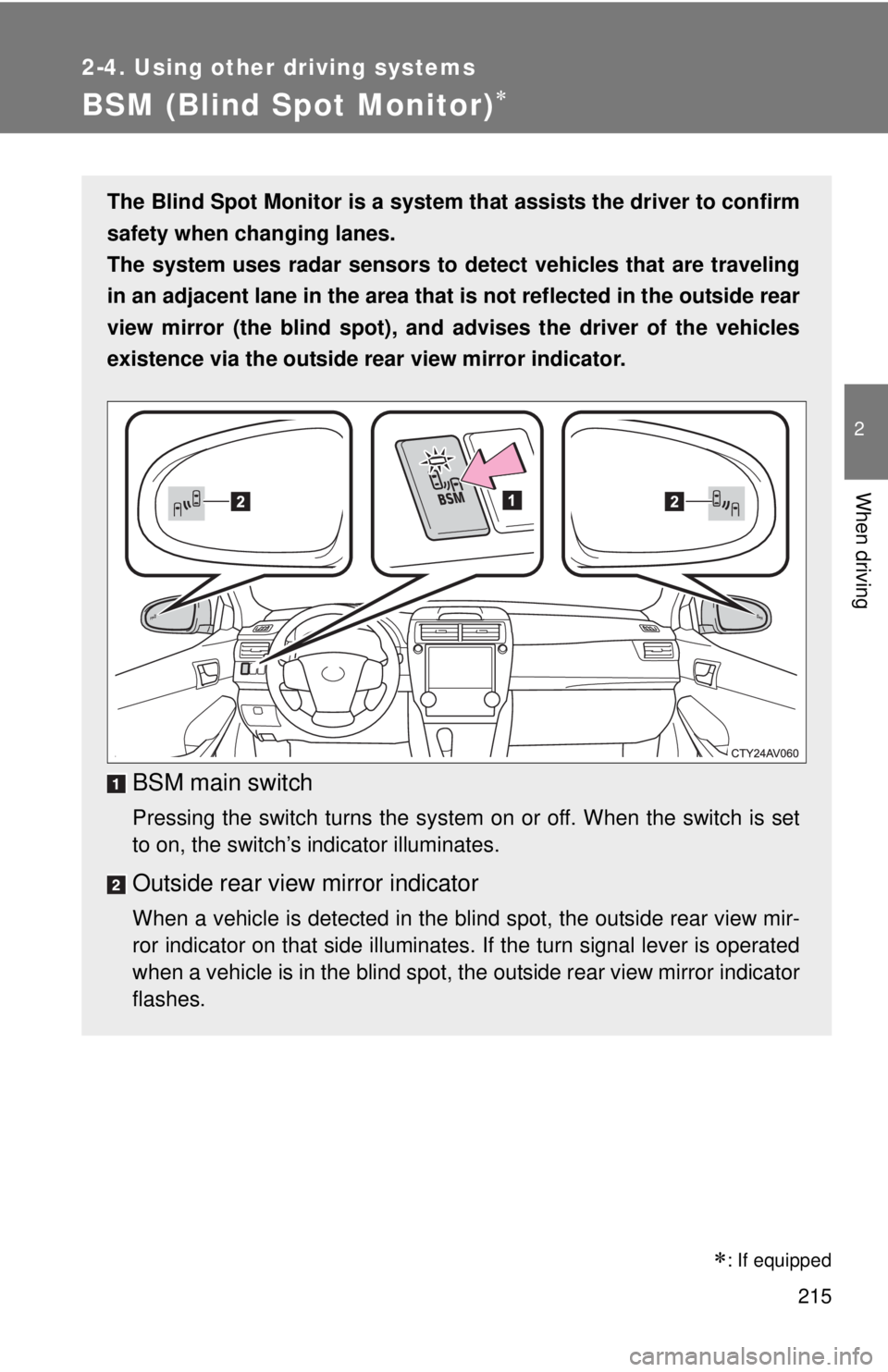
The Blind Spot Monitor is a system that assists the driver to confirm
safety when changing lanes.
The system uses radar sensors to detect vehicles that are traveling
in an adjacent lane in the area that is not reflected in the outside rear
view mirror (the blind spot), an d advises the driver of the vehicles
existence via the outside rear view mirror indicator.
BSM main switch
Pressing the switch turns the system on or off. When the switch is set
to on, the switch’s indicator illuminates.
Outside rear view mirror indicator
When a vehicle is detected in the blind spot, the outside rear view mir-
ror indicator on that side illuminates. If the turn signal lever is operated
when a vehicle is in the blind spot, the outside rear view mirror indicator
flashes.
Page 218 of 536

218 2-4. Using other driving systems
●Instances of the Blind Spot Monitor unnecessarily detecting a vehicle
and/or object may increase under the following conditions:
• When there is only a short distance between your vehicle and a guard-
rail, wall etc.
• When there is only a short distance between your vehicle and a follow- ing vehicle.
• When vehicle lanes are narrow and a vehicle driving 2 lanes across from your vehicle enters the detection area
■ The outside rear view mirror indicators visibility
When under strong sunlight, the outside rear view mirror indicator may be
difficult to see.
■ When there is a malfunction in the system
If a system malfunction is detected due to any of the following reasons,
warning messages will be displayed: ( P. 425)
● There is a malfunction with the sensors
● The sensors have become dirty
● The outside temperature is extremely high or low
● The sensor voltage has become abnormal
■ Certification for the BSM
FCC ID: OAYBSDTX
This device complies with part 15 of the FCC Rules. Operation is subject to
the following three conditions:
(1) This device may not cause harmful interference.
(2) This device must accept any interference received, including interference
that may cause undesired operation.
(3) This device may only work when the vehicle is in operation pursuant to § 15.252 (a) (4).
FCC WARNING
Changes or modifications not expressly approved by the party responsible
for compliance could void the user’s authority to operate the equipment.
Page 231 of 536
Interior features3
231
3-1. Using the air conditioning system and defogger
Automatic air conditioning system ....... 232
Rear window and outside rear view mirror
defoggers ....................... 239
3-2. Using the audio system Audio system types .......... 240
Using the radio ................. 246
Using the CD player ......... 249
Playing back MP3 and WMA discs ..................... 255
Operating an iPod ............ 262
Operating a USB memory .......................... 270
Optimal use of the audio system ........................... 278
Using the AUX port .......... 281
Using the steering wheel audio switches ..... 283
3-3. Using the interior lights Interior lights list ............... 286
• Interior lights .................. 287
• Personal lights ............... 288 3-4. Using the storage features
List of storage features .... 289
• Glove box....................... 290
• Console box ................... 291
• Coin holder .................... 292
• Bottle holders ................. 293
• Cup holders ................... 294
• Auxiliary boxes ............... 296
3-5. Other interior features Sun visors ........................ 298
Vanity mirrors ................... 299
Clock ................................ 300
Outside temperature display............................ 301
Ashtray ............................. 302
Power outlets ................... 303
Seat heaters..................... 305
Armrest ............................ 307
Coat hooks ....................... 308
Floor mat .......................... 309
Trunk features .................. 311
Garage door opener......... 313
Compass .......................... 320
Safety Connect ................ 324