ECO mode TOYOTA CAMRY HV 2012 Owner's Manual
[x] Cancel search | Manufacturer: TOYOTA, Model Year: 2012, Model line: CAMRY HV, Model: TOYOTA CAMRY HV 2012Pages: 536, PDF Size: 6.29 MB
Page 188 of 536
188 2-2. Instrument cluster
■Eco drive level
Displays the average fuel consum ption and eco drive level since
the hybrid system was started.
Even if a different screen has been selected for the multi-information dis-
play, when the “POWER” switch is turned off, the eco drive level is dis-
played. This is not a malfunction.
When the highest eco drive level has been achieved “EXCELLENT!” is
displayed.
■ Energy monitor
Displays the status of the hybrid system ( P. 3 9 )
■ Customization
Language, Eco Indicator (current fuel consumption gauge) and EV
Indicator settings can be changed. ( P. 188)
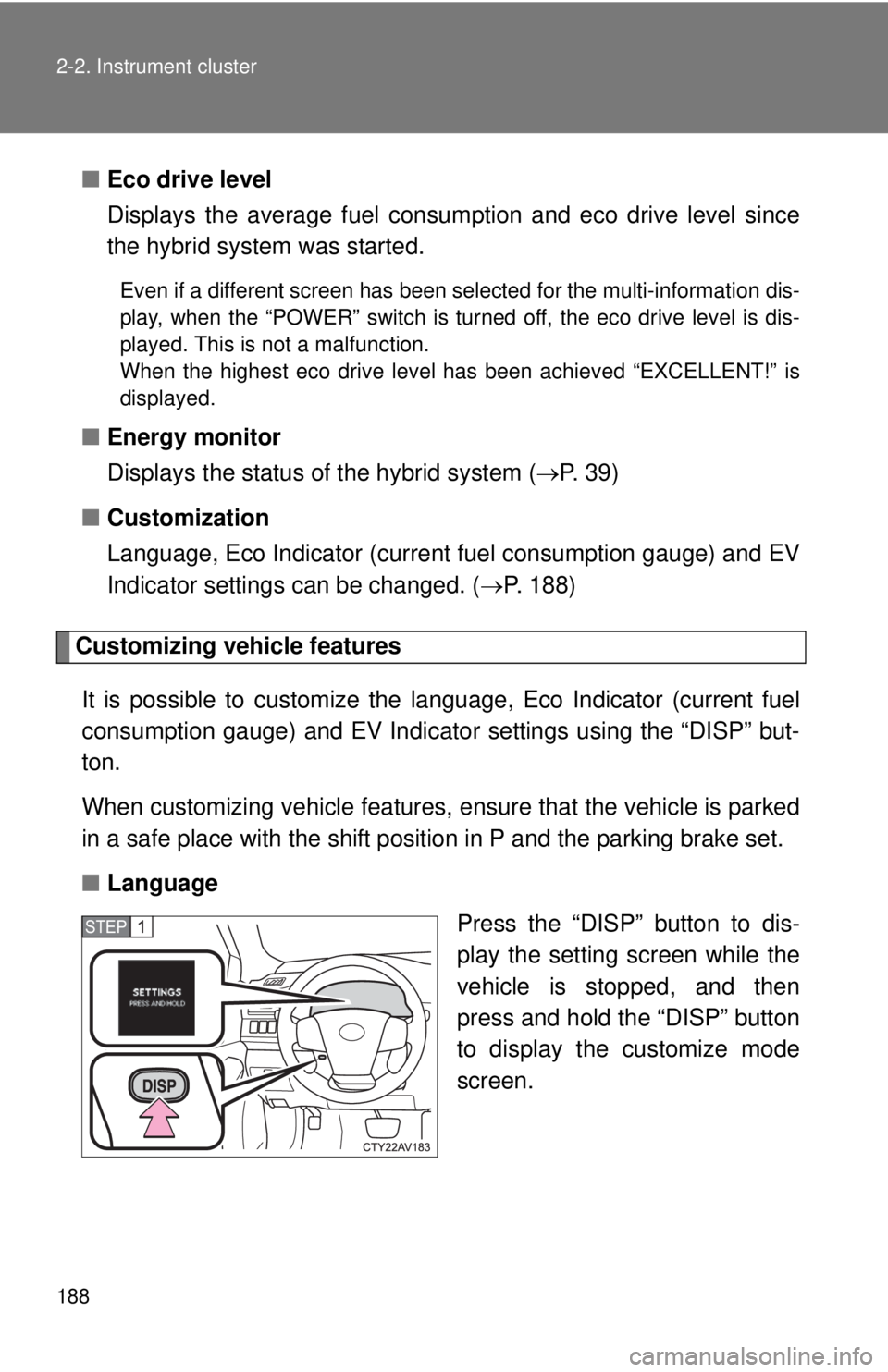
Customizing vehicle features
It is possible to cust omize the language, Eco Indicator (current fuel
consumption gauge) and EV Indicator settings using the “DISP” but-
ton.
When customizing vehicle features, ensure that the vehicle is parked
in a safe place with the shift position in P and the parking brake set.
■ Language
Press the “DISP” button to dis-
play the setting screen while the
vehicle is stopped, and then
press and hold the “DISP” button
to display the customize mode
screen.
STEP1
Page 189 of 536
189
2-2. Instrument cluster
2
When driving
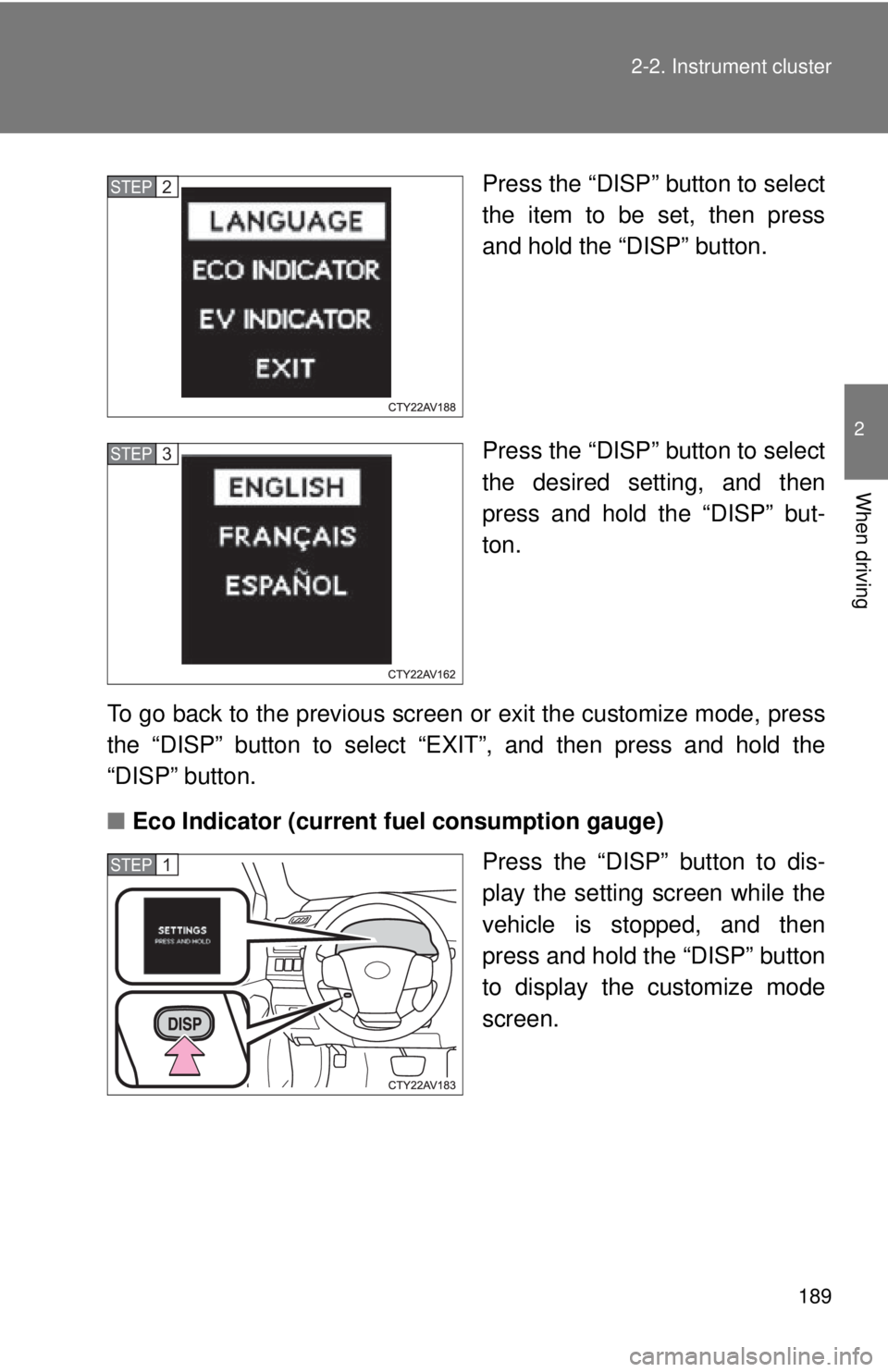
Press the “DISP” button to select
the item to be set, then press
and hold the “DISP” button.
Press the “DISP” button to select
the desired setting, and then
press and hold the “DISP” but-
ton.
To go back to the previous screen or exit the customize mode, press
the “DISP” button to select “EXIT”, and then press and hold the
“DISP” button.
■ Eco Indicator (current fuel consumption gauge)
Press the “DISP” button to dis-
play the setting screen while the
vehicle is stopped, and then
press and hold the “DISP” button
to display the customize mode
screen.STEP2
STEP3
STEP1
Page 190 of 536
190 2-2. Instrument cluster
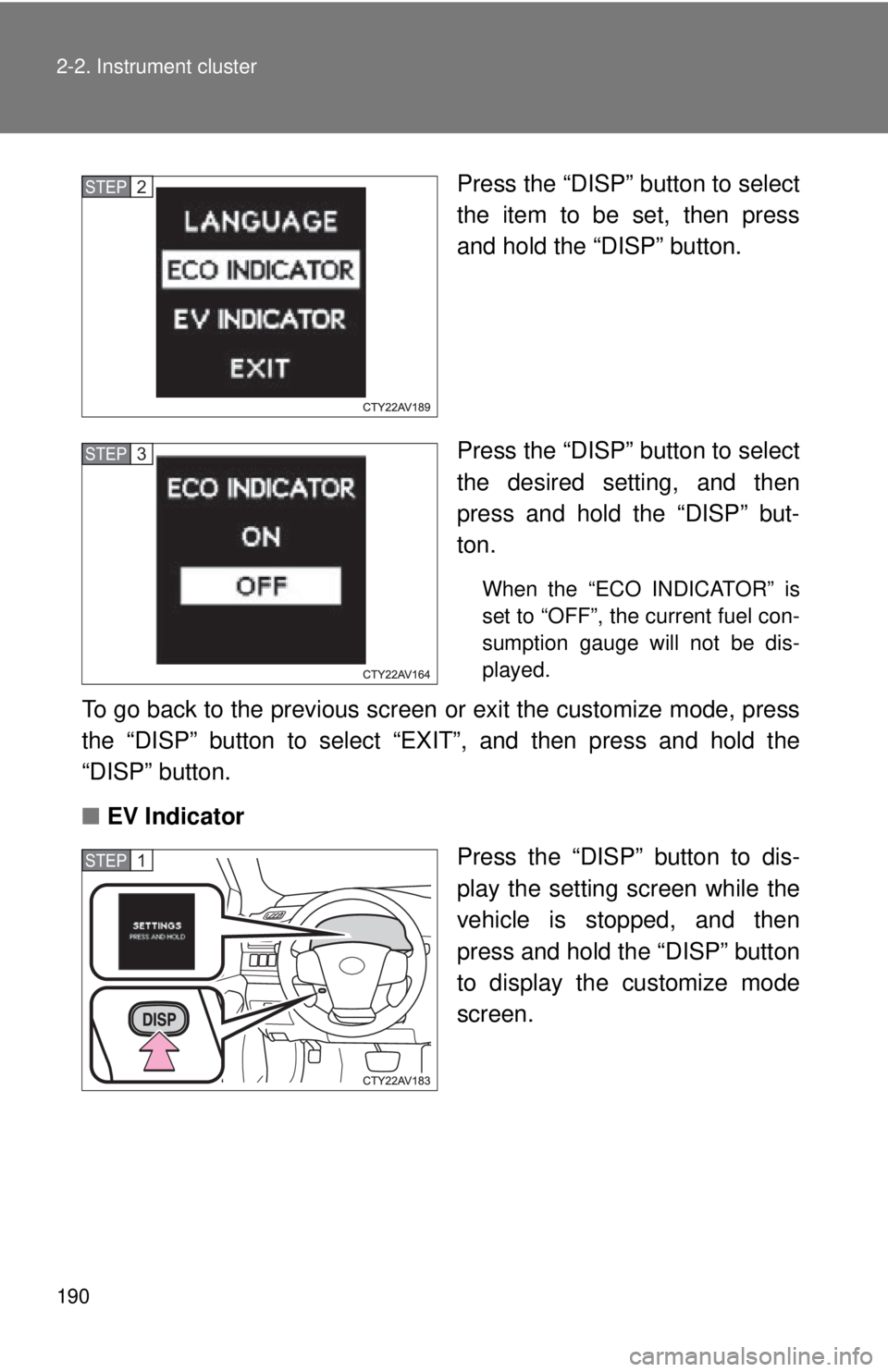
Press the “DISP” button to select
the item to be set, then press
and hold the “DISP” button.
Press the “DISP” button to select
the desired setting, and then
press and hold the “DISP” but-
ton.
When the “ECO INDICATOR” is
set to “OFF”, the current fuel con-
sumption gauge will not be dis-
played.
To go back to the previous screen or exit the customize mode, press
the “DISP” button to select “EXIT”, and then press and hold the
“DISP” button.
■ EV Indicator
Press the “DISP” button to dis-
play the setting screen while the
vehicle is stopped, and then
press and hold the “DISP” button
to display the customize mode
screen.
STEP2
STEP3
STEP1
Page 196 of 536
196 2-3. Operating the lights and wipers
■Automatic light off system
When the light switch is in : The headlights and tail lights turn off 30
seconds after the “POWER” switch is turned to ACCESSORY mode or
turned off and a door is opened and closed. (The lights turn off immediately if
on the key is pressed twice after all the doors are closed.)
To turn the lights on again, turn the “POWER” switch to ON mode, or turn the
light switch off once and then back to or .
If any of the doors or trunk lid is kept open, the lights automatically turn off
after 20 minutes.
■ Light reminder buzzer
A buzzer sounds when the “POWER” switch is turned off or turned to
ACCESSORY mode and the driver's door is opened while the lights are
turned on.
■ 12-volt battery-saving function
In order to prevent the vehicle 12-volt battery from discharging, if the head-
lights and/or tail lights are on when the “POWER” switch is turned off the 12-
volt battery saving function will operate and automatically turn off all the
lights after approximately 20 minutes.
When the “POWER” switch is turned to ON mode, the 12-volt battery-saving
function will be disabled.
When any of the following are performed, the 12-volt battery-saving function
is canceled once and then reactivated. All the lights will turn off automatically
20 minutes after the 12-volt battery-saving function has been reactivated:
●When the headlight switch is operated
● When a door is opened or closed
■ Customization that can be co nfigured at Toyota dealer
Settings (e.g. Light sensor sensitivity) can be changed.
(Customizable features P. 498)
Page 237 of 536
237
3-1. Using the air conditioning system
and defogger
3
Interior features
■Operation of the air conditio ning system in Eco drive mode
In Eco drive mode, the air conditioning sy stem is controlled as follows to pri-
oritize fuel efficiency:
● Engine speed and compressor operation controlled to restrict heating/
cooling capacity
● Fan speed restricted when automatic mode is selected
To improve air conditioning performance, perform the following operations:
● Adjust the fan speed
● Turn off Eco drive mode
■ Customization
The air conditioning control of Eco drive mode can be changed to the same
setting as that used in normal drive mode.
(Customizable features P. 498)
■ Using automatic mode
Fan speed is adjusted automatically according to the temperature setting
and the ambient conditions.
Therefore, the fan may stop for a while until warm or cool air is ready to flow
immediately after is pressed.
■ Fogging up of the windows
●The windows will easily fog up when the humidity in the vehicle is high.
Turning on will dehumidify the air from the outlets and defog the
windshield effectively.
● If you turn off, the windows may fog up more easily.
● The windows may fog up if the recirculated air mode is used.
■ Outside/recirculated air mode
●When driving on dusty roads such as tunnels or in heavy traffic, set the
outside/recirculated air mode button to the recirculated air mode. This is
effective in preventing outside air from entering the vehicle interior. Dur-
ing cooling operation, setting the recirculated air mode will also cool the
vehicle interior effectively.
● Outside/recirculated air mode may automatically switch depending on
the temperature setting or the inside temperature.
Page 238 of 536
238 3-1. Using the air conditioning system and defogger
■When the outside temperat ure falls to nearly 32F (0 C)
The dehumidification function may not operate even when is
pressed.
■ Air conditioning odors
●During use, various odors from inside and outside the vehicle may enter
into and accumulate in the air conditioning system. This may then cause
odor to be emitted from the vents.
● To reduce potential odors from occurring:
• It is recommended that the air conditioning system be set to outside air
mode prior to turning the vehicle off.
• The start timing of the blower may be delayed for a short period of time immediately after the air conditioning system is started in automatic
mode.
■ Air conditioning filter
P. 380
■ Customization that can be co nfigured at Toyota dealer
Settings (e.g. air conditioning setting) can be changed.
(Customizable features P. 498)
CAUTION
■To prevent the windshield from fogging up
Do not use during cool air operation in extremely humid weather.
The difference between the temperature of the outside air and that of the
windshield can cause the outer surface of the windshield to fog up, blocking
your vision.
NOTICE
■To prevent 12-volt battery discharge
Do not leave the air conditioning system on longer than necessary when the
hybrid system is off.
Page 239 of 536
239
3-1. Using the air conditioning system and defogger
3
Interior features
Rear window and outside rear view mirror defoggers
■The defoggers can be operated when
The “POWER” switch is in ON mode.
■ The outside rear view mirr or defoggers (if equipped)
Turning the rear window defogger on will turn the outside rear view mirror
defoggers on.
CAUTION
■ When the outside rear view mirr or defoggers are on (if equipped)
Do not touch the outside surface of the rear view mirrors, as they can
become very hot and burn you.
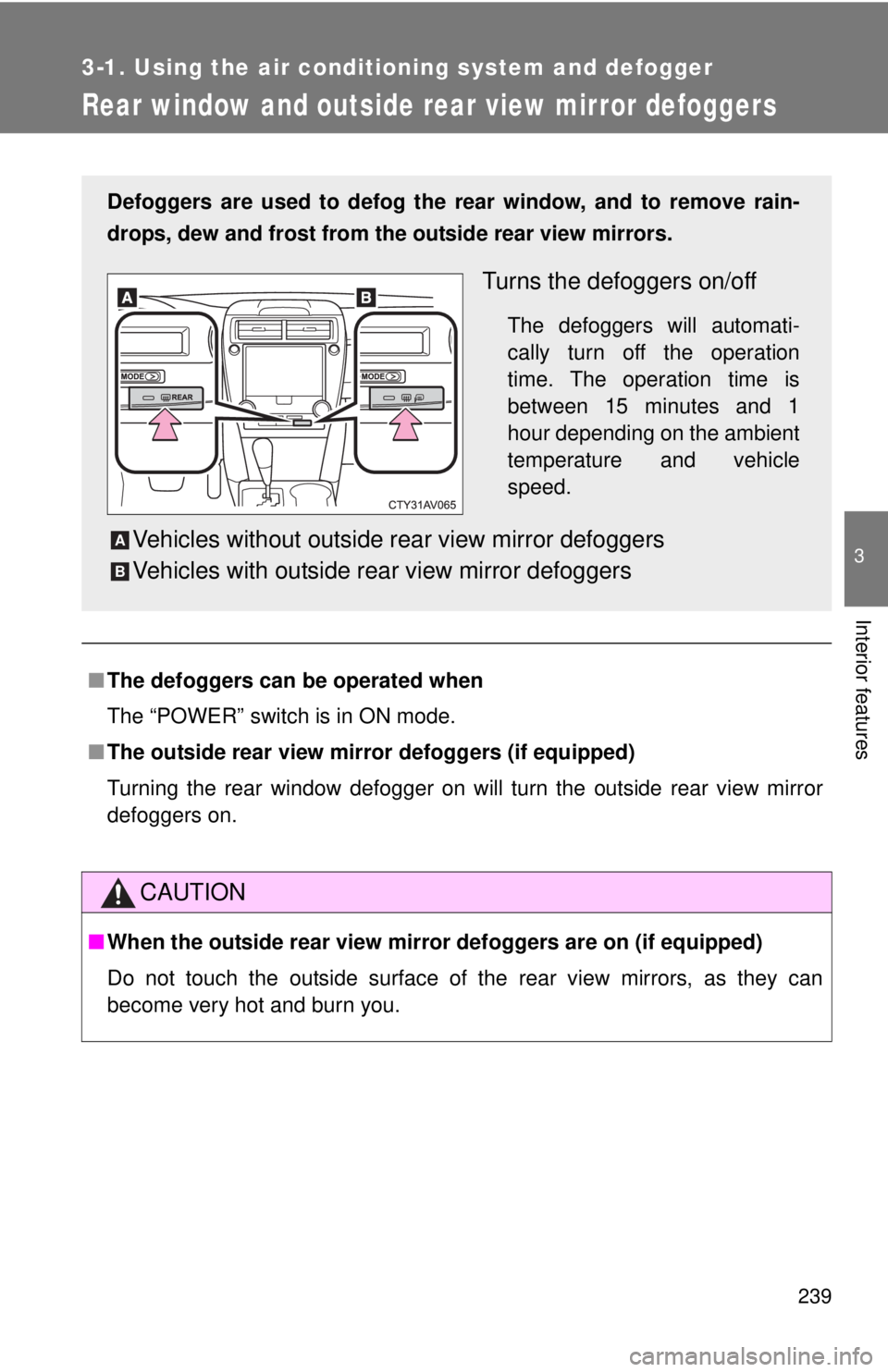
Defoggers are used to defog the rear window, and to remove rain-
drops, dew and frost from the outside rear view mirrors.
Turns the defoggers on/off
The defoggers will automati-
cally turn off the operation
time. The operation time is
between 15 minutes and 1
hour depending on the ambient
temperature and vehicle
speed.
Vehicles without outside rear view mirror defoggers
Vehicles with outside rear view mirror defoggersA
B
Page 259 of 536
259
3-2. Using the audio system
3
Interior features
■
Lens cleaners
Do not use lens cleaners. Doing so may damage the CD player.
■ MP3 and WMA files
MP3 (MPEG Audio LAYER3) is a standard audio compression format.
Files can be compressed to approximately 1/10 of their original size by using
MP3 compression.
WMA (Windows Media Audio) is a Microsoft audio compression format.
This format compresses audio data to a size smaller than that of the MP3
format.
There is a limit to the MP3 and WMA file standards and to the media/formats
recorded by them that can be used.
●MP3 file compatibility
• Compatible standards
MP3 (MPEG1 LAYER3, MPEG2 LSF LAYER3)
• Compatible sampling frequencies MPEG1 LAYER3: 32, 44.1, 48 (kHz)
MPEG2 LSF LAYER3: 16, 22.05, 24 (kHz)
• Compatible bit rates MPEG1 LAYER3: 32, 40, 48, 56, 64, 80, 96, 112, 128, 160, 192, 224,
256, 320 (kbps)
MPEG2 LSF LAYER3: 8, 16, 24, 32, 40, 48, 56, 64, 80, 96, 112, 128,
144, 160 (kbps)
* Compatible with VBR
• Compatible channel modes: stereo, joint stereo, dual channel and monaural
● WMA file compatibility
• Compatible standards
WMA Ver. 7, 8, 9
• Compatible sampling frequencies 32, 44.1, 48 (kHz)
• Compatible bit rates Ver. 7, 8: CBR 48, 64, 80, 96, 128, 160, 192 (kbps)
Ver. 9: CBR 48, 64, 80, 96, 128, 160, 192, 256, 320 (kbps)
* Only compatible with 2-channel playback
Page 260 of 536

260 3-2. Using the audio system
●Compatible media
Media that can be used for MP3 and WMA playback are CD-Rs and CD-
RWs.
Playback in some instances may not be possible, depending on the status
of the CD-R or CD-RW. Playback may not be possible or the audio may
jump if the disc is scratched or marked with fingerprints.
● Compatible disc formats
The following disc formats can be used.
• Disc formats: CD-ROM Mode 1 and Mode 2
CD-ROM XA Mode 2, Form 1 and Form 2
• File formats: ISO9660 Level 1, Level 2, (Romeo, Joliet) MP3 and WMA files written in any format other than those listed above
may not play correctly, and their file names and folder names may not
be displayed correctly.
Items related to standards and limitations are as follows.
• Maximum directory hierarchy: 8 levels
• Maximum length of folder names/file names: 32 characters
• Maximum number of folders: 192 (including the root)
• Maximum number of files per disc: 255
● File names
The only files that can be recognized as MP3/WMA and played are those
with the extension .mp3 or .wma.
● Multi-sessions
As the audio system is compatible with multi-sessions, it is possible to play
discs that contain MP3 and WMA files. However, only the first session can
be played.
● ID3 and WMA tags
ID3 tags can be added to MP3 files, making it possible to record the track
title, artist name, etc.
The system is compatible with ID3 Ver. 1.0, 1.1, and Ver. 2.2, 2.3 ID3 tags.
(The number of characters is based on ID3 Ver. 1.0 and 1.1.)
WMA tags can be added to WMA files, making it possible to record the
track title and artist name in the same way as with ID3 tags.
Page 264 of 536
264 3-2. Using the audio system
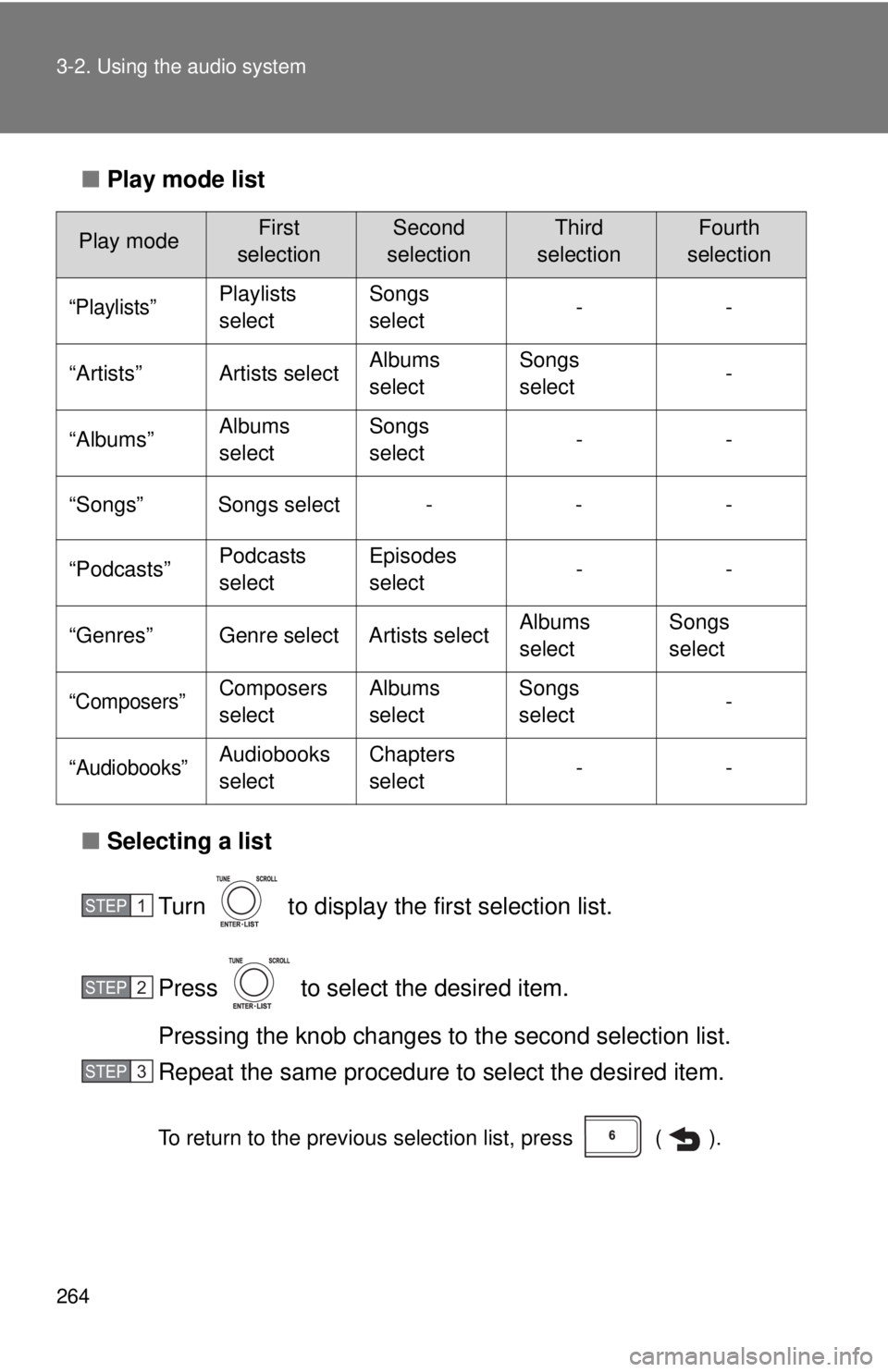
■Play mode list
■ Selecting a list
Turn to display the first selection list.
Press to select the desired item.
Pressing the knob changes to the second selection list.
Repeat the same procedure to select the desired item.
To return to the previous selection list, press ( ).
Play modeFirst
selectionSecond
selectionThird
selectionFourth
selection
“Playlists”Playlists
select Songs
select
--
“Artists” Artists select Albums
selectSongs
select
-
“Albums” Albums
selectSongs
select
--
“Songs” Songs select - - -
“Podcasts” Podcasts
selectEpisodes
select
--
“Genres” Genre select Artists select Albums
selectSongs
select
“Composers”Composers
selectAlbums
select Songs
select
-
“Audiobooks”Audiobooks
selectChapters
select
--
STEP1
STEP2
STEP3