ESP TOYOTA CAMRY HV 2012 Owner's Manual
[x] Cancel search | Manufacturer: TOYOTA, Model Year: 2012, Model line: CAMRY HV, Model: TOYOTA CAMRY HV 2012Pages: 536, PDF Size: 6.29 MB
Page 219 of 536
219
2-4. Using other
driving systems
2
When driving
CAUTION
■Cautions regarding the use of the system
The driver is solely responsible for safe driving. Always drive safely, taking
care to observe your surroundings.
The Blind Spot Monitor is a supplementary system which alerts the driver
that a vehicle is present in the blind spot. Do not overly rely on the Blind Spot
Monitor. The system cannot judge if it is safe to change lanes, therefore over
reliance could cause an accident resulting in death or serious injury. Accord-
ing to conditions, the system may not function correctly. Therefore the
driver’s own visual confirmation of safety is necessary.
■ Handling the radar sensor
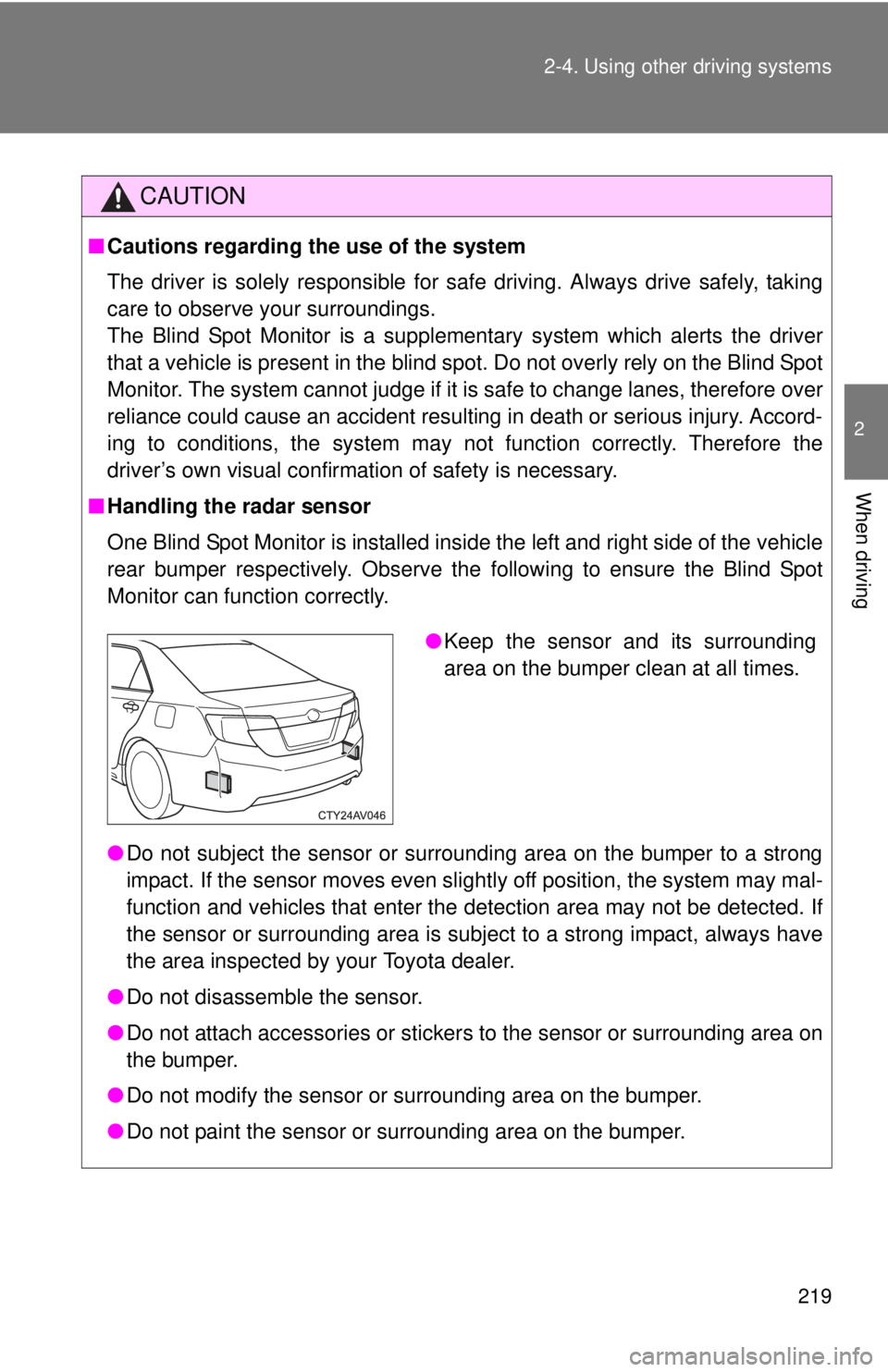
One Blind Spot Monitor is installed inside the left and right side of the vehicle
rear bumper respectively. Observe the following to ensure the Blind Spot
Monitor can function correctly.
●Do not subject the sensor or surrounding area on the bumper to a strong
impact. If the sensor moves even slightly off position, the system may mal-
function and vehicles that enter the detection area may not be detected. If
the sensor or surrounding area is subject to a strong impact, always have
the area inspected by your Toyota dealer.
● Do not disassemble the sensor.
● Do not attach accessories or stickers to the sensor or surrounding area on
the bumper.
● Do not modify the sensor or surrounding area on the bumper.
● Do not paint the sensor or surrounding area on the bumper.
●Keep the sensor and its surrounding
area on the bumper clean at all times.
Page 242 of 536
242 3-2. Using the audio system
■About Bluetooth® (with Display Audio system)
The Bluetooth wordmark and logo are owned by Bluetooth SIG. and permis-
sion has been granted to use the trademark of the licensee Panasonic Cor-
poration/Pioneer Corporation. Other trademarks and trade names are
owned by various different owners.
CAUTION
■ Certifications for the Bluetooth (with Display Audio system)
FCC ID: ACJ932CQ-US70G0
IC ID: 216J-CQUS70G0
FCC ID: AJDK032
IC ID: 775E-K032
● FCC WARNING:
Changes or modifications not expressly approved by the party responsible
for compliance could void the user's authority to operate the equipment.\
● Part 15 of the FCC Rules & Industry Canada licence-exempt RSS stan-
dard(s)
• Properly shielded a grounded cables and connectors must be used for
connection to host computer and/or peripherals in order to meet FCC
emission limits.
• This transmitter must not be co-located or operated in conjunction with any other antenna or transmitter.
• This device complies with Part 15 of FCC Rules and Industry Canada licence-exempt RSS standard(s). Operation is subject to the following
two conditions: (1) this device may not cause interference, and (2) this
device must accept any interference, including interference that may
cause undesired operation of this device.
• Le présent appareil est conforme aux la partie 15 des règles de la FCC et CNR d’Industrie Canada applicables aux appareils radio exempts de
licence. L’exploitation est autorisée aux deux conditions suivantes : (1)
l’appareil ne doit pas produire de brouillage, et (2) l’utilisateur de
l’appareil doit accepter tout brouillage radioélectrique subi, même si le
brouillage est susceptible d’en compromettre le fonctionnement.
Page 243 of 536
243
3-2. Using the audio system
3
Interior features
CAUTION
• This equipment complies with FCC/IC radiation exposure limits set
forth for an uncontrolled environment and meets the FCC radio fre-
quency (RF) Exposure Guidelines in Supplement C to OET65 and
RSS-102 of the IC radio frequency (R F) Exposure rules. This equip-
ment has very low levels of RF energy that it deemed to comply without
maximum permissive exposure evaluat ion (MPE). But it is desirable
that it should be installed and operated keeping the radiator at least 20
cm or more away from person’s body (excluding extremities: hands,
wrists, feet and ankles).
• Cet équipement est conforme aux limites d’exposition aux rayonnements énoncées pour un environnement non contrôlé et
respecte les règles les radioélectriques (RF) de la FCC lignes
directrices d’exposition dans le Supplément C à OET65 et d’exposition
aux fréquences radioélectriques (RF) CNR-102 de l’IC. Cet
équipement émet une énergie RF très faible qui est considérée
conforme sans évaluation de l’exposition maximale autorisée.
Cependant, cet équipement doit être installé et utilisé en gardant une
distance de 20 cm ou plus entre le dispositif rayonnant et le corps (à
l’exception des extrémités : mains, poignets, pieds et chevilles).
• Under Industry Canada regulations, this radio transmitter may only operate using an antenna of a type and maximum (or lesser) gain
approved for the transmitter by Industry Canada. To reduce potential
radio interference to other users, the antenna type and its gain should
be so chosen that the equivalent isotropically radiated power (e.i.r.p.) is
not more than that necessary for successful communication.
• Conformément à la réglementation d’Industrie Canada, le présent émetteur radio peut fonctionner avec une antenne d’un type et d’un
gain maximal (ou inférieur) approuvé pour l’émetteur par Industrie
Canada. Dans le but de réduire les risques de brouillage
radioélectrique à l’intention des autres utilisateurs, il faut \
choisir le type
d’antenne et son gain de sorte que la puissance isotrope rayonnée
équivalente (p.i.r.e.) ne dépasse pas l’intensité nécessaire à
l’établissement d’une communication satisfaisante.
Page 266 of 536
266 3-2. Using the audio system
Shuffle playbackPressing (RDM) changes mode s in the following order:
Track shuffle Album shuffle Off.
Playing and pausing songs
Press ( ).
Switching the displayPress .
Each time is pressed, the display changes in the following order:
Track no./Elapsed time Album name Track title Artist name.
■About iPod
●“Made for iPod” and “Made for iPhone” mean that an electroni\
c acces-
sory has been designed to connect specifically to iPod, or iPhone,
respectively, and has been certified by the developer to meet Apple per-
formance standards.
Page 267 of 536
267
3-2. Using the audio system
3
Interior features
●
Apple is not responsible for the operation of this device or its compliance
with safety and regulatory standards. Please note that the use of this
accessory with iPod or iPhone may affect wireless performance.
● iPhone, iPod, iPod classic, iPod nano and iPod touch are trademarks of
Apple Inc., registered in the U.S. and other countries.
■ iPod functions
●When an iPod is connected and the audio source is changed to iPod
mode, the iPod will resume play from the same point in which it was last
used.
● Depending on the iPod that is connected to the system, certain functions
may not be available. If a function is unavailable due to a malfunction (as
opposed to a system specification), disconnecting the device and recon-
necting it once again may resolve the problem.
● While connected to the system, the iPod cannot be operated with its own
controls. It is necessary to use the controls of the vehicle’s audio system
instead.
● When the battery level of an iPod is very low, the iPod may not operate. If
so, charge the iPod before use.
● Supported models ( P. 268)
■ iPod problems
To resolve most problems encountered when using your iPod, disconnect
your iPod from the vehicle iPod connection and reset it.
For instructions on how to reset your iPod, refer to your iPod Owner’s Man-
ual.
■ Display
P. 251
Page 274 of 536

274 3-2. Using the audio system
■USB memory functions
●Depending on the USB memory that is connected to the system, the
device itself may not be operable and certain functions may not be avail-
able. If the device is inoperable or a function is unavailable due to a mal-
function (as opposed to a system specification), disconnecting the device
and reconnecting it once again may resolve the problem.
● If the USB memory still does not begin operation after being discon-
nected and reconnected, format the memory.
■ Display
P. 251
■ Error messages
“ERROR”: This indicates a problem in the USB memory or its connection.
“NO MUSIC”: This indicates that no MP3/WMA files are included in the USB memory.
■ USB memory
●Compatible devices
USB memory that can be used for MP3 and WMA playback
● Compatible device formats
The following device formats can be used:
• USB communication formats: USB2.0 FS (12 Mbps)
• File formats: FAT12/16/32 (Windows)
• Correspondence class: Mass storage class
MP3 and WMA files written in any format other than those listed above
may not play correctly, and their file names and folder names may not be
displayed correctly.
Items related to standards and limitations are as follows:
• Maximum directory hierarchy: 8 levels
• Maximum number of folders in a device: 999 (including the root)
• Maximum number of files in a device: 9999
• Maximum number of files per folder: 255
Page 280 of 536
280 3-2. Using the audio system
■Trademark owned by SRS Labs, Inc.
The audio systems utilize SRS FOCUS
® and SRS TruBass® audio
enhancement technologies, under license from SRS Labs, Inc., in all modes
except AM radio mode.
FOCUS, TruBass, SRS and
symbol are trademarks of SRS Labs,
Inc.
FOCUS and TruBass technologies are incorporated under license from
SRS Labs, Inc.
TruBass
® enhances the perception of bass frequencies to provide deep, rich
bass response from any size speaker.
SRS FOCUS
® raises the audio image from non-optimally placed speakers
up to the natural listening height at ear level.
Page 310 of 536
310 3-5. Other interior features
CAUTION
Observe the following precautions.
Failure to do so may cause the driver's floor mat to slip, possibly interfering
with the pedals while driving. An unexpectedly high speed may result or it may
become difficult to stop the vehicle, leading to a serious accident.
■When installing the driver's floor mat
●Do not use floor mats designed for other models or different model year
vehicles, even if they are Toyota Genuine floor mats.
● Only use floor mats designed for the driver's seat.
● Always install the floor mat securely using the retaining hooks (clips) pro-
vided.
● Do not use two or more floor mats on top of each other.
● Do not place the floor mat bottom-side up or upside-down.
■ Before driving
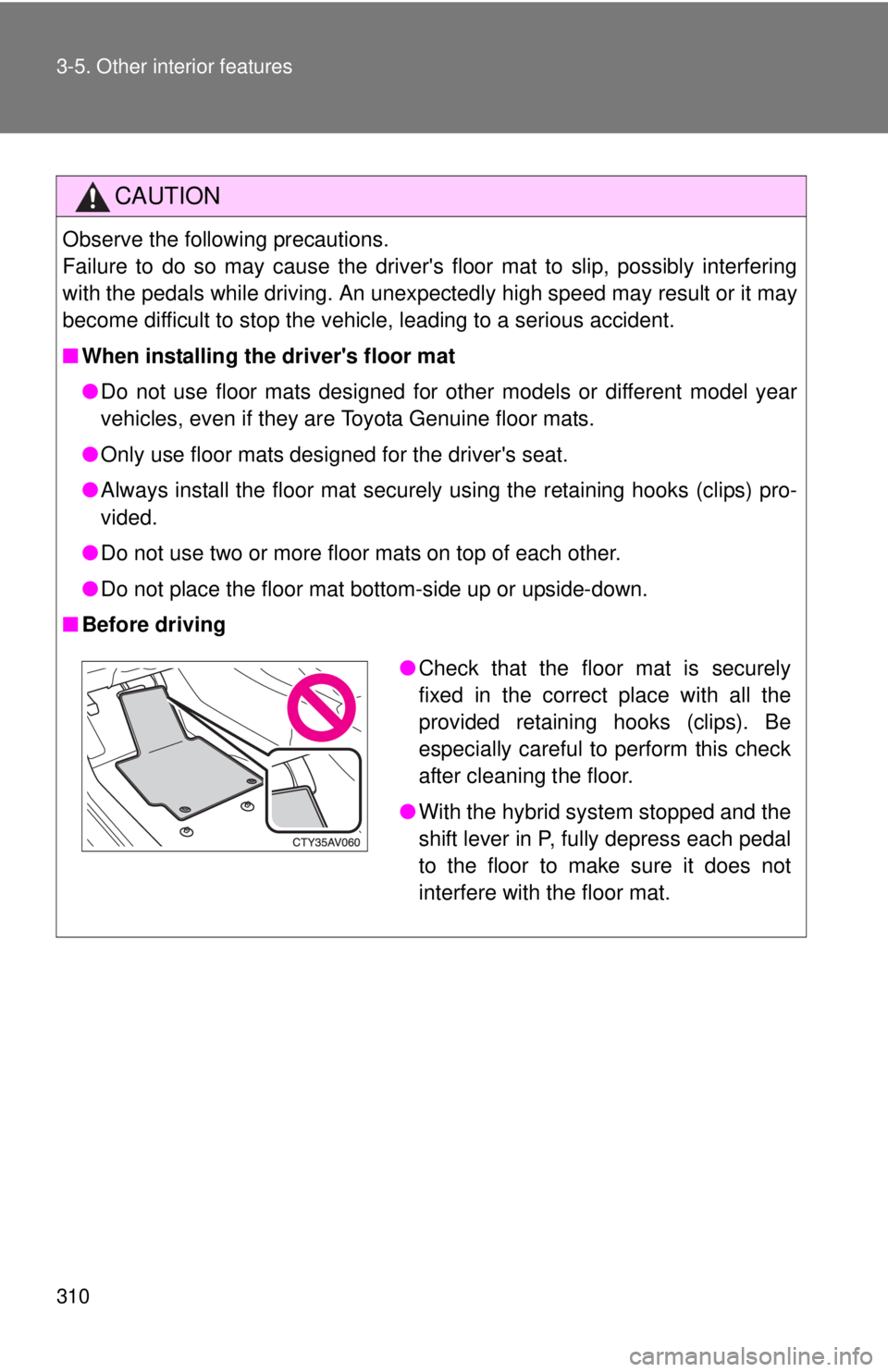
●Check that the floor mat is securely
fixed in the correct place with all the
provided retaining hooks (clips). Be
especially careful to perform this check
after cleaning the floor.
● With the hybrid system stopped and the
shift lever in P, fully depress each pedal
to the floor to make sure it does not
interfere with the floor mat.
Page 318 of 536

318 3-5. Other interior features
■Before programming
●Install a new battery in the remote control transmitter.
● The battery side of the remote control transmitter must be pointed away
from the HomeLink
button.
■ To prevent 12-volt battery discharge
HomeLink
will turn off if a door has not been opened and closed for 20 min-
utes or the “POWER” switch is left turned off. (After which programming can-
not be completed.) Open and close a door or turn the “POWER” switch to
ACCESSORY mode to turn HomeLink
on. We recommend programming
while the “POWER” switch is in ACCESSORY mode.
■ Certification for the garage door opener
U.S.A.
FCC ID: CB2051AHL4/CB251AHL4NR
NOTE:
This device complies with Part 15 of the FCC Rules. Operation is subject to
the following two conditions: (1) this device may not cause harmful interfer-
ence, and (2) this device must accept any interference received, including
interference that may cause undesired operation.
FCC WARNING:
Changes or modifications not expressly approved by the party responsible
for compliance could void the user's authority to operate the equipment.
Canada
NOTE:
Operation is subject to the following two conditions: (1) this device may not
cause interference, and (2) this device must accept any interference, includ-
ing interference that may cause undesired operation of the device.
■ When support is necessary
Visit on the web at www.homelink.com
or call 1-800-355-3515.
Page 324 of 536
324
3-5. Other interior features
Safety Connect
Safety Connect is a subscription-based telematics service that uses
Global Positioning System (GPS) data and embedded cellular tech-
nology to provide safety and security features to subscribers. Safety
Connect is supported by Toyota ’s designated response center,
which operates 24 hours per day, 7 days per week.
Safety Connect service is available by subscription on select,
telematics hardware-equipped vehicles.
By using the Safety Connect servi ce, you are agreeing to be bound
by the Telematics Subscription Serv ice Agreement and its Terms and
Conditions, as in effect and amende d from time to time, a current
copy of which is available at Toyota.com. All use of the Safety Con-
nect service is subject to such then-applicable Terms and Condi-
tions.
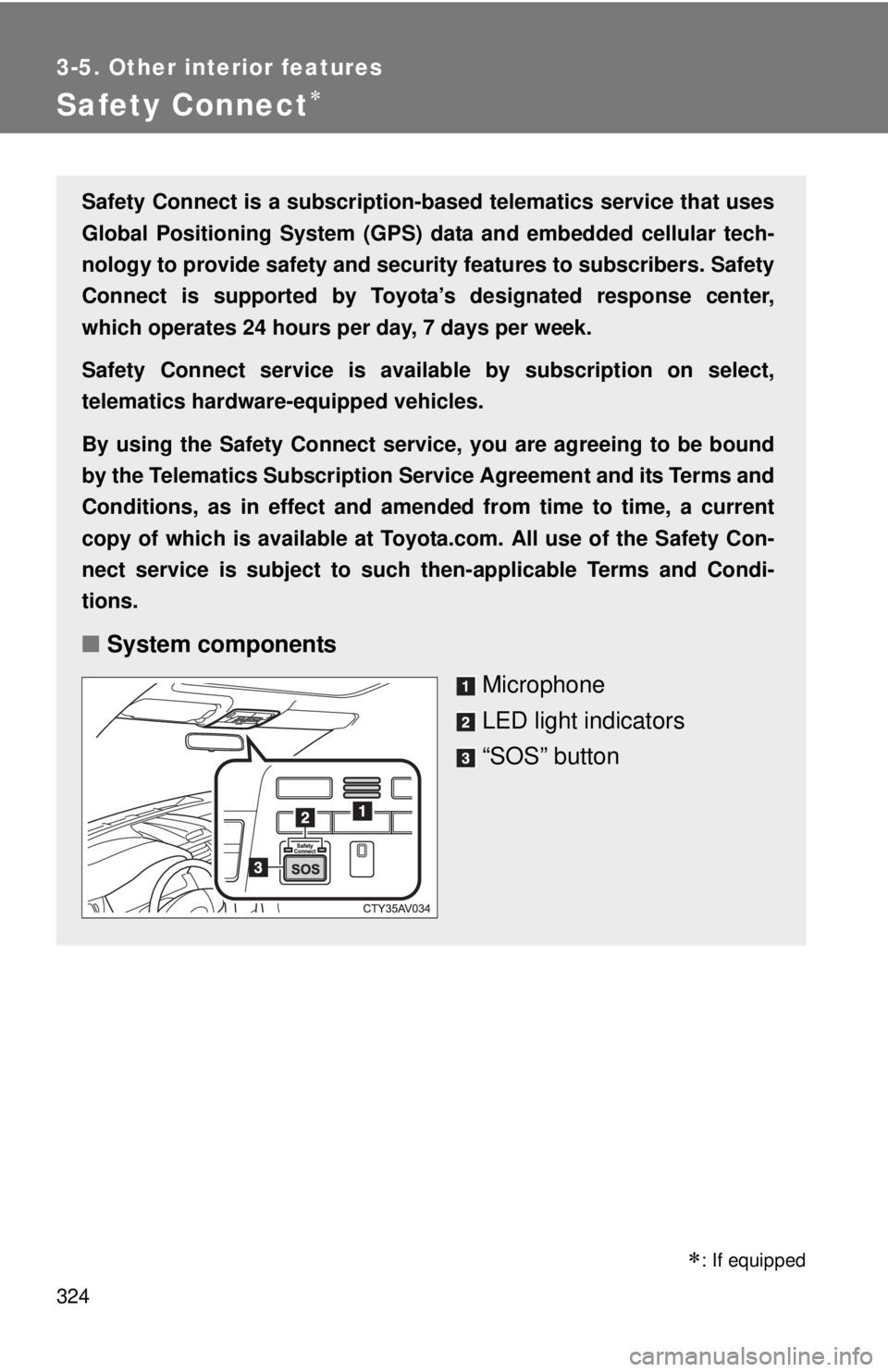
■ System components
Microphone
LED light indicators
“SOS” button
: If equipped