light TOYOTA CAMRY HV 2012 Workshop Manual
[x] Cancel search | Manufacturer: TOYOTA, Model Year: 2012, Model line: CAMRY HV, Model: TOYOTA CAMRY HV 2012Pages: 536, PDF Size: 6.29 MB
Page 165 of 536
165
2-1. Driving procedures
2
When driving
CAUTION
■
Stopping the hybrid system in an emergency
If you want to stop the hybrid system in an emergency while driving the vehi-
cle, press and hold the “POWER” switch for more than 3 seconds, or press it
briefly 3 times or more in succession.
However, do not touch the “POWER” switch while driving except in an emer-
gency. Turning the hybrid system off while driving will not cause loss of
steering or braking control, but the power assist to these systems will \
be lost.
This will make it more difficult to steer and brake, so you should pull over
and stop the vehicle as soon as it is safe to do so.
NOTICE
■To prevent 12-volt battery discharge
●Do not leave the “POWER” switch in ACCESSORY or ON mode for long
periods of time without the hybrid system on.
● If is displayed on the multi-information display, the “POWER”
switch is not off. Exit the vehicle after turning the “POWER” switch off.
● Do not stop the hybrid system when the shift lever is in a position other
than P. If the hybrid system is stopped in another shift lever position, the
“POWER” switch will not be turned off but instead be turned to ACCES-
SORY mode. If the vehicle is left in ACCESSORY mode, 12-volt battery
discharge may occur.
■ When starting the hybrid system
Do not depress the accelerator pedal unnecessarily.
■ Symptoms indicating a malfunction with the “POWER” switch
If the “POWER” switch seems to be operating somewhat differently than
usual, such as the switch sticking slightly, there may be a malfunction. Con-
tact your Toyota dealer immediately.
Page 171 of 536
171
2-1. Driving procedures
2
When driving
Tur n signal lever
■Turn signals can be operated when
The “POWER” switch is in ON mode.
■ If the indicators flashes faster than usual
Check that a light bulb in the front or rear turn signal lights has not burned
out.
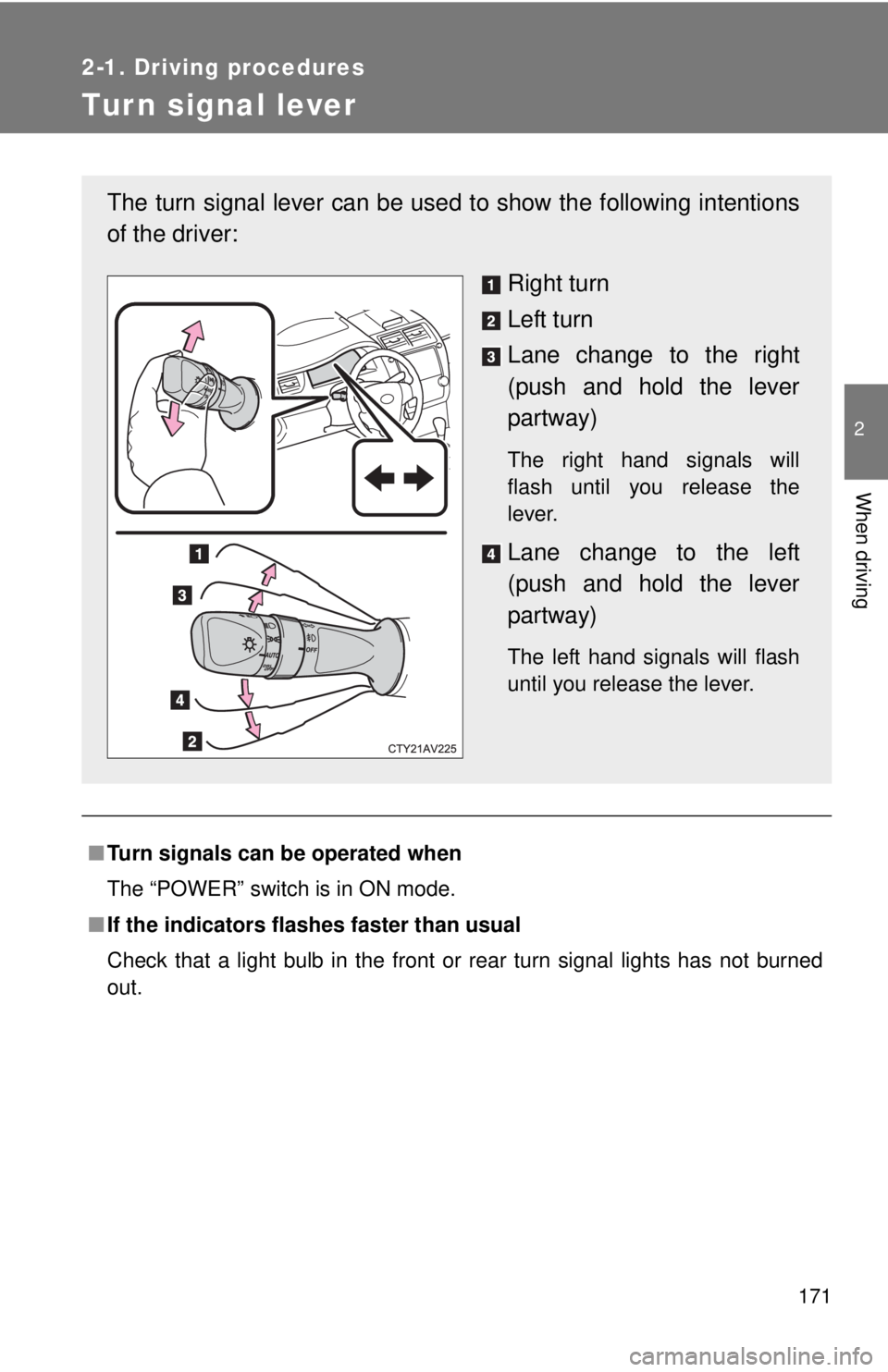
The turn signal lever can be used to show the following intentions
of the driver:
Right turn
Left turn
Lane change to the right
(push and hold the lever
partway)
The right hand signals will
flash until you release the
lever.
Lane change to the left
(push and hold the lever
partway)
The left hand signals will flash
until you release the lever.
Page 175 of 536
175
2-2. Instrument cluster
2
When driving
Engine coolant temperature displa
y/instrument panel light con-
trol display
Displays the engine coolant temperature and instrument panel light
control.
Outside temperature display
P. 301
Shift position display
Displays the currently selected shift position.
P. 169
Instrument panel light control button
P. 177
Page 177 of 536
177
2-2. Instrument cluster
2
When driving
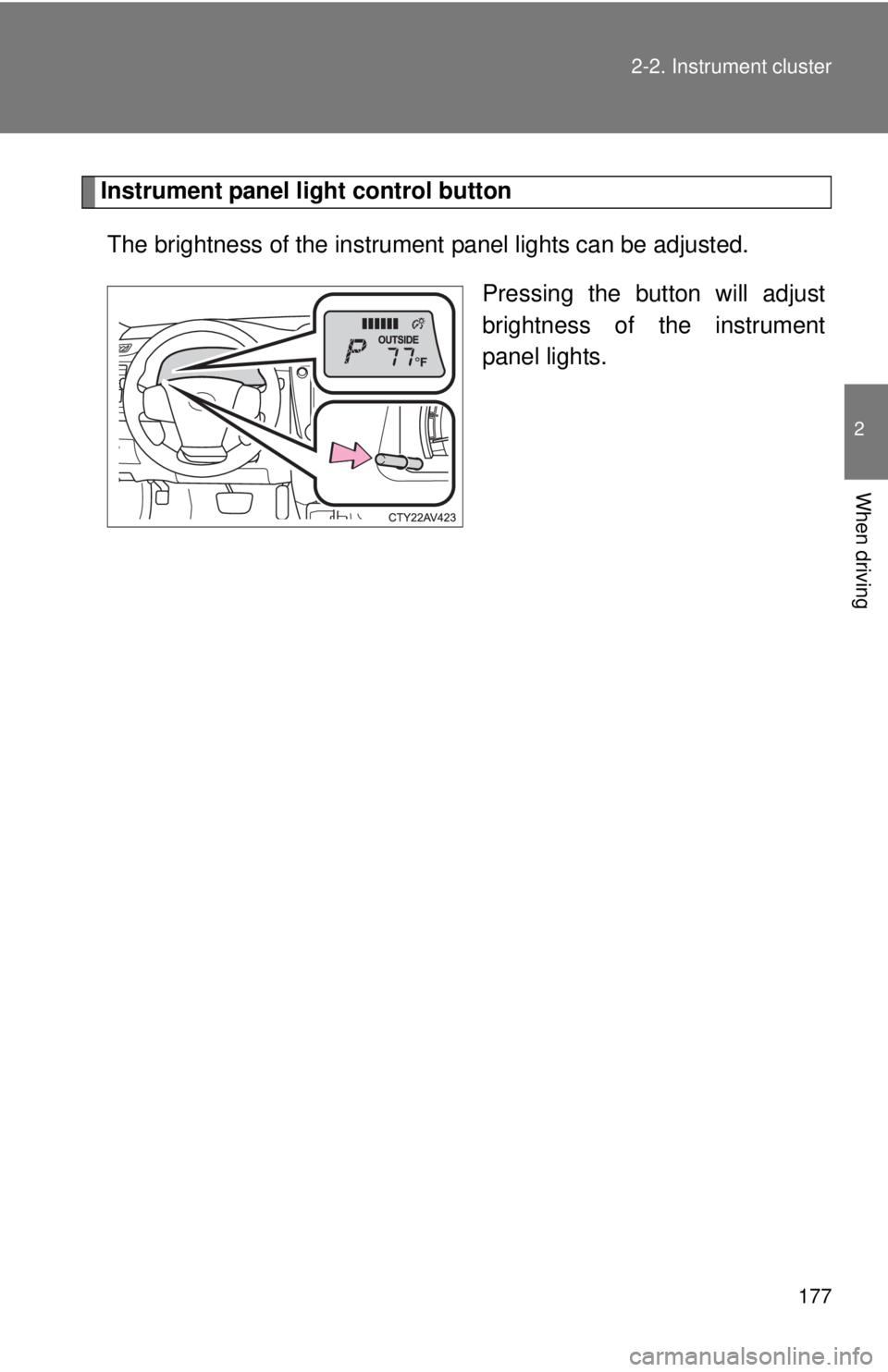
Instrument panel light control button
The brightness of the instrument panel lights can be adjusted.
Pressing the button will adjust
brightness of the instrument
panel lights.
Page 179 of 536
179
2-2. Instrument cluster
2
When driving
■
The brightness of the instrument panel lights
When the tail lights are turned on, the meter’s brightness will be reduced
slightly unless the meter brightness level adjustment is set to the brightest
setting.
If the tail lights are turned on when the surroundings are dark, the meter’s
brightness will reduce slightly. However, when the surroundings are bright,
such as during the daytime, the meter’s brightness will not be reduced even
if the tail lights are turned on.
■ Fuel gauge and odometer/trip meter display remain on mode
After the “POWER” switch has been turned off, the fuel gauge and odome-
ter/trip meter display remain on for 10 minutes, enabling the fuel gauge and
odometer/trip meter values to be checked again without having to turn the
“POWER” switch to ON mode.
When confirming the gauges and meters, turn the headlight switch to the
position. Press the display change button to change between the
odometer and trip meter displays.
NOTICE
■ To prevent damage to the engine and its components
The engine may be overheating if the rightmost segment of the engine cool-
ant temperature display is flashing. In this case, immediately stop the vehicle
in a safe place, and check the engine after it has cooled completely.
(
P. 465)
Page 180 of 536
180
2-2. Instrument cluster
Indicators and warning lights
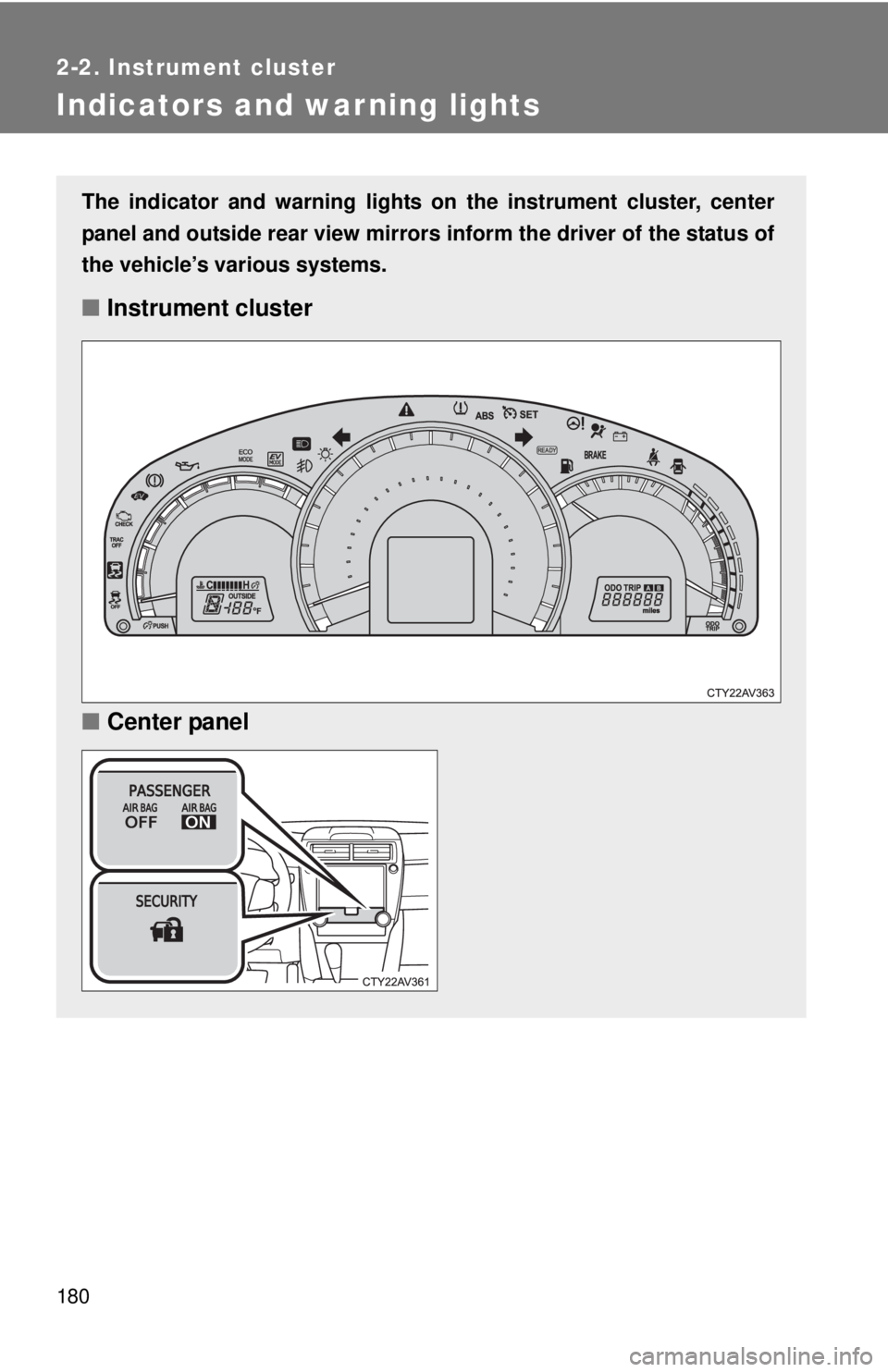
The indicator and warning lights on the instrument cluster, center
panel and outside rear view mirrors inform the driver of the status of
the vehicle’s various systems.
■ Instrument cluster
■ Center panel
Page 182 of 536
182 2-2. Instrument cluster
■Indicators
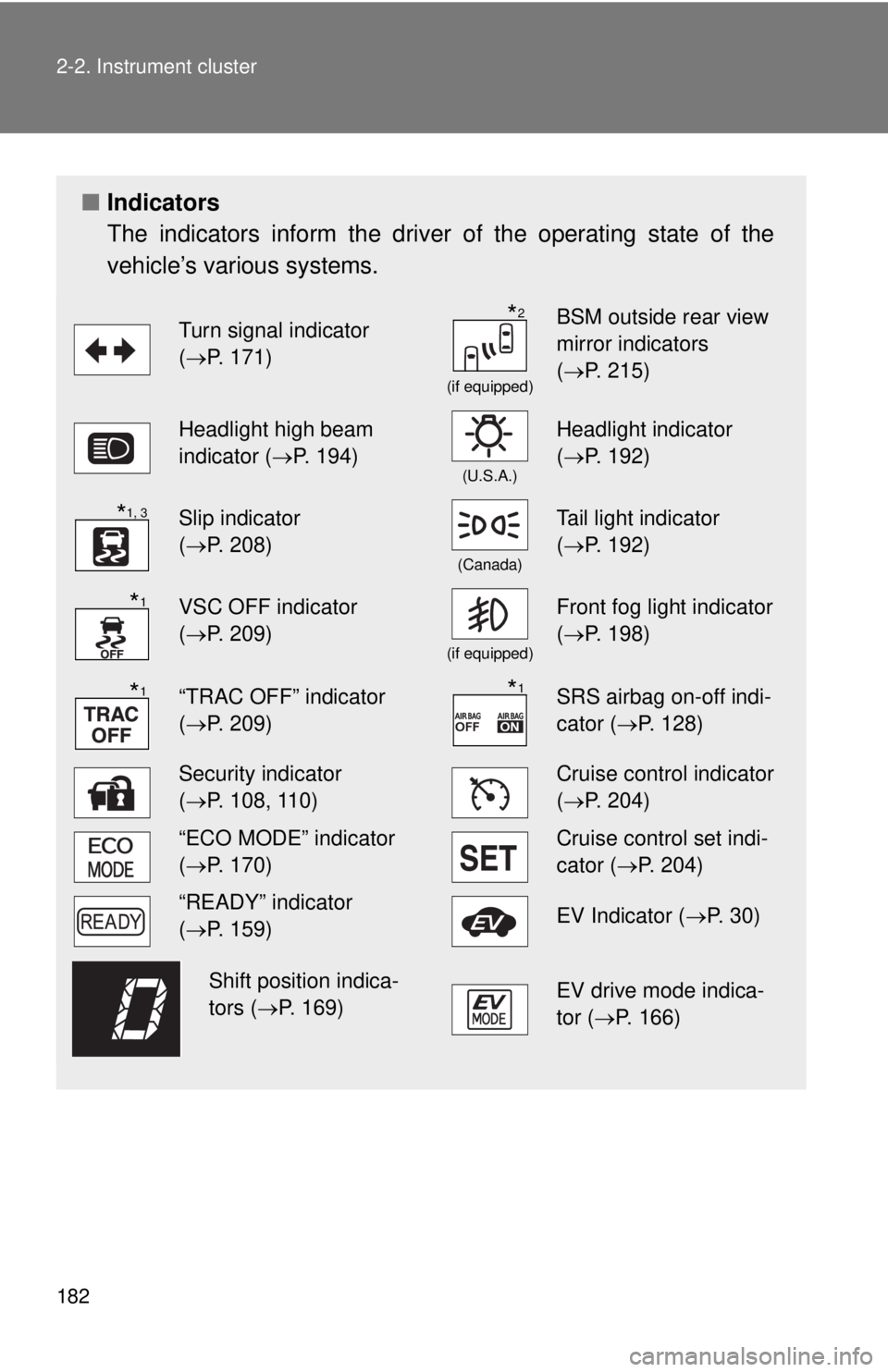
The indicators inform the driver of the operating state of the
vehicle’s various systems.
Turn signal indicator
(P. 171)
(if equipped)
BSM outside rear view
mirror indicators
( P. 215)
Headlight high beam
indicator ( P. 194)
(U.S.A.)
Headlight indicator
(P. 192)
Slip indicator
(P. 208)
(Canada)
Tail light indicator
( P. 192)
VSC OFF indicator
(P. 209)
(if equipped)
Front fog light indicator
( P. 198)
“TRAC OFF” indicator
(P. 209)SRS airbag on-off indi-
cator (P. 128)
Security indicator
(P. 108, 110)Cruise control indicator
( P. 204)
“ECO MODE” indicator
(P. 170)Cruise control set indi-
cator (P. 204)
“READY” indicator
(P. 159)EV Indicator ( P. 3 0 )
EV drive mode indica-
tor (P. 166)
*2
*1, 3
*1
*1*1
Shift position indica-
tors (P. 169)
Page 183 of 536
183
2-2. Instrument cluster
2
When driving
*1: These lights turn on when the “POWER” switch is turned to ON
mode to indicate that a system check is being performed. They will
turn off after the hybrid system is on, or after a few seconds. There
may be a malfunction in a system if a light does not come on, or if
the lights do not turn off. Have the vehicle inspected by your Toyota
dealer.
*2: In order to confirm operation, the BSM outside rear view mirror indi-
cators illuminate in the following situations:
• When the “POWER” switch is turned to ON mode while the BSM
main switch is set to ON.
• When the BSM main switch is set to ON while the “POWER” switch is in ON mode.
If the system is functioning correctly, the BSM outside rear view mir-
ror indicators will turn off after a few seconds.
If the BSM outside rear view mirror indicators do not illuminate or do
not turn off, there may be a malfunction with the system.
If this occurs, have the vehicle inspected by your Toyota dealer.
*3: The light flashes to indicate that the system is operating.
Page 184 of 536
184 2-2. Instrument cluster
CAUTION
■If a safety system warning light does not come on
Should a safety system light such as the ABS and SRS warning light not
come on when you start the hybrid system, this could mean that these sys-
tems are not available to help protect you in an accident, which could result
in death or serious injury. Have the vehicle inspected by your Toyota dealer
immediately if this occurs.
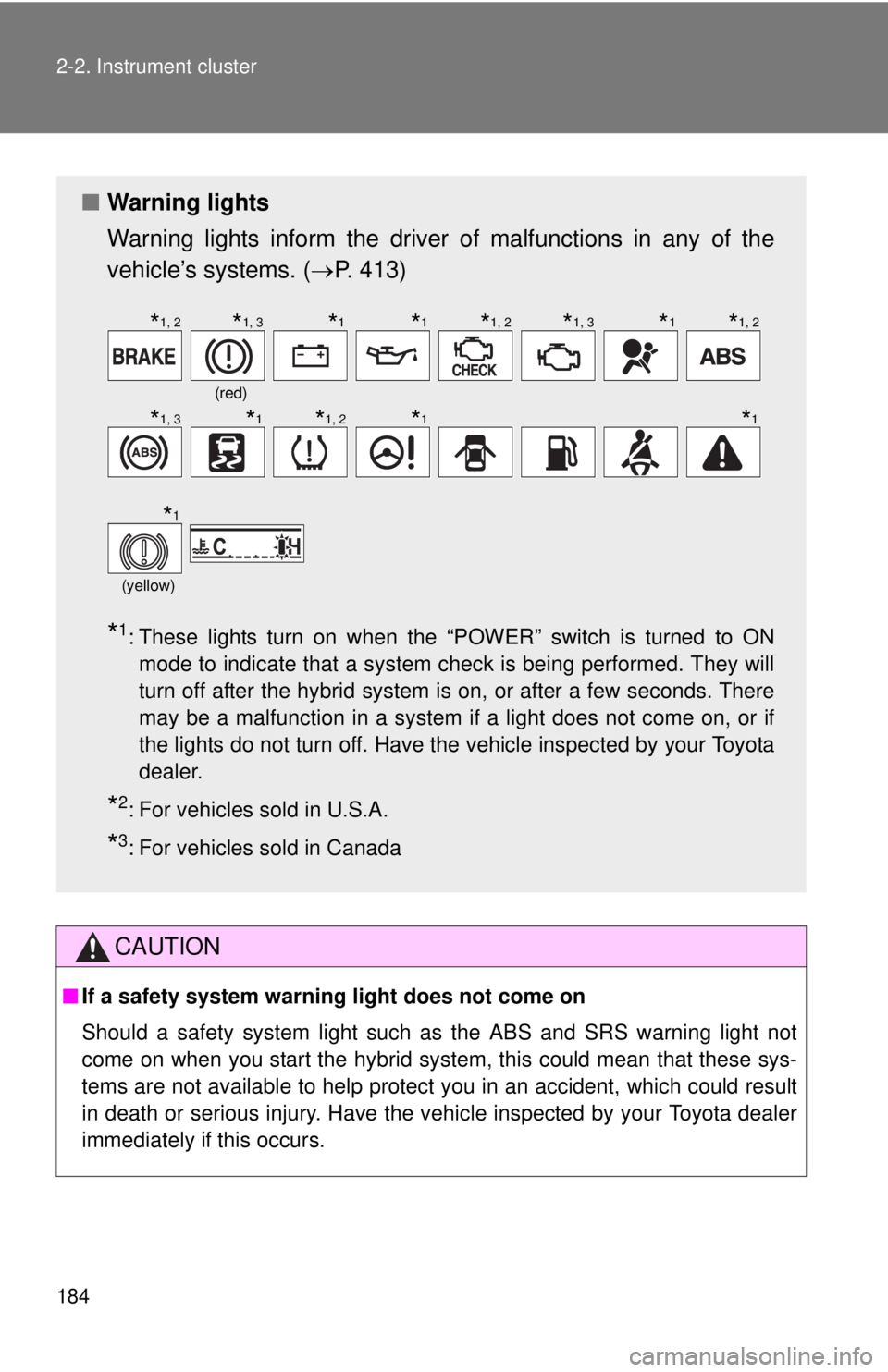
■ Warning lights
Warning lights inform the driver of malfunctions in any of the
vehicle’s systems. ( P. 413)
*1: These lights turn on when the “POWER” switch is turned to ON
mode to indicate that a system check is being performed. They will
turn off after the hybrid system is on, or after a few seconds. There
may be a malfunction in a system if a light does not come on, or if
the lights do not turn off. Have the vehicle inspected by your Toyota
dealer.
*2: For vehicles sold in U.S.A.
*3: For vehicles sold in Canada
(red)
(yellow)
*1, 2*1, 3*1*1*1, 2*1, 3*1*1, 2
*1, 3*1*1, 2*1*1
*1
Page 192 of 536
192
2-3. Operating the lights and wipers
Headlight switch
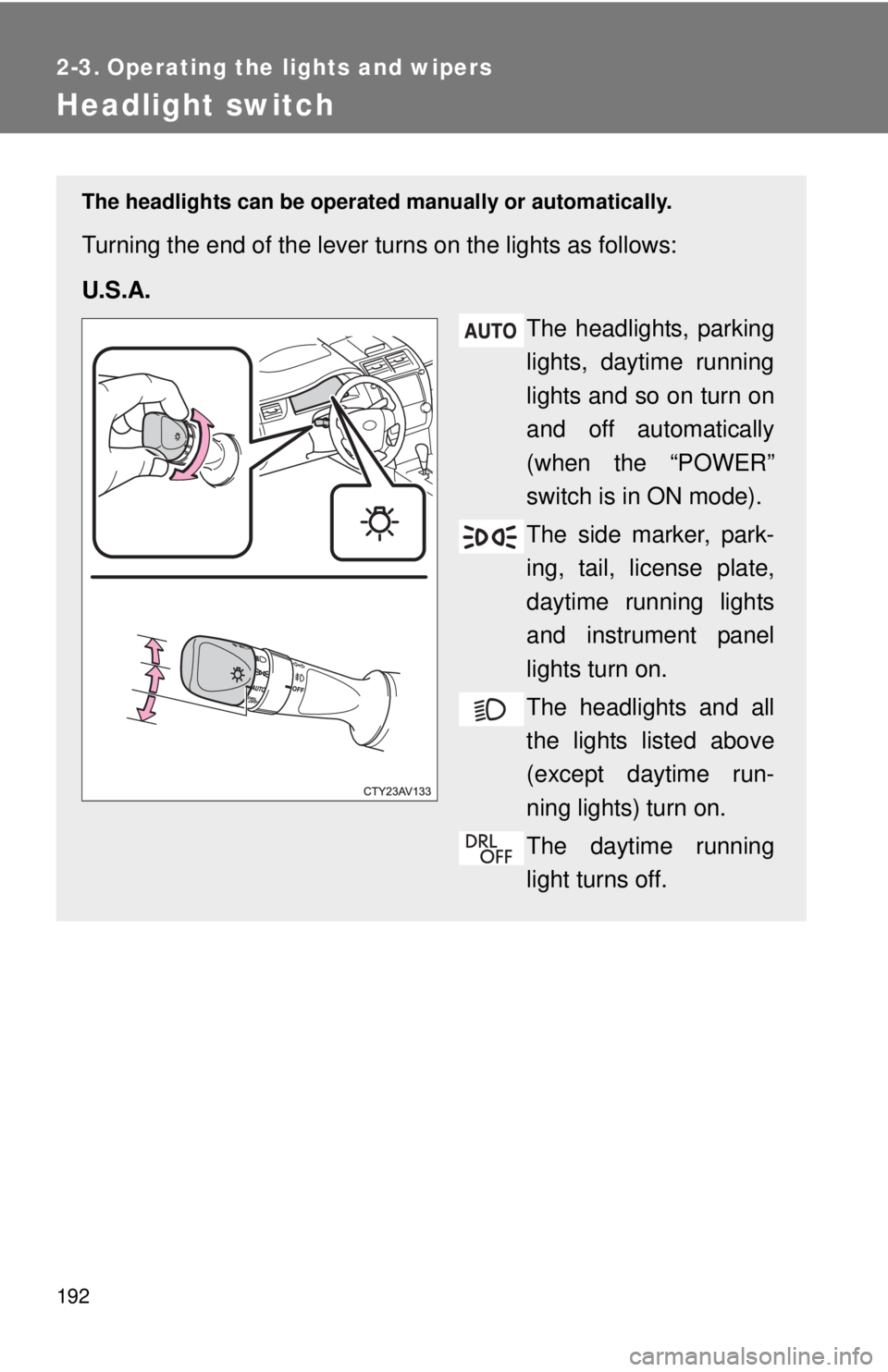
The headlights can be operated manually or automatically.
Turning the end of the lever turns on the lights as follows:
U.S.A.
The headlights, parking
lights, daytime running
lights and so on turn on
and off automatically
(when the “POWER”
switch is in ON mode).
The side marker, park-
ing, tail, license plate,
daytime running lights
and instrument panel
lights turn on.
The headlights and all
the lights listed above
(except daytime run-
ning lights) turn on.
The daytime running
light turns off.