air condition TOYOTA CAMRY HYBRID 2011 XV50 / 9.G Owner's Manual
[x] Cancel search | Manufacturer: TOYOTA, Model Year: 2011, Model line: CAMRY HYBRID, Model: TOYOTA CAMRY HYBRID 2011 XV50 / 9.GPages: 508, PDF Size: 8.76 MB
Page 189 of 508

189
3-1. Using the air conditioning system
and defogger
3
Interior features
■Air conditioning odors
●During use, various odors from inside and outside the vehicle may enter
into and accumulate in the air conditioning system. This may then cause
odor to be emitted from the vents.
● To reduce potential odors from occurring:
• It is recommended that the air conditioning system be set to outside air
mode prior to turning the vehicle off.
• The start timing of the blower may be delayed for a short period of time immediately after the air conditioning system is started in automatic
mode.
■ Windshield air flow button
When the “POWER” switch is set at ON mode after the 12-volt battery is
reconnected, the indicator light on the button may flash and a motor sound
may be heard. This does not indicate a malfunction.
■ Plasmacluster *
This air conditioning system adopts plasmacluster technology, which helps
to keep good air quality in the cabin by emitting positive and negative ions
through the driver's side vent.
A slight noise may be heard during operation. This is not a malfunction. Also,
static electricity may be discharged near the driver's side vent due to the
high voltage used to operate the system.
To clean the drive's side vent, turn the system off and wipe the vent using a
soft cloth.
*: Plasmacluster technology is manufactured under license from the SHARP Corporation.
“Plasmacluster ” is a trademark of the SHARP Corporation.
Page 190 of 508

190 3-1. Using the air conditioning system and defogger
CAUTION
■To prevent the windshield from fogging up
Do not use during cool air operation in extremely humid weather.
The difference between the temperature of the outside air and that of the
windshield can cause the outer surface of the windshield to fog up, blocking
your vision.
■ Plasmacluster
Do not disassemble or repair the system because it contains high voltage
parts. Call your Toyota dealer if the system needs repair.
NOTICE
■ To prevent the 12-volt battery from being discharged
Do not leave the air conditioning system on longer than necessary when the
hybrid system is off.
■ To prevent damage to the Plasmacluster
Do not insert anything into the driver's side vent, attach anything to it, or use
sprays around the drive's side vent. These things may cause the system not
to work properly.
Page 191 of 508
191
3-1. Using the air conditioning system and defogger
3
Interior features
Rear window and outside rear view mirror defoggers
■Outside rear view mirror defoggers (if equipped)
Turning the rear window defogger on will turn the outside rear view mirror
defoggers on.
CAUTION
■Outside rear view mirror defoggers (if equipped)
The surfaces of the outside rear view mirrors become hot. Do not touch
them to prevent from burning yourself.
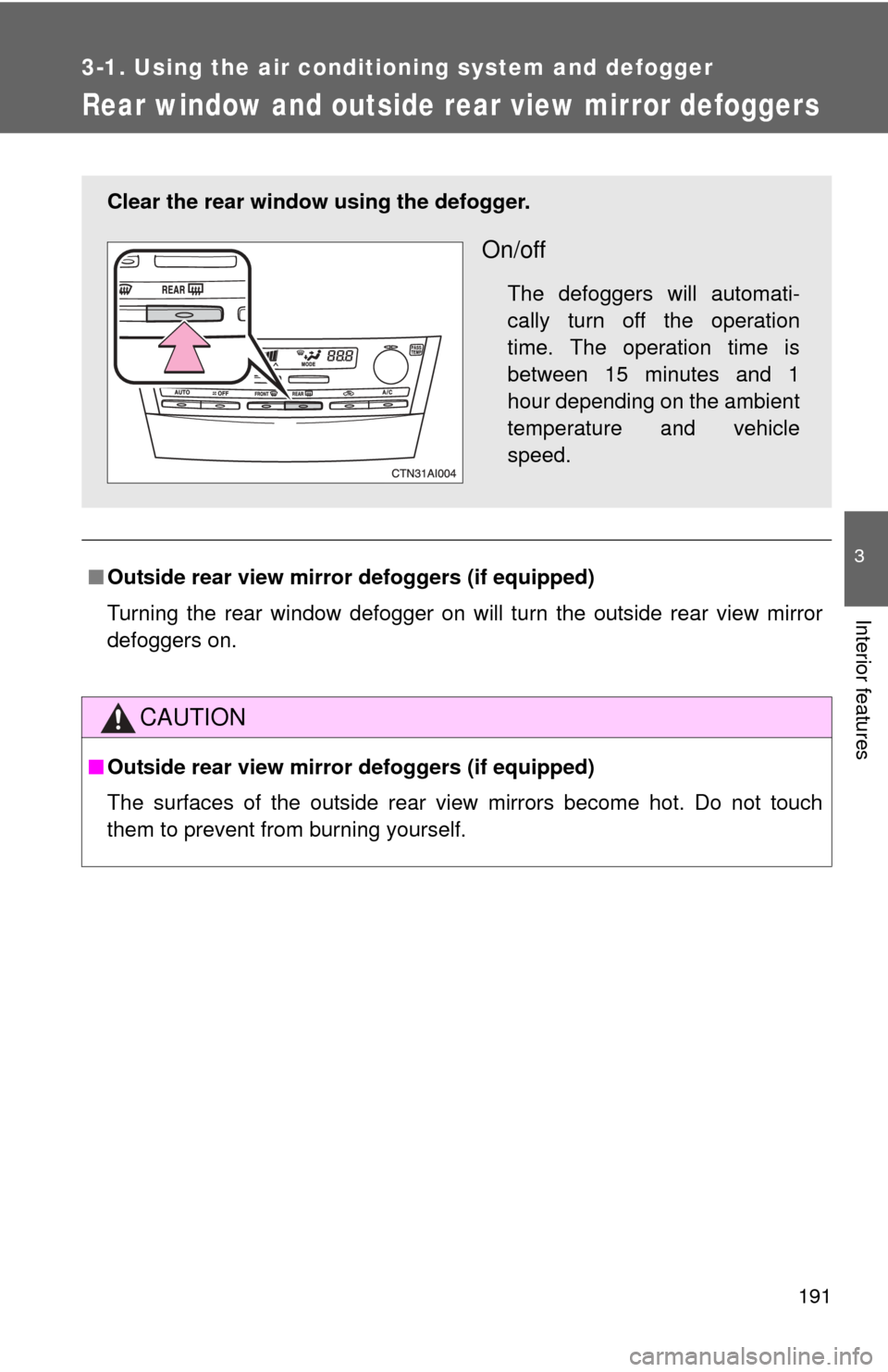
Clear the rear window using the defogger.
On/off
The defoggers will automati-
cally turn off the operation
time. The operation time is
between 15 minutes and 1
hour depending on the ambient
temperature and vehicle
speed.
Page 249 of 508
249
3-3. Using the Bluetooth
® audio system
3
Interior features
■
When using a voice command
For numbers, say a combination of single digits from zero to nine.
Say the command correctly and clearly.
■ Situations that the system ma y not recognize your voice
● When driving on rough roads
● When driving at high speeds
● When air is blowing out of the vents onto the microphone
● When the air conditioning fan emits a loud noise
■ Operations that cannot be performed while driving
●Operating the system with
● Registering a portable player to the system
■ Changing the passkey
P. 255
Page 269 of 508
269
3-4. Using the hand
s-free phone system (for cellular phone)
3
Interior features
■Automatic volume adjustment
When vehicle speed is 50 mph (80 km/h) or more, the volume automatically
increases. The volume returns to the previous volume setting when vehicle
speed drops to 43 mph (70 km/h) or less.
■ When using a voice command
For numbers, say a combination of single digits from zero to nine, # (pound),
(star), and + (plus).
Say a command correctly and clearly.
■ Situations that the system ma y not recognize your voice
● When driving on a rough road
● When driving at high speeds
● When air is blowing out of the vents onto the microphone
● When the air conditioning fan emits a loud noise
■ Operations that cannot be performed while driving
●Operating the system with
● Registering a cellular phone to the system
■ Changing the passkey
P. 277
Page 323 of 508
Maintenance and care4
323
4-1. Maintenance and careCleaning and protecting the vehicle exterior ......... 324
Cleaning and protecting the vehicle interior .......... 326
4-2. Maintenance Maintenance requirements .................. 329
General maintenance....... 331
Emission inspection and maintenance (I/M)
programs........................ 334
4-3. Do-it-yourself maintenance
Do-it-yourself service precautions .................... 335
Hood ................................ 338
Positioning a floor jack ..... 339
Engine compartment ........ 341
12-volt battery .................. 350
Tires ................................. 354
Tire inflation pressure ...... 363
Wheels ............................. 367
Air conditioning filter......... 369
Key battery ....................... 372
Checking and replacing fuses .............................. 375
Light bulbs........................ 385
Page 337 of 508

337
4-3. Do-it-yourself maintenance
4
Maintenance and care
CAUTION
The engine compartment contains many mechanisms and fluids that may
move suddenly, become hot, or become electrically energized. To avoid death
or serious injury observe the following precautions.
■
When working on the engine compartment
●Make sure that the indicator on the “POWER” switch and the “READY”
indicator are both off.
● Keep hands, clothing, and tools away from the moving fan and engine
drive belt.
● Be careful not to touch the engine, power control unit, radiator, exhaust
manifold, etc. right after driving as they may be hot. Oil and other fluids
may also be hot.
● Do not leave anything that may burn easily, such as paper or rags, in the
engine compartment.
● Do not smoke, cause sparks or expose an open flame to fuel. Fuel fumes
are flammable.
■ When working near the electric c ooling fans or radiator grille
Be sure the “POWER” switch is turned OFF.
With the “POWER” switch in ON mode, the electric cooling fans may auto-
matically start to run if the air conditioning is on and/or the coolant tempera-
ture is high. ( P. 348)
■ Safety glasses
Wear safety glasses to prevent flying or falling material, fluid spray, etc. from
getting in the eyes.
NOTICE
■If you remove the air cleaner
Driving with the air cleaner removed may cause excessive engine wear due
to dirt in the air. Also, a backfire could cause a fire in the engine compart-
ment.
Page 362 of 508

362 4-3. Do-it-yourself maintenance
NOTICE
■Repairing or replacing tires, wheels, tire pressure warning valves,
transmitters and tire valve caps
●When removing or fitting the wheels, tires or the tire pressure warning
valve and transmitter, contact your Toyota dealer as the tire pressure
warning valve and transmitter may be damaged if not handled correctly.
● When replacing tire valve caps, do not use tire valve caps other than those
specified. The cap may become stuck.
■
To avoid damage to the tire pressure warning valves and transmit-
ters
When a tire is repaired with liquid se alants, the tire pressure warning
valve and transmitter may not operate properly. If a liquid sealant is
used, contact your Toyota dealer or other qualified service shop as soon
as possible. Make sure to replace the tire pressure warning valve and
transmitter when replacing the tire. ( P. 355)
■Driving on rough roads
Take particular care when driving on roads with loose surfaces or pot-
holes.
These conditions may cause losses in tire air pressure, reducing the
cushioning ability of the tires. In addition driving on rough roads may
cause damage to the tires themselves, as well as the vehicle’s wheels
and body.
■If tire inflation pressures become low while driving
Do not continue driving, or your tires and/or wheels may be ruined.
Page 366 of 508

366 4-3. Do-it-yourself maintenance
CAUTION
■Proper inflation is critical to save tire performance
Keep your tires properly inflated. Otherwise, the following conditions
may occur and result in an accident causing death or serious injury.
●Excessive wear
●Uneven wear
●Poor handling
●Possibility of blowouts resu lting from overheated tires
●Poor sealing of the tire bead
●Wheel deformation and/or tire separation
●A greater possibility of tire damage from road hazards
NOTICE
■When inspecting and adjusting tire inflation pressure
Be sure to reinstall the tire valve caps.
Without the valve caps, dirt or mo isture could get into the valve and
cause air leakage, which could result in an accident. If the caps have
been lost, replace them as soon as possible.
Page 369 of 508
369
4-3. Do-it-yourself maintenance
4
Maintenance and care
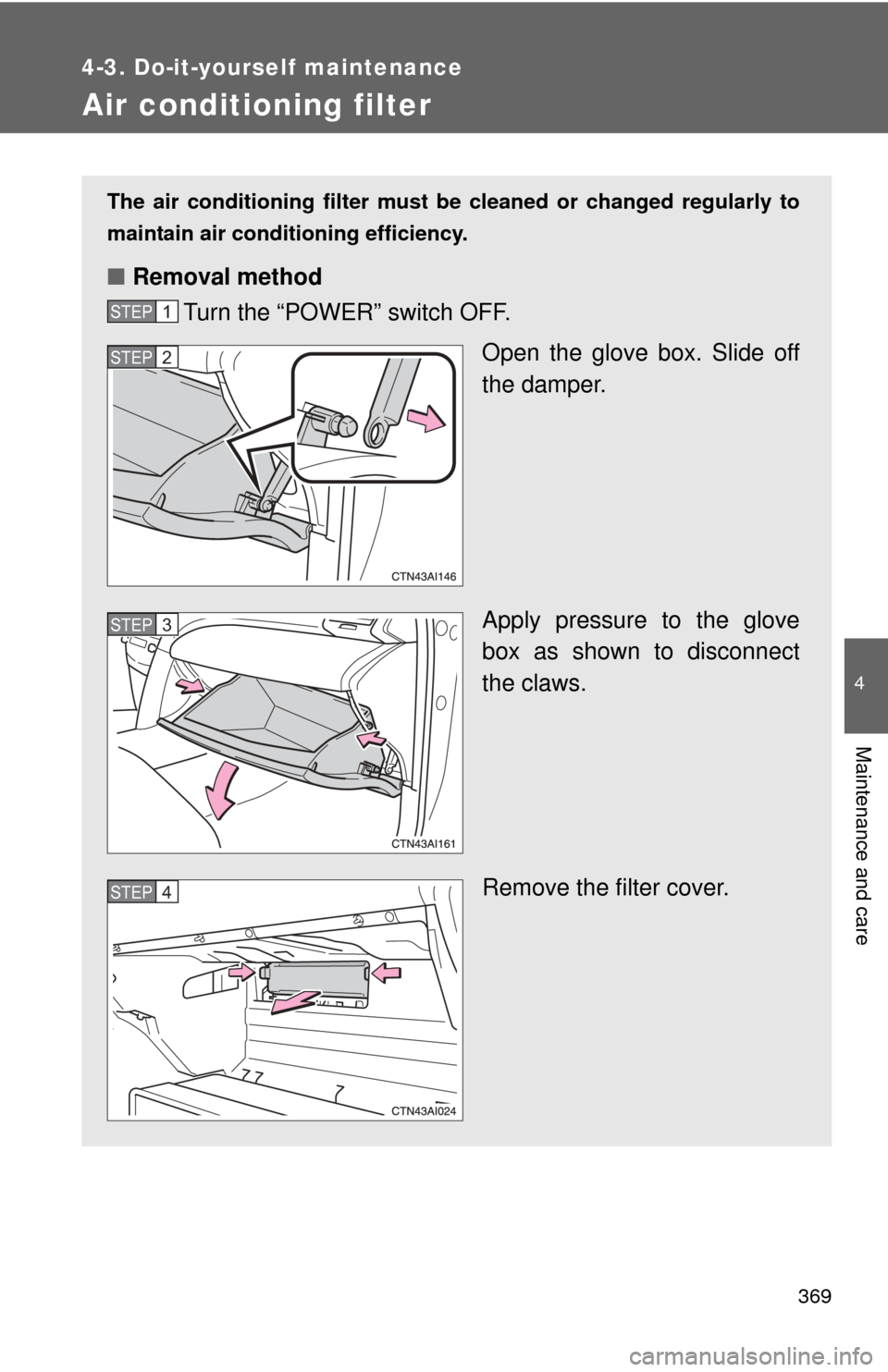
Air conditioning filter
The air conditioning filter must be cleaned or changed regularly to
maintain air conditioning efficiency.
■ Removal method
Turn the “POWER” switch OFF.
Open the glove box. Slide off
the damper.
Apply pressure to the glove
box as shown to disconnect
the claws.
Remove the filter cover.
STEP1
STEP2
STEP3
STEP4